Integrate Firebase

Integrate Firebase
Description
The Firebase for WordPress Plugin will help a Firebase user to login to your WordPress interface – not to WordPress dashboard – from Firebase authentication. You can show user info and display data that is only available to your Firebase users.
If you want a secured implementation, with much more features, check the Interate Firebase PRO version.
Links
Installation
If installing the plugin from wordpress.org:
- Upload the entire
/integrate-firebasedirectory to the/wp-content/plugins/directory. - Activate Integrate Firebase Plugin through the ‘Plugins’ menu in WordPress.
- Profit.
Screenshots
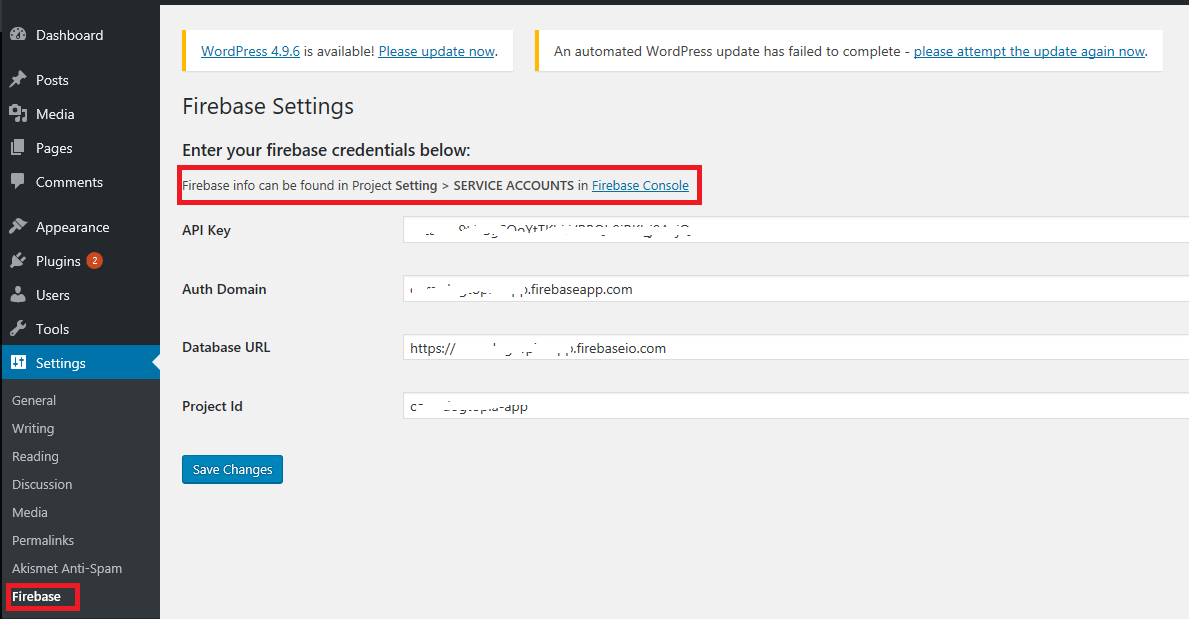
After activating the plugin, you need enter Firebase credentials under Setting > Firebase.

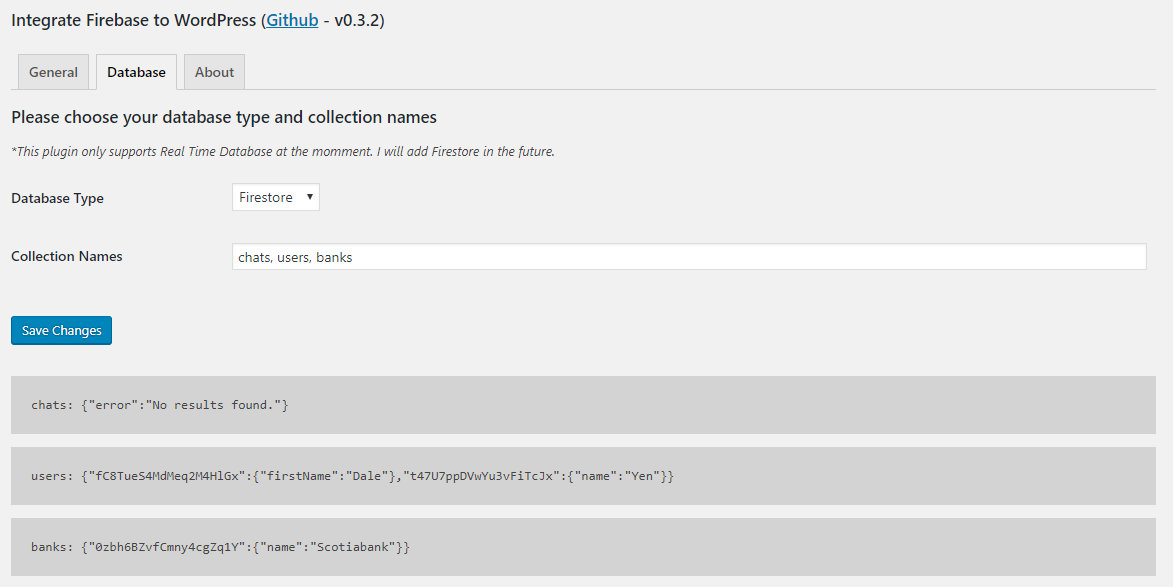
Please enter collection names in order to show the data from Real Time Database
Faq
At version 0.6.1, the user can integrate Firebase authentication to WordPress. That means you can:
- Log in, log out and show custom data only to logged in users.
- Get Real Time and Firestore database in Dashboard
- Show realtime database on frontend after users log in
The example in this guide only shows you how to put in a PHP file. If you want to put the shortcode inside a widget or editor. You can simply do this:
[firebase_login][/firebase_login]
After adding Firebase credentials from Settings > Firebase. You can add login form through shortcodes:
echo do_shortcode(“[firebase_login]”);
If you want to create your own form. Please start with *
<
form id=’login-form’>*. For submit button, you have to add ‘firebase-form-submit’ as an ID.
You can add a shortcode to show user’s info
echo do_shortcode(“[firebase_greetings]”);
You can show error message when a user cannot login by using a shortcode
echo do_shortcode(“[firebase_login_error class=”your-optional-CSS-class-name”][/firebase_login_error]”);
You can put your data as an HTML code inside a shortcode
echo do_shortcode(“[firebase_show_not_login class=”your-optional-CSS-class-name”]YOUR HTML CODE[/firebase_show_not_login]”);
You can put your data as an HTML code inside a shortcode
echo do_shortcode(“[firebase_show class=”your-optional-CSS-class-name”]YOUR HTML CODE[/firebase_show]”);
You can put your data as an HTML code inside a shortcode. Realtime data will be shown as a table with an id #if-realtime.
echo do_shortcode(“[realtime class=”your-optional-CSS-class-name” collection_name=”string” document_name=”string”]”);
This is a shortcode for log out button.
echo do_shortcode(“[firebase_logout]”);
Reviews
Great plugin, even better support
By 
Greate for Firebase and awesome customer service
By 
Great for Firebase integration
By 
Excellent customer service
By 
Easy to use and amazing support
By 
The Man Behind the Product
By 
Fast to implement, faster support
By 
Best of breed
By 
Amazing support, great plugin
By 
Great plugin, great support
By 
Changelog
0.10.0
- update tested version
- feedback from wordfence
0.9.3
- update css wording
0.9.2
- test support for WP v6.5.2
0.9.1
- Fix support WP version
0.9.0
- Bump support version to WordPress v5.9
0.8.0
- Updated firebase packages to 8.2.5
- Moved scripts to the end of body tag
0.7.0
- Fixed add_options_page error
- Preformated data before showing in dashboard
- Delegated button style to WordPress
- Updated firebase package to 7.18.0
0.6.1
- Removed hide realtime table script
0.6.0
- Show realtime data publicly
0.5.3
- Update firebase scripts
0.5.2
- Show realtime database after login
0.5.1
- Hide login form after logging in
0.5.0
- Add shortcode to display when not login
- Add error handling shortcode
0.4.0
- Added Firestore database support in Dashboard
0.3.2
- Fixed firebase show shortcode
0.3.1
- Fixed get firebase credentials
0.3.0
- Added about information
- Added Real Time database support in Dashboard
0.2.2
- Fixed readme typos
0.2.1
- Change plugin name
- Update logout shortcode
0.2.0
- Add scripts & styles
- Allow to show and hide data after login
0.1.0
- Started the project and add authentication method