IntelliPOS E-commerce Fiscalization

IntelliPOS E-commerce Fiscalization
Description
IntelliPOS E-commerce Fiscalization connects a WooCommerce store in Serbia to the merchant’s IntelliPOS instance. When an order reaches the status you choose, the plugin sends it to IntelliPOS, which issues the fiscal receipt through the Tax Administration fiscal processor (PFR). The receipt number, receipt time and journal are stored with the order.
The plugin is free, but fiscalization is not. The plugin is not an ESIR and cannot issue fiscal receipts on its own: every receipt is issued by your IntelliPOS instance, which requires an active paid IntelliPOS license and a security element. Installing the plugin alone does not let you fiscalize orders.
Pricing
- IntelliPOS E-commerce Fiscalization (this plugin): free, no additional fee.
- IntelliPOS annual license without advance invoices: RSD 14,388 + VAT per year.
- IntelliPOS annual license with advance invoices: RSD 18,000 + VAT per year.
Prices as of October 2026. Request a license at intellipos.rs.
What it does
- Issues a fiscal receipt automatically when an order reaches a selected status (for example “Processing”), or manually from the order screen.
- Training mode for testing: with the invoice type set to “Obuka”, IntelliPOS issues training receipts that are not fiscal receipts and are not recorded as turnover. Switch back to “Promet” when the store goes live.
- Runs in the background, so customers do not wait for the fiscal processor at checkout.
- Shows the receipt on the order: status, fiscal number, document number, receipt time, journal and a link to the Tax Administration verification page.
- Issues a full fiscal refund manually, or automatically when an order is fully refunded in WooCommerce.
- Optionally asks IntelliPOS to e-mail the fiscal receipt to the customer. The order shows that IntelliPOS accepted the request; delivery is not confirmed.
- Adds customer type, company name and tax ID (PIB, 9 digits) fields to the classic checkout and to the Checkout block.
- Maps WooCommerce tax classes to IntelliPOS tax labels and checks that each item’s VAT rate matches its label.
- Maps each payment method to the payment type printed on the receipt.
- Sends products, shipping and fees as receipt items and checks that the receipt total equals the amount paid.
- Supports High-Performance Order Storage (HPOS); pauses fiscalization on a copy of the site (staging) until an administrator confirms it.
Built for unclear outcomes
Networks fail. When the plugin cannot be sure whether a receipt was issued (a timeout, a broken connection or a server error after sending), it does not send the order again. The order is marked “unknown outcome” and the administrator follows a guided check in IntelliPOS: link the existing receipt, or confirm that none was issued and only then send it again. Every decision is logged.
- One fiscalization request and at most one refund request per order, each with a fixed external ID.
- Repeated clicks, repeated status changes and repeated payment notifications do not send a second request.
- Automatic triggers send only the first attempt; nothing is retried on its own after an error.
Limitation: the IntelliPOS service does not currently reject a second request with the same external ID. The plugin therefore cannot guarantee by itself that a duplicate receipt is impossible; an incorrect manual confirmation on the resolution page can still produce one.
What the plugin does not do
- Partial refunds are recorded in order notes but not sent, because IntelliPOS refunds the complete original receipt.
- Orders in a currency other than RSD and orders with negative fees are not fiscalized; the order note explains why.
- Receipt e-mail delivery is not confirmed. IntelliPOS reports only that it accepted the send request; whether the message arrives depends on the mail setup of the IntelliPOS server.
- The plugin transfers order data to your IntelliPOS instance. The merchant remains responsible for tax settings and for the fiscal documents issued.
External service
This plugin relies on the IntelliPOS service operated by Obelus d.o.o. Nothing is sent until an administrator enters an IntelliPOS instance address and credentials, tests the connection, or enables fiscalization.
- Requests go only to the IntelliPOS instance address entered by the administrator (https).
- Sent for authentication: the configured username and password.
- Sent for receipts and refunds: order number and external ID, items, quantities, prices, tax labels, payment amounts, the customer’s billing e-mail address (used by IntelliPOS to deliver the receipt when receipt e-mail is enabled), and the customer’s tax ID or identifier when required.
- Service: intellipos.rs · Privacy Policy · Terms of Use
Support
User guide (Serbian): intellipos.rs. Technical support: +381 67 750 0005, info@obelus.rs, Monday to Friday 08:00–22:00 (Belgrade time). Sales and presentations: Monday to Friday 08:00–16:00.
Installation
- Make a backup of your site and database.
- Upload the plugin in Plugins > Add Plugin > Upload Plugin, or install it from the directory, and activate it. WooCommerce must be active.
- Open WooCommerce > Settings > IntelliPOS.
- Enter the IntelliPOS instance address (https), username and password, save, and click “Test connection”.
- Enter the tax labels used by your IntelliPOS instance and map your payment methods.
- To test first, set “Vrsta računa” (invoice type) to “Obuka” (training). Place a few test orders, check the training receipts in IntelliPOS under Dokumenti > Obuka, then set the invoice type back to “Promet”.
- Fiscalize one controlled order manually (Order actions > IntelliPOS: Fiskalizuj račun), check the receipt in IntelliPOS, then enable automatic fiscalization.
Upgrading from 1.0.3: settings, receipts, refunds and order history are kept. On first run the plugin records the state of existing orders without contacting IntelliPOS; orders whose earlier outcome was unclear are marked “unknown outcome” for review.
Screenshots
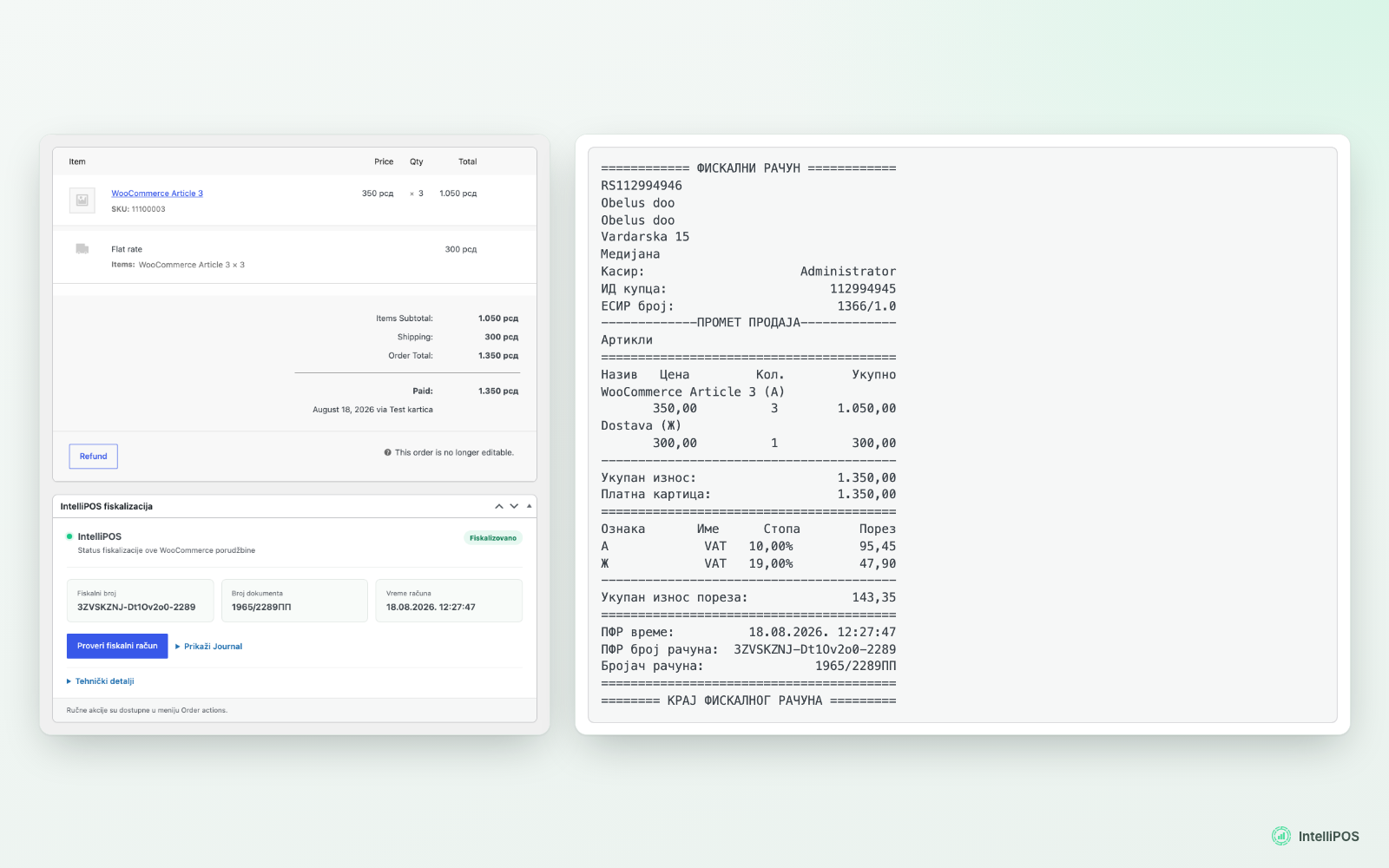
See the fiscal receipt on the order: fiscal number, document number, receipt time and the full receipt journal (test environment).
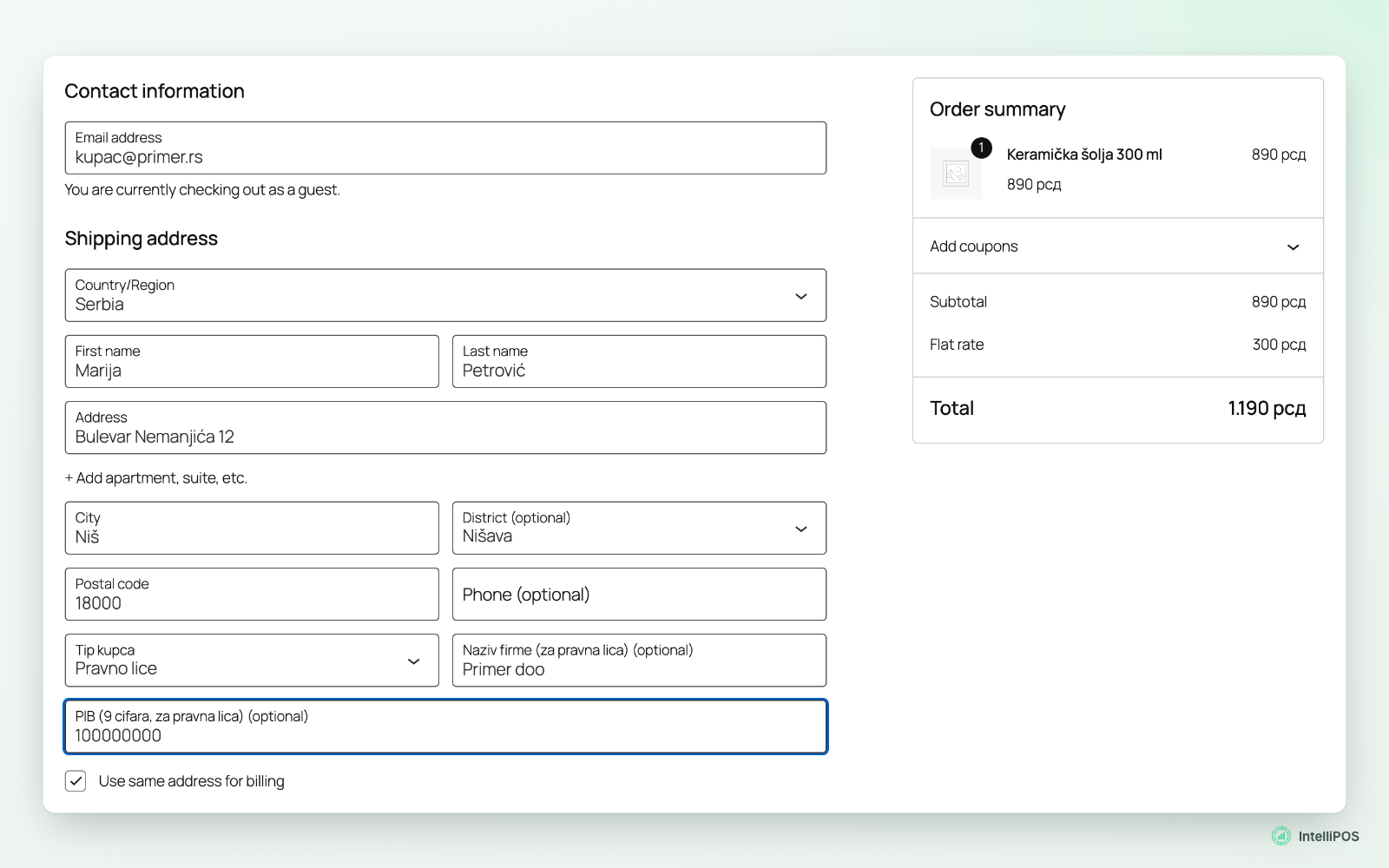
Let business customers enter their company name and tax ID (PIB) at checkout.
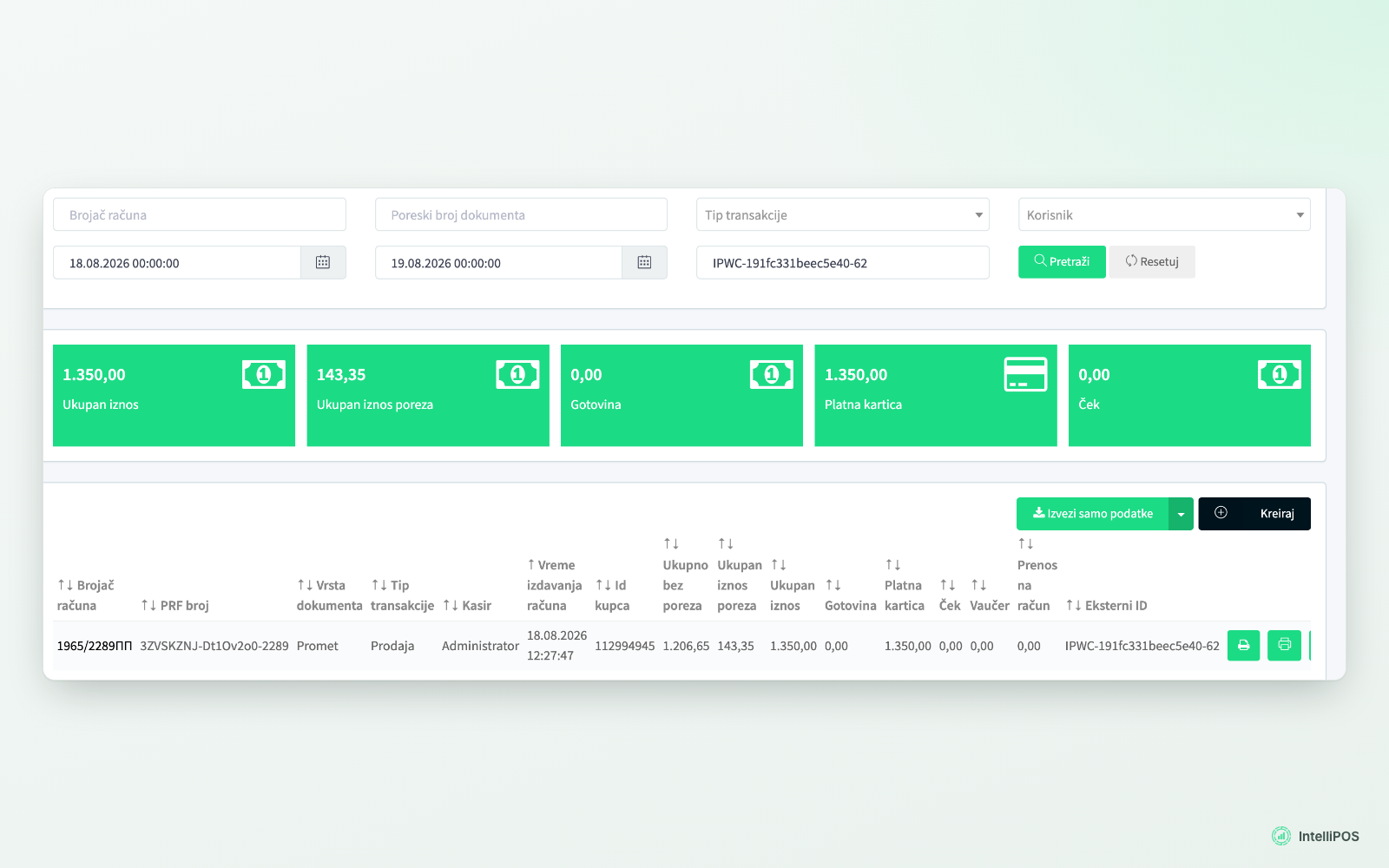
Find the same receipt in IntelliPOS by the order's external ID, next to your in-store sales.
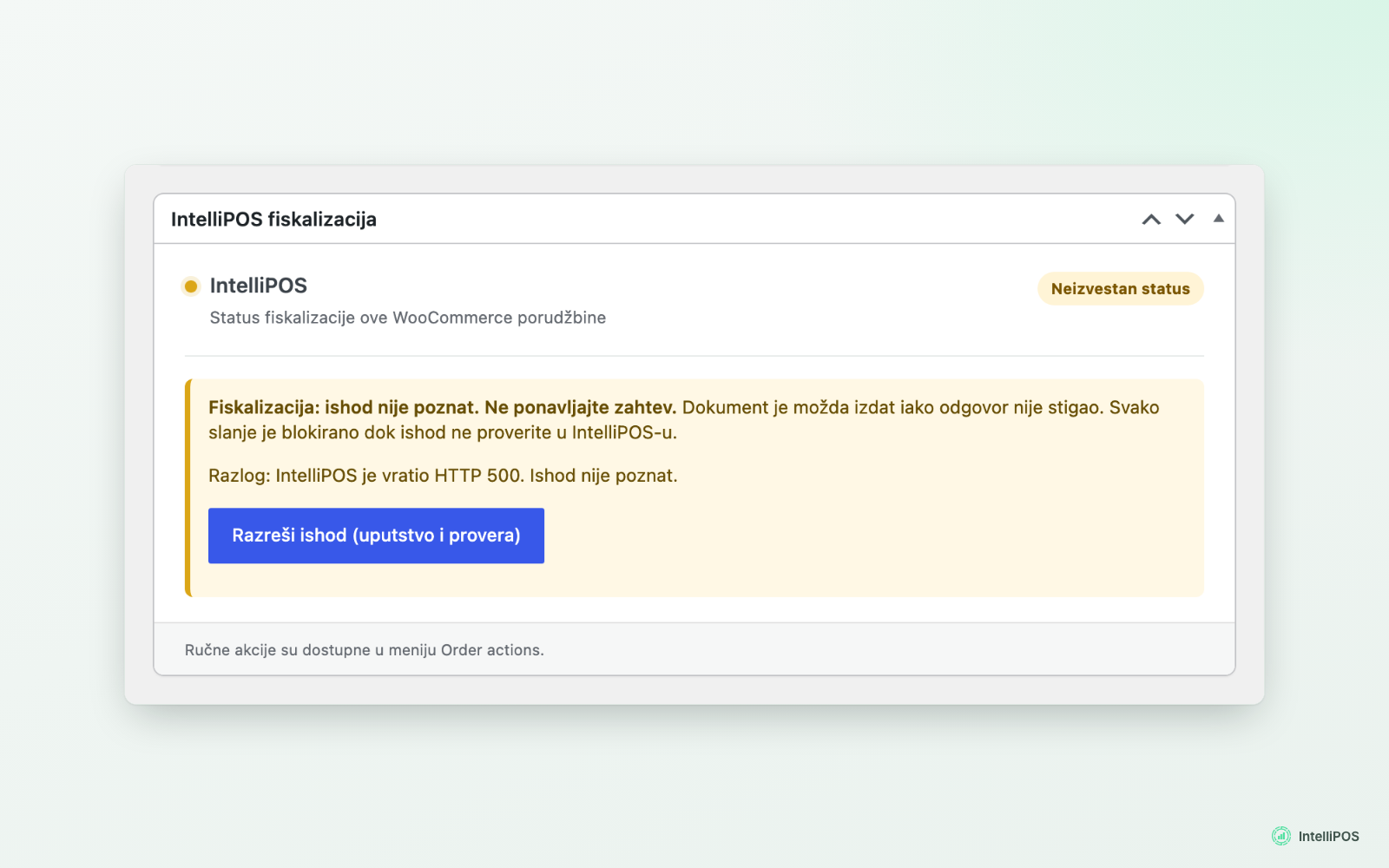
Stop automatic retries when the outcome is unknown and guide the administrator to check IntelliPOS.
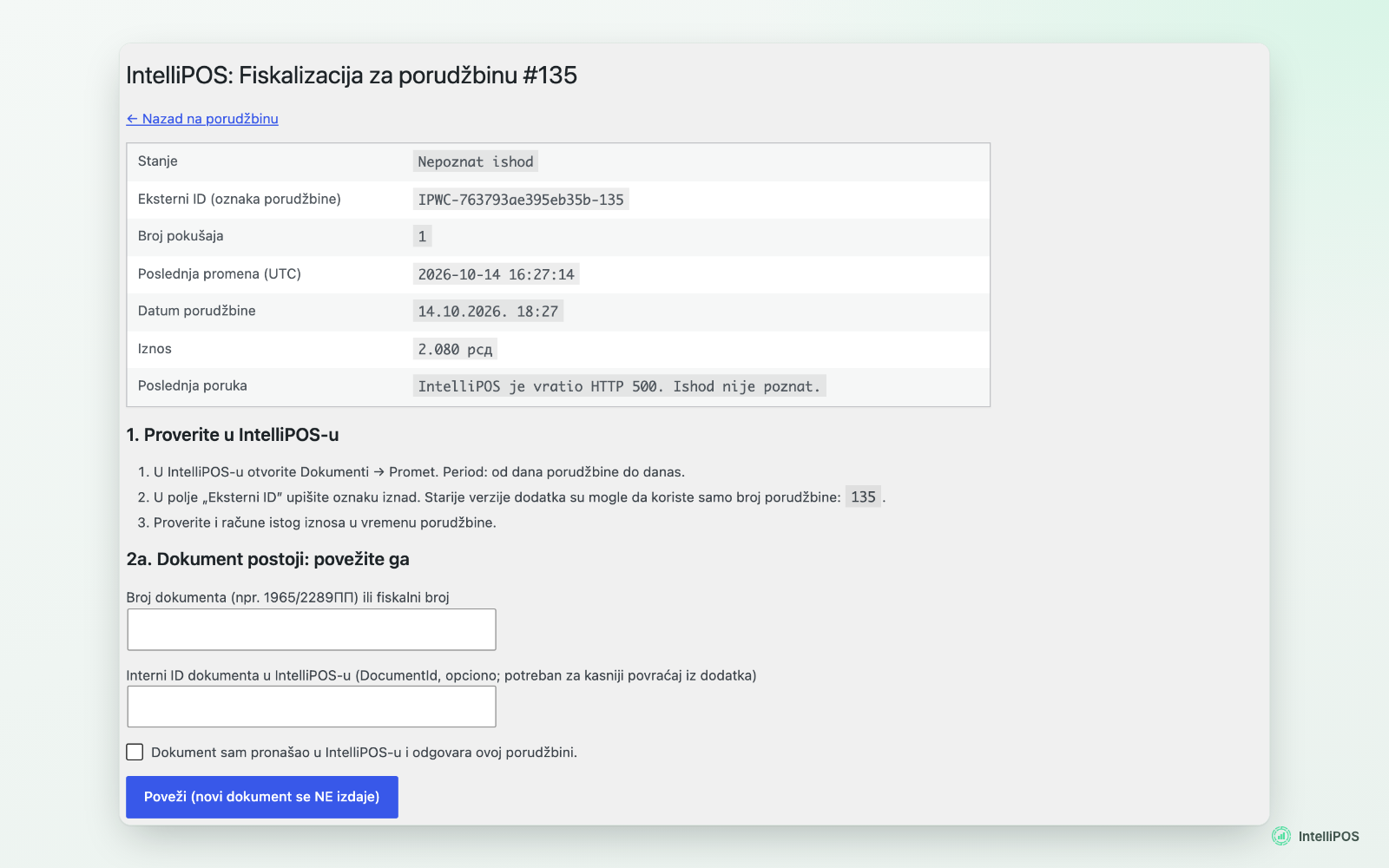
Resolve an unknown outcome safely: link the existing receipt or confirm it was not issued.
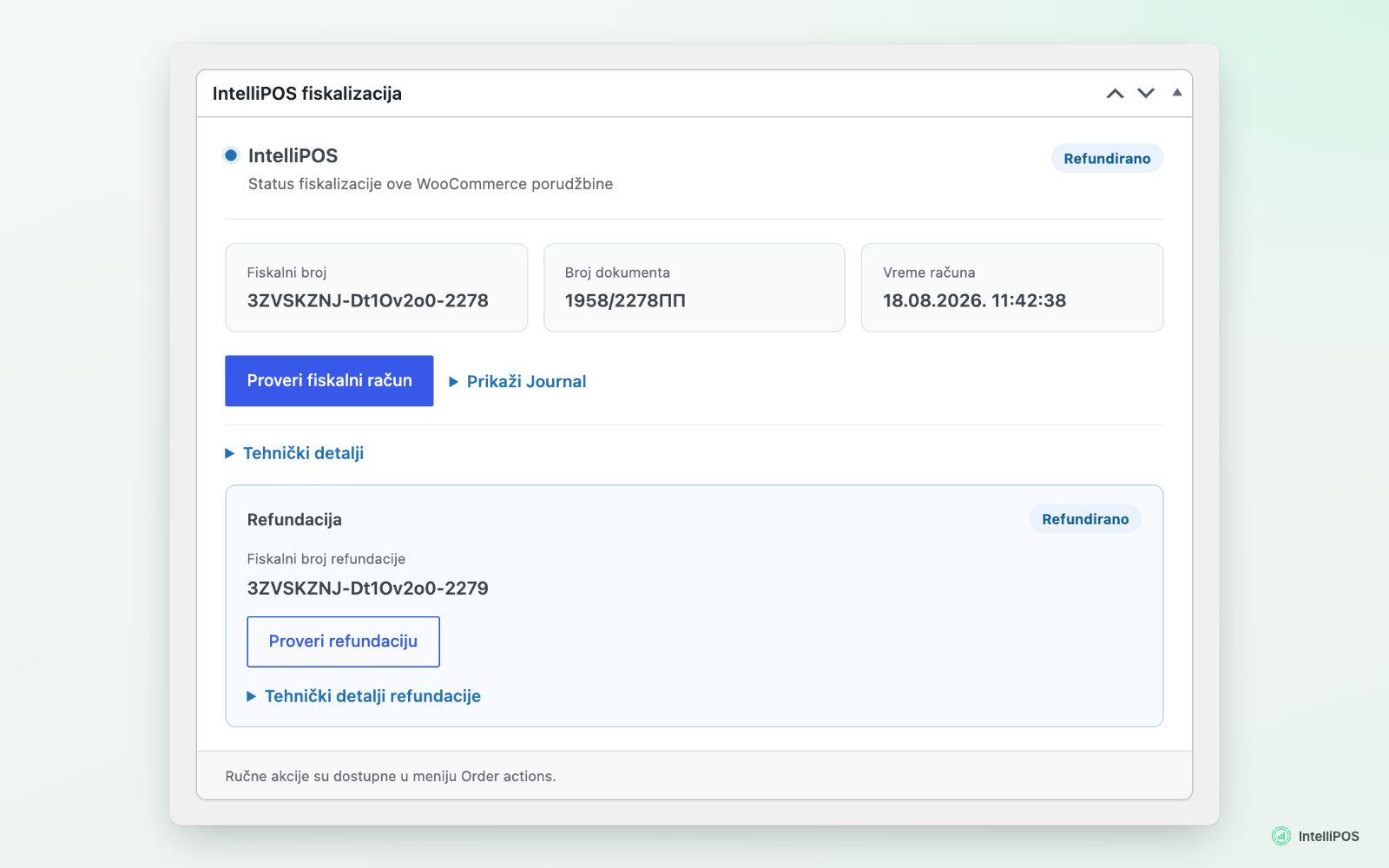
Issue a full fiscal refund manually or automatically when an order is fully refunded.
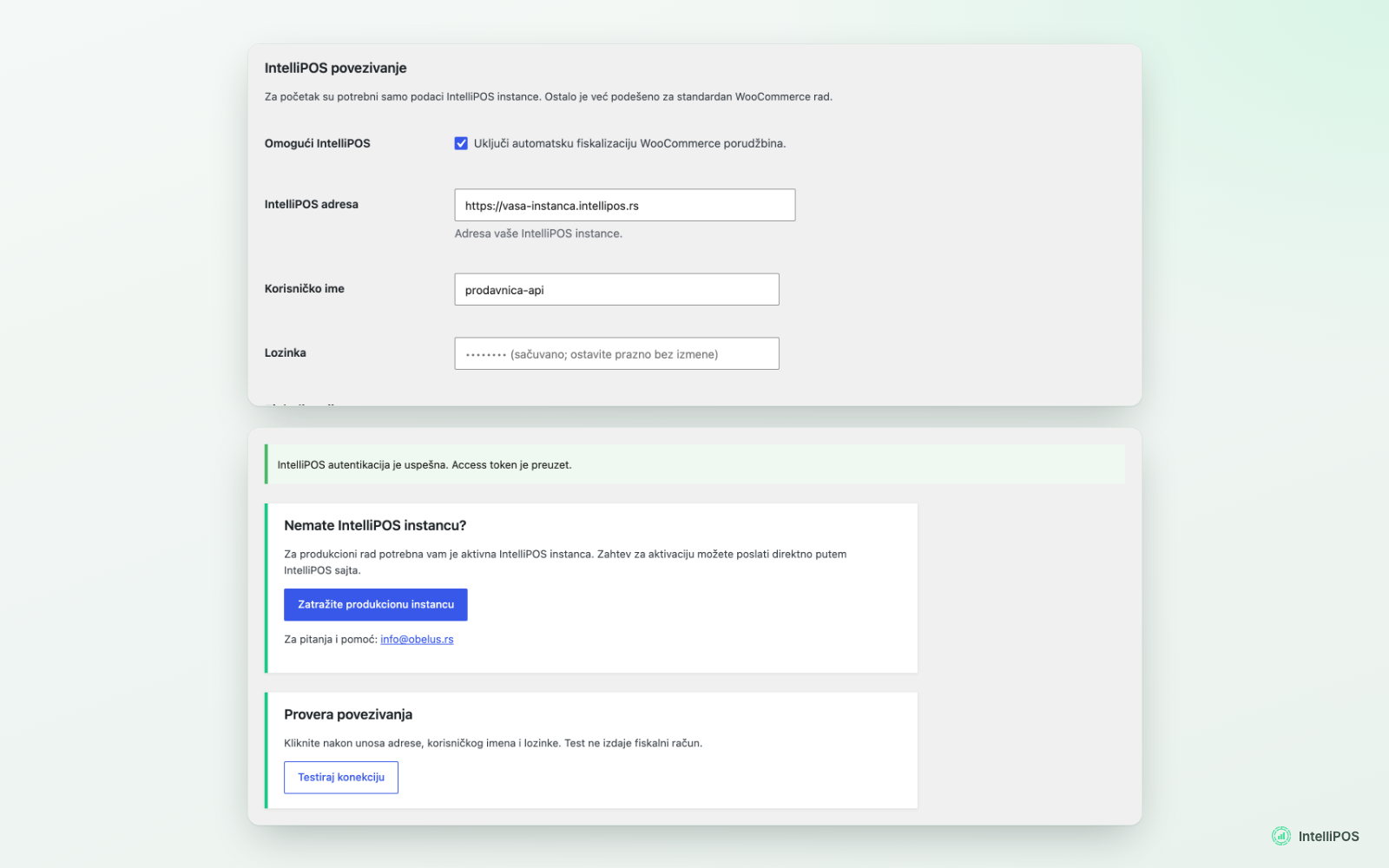
Connect your IntelliPOS instance and test the connection without issuing a receipt.
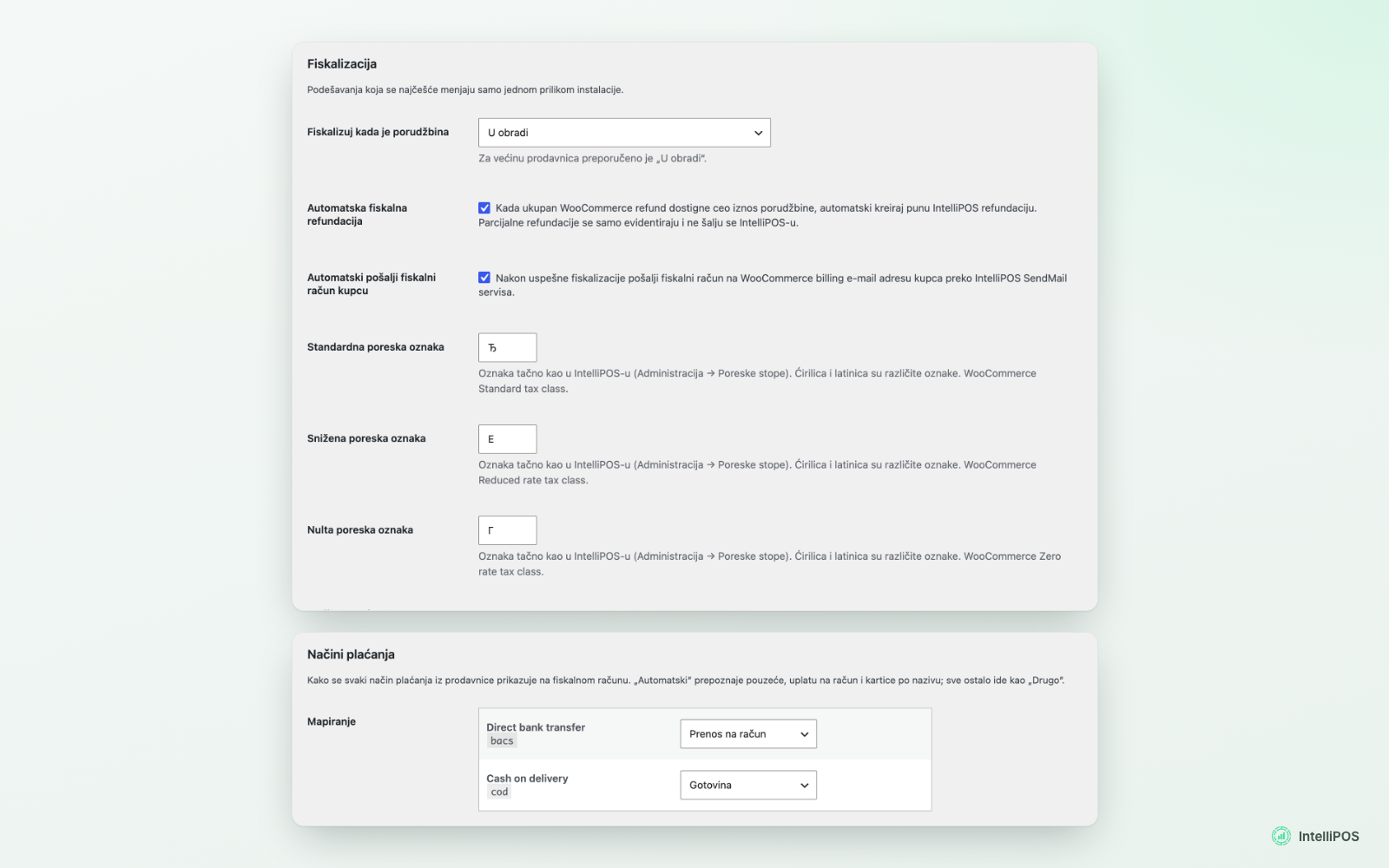
Choose when receipts are issued, enter your tax labels and map payment methods.
Faq
The plugin is free and there is no additional fee for it. Fiscalization requires an active IntelliPOS license: RSD 14,388 + VAT per year without advance invoices, or RSD 18,000 + VAT per year with advance invoices (prices as of October 2026). Without a license, the plugin cannot issue receipts.
Set WooCommerce > Settings > IntelliPOS > “Vrsta računa” to “Obuka” (training). Every new order then gets a training receipt (“ОВО НИЈЕ ФИСКАЛНИ РАЧУН”), which is not recorded as turnover and is shown in IntelliPOS under Dokumenti > Obuka. A warning is shown in the admin area while training mode is on. When you are done, set it back to “Promet”. Orders that received a training receipt keep it and are not sent again as Promet, so use separate test orders. Refunds work the same way in training mode and produce a training refund. Training receipts are not counted towards the receipts included in the IntelliPOS license.
Yes. The plugin connects WooCommerce to an IntelliPOS instance with a security element; IntelliPOS issues the receipts.
When the order reaches the status you select in the settings (for example “Processing”), or when you run “IntelliPOS: Fiskalizuj račun” from the order actions.
If the request did not reach IntelliPOS, the order shows an error and nothing was issued; you can send it again from the order screen. If the request was sent but the answer did not arrive, the outcome is unknown: the plugin blocks every new attempt until an administrator checks IntelliPOS and records the result on the resolution page.
The plugin sends only one request per order and blocks repeats after a confirmed receipt or an unknown outcome. Because the IntelliPOS service does not currently reject duplicate requests, a duplicate is still possible if an administrator confirms “not issued” for a receipt that actually exists. The resolution page asks for a check in IntelliPOS, a waiting period and a written reason before anything can be sent again.
No. IntelliPOS sends the e-mail. The order shows “request accepted” when IntelliPOS accepts the send request, but the plugin cannot see whether the message reached the customer’s mailbox. If a customer does not receive it, give them the receipt from IntelliPOS and contact support.
Full refunds of a fiscal receipt are supported, manually or automatically when the WooCommerce order is fully refunded. Partial refunds are recorded in the order notes but not sent.
Checkout gets a customer type field. Business customers enter the company name and the 9-digit tax ID (PIB), which is printed on the receipt.
Standard, reduced and zero-rate WooCommerce tax classes are mapped to the labels configured in the settings (for example Ђ, Е and Г). A product can override its label. When WooCommerce calculates VAT, the plugin checks that each item’s rate matches its label and does not send the receipt if it does not.
No. It transfers order data to your IntelliPOS ESIR, which issues the fiscal documents. Settings such as tax labels and the moment of fiscalization remain the merchant’s responsibility.
Reviews
Changelog
1.0.5
- New “Invoice type” setting: Promet (fiscal receipt, default) or Obuka (training). Training receipts are not fiscal receipts and are not recorded as turnover, so the shop can be tested safely.
- The invoice type is fixed at the first attempt for each order and never changes on a later retry. Training receipts use their own external ID.
- Training receipts can be refunded like fiscal receipts (full refund, manually or automatically); IntelliPOS issues a training refund, which is not recorded as turnover.
- A warning is shown in the admin area while training mode is on.
- The resolution page points to Dokumenti > Obuka for training receipts and accepts training document numbers (for example 3/70ОП, and 2/72ОР for a training refund).
1.0.4.1
- Important reliability and fiscal-safety update for 1.0.3 users. This is the first WordPress.org release that includes all 1.0.4 changes listed below.
- Email status wording: an accepted SendMail request is shown as “request accepted”, not as delivered. IntelliPOS confirms only that it accepted the request.
1.0.4
- Every fiscal operation is recorded in its own table: one fiscalization record and one refund record per order, each with a fixed external ID.
- Requests with an unknown outcome are never resent automatically; new guided resolution page with an audit log.
- Background fiscalization; automatic refunds wait for an unconfirmed receipt and are sent once.
- Fees are sent as receipt items; totals, currency and VAT rates are checked before sending.
- Payment method mapping in the settings; production tax labels (Ђ, Е, Г, А).
- Block checkout validates the company tax ID; the sale receipt carries only a company tax ID.
- Staging/copy protection; only administrators can change connection settings; https required.
- Receipt time shown from the receipt (Europe/Belgrade).
- Safe upgrade from 1.0.3 with review of unclear historical outcomes.
Earlier versions: see changelog.txt.