AI Product Schema for WooCommerce – Product JSON-LD & llms.txt
AI Product Schema for WooCommerce – Product JSON-LD & llms.txt
Description
AI shopping agents (ChatGPT, Gemini, Perplexity, Claude and others) increasingly research and recommend products for shoppers. To be considered, a store’s products need machine-readable, structured, complete data. WooCommerce does not provide this out of the box.
AI Product Schema makes your WooCommerce catalog first-class for AI shopping agents:
- Complete Product JSON-LD on every product page (schema.org
Productwith offers, availability, ratings, brand and images), built from your live WooCommerce data. - No duplicate schema. AI Product Schema detects Yoast SEO and Rank Math and merges its data into their existing Product node instead of printing a second one. With no SEO plugin, it prints a standalone node.
- AI product attributes you can fill in the classic product editor: a Q&A list, compatible accessories, and substitute products. These map to verified schema.org properties (
subjectOf/FAQ,isRelatedTo,isSimilarTo). /llms.txt— a Markdown index of your published products following the llms.txt convention, so agents can find your catalog quickly.- AI-crawler
robots.txtdirectives that welcome known shopping/agent crawlers (GPTBot, Google-Extended, ClaudeBot, PerplexityBot and more) and point them at your/llms.txt. - Feature toggles under WooCommerce Settings AI Product Schema.
llms.txt built for a catalog, not for a blog
Most llms.txt plugins index pages: your posts, your about page, your contact form. That is
the right shape for a content site and the wrong shape for a store.
AI Product Schema generates a product index. It lists your published WooCommerce
products, and it is backed by complete Product JSON-LD on every product page, so an agent
that follows your /llms.txt finds real structured product data when it arrives: price,
availability, ratings, brand, images, and your AI attributes.
That pairing is the point. An llms.txt with nothing structured behind it tells an agent
where to look but not what it is looking at. Structured data with no index makes the agent
find your products on its own. This plugin does both, for WooCommerce specifically.
AI Product Schema reads product data exclusively through the WooCommerce CRUD API and declares High-Performance Order Storage (HPOS) compatibility.
Development
The full source code is publicly available at:
https://github.com/internick2017/ai-product-schema
Installation
- Upload the plugin to
/wp-content/plugins/internick-ai-product-schema, or install it from the Plugins screen. - Activate it. WooCommerce must be installed and active.
- Go to WooCommerce Settings AI Product Schema to toggle features.
- Edit any product and open the AI Attributes tab to add Q&A, accessories, and substitutes.
Screenshots
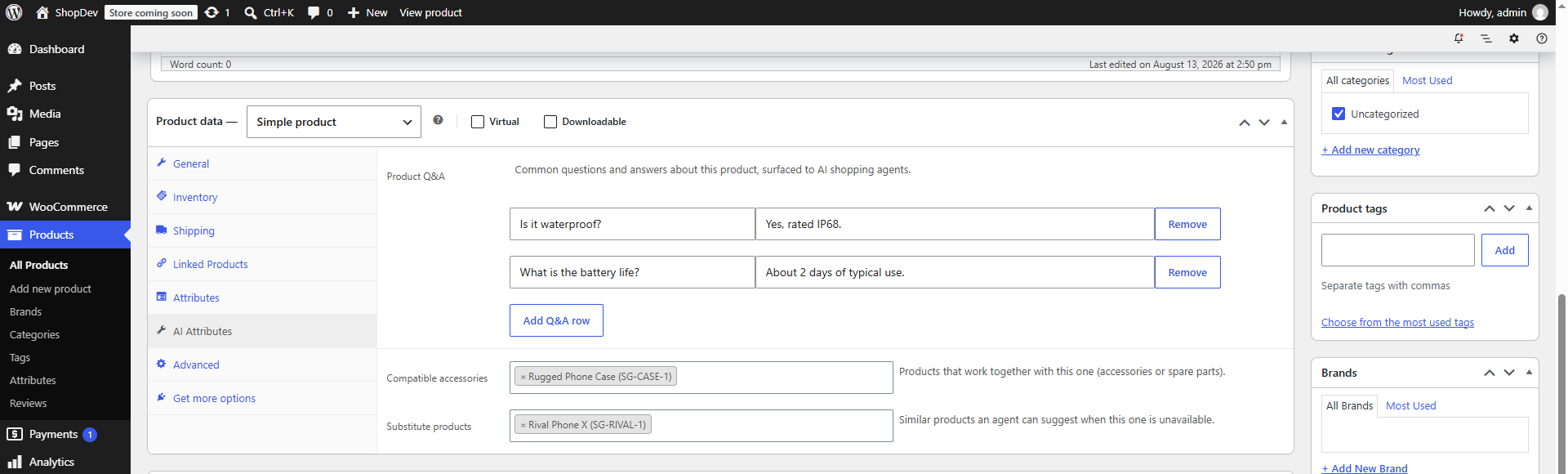
The "AI Attributes" tab in the product editor: add product Q&A, compatible accessories, and substitute products.
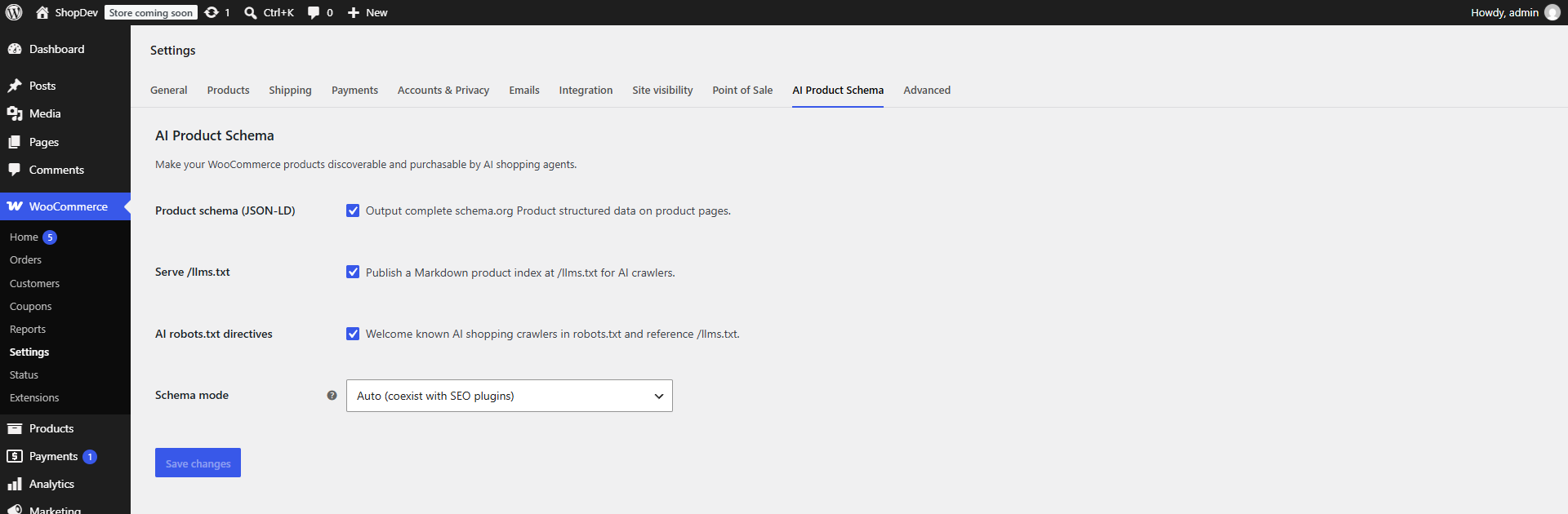
AI Product Schema settings under WooCommerce → Settings: toggle Product schema, /llms.txt, and AI robots.txt, and choose the schema mode.
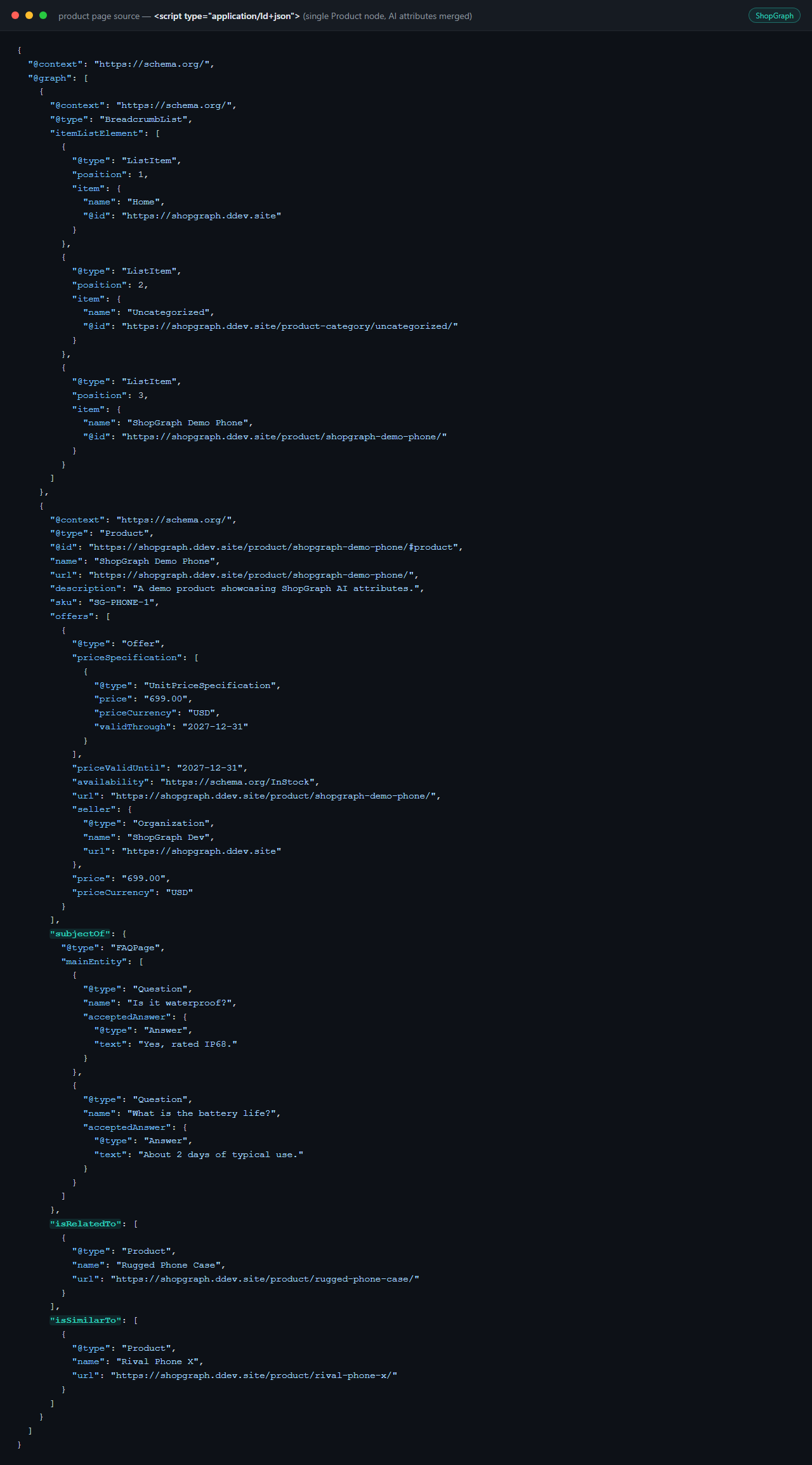
The complete schema.org Product JSON-LD emitted on a product page, with AI attributes merged in (no duplicate node).
Faq
No. AI Product Schema detects those plugins and merges its AI attributes into their existing Product schema node. It only prints a standalone node when no supported SEO plugin is active (or when you force “Standalone” mode).
No. This version generates structured data and files from your own product data. Nothing is sent to third parties.
AI attributes are stored on the product via the WooCommerce CRUD API (product meta), never through direct database writes.
General llms.txt plugins index your site’s pages and posts. This one indexes your
product catalog, and pairs it with complete Product JSON-LD on each product page, so
agents get structured product data and not just a list of links. It is built for
WooCommerce rather than for sites in general. The /llms.txt index is optional and can be
turned off entirely if you only want the structured data.
A simple Markdown convention (https://llmstxt.org/) that gives AI agents a concise, curated index of a site. AI Product Schema serves one at yourstore.com/llms.txt listing your published products.
Reviews
Changelog
0.1.3
- Documentation only: clearer plugin name, and the description now explains the
/llms.txtproduct index and how it differs from general-purpose llms.txt plugins. Added a link to the public source repository. No functional changes.
0.1.2
- New: the plugin now speaks Spanish (es_ES) and Brazilian Portuguese (pt_BR). The settings screen, the AI Attributes tab in the product editor, and all notices are translated.
- Fixed the description of the “Schema mode” setting, which showed an internal PHP namespace instead of the plugin name.
0.1.1
- Banner updated to the current plugin name and missing directory assets added. Donate link added. No functional changes.
0.1.0
- Initial release: Product JSON-LD with Yoast/Rank Math coexistence, AI product attributes (Q&A, accessories, substitutes),
/llms.txt, AI-crawlerrobots.txtdirectives, and a settings tab.