Intro Wrapper

Intro Wrapper
Description
This plugin takes care of wrapping your intro text (everything before <!–more–> — also called “teaser content”) in a div element with the class “intro”.
This allows for easy styling of the intro text, e.g. with larger fonts, colors, etc.
Installation
- Download and unzip plugin
- Upload the ‘intro-wrapper’ folder to the ‘/wp-content/plugins/’ directory,
- Activate the plugin through the ‘Plugins’ menu in WordPress.
Screenshots
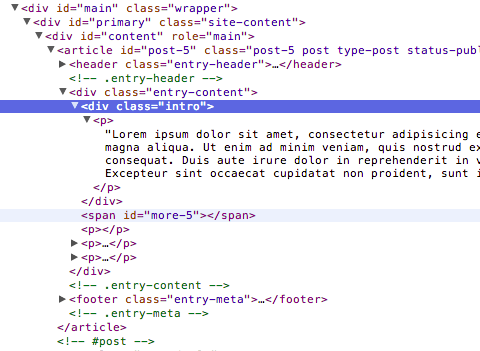
Resulting code

Example with twentytwelve and adjusted font size and color
Faq
Installation Instructions
- Download and unzip plugin
- Upload the ‘intro-wrapper’ folder to the ‘/wp-content/plugins/’ directory,
- Activate the plugin through the ‘Plugins’ menu in WordPress.
I installed the plugin, but can’t see any difference
The difference is only in the outputted HTML. You must add styling of the intro class yourself.
Where do I add the styling?
Try style.css.
The styling i added was lost when I upgraded my theme
This has nothing to do with the plugin. You’re doing things the wrong way. Read this: https://codex.wordpress.org/Child_Themes
Reviews
Changelog
Version 1.0
- Public release