IP Limit Add-On for Gravity Forms

IP Limit Add-On for Gravity Forms
Description
The Gravity Forms IP Limit Add-On allows you to restrict how many times a user can submit a form based on their IP address, within a specified number of days.
Features:
- Enable or disable IP limiting per form.
- Set a custom number of days to look back.
- Set the maximum number of submissions allowed from the same IP in that period.
- Adds a validation error if the IP has already submitted too many times.
Perfect for:
* Preventing form abuse/spam
* Limiting contact form submissions
Installation
- Upload the plugin folder to
/wp-content/plugins/or install via WordPress Admin > Plugins > Add New > Upload Plugin. - Activate the plugin through the ‘Plugins’ menu.
- Navigate to Forms > [Your Form] > Settings > IP Limit to configure.
Screenshots
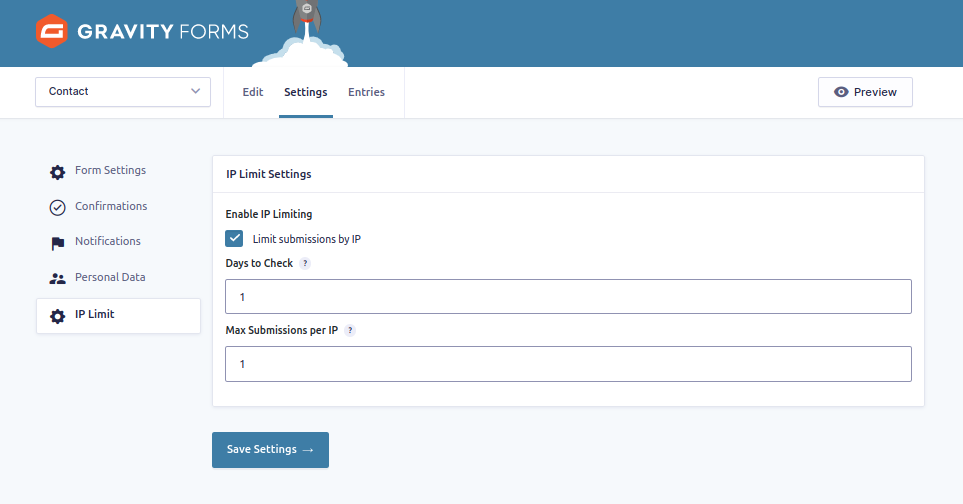
IP Limit settings in the form admin.
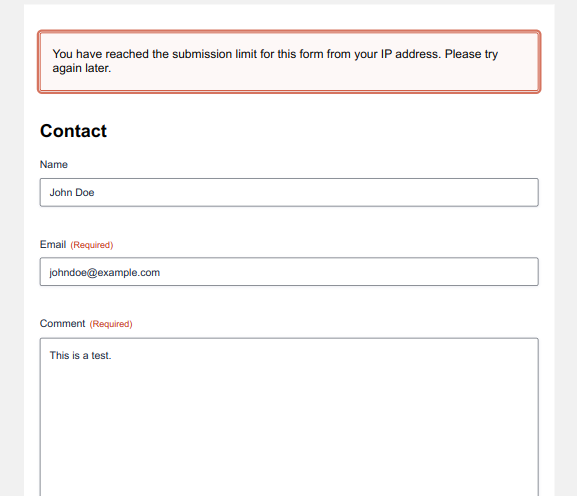
Validation message when submission is blocked.
Faq
Yes, you can enable or disable it per form in the form’s settings.
Yes, each form has its own setting for days and max entries.
They will receive a validation error, and the form will not submit.
Reviews
Changelog
1.0
- Initial release.