Page Speed Insights
Page Speed Insights
Description
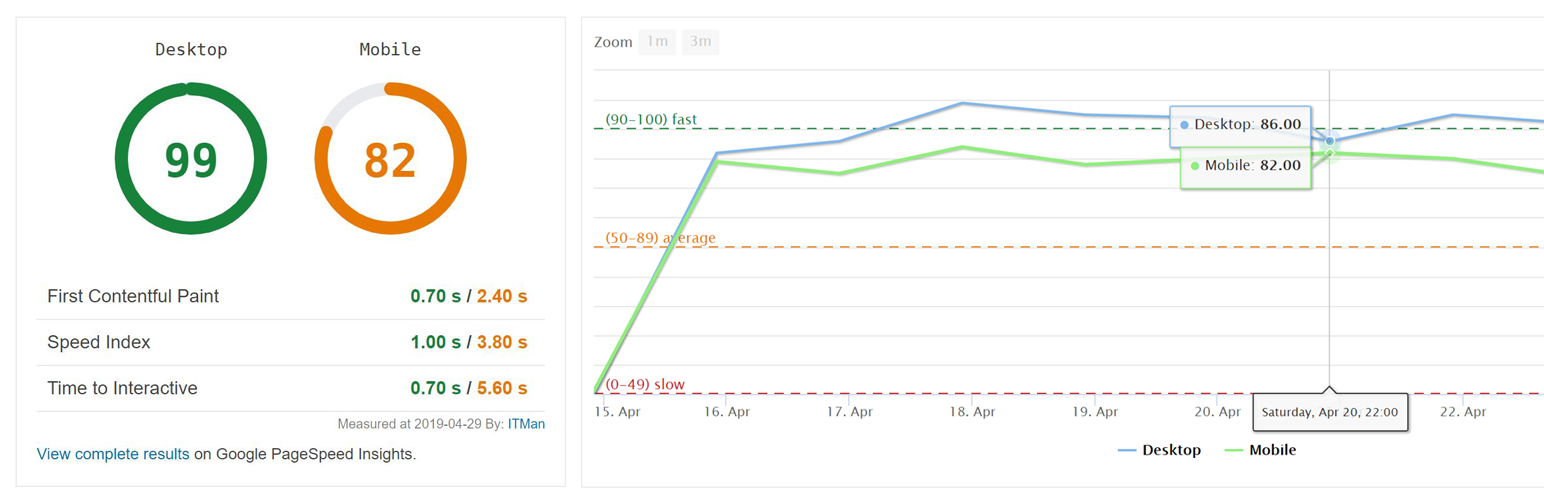
ITMan Page Speed Insights plugin enables you to view daily updated page speed statistics on your dashboard.
All measurement data are fetched from Google PageSpeed Insights leveraging their API.
In addition to dashboard widget, you can view measurement history in Tools > Page Speed Insights.
Installation
- Upload the full itman-page-speed-insights directory into your wp-content/plugins directory.
- In WordPress select Plugins from your sidebar menu and activate the ITMan Page Speed Insights plugin.
Screenshots

Dashboard widget

Tools > Page Speed Insights
Faq
Tools > Page Speed Insights
No, you do not need any API key.
No, plugin will not measure any data while installed on localhost.
Reviews
Works like a charm
By 
works!
Changelog
1.0.6
- FIX: JS problem with showing graph data on settings page
- UPDATE: Debugging statements added
1.0.5
- UPDATE: Admin page moved from Settings to Tools menu
- FIX: Responsive CSS issue on the admin page
1.0.4
- UPDATE: Initial measurement in progress. – Status information line added when report is loaded for a first time.
- FIX: Trying to get property of non-object warning fixed.
1.0.3
- FIX: Performance number – line height added (CSS)
- FIX: Google charts enqueue
1.0.2
- FIX: View complete results on Google PageSpeed Insights (empty link)
1.0.1
- Cron schedule changed from hourly to daily
1.0.0
- Initial release