Jarvis

Jarvis
Description
Let’s say you’ve just logged in and you’re on the dashboard. You want to get to a child page of your about page called “mission”, but you can’t remember if it’s on page 2 or 5. With Jarvis it’s simple. Open Jarvis and start typing “mission” and your page will show up immediately.
Once Jarvis is installed all you have to do to start using it is hit the quick key “/”, type in your search (eg, “settings”) and select the page you’re looking for. It’s the fastest way to get from the dashboard to editing your anything on the admin side.
- Access the settings for permalinks:
/+Permalinks+ enter and you’re there. - Edit your contact page:
/+Contact+ enter and you’re there. - Access your post about caving in Nigeria from last year:
/+Nigeria Caving+ enter and you’re there. - Flush the site rewrite rules:
/+Flush Rewrite Rules+ enter
The idea is to make it easier for anyone using the admin side of WordPress to get to the pages they’re looking for.
Each user can also cusomize their own quick key, and color scheme!
Learn more about The Web Development Group
Installation
- Upload the plugin folder to the /wp-content/plugins/ directory
- Activate the plugin through the ‘Plugins’ menu in WordPress
- Type
/anywhere in the admin section of WordPress or click the Jarvis button in the toolbar.
or
Install using the Plugin Installer.
Screenshots

First click the Jarvis button or hit the / button.
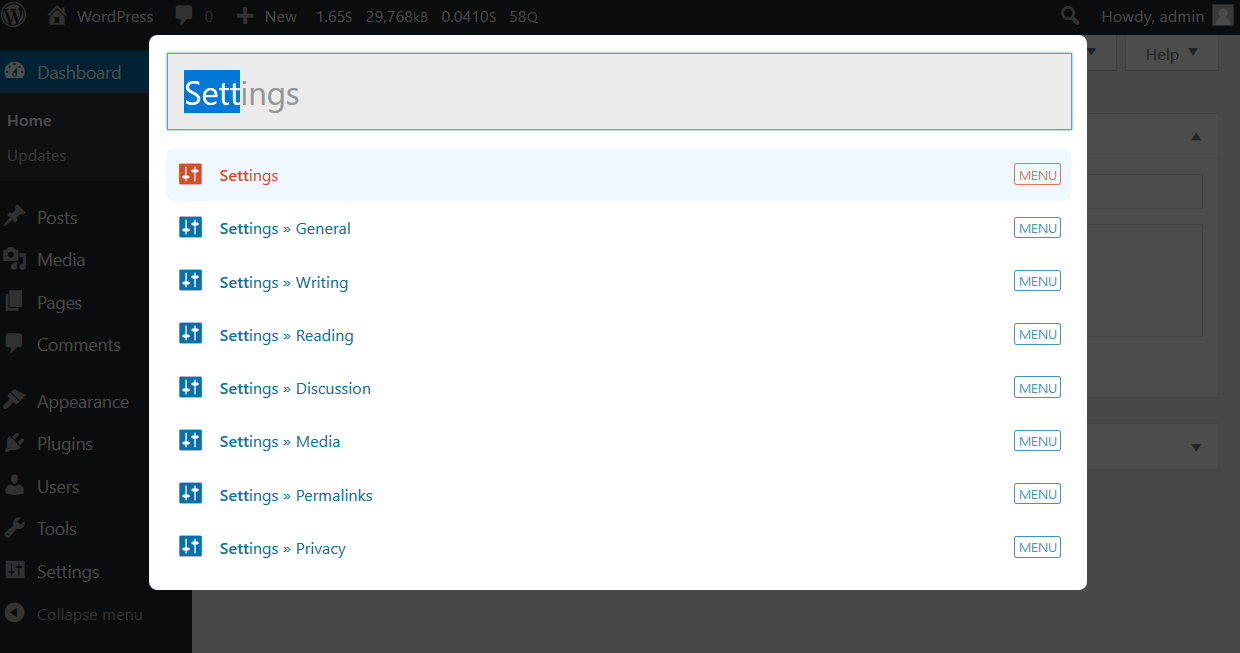
Then start typing your search query. Results will show up below the search box.

Ectoplasm theme - showing the Flush Rewrite Rules action

View image thumbnails for both attachments and featured images

Jarvis on mobile
Faq
Hit the / key in the admin section or click the Jarvis button in the admin toolbar.
You may be on a page that’s focusing on a text area or input box. If this is the case just click somewhere on the page outside of these boxes and the hit /.
Reviews
Very solid plugin - please do a review of the code!
By 
Great!!
By 
must to have plugin
By 
Wow! Amazing!
By 
It would be ten times more useful if it could do full-text search.
By 
Inavluable resource for large content sites
By 
When you are dealing with multiple custom post types and large data sets, I have found this plugin invaluable. It's been a major assistance to both myself and our clients. Extremely easy to use and highly functional.
Clients like it too
By 
Our clients ask for this back if we accidentally remove it! Not sure anything else would be a better endorsement.
Fantastic
By 
I use Alfred daily so this was a gem to find. Thank you!!!!
Changelog
1.1.1
- Fix PHP 8.1 compatibility
1.1.0
- Drop IE11 support
- Add Modern and Dracula color schemes
- Refactor themes to use CSS variables
- Refactor the build process from a gulp build to es modules with rollup and bundle typeahead/bloodhound dependencies
- Introduce composer for autoloading and build scripts
- Introduce phpcs with WP Coding Standards
1.0.6
- Hotfix for missing svn change
1.0.5
- Update build dependencies
- Add permission_callback on rest api routes for 5.5 update
- Add capability checks to instant actions
1.0.4
- fix the autoloader to support web roots with underscore characters
1.0.3
- exclude hidden taxonomies from the search results and implement a new jarvis/taxonomies filter the list of taxonomies to be included in the search
1.0.2
- Send attachment suggestions to the ‘Edit more details’ page instead of the grid view as wp.media-grid throws an error if the item is not already loaded in the grid
1.0.1
- Fix an installation issue some users were reporting
1.0.0
- Rewrite most of Jarvis
- New – User search
- New – Mobile compatibility
- New – Add Instant Actions that can be selected that are not in the admin menu
- New – Nonce security for searches
- New – Theme support!
- Improved – icon detection methods such as dashicons with custom fonts
- Improved – Hi-DPI loading icon
- Drop support for IE < 11
- New gulp build pipeline
- Remove Hogan in favor of underscore templates
- Removed – support for old versions of wordpress
- Removed – support for IE < 11
0.51.0
- Add post type check to search query to only query post types shown in wp-admin
0.50.0
- Refactored to use the latest Twitter Typeahead
0.40
- Code maintenance
- Ability to search by post_id
- add user setting for invoking jarvis
0.31
- Quick bug fix for icon issue that lead to database results not being shown
0.3
- Updated to work with dashicons of WP 3.8+
- Use search icon instead of J as a more intuitive icon
0.2
- Official initial release.
0.1
- Internal testing at WDG.