All in One – AI Product Manager for WooCommerce
All in One – AI Product Manager for WooCommerce
Description
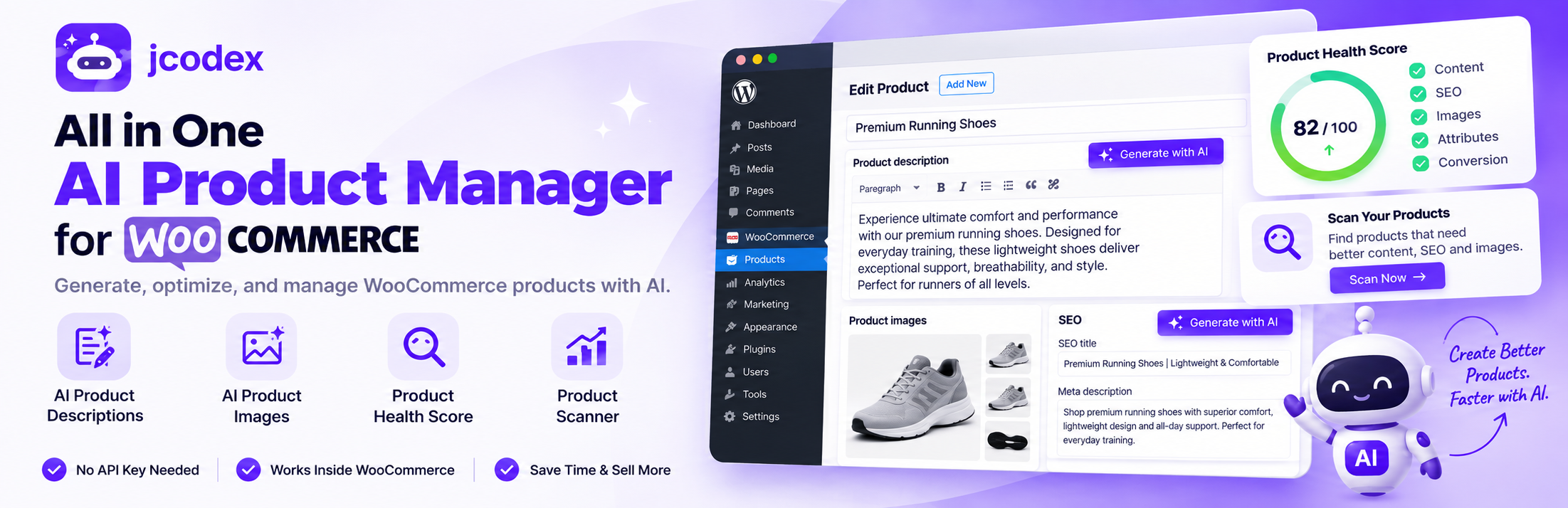
All in One – AI Product Manager for WooCommerce doesn’t just write content it tells you what’s actually wrong with each product first. Open any product and get a free Product Health Score out of 100, broken down across content, SEO, images, and conversion, so you know exactly what’s missing before a customer ever finds the gap. Then generate descriptions, short descriptions, SEO titles, meta descriptions, tags, features, benefits, and product images right inside the WooCommerce product editor. SEO titles and meta descriptions can also be saved to the plugin’s built-in SEO fields when no supported SEO plugin is installed. Click one button. No API key required, no OpenAI account, nothing to configure.
Running an online shop with hundreds of products? The built-in All Products Scanner checks every product in one scan and reports exactly which ones are missing titles, descriptions, meta titles, meta descriptions, images, image alt text, or FAQs — and gives each product a Health Score — so you know where to focus instead of clicking through them one by one.
Whether you run a WooCommerce store, a dropshipping business, a print-on-demand shop, or manage client stores as an agency, this plugin cuts product listing time from hours to seconds. And unlike a one-time trial, your free generations refresh every month.
🚀 Why Store Owners Choose This Plugin
Most WooCommerce stores lose hours writing listings by hand, or copy-paste from suppliers and get hit with Google’s duplicate content penalty. This plugin solves both, running on the same class of AI models behind ChatGPT — without you ever touching an API key.
✅ Product Health Score — a 0–100 score for every product across content, SEO, images, and conversion, with a checklist showing what’s done, weak, or missing.
✅ All Products Scanner — one scan for your whole catalog: missing titles, descriptions, meta titles, meta descriptions, images, alt text, FAQs, tags, categories, attributes, SKUs and prices, plus a Health Score for every product.
✅ Brand Voice — tell the AI your brand name, industry, target customer, personality and writing style so every generation sounds like your store.
✅ Writes in your site language — content is generated in the language set under Settings > General > Site Language (Swedish, German, French, Spanish and more).
✅ No API key needed — no OpenAI account, no ChatGPT Plus subscription, no third-party setup. Install and generate.
✅ Lives inside WooCommerce — the panel appears right in the product editor. No tab switching, no copy-pasting.
✅ One click, ready to publish — descriptions fill the content field, images are set as the featured image, alt text is added automatically.
✅ Free limits reset monthly — not a one-time trial. Your free generations refresh on a rolling cycle every month.
✅ Free regenerate — didn’t like a result? Click Generate again with the same inputs within 15 minutes for a new version, no credit used.
✅ SEO works with or without an SEO plugin — AI-written titles and meta descriptions write directly into Yoast SEO, Rank Math, or All in One SEO when available. If none is installed, the plugin provides its own built-in SEO fields and saves the values with the product.
✅ Built for scale — generate for a single product or your whole catalog in bulk (Pro).
✅ Written to rank — output is structured for search, not just filler text.
🆓 What’s Included in the Free Version
Product Health Score (free, unlimited)
– Every product gets a Product Health score out of 100
– Content check: title, short description, long description length, benefits, FAQ
– SEO check: SEO title, meta description length, focus keyword, keyword usage
– Image check: featured image, alt text, image count
– Conversion check: FAQ, clear benefits, title strength
– Each item is marked done, weak, or missing, so you can see exactly what to fix
– One-click Improve Product with AI button generates the missing or weak pieces directly
All Products Scanner (free, unlimited)
– Combines the former Missing Content Scanner and Product Scanner into one tool
– Reports missing or very short titles, missing or very short descriptions, missing short descriptions and FAQs
– Reports missing meta titles (SEO titles) and meta descriptions, with support for Yoast SEO, Rank Math, All in One SEO and the plugin’s built-in SEO fields
– Reports missing product images, products with only one image, and missing image alt text
– Reports missing tags, categories, attributes, SKUs and prices, plus duplicate or similar descriptions
– Shows a Health Score for every product, an average score for the store, and lists of the products that need attention
– Filter the scan by product status, product type and category
– Runs in small batches and uses no AI credits
Brand Voice (basic in Free, advanced in Pro)
– Set your brand name, industry, target customer, brand personality and writing style once
– Every AI generation follows the same brand voice
– Pro adds words to use, words to avoid, extra brand rules and Analyze My Existing Store, which learns your writing style from 5–10 of your existing products
Content generation, inside the product editor
– Product descriptions — 10/month, with tone, length, and audience controls
– Short descriptions — 10/month
– Product images — 10/month, 4 style presets (ecommerce, lifestyle, luxury, minimal)
– Feature lists — 10/month
– Benefit lists — 10/month
– Product tags — 10/month, one-click apply
– SEO titles — 10/month
– Meta descriptions — 10/month
– Title/name improvement suggestions — 10/month
– Free regenerate: re-run the same prompt within 15 minutes for a fresh result — only your monthly allowance is metered, not your patience
WooCommerce & SEO integration
– Works with the Classic Editor and the Block Editor (Gutenberg)
– Auto-fills the description and short description fields
– Auto-sets the generated image as the featured image
– Auto-generates image alt text from the product title
– Saves every generated image to the Media Library
– Writes SEO titles and meta descriptions directly into Yoast SEO, Rank Math, or All in One SEO when one is active
– Provides built-in SEO title and meta description fields when no supported SEO plugin is active
– Saves the built-in SEO values with the product when you click Update or Publish
No API key required. Free generations refresh every month, so you can keep using the plugin long-term before deciding whether to upgrade.
💎 Pro — Unlimited Generation, Bulk Tools, and More
Everything in Free, plus:
Unlimited generation
– Unlimited descriptions and short descriptions
– Advanced Brand Voice: words to use, words to avoid and extra brand rules applied to every generation
– Analyze My Existing Store: the AI learns your writing style from 5–10 of your existing products, then “Use my existing brand voice” keeps new content consistent
– CSV export of the All Products Scanner report
– Writing styles: Professional, Friendly, Luxury, Technical, Sales-Focused
– Tone options: Formal, Casual, Persuasive, Premium
– Length control: Short, Medium, Long
Deeper SEO tools
– Unlimited SEO titles and meta descriptions
– Focus keyword and long-tail keyword suggestions
– Product SEO audit score (e.g. “87/100 — Missing FAQ, description too short”)
– Optimization recommendations
More product content
– Attribute generator (material, size, weight, color — auto-creates WooCommerce attributes)
– FAQ generator (schema-ready, built for Google rich results)
– Specifications generator (weight, dimensions, connectivity, battery life)
– Comparison table generator (useful for affiliate and electronics stores)
Bulk generation
– Generate everything at once — description, short description, SEO title, meta description, tags, features, benefits, FAQ
– Run across selected products, categories, or your entire catalog
– Bulk image generation across multiple products
Image tools
– Lifestyle scenes: office, home, outdoor, in-use
– Mockups: T-shirts, mugs, bottles, phone cases
– Background removal (transparent PNG)
– Upscaling for low-resolution photos
Marketing content
– Ad copy: Facebook, Instagram, Google, Pinterest
– Email copy: launch, promotional, sales campaigns
– Video scripts: TikTok, Reels, YouTube Shorts
Import and rewrite
– Import a product from a URL (Amazon, AliExpress, Etsy, or any supplier) and generate unique content automatically
– Rewrite existing content to improve SEO, humanize, expand, shorten, or persuade
Multilingual
– Generate content in English, German, French, Spanish, Italian, Arabic, and Urdu
– WPML and Polylang compatible
For agencies
– CSV export and import
– Manage multiple WooCommerce stores from one dashboard
👉 Upgrade to Pro: https://jcodex.com/plugins/jcodex-ai-product-generator-for-woocommerce/
Who This Plugin Is For
- WooCommerce store owners who add products regularly and want out of manual copywriting
- Dropshippers importing large catalogs from AliExpress, Amazon, or suppliers who need unique content fast
- Print-on-demand stores with hundreds of products that each need individual copy
- Ecommerce agencies managing multiple client stores who need a faster workflow
- Amazon/AliExpress importers rewriting supplier content to avoid duplicate-content penalties
- Retailers who want better search visibility without hiring a copywriter
How It Works
- Open any product in WooCommerce
- Find the AI Product Generator panel in the product editor — it opens showing that product’s Product Health Score, with a checklist of what’s done, weak, or missing
- Click Improve Product with AI to generate the flagged items, or pick a specific tab (Description, Image, Features, Benefits, Tags, SEO Title, Meta Description, Name Ideas)
- Content fills the correct WooCommerce fields — SEO titles and meta descriptions write into Yoast/Rank Math/AIOSEO when active, or into the plugin’s built-in SEO fields when no supported SEO plugin is installed
- Review, edit if needed, then Publish or Update
- To check your whole catalog at once, run the All Products Scanner from the plugin’s main menu, then open any product it lists to fix what is missing
- To make every generation sound like your store, open Brand Voice from the plugin’s main menu and fill in your brand profile
The plugin connects to the JCodex API, which handles processing on the backend using the same class of models behind ChatGPT and leading image generators. No OpenAI account, ChatGPT subscription, or external API key needed — it’s all managed for you.
External Services
This plugin connects to the JCodex API (https://jcodex.com/wp-json/apg/v1) to process generation requests. Requests are sent only when a logged-in admin or editor clicks Generate inside the product editor.
Data sent: your site’s public URL and the prompt built from your product content.
- JCodex Terms of Use: https://jcodex.com/terms/
- JCodex Privacy Policy: https://jcodex.com/privacy/
JCodex may use OpenAI on its backend. Their policies apply to prompt processing:
– OpenAI Terms: https://openai.com/policies/terms-of-use/
No customer personal data is collected or transmitted.
Requirements
- WordPress 5.8 or higher
- WooCommerce, installed and active
- PHP 7.4 or higher
Installation
- Make sure WooCommerce is installed and active.
- Go to Plugins > Add New in your WordPress dashboard.
- Search for AI Product Manager for WooCommerce and click Install Now.
- Click Activate.
- Open any product under Products > Add New, or edit an existing one.
- Find the AI Product Generator panel near the top of the product editor.
- Click Generate for a description or image — content appears instantly.
Screenshots
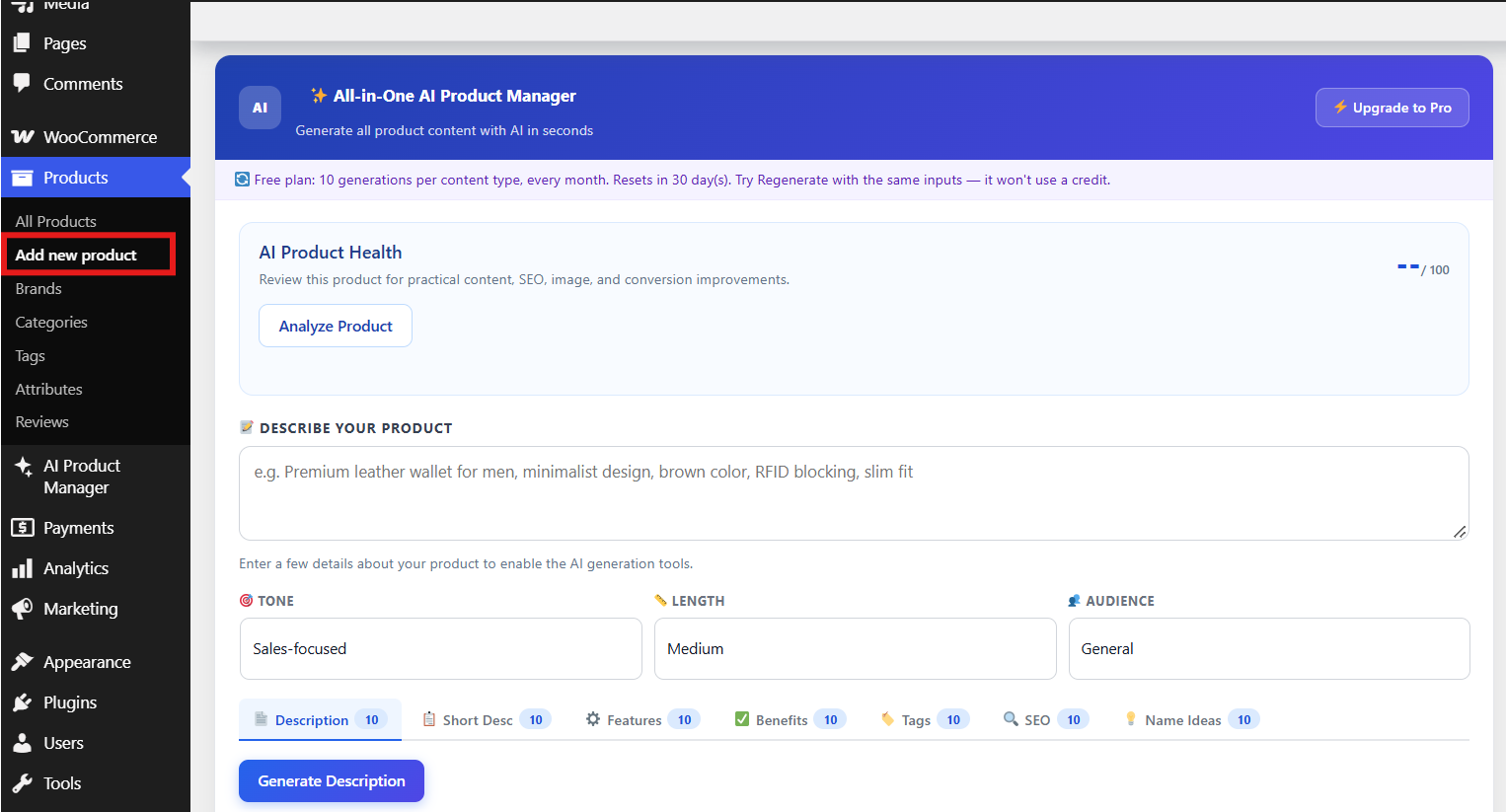
The AI Product Generator panel inside the WooCommerce product editor
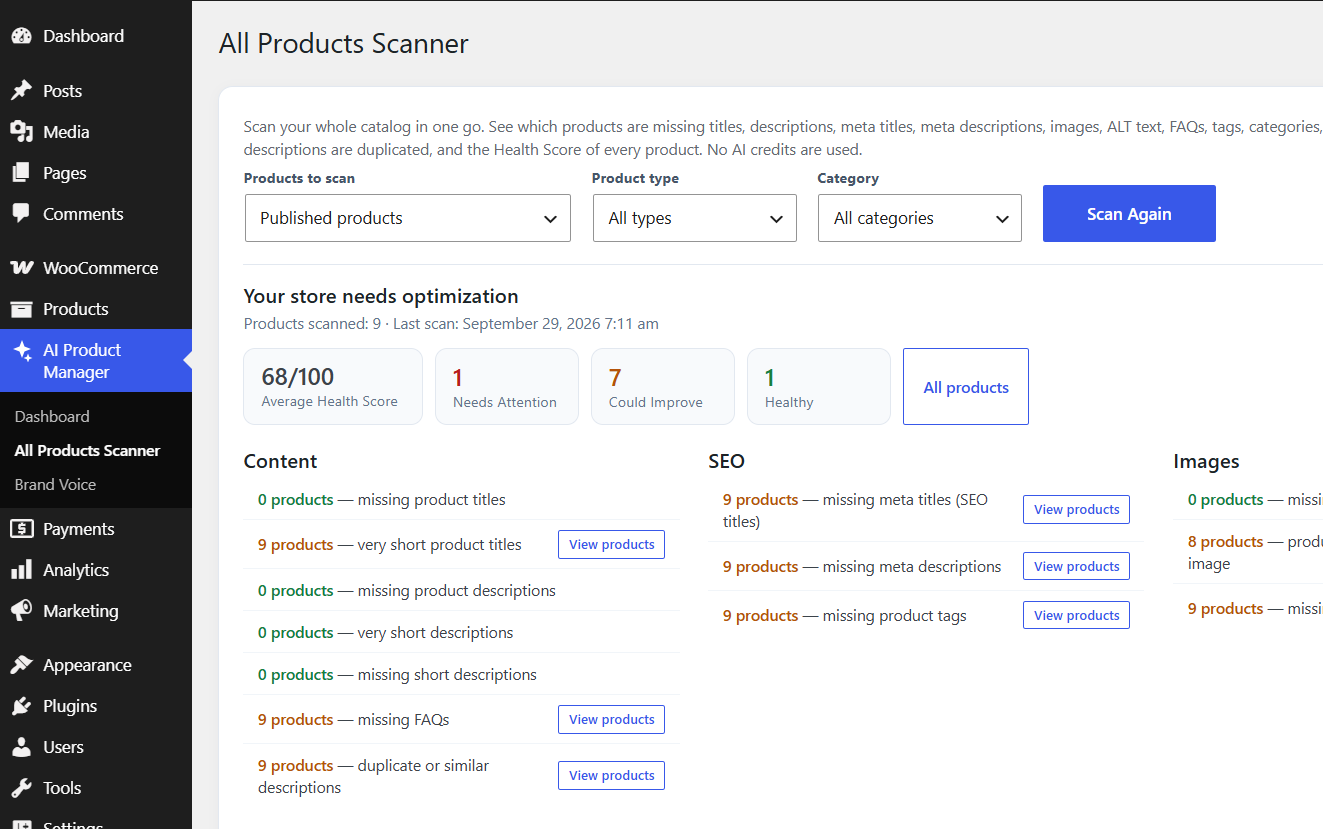
Scan your whole catalog in one go. See which products are missing titles, descriptions, meta titles, meta descriptions, images, ALT text, FAQs, tags, categories, attributes, SKUs or prices, which descriptions are duplicated, and the Health Score of every product. No AI credits are used.
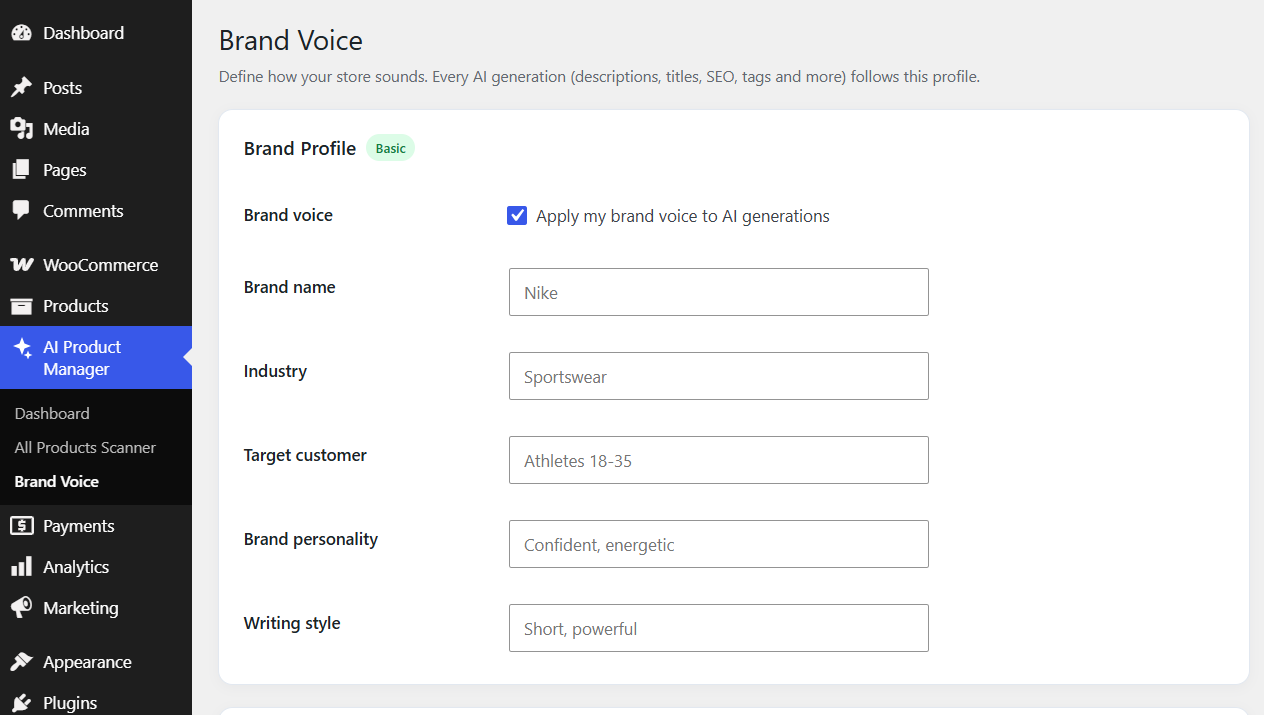
Define how your store sounds. Every AI generation (descriptions, titles, SEO, tags and more) follows this profile.
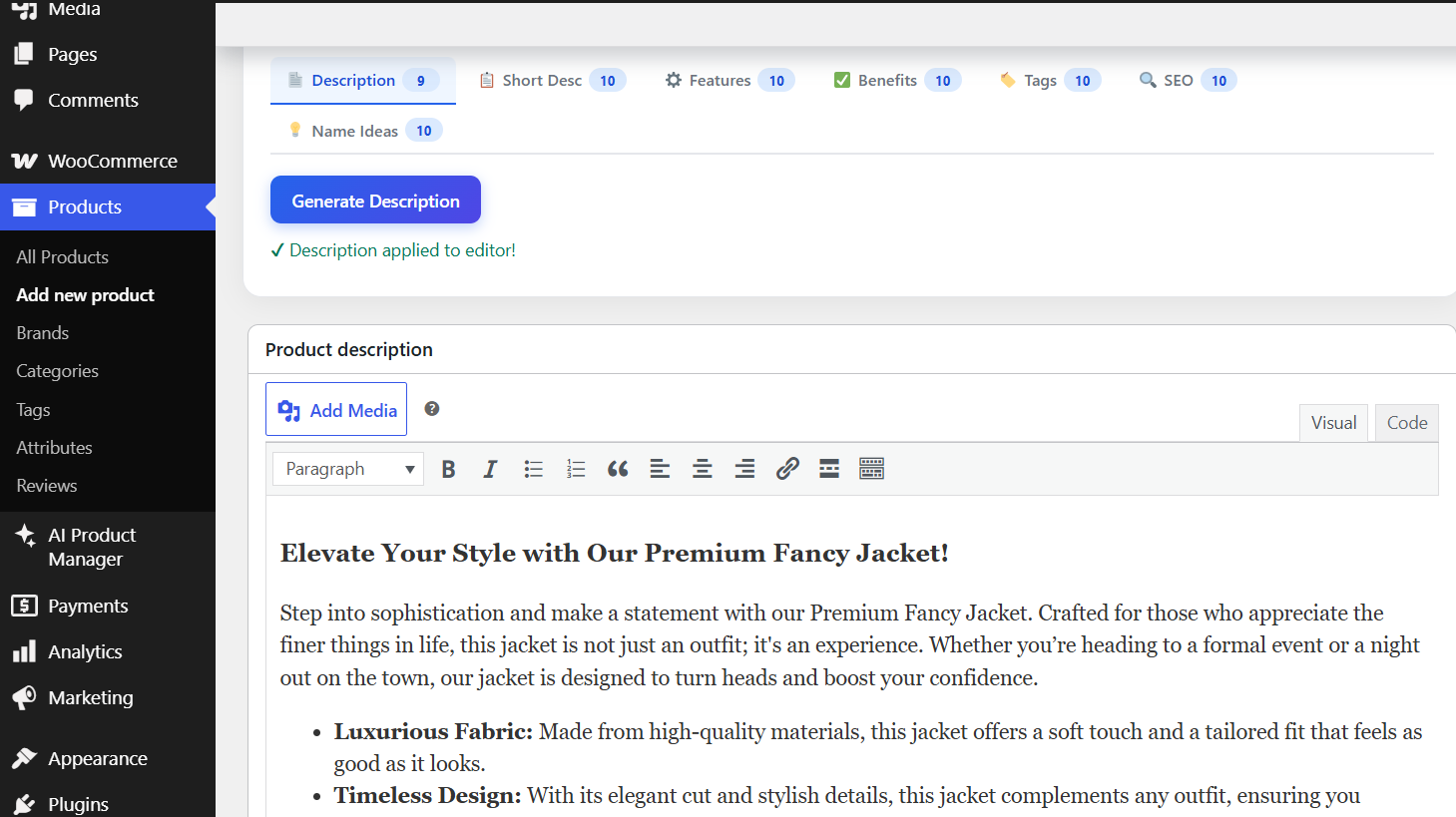
Generate product content with AI and auto-fill it into the editor in one click
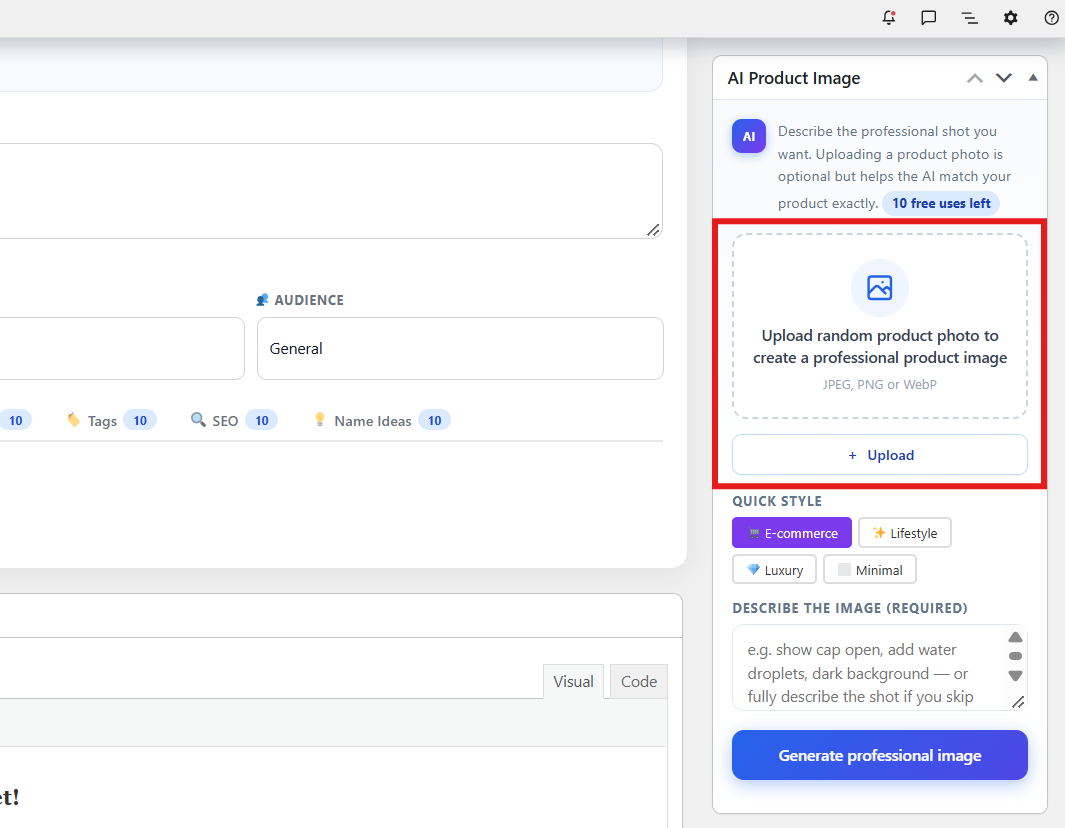
Generate or convert photos into professional product images
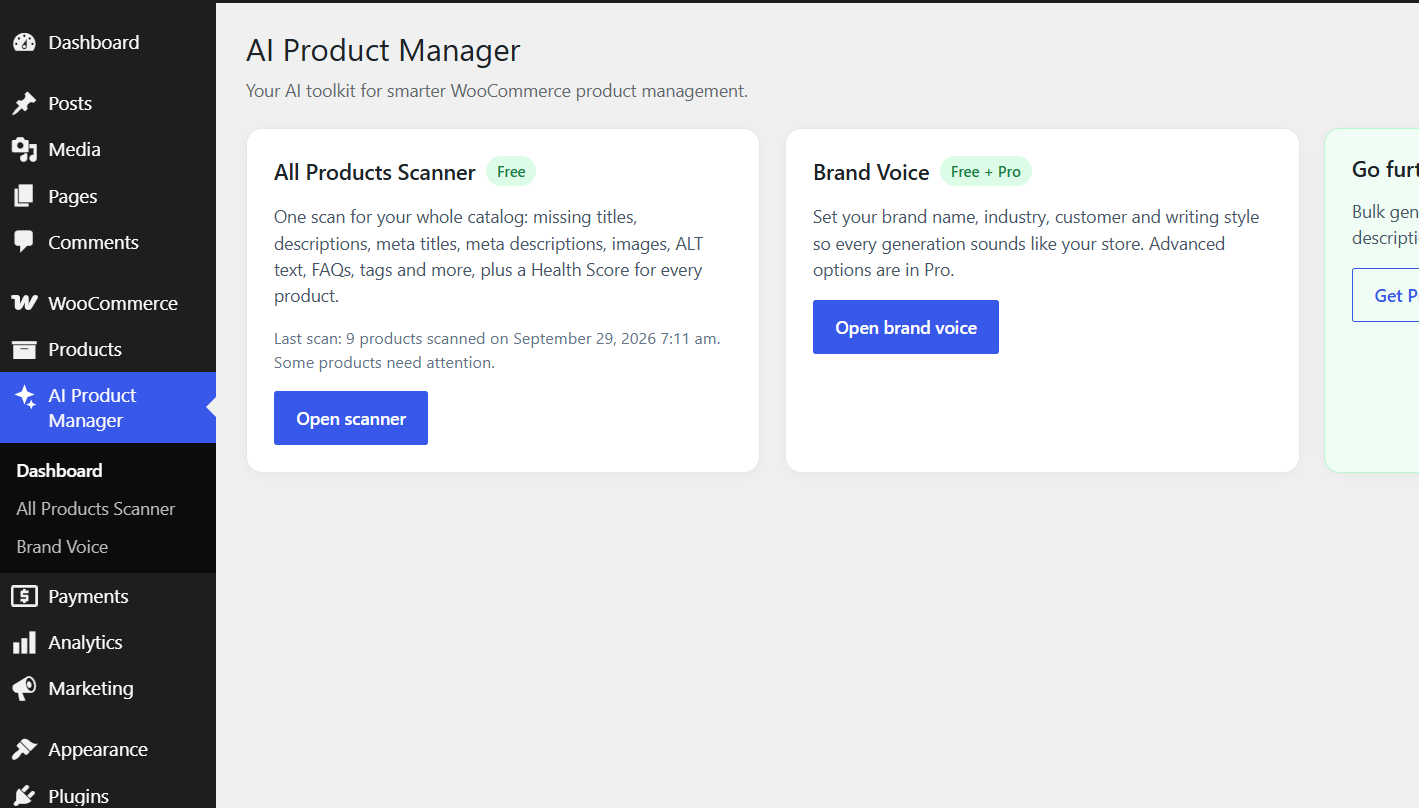
The AI Product Manager dashboard
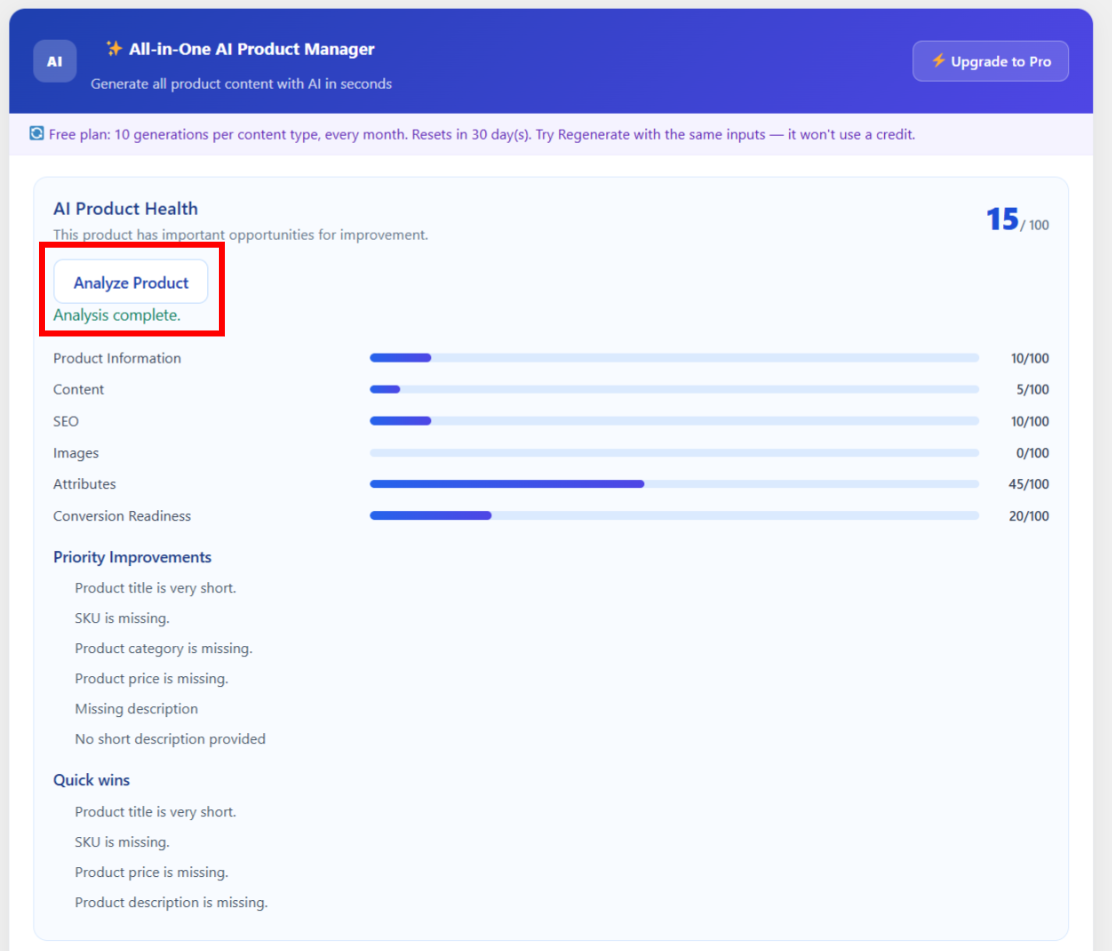
AI Product Health checker inside the WooCommerce product editor
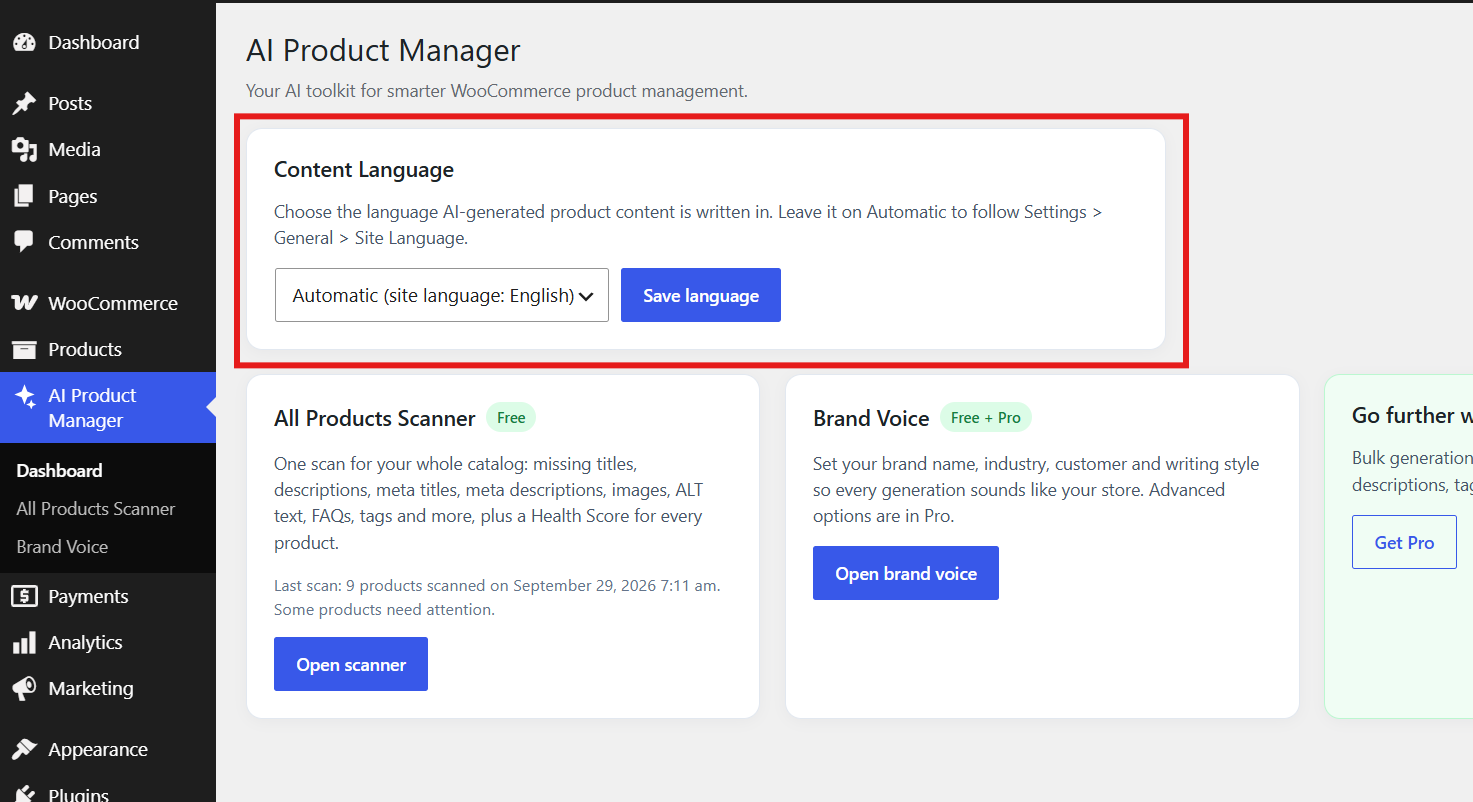
Choose the language AI-generated product content is written in.
Faq
It’s built specifically for WooCommerce. The description, image, and SEO tools live inside the native product editor and write directly into WooCommerce’s own fields — description, short description, tags, and featured image.
No. The plugin connects to the JCodex API, which handles all AI processing on the backend using the same class of models that power ChatGPT and modern image generators. No OpenAI account, ChatGPT Plus subscription, or third-party API key required.
Yes. WooCommerce must be installed and active. The generator panel only appears on WooCommerce product edit pages.
Yes. The free version includes 10 descriptions, 10 short descriptions, 10 images, 10 SEO titles, 10 meta descriptions, 10 feature lists, 10 benefit lists, 10 tag sets, and 10 name-suggestion runs — every month. Each content type has its own independent monthly allowance, not a one-time limit.
You’ll be prompted to upgrade to Pro for unlimited generation. Your free allowance for each content type refreshes on a rolling 30-day cycle either way, so you can keep using the plugin at a smaller scale if you don’t upgrade. Anything already generated stays in place.
Yes. Click Generate again with the exact same prompt, tone, length, and audience settings within 15 minutes and it counts as a free regenerate. This applies once per generation — a second identical re-click uses a credit.
Yes. When you generate an SEO title or meta description and one of those plugins is active, the content is written directly into that plugin’s fields, in addition to appearing in the AI Product Generator panel.
You can still generate and save an SEO title and meta description. The plugin creates and manages its own built-in SEO fields for the product when Yoast SEO, Rank Math, and All in One SEO are not active. The values are saved when you Update or Publish the product.
They are stored with the WooCommerce product by the plugin and remain available when you edit the product again. This allows you to manage basic product SEO metadata without installing a separate SEO plugin.
Yes. Every generated image gets alt text based on the product’s title (or your image prompt if the product has no title yet), which helps image SEO and accessibility.
Upgrade to Pro, which includes bulk generation for descriptions, SEO titles, meta descriptions, tags, and FAQs — across your whole catalog, or for selected products or categories, in one batch.
The free version includes Sales-Focused, SEO Optimized, Luxury, and Casual tones, plus Short/Medium/Long length and audience targeting (General, Men, Women, Kids, B2B). Pro adds Professional, Friendly, and Technical styles, plus Formal and Persuasive tones.
Yes. By default, generated content automatically follows your WordPress site language (Settings > General > Site Language). If your store language differs from your site language, choose a language under AI Product Manager > Dashboard > Content Language. If your site is set to Swedish, descriptions, short descriptions, features, benefits, tags, SEO titles, meta descriptions, product name suggestions and Product Health insights are written in Swedish, even if you type the product details in another language. English sites keep working exactly as before. Pro is also compatible with WPML and Polylang.
Make sure Site Language is set to your language under Settings > General and saved, or pick the language under AI Product Manager > Dashboard > Content Language (the product editor panel also shows the active language with a Change language link). The plugin reads these settings for every generation. The plugin’s own screens and buttons are translated through the standard WordPress translation files, so they may still show English until a translation for your language is available.
To your WordPress Media Library, automatically set as the product’s featured image with alt text applied. Manage them like any other media file.
No. API calls only happen when you manually trigger a generation inside the product editor. There’s no frontend code, so it doesn’t affect performance for customers.
Yes, both.
Yes. Content is inserted into the product fields but nothing saves until you click Update or Publish. Edit or discard anything before saving.
Yes. The plugin operates inside the WooCommerce product editor and is compatible with all standard WooCommerce themes.
The plugin only transmits product content data — your site URL and generation prompts. No customer personal data is collected or transmitted. Review the JCodex Privacy Policy and third-party AI provider policies for full details.
Yes, in Pro. Import a product URL from Amazon, AliExpress, Etsy, or any supplier site, and the plugin generates unique, SEO-optimized content — useful for avoiding duplicate-content penalties.
Yes, in Pro: Facebook Ads, Instagram Posts, Google Ads, launch emails, promotional emails, TikTok scripts, and more.
It’s a free, per-product score out of 100 that checks your content (title, descriptions, benefits, FAQ), SEO (title, meta description, focus keyword, keyword usage), images (featured image, alt text, image count), and conversion elements (FAQ, benefits, title strength). Each item is marked done, weak, or missing, and you can click Improve Product with AI to generate whatever’s flagged.
Yes, it’s included in the free version with no limits — check as many products as you like.
Yes. The All Products Scanner is free and unlimited. One scan checks every product and reports how many are missing titles, descriptions, meta titles, meta descriptions, images, alt text, FAQs, tags, categories, attributes, SKUs or prices, plus which have very short or duplicate descriptions. It also shows a Health Score for every product, so you can prioritize what to fix first.
They were merged into a single tool, the All Products Scanner. Old links to the Product Scanner page open the new scanner automatically.
Brand Voice lets you define how your store sounds: brand name, industry, target customer, brand personality and writing style. Once saved, every AI generation follows it. Pro adds words to use and avoid, extra brand rules, and Analyze My Existing Store, which learns your current writing style from your existing products.
Reviews
The best support I have ever received
By 
The best support I’ve ever received—friendly, fast, and genuinely helpful.
Great plugin & Support
By 
i found this plugin very impressive but there real benchmark is support i talk to them and they respond to me quickly for done customisations for me
Finally Found Something Real
By 
I just use this plugin on my car parts store that have lots of products to add & it works exactly what i want to do it don't ask me for complex setup just installed and ready to create complete products quickly
Great plugin!
By 
Perfect plugin to create product description and tags as well as its creating outstanding product images instantly with just one prompt recommended to every one.
Really Helpful Plugin for WooCommerce
By 
I've been using this plugin for a few days while adding products to my WooCommerce store, and it has saved me a lot of time. Instead of writing every descriptions, features, tags from scratch, I can generate one and make a few small changes if needed.
I also tried the AI image feature, and the results were better than I expected.
Overall, it's a useful plugin if you have a lot of products to add. Looking forward to seeing more features in future updates. Great job by the developer!
Changelog
1.2.5
- New settings page to manage plugin options
- Security improvements
1.2.4
- Merged the Missing Content Scanner and the Product Scanner into one All Products Scanner: scans all products in small batches and reports missing or very short titles, descriptions and short descriptions, meta titles, meta descriptions, images, image ALT text, FAQs, tags, categories, attributes, SKUs and prices, plus duplicate/similar descriptions, with a Health Score and a product list for each issue
- The All Products Scanner can be filtered by product status, product type and category
- Added Brand Voice: define your brand name, industry, target customer, personality and writing style, and every AI generation follows it (advanced options are in Pro)
- Added a Content Language setting (AI Product Manager > Dashboard, with a Change language link inside the product editor panel): leave it on Automatic to follow the WordPress site language or choose any supported language for AI-generated content
- AI content now follows the WordPress site language: descriptions, short descriptions, features, benefits, tags, SEO titles, meta descriptions, name suggestions and Product Health insights are generated in the language set under Settings > General > Site Language (developers can override it with the
jcodex_apgwco_content_languagefilter) - Added a main “AI Product Manager” menu with a Dashboard page and submenus for the All Products Scanner and Brand Voice
- Added a Settings link on the Plugins page that opens the plugin Dashboard
- AI Product Image: the description field is now required and the source photo upload is now optional — you can generate an image from a text description alone, or upload a photo for the AI to match
- Removed the non-functional “Fix with AI” button from the Product Health results
- Added built-in SEO title and meta description fields for stores that do not have Yoast SEO, Rank Math, or All in One SEO installed.
- Generated SEO titles and meta descriptions can now be saved with the product through the plugin’s own SEO fields.
- Updated the SEO workflow so it can use supported SEO plugins when available and the plugin’s built-in fields when they are not.
1.2.3
fix an ux issue with generate buttons
1.2.2
- Added the Product Health Score — a free, per-product score out of 100 across content, SEO, images, and conversion, with a done/weak/missing checklist
- Added Improve Product with AI — one-click generation for whatever the Health Score flags
- Added the Missing Content Scanner — a free, catalog-wide scan for missing descriptions, meta descriptions, images, alt text, and FAQs, plus short or duplicate descriptions
- Added Fix with AI on the scanner results to jump straight into generation
1.2.1
- Free generations now refresh every month instead of a one-time lifetime cap
- Added free regenerate — re-click Generate with the same inputs within 15 minutes at no extra credit cost
- Generated images now get automatic alt text (from product title or image prompt)
- SEO titles and meta descriptions now write directly into Yoast SEO, Rank Math, or All in One SEO when active
- Added a usage-cycle note inside the panel so users know when free monthly limits reset
1.2.0
- Added limited product description, short description, and image generation
- Added feature list, benefit list, and tag generators
- Added AI panel inside the WooCommerce product editor, with Classic and Block Editor support
- Auto-fill for description, short description, and featured image
- Added basic SEO title and meta description generation
- Added product name improvement suggestions
- Free tier: 10 descriptions, 10 short descriptions, 10 images, 10 SEO titles — no API key required
1.0.0
- Initial release
- Product description and image generation inside the WooCommerce product editor
- Auto-save generated images to the Media Library
- Auto-fill description and short description fields, auto-set featured image
- Basic SEO title and meta description generation
- Tags, features, and benefits generators
- Freemium usage limits for free-tier users
- Classic Editor and Block Editor support