Kansleri Cookie Consent
Kansleri Cookie Consent
Description
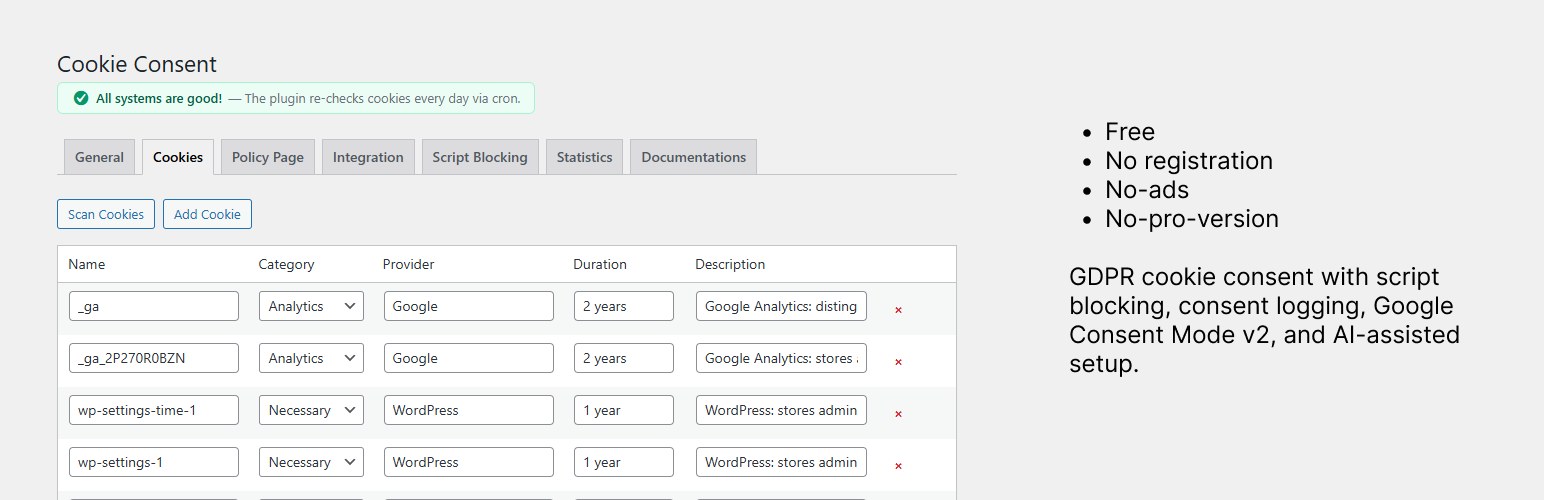
Kansleri Cookie Consent is a free, lightweight, and easy-to-use WordPress cookie consent plugin. There are no ads, no pro version, and no upsells. It is perfect for personal websites, small businesses, and hobby sites who want no-hassle cookie consent.
Features:
- Three banner styles: bottom bar, centered modal, corner popup
- Customizable colors, texts, and button labels
- Plugin or Theme typography mode for consistent banner styling (Plugin style is the default)
- Four consent categories: Necessary, Analytics, Marketing, Preferences
- Script auto-blocking — prevents third-party scripts from running until consent is given, including WordPress-enqueued scripts and raw HTML scripts from page builders (Bricks, Elementor, custom code injectors)
- YouTube & Vimeo iframe blocking — video embeds are blocked until marketing cookies are accepted, with a user-friendly placeholder
- Google Consent Mode v2 integration with automatic default/update signals
- GTM dataLayer push on consent changes
- Integration tab recommends Google Site Kit (Google’s official WordPress plugin) for installing Google Analytics 4 and Google Tag Manager, so Consent Mode v2 signals work out of the box without manual GTM snippet management
- Built-in cookie scanner that auto-identifies common cookies (Google Analytics, Meta Pixel, WordPress core, and more) — including cookies from consent-blocked scripts via service inference
- AI-assisted cookie descriptions — copy a prompt, paste into an AI tool, import the result
- AI-assisted policy page generation — generate a complete cookie/privacy policy page with one prompt
- Cookie policy page defaults to the WordPress Privacy Policy page, with a dynamic
[kncc_cookie_policy]shortcode (theme styling by default; plugin styling optional) - Floating settings button for visitors to update preferences (on by default)
[kncc_cookie_settings]shortcode — add a cookie settings link anywhere (footer, menu, etc.) with customizable text- “Edit cookie preferences” button on the policy page for easy consent withdrawal
- Per-user consent logging — anonymized audit trail for GDPR compliance with CSV export
- Consent statistics dashboard (no personal data stored)
- Graceful multilingual policy page fallback — if a language is missing a translated policy page, the banner links to the default-language page instead of a 404
- Google Site Kit integration — auto-detects and avoids duplicate consent signals
- WP Consent API integration — shares consent status with other plugins
- Full WPML and Polylang support — per-language banner texts, cookie descriptions, banner style, colors, and policy page
- Finnish translation included with auto-localized defaults
- Daily cron check for missing cookie descriptions with admin notifications
- Comprehensive documentations tab with installation guide, option explanations, and troubleshooting
- Clean uninstall — removes all data when deleted
Installation
- Upload the
kansleri-cookie-consentfolder to the/wp-content/plugins/directory, or install directly through the WordPress plugin screen. - Activate the plugin through the Plugins menu in WordPress.
- Navigate to Settings > Cookie Consent to configure the banner.
- Use the Cookies tab to scan your site and register cookies.
- The Cookie Policy page defaults to your WordPress Privacy Policy page — add the
[kncc_cookie_policy]shortcode to that page (or another page you select).
Screenshots

Cookie consent banner on the frontend (corner popup style)

General settings — customize banner style, colors, typography, and button texts

Cookies tab — scan your site, auto-detect cookies, and use AI to generate descriptions

Policy Page tab — select your policy page and generate a complete privacy policy with one AI prompt

Integration tab — Google Consent Mode v2 and Site Kit / WP Consent API status

Script Blocking tab — auto-detected third-party scripts blocked before consent

Statistics tab — consent response summary with accept, reject, and custom breakdown

Consent Log — anonymized per-visitor audit trail with CSV export
Faq
Yes. When enabled under the Integration tab, the plugin outputs consent defaults in <head> before any other scripts, and sends consent update signals whenever a visitor changes their preferences. If Google Site Kit is active, duplicate defaults are automatically avoided.
The scanner loads your homepage in a hidden iframe, reads cookies from the browser, and also infers expected cookies from tracking scripts detected on your site (Google Analytics, Meta Pixel, HubSpot, etc.) — even when those scripts are blocked until consent. Known cookies are added automatically; unknown cookies are presented for categorization with an AI-assisted workflow. Expected cookies are also synced when you open the Cookies tab and during the daily cron check.
Yes. When WPML or Polylang is active, you can set per-language banner texts, cookie descriptions, banner style, colors, and policy page. Two workflows are supported for banner texts:
- Switch to a secondary language in the admin bar, edit the General tab, and save — texts are stored per language (
kncc_texts_{lang}) and take priority. - With WPML String Translation, translate the
[kncc_settings]*admin text strings. Those translations are used when no per-language override is saved for that language.
If neither is set, the plugin falls back to that language’s own plugin defaults (English if the language is not yet translated). Banner texts are never copied blindly from the default language. Non-text settings (colors, style) still inherit from the default language unless overridden. Cookie names, categories, providers, and durations are shared across all languages.
Yes. The plugin detects Site Kit automatically. If Site Kit is managing consent mode defaults, this plugin skips its own default output and only sends consent updates when visitors make a choice. Consent Mode v2 is forced on when Site Kit is active.
Yes. When the WP Consent API plugin is active, consent status is automatically shared with other plugins that support the API.
Statistics are tracked server-side via lightweight AJAX calls when visitors make a consent choice. No personal data, IP addresses, or tracking cookies are used. Only daily aggregates (accept/reject/custom counts) are stored.
Yes. YouTube and Vimeo iframes are automatically blocked until the visitor accepts marketing cookies. A placeholder is shown in place of the video with an “Accept marketing cookies” button. If the visitor has already accepted cookies via the consent banner, videos load normally without any placeholder.
Use the shortcode [kncc_cookie_settings] in any widget, page, or template. You can customize the link text with [kncc_cookie_settings text="Manage cookies"]. The shortcode is also shown with a copy button in the plugin settings page.
All plugin options (kncc_settings, kncc_cookies, kncc_consent_stats, kncc_incomplete_cookies, kncc_show_activation_notice, kncc_defaults_localized, kncc_cron_error, kncc_blocked_scripts, kncc_custom_blocked_scripts, migration flags, and per-language kncc_texts_* / kncc_cookie_descriptions_* options), the consent log table, and the daily cron schedule are removed from the database. Your WordPress Privacy Policy page is never deleted.
Reviews
So Simple - It's Brilliant
By 
Thank you for developing this easy to use plugin that does exactly what is needed.
Perfect 🙂
By 
Easy to use, simple, just perfect. The best I have used so far.
Excellent work
By 
Very simple and overall brilliant
By 
This plugin has everything you need to control cookies and be GDPR compliant. Very easy to configure.
Changelog
1.8.2
- Fixed: WPML String Translation of banner texts (
[kncc_settings]*) works again on secondary languages after the 1.8.0 per-language defaults change — overrides inkncc_texts_{lang}still take priority, then WPML ST, then language plugin defaults
1.8.1
- Changed: Default banner style is now Corner popup instead of Bottom bar (existing sites keep their saved style)
- New: WordPress Playground Live Preview blueprint (
assets/blueprints/blueprint.json) for the official plugin directory preview button
1.8.0
- Improved: Accept / Reject / Save preferences activate blocked scripts and iframes immediately — no page reload required
- Fixed: After Reject all, Accept all can re-activate the same blocked scripts without refreshing the page
- Fixed: Cookie scanner needed two manual runs to find WP Consent API bridge cookies (
wp_consent_*) and other consent-gated trackers — one Scan click now seeds consent, reloads once, then collects - Changed: Plugin no longer auto-creates a Cookie Policy page — the Cookie policy page dropdown defaults to the WordPress Privacy Policy page (Settings Privacy)
- Fixed: Polylang/WPML secondary languages no longer inherit banner texts from the default language — each language uses its own plugin defaults, with English as fallback when a language is unsupported
- Fixed: Modal close (×) no longer pushes banner content to the left on mobile — only the heading reserves space for the icon
- Improved: Blocked iframe message / accept button fields use per-language defaults (same as other banner texts)
1.7.2
- Fixed:
wp_consent_statisticscould staydenyafter Accept All — WP Consent API cookies now sync server-side fromkncc_consenton every request, with an earlywp_headfallback and hardened client-side sync (includingstatistics-anonymous) - Fixed:
wp_consent_statisticsdeny persisting due to a URL-encodedkncc_consentcookie — the server now URL-decodes the cookie before syncing, and the consent choice (accept/reject/custom) is stored so a missing category key can no longer leave statistics stuck on deny - Fixed: WP Consent API client sync now writes cookies even when the WP Consent API script is delayed, dispatches a consent-change event for Google Site Kit, and clears stale statistics cookies on parent domains
- Improved: Cookie policy page notes the technical WP Consent API cookie names (wp_consent_functional, wp_consent_statistics, etc.) so the mapping from banner labels is clear
- Fixed: Scanner no longer flags
wp_consent_statistics-anonymousas unknown — it is now auto-recognized and described as a consent-record cookie - Fixed: Copy AI Prompt now includes every cookie the plugin knows about — the scan returns the full saved cookie list, which is unioned with the scan results and the current table rows (your live edits take priority) so no cookies are dropped due to scan/save/reload timing
- Fixed: Copy AI Prompt on the Cookies and Policy Page tabs no longer uses a browser prompt dialog — the full prompt is shown in a selectable textarea below the button, with reliable clipboard copy on both http and https (fixes truncated/garbled JSON on local sites)
- Improved: AI cookie prompt now asks the AI to verify and correct each cookie’s category (not just the description), with clear category definitions so tracking cookies are not mislabeled as Necessary
- Changed: Default banner typography is now Plugin style (strict sizes/colors) instead of Theme style — the select field remains so you can switch back
- Unchanged: Cookie policy page still defaults to Theme style so it matches your site typography; only the consent banner/popup uses Plugin style by default
- Improved: WP Consent API bridge cookies (
wp_consent_functional,wp_consent_statistics,wp_consent_marketing,wp_consent_preferences,wp_consent_statistics-anonymous) are now categorized as Necessary — they only store consent choices, they do not perform tracking - Improved: Jetpack stats cookies (
tk_ai,tk_qs) are auto-categorized as Analytics; WooCommerce Order Attribution / Sourcebuster cookies (sbjs_*) are auto-categorized as Marketing - Improved: Admin JS/CSS assets use file modification time for cache busting so updated scripts load immediately after plugin updates
- Fixed: Custom save with hidden empty categories now explicitly denies missing optional categories so stale consent keys cannot linger
- Fixed: Floating cookie settings button no longer hardcodes white for the icon — background and icon colors now follow the Primary button and Primary button text settings
- New: Cookie scanner detects cookies whose tracking provider is no longer on the homepage (e.g. after removing Google Analytics) and lists them under “Possibly removed”
- New: Admin can review and confirm removal of stale cookies from the scan results — nothing is deleted automatically
- New: Cookie policy page shows your current consent status (allowed, denied, or not chosen) above the “Edit cookie preferences” button
- Changed: Frontend banner close control is now a × icon in the top-right corner, matching the admin banner preview — the text “Close” link in the button row is removed
- Changed: “Close button text” setting renamed to “Close button label” — it sets the screen reader label only; the visible button is always ×
- Improved: Banner preview and live frontend now share the same close-button styling via consent.css
1.7.1
- Fixed: Google Analytics cookies (
_ga,_ga_*,_gid) could remain visible after rejecting analytics or withdrawing consent — stale cookies are now cleared on page load when analytics is denied, on Reject all, and when analytics is turned off in custom preferences - Fixed: Non-essential cookies for rejected categories (analytics, marketing, preferences) are now removed using registered cookie categories and built-in scanner patterns — not just Google Analytics
- Fixed: Google Site Kit Google Tag Gateway scripts (
google_gtagjs-*handles andgtg/measurement.php) were not blocked before consent - Fixed: WP Rocket Delay JavaScript could rewrite blocked scripts to
rocketlazyloadscript, bypassing consent blocking — HTML script blocking now normalizes those tags back totext/plain - New: WP Rocket compatibility — registers
kncc_consentas a dynamic cache cookie and excludes consent/GA scripts from Delay JS - Improved: Accept all now reloads the page after saving consent so blocked scripts and tracker cookies load reliably on the next request (same pattern as Reject all)
- Improved: Custom save always reloads the page after saving preferences so blocked scripts and category cookies apply correctly (same pattern as Accept all and Reject all)
- Improved: WP Consent API bridge cookies (
wp_consent_functional,wp_consent_statistics,wp_consent_marketing,wp_consent_preferences) are now auto-described in the Cookies tab when scanned or inferred - Improved: Known cookies that were previously saved without descriptions are backfilled automatically when the Cookies tab loads or during scan/cron sync
1.7.0
- Fixed: Google Analytics and other consent-blocked tracker cookies not appearing during cookie scan
- New: Service-based cookie inference — expected cookies are registered automatically when tracking scripts are detected on your site, even before consent is granted
- New: Cookie inference runs on Scan Cookies, when opening the Cookies tab, and during the daily cron check
- New: Custom Code blocking for page builders and header/footer injectors (Bricks, Elementor, etc.) — toggle on Script Blocking tab, enabled by default
- New: Microsoft Clarity auto-blocking and cookie inference
- Fixed: GA4/gtag snippets pasted into Custom Code fields running before consent
- Improved: Browser scan waits up to 8 seconds and grants temporary scan consent so runtime cookies can be discovered
- Improved: Scan results now show inferred cookies and filtered browser-only cookies separately
- Improved: Script Blocking tab copy simplified for non-technical users, with guidance on when to turn off Custom Code blocking
1.6.2
- Fixed: WordPress 6.7+ “Translation loading for the kansleri-cookie-consent domain was triggered too early” notice. Two early triggers were calling
__()before theinitaction: the Consent Mode class was reading settings (and therefore the translated defaults) in its constructor onplugins_loaded, and the one-time default-text localization migration ran onplugins_loaded:20. The Consent Mode setting check now happens inside thewp_headcallback, and the migration is hooked oninit:5.
1.6.1
- New: “Close” button text is now a customizable setting in the General tab — previously it was a hardcoded translation string, which made it impossible to override per language on sites using Polylang or WPML. Add or edit it like any other banner button label, with per-language overrides via the admin-bar language filter. Reported by a multilingual user running Catalan / Spanish / English.
- Tested with WordPress 7.0.
1.6.0
- New: Empty cookie categories — when a category (e.g. Marketing) has no registered cookies, the banner can now either hide that category from the customize panel or show it with a locked (disabled) switch. Default is “Show but lock” so visitors still see what categories exist while being clearly told nothing is collected. Switch in Settings Cookie Consent General Empty cookie categories, with live preview.
- New: Per-category empty note — locked empty categories display a small italic note such as “No marketing cookies are used on this site.” (translatable per category, so Finnish and other inflected languages get proper wording).
- Fixed: WP Consent API integration was non-functional and could break analytics when Google Site Kit Consent Mode was active. The bridge that syncs
kncc_consentto WP Consent API now loads after the WP Consent API script, sowp_set_consentactually runs and dispatches thewp_listen_for_consent_changeevent that consent-aware integrations (Site Kit, Complianz, others) listen for. - Fixed: The plugin now declares itself as an opt-in consent manager via the
wp_get_consent_typefilter. Without this,window.wp_fallback_consent_typewas empty and Site Kit’s Consent Mode JS short-circuited — leavinganalytics_storagestuck atdeniedeven after visitors accepted analytics cookies. Other consent-aware plugins now also receive correctwp_has_consent()results instead of an always-true response. The filter yields to any other plugin that already set the consent type. - Fixed: WP Consent API registration filter used the wrong handle (slug only instead of the full plugin basename), so the plugin appeared as “not registered” in Site Health > WP Consent API. Now uses the correct basename.
1.5.1
- New: Documentations tab now ships a Custom CSS template — every selector the plugin uses, presented as one copy-paste-ready CSS block with a one-click “Copy CSS template” button. Uncomment the rules you want to customize, paste into Customizer or your child theme, save.
- Improved: Category toggles redesigned with an outlined “off” state that tracks the body text color, and an “on” knob that tracks the primary text color — so the on/off states stay visible at any color combination, including pure-white primary buttons.
- Improved: “Customize” and “Close” link buttons in the banner now have a clear hover state — subtle background tint with rounded corners and a thicker underline, so the click target is obvious instead of relying only on a small color shift.
- Improved: “Close” button now uses the body text color so it reads as a quiet dismissal action rather than competing for attention with “Customize” and the primary buttons.
- Improved: Banner preview’s close (×) icon follows the body text color picker, so it stays visually integrated as the admin tunes the palette.
- Removed: “Border / divider” color picker and the matching divider line in the details panel — one less rarely-changed setting in the General tab, and a cleaner banner layout.
1.5.0
- New: Integration tab now recommends Google Site Kit (Google’s official WordPress plugin) for adding Google Analytics 4 or Google Tag Manager — Site Kit handles Consent Mode v2 natively alongside Kansleri, so no manual GTM snippet, script blocking tweaks, or container ID management is needed. A one-click link takes you straight to the Site Kit install page.
- New: Cookie scanner filters out “browser-only” third-party cookies — when the scanner sees a tracker cookie (GA, Meta Pixel, HubSpot, LinkedIn, Hotjar, Plausible) but the matching script is not actually in the homepage HTML, the cookie is silently dropped. Fixes false positives on subdomain installs where parent-domain cookies (like
_ga) bleed into the admin’s browser even though this site has no tracker. - New: Live banner preview reworked from a fullscreen lightbox into an in-place floating popup — the “Open banner preview” button sits at the top of the General tab, and clicking it shows the banner in its real position (bar at bottom, modal centered, corner at corner). Colors, text, banner style, and typography updates appear in the preview in real time while the form stays editable behind it.
- Improved: Banner preview “Centered modal” variant now positions itself in the actual screen center.
- Improved: Banner preview Customize button toggles the categories panel like the real frontend banner; the panel starts collapsed.
- Improved: Banner preview Necessary-category toggle no longer shows a stray native checkbox alongside the custom toggle UI.
- Improved: Banner preview is automatically disabled when Theme style is selected, with a clear notice that Theme style depends on the frontend theme’s CSS which doesn’t load inside /wp-admin/.
- Improved: Color picker grid in the General tab — each color swatch now shows its purpose label (Banner background, Primary button, etc.) above it.
- Improved: Blocked YouTube iframe placeholder — switched from
hqdefault.jpg(4:3 with baked-in black letterbox bars) tomqdefault.jpg(native 16:9), and added defensive resets so theme styles like.entry-content img { margin: 2em 0; border-radius: 4px; }no longer leak into the thumbnail and create gaps or rounded edges. A subtle radial gradient keeps the message text and Accept button readable against any thumbnail. - Improved: Iframe placeholder mobile layout — tighter padding under 600px and
box-sizing: border-boxon the overlay so the message text no longer overflows the right edge on narrow screens. - Improved: Integration tab copy rewritten for non-technical users — fewer technical terms, clearer recommendations.
- Improved: Removed the now-discouraged
load_plugin_textdomain()call — translations on translate.wordpress.org are loaded automatically by WordPress core.
1.4.0
- New: Empty banner text fields fall back to the visitor’s locale default at render time — each language gets its own locale-appropriate defaults (English by default, Finnish only on the Finnish version). Cleared fields stay empty in the database, so the admin can leave a field empty to “use the default” without the form filling itself back in on save.
- New: Default values shown as placeholders in the admin form so it’s obvious what visitors would see if a field is left empty
- New: Graceful fallback to default-language policy page when a language is missing its own translation (both Polylang and WPML)
- New: Dead policy-page links are no longer rendered — if the selected page is deleted, trashed, or unpublished, the banner omits the link instead of pointing to a 404
- Improved: Admin language notice is clearer — a warning when editing a secondary language (saves target that language only), and an info notice when editing the default language so the active save target is never ambiguous
- Improved: Polylang’s “Show all languages” admin-bar filter is now treated as the default language, including under Polylang’s WPML compatibility mode — no more misleading “language: ALL” warnings
- Improved: WPML policy-page resolution now uses the same default-language fallback logic as Polylang, with explicit publish-status checks for every resolved translation
- Removed: Admin warning about missing policy-page translations (no longer needed, replaced by the graceful fallback)
- Updated: Finnish translations for all new and changed admin strings
1.3.0
- New: Policy page style setting — choose theme or plugin styling for the [kncc_cookie_policy] cookie declaration table
- Improved: Cookie policy table is now mobile-responsive — stacks into card layout on small screens
- Improved: Policy page theme mode adapts to dark and light backgrounds
- Improved: “Edit cookie preferences” button moved to top of policy page
- Fixed: Daily cron check not re-scheduling after plugin updates
- Updated: Finnish translations
1.2.1
- Fixed: Direct file access protection added to uninstall.php
- Updated: Finnish translations for documentation tab strings
1.2.0
- New: Full WPML and Polylang multilingual support — per-language banner texts, cookie descriptions, banner style, colors, and policy page
- New: Per-language cookie descriptions — cookie structure is shared, only descriptions are translatable
- New: AI prompts auto-generate in the current admin language
- Improved: Reliable language detection during AJAX saves for Polylang compatibility
- Improved: Iframe placeholder sizing — proper min-height and no overflow on mobile
- Improved: Documentation tab with multilingual guide, shortcode reference, and iframe blocking docs
- Fixed: Cookie deletion not persisting when saving from a secondary language
- Fixed: Scanner result strings showing mixed languages
1.1.0
- New: YouTube and Vimeo iframe blocking — video embeds are blocked until marketing cookies are accepted
- New:
[kncc_cookie_settings]shortcode to add a cookie settings link anywhere (footer, menu, widgets) - New: Shortcode info box with copy button in admin settings
- Improved: Page reload on “Reject all” to ensure blocked content is properly hidden
- Improved: Server-side consent cookie check to avoid unnecessary placeholders for returning visitors
- Updated: Finnish translations for all new strings
1.0.0
- Initial release