Kodlo Price Builder for WooCommerce

Kodlo Price Builder for WooCommerce
Description
Kodlo Price Builder turns your WooCommerce prices into formulas built from reusable ingredients — so you never have to manually edit a product price again.
Need help? For questions, support, or feedback, contact us at hello@kodlo.dev or visit our website at kodlo.dev.
Found a security issue? Please report it privately to hello@kodlo.dev rather than in a public forum. See SECURITY.md for our disclosure process.
The Problem It Solves
If you sell products made from shared materials or ingredients, you already know the pain: the price of one ingredient changes, and suddenly you’re manually editing 20, 30, or 100 product prices — one by one, hoping you don’t miss any.
-
Rose price goes up. You have 30 bouquets to update. Every florist knows this drill. Miss one product and you’re selling below cost without knowing it.
-
Material or labor cost changes. Every product using it needs a new price. Jewelers, custom furniture makers, and manufacturers deal with this constantly — fluctuating material costs, but static WooCommerce prices.
-
No visibility into what a price change will actually affect. Without Kodlo Price Builder, there’s no way to know in advance which products use a given ingredient, or by how much their price will shift.
Kodlo Price Builder solves this at the root: define a component once (e.g. “Rose” = 45.00), use it inside a formula on any product (comp_1 * 7 + comp_3), and every time you update the component’s price, every linked product recalculates instantly — automatically, with no manual editing.
How It Works
- Go to WooCommerce Price Builder and create your price components (e.g. Rose = 45.00, Labor = 80.00, Packaging = 12.00).
- Open any product, find the Price Builder Formula box, and build an expression:
comp_1 * 7 + comp_2 + comp_3. - Save. WooCommerce now shows the calculated price everywhere — shop page, cart, checkout, emails.
- Change a component’s price later, and every product using it updates automatically. No manual editing, no missed products.
Key Features
- Reusable price components — define ingredients/materials once, reuse them across unlimited products, no limit on the free version
- Formula-driven pricing — real math (
+ - * / ( )) plus a built-inqtyvariable for quantity-based pricing - Formula toggle per product — turn formula pricing on or off per product without losing your setup; the standard WooCommerce price field shows a clear override notice when active
- Live price preview — see the calculated price as you build the formula, before saving
- Automatic recalculation — cached with WordPress transients, invalidated instantly whenever a component or product changes
- No manual editing, ever — this is the entire point: change one number, every linked product updates
- HPOS compatible — works with WooCommerce’s High-Performance Order Storage
- Multilingual — English and Ukrainian included, fully translation-ready
Who Is This Plugin For?
Florists and flower shops. Flower prices change weekly or even daily. A single rose used across 30 bouquet variations means 30 manual price edits every time the wholesale cost shifts — or one component update with Kodlo Price Builder.
Jewelers, custom furniture makers, and handmade product sellers. Your prices are built from material cost + labor + markup. Kodlo Price Builder lets your WooCommerce price reflect your real cost structure instead of a static number you have to remember to update.
Any store where the same ingredient, material, or service appears across many products. Catering, sign shops, print shops, bakeries, fabricators — if you’ve ever thought “I wish changing one thing updated all my products,” this plugin is built for exactly that.
No hidden fees on the free version. Unlimited components, fully functional, no time limit.
Free vs Pro — What You Get
Free (this plugin) includes everything you need to try formula-based pricing:
- Unlimited price components — no cap, no trial, no time limit
- Visual formula builder — click components to add them, drag to reorder, connect with
+or− - Formula toggle per product with live preview
- Automatic recalculation when a component price changes
- Variable product support — each variation can have its own independent formula
- Dashboard widget with quick stats
- HPOS compatible, fully translatable
Kodlo Price Builder Pro adds:
Components
- Component images (WordPress Media Library)
- SKU / internal code field for each component
- Extended description field
- Component Groups — organize components into named groups (e.g. Flowers, Decor, Labor)
Search & Navigation
- Live search by name, SKU, or description
- Pagination for large component libraries
- Filter components by group
Formulas
- Quantity multiplier per component, plus
×and÷operators (Free covers+/−only) - Advanced text editor — type formulas directly, with a
qtyvariable for quantity-based pricing IF()conditional expressions — e.g. bulk discounts based on quantityROUND(),MIN(),MAX(),CEIL(),FLOOR()functions- Percentage operator (
comp_1 * 15%) - Save and reuse formula templates across products
Alerts & Change Log
- Impact Alert — before you save a new component price, see exactly which products are affected and by how much
- Full Change Log — who changed what and when, for every component
- One-click restore to any previous price
When is Free enough? If simple addition/subtraction of components covers your pricing (e.g. “Rose + Ribbon + Vase”), Free is fully capable — permanently, no trial, no time limit.
When should you upgrade to Pro? If you need quantities per component, multiplication or division, conditional or percentage-based pricing, or want to see the impact of a price change before committing to it — Pro adds that on top of the free builder.
How to Upgrade to Pro
Kodlo Price Builder Pro is a separate, standalone plugin — installing it doesn’t touch or remove the free version’s data.
- From WooCommerce Price Builder, click “See Pro features”, or go directly to kodlo.dev/price-builder.
- Choose a plan and complete checkout.
- Download the Pro plugin ZIP from your Kodlo account and install it via Plugins Add New Upload Plugin.
- Deactivate the free “Kodlo Price Builder for WooCommerce” plugin, then activate “Kodlo Price Builder for WooCommerce Pro”. The two share the same database tables, so all your components and formulas carry over automatically — nothing to re-enter.
- Enter your license key under WooCommerce Price Builder Account to unlock Pro features.
If you ever deactivate Pro and go back to the free version, your data stays exactly as it was — components and formulas live in the same tables either way.
Translations
Kodlo Price Builder for WooCommerce is fully translatable — including the formula builder and every admin screen, not just static labels. The plugin follows your site’s admin language automatically (change it under Users Profile Language, or Settings General Site Language), and the entire interface switches with it.
Translations are managed through translate.wordpress.org — once community translations reach 100% for a language, WordPress delivers them automatically. No translation files are bundled with the plugin.
Want to contribute a translation? Head to the plugin’s page on translate.wordpress.org and submit strings for your language directly — no files to download or upload.
Installation
- Upload the plugin files to
/wp-content/plugins/kodlo-price-builder-for-woocommerce/, or install directly through Plugins Add New. - Activate the plugin through the Plugins screen in WordPress.
- Make sure WooCommerce is installed and active — Kodlo Price Builder requires it.
- Go to WooCommerce Price Builder to create your first components.
Screenshots
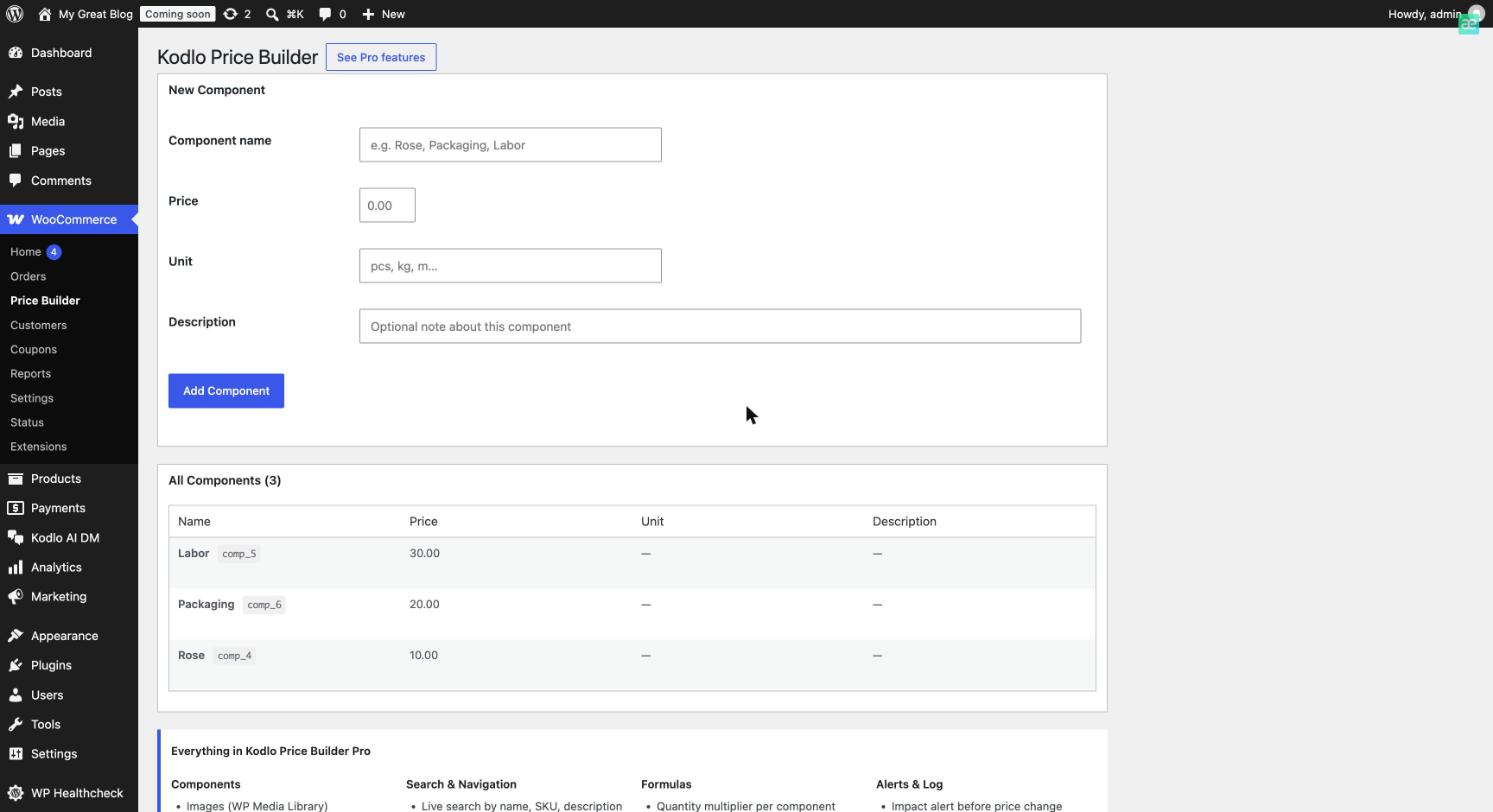
Component Manager — Create and manage reusable price components; each gets a unique token (like
comp_4) to use in formulas.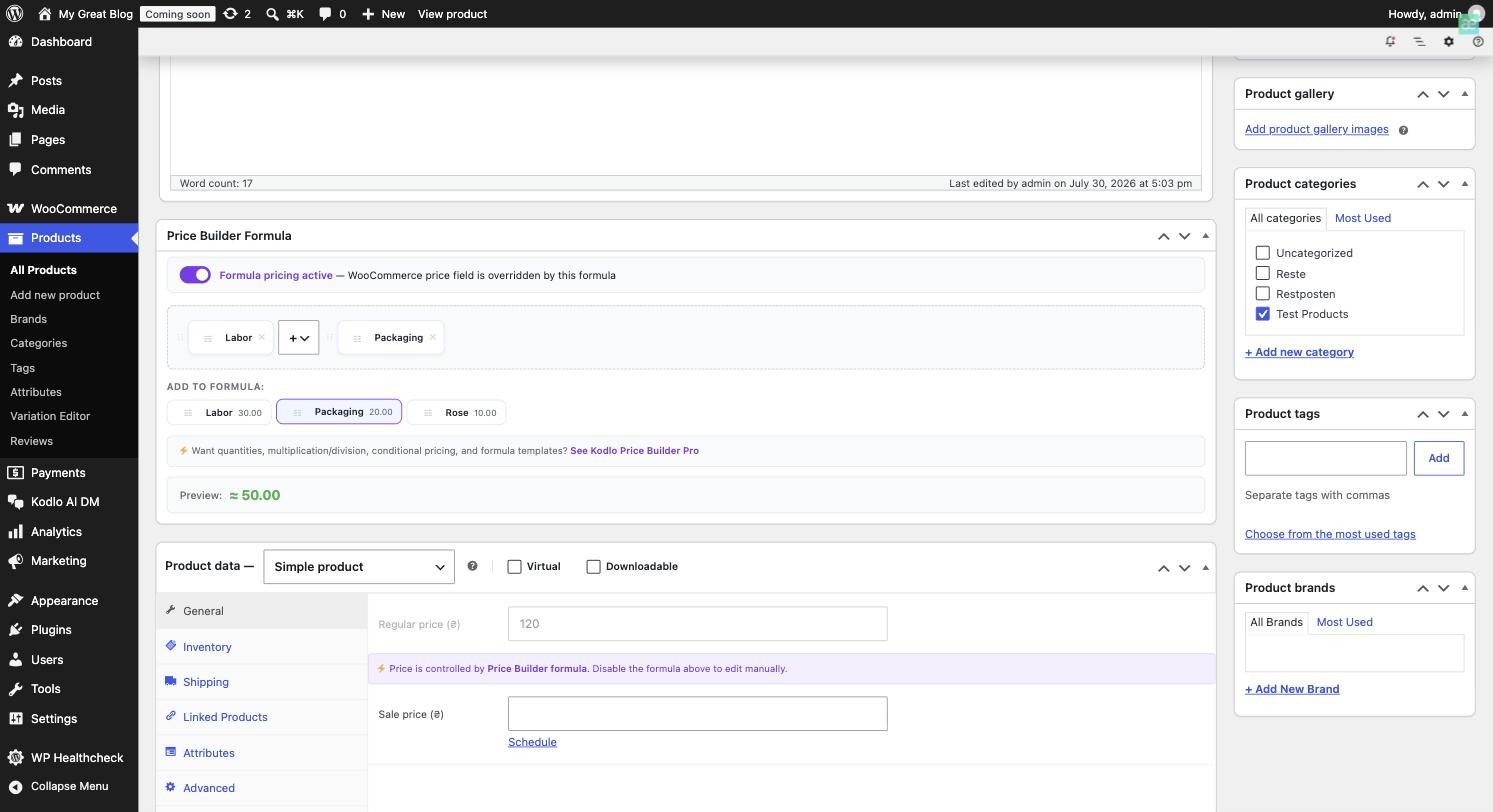
Formula Builder — Click components to build a formula, see a live price preview as you go, and toggle formula pricing on/off per product.
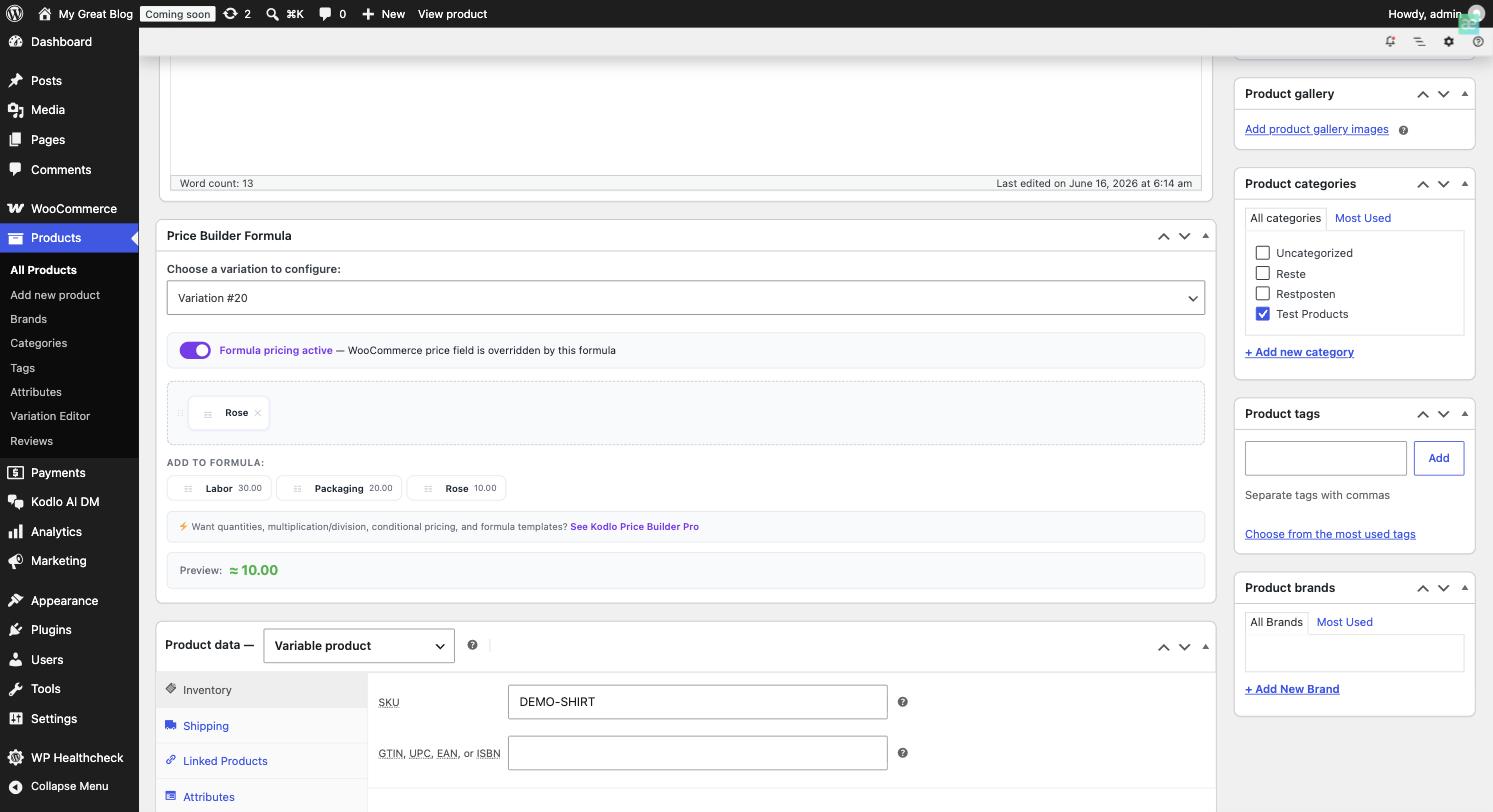
Variable Products — Build a separate formula per variation and switch between them from the same meta box.
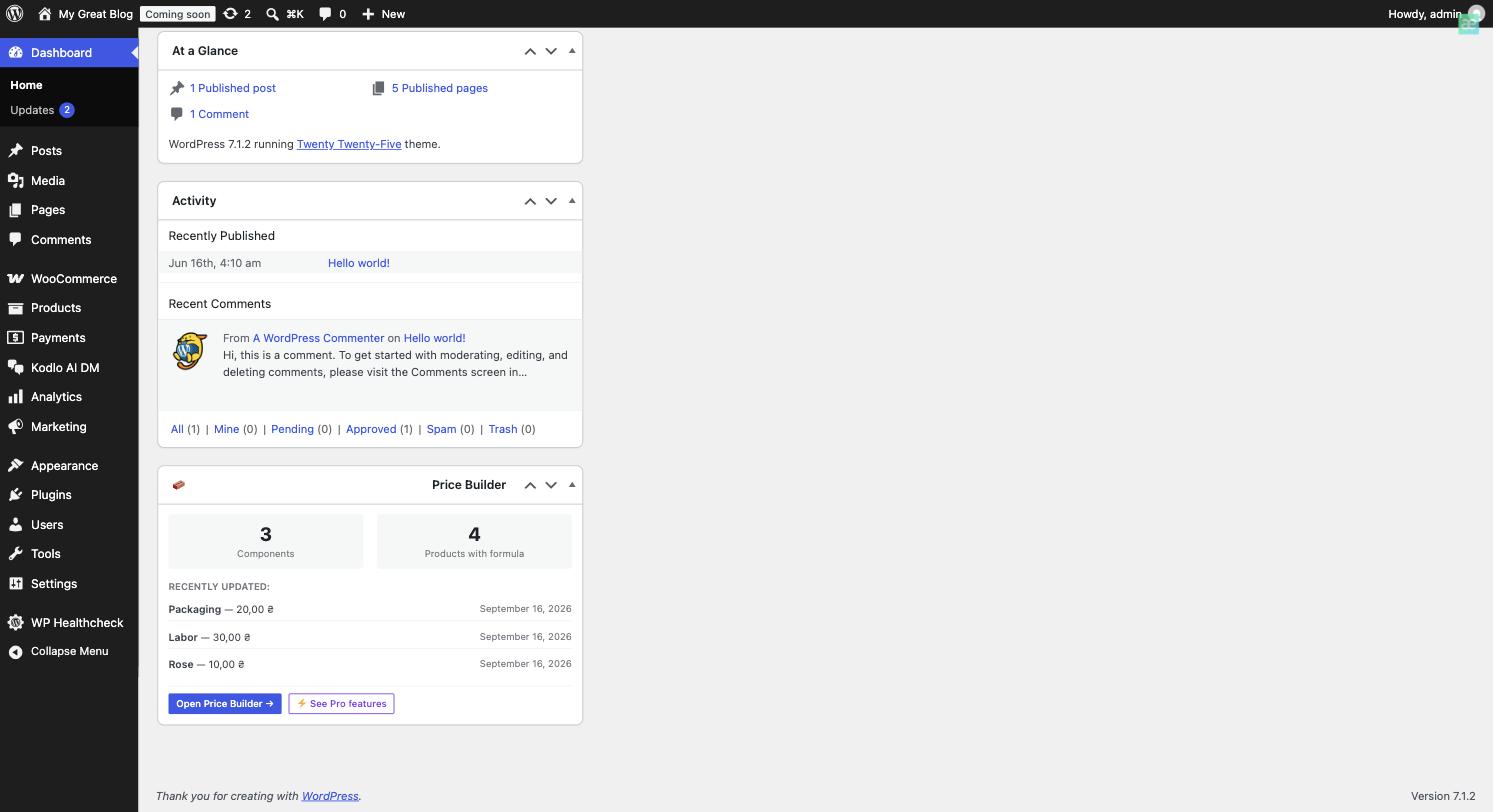
Dashboard Widget — Key stats on the WordPress admin home page.
Faq
It removes manual price editing when a shared ingredient, material, or cost changes. Instead of updating 30 products by hand, you update 1 component and every product using it recalculates automatically.
Everywhere. Kodlo Price Builder hooks directly into WooCommerce’s core price functions, so the calculated price is the real product price — shown correctly in the shop, cart, checkout, order emails, and reports.
Yes. Each variation can have its own independent formula (e.g. a “5 roses” variation and an “11 roses” variation of the same bouquet) — set it right in the Variations panel on the product edit screen.
The product automatically falls back to its standard WooCommerce price, and the formula builder shows a warning so you can fix it.
No. Calculated prices are cached using WordPress transients and only recalculated when a component price or the product itself changes — there’s no extra computation on every page load.
Formulas are parsed with a strict, purpose-built evaluator — never eval() and never arbitrary PHP or JavaScript execution. Only numbers, component tokens, and a fixed set of math operators/functions are allowed.
Unlimited — there’s no cap, no trial period, no countdown. Pro adds richer formula tools (quantities, multiplication/division, conditional pricing, templates) on top of the same unlimited components.
You need to deactivate the free plugin and activate Pro instead (both define the same functionality, so they can’t run at the same time) — but you don’t need to uninstall it, and your data isn’t affected either way, since both plugins use the same database tables.
Nothing is deleted. If you deactivate Pro and go back to the free plugin, formulas using Pro-only functions (IF(), ROUND(), etc.) will simply show a “Check formula” notice until you either reactivate Pro or simplify them to basic +/- math.
Not built in yet — this is on our roadmap. If you need it now, please reach out at hello@kodlo.dev so we can prioritize it.
Simple products and Variable products (with an independent formula per variation). Other product types (e.g. Subscriptions, Bundles) aren’t officially supported yet.
There’s no separate trial — the Free version itself has no time limit, so you can use it for as long as you like before deciding to upgrade. Pro purchases come with a 30-day money-back guarantee.
Reviews
A very smart approach to WooCommerce pricing
By 
This solves a WooCommerce problem that is surprisingly difficult to manage once a store grows.
If several products depend on the same material, ingredient, service or production cost, maintaining prices manually becomes extremely inefficient. You change the cost of one component and suddenly have to remember every product that uses it and update them individually.
The component-based approach in Kodlo Price Builder makes much more sense. You define reusable price components once, build the product price from them, and when one component changes the affected product prices are recalculated automatically.
I also like that the calculated price isn't just some visual value displayed on the product page. It becomes the actual WooCommerce price and continues to work through the cart, checkout and the rest of the normal WooCommerce flow.
The interface is straightforward, the live calculation makes formulas much easier to understand, and the whole concept feels like something that should have existed in WooCommerce for a long time.
For stores dealing with materials, ingredients, production costs or frequently changing supplier prices, this can save a huge amount of repetitive work and, more importantly, reduce the chance of forgetting to update a product.
Changelog
1.3.9
- Added price formula support for variable products — build a separate formula per variation, switch between them from the same “Price Builder Formula” meta box, with a read-only notice in WooCommerce’s Variations panel when a variation’s price is overridden
- Added a WordPress Playground blueprint so the plugin can be tried instantly via the “Live Preview” button on its WordPress.org page
- Fixed the Price Builder admin postbox titles rendering flush against the box edge instead of with the standard WordPress padding
1.3.8
- Added url to plugin page
1.3.7
- Verified compatibility with WordPress 7.1 and WooCommerce 11.0.1
1.3.6
- Critical fix: resolved a fatal error on every admin page (
class_alias(): Argument #1 must be a user-defined class name, internal class name given) introduced in 1.3.5 - Added a proper
.wrapcontainer to the Price Builder admin page so it renders correctly even before JavaScript loads - Added
uninstall.phpto clean up internal housekeeping data (security logs, rate-limit transients); component/formula data is intentionally kept so switching to Kodlo Price Builder Pro doesn’t lose anything, since both plugins share the same database tables - Added a documented security contact and SECURITY.md
- Fixed a docblock/filter mismatch — the
kodlo_price_builder_component_pricefilter now actually receives the product ID it always claimed to pass - Replaced a remaining inline
style=""attribute with a properly enqueued rule - Minor code-quality cleanups (redundant null-coalesce, explicit type cast)
1.3.5
- Code clarity: removed leftover conditional logic and stale comments referencing the old shared Free/Pro codebase — no functional change, this build has never had a Pro state to begin with
- Regenerated the .pot translation template to match the current file structure (previous version referenced files that no longer exist in this plugin)
1.3.4
- Code clarity: simplified a redundant condition in the plugin-conflict safety check (no functional change)
1.3.3
- Fixed a sanitization warning on the variable product formula field — sanitization now happens at the same point where the input is read, not on a later line
1.3.2
- Security: fixed output escaping and input sanitization in the variable product formula UI (component price display, formula field, hidden variables field, and POST handling on save)
1.3.1
- Variable product support is now included in the free version — each variation can have its own independent formula, set in the Variations panel
- Renamed internal option/transient names to consistently use the plugin’s full prefix
1.3.0
- Kodlo Price Builder Pro is now a separate, standalone plugin instead of an in-place upgrade — install it alongside (after deactivating) the free version, no data is lost since both use the same database tables
- Removed the Freemius SDK from the free version entirely — this plugin now relies exclusively on WordPress.org for hosting and updates
- Added a safety check to prevent the free and Pro plugins from running at the same time
- Updated “Upgrade to Pro” links to point to kodlo.dev
1.2.1
- Fixed a bug where formulas using Pro functions (IF, ROUND, MIN, MAX, CEIL, FLOOR) were not calculated correctly
- Fixed the live formula preview in the admin to correctly show results for formulas using those functions
- Fixed the Freemius connect notice showing on every admin page instead of only the Price Builder screen
- Removed a duplicate license-connect notice on the Price Builder page
- Cleaned up plugin metadata (readme and header fields)
1.2.0
- Removed the free-plan component limit — components are unlimited on the free version
- Simplified the free formula builder to a drag-and-drop
+/−component builder; quantities, multiplication/division, the advanced text editor, and functions are part of Pro - Renamed the plugin to Kodlo Price Builder for WooCommerce for clarity
- The entire admin interface is translatable, including the formula builder — the plugin switches language automatically with your site’s admin language
- Added a German (de_DE) translation
- Refreshed the Ukrainian translation to cover all current strings
- Added a direct “Settings” link on the Plugins list page
- Added a “Requires Plugins” header to prompt for WooCommerce if it isn’t active
- Updated the bundled Freemius SDK to 2.13.4
- Raised minimum requirements to WordPress 6.6, WooCommerce 9.0, and PHP 8.1 to align with actively supported versions
- Security: rate limiting now keys off the actual connection IP instead of client-supplied headers, which are spoofable
- Refreshed plugin description, FAQ, and documentation
1.1.2
- Security: added multi-layer license verification
- Security: added REST API rate limiting and request validation
- Security: tightened capability checks across all REST endpoints
- General code audit and hardening ahead of the WordPress.org submission
1.1.1
- Added Simple mode formula builder with drag & drop blocks (Pro)
- Added the ability to save and reuse formula templates across products (Pro)
- Redesigned the admin interface using the Tabler design system for a cleaner, more consistent look
- Various small UI/UX polish passes on the formula builder
1.1.0
- Introduced Kodlo Price Builder Pro
- Added unlimited components, component images, and SKU support (Pro)
- Added component groups, live search, and pagination (Pro)
- Added Advanced mode functions: IF(), ROUND(), MIN(), MAX(), CEIL(), FLOOR() and the percentage operator (Pro)
- Added Impact Alert — preview affected products before saving a component price change (Pro)
- Added full Change Log with one-click price restore (Pro)
- Added variable product support with independent per-variation formulas (Pro)
- Added formula active/inactive toggle per product, with a clear override notice on the WooCommerce price field
- Added a live price preview while editing a formula
1.0.1
- Fixed the formula not saving correctly the first time a new product was published
- Fixed a notice shown when a product’s quantity field was left empty
- Minor translation string corrections
1.0.0
- Initial release
- Free formula builder (Advanced/text mode) with
+ - * / ( )and a built-inqtyvariable - Up to 5 reusable price components
- Automatic price recalculation when a component price changes
- Dashboard widget with basic stats