Krawlup Analytics

Krawlup Analytics
Description
Krawlup is the privacy-friendly, 100% cookieless website analytics and AI crawler intelligence platform.
This official plugin makes installing Krawlup effortless: simply install the plugin, enter your Site Analytics Token, and start collecting privacy-compliant visitor analytics, referral channels, and outbound link clicks without touching code.
If you run an online store (compatible with WooCommerce), Krawlup automatically attributes completed orders and revenue to your organic, paid, and social referral sources with built-in idempotency protection against page refreshes.
Why Krawlup?
- 100% Cookieless by Design: No cookies, no local storage tracking, no cross-site profiling. 100% compliant with GDPR, PECR, and CCPA out of the box without annoying cookie consent banners.
- Lightweight & Fast: The tracker is 3,287 bytes parsed, 1,383 bytes gzipped with zero rendering delays. Deferred loading preserves your Core Web Vitals and PageSpeed scores.
- Automated WooCommerce Revenue Attribution: Connects your store’s orders and revenue directly to marketing channels (search engines, social networks, direct, and custom campaigns) on the order confirmation screen.
- Admin Exclusion: Automatically filters out visits from logged-in site administrators and editors so your analytics reflect true customer traffic.
- AI & Agent Crawler Tracking: Monitor incoming AI agents, LLM search scrapers, and bot crawlers directly in your Krawlup dashboard.
External services
This plugin connects to Krawlup (https://krawlup.com), a third-party website analytics and revenue attribution service. It is needed to collect visitor analytics and attribute WooCommerce orders to marketing channels in your Krawlup dashboard.
On every front-end page view of your site, it sends the page path, the referring URL, UTM source/medium/campaign parameters from the address bar, a random session identifier (stored in the browser’s sessionStorage, rotating after 30 minutes of inactivity; no cookies), and the browser’s user-agent string. The Krawlup server derives the visitor’s country from their IP address at the edge and immediately discards the raw IP address; no cross-site identifiers are set or shared. Visitors with Do Not Track or Global Privacy Control enabled are not tracked at all — no request is sent for them.
When WooCommerce order tracking is enabled, a purchase event is also sent when a customer reaches the order confirmation page. It contains the order total, currency, order ID, and item count — no customer name, email, or address.
This service is provided by Krawlup: terms of service, privacy policy.
Installation
- Download the latest
krawlup-analytics.zip— about 24 KB (from the Krawlup dashboard or this repository). The plugin ships no copy of the tracker; it loads/t.jsfrom the Krawlup API, so the archive size does not grow per install. - In your WordPress admin dashboard, navigate to Plugins -> Add New Plugin -> Upload Plugin.
- Select the
.zipfile, click Install Now, then Activate. - Go to Settings -> Krawlup Analytics.
- Enter your Site Analytics Token (found in your Krawlup Dashboard) and click Save Changes.
- That’s it! Live visitor stats, referrer channels, and WooCommerce purchases will start reporting immediately.
Screenshots
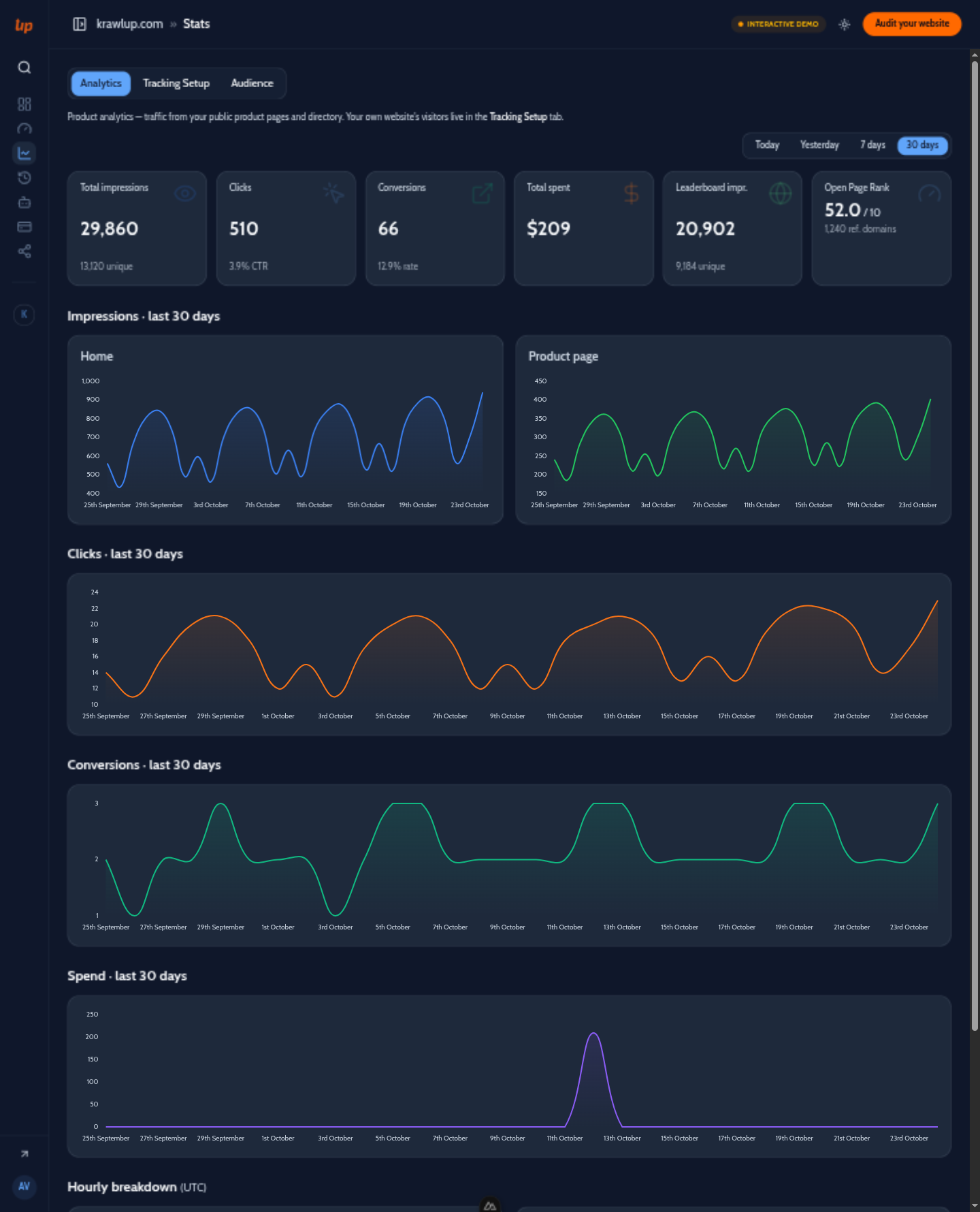
Analytics — product and directory impressions, clicks, conversions and spend (demo data shown).

Revenue attribution — conversion goals and revenue trend from your own site's tracking (demo data shown).
Faq
No. Krawlup is 100% cookieless and does not store or process persistent personal data or cross-site tracking identifiers. It complies with GDPR, PECR, and ePrivacy regulations without requiring a cookie consent popup.
Yes! When WooCommerce is active, Krawlup automatically hooks into the order completion page (woocommerce_thankyou) to record purchase conversions, order totals, and currency with built-in protection against duplicate tracking on page reloads.
By default, visits by logged-in users with the capability to edit posts or manage options are excluded from analytics, ensuring your own editing sessions do not skew your visitor counts. Note: this exclusion is decided when the page HTML is generated — behind a full-page cache or CDN HTML cache, visitors are served the cached decision of whoever primed the page.
Sign in to your Krawlup Dashboard, select your site or product, and view your Site Token under the Tracking Tag section.
Reviews
Changelog
1.0.3
- Listing refresh: dark banner, icon and screenshots on the WordPress.org directory; screenshot captions updated to match.
- No behavior change: the tracker URL, settings, and WooCommerce attribution are untouched.
1.0.2
- License: single-licensed under GPL-2.0-or-later, so the shipped license file now agrees with the
License: GPLv2 or laterheader wordpress.org requires. - Docs: the tracker footprint is re-measured — 3,287 bytes parsed, 1,383 bytes gzipped.
- No behavior change: the tracker URL, settings, and WooCommerce attribution are untouched.
1.0.1
- Fix: deferred loading now actually defers on WordPress 5.6–6.2 — the
strategyregistration argument is a WP 6.3+ API and was silently ignored (render-blocking script) on older branches; ascript_loader_tagfallback adds the attribute when missing. - Fix: deferred-payment orders (BACS, cheque, manual approval) are now attributed when the order actually becomes processing/completed, not only if a paid confirmation page happened to be viewed.
- Fix: revenue is counted when money is actually captured (processing/completed only) and refunds are netted back out as negative purchase events per refund.
- Fix: HPOS (custom order tables) compatibility is now declared to WooCommerce.
- Fix: custom tracking endpoints are https-only — plain http:// is rewritten with a visible warning, which also stops silent mixed-content tracking breaks.
- Chores: uninstall now clears tracked-order meta (postmeta + HPOS) and refund replay guards; readme claims match reality (tracker size, install path).
1.0.0
- Initial release of the official Krawlup WordPress & WooCommerce analytics plugin.
- Cookieless tracker injected into the footer via wp_enqueue_script, loaded deferred.
- Automated WooCommerce revenue attribution with order idempotency guards (an atomic per-order concurrency claim covering rapid double-loads of the confirmation page).
- Administrator and editor visit exclusion toggle.
- Custom domain endpoint proxy support.
- Tracking script properly registered via wp_enqueue_script() with deferred loading.