Lazy Load for Comments

Lazy Load for Comments
Description
Comments are heavy. A long thread can pull in dozens of avatars, gravatar lookups and reply scripts — all of which the browser downloads before the visitor has even reached them. Lazy Load for Comments defers all of that until the visitor either scrolls to the comments area or clicks a button.
The result: fewer HTTP requests, faster Largest Contentful Paint and a happier Lighthouse score, without changing how your comment template looks.
Version 2.0 is a complete rewrite. It uses the WordPress REST API to fetch the rendered comments on demand and works with both classic themes (comments_template()) and block themes (the core Comments block) out of the box.
Features
- Lazy-load comments on scroll, on button click, or turn the plugin off without deactivating it.
- Works with classic themes and block themes (the core Comments block).
- Loads comments inline for search engine crawlers, so indexing and SEO are not affected.
- Per-post cache of the rendered Comments block — REST renders stay fast.
- Minimum-comment-count threshold so short threads still render inline.
- Customisable load-button text, style and extra CSS classes.
- Clean React settings page under Comments Lazy Load.
- No jQuery dependency. Front-end script is vanilla JS and intentionally small.
- Translation-ready. Hooks and filters available for further customisation.
Useful links
Installation
From the WordPress admin (recommended)
- Go to Plugins Add New, search for Lazy Load for Comments and click Install now.
- Activate the plugin.
- Open Comments Lazy Load and pick the load method that suits you.
Manual install
- Upload the
lazy-load-for-commentsfolder to/wp-content/plugins/. - Activate the plugin from the Plugins screen.
- Open Comments Lazy Load to configure the settings.
For the full configuration guide, see the official documentation.
Screenshots
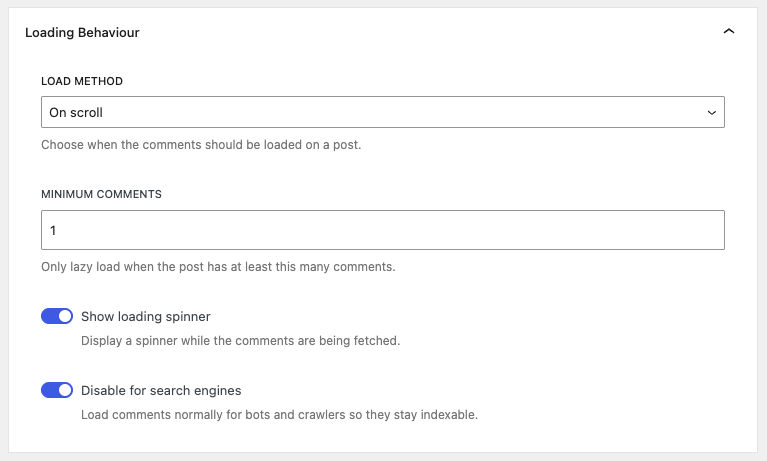
Loading behaviour settings.
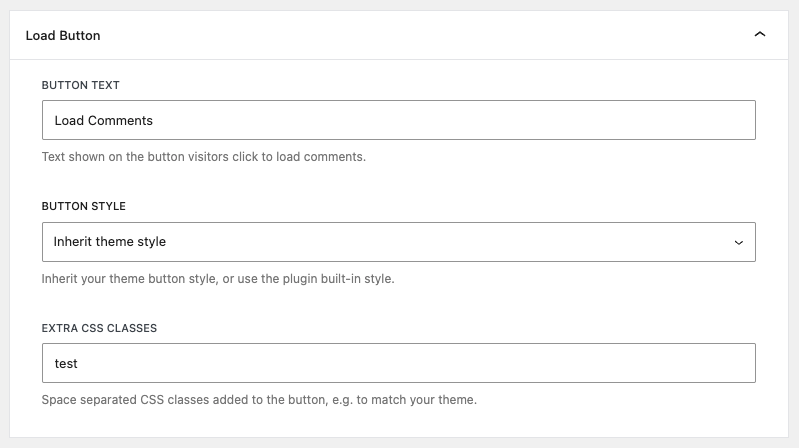
Load button settings.
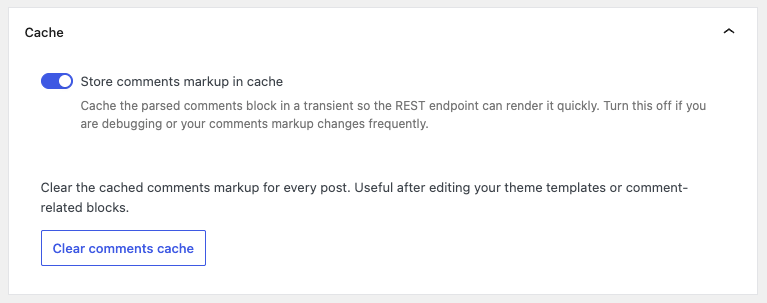
Cache management.
Faq
Yes. The plugin detects whether the active theme is a block theme and either swaps the classic comments_template() output or replaces the rendered core/comments block, whichever applies.
Yes. The placeholder rendered server-side is plain HTML, so full-page caches can cache it safely. The actual comments are fetched from a public REST endpoint, which is also cache-friendly.
Open Comments Lazy Load and pick one of On scroll, On button click or Disabled on the Settings tab.
The button text, the style (inherit your theme’s style or use the plugin’s built-in style) and extra CSS classes can all be set under Load Button on the Settings tab.
No — this plugin only handles the default WordPress comments. Third-party comment systems (Disqus, Jetpack Comments, etc.) replace the comment area entirely, so there is nothing for this plugin to lazy-load.
Use the lazy_load_for_comments_can_lazy_load filter:
add_filter( 'lazy_load_for_comments_can_lazy_load', function ( $can ) {
    if ( is_page( 'contact' ) ) {
        return false;
    }
    return $can;
} );
Yes. By default the plugin detects search-engine crawlers from the User-Agent and serves them the original (inline) comments markup, so indexing is not affected. You can turn this behaviour off on the Settings tab if you’d rather always lazy-load.
The official documentation covers most setups. For everything else, the free WordPress.org support forum is the best place to start.
Reviews
Has Potential
By 
But support is unresponsive.
Good, but needs some enhancements
By 
Amazing plugin
By 
Best Plugin I've ever used
By 
Отличный плагин!
By 
Just what I needed
By 
It's a ( JUNK ) killer, right off the bat.
By 
Almost Great
By 
Straight-forward, effective solution
By 
Excellent
By 
Changelog
2.0.1
- Fixed comments not rendering on Genesis and similar classic themes that rely on
comments_template()populatingcomments_by_type.
2.0.0
- Complete rewrite using React and the WordPress REST API.
- Added support for block themes (the core Comments block).
- New React settings page under Comments Lazy Load.
- Settings for load method, minimum comment count, button text, button style and loader visibility.
- Per-post cache of the rendered comments block, with a “Clear comments cache” action in the settings.
- Crawlers receive the inline comments by default so SEO is preserved.
- Removed the dependency on jQuery.
- Existing v1.x load-method setting is migrated automatically on upgrade.
1.0.10
- Added compatibility for the Divi theme builder.