Leo Product Recommendations for WooCommerce

Leo Product Recommendations for WooCommerce
Description
Leo Product Recommendations is a sale boosting plugin for WooCommerce with a great strategy. It helps to recommend products smartly in a nice-looking popup. Suggesting products in an eye-catching popup after adding a product to a cart directly influences customers to purchase more related products. It comes with a fully customizable, powerful, and easy-to-use settings panel to recommend products manual and dynamic way based on your marketing need.
After purchasing a smartphone definitely, there is a high possibility that the customer will be interested to purchase mobile accessories like a mobile cover, screen protector, headphones, etc. Leo Product Recommendations helps here to recommend that product instantly.
In another scenario, customers usually search for the best matching T-Shirt after purchasing a pair of jeans pants. Leo Product Recommendations helps here to sell T-Shirts with a pair of jeans pants.
Woo Products Recommendation does everything Ajax way to improve the shopping experience. Customers do not require to browse a lot of pages to purchase products. It also reduces the steps and time of shopping and increases the chances of selling.
How To Setup Leo Product Recommendations
Key Features
- Responsive Popup
- Flexible Recommendation Popup Heading (Heading & Description)
- Recommended Products Grid Settings
- Manual Selection
- Global Selection
- Custom CSS
- Ajax Add to Cart
- Simple, Variable, Grouped Products Support
- Override templates via theme files (Like WooCommerce)
- Single & Product Archive page support
- Gutenberg blocks and page builder (Elementor, Divi, WpBakery)
- Quick Checkout Button
Pro Features
Including all free features, the Pro version provides more features and flexibility to recommend products.
- Slider Layouts
- Dynamic Selection
- Modal Color Settings
- Modal Sizes Settings
- Recommended Product Color Settings
- Items visibility and more
Demos
Leo Product Recommendations is perfectly feet for all types of WooCommerce shop. Check example bellow:
👉SMARTPHONE
👉ELECTRONICS
👉COMPUTER
👉SHOES
👉FOOD
👉CLOTHING
👉JEWELLERY
👉LEATHER
👉SOFTWARE
👉TOYS
👉FASHION
👉SPORTS
Installation
MINIMUM REQUIREMENTS
- WordPress Version 5.0 or greater is required
- WooCommerce Plugin 3.5 or greater is required
- PHP 5.6 or greater is required
Automatic Installation
- From the dashboard Navigate to Plugins > Add New
- Search Leo Product Recommendations for WooCommerce
- Click on the Install Now button
- When the installation is complete, click the Activate button to activate the plugin.
Manual Installation
Install From WordPress Dashboard:
- From the dashboard Navigate to Plugins > Add New
- Click on the Upload Plugin button at the top of the screen
- Select the zip file from your local filesystem
- Click on the Install Now button
- When the installation is complete, you’ll see “Plugin installed successfully.” Click on the Activate Plugin button at the bottom of the page.
Install Using FTP/SFTP:
If you are unable to install the plugin from your WordPress dashboard you can install the plugin by the following method using FTP / SFTP
- Unzip the plugin file
- Connect to your WordPress server with your FTP / SFTP client (Fileziall, Cyberduck, etc)
- Copy the plugin folder to the wp-content/plugins folder in your WordPress directory. This installs the plugin to your WordPress site.
- Navigate to your Plugins admin screen from the WordPress dashboard and locate the newly uploaded Plugin in the list.
- Click the plugin’s Activate link.
Note: After activating the plugin it will automatically enable “Enable AJAX add to cart buttons on archives” setting and disable “Redirect to the cart page after successful addition” setting. It is a required setting to work the plugin properly.
Screenshots
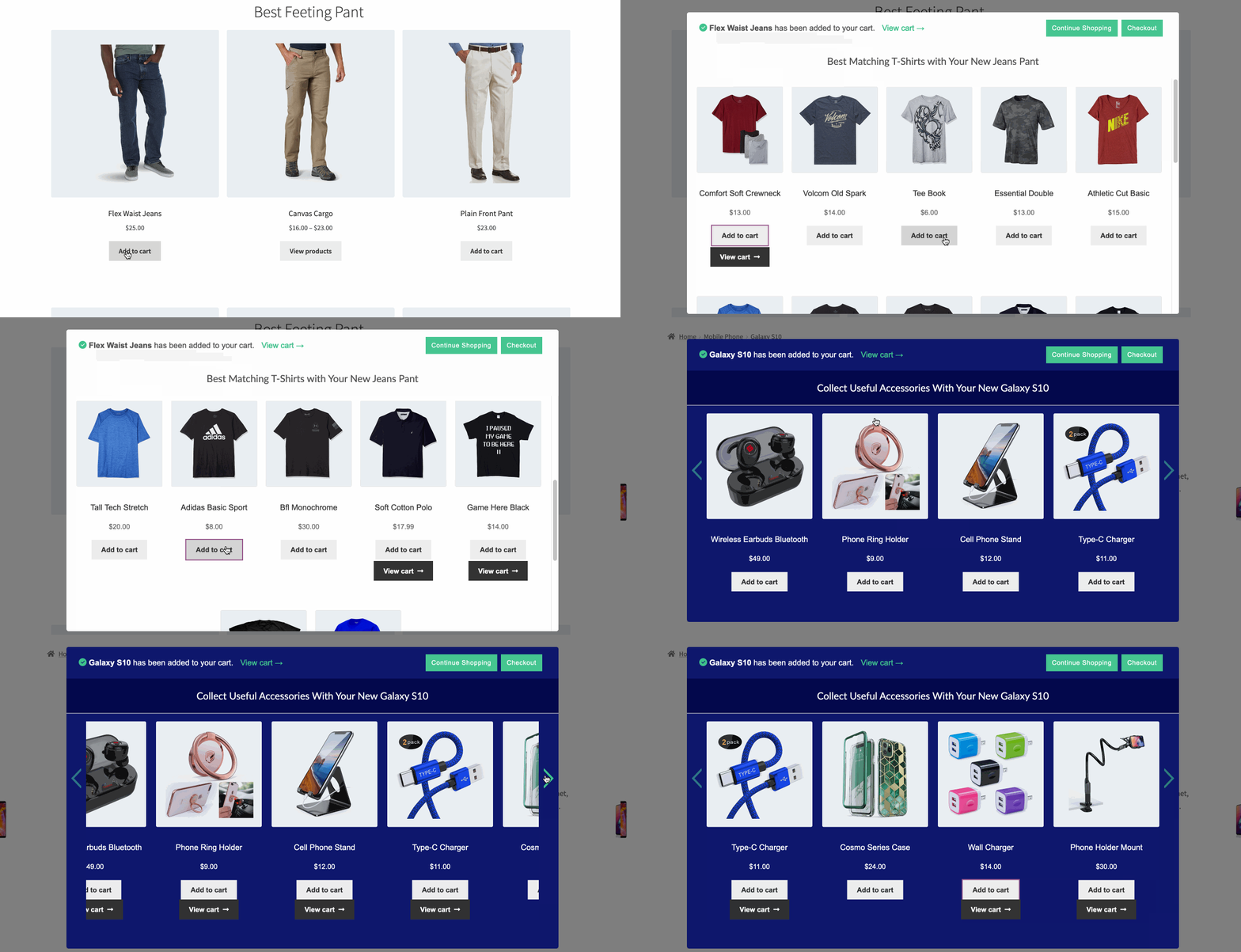
Product Recommendations Preview
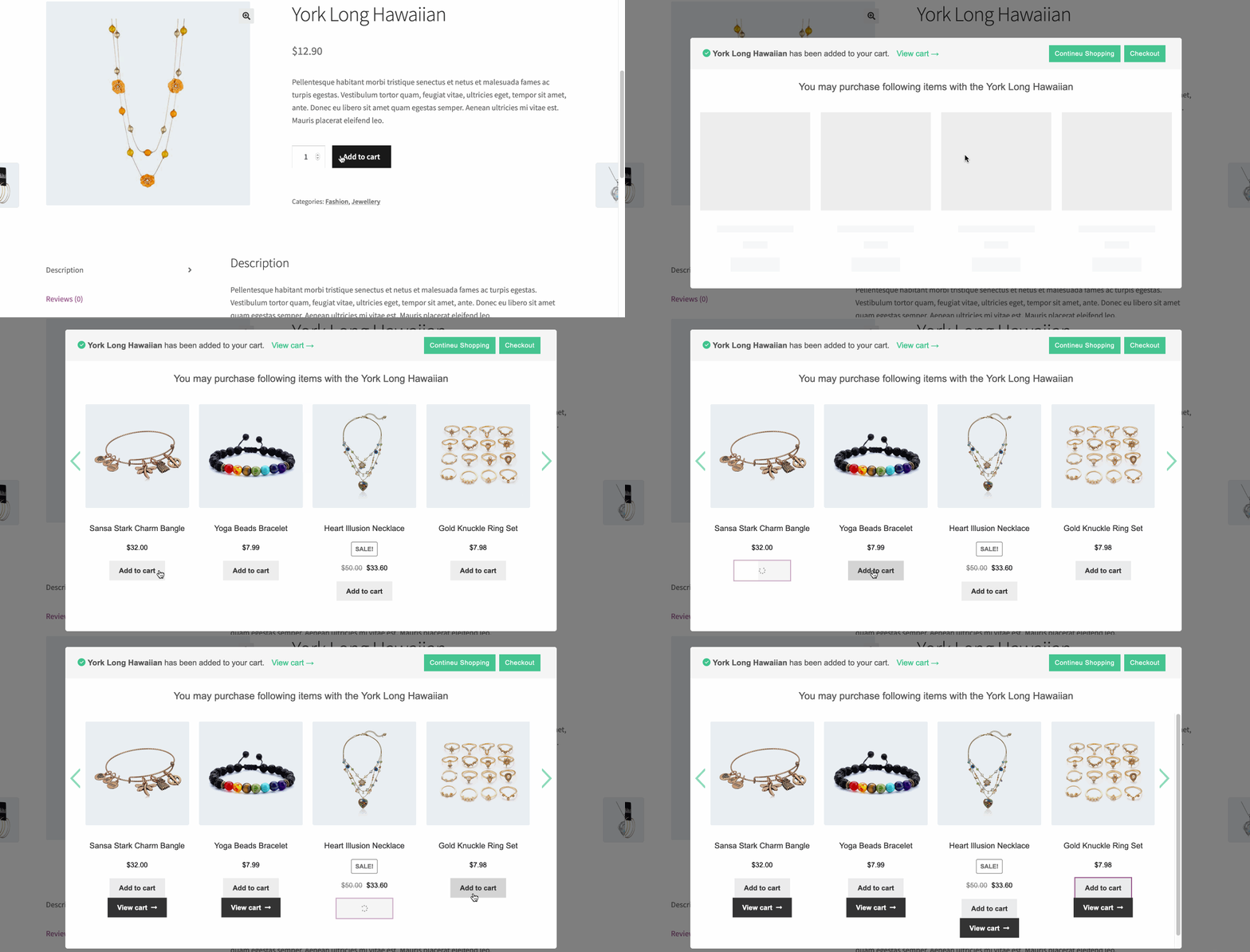
Ajax Add To Cart
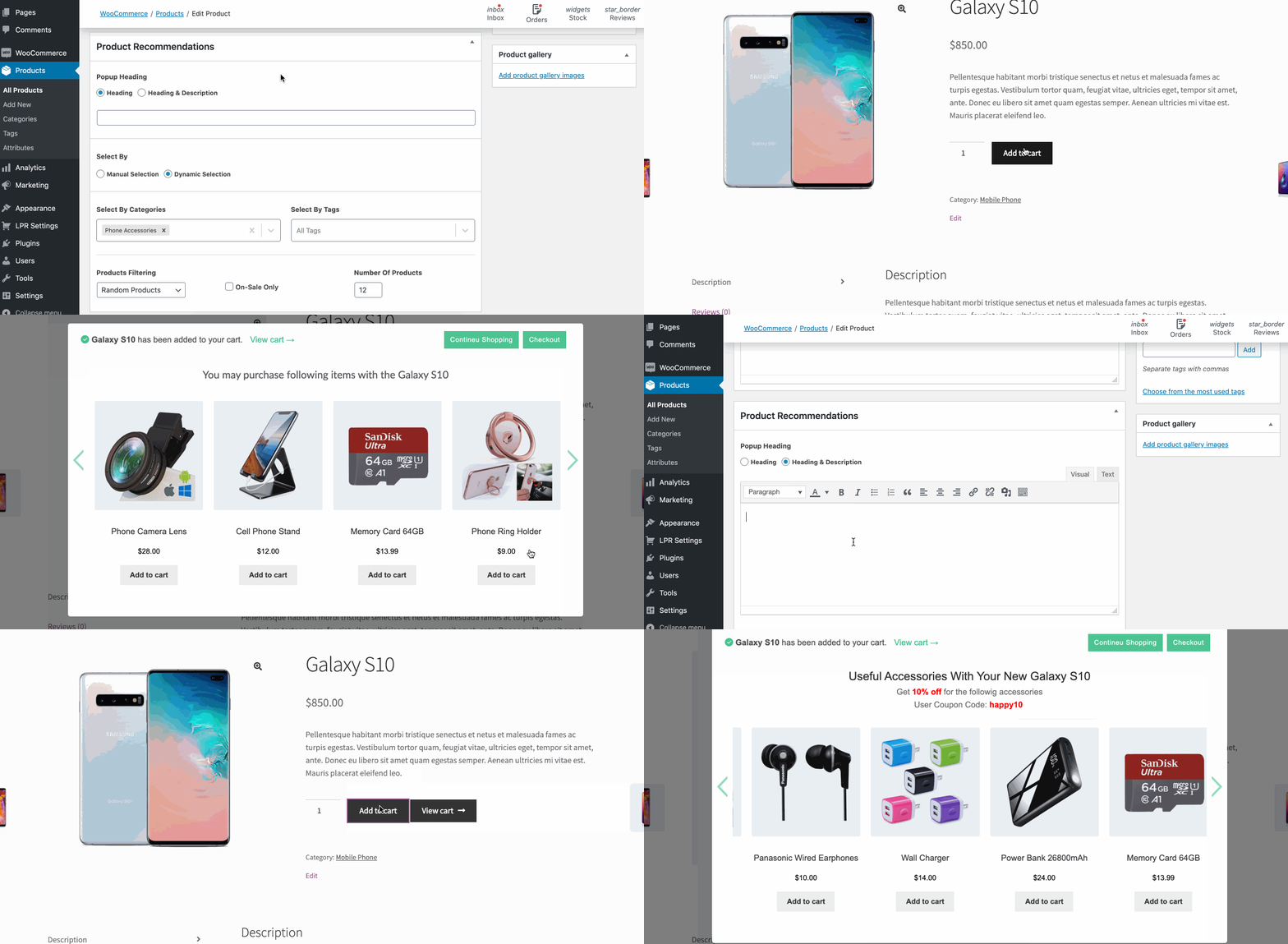
Flexible Popup Heading
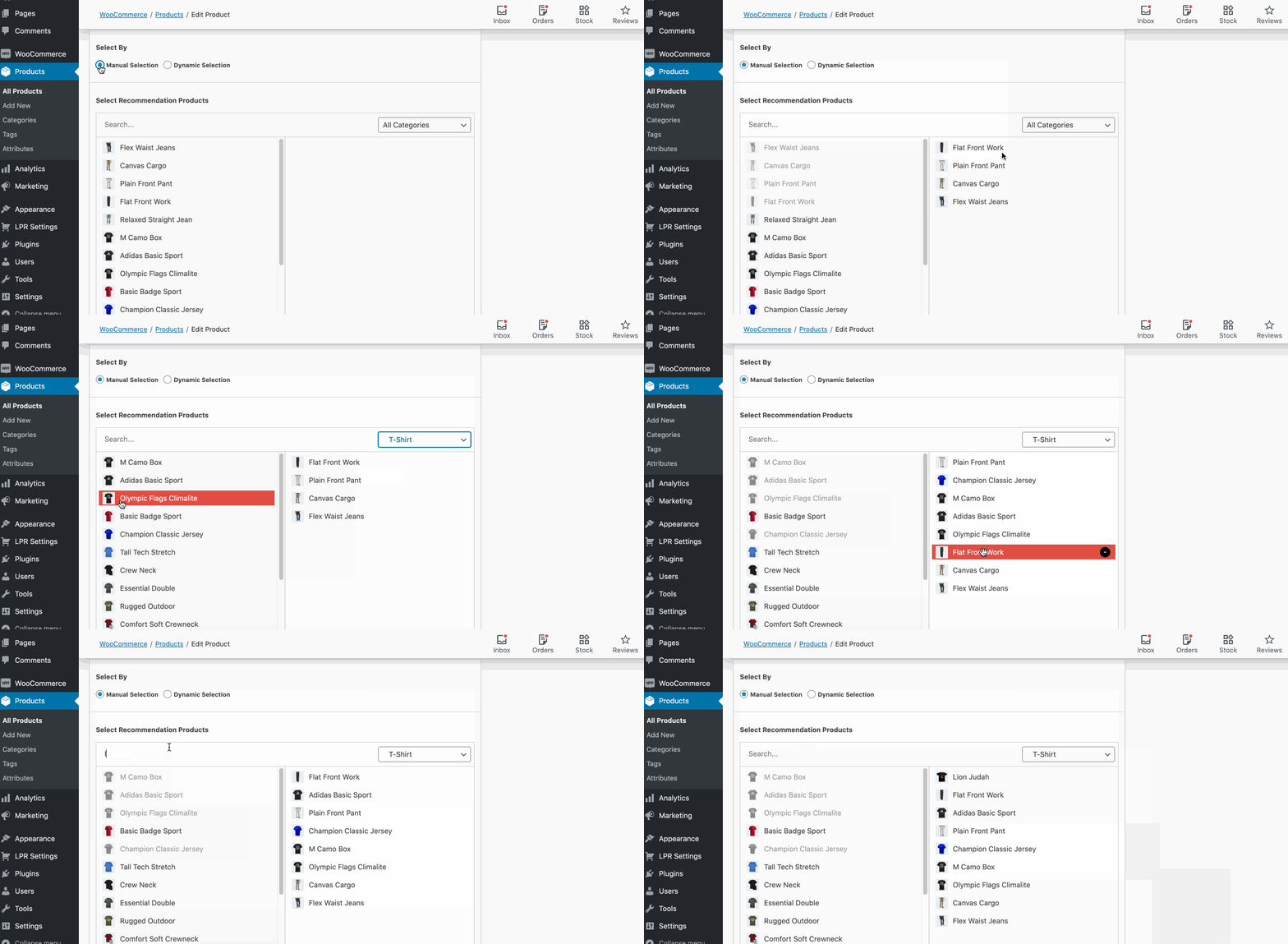
Selection Panel
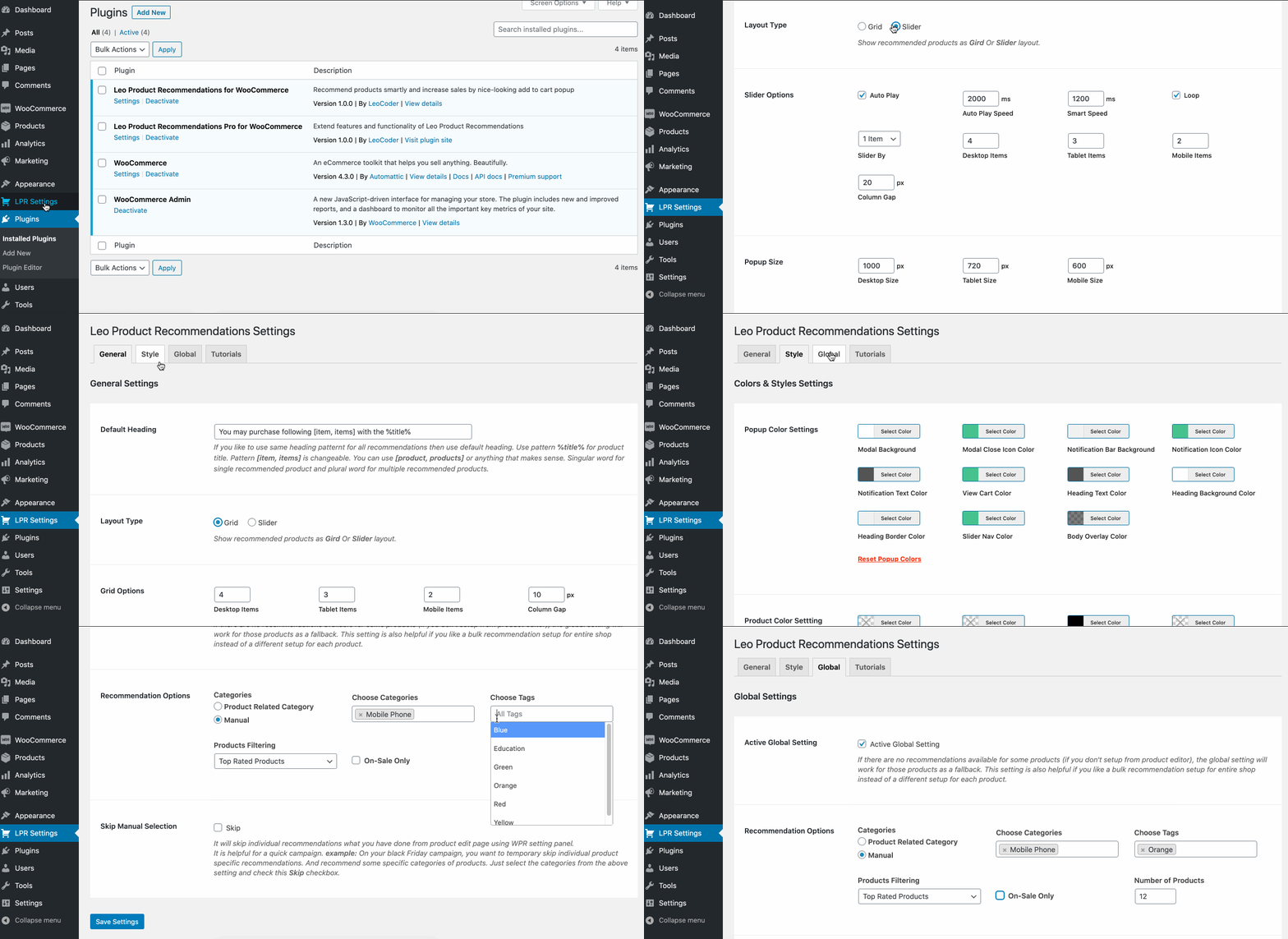
Settings Panel
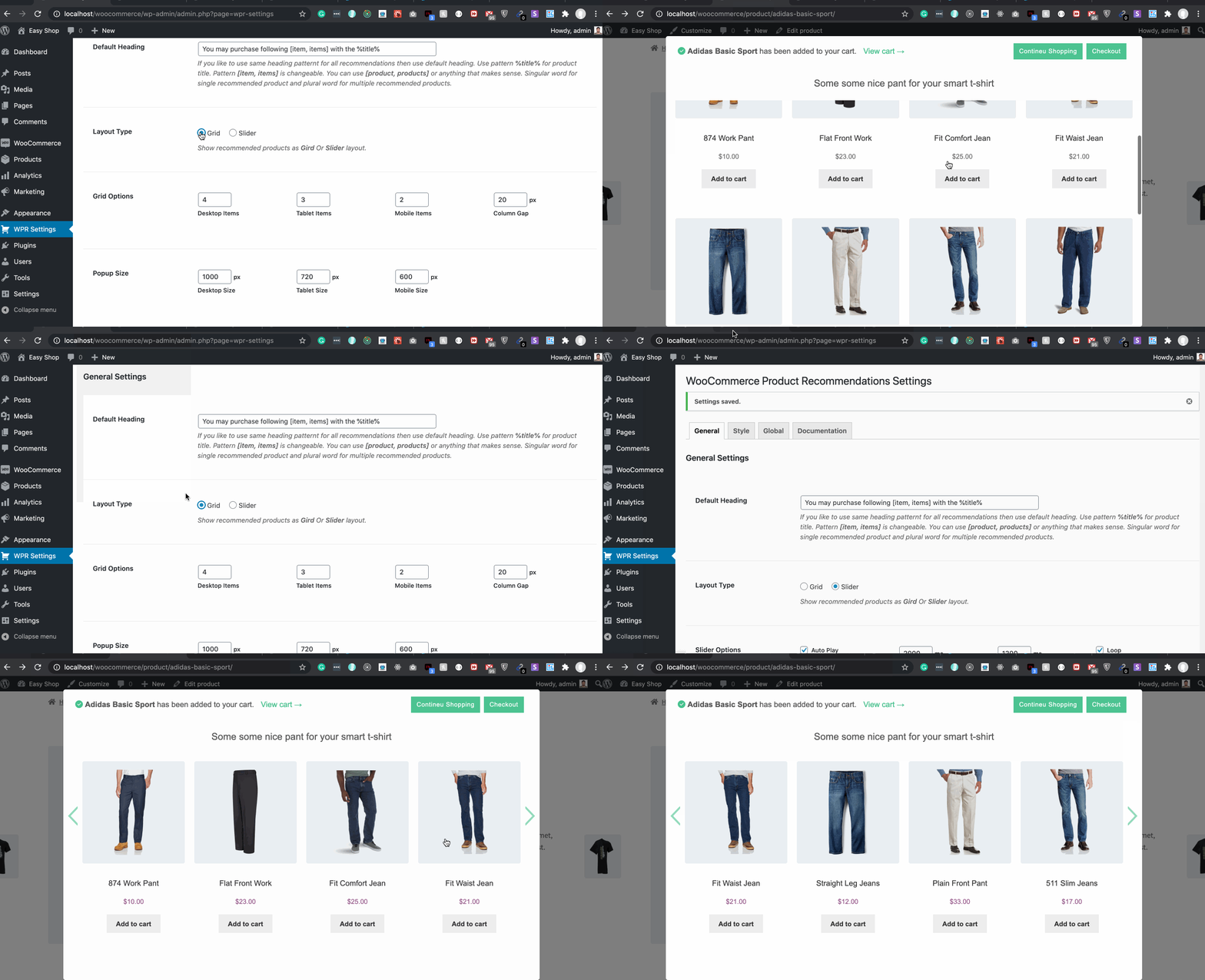
Popup Layouts
Faq
The plugin is completely translation-ready for any language. You need to use the Loco Translate plugin.
More Details Documentation »
Yes, it works perfectly for a single product page and product archive page.
Yes, It works for WooCommerce Products shortcode and all Gutenberg Products Blocks.
Yes, This plugin is compatible with DIVI, WooCommerce Builder for DIVI, Elementor, and WPBakery page builder.
Yes, It works on all types of products including Simple products, Variable products & Grouped Product
Yes, it works with quick view of all major quick view plugins. If it does not work for your quick view option please contact support quickly to fix it.
All template files are available in the templates folder inside plugin files.
In the templates files, filter and action hooks are available that allow you to add/edit popup templates.
You also can overwrite template files with your theme. Create a directory as /lpr/templates/ and copy the template file inside the directory.
Example: To overwrite template-modal.php file by your theme then the file structure should be wp-content/themes/yourtheme/lpr/templates/template-modal.php
Note: You need some development knowledge to overwrite template files or it may cause an error.
Reviews
Great plugin, great service!
By 
At first when I tried using the plugin, it was not showing images. I emailed support and one day later they released an update that completely solved the issue. Every company will run into issues, it's how they handle them that matters, and Leo is top notch. Keep it up.
Great plugin and great support!
By 
I've been using this plugin for several woocommerce sites, and it's perfect to upsell compatible products.
Support has been very helpful, and quick with responses!
Great plugin! Great support!
By 
Great plugin, easy to set up and use.
Excellent support service from the developer: during an update a small conflict occurred with another plugin, we contacted the developer who quickly provided us with all the information to fix the issue. Thank you!
Plugin Owner Hasan is such an incredible person
By 
I highly recommend everyone to use this plugin as the plugin owner is compassionate and dedicated. He went above and beyond to fix the issue and my request not once but twice he repeated the process.
My website/ cpanel had gone through migration before launching (which was a mistake from cost vs benefits). And couple times, things didnt go as plan during migration. During this process, Hasan helped me with my requests/ issues i faced with the plugin in terms of aesthetics. And he did a great job!! But what happened was, we had to restore data from old backup so whatever changes he made were all gone. It was time consuming and I did not expect Hasan to actually agree to help the second time. A kind person indeed. Thank you Hasan for supporting this small business. So anyone out who is looking to have product recommendation plugin, look no further than LPR plugin.
Great customer service ever!
USe this plugin, you will not regret.
Unbias and real life review,
Deema from deemaandco.com
Good customer Care service
By 
Excellent plugin, I recommend it to everyone
By 
Top product and support ever seen
By 
Very Good Plugin
By 
good plugin
By 
Must Have Plugin
By 
Changelog
3.0.0
- Fix plugin compatibility issue
2.8.0
- Compatible with HPOS
2.7.0
- Bug Fix
2.6.4
- Bug Fix: Fix for Be theme
2.6.3
- Bug Fix: Fix for Blocksy theme
2.6.2
- Bug Fix: Fix when product data null
2.6.1
- Bug Fix: Fix when product data null
2.6.0
- Bug Fix: Bug for for pro version for popup limit.
2.5.0
- Feature Added: Limit to show recommendation popup (Every time, 1, 2, 3, 5 times)
2.4.0
- Feature Added: Modeal close icon
2.3.1
- Bug fix
2.3.0
- Exclude private, hidden, out-of-stock products from recommendation
- Template fix for Rey theme
2.2.0
- Fixing for OceanWP
2.0.2
- Bug fix
2.0.1
- Bug fix
2.0
- Removed preloader from the popup
- Moved selection panel to WooCommerce data table as Recommendations tab
- Improved performance
- Bug Fixed
1.9.0
- Bug fix
1.9.0
- Update recommendation modal & added new features.
1.8.9
- Bug fixed for product_page shortcode
1.8.8
- Feature improvement & bug fixed
1.8.6
- Bug fix for WooCommerce Custom Product Addons
1.8.4
- Fixed theme compatibility
1.8.3
- Fixed modal appearing issue for variable product
1.8.2
- Fixed theme compatibility
1.8.0
- Added animation is added to cart and recommendations heading
1.7.0
- Improved plugin documentation
1.6.1
- Fix for Safari theme quick view
1.6.0
- Optimized coding & performance
- Added deactivation feedback
1.5.3
- Improved performance.
- Improved theme compatibility.
1.5.1
- Bug Fixed
1.5
- Added Add To Cart flash notification.
- Improved theme compatibility.
1.4
- Add option to ajax add to cart for Variable & Group recommend products. Customers don’t need to go to a single product page to add to a cart variable/group.
1.3.2
- Bug Fix
1.3.1
- Add editor field for default heading
1.2
- Update compatibility
1.1
- Update Features
1.0
- Initial release