LightPOS – Point of Sale (POS) for WooCommerce

LightPOS – Point of Sale (POS) for WooCommerce
Description
LightPOS is a WooCommerce-native point of sale plugin built for fast cashier workflows without the complexity of an external frontend app.
Instead of relying on an external JavaScript bundle or a separate hosted interface, LightPOS renders its POS interface directly from WordPress and WooCommerce. That makes it easier to understand, easier to customize, and easier to maintain for stores and developers who want full control over how the POS behaves.
LightPOS also lets you define custom customer meta fields directly in the POS. Those fields can then be used programmatically in custom workflows, such as your own invoice output, custom email templates, or other project-specific integrations.
Core features
- Dedicated, responsive POS screen with a configurable URL slug, product-grid display options, and clear cashier controls.
- Fast product search and configurable filtering by stock status, category, brand, tag, language, and keyword.
- Choose which product filters are visible to cashiers from the WordPress settings screen.
- Variable product support with a product detail modal and stock-aware add-to-cart flow.
- Add custom products to a sale with their own title, SKU, VAT rate, and price.
- Collapsible cart tools for coupons, manual fees, manual discounts, and manual shipping, keeping the checkout workspace uncluttered.
- Cash payment support with received-cash entry and automatic change-due calculation.
- Cancel the current sale safely from the cart when needed.
- Customer search, creation, editing, and assignment during checkout.
- Configurable custom customer fields with Polylang and WPML-ready labels.
- Custom customer meta fields can be reused programmatically in custom invoices, custom emails, and other tailored integrations.
- Configurable POS payment methods with payment-status mapping.
- Configurable POS interface language, with included Czech and English translations.
- WooCommerce HPOS compatibility and CRUD-based order handling.
- Optional currency integrations for WooCommerce base currency, CURCY, and FOX.
Orders, statuses, and emails
- Marks POS-created orders so they can be managed separately from regular store orders.
- Adds a custom WooCommerce order status for completed POS orders.
- Registers its own WooCommerce receipt email template for POS orders.
- Optionally attaches the rendered LightPOS receipt as an HTML file to receipt emails.
- Integrates with WP Overnight’s WooCommerce PDF Invoices & Packing Slips, allowing POS users to create, print, and resend supported PDF invoices.
- Supports automatic receipt sending during checkout and manual resend later from the POS order tools.
- Includes POS order actions for viewing details, editing customer data, cancelling orders, and creating refunds with optional item restocking.
Receipt printing and customization
- Includes a printable receipt view with configurable logo and contact details.
- Shows clear VAT, fees, shipping, coupon, and total breakdowns on printed receipts.
- Lets you override the receipt template from a child theme for store-specific layouts or legal requirements.
- Supports theme-level template customization without depending on an external compiled frontend.
Why it is easy to customize
LightPOS is intentionally built without dependence on an external JavaScript bundle. The POS UI is server-rendered and enhanced with plain JavaScript, so developers can inspect, modify, and override behavior more easily than with a separate compiled frontend app.
Accessible cashier workflow
- Uses accessible dialogs with focus handling, keyboard-friendly controls, labelled form fields, live status messages, and a skip link.
- Provides clearer empty states, error feedback, filter reset controls, and improved screen-reader support throughout the POS.
- Keeps orders, customers, settings, checkout, and product options in focused dialogs so cashiers can work quickly without losing their place.
Installation
- Upload the plugin to
/wp-content/plugins/or install it in your local project. - Activate WooCommerce.
- Activate LightPOS – Point of Sale (POS) for WooCommerce.
- Open
LightPOS > Settingsand configure the POS slug, filters, currencies, payment methods, and customer fields. - Open the POS from
LightPOS > Open POS.
Screenshots
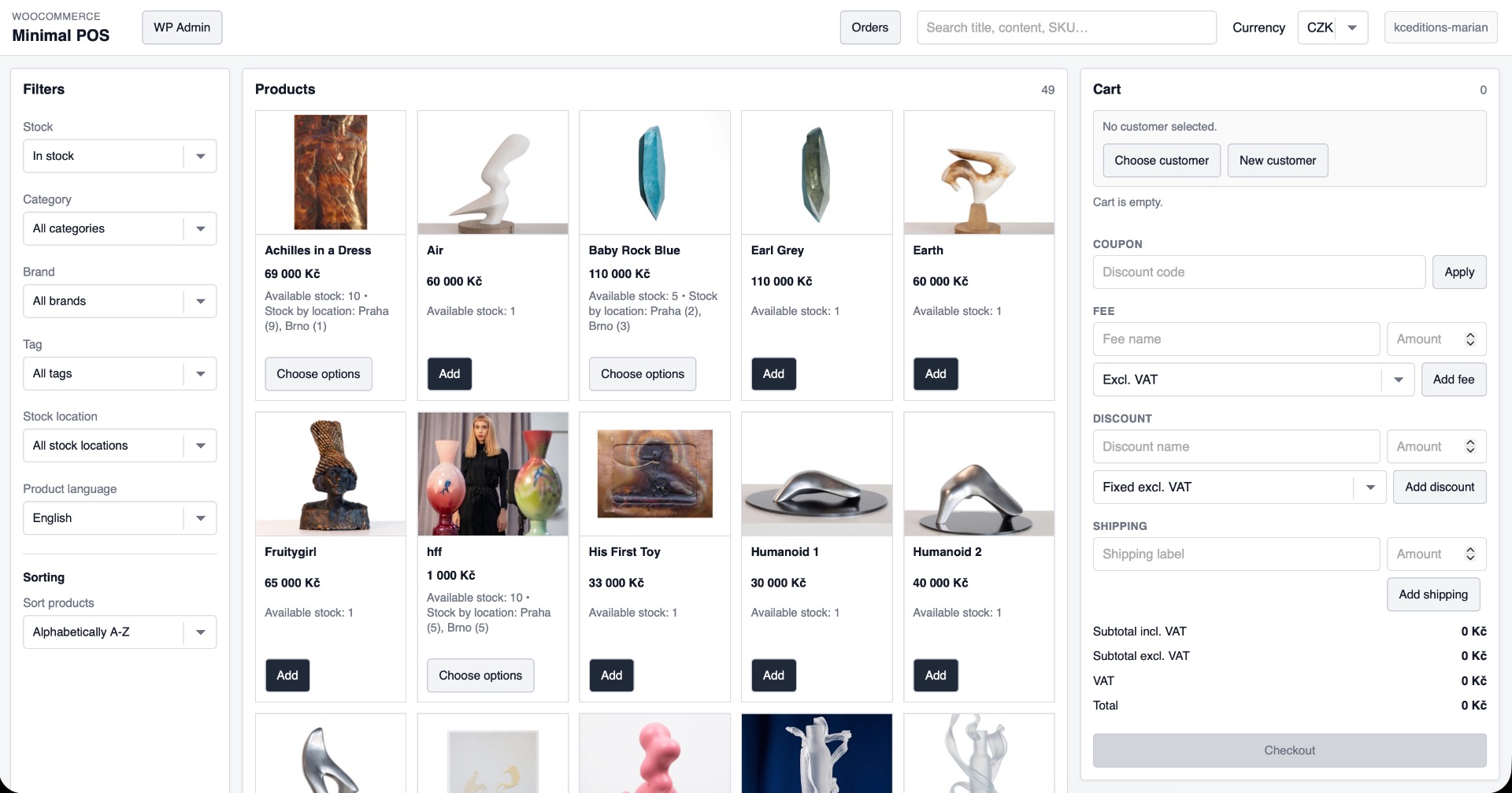
Main POS screen with product grid, filters, cart, and checkout actions.
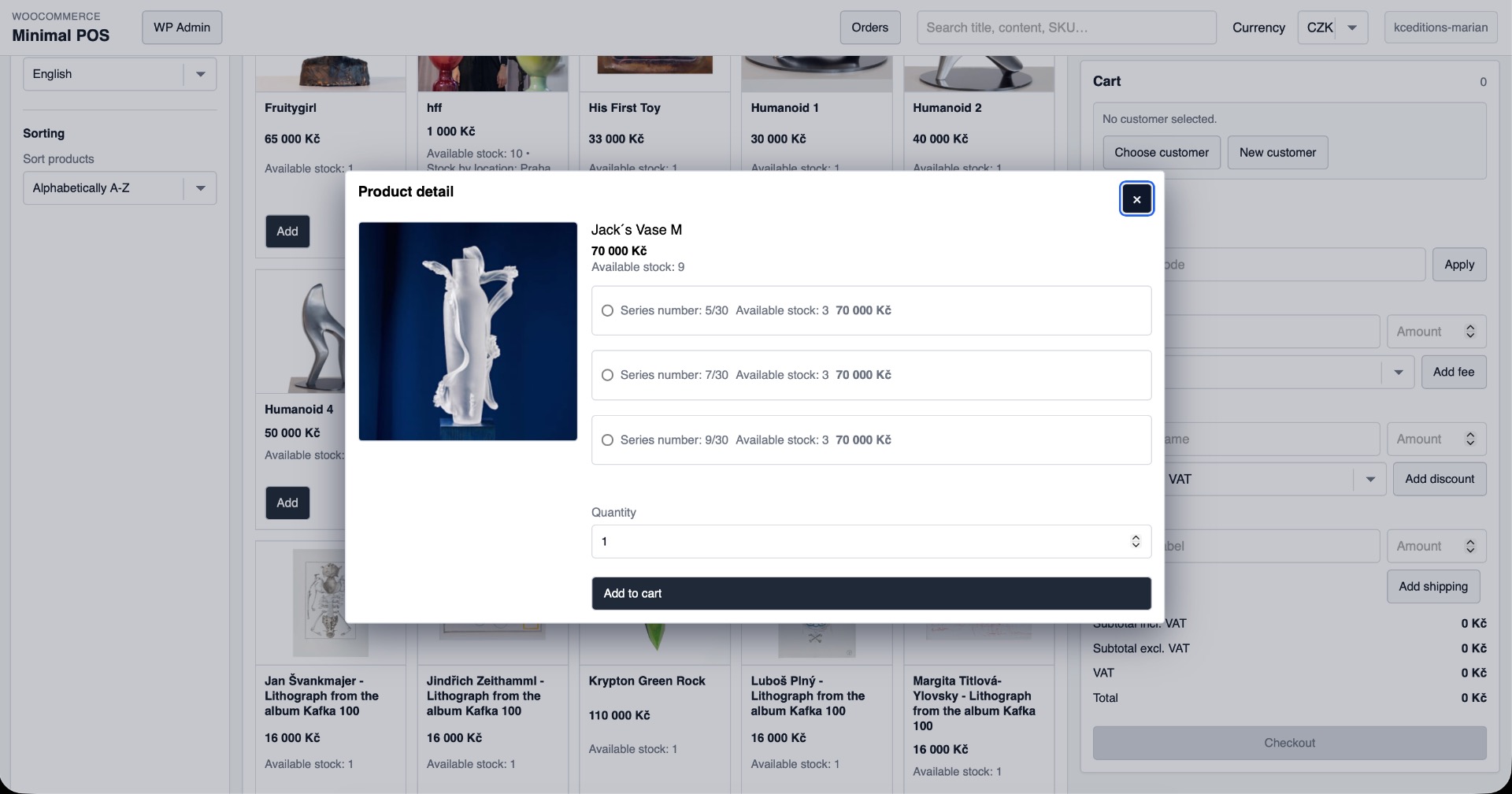
Product detail dialog for variable products and stock-aware add-to-cart flow.
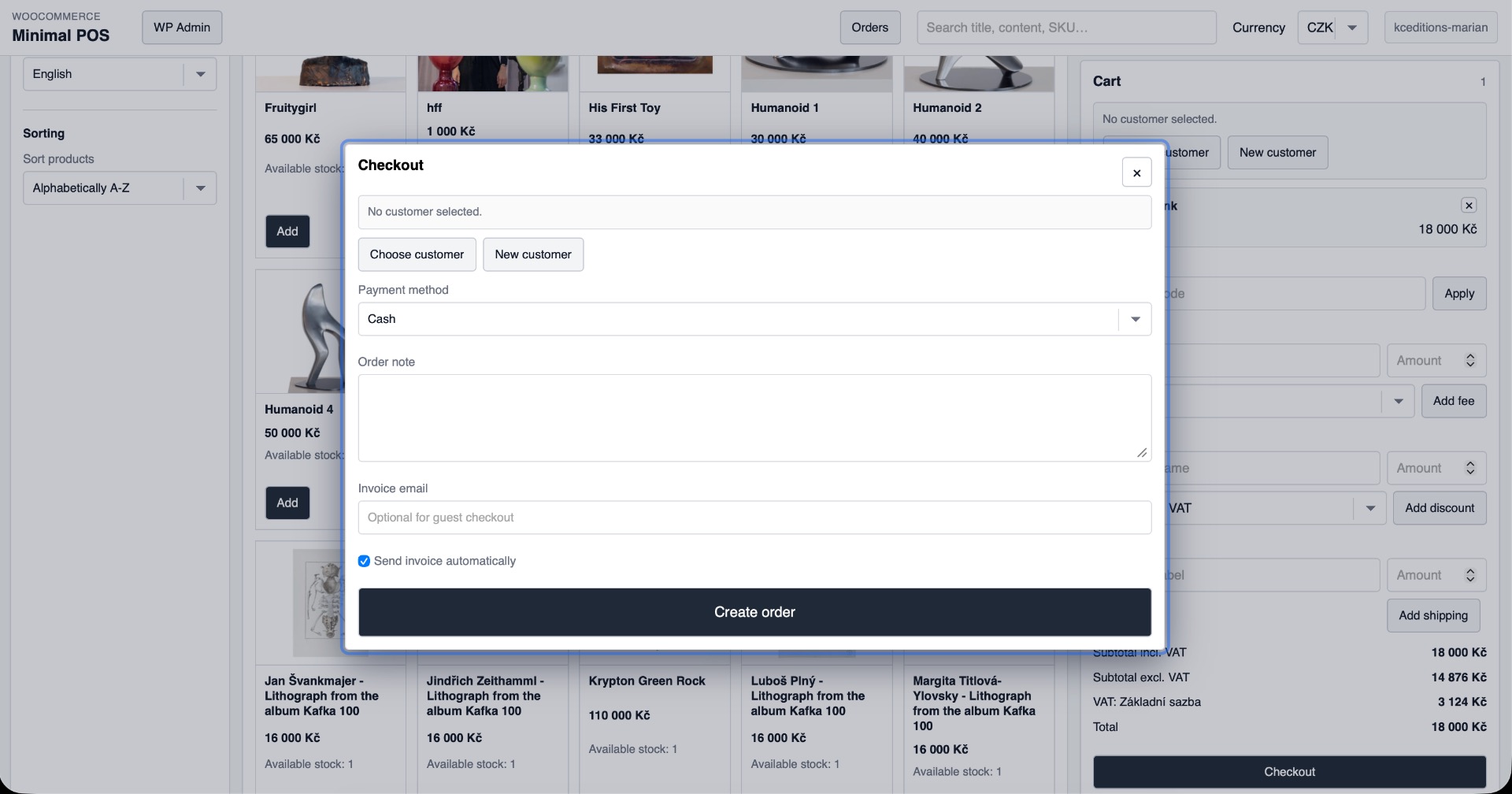
Customer search and customer form dialogs used during checkout.
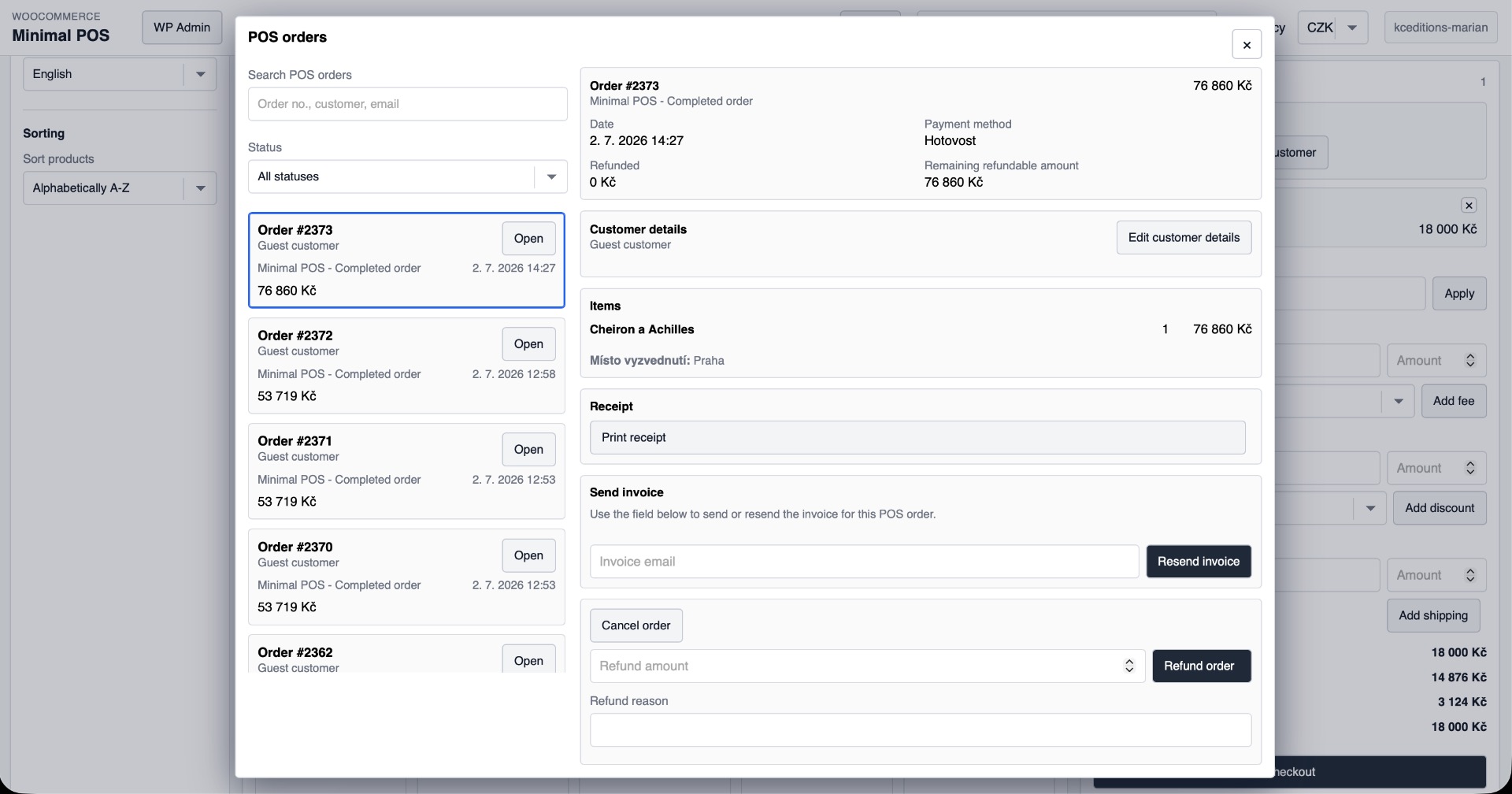
POS order management dialog with resend receipt email, cancel, refund, and print receipt actions.
Faq
No. The frontend is server-rendered and enhanced with plain JavaScript files that are enqueued directly.
Yes. The plugin declares HPOS compatibility and uses WooCommerce CRUD APIs for order and customer work.
Yes. Copy the receipt template into your child theme and customize it there. LightPOS supports overrides in lightpos/, and the legacy minimal-pos/ override path is also supported.
Reviews
Changelog
0.1.23
- Added content-based asset cache busting and early no-cache handling for the POS route.
- Added compatibility with current and legacy CURCY / Woo Multi Currency releases.
- Ensured WooCommerce administrator cancellation notices are sent when eligible LightPOS orders are cancelled.
0.1.22
- Refined the order-items table header styling.
0.1.21
- Removed padding from the order-items table header.
0.1.20
- Restored the order-items header to a normal background with black text and removed temporary cart calculation error logging.
0.1.19
- Simplified the order-items card and styled its column header as a black table header.
0.1.18
- Made the manual-discount amount field span the full form width.
0.1.17
- Added a “Print invoice” section heading above the invoice print action in the POS order detail.
0.1.16
- Simplified invoice-send wording and use “Send invoice” instead of “Resend invoice” in the order detail.
0.1.15
- Combined invoice sending and printing into one invoice card in the POS order detail, with email sending shown before printing.
0.1.14
- Simplified refund wording in Czech and English, and hide the “Create refund” opener after the itemised refund form is opened.
0.1.13
- Removed the manual-discount title field. Discounts use the localized default name automatically.
0.1.12
- Fixed zero-decimal currency rounding for VAT-inclusive manual delivery. The stored delivery amount now matches the whole-currency amount shown in the POS and no longer creates a one-koruna total difference.
0.1.11
- Improved diagnostic logging for POS cart-calculation discrepancies.
0.1.10
- Fixed manual VAT-inclusive discounts combined with a coupon: their VAT allocation now follows WooCommerce’s post-coupon calculation order.
- Product prices in the POS are rounded to the active currency’s configured precision before VAT calculation, so visible and charged amounts agree.
- An unnamed manual discount now defaults to “Discount” (“Sleva” in Czech), and fee, discount, and shipping panels close after their line is added.
0.1.9
- Fixed VAT allocation for VAT-inclusive POS discounts after coupon discounts, preventing whole-koruna total discrepancies.
- Manual delivery rows now display the calculated gross amount used by the WooCommerce cart total.
0.1.8
- Improved the POS order refund workflow with itemised product, fee, and shipping refunds, VAT-inclusive refund amounts, and clearer refund controls.
- Cancelling an invoiced POS order now creates a full WooCommerce refund so compatible invoice plugins can generate a credit note.
- Improved the checkout, order-detail, and refund UI, including VAT and total displays.
0.1.7
- Updated the WC Multi-Stock integration for WCMS 1.0.7: stock is allocated before checkout completes; shortages leave the cart intact and do not create an invoice.
- Cashier-selected locations remain fixed. Stock display and validation subtract online reservations, and location inventory cannot be oversold using a confirmation override.
- Refunds use explicit WooCommerce item lines with per-item quantities and refund amounts. Returned quantities are validated against prior refunds, and restocking can be selected separately.
- Deploy both LightPOS 0.1.7 and WCMS 1.0.7 together when using the location stock integration.
0.1.6
- Replaced legacy POS header controls with a settings modal for currency and interface language selection.
- Added a return link to WordPress admin in both the POS header and the settings modal.
- Improved admin settings UX with clearer language-setting descriptions.
0.1.5
- Fixed CSS/JS inlining, escaping and few other minor issues.
- Added translation updates for the new admin copy and bumped the plugin version for the settings/documentation refresh.
0.1.4
- Added plugin packaging fixes for WordPress.org submission, including license metadata and review-driven compatibility cleanups.
- Improved Plugin Check compliance for template loading, escaping, and packaging expectations.