Web3Press – Migrating to 3ook.com Decentralized Bookstore
Web3Press – Migrating to 3ook.com Decentralized Bookstore
Description
FINAL LEGACY VERSION NOTICE
This is the final version of the Web3Press LikeCoin plugin before the transition to 3ook.com. Version 4.0.0 serves as a read-only legacy version.
CURRENT STATUS (v4.0.0):
– Plugin is in read-only legacy mode
– All NFT publishing and ISCN publishing functions have been removed
– This is a maintenance version only – no new features will be added
– Existing content display and management features remain functional
WHAT STILL WORKS (Legacy Features):
– Display control for existing LikeCoin buttons and NFT widgets
– Update ISCN ID and Arweave ID for existing posts
– Assign Liker ID to site or post (legacy functionality)
– Internet Archive integration
– Payment pointer functionality
LEGACY MAINTENANCE:
– All existing content and widgets remain fully functional
– Portfolio access maintained at liker.land
– Display settings and configurations preserved
– No user action required for continued operation
About the Future 3ook.com Version
The next major release will be a new 3ook.com plugin with:
– Book collection displays from 3ook.com
– Book recommendation features
– Enhanced discovery and community tools
– Full EVM blockchain integration
Important Notes
- This v4.0.0 is maintenance-only – no new blockchain publishing
- Existing users can continue managing current content normally
- Future 3ook.com features will be in a new major plugin version release
- No migration action required from users at this time
Contribution
LikeCoin is an open-source project. You are welcome to contribute to the plugin on Github if you are a developer.
Installation
Installing the Web3Press plugin is easy-peasy. It takes only a few steps, within one minute.
Follow the below steps to install the Web3Press plugin:
- Go to the WordPress admin panel and log in ( For example, if your website is www.abc.com, the admin panel address is usually www.abc.com/wp-admin).
- Click on the menu on the left, go to “Plugin”, and click “install plugin” on top.
- Search for “LikeCoin” and find the LikeCoin plugin, click “Install Now” and wait for the system to finish the job, then click “Activate”.
- After installation, there will be a “LikeCoin” option in the menu. Congratulations, the installation is done!
After installing the plugin, please install Keplr, a crypto wallet Chrome extension for LikeCoin. See the detail procedure of installing Keplr here. The crypto wallet is necessary for you to publish and keep your Writing NFTs.
Configuring Web3Press plugin
You are ready to publish your post as Writing NFT after finishing the Keplr installation. However, if you want to enjoy the like-to-earn feature further, you can also register a Liker ID. After finishing Liker ID registration, follow the below configuration steps:
- On the menu, select “Your LikeCoin button”, then fill in your Liker ID in the Liker ID field.
- Click “Confirm” to finish setting up your Writing NFT widget. The widget will appear at the bottom of each post.
Configure the LikeCoin button to appear anywhere in the articles – use the shortcode [likecoin] to display extra LikeCoin buttons.
More Information
To learn more, please visit liker.land or product documentation
Screenshots
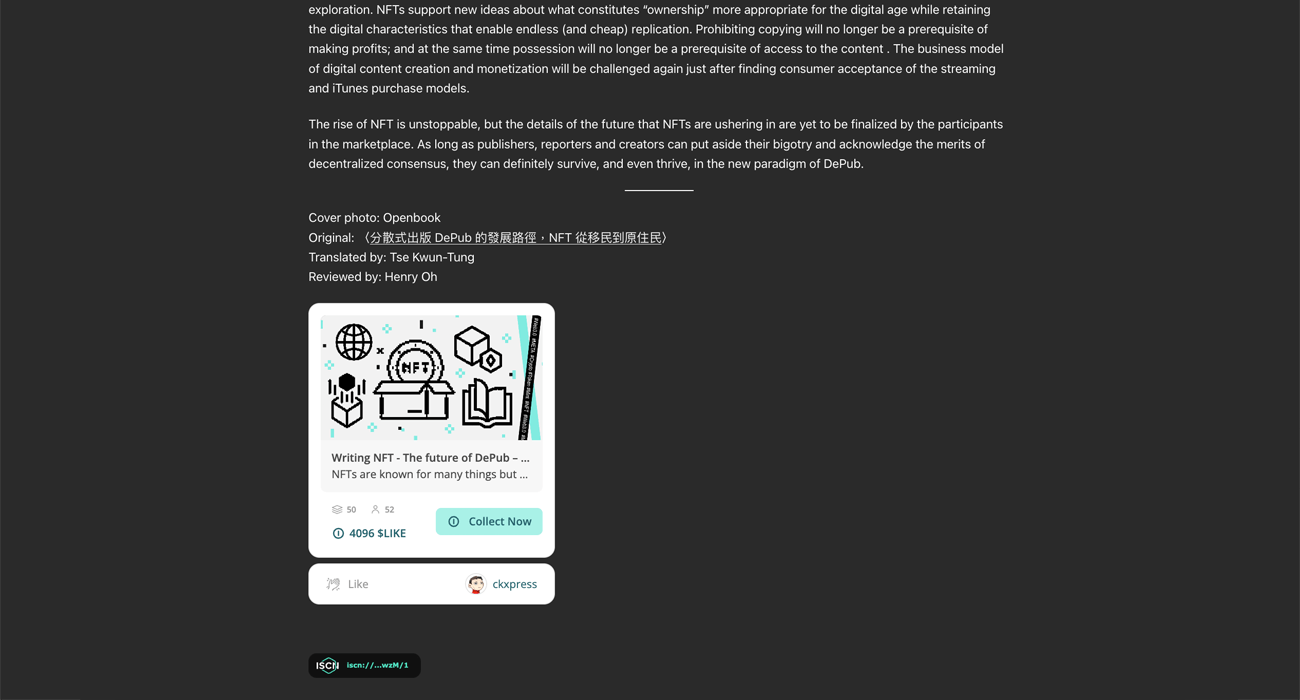
Writing NFT widget in a Post

LikeCoin button in a Post

Plugin Options

Editor Blocks
Faq
NFT publishing and ISCN registration features have been removed as part of the migration to 3ook.com. These features will be replaced with new book publishing capabilities on the 3ook.com platform.
Yes! You can still:
– Control display settings for existing LikeCoin buttons and NFT widgets
– Update ISCN ID and Arweave ID for your posts
– Access your existing NFT collection at liker.land
3ook.com is the next evolution of liker.land – a decentralized bookstore running on EVM blockchain. It focuses on book creation, discovery, and community building while maintaining the decentralized principles of its predecessor.
The migration is in progress. New 3ook.com widget integration will be rolled out gradually, allowing you to:
– Display your book collections from 3ook.com
– Recommend specific books to your readers
– Benefit from enhanced discovery features
No. Your existing posts, widgets, and content remain functional. The migration only affects publishing new NFTs – existing content display and management continue to work normally.
No action is required. The plugin will automatically transition to support 3ook.com features when they become available. You can continue using existing functionality normally.
Users can check their LikeCoin balance by:
For users who are familiar with cryptocurrencies, you can register a Liker ID by Keplr wallet, which you can have complete control of your wallet private key.
However, an easier way to register a Liker ID without any crypto knowledge is to register via email/password or social accounts such as Google or Facebook. Read the guide here.
Can change LIKE at Osmosis DEX to other coins such as ATOM first, then trade ATOM to other coins such stable coins (e.g., USDC、USDT、BUSD) that can then be changed to fiat currency on Centralized Exchanges such as Kraken or Binance.
LikeCoin can be converted to other currencies in some other exchanges. For details, please refer to this guide.
Civic Liker is a movement to reward good content and encourage openness. You can become a Civic Liker by staking at least 5,000 LikeCoin to the “Civic Liker” node with a Liker ID tied to the staking wallet address. The node takes 100% of the stake reward to let you distribute the reward to the creators you “like” via the LikeCoin button.
For details, please refer to this guide.
Creators Fund will be distributed daily according to the claps via LikeCoin buttons by Likers. You can add the LikeCoin button to your works by installing LikeCoin WordPress plugin. Note that Civic Likers’ claps have a much heavier weight for the fund distribution.
You can configure this function under the Web3Press plugin setting.
The post author’s account must be linked to a Liker ID for the LikeCoin button to show in posts. Please login to the LikeCoin plugin with the author’s WordPress account once before editing with another editor account. You can also use the “Site Liker ID” option to force all posts to use
Reviews
good
By 
關於安裝
By 
likeCoin:)
By 
好東西呀
By 
超爽der~
By 
very good :))
By 
很好!
By 
Plugin for additional income by Crypto
By 
easy to use!
By 
Working and easy to use
By 
Changelog
4.0.0
FINAL LEGACY VERSION – READ-ONLY MODE
This is the FINAL VERSION of the LikeCoin WordPress plugin before the transition to 3ook.com. This version removes publishing capabilities and serves as a read-only legacy version.
BREAKING CHANGES:
– REMOVED: All NFT publishing and ISCN registration features
– REMOVED: Matters.news integration
– READ-ONLY MODE: No new content can be published to blockchain
– LEGACY STATUS: This is the last version before 3ook.com transition
WHAT STILL WORKS (Legacy Features):
– Display control for existing LikeCoin buttons and NFT widgets
– ISCN ID and Arweave ID metadata updates for existing posts
– Liker ID assignment (legacy functionality)
– Internet Archive integration and backup functionality
– Web monetization and payment pointer features
LEGACY MAINTENANCE:
– Existing content and widgets remain fully functional
– Portfolio access maintained at liker.land
– All display settings and configurations preserved
– No new features will be added to this version
WHAT’S NEXT:
The next major plugin version will be the 3ook.com version with new functionality:
– Book collection displays from 3ook.com
– Book recommendation features
– Enhanced discovery and community tools
– Full EVM blockchain integration
IMPORTANT NOTES:
– This is a maintenance/legacy version only
– No new blockchain publishing capabilities
– Existing users can continue managing current content
– Future 3ook.com features will be in a new major plugin version release
3.3.0
- Remove matters integration. We will develop new features with matters after LikeCoin is migrated to EVM chain.
- Fix a security vulnerability that might allow contributors to access arbitrary file on host. Now only images under the WordPress upload directory will be processed and uploaded to Arweave when the post is published on decentralized storage.
3.2.0
- Show widget from [likecoin] shortcode even if widget display is disabled
3.1.3
- Fix metabox js not enqueued properly
3.1.2
- Fix undefined restful API path issue
- Fix duplicated import of sidebar js
3.1.1
- Update NFT Widget block icons
- Allow overriding ISCN related post metadata in sidebar
3.1.0
- Migrate to app.like.co for the whole publishing flow.
- Add Writing NFT Widget, Writing NFT Widget (Mini) and Writing NFT Collect Button blocks in Gutenberg editor.
3.0.6
- Add widget settings in editor sidebar. Please allow per post widget settings in plugin advanced settings first.
3.0.5
- Fix too many tags error when submitting post to matters.
3.0.4
- Fix invalid array index access when post images contain redirect
- Mitigate API crash when PHP DOM extension is not installed. Note that DOM extension is required for image upload to work properly when publishing.
3.0.3
- Add newsletter section in getting started and about page
- Add welcome notice on plugin activation
3.0.2
- Update Web3Press icon
- Fix admin setting checkbox layout
- Update sidebar wordings and icons
- Improve admin setting menu navigtion experience
3.0.1
- Fix plugin name was not replaced in metabox and sidebar
3.0.0
- Web3Press is now the new name for LikeCoin WordPress Plugin
2.8.5
- Fix a case where published post cannot be updated when auto publish to Matters.news is enabled
- Fix an issue where ISCN ID is not updated after published
- Support updating NFT Class ID in ISCN publish flow
- Update query string format in app.like.co NFT portal
2.8.4
- Fix broken action links in plugins page
- Auto redirect to Getting Started page on activation
- Add feedback form on deactivation
2.8.3
- Update getting start page and tutorial video
- Improve UI layout in admin pages
- Add likecoin html meta tags to posts
- Add likecoin and open graph html meta tags to posts on decentralized storage
2.8.2
- Add auto publish to Internet Archive
- Simplify publish setting page
2.8.1
- Fix LikeCoin button not shown when option is set to post only.
2.8.0
- Redesign simplified plugin settings pages
- Remove site Liker ID override feature
2.7.1
- Add web monetization to revamped other setting page
2.7.0
- Add license field when publishing to ISCN
- Remove matters and IPFS column from post list
- Remove web monetization settings
- Move ISCN badge option into main setting page
- Move Liker ID settings into a single setting page
- Simplify editor sidebar layout
- Update copywriting
2.6.4
- Improve support to WordPress < 5.7
- Add ISCN update from metabox
- Fix an issue where non character image name might cause Arweave upload error
2.6.3
- Improve feature image and general image upload reliablity when uploading to Arweave.
2.6.2
- Change LikeCoin button iframe size for NFT widget support
- Reorganize LikeCoin button/NFT widget display settings to allow enabling site LikeCoin button without forcing site Liker ID
2.6.1
- Improve Writing NFT minting UX. Support postMessage NFT class ID update event when minting Writing NFT
2.6.0
- Add Writing NFT Support
2.5.7
- Fix issue with login to matters
2.5.6
- Refactor restful API
- Use ISCN ID as key for LikeCoin button if exists
- Fix ISCN description would be missing if excerpt is not set
- Move Web Monetization into Other Settings
2.5.5
- Use custom excerpt as description if available
- Fix ISCN information was not passed correctly to widget
- Fix ISCN description might contain HTML escape code
- Fix strange NaN/0 in sidebar UI
- Fix site LikeCoin button display setting was not respect if per post setting is enabled
- Fix broken layout in LikeCoin button setting
- Add plugin information in iscn record note
2.5.4
- Add update function to DePub, you can now update metadata in ISCN after a post is updated.
- Fix ISCN title might contain esacpe string when using DePub
- Fix LikeCoin button default display behaviour. Now after setting a LikerID and without explicitly disable LikeCoin button, it will default to display.
- Fix unable to see Matters and ISCN column name when using filtering in admin post list page
2.5.3
- Fix metabox DePub does not work
- Fix Arweave ID not updated after submission
- Use app.like.co for all ISCN popup
- Add featured image into DePub post
2.5.2
- Fix DePub did not use latest post information.
2.5.1
- Revamp ISCN publising flow with new iscn-ar widget
- Improve publishing UX and performance for metabox and sidebar
- Fix issue with Matters draft saving and auto image uploading
- Improve Matters auto draft/publish performance
- Allow user with post editing right to set their own LikeCoin button LikerID
- Update ISCN badge link to app.like.co ISCN viewer
- Known issue: Distribution subpanel in post editor sidebar does not reflect actual Matters auto-publish settings
- Known issue: LikeCoin button per post setting does not work in post editor sidebar
2.5.0
- Revamp post editor interface and publishing flow
- Add Gutenberg siderbar for DePub.
2.4.6
- Fix confusing default select in LikeCoin button and ISCN badge display settings
2.4.5
- Fix matters publish settings does not work
2.4.4
- Added error message when ISCN widget popup is blocked by browser
- Allow re-triggering popup widget after refresh
2.4.3
- Improved user experience for Arweave and ISCN submission
- Fix broken admin settings links
- Fix ISCN button was not available if Matters options are not enabled
- Fix missing i18n string
- Added ISCN description
2.4.2
- Fix handling of files already exist Arweave
- Fix restful API error handling
- Fix parsing of post image src with querysring
2.4.1
- Fix invalid error notice in post editor
- Fix wrong license in ISCN for Arweave integration
2.4.0
- Integrate upload to Arweave + ISCN feature
2.3.1
- Fix matters CORS issue
2.3.0
- Revamp plugin admin pages
2.2.2
- Fixed an issue where matters publish status won’t auto refresh when entering post editor
2.2.1
- Support url field in ISCN widget
2.2.0
- Add ISCN status column in post list
- Support ISCN FoTan upgrade
2.1.2
- Fix buggy LikeCoin button display logic
2.1.1
- Add display of ISCN badge in posts submited to ISCN testnet.
- Simplify Matters and IPFS column in admin panel post list.
- Fix a bug that affects parsing of post tags to ISCN transaction.
2.1.0
- Add publish to ISCN testnet feature
2.0.8
- Fix “Illegal string offset ‘matters_id'” error
- Fix invalid noopener syntax
2.0.7
- Add refresh publish status button in post metabox
- Add Web Monetization setting
2.0.6
- Add Matters and IPFS status display in metabox and post management list
- Add class to LikeCoin button
<
figure> to allow CSS customization
2.0.5
- Fix LikeCoin button size issue in Twenty Twenty-One
2.0.4
- Fix Matters session expiration message is unreadable
- Sync post tags to Matters
2.0.3
- Unify Matters.news brand name
- Improve Matters publish support for classic editor
- New option to add post link in footer when publishing
2.0.2
- Fix publish to matters checkbox status does not display properly
2.0.1
- Fix typo in matters.news description
- Fix users’ LikeCoin button setting cannot be updated
2.0.0
- Try to fix title encoding issue when saving draft to matters
- Fix cannot save draft to matters when publishing article
- Improve formatting of matters ID display
- Add short introduction on matters.news
2.0.0-b.2
- Add display of current matters ID in settings
- Add sponsor information
2.0.0-b.1
- Add publish to matters function beta
1.3.3
- Add become civic liker button and update help url
1.3.2
- Add liker-id param in [likecoin] shortcode
- Rename Like Rewards banner to LikeCoin button
1.3.1
- Use LikeCoin wallet when updating user info.
1.3.0
- Allow user to input Liker ID directly
- Remove Metamask related code
1.2.4
- Fix Like Rewards banner not showing when using site Liker ID
1.2.3
- Add shortcode [likecoin] for displaying Like Rewards banner
1.2.2
- Fixes options in metabox did not follow current config
1.2.1
- Fixes Android Facebook Browser stuck in redirect issue
- Inject sandbox attributes in iframe only in AMP mode
1.2.0
- Support Metamask privacy mode
1.1.7
- Update names and branding
- Do not display Like Rewards banner in password-protected post
1.1.6
- Remove button referrer when in preview mode
1.1.5
- Support AMP plugin in paired/native mode
1.1.4
- Support new LikeButton setting available like.co
- Better compatibility with old php versions
- Add action shortcut to help and settings links
1.1.3
- Better support for page builder like elementor and beaver
- Fine-tune LikeButton display priority and default display option
1.1.2
- Fix localization not working
1.1.1
- Fix typos
1.1.0
- Add LikeCoin Plugin Settings page
- Add site LikeButton functionality
- UI revamp
1.0.2
- Minify JS
- Update localizations
1.0.1
- Add localization headers
1.0
- Initial release