Limited Admin Menu Access by URLs
Limited Admin Menu Access by URLs
Description
Limited Admin Menu Access by URLs is built for site owners and administrators who need to give support agents, clients, or junior staff a tightly controlled window into the WordPress admin — without handing over full access.
The typical use case: you have a support agent who needs to handle WooCommerce orders, or a client who should only see their own content settings, or a developer you want to restrict to specific tools. Instead of creating a custom role from scratch, you simply select the user and click the pages they are allowed to visit. The plugin hides everything else from their sidebar and blocks any attempt to navigate to restricted pages directly by URL.
Key Features
- User Targeting — Select one or more users from a searchable, filterable list. Filter by role (Administrator, Editor, Author, Subscriber) with live AJAX search by name or email.
- Visual Link Picker — Hold
CTRL(orCMDon Mac) to activate an interactive overlay on the admin sidebar. Click any link to instantly add it to the allowlist. Added links are highlighted green; click again to remove. - URL + Title Tags — Allowed URLs are stored with their menu title for a human-readable allowlist display and a friendlier Access Denied page.
- Menu Hiding — All admin sidebar menu items not in the allowlist are automatically hidden for targeted users.
- Hard URL Blocking — Direct navigation to a blocked URL is intercepted at
admin_initand returns a styled 403 Access Denied page — even if the user tries to type the URL directly into the address bar. - Access Denied Page — A professional full-page block screen lists all pages the user is allowed to visit, with titles and URLs as clickable links.
- Empty Dashboard Option — A single checkbox removes all dashboard widgets for restricted users, leaving a clean empty dashboard while keeping the page itself accessible.
- Plugin Self-Protection — When a restricted user is granted access to the Plugins page, the Deactivate and Settings action links for this plugin are automatically removed from their view. A server-side guard additionally intercepts and blocks any direct deactivation request, even if crafted manually, ensuring the plugin cannot be disabled by a restricted user.
- Backwards Compatible — Existing plain-text URL lists from earlier versions are automatically migrated to the new JSON format on first save.
- Clean Uninstall — All plugin data is removed from the database when the plugin is deleted.
Primary Use Case: Granting Limited Admin Access to Support Agents
When a support agent needs to help with order management, content issues, or plugin configuration, giving them full admin access is a security and compliance risk. This plugin solves that problem cleanly:
- Create a WordPress account for the support agent (any role).
- Open Limited Admin Access in your sidebar.
- Check the agent’s name in the Target Users list.
- Hold
CTRLand click the exact sidebar pages they need — Orders, a specific settings tab, the media library, whatever the job requires. - Click Apply Restrictions.
The agent now sees only those pages in their sidebar, and any attempt to navigate elsewhere returns a branded Access Denied screen listing exactly where they are allowed to go. No custom roles, no code, no guesswork.
Other Use Cases
- Give a client access to only their WooCommerce orders page and nothing else.
- Restrict a content author to only the post editor and media library.
- Limit a junior developer to only the tools relevant to their current task.
- Prevent non-technical staff from accidentally accessing sensitive settings.
- Provide a contractor with a scoped admin view for the duration of a project.
How It Works
- Go to Limited Admin Access in the WordPress admin sidebar.
- Select one or more users to restrict using the Target Users panel.
- Hold
CTRLand click sidebar links to add them to the allowlist — or type URLs manually. - Optionally check Hide All Dashboard Widgets to give restricted users a blank dashboard.
- Click Apply Restrictions.
From that point on, restricted users will only see the allowed menu items and can only navigate to allowed pages. Attempting to visit any other admin URL returns a 403 page with links to permitted pages.
Security
- All inputs are sanitized using WordPress-native functions (
sanitize_text_field,esc_url_raw,absint,wp_unslash). - URL scheme validation rejects
javascript:,data:, and other non-HTTP schemes from the allowlist. - AJAX endpoints are protected with nonces and
current_user_can('manage_options')checks. - URL matching uses exact path + query-string comparison — substring matching is not used, preventing crafted URL bypass attacks.
- The plugin page render callback has an explicit capability gate independent of the menu registration.
- Restricted users who are granted access to the Plugins page cannot deactivate this plugin — the Deactivate and Settings action links are stripped from the plugin row for those users, and a server-side
admin_initguard verifies WordPress’s own deactivation nonce before intercepting and blocking any direct deactivation request. - All data is removed on plugin deletion via
uninstall.php.
Installation
Automatic Installation
- Log in to your WordPress admin panel.
- Navigate to Plugins Add New.
- Search for Limited Admin Menu Access by URLs.
- Click Install Now and then Activate.
Manual Installation
- Download the plugin
.zipfile. - Extract it and upload the
limited-admin-menu-access-by-urlsfolder to/wp-content/plugins/. - Activate the plugin from the Plugins screen in WordPress admin.
After Activation
- Go to Limited Admin Access in the admin sidebar.
- Select users to restrict in the Target Users panel.
- Hold
CTRLand click sidebar links to add them to the allowlist. - Click Apply Restrictions.
Screenshots

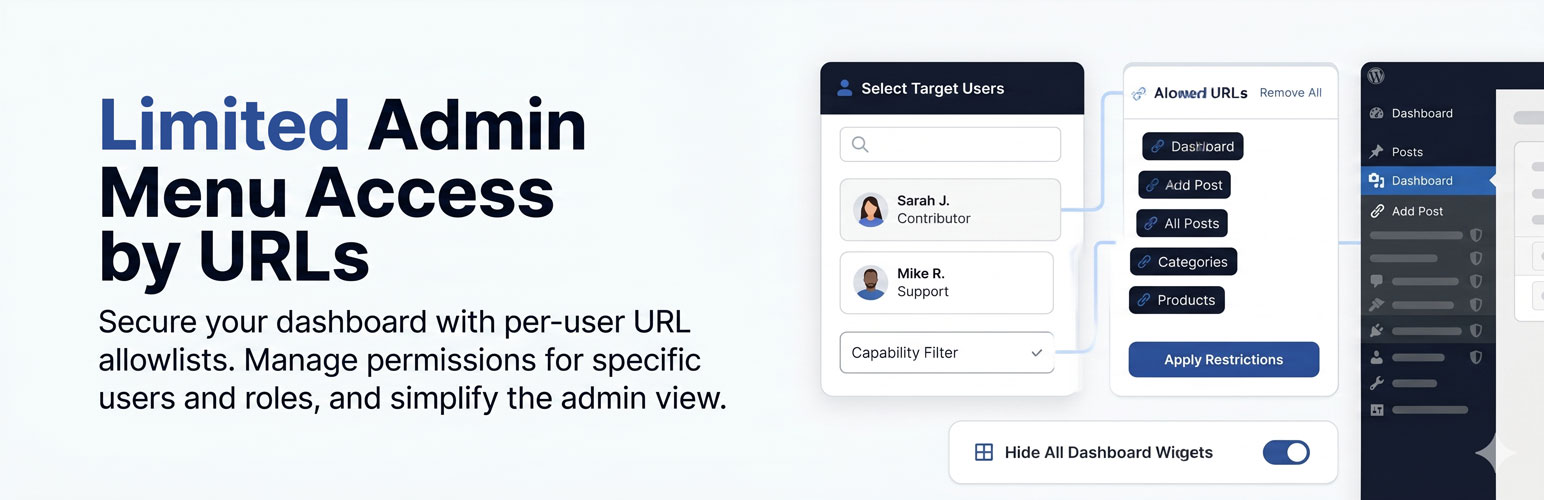
Visual Overview Our clean, modern interface designed to demonstrate how Limited Admin Menu Access by URLs gives you precise control over the WordPress dashboard experience.

Main Settings Page — The admin panel showing the Target Users list, capability filter, and URL allowlist with tag chips.

CTRL Link Picker Active — The sidebar in picker mode with blue overlay masks on each link, a green highlight on already-added links, and the active-mode banner at the top.

Allowed URLs Tag Chips — The allowlist panel showing URL+title chips in dark tag style with remove buttons.

Access Denied Page — The 403 block screen showing the plugin branding, a list of permitted pages with titles, and a link back to the dashboard.
Faq
No. The plugin never restricts the currently logged-in admin user. You cannot add yourself to the restricted users list. Super-admins on Multisite installs are also protected from accidental restriction.
They receive a styled 403 Access Denied page listing all pages they are permitted to visit. The page includes a link back to the dashboard.
Yes. Role does not determine restriction — only whether the user’s ID is in the targeted users list. You can restrict any user except yourself and users with the manage_options capability who manage the plugin settings.
The plugin works on single-site WordPress installations. Multisite support is planned for a future release.
Both full URLs (https://example.com/wp-admin/edit.php?post_type=page) and relative paths (/wp-admin/edit.php?post_type=page) are accepted. The CTRL link-picker automatically captures the full absolute URL with its menu title.
The plugin detects the old newline-separated format and reads it transparently. The data is migrated to the new JSON format automatically the next time you save settings.
Yes. URL matching includes the full query string. Adding /wp-admin/admin.php?page=wc-settings&tab=shipping will allow only that specific tab, not the entire WooCommerce settings area.
Yes — simply add /wp-admin/index.php to the allowlist. The dashboard is always accessible as a fallback landing page regardless of restrictions. To show it empty, enable the Remove All Dashboard Widgets option.
Absolutely — that is the primary use case this plugin was designed for. Select the agent’s user account, hold CTRL and click the WooCommerce Orders link in the sidebar, then click Apply Restrictions. The agent will see only the Orders page (and the dashboard) and nothing else.
Reviews
Changelog
3.1.3 — Normal checking
- Changed: Checking with the last version of wordpress, Version: 7.0
3.1.2 — including JS and/or CSS Fixes
including JS and/or CSS Fixes
- Fixed: Access-denied page styling and layout broken by Tailwind v3.4.1. The plugin now bundles its own Tailwind CSS (assets/tailwind.min.css) and loads it via wp_enqueue_style() instead of relying on the admin-footer global stylesheet.
- Fixed: Missing Font Awesome icons on the access-denied page. The plugin now bundles assets/font-awesome.min.css and loads it via wp_enqueue_style().
3.1.1 — Bug Fix
Bug Fixes
- Fixed: Infinite redirect loop when a restricted user tried to access an unallowed page. The access-denied page guard required a valid
_wpnonceparameter, but the redirect URL never included one — causing the access-denied page itself to be treated as blocked and redirected back to itself endlessly. - Fixed: Access-denied page bypass check moved before the allowed-links loop so it is evaluated first regardless of the allowlist contents.
- Removed: Unnecessary nonce requirement on the access-denied page routing check — this is a read-only page display, not a state-changing action.
- Changed: Prefixed all JavaScript functions with
limiadme_to prevent global scope conflicts and adhere to WordPress standards. - Fixed: Resolved the “Uncaught ReferenceError: limiadmeData is not defined” issue by correctly enqueuing the restricted-user JS and properly timing its data localization.
- Fixed: Resolved PHPCS warnings (unslashed inputs, heredocs, output escaping, discouraged parse_url).
- Fixed: Removed discouraged
load_plugin_textdomainand missing Domain Path header. - Fixed:
allowed.map is not a functionJS error caused by double-encoding of the allowed JSON array.
3.1.0 — Security & WP.org Compliance Release
Security
- Fixed: Replaced
stripslashes()withwp_unslash()throughout for canonical WordPress input handling. - Fixed:
$_SERVER['REQUEST_URI']now passed throughwp_unslash()before use. - Fixed:
aur_page_render()now has an explicitcurrent_user_can('manage_options')guard independent of menu registration. - Fixed: AJAX handler now uses
wp_send_json_error()with HTTP 403 for unauthorized requests instead of plainwp_die(). - Fixed:
wp_json_encode()in inline<script>blocks now usesJSON_HEX_TAG | JSON_HEX_AMPflags to prevent XSS via stored data. - Fixed: URL scheme validation in sanitizer now explicitly rejects
javascript:,data:,ftp:and other non-HTTP(S)/non-relative values. - Fixed:
onmouseover/onmouseoutinline JavaScript event handlers in the Access Denied page replaced with CSS:hoverrules — compatible with strict Content Security Policy headers. - Fixed: Anonymous closure used as
sanitize_callbackfor dashboard widget option replaced with named functionaur_sanitize_bool_option()— anonymous closures cannot be serialized by WordPress on some host configurations. - Added: Plugin self-protection — restricted users who are granted access to the Plugins page can no longer deactivate this plugin. The Deactivate and Settings row-action links are removed from the plugin list for restricted users (
plugin_action_links_filter). A separateadmin_inithook verifies WordPress’s owndeactivate-plugin_*nonce and then intercepts and redirects any deactivation attempt before it is processed, displaying a dismissible admin notice explaining the block.
WordPress.org Compliance
- Changed: Plugin renamed from “Admin URL Restrictor PRO” to “Limited Admin Menu Access by URLs” — better reflects the primary support-agent use case; WP.org guidelines prohibit “PRO” and similar suffixes.
- Changed: External CDN asset loading (Tailwind CSS from cdn.tailwindcss.com, Font Awesome from cdnjs) replaced with locally bundled assets loaded via
wp_enqueue_style()— WP.org guidelines prohibit external CDN dependencies. - Changed: Inline
<script>and<link>tags in render callback replaced with properwp_enqueue_style()calls. - Changed:
wp_add_inline_script()target changed from'jquery'to'wp-dom-ready'— jQuery may be dequeued on certain admin screens (e.g. block editor), causing the menu-hider script to silently fail. - Added:
uninstall.php— removes all plugin options (limiadme_restricted_users,limiadme_allowed_links,limiadme_remove_dashboard_widgets,aur_version) when the plugin is deleted. - Added:
register_activation_hook()seeds default option values and stores plugin version on first activation. - Added:
load_plugin_textdomain()registered oninithook for full internationalization support. - Added: Text domain string
'limited-admin-menu-access-by-urls'added to all translatable strings. - Added: Plugin header now includes
Requires at least,Requires PHP,License, andLicense URIfields. - Fixed: Author field updated from AI tool attribution to valid WordPress.org username.
Code Quality
- Removed: Dead function
aur_uri_to_file()which was defined but never called. - Removed:
limiadme_restricted_users_baseline[]hidden form inputs which were redundant — the JavaScriptsyncUsers()function already handles cross-filter user persistence correctly. - Fixed: Dashboard widget removal now uses
remove_meta_box()per widget instead of directly wiping$wp_meta_boxes['dashboard']— direct global mutation conflicts with other plugins hookingwp_dashboard_setup. - Changed: Version bumped to 3.1.0 to reflect the scope of security and compliance changes.
2.5.0 — URL Picker & Tag UI Release
New Features
- Added: Interactive CTRL link-picker mode — hold CTRL (or CMD on Mac) to activate an overlay on the admin sidebar; click any link to add it to the allowlist instantly.
- Added: Visual tag-chip allowlist UI replaces the plain textarea — each allowed URL is shown as a dark chip with its menu title and URL, with individual remove buttons.
- Added: “Remove All” button clears the entire allowlist with a confirmation prompt.
- Added: Allowed URLs are now stored as JSON objects containing both the URL and the menu title captured at pick time.
- Added: Access Denied page now shows the page title alongside the URL for each permitted link.
- Added: CTRL picker highlights already-added links in green; clicking them removes them from the allowlist.
- Added: Blue banner at the top of the screen is displayed while picker mode is active.
- Added: Legacy plain-text URL format automatically migrated to JSON on first save — no data loss on upgrade.
Improvements
- Improved: URL matching in menu-hider JS now uses browser-native
<a>element resolution — bare slugs (edit.php?post_type=page) are resolved against the current page base automatically, eliminating all edge cases. - Improved: Protocol-agnostic comparison strips
http:///https://before matching so full URLs and relative paths always match correctly regardless of how the site URL scheme is configured. - Improved:
&HTML entity decoding added to URL normalisation to handle WordPress-encoded href attributes in menu links.
2.4.0 — Menu Hiding & Access Denied Overhaul
New Features
- Added: Admin sidebar menu items not in the allowlist are now hidden for restricted users via a JavaScript pass over
#adminmenuafter DOM ready. - Added: Two-pass menu hiding — first hides individual items, then hides top-level parent items whose all children are hidden (prevents orphaned section headers).
- Added: Access Denied page redesigned as a full-page card with a gradient header, allowed URLs list, and dashboard button.
- Added: Allowed URLs in the Access Denied page are now rendered as clickable cards.
Bug Fixes
- Fixed: Hardcoded bypass for the plugin settings page removed — restricted users were always able to access it regardless of the allowlist.
- Fixed:
home_url()double-prepending on full URLs in the Access Denied page — the plugin now detects whether a stored URL is already absolute before prepending the site URL. - Fixed: Access Denied page body width overridden to 100% — WordPress’s
wp_die()injectsmax-width: 700pxon the body which was constraining the full-page layout. - Fixed: URL matching changed from
strpos()substring match to exactparse_url()path + query-string comparison — substring matching allowed crafted URL bypass attacks.
2.3.0 — Dashboard Widgets & Persistence Release
New Features
- Added: “Hide All Dashboard Widgets” checkbox — when enabled, all dashboard widgets are removed for restricted users while keeping the Dashboard page itself accessible.
- Added: Capability filter selection is now remembered across page reloads using
localStorage.
Bug Fixes
- Fixed:
is_super_admin()used to filter the user list returnedtruefor all administrators on single-site WordPress installs, causing the Target Users list to always appear empty. - Fixed:
'capability'was passed as aWP_User_Queryargument — this key is not recognised by WordPress. Replaced withrole__inmapped from the capability dropdown selection. - Fixed:
search_columnsnot specified in user search query caused inconsistent search results across WordPress versions. - Fixed: Users not visible in the current filtered/paginated view were silently removed from the restricted list on save. Fixed with an in-memory checked-users Set persisted across filter changes.
- Fixed: Anonymous function used as
sanitize_callbackforlimiadme_restricted_users— replaced with named functionaur_sanitize_user_ids().
2.2.0 — UI & Search Release
New Features
- Added: AJAX-powered user table with live search by display name, login, and email address.
- Added: Capability-based user filter dropdown (All Users, Editors/Authors, Administrators, Subscribers, Authors+).
- Added: Search debounce (300ms) to prevent excessive AJAX requests while typing.
- Added: “Select All” checkbox in the user table header.
- Added: Loading state opacity transition on the user table during AJAX fetch.
- Added: Error message displayed in the user table if the AJAX request fails.
- Added: “Loading users…” placeholder shown while the initial user list loads.
Improvements
- Improved: Modern card-based admin UI built with Tailwind CSS utility classes.
- Improved: User table shows display name, email address, and role for each user.
2.1.0 — Nonce & AJAX Security Release
Security
- Added: Nonce verification (
check_ajax_referer) on theaur_filter_usersAJAX endpoint. - Added:
current_user_can('manage_options')check on the AJAX endpoint. - Added: Nonce value passed from PHP to JavaScript via
wp_json_encode().
2.0.0 — Hard Block & Protection Logic
New Features
- Added:
admin_inithook intercepts requests to blocked admin pages for restricted users and callswp_die()with a 403 response. - Added: Restricted users who attempt to access a blocked URL are shown an Access Denied screen.
- Added: Dashboard (
index.php) is always allowed as a fallback landing page regardless of the allowlist. - Added: AJAX requests (
admin-ajax.php) are always permitted to avoid breaking plugin functionality.
Improvements
- Improved: Exact URL path matching using
parse_url()instead of simple string comparison. - Improved: Stored allowlist is trimmed and filtered to remove empty lines on each comparison.
1.0.0 — Initial Release
- Initial release.
- Added: Settings page with user selection checkboxes and a plain-text URL allowlist textarea.
- Added:
manage_options-only admin menu page registered viaadd_menu_page(). - Added: Settings registered via
register_setting()with WordPress Settings API. - Added: Plugin action link added to the Plugins list page pointing to the settings page.