List Last Changes

List Last Changes
Description
Shows a list of the last changes in the widget area, via shortcode or in the gutenberg block editor.
This can include changed pages and/or posts (configurable).
Additional features include:
- Select the number of entries in the list
- Define pages to be excluded
- Show the author or the last editor of the page/post
- Select and order by date modified or date published
Exclude page or post
To exclude a page or post from being listed in the widget do the following steps:
- Open the page or post you want to exclude for editing.
- Open the “Screen Options” (on the top right of the page)
- Ensure that “Custom Fields” is checked (see Screenshot #3)
- In the “Custom Fields” further down the screen add the following custom field (see Screenshot #4):
- name: list_last_changes_ignore
- value: true
To include it again set the value to false or remove the custom field completely.
Block Editor (Gutenberg)
The block can be found in Widgets -> List Last Changes.
The block can be configured in the block settings (panel on the right side)
In difference to the widget, with the block no title is written. If a title is needed it has to be defined in an own block in front of the List Last Changes block.
Shortcode
To show the list of the last changes via shortcode use the following syntax:
[list_last_changes number='7' showpages='true' showposts='true' showauthor='false' usedatepublished='true' template='{title} {change_date} {author}' /]
The attribute ‘number’ defines the number of entries shown.
With the attributes ‘showpages’ and ‘showposts’ changed pages and/or posts are included.
To show also the author set the attribute ‘showauthor’ to true (deprecated, use template mechanism instead).
With the attribute ‘usedatepublished’ set to ‘true’ the date when the page or post was first published, if set to ‘false’ (or not set at all) the date the page or post was modified is used.
The ‘template’ attribute defines the content of the entries. If the ‘template’ attribute is defined the attribute ‘showauthor’ is ignored.
In difference to the widget, with the shortcode no title is written. If a title is needed it has to be defined by hand in front of the shortcode.
Templates
In the template string the following fields can be used: {title}, {change_date}, {published_date}, {author} and {editor}.
{title} : the title of the page or post with a link to it
{change_date} or {change_date[format]} : the date the page or post was changed (“modified date”)
{published_date} or {published_date[format]} : the date the page or post was published (“post date”)
{author} : the author of the page or post
{editor} : the last editor of the page or post
With the optional [format] the date format of change_date and published_date can be defined. The date format is in the php date formatting.
Without definition the wordpress system date format is used.
Sample templates:
{title} {change_date} : the default template
{title} {change_date[Y-m-d H:i]} : like the default template but with date and time defined by the given format
{title} {change_date} {author} : behaves as in versions before 0.9 when show author was enabled
{change_date} : shows only the change_date, can be used with number = 1 as last modified date of a WordPress Site
Screenshots
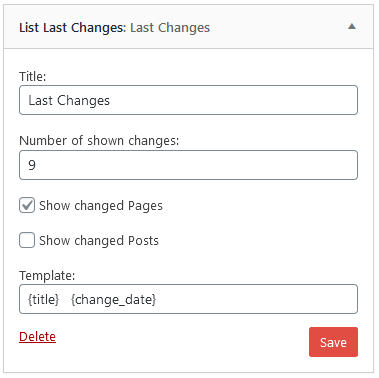
Configuration of the widget
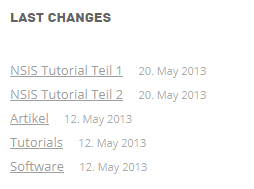
Output of the widget
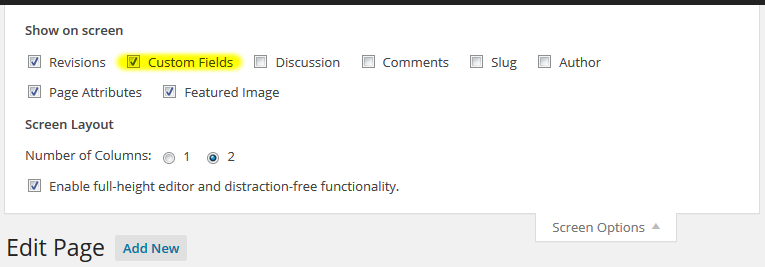
Enable custom fields on the page
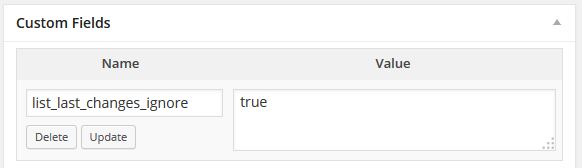
Add this custom field on a page to exclude it from being listed in the widget.
Faq
You can report security bugs through the Patchstack Vulnerability Disclosure Program.
The Patchstack team help validate, triage and handle any security vulnerabilities.
Report a security vulnerability.
Or you send them directly to info@rolandbaer.ch.
Because no questions were asked.
Reviews
Good one
By 
Good plugin.
Good plug-in
By 
This does exactly what the description says, with no problems caused. All good, thanks!
То, что нужно!
By 
Спасибо!
Top
By 
Top plugin.
Great
By 
I love the plugin but the version 1.0.2 broke the website.
Great plugin
By 
Gutes Plugin
By 
Simple to use widget, with just a few options, also as Last Modified Date
By 
Works great! No issues in over a year of use!
By 
Quicker than RSS feed
By 
Changelog
1.2.3
Release date: April 25, 2025
- fixed bug that a date with a defined date format was missing the surrounding span tag to style it via css
1.2.2
Release date: April 17, 2025
- fixed bug introduced with XSS vulnerability fix in 1.2.1
1.2.1
Release date: April 16, 2025
- fixed XSS vulnerability
1.2.0
Release date: October 02, 2024
- fields {change_date} and {published_date} with optional date format
1.1.2
Release date: September 13, 2024
- fix for wrong user name of editor field under some circumstances