List Sub Categories (LSC)

List Sub Categories (LSC)
Description
This plugin enables a widget that lists only sub categories for the current category page.
Features:
- Write your own custom widget title.
- Select which categories to use the widget on.
If you like this plugin, remember to vote 🙂
Installation
This section describes how to install the plugin and get it working.
- Upload
list-sub-categories-lscfolder to the/wp-content/plugins/directory - Activate the plugin through the ‘Plugins’ menu in WordPress
- Go to
Appearance->Widgets. Drag and Drop theList Sub Categories (LSC)into a sidebar area.
Screenshots
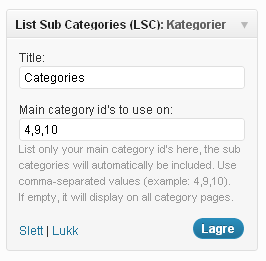
Screenshot of the
Appearance->Widgets->List Sub Categories (LSC)widget window.
Faq
Will add some when i get som FAQ’s 🙂
Reviews
Changelog
1.0
- Plugin published.