Login Logout Menu
Login Logout Menu
Description
Login Logout Menu plugin will help you to add the dynamic login and logout menu to any menu of your WordPress website. You can also set the Login Page url, Login redirect url, and logout redirect url. The menu item will change based on the current user status (Login or Logout).
You can use the following plugin shortcodes to display the Login, Logout, Register, Password reset, Username and Profile links on your website pages.
- login_logout_menu__login_link
- login_logout_menu__logout_link
- login_logout_menu__profile_link
- login_logout_menu__register_link
- login_logout_menu__username_link
- login_logout_menu__reset_pass_link
- login_logout_menu__login_logout_link
Check out our documentation to implement the shortcodes and filters of Login Logout Menu Plugin.
If you find our plugin useful, please leave a good rating/review and check out our other plugins below.
- Analytify – Google Analytics Plugin
- LoginPress – For Custom login page and login page security
- Simple Social Buttons – Plugin for Social share buttons and social icons
- Related Posts Thumbnails Plugin – For related posts/products
- Under Construction, Coming Soon & Maintenance Mode – Plugin for Under construction & Coming soon page
Installation
- Upload the plugin to your ‘wp-content/plugins’ directory, or download and install automatically through your admin panel.
- Activate the plugin through the ‘Plugins’ menu in WordPress.
- Go to Menus, You will see a separate section for Login,Logout,Register and Profile Menu Items.
- Drag and Drop these menu items to your menus you have created already.
Screenshots
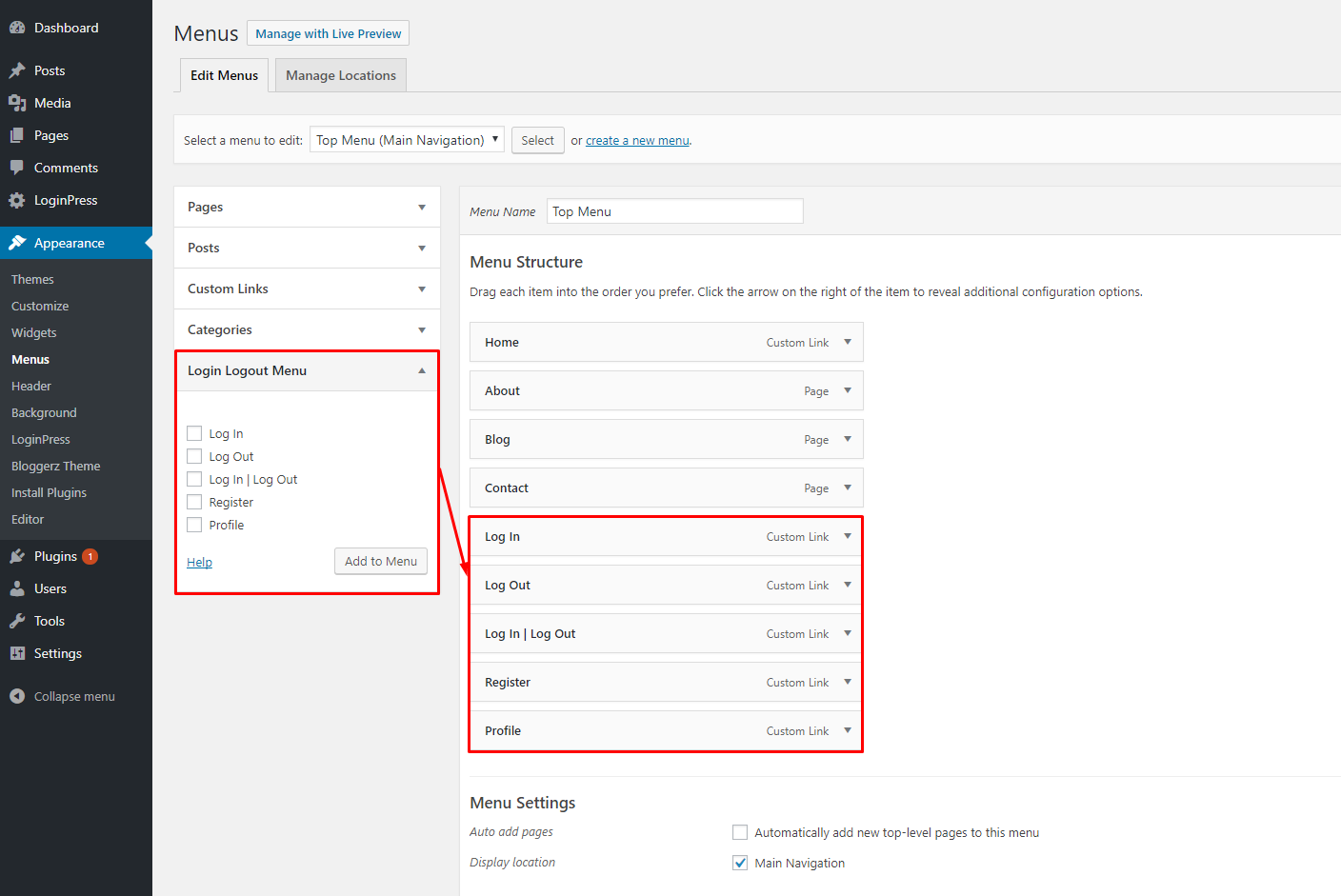
Menus Screen for Login | Logout | Profile | Register Icons

Login Menu Item

Logout and Profile Menu Item
Reviews
Great plugin, great support
By 
The plugin works well and the support is really great. They helped me immediately.
Works well. A worthy replacement for the "Login Logout Register Menu” plugin
By 
I was looking for a replacement for the “Login Logout Register Menu” since it hasn't been updated for years and is reported to have a Cross Site Scripting (XSS) vulnerability. This plugin worked well and was easy to use. Thanks, WPBrigade!
Great plugin
By 
I have been using the premium version for a while and it works as expected, you get great support and it has many other login related features that are very useful. They have the best login plugins.
a absolute no brainer
By 
Best menu solution i could image.
Absolute worth some money
Very simple
By 
Function Well
By 
great plugin, great support
By 
Thank You - Works Perfect !
By 
Works Beautifully!
By 
Exellent !
By 
Changelog
1.5.2 – 2024-09-10
- Enhancement: Improved help content in the WordPress dashboard for better user guidance.
- Compatibility: Compatible with WordPress 6.6
1.5.1 – 2024-06-11
- Enhancement: Added a filter
login_logout_menu_avatar_attrsallows to modify the attributes used for rendering the HTML markup of the login/logout menu avatar. - Enhancement: Added a filter
login_logout_menu_avatar_htmlallows customization of the HTML markup for the avatar displayed in the login/logout menu. - Compatibility: Compatible with WordPress 6.5
1.5.0 – 2024-01-09
- New Feature: Added the User Avatar functionality.
- Enhancement: Added a filter
login_logout_menu_avatarto change the html structure of login logout menu avatar. - Enhancement: Added a filter
login_logout_menu_avatar_argsto change the login logout menu avatar’s arguments. - Enhancement: Code re-factor and optimize.
- Compatibility: Compatible with WordPress 6.4
- Compatibility: Compatible with PHP 8.3
1.4.0 – 2022-12-26
- Bugfix: Apply escaping on the login menu shortcode attributes for security.
- Compatibility: Compatible with Theme My Login
- Compatibility: Compatible with WordPress 6.1
- Compatibility: Compatible with PHP 8.1
1.3.3 – 2022-06-22
- Compatibility: Compatible with OceanWP theme.
- Compatibility: Compatible with WordPress 6.0
1.3.2 – 2022-05-19
- Enhancement: Added a filter
before_login_logout_menu_itemsto change the menu item behavior. - Compatibility: Compatible with WordPress 6.0
1.3.1 – 2021-07-22
- Bugfix: Shortcode Parameters for Login/Logout redirects.
- Compatibility: Compatible with WordPress 5.8.
1.3.0 – 2021-06-16
- Enhancement: Added a shortcode
login_logout_menu__login_linkfor using the Login link. - Enhancement: Added a shortcode
login_logout_menu__logout_linkfor using the Logout link. - Enhancement: Added a shortcode
login_logout_menu__profile_linkfor using the Profile page link. - Enhancement: Added a shortcode
login_logout_menu__register_linkfor using the Registration page link. - Enhancement: Added a shortcode
login_logout_menu__username_linkfor using the Username link. - Enhancement: Added a shortcode
login_logout_menu__reset_pass_linkfor using the Reset Password link. - Enhancement: Added a shortcode
login_logout_menu__login_logout_linkfor using the Login/Logout link.
1.2.0 – 2021-04-01
- New Feature: Create a new nav menu item for showing username. (if user is Login)
- Enhancement: Added a filter
login_logout_menu_loginto change the Login URL. - Enhancement: Added a filter
login_logout_menu_logoutto change the Logout URL. - Enhancement: Added a filter
login_logout_menu_profileto change the Profile page URL. - Enhancement: Added a filter
login_logout_menu_registerto change the Registration page URL. - Enhancement: Added a filter
login_logout_menu_usernameto change the Username. - Enhancement: Added a filter
login_logout_menu_username_urlto change the Username URL. - Compatibility: Compatible with WordPress 5.7.
- Compatibility: Compatible with PHP 8.0.
1.1.0 – 2019-06-09
- Compatibility: Compatible with WordPress 5.2
1.0.0 – 2018-01-05
- Initial Release.