Login Security – Custom Login URL

Login Security – Custom Login URL
Description
Bots hammer /wp-login.php on almost every WordPress site. This plugin moves the login form to an address only you know, for example example.com/my-door/, and answers requests to the default entry points with a regular 404 page of your theme.
Features
- Choose any login URL – letters, numbers, hyphens and underscores.
wp-login.php,wp-register.phpand/wp-admin/return a real 404 status for logged-out visitors (no white screen, no redirect that gives the new URL away).- WordPress’ shortcuts
/login,/adminand/dashboardno longer reveal the login. - Password reset, registration, logout and e-mail links automatically use the new URL.
- Works with and without pretty permalinks. Your permalink settings are never touched.
- Collision check: the plugin refuses slugs that are already used by WordPress, a page or a post.
- Emergency switch:
define( 'LSFW_DISABLE', true );inwp-config.php. - No database tables, no rewrite rules, no tracking. Uninstall removes all options.
Why hide the login at all?
Honest answer: a hidden login is no replacement for strong passwords, two-factor authentication or a login limit. Its value is different – automated attacks stop hitting your login form, which means less server load, fewer lockouts of real users and cleaner logs. It is especially handy on sites with customer accounts where a .htaccess password is not an option, and it gives your customers a nicer login address. Combine it with 2FA for real protection.
Settings
Settings Login Security
Installation
- Install and activate the plugin.
- Go to Settings Login Security and enter your new login slug.
- Bookmark the new login URL shown on the settings page.
Screenshots
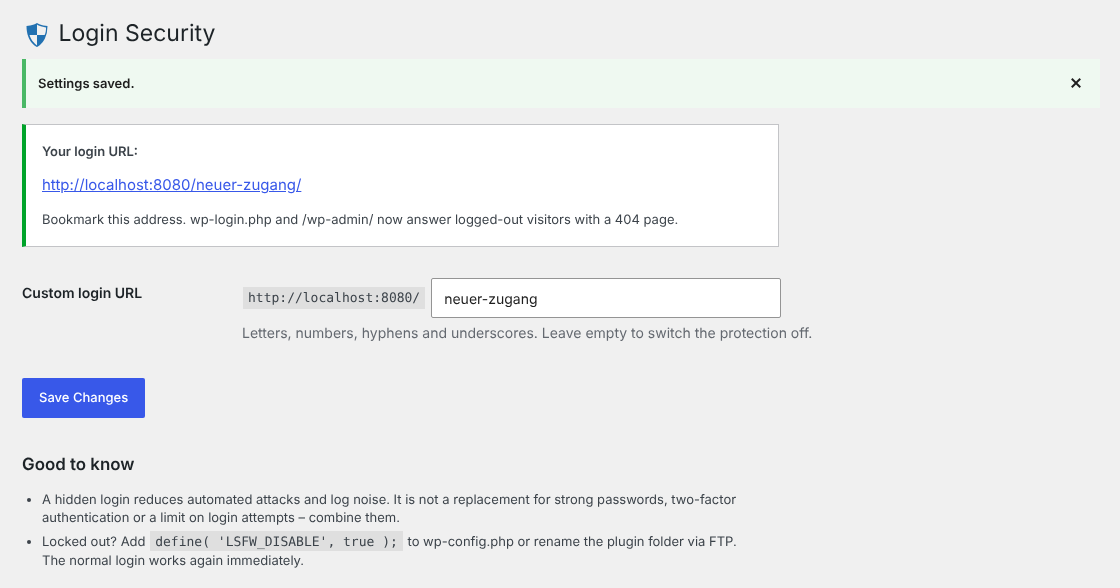
Settings page with the active login URL.
Faq
Add define( 'LSFW_DISABLE', true ); to your wp-config.php or rename the folder wp-content/plugins/login-security-for-wp via FTP. The default login works again. With WP-CLI you can read the slug with wp option get wplogsec_url.
A redirect would tell every visitor where your login is. Logged-in users can use wp-admin as usual.
Yes. Front-end login forms (e.g. the WooCommerce “My account” page) are not affected. Only wp-login.php and /wp-admin/ are hidden.
Yes – every link created with wp_login_url(), for example the “Log in” link of the comment form or the Login/out block, points to the new URL. Remove those links if you want to keep the address private.
The plugin is built and tested for single sites.
Reviews
Changelog
2.0.0 – 2026-10-24
- Complete rewrite following the WordPress Coding Standards.
- Fixed: the login could still be reached through
index.php?lsfw_custom_login=1. The query variable no longer exists. - Fixed: hidden pages showed a white screen. They now return a proper 404 page with HTTP status 404.
- Fixed:
/login,/admin,/dashboardandwp-signup.phpredirected to the custom login and revealed it. - Fixed: rewrite rules were flushed on every page load (performance).
- Fixed: an empty login slug no longer breaks the site – the protection simply stays off until a slug is set.
- Changed: the plugin no longer changes your permalink structure on activation or deactivation.
- Changed: settings page moved to
add_options_page()(wrongadd_submenu_page()parameters and duplicate text domain removed). - New: validation against reserved slugs and existing pages/posts.
- New: emergency switch
LSFW_DISABLE. - New: uninstall routine removes all options.
- Tested with WordPress 7.1 and PHP 8.3.
1.0.1
- Tested up to WordPress 6.8.
1.0.0
- Initial release.