Logo and Address Widget with Schema

Logo and Address Widget with Schema
Description
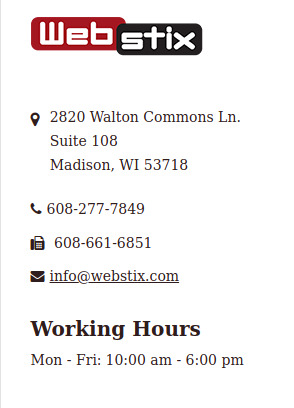
Are you still trying to show your business address in the plain text widget? Are you tired of adding custom CSS to make your business hours look good on your website? No more worries! Here is a widget, which will help you to add your business address and hours (if you want) as a widget with schema in less than 5 minutes.
The widget takes care of all the formatting. You can change labels, show hours for Monday through Friday or each day separately. We’ve even included schema markup, which is great for SEO.
Features List:
– Upload your logo and even specify alternate text for your logo. Use the WordPress Media Library to upload/select your logo.
– Add your full address, email, phone, and fax number.
– You can either show labels or show icons for the address, email, phone and fax number.
– Enable or disable schema for the address.
– Show business hours by weekdays and for weekends.
Installation
Option 1:
- Install the plugin in the Dashboard => Plugins menu => Add New => Upload => Select the zip file => Install Now
- After plugin activation, please go to Dashboard => Appearance => Widgets
- Choose the “Logo and Address Widget with Schema” widget then drag and drop it to any sidebar or footer
- Enter your contact information and click the Save button
Option 2:
- Unzip the zip file you’ve downloaded.
- Upload the “logo-and-address-widget-with-schema” folder via FTP to your /wp-content/plugins/ folder/directory
- Activate the “Logo and Address Widget with Schema” plugin by going to Dashboard => Plugins and clicking Activate next to the plugin
GETTING STARTED
Here is more information about the plugin.
- After activating the plugin, please go to Appearance => Widgets
- Please select the “Logo and Address Widget with Schema” widget then drag and drop it your desired sidebar.
- Enter your contact information and save the widget to see it on your website.
Screenshots
screenshot-1.png

screenshot-2.png
Faq
Yes, it is enabled by default. If you have used any other plugin to add schema for address, please disable it and this plugin will take care of schema or you can keep it enabled and disable it in this plugin.
Drag and drop the “Logo and Address Widget with Schema” widget in the same or into another sidebar and then configure it to show the next address.
Enable the Business Hours section, then choose the “Mon-Fri” option by checking the checkbox then enter your business hours. If you are open on weekends, you can specify those hours as well.
Reviews
Changelog
3.0
- Compatibility update for WordPress 7.1 and PHP 7.0+.
- Improved sanitization, escaping, and internationalization.
- Host Font Awesome locally (removed remote CDN dependency).
- Valid JSON-LD schema output via wp_json_encode.
- Fixed admin form fax field reading and default radio/checkbox handling.
- Added show_instance_in_rest support for the block-based widgets editor.
- Cleaned up asset loading and uninstall option removal.
2.9
- PHP error fixed
- Updated the plugin to be compatible with 6.1.1
2.8
- Updated the plugin to be compatible with 6.0.1
2.7
- Updated the plugin to be compatible with 6.0
2.6
- Updated the plugin to be compatible with 5.9.3
2.5
- Updated the plugin to be compatible with 5.9.2
2.4
- Updated the plugin to be compatible with 5.9.1
2.3
- Updated the plugin to be compatible with 5.9
2.2
- Updated the plugin to be compatible with 5.8.3
2.1
- Updated the plugin to be compatible with 5.8.2
2.0
- Updated the plugin to be compatible with 5.8.1
1.10
- Updated the plugin to be compatible with 5.8
1.9
- Updated the plugin to be compatible with 5.8
1.8
- Updated the plugin to be compatible with 5.7.2
1.7
- Updated the plugin to be compatible with 5.6
1.6
- Updated the plugin to be compatible with 5.5.1
1.5
- Updated the plugin to be compatible with 5.4.2
1.4
- Updated the plugin to be compatible with 5.4
1.3
- Updated the plugin to be compatible with 5.3.2
1.2
- Updated the plugin to be compatible with 5.2.2
1.1
- Added option to choose default or Fontawesome or custom image icons for address section.
- Updated the plugin to be compatible with 5.0
1.0
- Added schema for the Address section.