Logo Showcase – Logo Slider, Carousel & Sponsors Gallery

Logo Showcase – Logo Slider, Carousel & Sponsors Gallery
Description
Logo Showcase lets you display client, sponsor, partner, or brand logos in a clean, professional, and highly customizable way—without writing a single line of code.
Create responsive logo sliders, grids, lists, tickers, or tables in minutes using an intuitive shortcode generator. Each logo supports images, titles, descriptions, tooltips, and custom links, giving you full control over how your brand partners are presented.
Built for performance and mobile-first design, Logo Showcase works seamlessly with any WordPress theme and looks great on all screen sizes. Whether you’re showcasing clients, sponsors, or trusted brands, this plugin helps you build credibility and visual trust instantly.
Helpful Links
– Upgrade to Pro
– Live Preview
– Documentation
Video Tutorial
Logo Showcase 2.0.0
We Completly Update the plugin admin UI and update the plugin version. If you face any problems or find any bugs, please post it in the support forum or contact us directly via our website and we try to respond within a short time.
🔹 Layout Types
- Slider
- Grid
- List
- Ticker
- Table
🔹 Logo Fields
- Logo image upload
- Logo title
- Logo description
- Logo link (external or internal)
KEY FEATURES
- Easy & Lightweight.
- Clean Design & Code.
- Fully responsive and mobile-ready.
- Highly customized for User Experience.
- Unique Shortcode Generator.
- Multiple shortcodes on one page.
- Touch & Swipe Enable.
- Logo Showcase Style
- Slider Style
- Grid Style
- List Style
- Ticker Mode
- Table Style
- Item Background Color
- Item Hover Background Color
- Item Border Width
- Item Border Color
- Item Hover Border Color
- Item Padding
- Logo Title Show/Hide
- Title Position
- Position Left
- Position Center
- Position Rright
- Title Font Size
- Title Font Style
- Normal Style
- Italic Style
- Title Font Color
- Description Show/Hide
- Description Position
- Position Left
- Position Center
- Position Right
- Description Font Size
- Description Font Style
- Normal Style
- Italic Style
- Description Font Color
- Image Effects
- Normal Effect
- Grayscale Effect
- Blur Effect
- Blur & Grayscale Effect
- Image Hover Effects
- Normal Effect
- Grayscale Effect
- Blur Effect
- Blur & Grayscale Effect
- Image Animation
- Normal Animation
- ZoomIn Animation
- ZoomOut Animation
- SlideUp Animation
- Tooltip Enable/Disable
- Tooltip Position
- Position Top
- Position left
- Position Right
- Position Bottom
- Tooltip Text Color
- Tooltip Bg Color
- Grid Settings:
- Grid Total Columns(1-6)
- Grid Column Padding Left
- Grid Column Padding Right
- Grid Column Margin Bottom
- Slider Settings:
- Slider Auto Play Mode Enable/Disable
- Slider Sliding Speed
- Slider Stop On Hover Enable/Disable
- Slider Autoplay Time Out (Sec)
- Slider Total Items
- Slider Items for Desktop Small
- Slider Items for Mobile
- Slider Loop Enable/Disable
- Slider Item Margin
- Navigation Enable/Disable
- Navigation Position
- Top Right
- Top Left
- Centered
- Navigation Style
- Default Style
- Round Style
- Navigation Color
- Navigation Background Color
- Navigation Hover Color
- Navigation Hover Background Color
- Pagination Enable/Disable
- Pagination Style
- Round Style
- Square Style
- Line Style
- Pagination Position
- Position left
- Position Center
- Position Right
- Pagination Background Color
- Pagination Background Active Color
- And much more.
Pro Version Key Features
- Unlock All the Features.
- Online Documentation.
- No Hidden Charges.
- 24/7 Dedicated Support Forum.
- Auto Updated Enabled.
Installation
- Install as regular WordPress plugin.
- Go your Pluings setting via WordPress Dashboard and activate it.
- After activate plugin you will see a new menu on the dashboard left side called Logo Showcase. Click Add Showcase & create your logo showcase list easily & paste this shortcode anywhere your post/page or template to show the logo showcase.
Using FTP
1.Extract logo-showcase.zip to your computer.
2.Upload the logo showcase directory to your wp-content/plugins directory.
3.After activate plugin you will see “Logo Showcase” menu at left side on WordPress dashboard and find the “Shortcode”
How to Display Logo Showcase
First create a logo showcase list then copy shortcode into shortcode Ex: [logo_showcase id="25"] page and paste into any where your website to display logo showcase. also you can use it into theme file to display logo Showcase .Ex:<?php echo do_shortcode("[logo_showcase id="25"]");?>
Screenshots
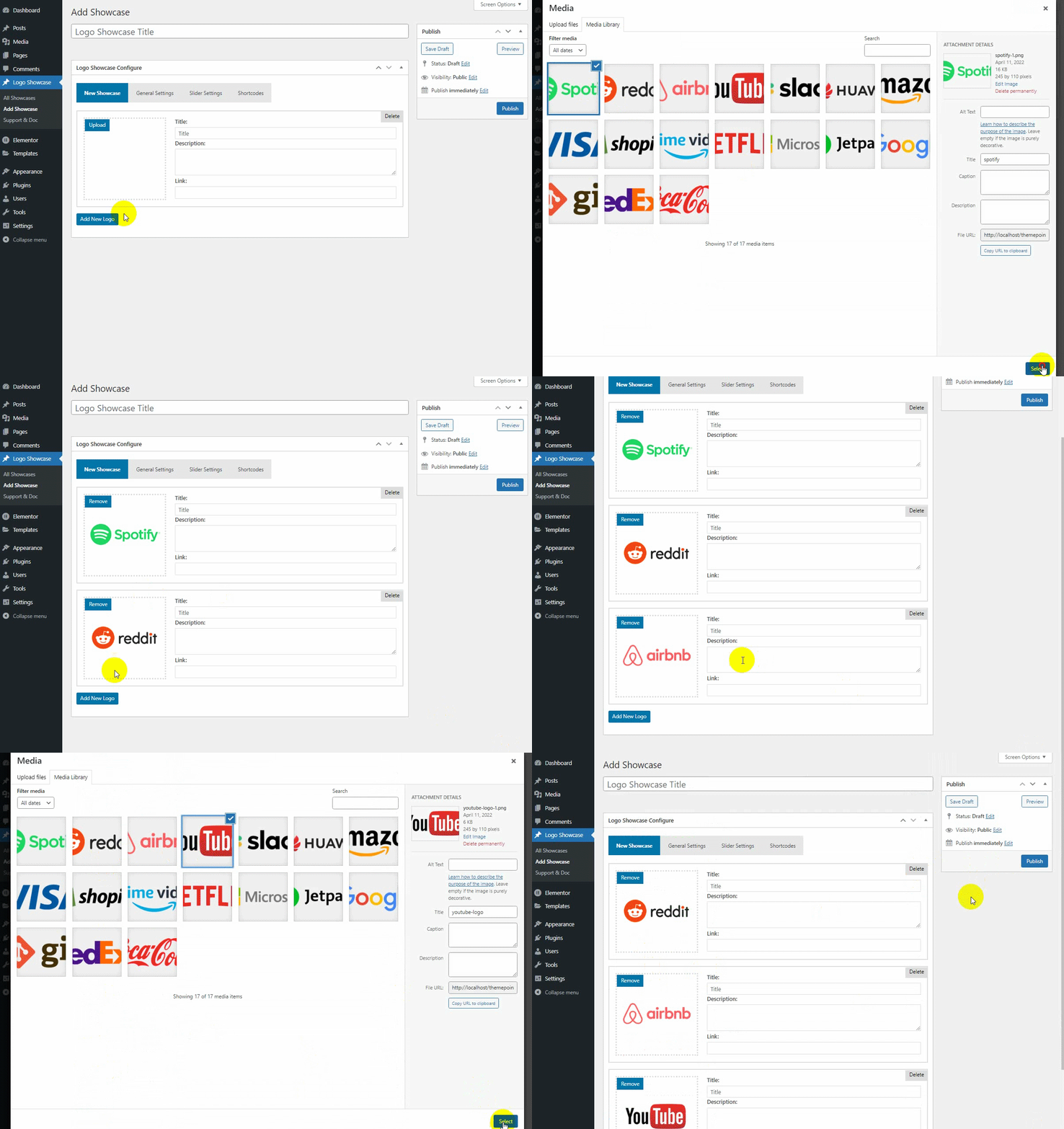
screenshot-1

screenshot-2

screenshot-3

screenshot-4
Faq
Yes, Logo Showcase works with all standard WordPress themes.
Yes, all layouts are fully responsive and mobile-friendly.
Yes, unlimited shortcodes are supported.
No. Everything is managed via the admin panel.
Reviews
Works as it should
By 
Simple to use.
Flawless, simple, perfect.
By 
Exactly what I needed in a very simple setup. Thanks!
Easy to use logo carousel
By 
I needed a simple logo carousel, and I got it working within minutes of using the free version. If my needs change in the future, I will probably go for the Pro version.
DON'T BUY THE PRO VERSION
By 
Timely response
By 
Great support
By 
Pro ver
By 
Free Version is a Joke.
By 
Best Support & Plugin
By 
Fantastic Work
By 
Changelog
4.0.4
- Added: Added New Options.
- New: Update CSS.
4.0.3
- Fix output escaping issue.
4.0.2
- Check: Latest Version Compatibility.
- Improved: Admin dashboard UI.
- Update: Update Options Page.
4.0.1
- Fix: Fix Vulnerability Issue.
4.0.0
- Fix: Fix Vulnerability Issue.
- Update: Update Options Page.
3.0.9
- Added New Styles.
- Added New Options.
- Check: Latest Version Compatibility.
- Improved: Admin dashboard UI.
- Update: Update Options Page.
3.0.8
- Check: Latest Version Compatibility.
- Improved: Admin dashboard UI.
- Update: Update Options Page.
3.0.7
- Update Option Page.
3.0.6
- Added: Added New Options.
- Update Option Page.
3.0.4
- Update Option Page.
- Fix spelling mistake.
3.0.3
- Check: Latest Version Compatibility.
- Improved: Admin dashboard UI.
- Update: Update Options Page.
3.0.2
- Check: Latest Version Compatibility.
- Update: Update Options Page.
- Added: Added New Options.
- New: Update CSS.
3.0.1
- Check: Latest Version Compatibility.
- Update: Update Options Page.
- New: Update CSS.
3.0.0
- Check: Latest Version Compatibility.
- Update: Update Support Page Info.
- New: Update Layout.
2.0.9
- Added: Added New Options.
- Check: Latest Version Compatibility.
- Update: Update Security Issue.
- New: Update Layout.
2.0.8
- Added: Added New Options.
- New: Update Layout.
2.0.7
- Added: Added New Options.
- New: Update CSS.
2.0.6
- Added: Added New Options.
- New: Update CSS.
2.0.5
- Check: Latest Version Compatibility Issue.
- Update: Update Options Page.
- New: Update CSS.
2.0.4
- Check: Latest Version Compatibility Issue.
- Update: Update Options Page.
- Update: Added New Options.
- New: Update CSS.
2.0.3
- Check: Latest Version Compatibility Issue.
- Update: Update Options Page.
- New: Add Logo Slider New CSS.
2.0.2
- Check: Latest Version Compatibility Issue.
- Update: Update Options Page.
- New: Add Logo Slider New CSS.
- Update: Update Logo Slider Responsive CSS.
2.0.1
- Improved: Number of items display issue.
- New: Add Logo Slider CSS .
2.0.0
- Improved: Admin dashboard UI.
- Improved: Admin Logo Uploader Item.
- Improved: Logo Uploader Option.
- New: Add Logo Slider Style.
- New: Add Logo Grid Style.
- New: Add Logo List Style.
- New: Add Logo Item Background Color Option.
- New: Add Logo Item Hover Background Color Option.
- New: Add Logo Border width Option.
- New: Add Logo Border Color Option.
- New: Add Logo Border Hover Color Option.
- New: Add Logo Item Box Padding Option.
- New: Add 3 Logo Title Position.
- New: Add Logo Title Font Style Option.
- New: Add Logo Title Font Color Option.
- New: Add Logo Title Font Size Option.
- New: Add 3 Logo Title Description Position.
- New: Add Logo Description Font Style Option.
- New: Add Logo Description Font Color Option.
- New: Add Logo Description Font Size Option.
- New: Add 3 Logo Animation Option.
- New: Add 3 Logo Hover Effect Option.
- New: Add Logo Tooltip Enable/Disable Option.
- New: Add 30+ Logo Slider Control Option.
- Remove: Link Open Option.
- Improved: Update All CSS.
1.9
- Fix: PHP Error Issue.
- Improved: Options page.
- Improved: Option Page CSS.
1.8
- Improved: Options page.
- New: New Options.
1.7
- New: shortcode & Template Shortcode Option.
- Fix: Responsive CSS Issues.
- Change: Grayscale Style Name to Image Effect.
1.6
- New: Border Hover Color Option.
- New: Title Show/Hide Option.
- Fix: Pagination Style Issues.
- New: Plugin Support Page.
- Improved: Other options.
1.5
- Fix: Admin js error issues.
1.4
- Fix: Backend error issues.
- Fix: Translation issues.
1.3
- Improved: Update Option Page.
- Fix: Translation issues.
- Fix: Fix CSS Issue.
1.2
- Improved: Responsive CSS.
- New: Added 2 New Option.
- Fix: Fix CSS Issue.
- Fix border Color Issues.
1.1
- Fix: Logo width issues.
- Fix: widget issues.
1.1
- Fix: Logo Box shadow issues.
- Fix: Css Issues.
1.0
- Initial release