Lookit Cache Purge for Sucuri

Lookit Cache Purge for Sucuri
Description
Sucuri’s Website Firewall caches your pages on its global edge network. That caching makes your site fast, but it also means that when you update a page, visitors may continue to see the old version for up to 2 minutes — or longer.
Sucuri’s dashboard has a “Clear Cache – Per File” feature that lets you purge a single URL from the edge cache. But to use it, you have to leave WordPress, log into the Sucuri WAF dashboard, navigate to Performance, and paste the path manually. Meanwhile, tools like WP Rocket’s Sucuri add-on only support full-site cache clearing — the nuclear option.
Lookit® Cache Purge for Sucuri fills this gap.
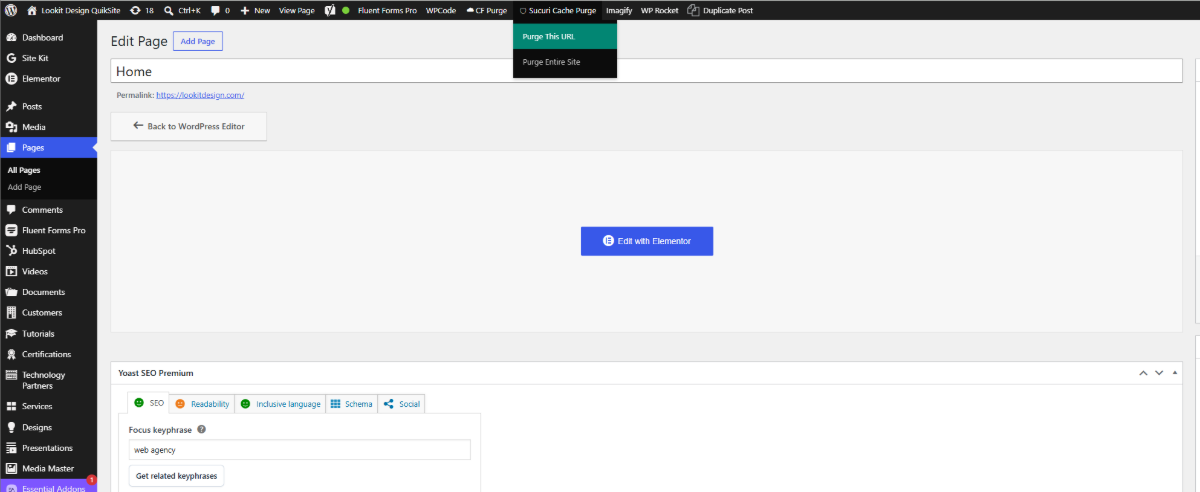
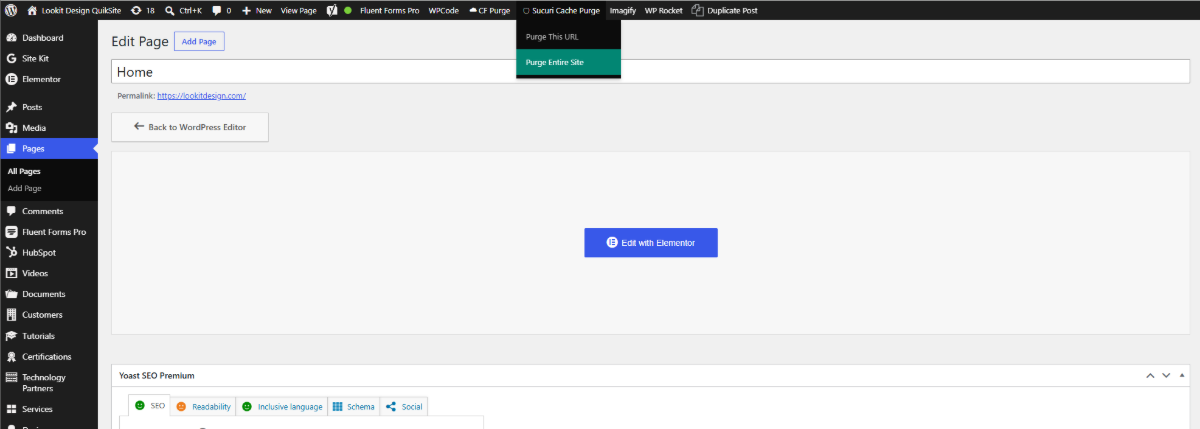
A clean “🛡 Sucuri Cache Purge” menu appears in your WordPress admin bar with two options:
- Purge This URL — clears only the page you are currently editing or viewing
- Purge Entire Site — full cache purge when you need it (with a confirmation dialog)
The plugin uses Sucuri’s documented Website Firewall API. It does not touch any other Sucuri settings — no WAF rules, no SSL, no security options. Cache purge only.
Why This Plugin Exists
Sucuri’s own dashboard can clear a single URL, but there’s no easy way to do it from inside WordPress while you’re editing content. WP Rocket’s Sucuri add-on only offers full-site purging. The official Sucuri WordPress plugin is a security tool, not a cache-clearing tool. This plugin does exactly one thing: give you a button in the WordPress admin bar to purge a URL from Sucuri’s edge cache — without leaving the editor.
Features
- Context-aware: automatically detects the URL of the post or page you are editing or viewing
- Works in both wp-admin (post editor) and on the frontend (when logged in as an administrator)
- Full-site purge option with confirmation dialog
- Built-in rate limiting: 6 purges per minute per user, to prevent accidental hammering
- Handles Sucuri’s API rate limit (HTTP 429) gracefully, with clear retry-wait messages
- Lightweight — no zone settings, no DNS, no security toggles, no bloat
- Secure — uses Sucuri’s documented API with a scoped API Key
Requirements
- A Sucuri Website Firewall (WAF) account with your site connected
- The “API Key (for plugin)” value from your Sucuri dashboard API API Details
Setup
- Install and activate the plugin
- Go to Settings Sucuri Cache Purge
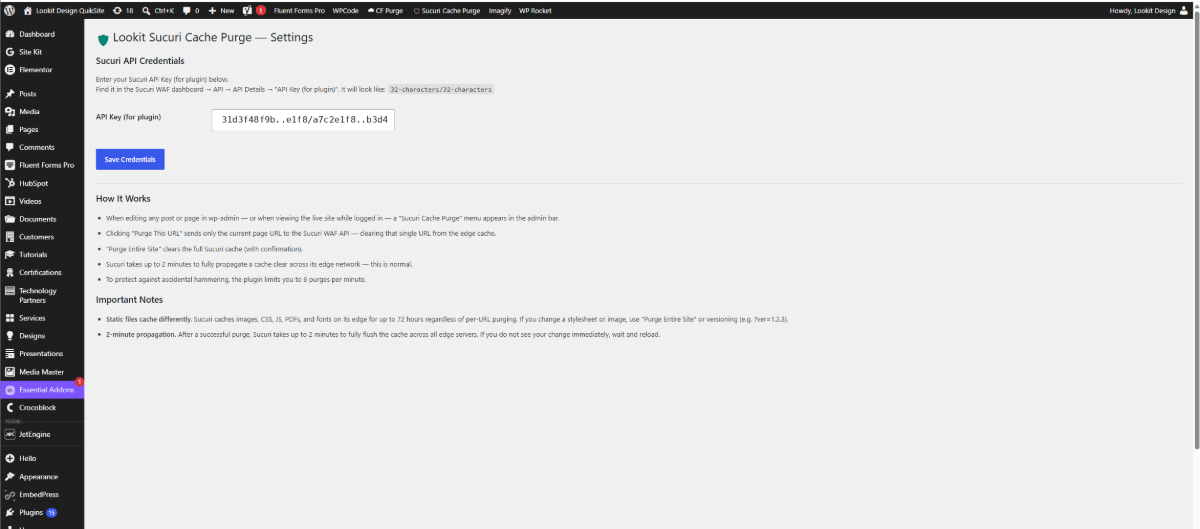
- Paste your Sucuri “API Key (for plugin)” — it looks like
32characters/32characters - Save. The 🛡 Sucuri Cache Purge menu will now appear in your admin bar
Important: Static Files Cache Differently
Sucuri caches static files — images, CSS, JS, PDFs, fonts — on its edge network for up to 72 hours, regardless of per-URL purging. If you update a stylesheet or an image, a per-URL purge will not be enough. Use “Purge Entire Site” instead, or use versioning (?ver=1.2.3) to force browsers to fetch the new version.
Important: 2-Minute Propagation
After a successful purge, Sucuri takes up to 2 minutes to fully flush the cache across its global edge network. If you do not see your change immediately, wait two minutes and reload. This is normal Sucuri behavior, not a plugin issue.
Documentation and Support
- Full documentation: https://lookitdesign.com/software/sucuri-cache-purge/
- Support: https://lookitdesign.com/sucuri-purge-support-form/
Lookit® is a registered trademark of ZENOVA CORP. Sucuri is a trademark of its respective owner (a GoDaddy brand); this plugin is an independent integration and is not affiliated with, sponsored by, or endorsed by Sucuri.
External Services
This plugin connects to the Sucuri Website Firewall (WAF) API to purge cached pages from Sucuri’s global edge network. This connection is required for the plugin’s core function — without it, no cache purging can occur.
What the service is used for:
When you trigger a purge (a single URL or the entire site), the plugin sends a request to Sucuri’s WAF API asking it to clear the relevant cache.
What data is sent, and when:
A request is sent to Sucuri only when you click “Purge This URL” or “Purge Entire Site” in the admin bar. Each request includes:
- Your Sucuri API Key and API Secret (the combined “API Key (for plugin)” value you enter in the plugin settings), used to authenticate the request
- For a single-URL purge: the path of the page being purged (for example,
/about/)
No data about your site’s visitors is collected or transmitted. The plugin does not send any personally identifiable information (PII).
Service endpoint: https://waf.sucuri.net/api?v2
Service provider: Sucuri (GoDaddy Media Temple, Inc. d/b/a Sucuri)
- Terms of Service: https://sucuri.net/terms/
- Privacy Policy: https://sucuri.net/privacy/
Installation
- Upload the
lookit-cache-purge-for-sucurifolder to/wp-content/plugins/ - Activate the plugin through the Plugins menu in WordPress
- Go to Settings Sucuri Cache Purge and paste your Sucuri API Key (for plugin)
- The menu will appear in your admin bar
Screenshots
The Sucuri Cache Purge admin bar menu
The Settings page with the combined API Key field
A successful purge toast notification
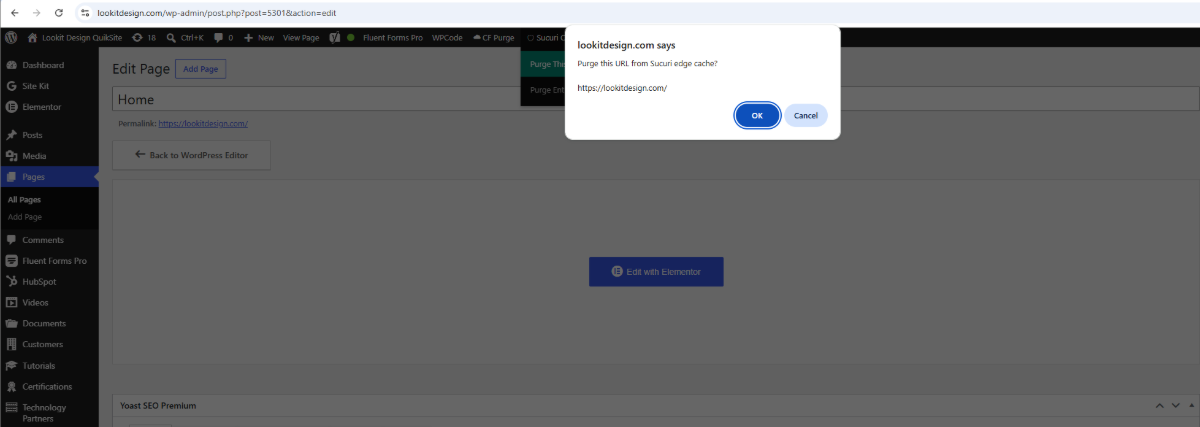
The confirmation dialog shown before a purge, with the exact URL to be cleared
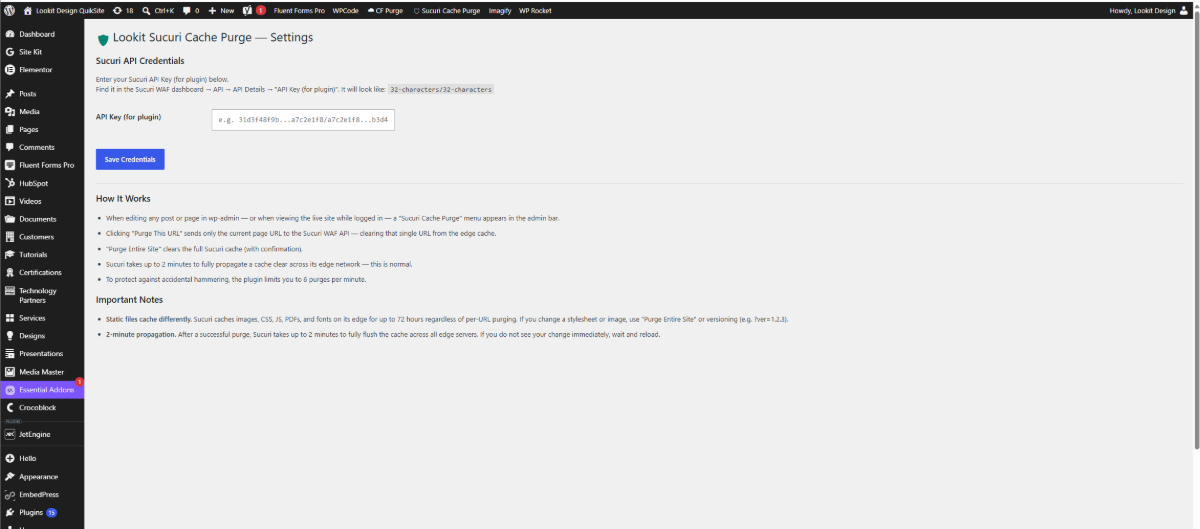
The full Settings page with the API Key field, "How It Works", and "Important Notes"
Faq
Log into your Sucuri Website Firewall dashboard. Select your site, then go to API API Details. Copy the value labeled “API Key (for plugin)” — it’s a single string in the format 32characters/32characters.
Do not paste the separate “API Key” and “API Secret” values — use the combined “for plugin” version.
Sucuri’s API accepts any URL path and reports success regardless of whether that URL exists or is cached. A typo (e.g. /abouut/ instead of /about/) would return a green success message even though nothing was actually purged. To avoid silent errors, this plugin only purges URLs that WordPress itself generates — the current post, page, taxonomy archive, or the front page.
Yes, as long as the custom post type has a public permalink. When you are editing any post (custom or otherwise) in wp-admin, the plugin uses get_permalink() to resolve the canonical URL.
The plugin limits you to 6 purges per minute. If you try a 7th purge in the same minute, you’ll see a message asking you to wait a specific number of seconds. Sucuri’s own API has a 12/min rate limit and also deduplicates cache clears within a 2-minute window for the same domain — the plugin’s 6/min limit keeps you well below Sucuri’s ceiling.
Your first purge attempt will fail with a message telling you to check the API Key in Settings. Sucuri’s API returns “Internal error” for bad credentials, which the plugin translates into a clearer message.
It can. WP Rocket’s Sucuri add-on only triggers a full-site purge when WP Rocket clears its own cache. This plugin gives you a manual, per-URL purge button — a different kind of tool. You can use both together, or disable the WP Rocket add-on and rely on this plugin for manual Sucuri purging.
No. The plugin only calls Sucuri’s clear_cache API action. It cannot read, modify, or see any other Sucuri settings (WAF rules, IP whitelists, SSL, security headers, etc.).
You can reach us through the support form at https://lookitdesign.com/sucuri-purge-support-form/, or post in the WordPress.org support forum for this plugin. Full documentation is available at https://lookitdesign.com/software/sucuri-cache-purge/.
Reviews
Changelog
1.0.0
- Initial release
- Context-aware single-URL purge from admin bar
- Full-site purge with confirmation dialog
- Per-user rate limiting (6 purges / minute)
- Handles Sucuri HTTP 429 rate-limit responses with accurate retry-wait time
- Toast notification confirms success with clear 2-minute propagation message
- Works in wp-admin editor and frontend (when logged in)