Make Section & Column Clickable For Elementor

Make Section & Column Clickable For Elementor
Description
A plugin that allows users to click in the whole column or section instead of individual elements
- Users will be able to click on the whole column when you add a link on that.
- Users will be able to click on the whole section when you add a link on that.
HOW TO USE IT
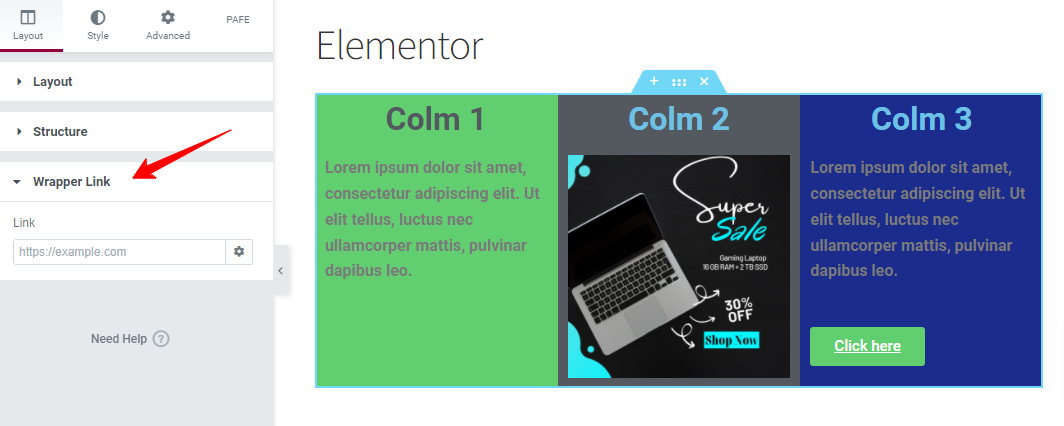
After installing the plugin, open your Elementor editor, start editing a Column or Section, and under the Layout block (wrapper link option) you can add your custom link.
You can make my day by submitting a positive review on WordPress.org!
Contribute
This may have bugs and lack of many features. If you want to contribute on this project, you are more than welcome. Please fork the repository from Github.
Privacy Policy
Make Section & Column Clickable For Elementor uses Appsero SDK to collect some telemetry data upon user’s confirmation. This helps us to troubleshoot problems faster & make product improvements.
Appsero SDK does not gather any data by default. The SDK only starts gathering basic telemetry data when a user allows it via the admin notice. We collect the data to ensure a great user experience for all our users.
Integrating Appsero SDK DOES NOT IMMEDIATELY start gathering data, without confirmation from users in any case.
Learn more about how Appsero collects and uses this data.
Installation
- Upload
Make Section & Column Clickable For Elementorto the/wp-content/plugins/directory - Activate the plugin through the ‘Plugins’ menu in WordPress
Screenshots
Faq
This plugin will add a custom URL field in each column or section of your Elementor editor. If you fill it, the column will be clickable..
If you have any issue, please use the support here.
Yes.
Reviews
Urgent: vulnerability needs patching
By 
Urgent action needed by the developer to patch the vulnerability found by Wordfence. Google "Make Section & Column Clickable For Elementor vulnerability" to see their report.
I've had to disable it until this has been done, for security reasons.
Works, but changelog should begin with most recent version updates
By 
Worked for our needs. However the changelog should start with the most recent version updates
simple & good
By 
easy to use
Simply Great
By 
Thanks, works very fine
dynamic wrapper link
By 
Is there any way to insert the dynamic link in the wrapper link??
Works perfect
By 
Worked perfect with my previous theme
Nice and simple
By 
nothing more to say... nice and simple
Make it compatible with the new "Container" Elementor sections please
By 
Thanks for your plugin mate!
You should make it work with the new "Container" flexbox sections to make it perfect!
Thanks bro. Stay awesome!
Recommended
By 
Perferct. Recommended.
Code change to allow target _blank or _self
By 
Hello, I have made a change in the code to include compatibility with links in external window or in the same window. They are only two lines of code but I provide them for a future version
public static function before_section_render(Element_Base $element) {

    $link_settings = $element->get_settings_for_display('ra_element_link');

    if ($link_settings && !empty($link_settings['url'])) {

      $target = $link_settings['is_external'] != '' ? '_blank' : '_self';

      $element->add_render_attribute(

        '_wrapper',

        [

          'data-ra-element-link' => json_encode($link_settings),

          'style' => 'cursor: pointer',

          'target' => $target,

          'onClick' => 'window.open(\'' . $link_settings['url'] . '\', \'' . $target . '\')',

        ]

      );

    }

  }
I hope it can helps!
Changelog
1.0
- Initial version.
1.1
- WordPress version compatible
1.2
- Fix/elementor version compatible
1.3
- Add Contributing link via github
- Add donate link for supporting
- Compatible with elementor version
1.4
- Compatible with WordPress version
- Compatible with Elementor version
1.5
- Add automatic new tab opening for wrapper link
- Add wrapper link within container
- Compatible with WordPress version
- Compatible with Elementor version
1.6
- Add new tab option in wrapper settings menu
- Compatible with WordPress version
- Compatible with Elementor version
1.7
- Compatible with WordPress version
- Compatible with Elementor version
1.8
- Fix PHP Warning: Trying to access array offset on value of type null
- Compatible with WordPress version
- Compatible with Elementor version
1.9
- Compatible with WordPress version
- Compatible with Elementor version
2.0
- Compatible with WordPress version
- Compatible with Elementor version
- Add Appsero SDK
2.1
- Compatible with WordPress version
- Compatible with Elementor version
2.2
- Compatible with WordPress version
- Compatible with Elementor version
2.3
- Compatible with WordPress version
- Compatible with Elementor version
2.4
- Compatible with WordPress version
2.4.1
- Compatible with WordPress version
-
Compatible with Elementor version
-
🔐 Security
- Fixed a stored XSS vulnerability caused by inline JavaScript usage
- Removed inline onclick handlers from frontend rendering
- Implemented secure click handling using external JavaScript
- Sanitized and escaped all user-provided URLs and attributes
-
Improved compatibility with WordPress Multisite security restrictions
-
🛠️ Improvements
- Cleaner frontend markup
- CSP-friendly implementation
- Improved long-term security hardening