MapPress – Google Maps, OpenStreetMap & Leaflet

MapPress – Google Maps, OpenStreetMap & Leaflet
Description
MapPress is the easiest way to add beautiful interactive maps to WordPress, with Gutenberg map blocks and classic editor support.
Create unlimited maps and markers in the free version, with no upgrade required. MapPress works the moment you activate it: no API key, no billing account, no configuration.
Pick the map service that fits you: Google Maps, or free keyless Leaflet maps using OpenFreeMap (OpenStreetMap data) — no API key required. Mapbox is also supported.
Perfect for contact pages, store and office locations, real estate listings, travel routes, delivery areas and directories.
Upgrade to MapPress Pro for even more features, including custom icons (with a built-in icon editor!), search and filter, mashups, and much more. See it in action on the MapPress Home Page or test it yourself with a Free Demo Site!
Home Page
What’s New
Documentation
FAQ
Support
Key Features
- Unlimited maps and markers in free version
- No API key, no setup and no fees
- Google Maps, Leaflet, Mapbox, and free OpenFreeMap maps (using OpenStreetMap data)
- Gutenberg editor map blocks
- Classic editor support
- Styled maps
- Marker clustering
- Add maps to any post, page or custom post type
- Responsive maps
- Size maps by pixels, percent or viewport
- Popups with custom text, photos, images, and links
- Google overlays for traffic, bicycling and transit
- Directions from Google Maps
- Geocoders from Google, Nominatim, and Mapbox
- KML map overlays
- GPX tracks
- Draw polygons, circles, and lines
- Generate maps using PHP
- WPML compatible
- MultiSite compatible
Pro Version Features
- Get MapPress Pro for additional functionality
- Build a searchable map or store locator with search, geolocation and filtering
- Custom markers upload
- Marker editor with thousands of icons, shapes and colors
- Gutenberg “mashup” block for searchable maps and store locators
- Map widget and mashup widget
- Customizable templates for markers and lists
- Generate maps automatically from custom fields
- Automatically assign marker icons by taxonomy, tag, or category
- Advanced Custom Fields (ACF) integration
Localization
Please Contact me to provide a translation. Many thanks to all the folks who have created and updated translations.
Installation
- Install and activate the plugin through the ‘Plugins’ menu in WordPress
- You should now see a MapPress meta box in the ‘edit posts’ screen
See full installation instructions and Documentation.
Updating is automatic. Your maps are stored in the database, so they are preserved across updates.
Screenshots
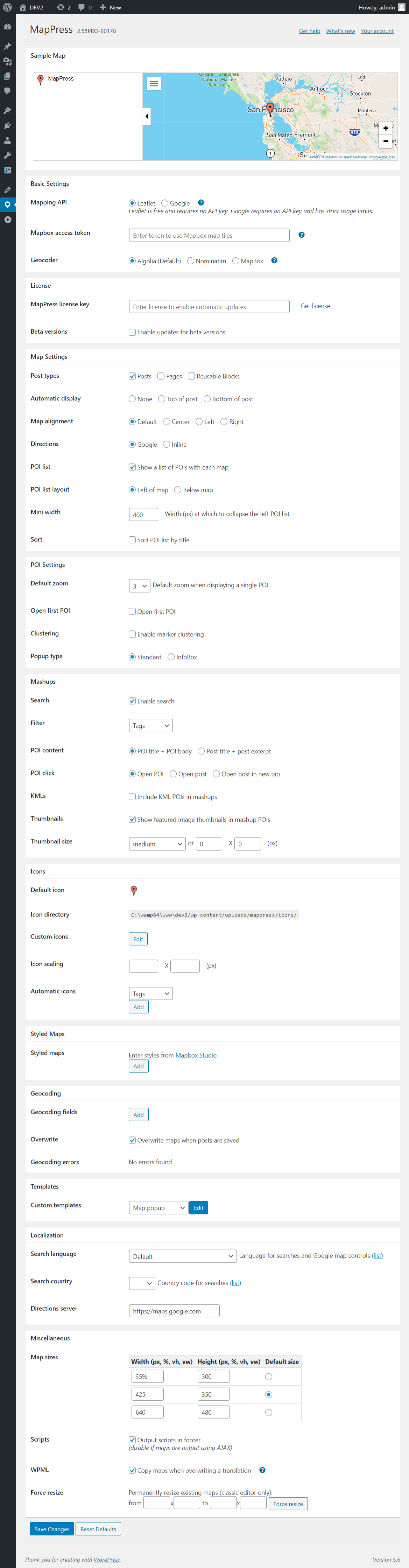
MapPress settings page
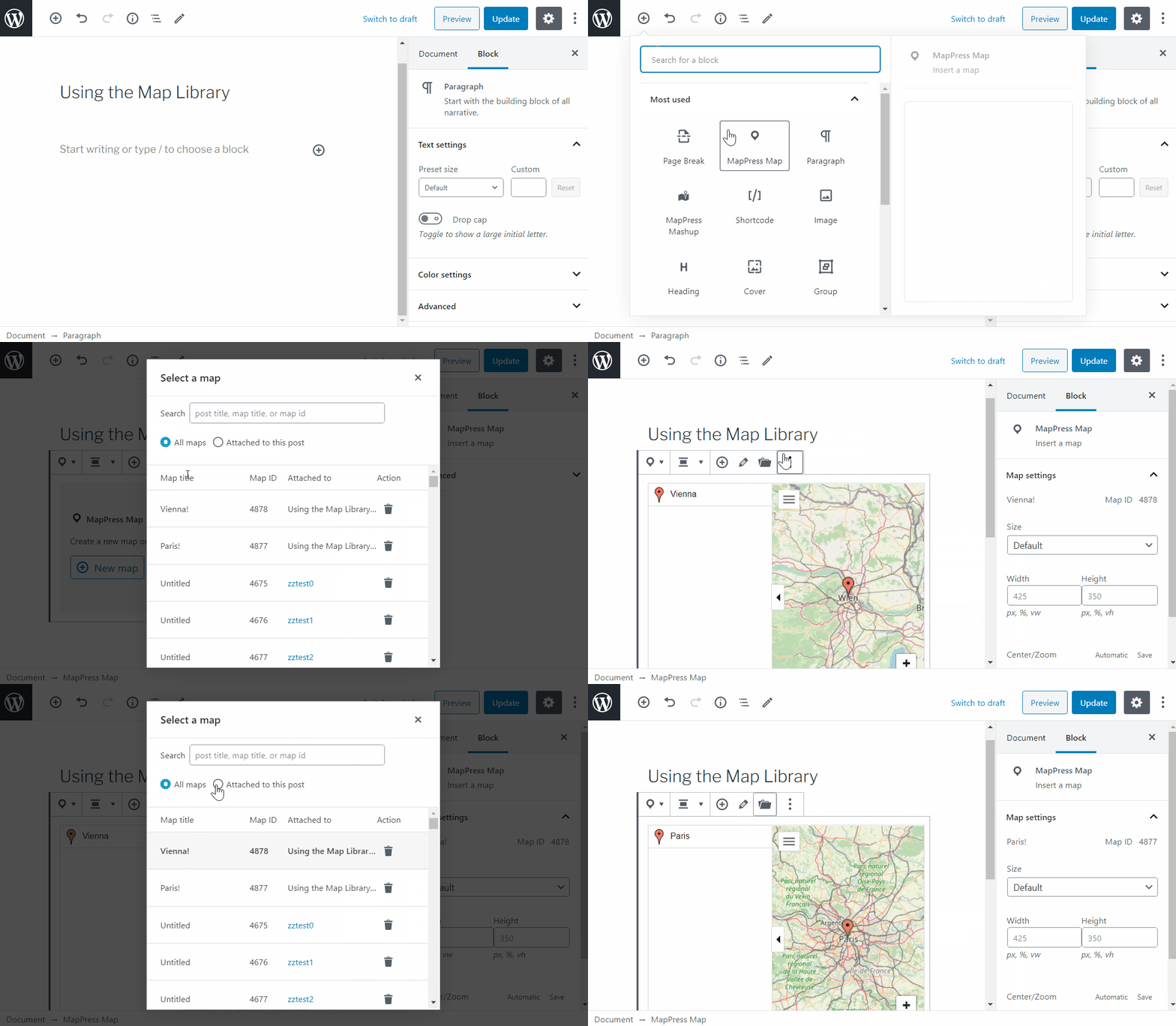
Map Library in Gutenberg

Creating a map
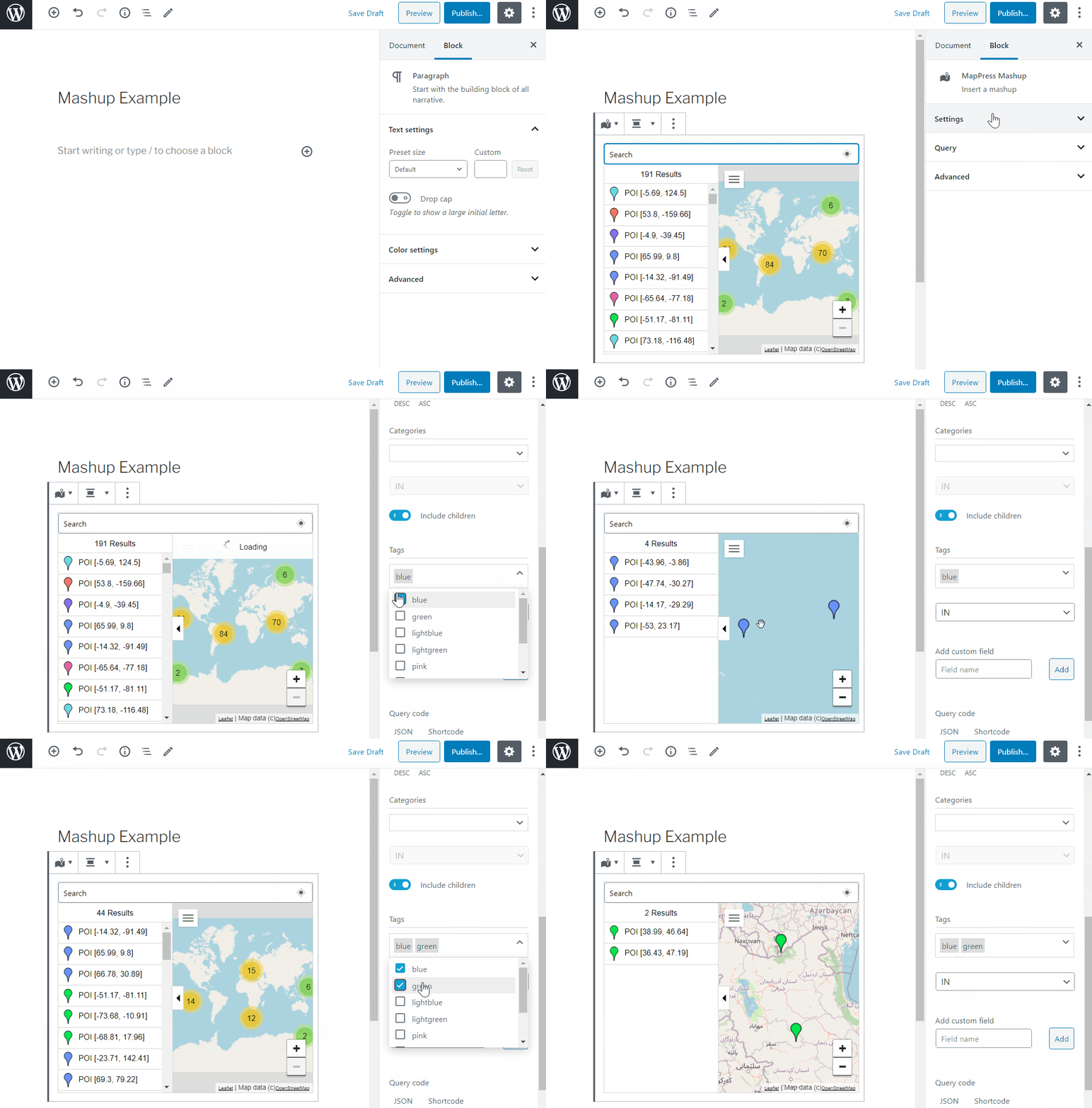
Creating a mashup

Faq
No. The free version allows unlimited maps and markers — no cap, and no upgrade required. Pro adds more features, but it doesn’t raise any limit, because there isn’t one.
No. MapPress includes free Leaflet maps using OpenFreeMap, which serves OpenStreetMap data and needs no API key. A key is only required if you choose the Google Maps or Mapbox engines. You can switch engines at any time without losing your maps.
Leaflet maps using OpenFreeMap need no API key or billing setup, or choose Google Maps (which require an API key). Your maps are stored independently of the engine, so you can switch at any time without losing data.
Yes. MapPress includes a Gutenberg map block and full classic editor support, and you can place maps anywhere using a shortcode or directly in PHP.
The free Leaflet maps using OpenFreeMap set no cookies and do not track your visitors, so they require no cookie consent. Google Maps and Mapbox may track users, but if you use the Complianz consent plugin, MapPress integrates with it automatically to block those services until a visitor consents.
Yes. If a map stops loading after enabling aggressive JavaScript optimization, exclude the MapPress scripts from minification or deferral.
Yes. MapPress is WPML compatible, including translation of map and marker content.
Please contact us. We respond promptly and credit reporters in the changelog.
Reviews
Brilliant map plugin
By 
MapPress is invaluable for my blog when I want to highlight where I took photos. It's easy to use, lightweight, and does what I need. There are extra features I don't use too!
Just awesome
By 
I am only using the free version (at the moment), but this plugin is amazing. There is so much flexibility, and the ease of getting markers exactly where they should be is brilliant.
It is very intuitive and easy to use, and the support is fantastic.
Currently, I have three separate maps - two of which have single locations to indicate the venue for a meeting. The third is more complex, with numerous locations across the country for people to search.
Thoroughly recommend this plugin to anyone who needs maps on their site.
Best Map Plugin
By 
Great service
Simple and effective
By 
I used it to place the Clubs of an organization in Italy. Easy to use and configure!
superb tech support
By 
I had a simple problem due only to my browser cache - the plugin itself was working fine.
I had to clean my cache and that's all.
Chris helped me to fix the problem anyway, quick & great!
Thanks
Easy-to-use plugin with extremely responsive support.
By 
I am currently using Mappress for a client project, and it was the best solution I could find to meet all of my client's needs. Most importantly, the support from the Mappress team has been stellar and has saved me many hours of frustration.
Easy to Use Plugin to Add Map
By 
It is very easy to use with options to customize it further, very recommended
Good Plugin, good support
By 
The Plugin provides a map and custom fields. The support is helpful.
Thanks
Error after the update.
By 
Version: 2.88 causing error after the update.
WordPress message:
"... WordPress caught an error with one of your plugins, MapPress Google Maps and Leaflet Maps..."
Had to disable and remove the plugin.
Perfect plugin
By 
I spent quiet a lot of time to look for a good maps plugin. I tried 5 or 6 diferent. I found MapPress Maps for WordPress the best. In its free version, you can do a lot. And if you want more, you can have a premium version with many more options. When I tried to use this plugin, I found an issue. I wrote to the founder, Chris. He answered me diferent times until he found THE solution. He was not forced to do it because I am a free user. But he did. And I do thank him. If you are looking for a great maps solutions, here is the best plugin.
Changelog
2.97.14
- Fixed: early return prevents map display
2.97.13
- Fixed: prevent other plugins from displaying notice dismissal code
2.97.12
- Fixed: bug causing settings page reload
- Fixed: mashup block queries not updating properly
2.97.11
- Changed: multiple compatibility updates for the WP 7.1 iframed editor
- Changed: you can now choose which post types display a ‘map’ colum independently from the geocoding settings
- Changed: minimum WP version is now 6.3
- Fixed: sidebar preview for poi list and filters was not working in Gutenberg editor
2.97.10
- Changed: better labeling of the search box for the map editor
- Fixed: Google removed the drawing manager, breaking MapPress functionality
2.97.9
- Changed: better handling for ‘excerpt_more’ filters for mashup POIs
- Changed: improvements to the Pro updater, to prevent accidentally overwriting Pro with free version
- Changed: POI ‘more’ links now open outside iframe for iframed maps
2.97.8
- Added: improve terms fetching for mashup block, applies to sites with large numbers of taxonomies and hosts limiting connections
- Added: map-level POI list toggle
- Changed: update icon sizing to work with newer Leaflet stylesheet
- Fixed: mashup block lines/search buttons weren’t responding
2.97.7
- Added: dark theme for OFM maps
- Changed: improved reminders
- Changed: better tile service setup
- Changed: better prevention for Siteground Optimizer minification problems
- Fixed: ‘search’ and ‘filter’ buttons were not working for Gutenberg mashup block
- Fixed: mashup block taxonomies were read with ‘edit’ context, should be ‘view’
- Fixed: prevent reading draft/deleted posts in popups
- Fixed: try to implement workaround for hosts limiting connections, which intermittently prevents taxonomy reads
2.97.6
- Added: check that webGL is active
- Added: prevent optimizers like Siteground from re-minifying mablibre
2.97.5
- Changed: limit query and filter nonce check for sites with caching plugins
2.97.4
- Added: escape in iframe
2.97.3
- Fixed: change in 2.97 caused mashup shortcodes to show all posts
- Changed: improved hierarchical taxonomy handling in filters
2.97.2
- Fixed: invalid Nominatim geocoder with Google engine
- Fixed: wp-cli error prevented translation file generation
- Thanks to https://shovon.bd for security assistance in 2.97
2.97.1
- Bump version
2.97
- Added: compatibility with WP7
- Changed: required minimum version is now WordPress 6.2
- Changed: maplibre scripts are now bundled with plugin
- Changed: more restrictive permissions for API calls
- Fixed: changes to support pooled SQL connections
- Fixed: add missing ob_start
2.96.6
- Fixed: better compatibility with Complianz when using ofm
2.96.5
- Fixed: improved click/drag handling inside Gutenberg editor’s new content iframe
2.96.4
- Fixed: clicking on map not closing popup with openfreemap
- Fixed: latest Leaflet defaults autoPanOnFocus true
2.96.3
- Fixed: error with filter for empty taxonomy (with no terms)
2.96.2
- Fixed: version error
2.96
- Added: OpenFreeMap (OFM) GL maps, a better looking default instead of OpenStreetMaps (OSM) raster tiles
- Added: for mashups, empty filters now default to only the ‘include’ terms or post types
- Added: dropdown slug search for filters
- Changed: new styled maps component, including support for OFM
- Fixed: selecting specific post types was not possible in post types filter
- Fixed: resetting post types filter uses only default post types
2.95.12
- Changed: save options when tileservice changes
- Changed: allow ‘lon’ as synonym for ‘lng’ when importing
- Fixed: ‘post types’ filter not displaying checkboxes correctly
- Fixed: try to give better errors on import invalid JSON
2.95.11
- Fixed: fatal error in wpml module
2.95.10
- Fixed: template editor not saving properly
2.95.9
- Fixed: lines attribute not saving in Gutenberg block
- Fixed: string saving with WPML
2.95.8
- Fixed: error in filters dropdown from 2.95.7
2.95.7
- Added: travel lines can now be toggled on/off in the map editor
- Added: Google Material Symbols font for icon editor
- Added: new WPML integration to allow map POI translation
- Changed: remove top margin from ‘directions’ wrapper div
- Fixed: error when displaying filters but custom CSS has hidden the header
- Fixed: scrollbars not restored closing icon editor with escape key
2.95.6
- Added: new setting for ‘directions’ text for easier change/translation
- Fixed: error when creating new Mapbox style
- Fixed: Nominatim geocoder was not honoring lat, lng entry
- Fixed: default google directions to https
- Changed: removed google directions server URL setting
- Changed: adjustments to POI list CSS for padding
2.95.5
- Changed: improved merging of queries when using ACF location fields
- Fixed: Google drawing manager displayed twice on the map
- Fixed: better error highlighting in settings page
- Fixed: updated importer to treat input/radio/select fields as strings, checkboxes as arrays
- Fixed: additional bug fixes for template handling
2.95.4
- Added: better error handling for empty/missing template files
- Changed: move ‘mapp_filters_get’ query parameter to build version
- Fixed: scrollbars not restored after dialog box is closed
2.95.3
- Added: JS event on map ready. See documentation for details.
- Changed: ‘mapp_filters_get’ updated to include map query as parameter
2.95.2
- Added: support Places API (New) to stop Google warnings. If you would like to use this API, enable it in the cloud console.
2.95.1
- Fixed: single-map filters not working
2.95
- Added: corrected line colors in Leaflet KMLs
- Added: mashup filter checkboxes now default from initial query values
- Added: filter ‘mappress_filter_values’