MapSamurai Lite

MapSamurai Lite
Description
MapSamurai Lite gives you everything you need to build custom maps and store locators for any WordPress site in minutes — no coding required!
Designed for speed, simplicity, and flexibility, MapSamurai Lite includes:
– ✅ Easily build the perfect maps for your project, No coding required
– ✅ Create an unlimited amount of custom maps and locations
– ✅ Cutting edge search and filters to easily find locations
– ✅ Add location details, photos, and video to every location
– ✅ Fully responsive: Displays perfectly on all devices
– ✅ Easily place your map anywhere on your site via shortcode
No license key required. No intrusive upsells. Just powerful maps, made simple.
📚 View full documentation
📚 View Our Demo documentation
External Services
This plugin connects to external third-party services to provide map and video functionality. Below is a detailed disclosure of what services are used, what data is sent, and when:
OpenStreetMap Tile Servers
What it is: Map tiles used to render the interactive maps displayed on your site.
When data is sent: Every time a visitor views a page containing a map shortcode, tile requests are made to load the map imagery.
Data sent: The plugin sends map viewport coordinates (latitude, longitude, zoom level) to retrieve the appropriate map tiles. No personal user data is transmitted.
Service Provider: OpenStreetMap Foundation
Terms of Service: https://wiki.osmfoundation.org/wiki/Terms_of_Use
Privacy Policy: https://wiki.osmfoundation.org/wiki/Privacy_Policy
Alternative tile providers (ArcGIS, CARTO) may be available depending on your map tileset selection. All follow similar data transmission patterns.
Vimeo API (Optional)
What it is: Video thumbnail and metadata retrieval service.
When data is sent: Only when you (the site administrator) add a Vimeo video URL to a map location. The plugin fetches video thumbnails and metadata to display in location popups.
Data sent: Only the Vimeo video ID extracted from the URL you provide. No visitor or personal data is sent.
Caching: Thumbnail data is cached for 30 days to minimize external requests.
Service Provider: Vimeo, Inc.
Terms of Service: https://vimeo.com/terms
Privacy Policy: https://vimeo.com/privacy
YouTube Embeds (Optional)
What it is: Video embed functionality for location popups.
When data is sent: Only when a visitor opens a location popup that includes a YouTube video you’ve added.
Data sent: Standard YouTube embed player data. The plugin does not make API calls directly; it only embeds YouTube’s iframe player.
Service Provider: Google/YouTube
Terms of Service: https://www.youtube.com/static?template=terms
Privacy Policy: https://policies.google.com/privacy
Note: YouTube’s privacy and data collection policies apply to embedded videos. Users visiting pages with YouTube embeds may have cookies set by YouTube according to their privacy policy.
Source Code
This plugin includes compiled/minified JavaScript files. The source code for these files is included in the plugin and documented below:
Compiled JavaScript Files
Frontend Bundle (assets/js/dist/bundle.js):
– Source location: /assets/js/src/public/ directory
– Build tool: Webpack (bundler for modular JavaScript)
– Contains: Map initialization, popup handling, location list, pin management
– Source files:
– index.js – Main entry point
– map.js – Map controller
– map-services/leaflet-osm-map-service.js – Leaflet integration
– location-list.js – Interactive location list
– pin.js – Map pin/marker handling
– utils.js – Utility functions
Admin Bundle (assets/js/dist/bundle-admin.js):
– Source location: /assets/js/src/admin/ directory
– Build tool: Webpack
– Contains: Admin interface scripts
– Note: Admin functionality is also handled by separate unbundled files in /assets/js/
Third-Party Libraries
All third-party libraries are included in their original form with proper attribution:
- Leaflet.js – https://leafletjs.com/ (BSD-2-Clause License)
- Slick Carousel v1.8.1 – https://github.com/kenwheeler/slick (MIT License)
- Owl Carousel v2.3.4 – https://github.com/OwlCarousel2/OwlCarousel2 (MIT License)
- jQuery Easing v1.3 – https://github.com/gdsmith/jquery.easing (BSD License)
All libraries are used under their respective open-source licenses.
Credits
Map rendering powered by Leaflet.js
Installation
- Upload the plugin folder to
/wp-content/plugins/
Alternatively, you can upload the plugin’s ZIP file via Plugins > Add Plugin in your WordPress admin panel. - After installing the plugin, activate the plugin by clicking the “Activate” button, and that’s it! You’re ready to setup your map
- Navigate to MapSamurai Lite > Maps to set up your first map
- Navigate to MapSamurai Lite > Map Locations to start creating locations
To display your map on the frontend, use the shortcode generated at the top of your Map Settings page. It will look like this: [mapsamurai_map map_id="123" height="600" width="600"] (you can edit the height and width as needed). Simply copy and paste that shortcode anywhere you’d like your map to appear throughout your site.
All steps are covered in detail in our documentation
Screenshots
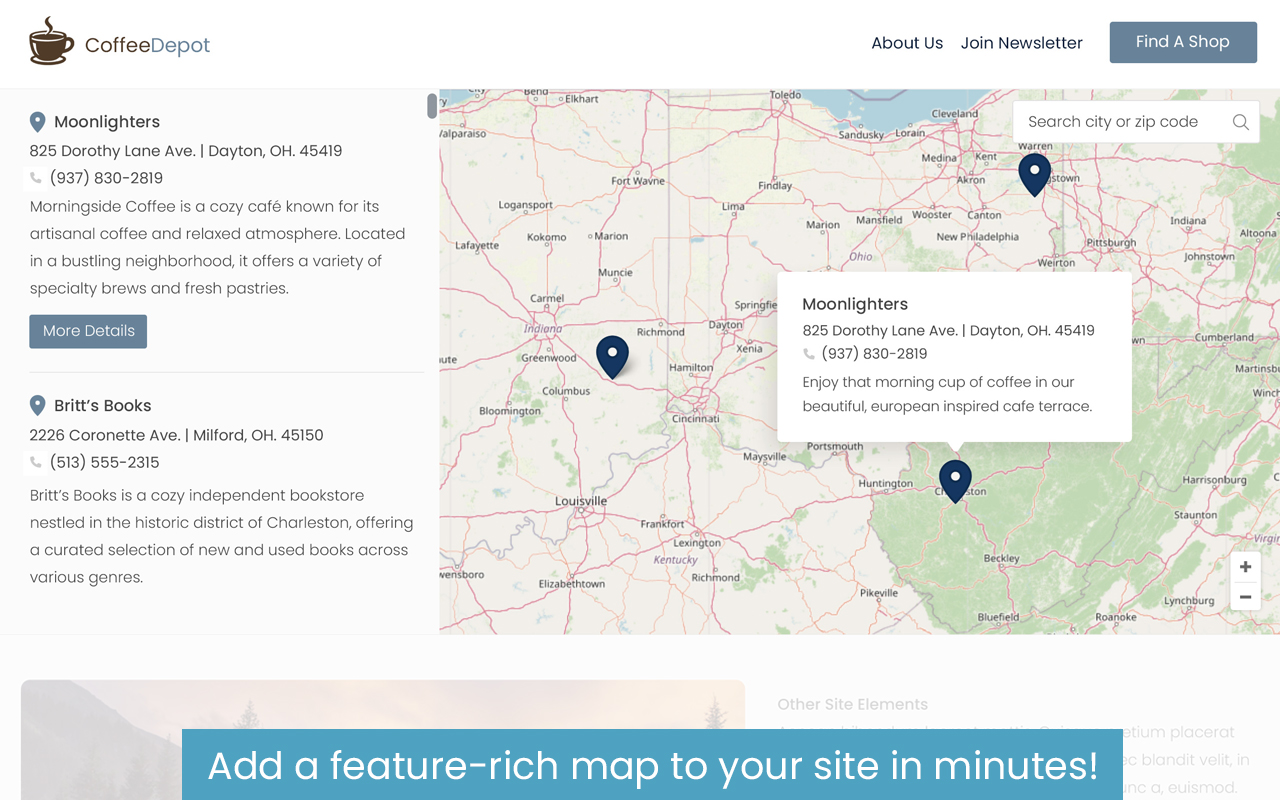
An example of a MapSamurai Lite frontend map

Add a beautiful gallery and details to every location

Quickly add and customize locations as needed
Faq
Yes! MapSamurai Lite supports unlimited maps across your site, so build as many as you like! Upgrade to Pro for unlimited maps, AI generated content, and a ton more features.
You can add as many locations as you like to any of your maps.
Yes! All locations and settings created in the Lite version will automatically be available if you choose to upgrade.
Reviews
Changelog
1.0.0
- Initial release of MapSamurai Lite