MapSVG – Vector maps, Image maps, Google Maps
MapSVG – Vector maps, Image maps, Google Maps
Description
MapSVG is a powerful WordPress mapping plugin that allows you to create interactive vector maps, floor plans, and image maps. Perfect for real estate websites, store locators, seating charts, and more.
Key Features (free version)
- SVG Vector Maps (100+ maps are included in the plugin)
- Custom SVG files support (upload your own SVG files and turn them into interactive maps)
- Google Maps
- Custom overlays on Google Maps
- Image Maps
- Floor Plans
- Store Locator (search by address)
- Markers (add markers by entering an address)
- Connect markers to clickable areas on the map (show all locations connected to a specific area in the popover window)
- Map areas and markers working as links
- Custom Tooltips, Popovers, Large scrollable modals
- Database Integration
- Custom Fields
- Filters & Search
- REST API Support
MapSVG vs other mapping plugin
Below is the comparison of the free version of MapSVG to other popular free mapping plugins on WordPress.org.
Unlimited maps
- MapSVG: Unlimited number of maps
- Others: 1 map
Unlimited locations
- MapSVG: Unlimited number of markers
- Others: Limited number of markers
Map regions to locations connection
- MapSVG: Connect markers to map clickable areas. Every area of the map can have one or many markers connected to it. Show the list of connected locations in the popover window.
- Others: No connection between markers and map clickable areas
Internal Database
- MapSVG: Custom database, with custom fields support
- Others: You can only use a small set of pre-defined fields, such as title, description and address.
Views
- MapSVG: Show custom fields, as formatted HTML, or show the fully rendered WP Post content – in the Tooltips / Popovers (unique feature of MapSVG)
- Others: You can only show the coordinates of the marker in a small tooltip
Labels
- MapSVG: Show marker labels (name or address of the location) and region labels (names of countries, states, etc.)
- Others: No labels
MapSVG Premium Features
- Directory: Display a list of interactive items alongside the map.
- Custom Overlays: Add custom overlays on Google Maps.
- Advanced Filters: Enable fulltext search, search by category, zip code, by date.
- Country-Specific Address Search: Restrict address searches by country.
- CSV Data Import: Load data seamlessly from CSV files.
- Image Gallery Module: Showcase images in a lightbox format.
- Parent/Child Maps: Open an additional map upon clicking a region.
- Marker Clustering: Group large amount of markers into clusters.
- Data Source: WordPressCPT: Use WordPress CPTs as a data source.
- Data Source: Custom API: Use JSON response from your own API as a data source.
- Code editor: CSS: Edit CSS directly in the map editor, customize the look and feel of the map.
- Code editor: Handlebars Templates: Get full control over the HTML of the popovers / tooltips / details view.
- Code editor: JavaScript: Use built-in JavaScript editor for event handling, middleware customization, modify data before it is displayed on the map.
- Custom Marker Images: Upload your own marker images.
- Chat Authorization: Store the chat history. Get access to the same chats online any time on mapsvg.com/dashboard.
- Priority Support: Faster response time in the chat.
- Purchase Code for Updates: Enable automatic updates from our servers with the purchase code for more frequent updates.
- One-Click wp-admin Access: Grant support agents quick access to your wp-admin for faster issue resolution.
Installation
- Unzip the plugin folder
- Upload the plugin folder to
/wp-content/pluginsdirectory - Activate the plugin through the ‘Plugins’ menu in WordPress
- Click on the MapSVG menu item
- Get your Google Maps API keys and add them to the MapSVG settings
- Create your first map
- Activate support chat
- Ask our AI bot any questions
Screenshots
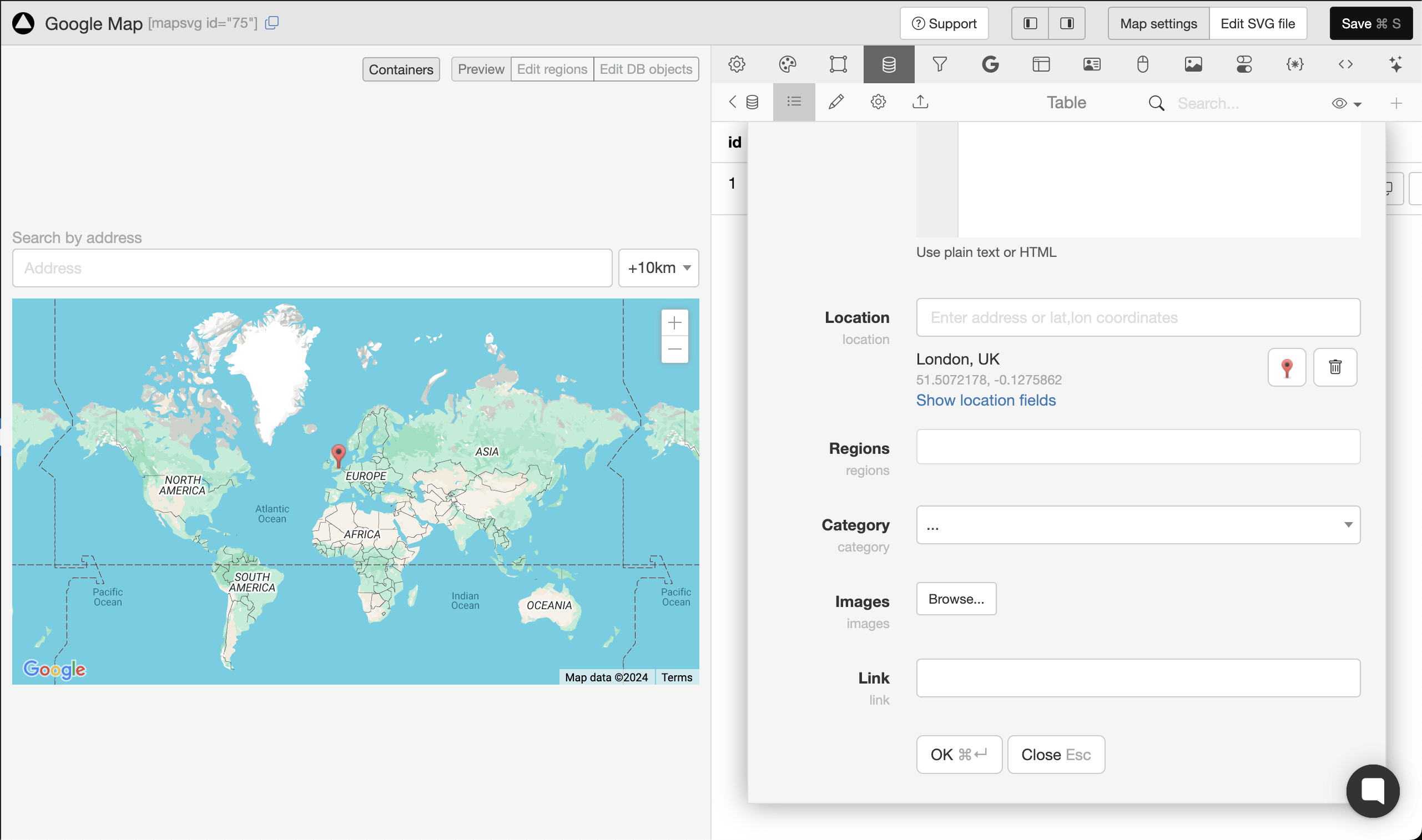
Adding a location
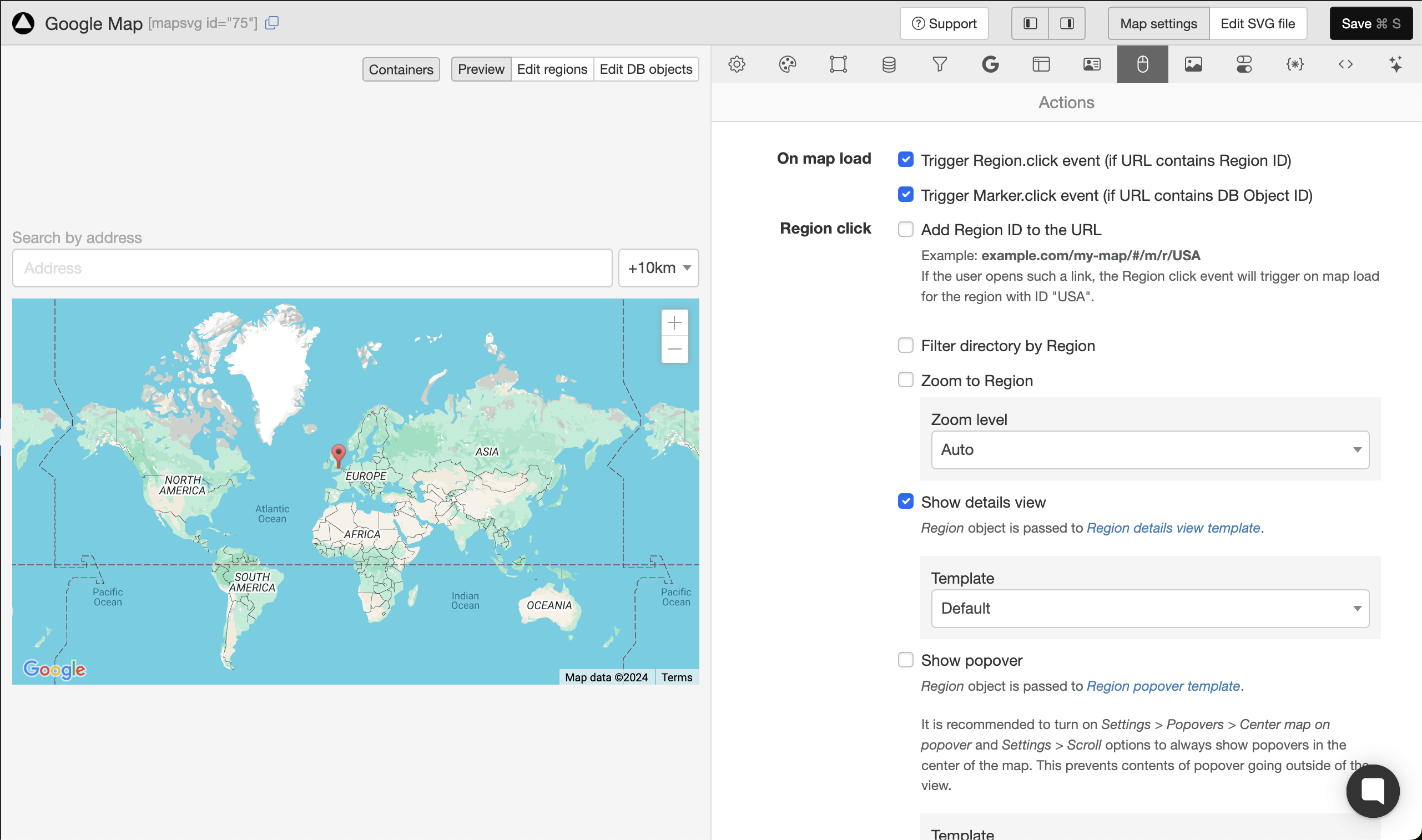
Setting up actions
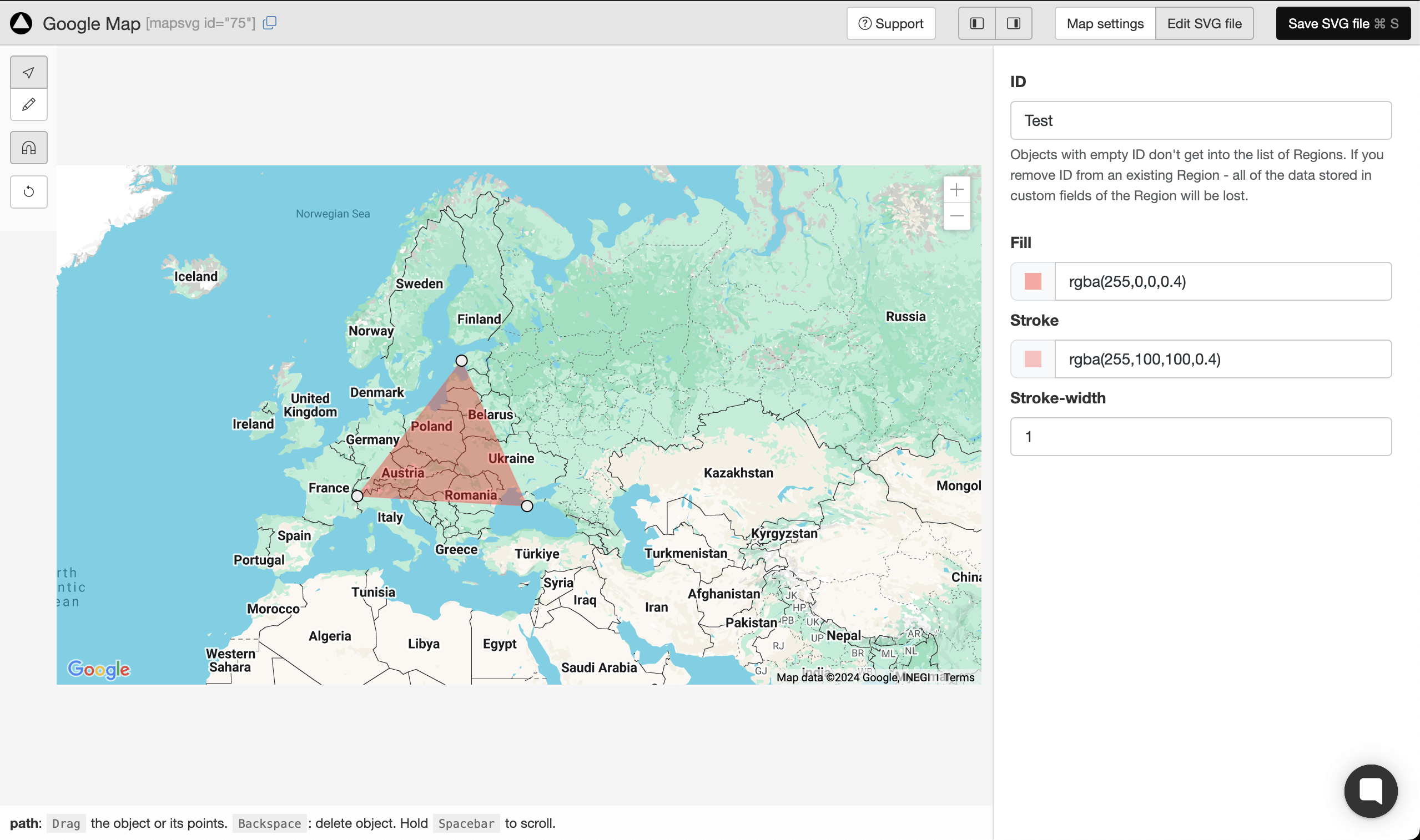
Drawing clickable areas on Google Maps
Faq
Yes, you can upload any SVG file and turn it into an interactive map.
MapSVG has 100+ SVG vector maps inlcuded in the plugin. Also, MapSVG can create an interactive map from any custom SVG file. But it can’t generate SVG maps from scratch and we don’t provide map drawing services. If you need a specific map of some country, you can try to search on Google “blank svg map of XYZ”, download the SVG file and then upload it to MapSVG.
Yes, you can do that.
Yes, you can do that – but only in the Premium version.
You can show a full rendered post content in the modal window on click on a map region. If you WP theme page template shows ACF fields – you can show them in a modal window. If you want to show just some of the ACF fields, it is possible to do – but only in the Premium version.
Yes, you can create store locator with search by address. But if you also need to show a clickable list of stores, you need to use MapSVG Premium.
You can – but only in the Premium version.
In the free version, you can use your WP theme’s CSS file to customize the looks of the map.
MapSVG Premium has an embedded CSV editor, which makes style editing more comfortable, because you can see the changes you make in real-time.
You can report security bugs through the Patchstack Vulnerability Disclosure Program. The Patchstack team helps validate, triage and handle any security vulnerabilities. Report a security vulnerability.
Reviews
Cannot Recommend
By 
I tried the free version before purchasing and nothing will save beyond a simple polygon. None of the default fields or custom fields will retain any information at all. Between that, the interface being BEYOND confusing and the poor documentation, I would not recommend this plugin. It's honestly one of the worst plugins I've ever tried.
Excellent plugin
By 
This plugin is a very good one whether you choose the Lite version or the complete one. For my needs, I chose the complete version which allows to customize a lot of things, among them the templates, with which you can give detailed information about a clicked hotspot, as well as the CSS directives and javascript code. Any SVG image can be used, not only geographic maps.
You can work with hotspots created in your .svg file or create them directly with the plugin.
Excellent and reactive support too, even when it takes some time to resolve complex problems.
Many thanks to the MAPSVG team.
I strongly recommend !
Great plugin - immediate support
By 
I have used MAP SVG for years successfully and would recommend to others. Does what it says and I have also been impressed at their online support, who with the occasional error (on my end), they helped resolve immediately.
Excellent plugin and excellent support
By 
I've been using this plugin for several years for my websites. It's a very comprehensive plugin that allows you to do a lot of things. Beyond the plugin, the support team is great and really takes the time to find solutions when you're stuck. Thanks for that!
Excellent Plugin
By 
Excellent plugin but I thing Rich text option must include with it.
Nice mapping plugin
By 
Works well for basic tasks even in the free version
Good plugin
By 
Plugin very useful and support available if necessary to fix issues.
Versatile and customizable plugin
By 
I have been using this plugin to create customized maps for my website for over three years. It provides all the options I need, and the support team is always responsive and helpful with my requests. I highly recommend it!
Does not work on my side
By 
Looks good but does not work smooth. ImageMaps only in pro Version? There is no alert or info - by loading image it does stop and nothing works...
Sadly put another time with confusion about lack of docs and very poor usability and descriptions... To much functions with a lot of pitfalls.
Summary, very easy steps get stuck, image maps went wrong. For Coders only. We could not manage to setup a basic Store Locator Image, not Map. Poor Tutorials
Settings not saved
By 
Using Lite version. It saves data on random. I try to change region colors, click Save, I get success message, then I refresh the page where map is embeded, no updates. I refresh the settings page in admin - it returns to the old look. Sometimes it just restores all the Actions and Settings to default, and I need to do it all over again... They have AI support, which is useless, and in support chat they have option "Talk with human", when I click that I get message "No one is available". Bad plugin, bad support. I need to update colors via CSS.
Changelog
8.5.17
- Fixed: show popover on directory item click
8.5.15
- Fixed: filters not working properlywhen “search” button is added to the form
8.5.14
- Fix filters
8.5.11
- Fix tables creation on plugin activation
8.5.10
- Fix tables creation on plugin activation
- Fix viewBox reset to initial value
8.5.9
- Fix pagination
8.5.8
- Limit zoom levels to 1-22 (same as Google Maps)
8.5.7
- Fix reloading filters state on directory redraw
8.5.6
- Adjust Australia SVG map for better region label placement
8.5.29
- Fix mobile buttons list/map
8.5.30
- Fix zero header/footer size, when used with details view
8.5.31
- Fix invisible settings tabs in the Map Editor
- Fix the flush_rewrite_rules() execution issues
- Defer JS scripts loading
8.5.32
- Fix handle click on HTML links in SVG files
- Fix duplicate map feature
- Fix on mobile devices, on directory item click – properly fit markers on google maps
- Fix keep text search field state on database fetch, when filters are located in directory
8.5.34
- Change “Upgrade to Pro” links to mapsvg.com/pricing
8.5.35
- Add “mapsvg_format_post_data” filter
- Improve upgrading scripts from old MapSVG versions
- Fix flush_rewrite_rules issues
8.5.36
- Fix shortcode rendering in the templates
8.5.37
- Fix plugin activation issues
8.5.38
- Fix clicking on links in SVG
- Fix broken options in 8.5.37
8.5.39
- Fix filter tags (show clickable filter tags when filters are hidden)
- Fix search by regions
8.5.40
- Fix “select” field editing
- Fix shortcode rending function (for mapsvg templates)
8.5.41
- Fix Handlebars WP shortcode rendering
8.5.42
- Fix clustering
8.6.0
- (Pro only) Filters for WP CPT
- (Pro only) Dynamic markers by WP CPT field values
8.6.3
- Fix map.destroy() method
8.6.4
- Fix loading of different kinds of data sources
8.6.5
- Fixed XSS vulnerability
- Fixed SVG file copy vulnerability
8.6.6
- Fixed post title being rendered as plain text (in popovers / details)
8.6.7
- Added SVG file sanitization for non-admins
8.6.8
- Minor bugfix
8.6.9
- Minor bugfix for migrations
8.6.10
- Fixed security vulnerabilities related to unauthorized shortcode rendering in templates
8.6.11
- Fixed unavailable filtering by ACF fields
- Fixed handling of post type names containing dashes
8.6.12
- Fixed a few vulnerabilities
8.6.13
- Fixed: Duplicating a map now correctly updates the map ID in the “CSS” tab, preventing conflicts with the original map.
8.6.14
- Fixed: saving settings on the main screen
- Fixed: maps not working with disabled permalinks
8.6.15
- Fixed: filter by region
8.7.0
- Feature: dynamic Region statuses
- Fixed: incorrect container height issues in the map editor
8.7.1
- Fixed: deleting a post did not delete marker from the map
- Fixed: scrolling of css/js/templates code editors on Firefox
- Fixed: map sizing issues with some WP themes
8.7.2
- Fixed: “Show another map” feature functionality
- Fixed: WP Rocket and LiteSpeed cache plugins were breaking MapSVG code. Added JavaScript files to exclusions in those plugins’ settings.
- Fixed: premature jQuery call that was breaking the map when jQuery wasn’t immediately available
8.7.3
- Fixed: directory rendering issues with enabled categories
8.7.4
- Fixed: security issue, checking uploaded file type
8.7.5
- Fixed: fixed issues of the “show another map in the same container” feature
8.7.8
- Fixed: scroll on mobile devices
- Fixed: null region titles
8.7.9
- Fixed: visibility toggles for SVG groups
- Fixed: shortcode rendering in templates
8.7.10
- Fixed: lite version fatal error
8.7.11
- Fixed: buttons that control enabled/disabled state of the region status options
- Fixed: mobile map scroll issues
- Fixed: WP CPT connection, Gutenberg/Classic Editor scripts loading
8.7.12
- Fixed: marker drag & drop
8.7.13
- Fixed: prevent setting region statuses before the data has loaded from the server
8.7.14
- Fixed: SVG file reload failed when regions had no Title field.
8.7.15
- Fixed: prevent loading of Google Maps API for incompatible (uncalibrated) maps
- Fixed: user and access token creation (for support)
- Fixed: Clockwork issues in Laravel environment
- Fixed: filter tags were not loading when no filterSchema was provided
- Fixed: passing correct data to custom event handlers on mobile devices
8.7.16
- Fixed: duplicating maps created in older version of mapsvg was triggering an error about auto_increment
- Fixed: improved world.svg map calibration
8.7.17
- Fixed: unserialized ACF field values in filter options
8.7.18
- Fixed: filtering by ACF select and multiselect fields
- Fixed: added compatibility with PHP 7.4
8.7.19
- Fixed: filtering by ACF using checkboxes fields
- Fixed: migration issues
8.7.20
- Fixed: zoom to a cluster did not always reveal its markers
8.7.21
- Fixed: empty directory in duplicated maps
- Fixed: “deprecated” error in logs
8.7.22
- Feature: Maximum zoom level for clustering
- Fixed: blurred map on zoom in Safari
- Fixed: zoom to cluster on Google Maps
8.7.23
- Fixed: XSS vulnerability in shortcode attributes