MapVisiblr – Sections visibility in Elementor for MapGeo
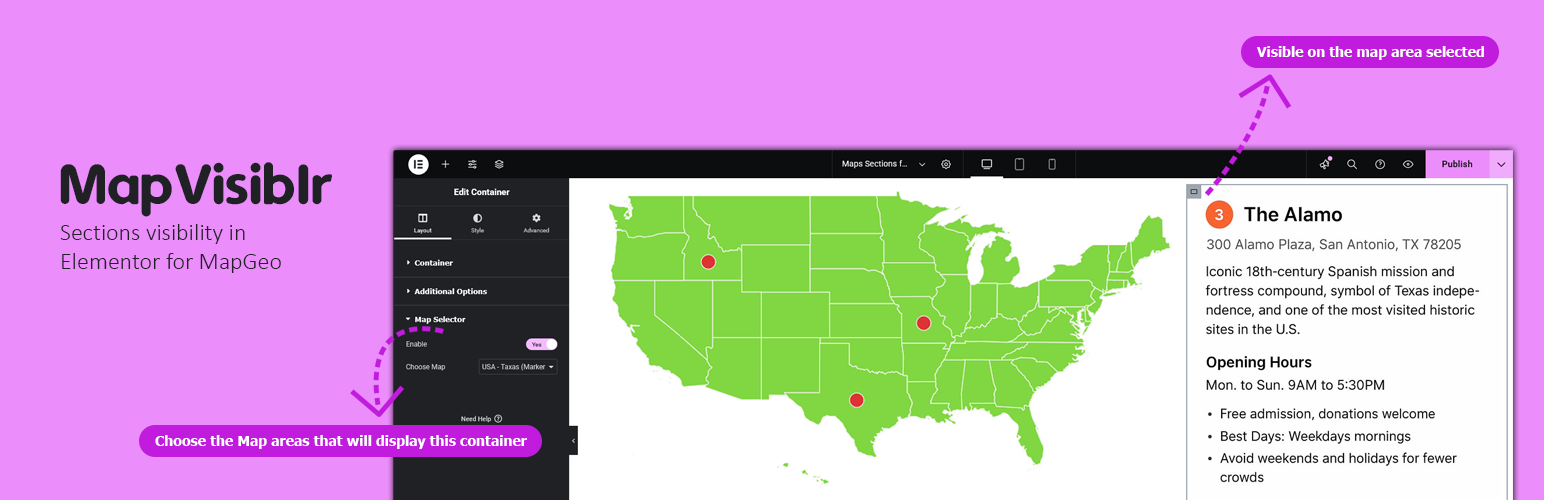
MapVisiblr – Sections visibility in Elementor for MapGeo
Description
MapVisiblr is an extension plugin for the MapGeo WordPress plugin. It allows you to show or hide Elementor containers based on the MapGeo map area selected. This provides dynamic control over your page layout directly from the map interaction.
Key Features:
– Show or hide Elementor containers when a MapGeo map area is selected.
– Simple integration inside Elementor editor.
– Works with multiple containers on the same page.
– Lightweight and fully compatible with Elementor and MapGeo.
Elementor Container Settings
When editing a container in Elementor, you will see additional controls:
– Enable MapGeo Selector – Activates conditional visibility for the container.
– Select Map Area(s) – Choose the MapGeo areas that will display this container.
Support
For support, visit the Pluginable support page or contact us via our official support channels.
Installation
- Download the plugin from the WordPress plugin repository or from the Pluginable.dev website.
- Log in to your WordPress admin panel.
- Navigate to Plugins > Add New.
- Click Upload Plugin and select the plugin ZIP file.
- Click Install Now and then Activate.
- Once activated, Open your page in Elementor editor.
- Select a container and enable MapGeo Section Visibility from the container settings.
- Assign the container to one or more MapGeo areas.
- Update the page and preview.
Screenshots

Faq
No, it requires the MapGeo plugin to function.
Inside Elementor editor, in the container settings.
Reviews
A real time saver plugin
By 
Amazing plugin!
Effectively controls Elementor containers with MapGeo maps.
Thanks for the support.
Changelog
1.0.0
- Initial release of MapVisiblr – Sections visibility in Elementor for MapGeo.