Martial Arts Club Manager

Martial Arts Club Manager
Description
Martial Arts Club Manager is a comprehensive WordPress plugin designed specifically for martial arts club owners, dojo managers, and gym operators who need a professional system to manage their students, classes, and operations.
Who Is This Plugin For?
- Karate dojos and martial arts schools
- Taekwondo, Judo, Jiu-Jitsu, and other martial arts clubs
- Fitness centers offering martial arts classes
- Sports clubs needing member and class management
- Any organization requiring attendance tracking and membership management
Free Features
Member Management
* Add unlimited members to user accounts
* Detailed member profiles with photo, belt color, weight, height
* Basic membership type management
* Member status management (active/inactive)
* Date of birth and personal information tracking
* Export member data to CSV
Trial Class Booking
* Public booking form for prospective students
* Admin notification emails with applicant details
* Customizable success messages
* Manage trial bookings from admin panel
* Convert trial students to members easily
WooCommerce Integration
* Associate members with product purchases
* Mark products as “dojo products” requiring member selection
* Display member information in cart and checkout
* Seamless integration with WooCommerce workflows
Admin Dashboard (Basic)
* Member list with sorting and filtering
* Belt distribution analytics
* Membership type breakdown
* Recent members view
* Recent trial bookings
* Settings and customization
Frontend Member Area
* View and edit member profiles
* Upload member photos
* Manage personal information
* Access member cards
Pro Features (Premium License)
Advanced Member Management
* Multi-club support for franchise operations
* Group assignments for organizing students
* License expiration tracking with automated reminders
* Belt grading history tracking
* Club and group filtering in member lists
Class Scheduling & Management 🔒
* Create and manage unlimited classes
* Schedule classes by day, time, and location
* Multiple location support
* Assign groups to specific classes
* Enroll members in classes
* Class capacity management
* Archive old classes while preserving history
Attendance Tracking 🔒
* Quick attendance recording for each class
* View and modify historical attendance records
* Comprehensive attendance reports
* Export attendance data to CSV
* Filter by class, member, or date range
* Attendance trends analytics (6 months)
Events Management 🔒
* Create and manage martial arts events (tournaments, seminars, gradings)
* Multiple member registration per event
* Registration closing dates
* Event status tracking (upcoming, ongoing, completed)
* Email notifications for registrations
* Export event registrations to CSV
* Archive events when complete
* Member event history tracking
Training Videos 🔒
* Organize training videos by belt level
* Filter videos by category, difficulty, and instructor
* Restrict access based on membership type
* Video thumbnail and description support
* YouTube and Vimeo integration
* Progress tracking
Communication Tools 🔒
* Send bulk emails to all members or filtered groups
* Filter recipients by membership type, group, or status
* Email preview before sending
* Customizable email templates with header/footer
* Button color customization for branded emails
Page Access Control 🔒
* Restrict pages to logged-in users only
* Set membership-level restrictions
* Create premium content areas
* Custom redirect rules
Enhanced Dashboard 🔒
* Active classes statistics
* Monthly attendance overview
* Upcoming events widget
* Expiring licenses alerts
* Attendance trends chart
* Advanced analytics
Requirements
This plugin requires WooCommerce to be installed and active. WooCommerce is used for handling product purchases and member associations during checkout.
Language Support
- Fully internationalized and translation-ready
- Text domain: martial-arts-club-manager
- POT file included for translators
Documentation
Comprehensive user documentation is included with the plugin and accessible from the admin dashboard.
Support
For support and questions, please visit the WordPress.org support forums for this plugin.
For bug reports, please include:
* WordPress version
* WooCommerce version
* PHP version
* Description of the issue
* Steps to reproduce
Credits
Martial Arts Club Manager is developed and maintained by madebyeli.com.
Privacy Policy
Martial Arts Club Manager stores member information in your WordPress database. This information includes:
* Member names and contact details
* Date of birth
* Belt colors and membership information
* Attendance records
* Event registrations
* Trial booking requests
All data is stored locally on your WordPress installation. The plugin does not send any data to external servers. You are responsible for complying with privacy laws (GDPR, CCPA, etc.) in your jurisdiction.
Third-Party Services
This plugin integrates with:
* WooCommerce (required) – For product purchases and checkout
* YouTube/Vimeo (optional) – For embedding training videos (if you use the training videos feature)
When using training videos with embedded YouTube or Vimeo content, those platforms may collect data according to their privacy policies. Please review YouTube and Vimeo privacy policies if you use this feature.
Installation
Automatic Installation
- Log in to your WordPress admin panel
- Go to Plugins > Add New
- Search for “Martial Arts Club Manager”
- Click “Install Now” and then “Activate”
- Important: Ensure WooCommerce is installed and active first
Manual Installation
- Download the plugin ZIP file
- Log in to your WordPress admin panel
- Go to Plugins > Add New > Upload Plugin
- Click “Choose File” and select the downloaded ZIP
- Click “Install Now” and then “Activate”
- Important: Ensure WooCommerce is installed and active first
After Activation
- Go to “Martial Arts Club” in the WordPress admin menu
- Visit Settings to configure your preferences
- Set up your first members under “Members”
- Create your class schedule under “Classes”
- Start tracking attendance!
Configuration Steps
Step 1: Configure Basic Settings
* Navigate to Martial Arts Club Settings
* Set your date and time formats
* Configure email settings (from name, from email)
* Customize button colors for frontend forms
Step 2: Set Up Configuration Entities
* Add Belt Colors (white, yellow, green, blue, brown, black, etc.)
* Add Locations where classes are held
* Add Groups to organize members (beginners, intermediate, advanced, etc.)
* Add Membership Types if using custom types beyond Premium/Basic
Step 3: Add Members
* Go to Martial Arts Club Members
* Click “Add Member”
* Fill in member details (name, DOB, belt color, group, etc.)
* Upload member photo (optional)
* Assign membership type
Step 4: Create Class Schedule
* Go to Martial Arts Club Classes
* Click “Add Class”
* Set class name, day, time, and location
* Assign which groups can attend
* Save the class
Step 5: Enroll Members in Classes
* Go to Martial Arts Club Classes
* Click “Enroll” for a specific class
* Select members to enroll using checkboxes
* Save enrollments
Step 6: Set Up WooCommerce Products (Optional)
* Go to Products in WooCommerce
* Edit any product that should require member association
* Check “Is Dojo Product” in the product data section
* When customers purchase, they’ll select which member the product is for
Screenshots
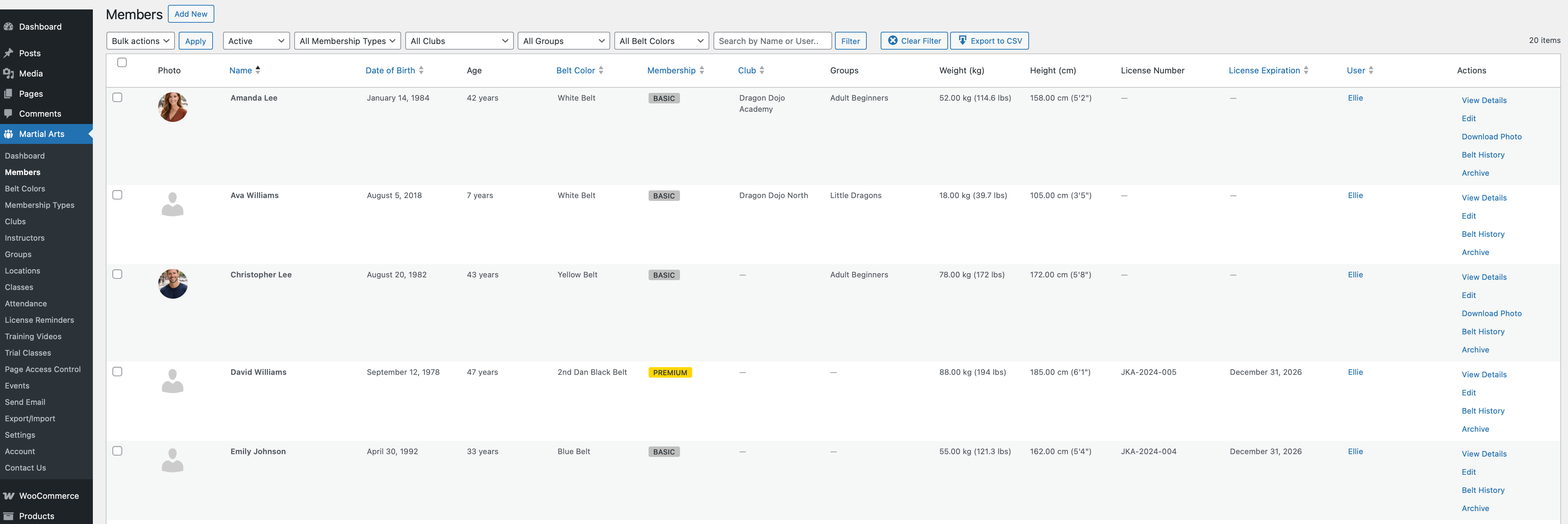
Member Management - Add and manage unlimited members with detailed profiles
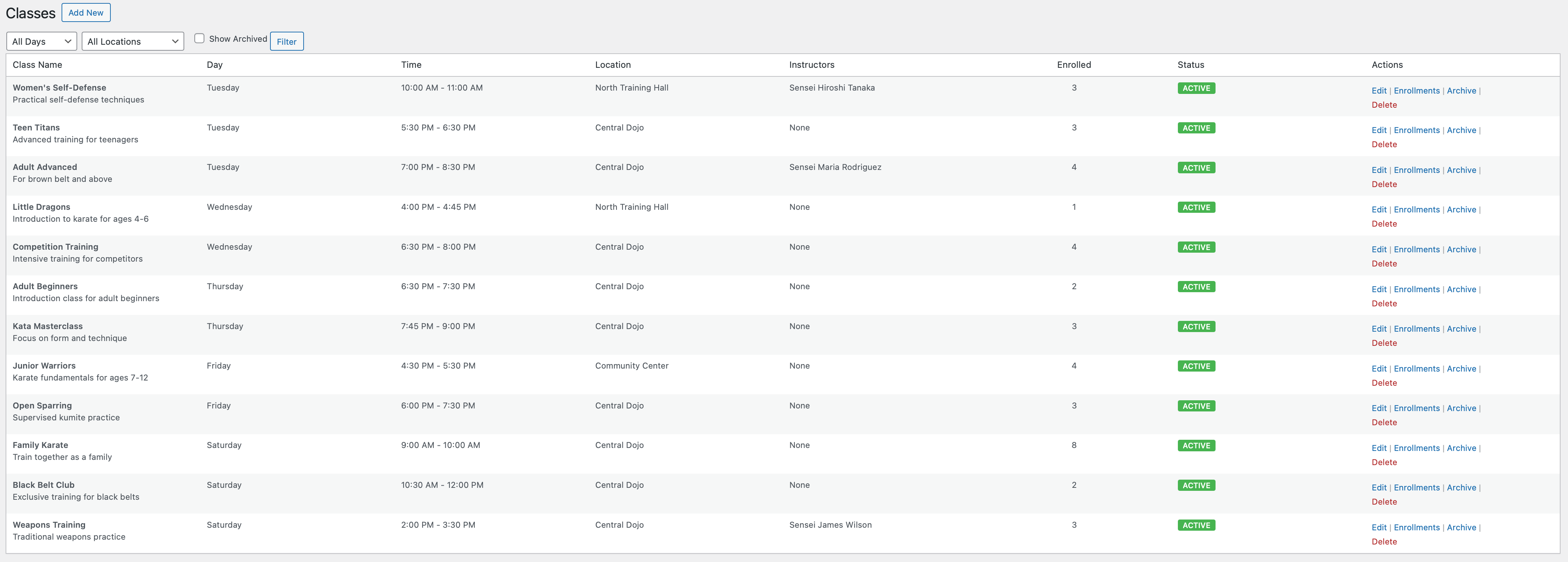
Class Schedule - Create and organize classes by day, time, and location
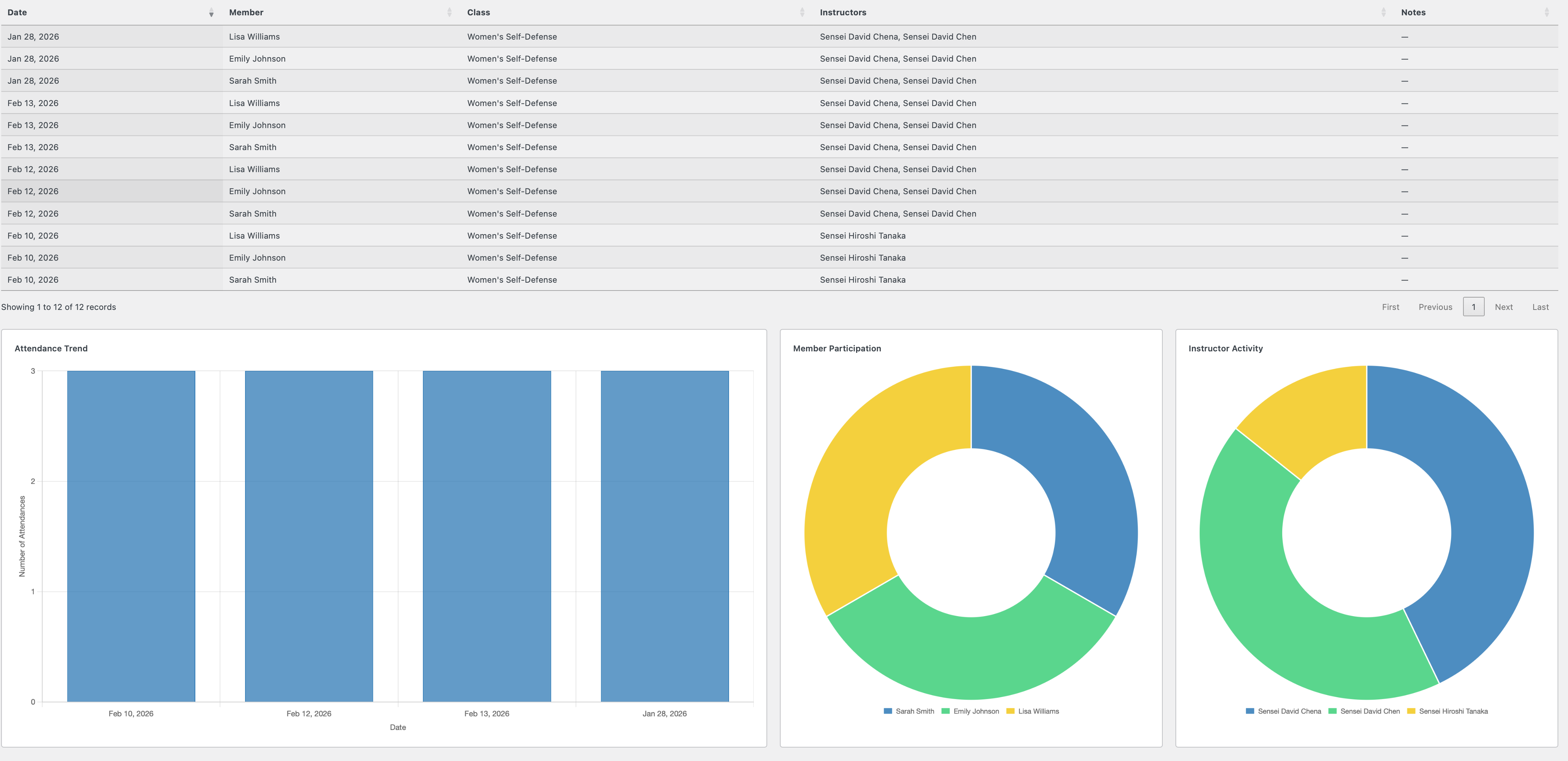
Attendance Tracking - Quick attendance recording interface
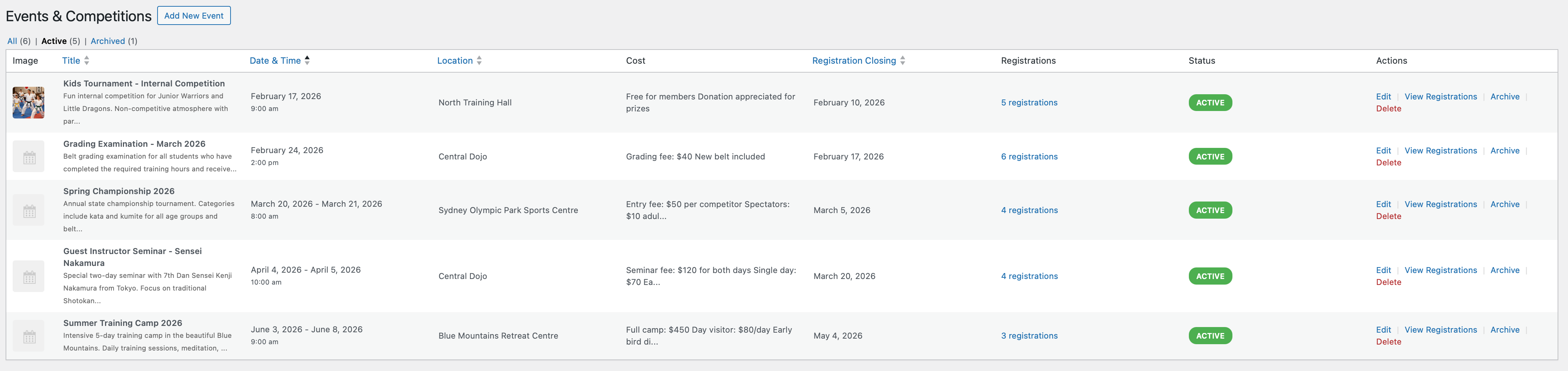
Events Management - Create tournaments, seminars, and special events
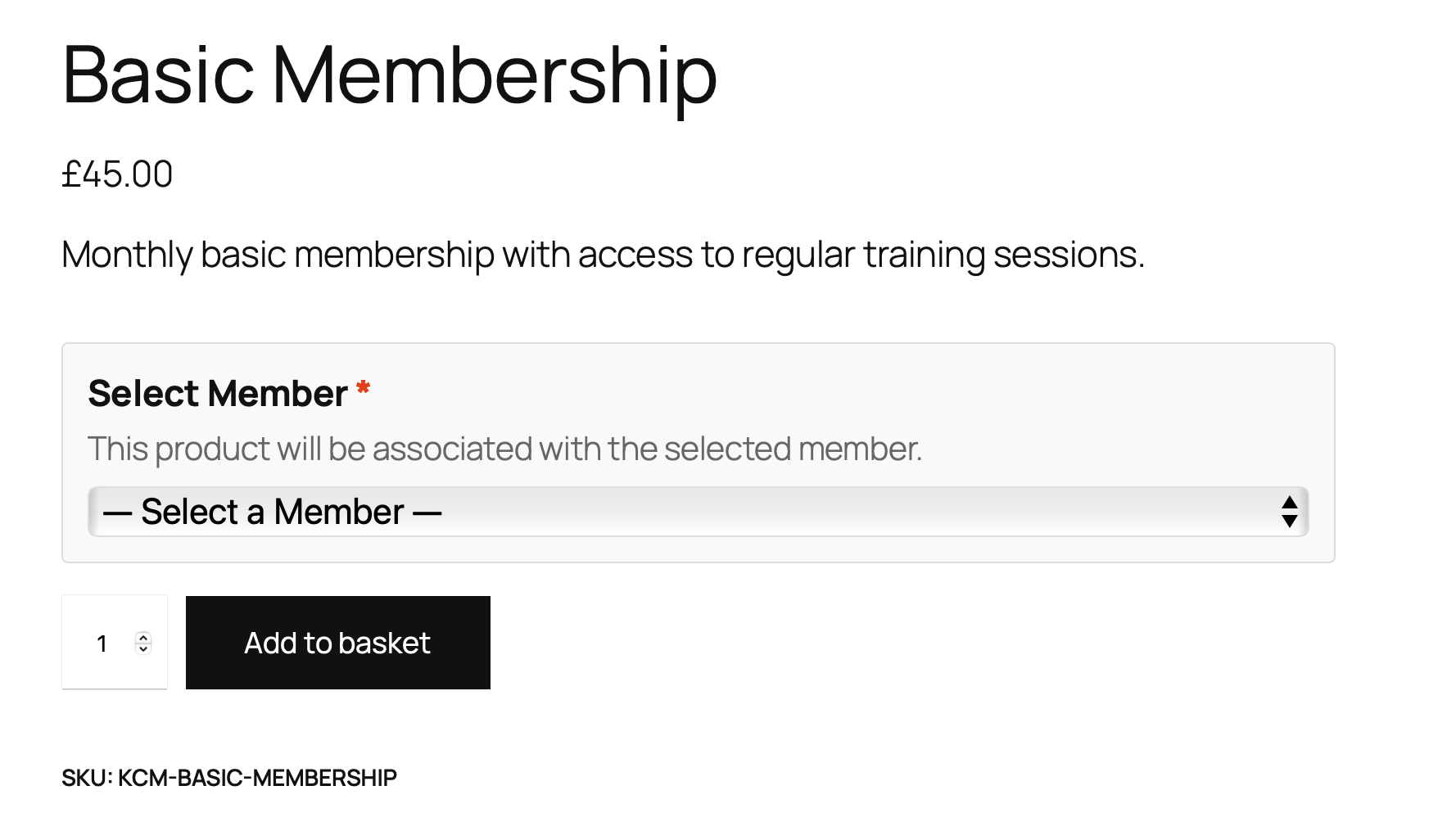
WooCommerce Integration - Member selection during product purchase
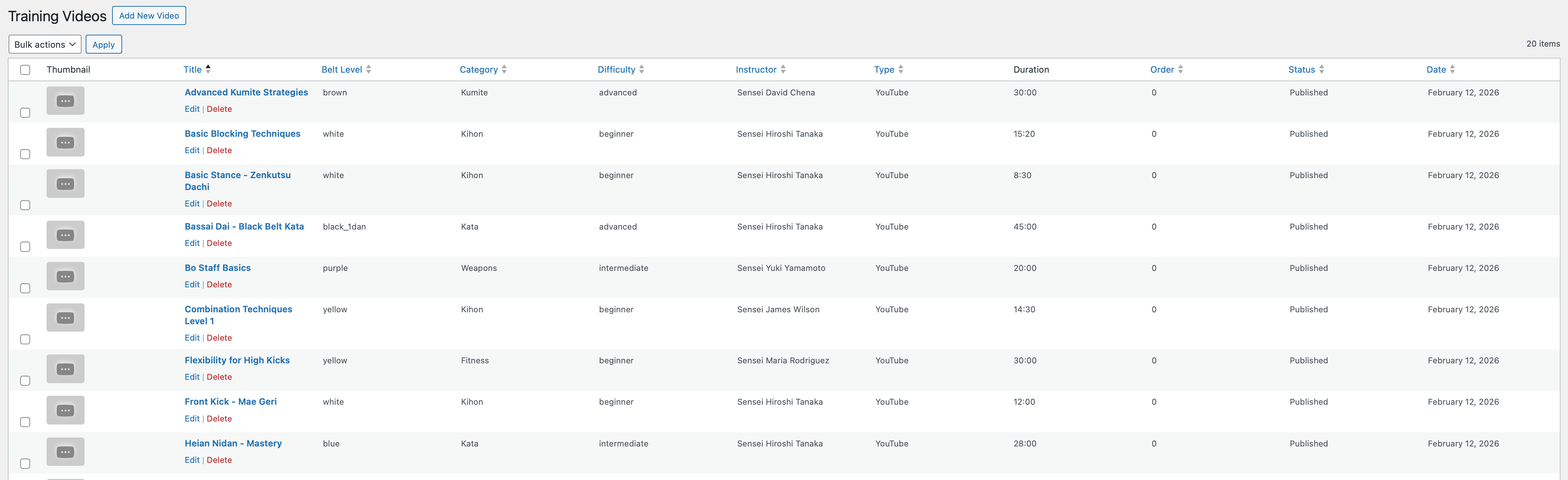
Training Videos - Organized video library with filtering
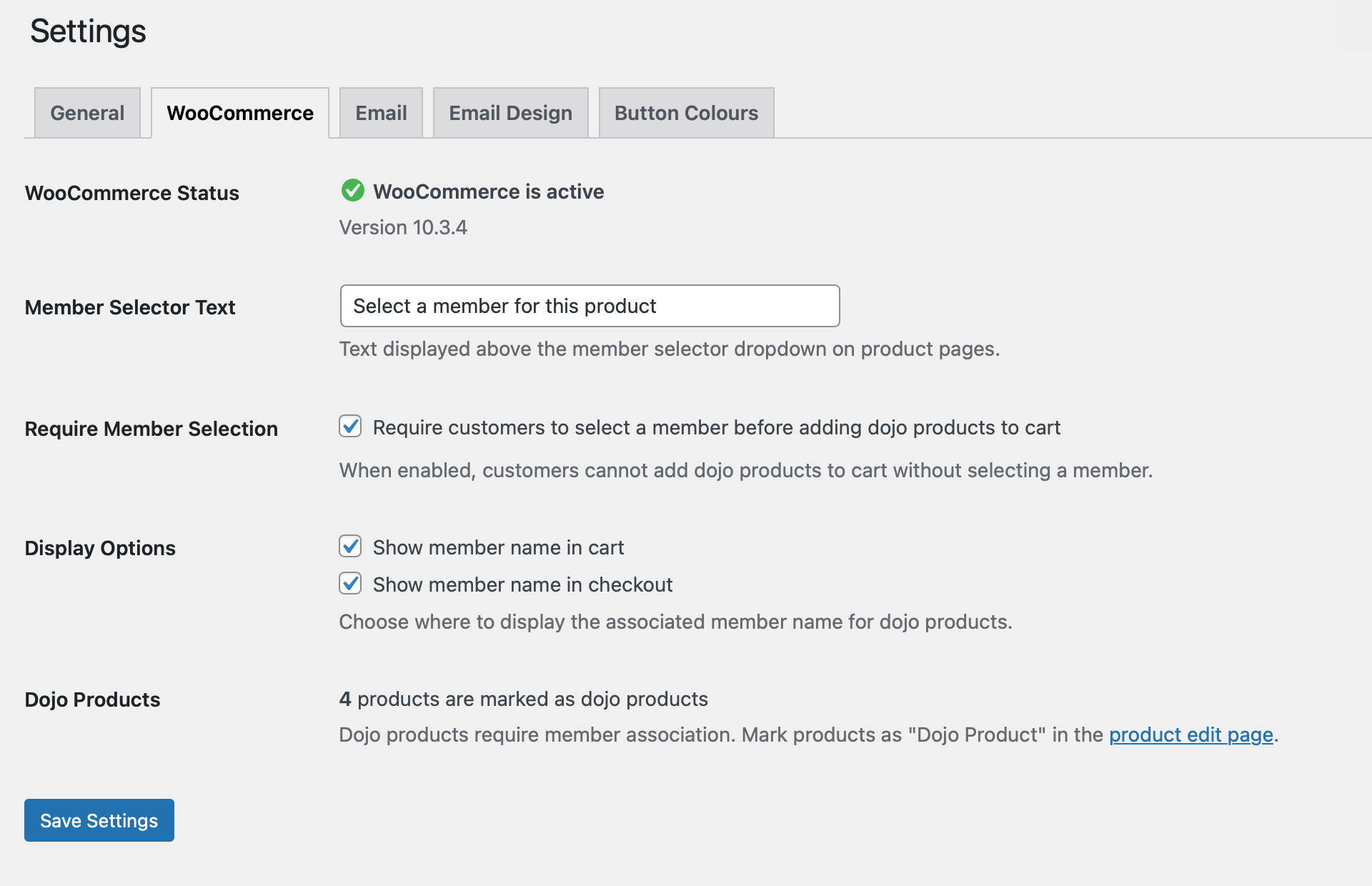
Settings Dashboard - Comprehensive configuration options
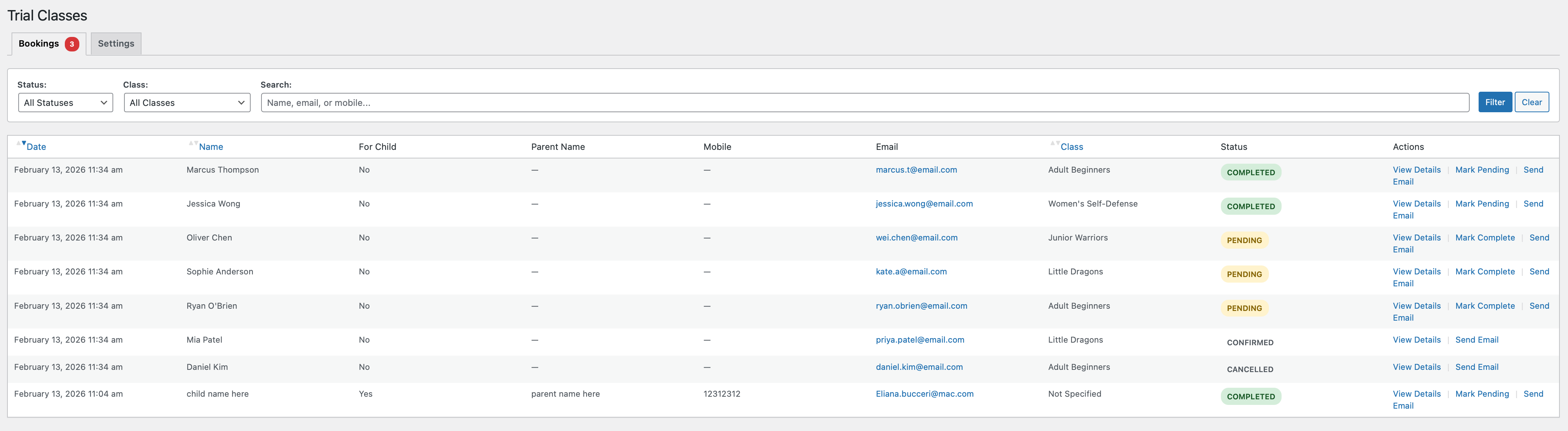
Trial Class Bookings - Manage trial class requests with status tracking
Faq
Yes, absolutely. Martial Arts Club Manager requires WooCommerce to be installed and active. WooCommerce handles the product purchase workflows and member associations during checkout.
No. If WooCommerce is not active, the plugin will automatically deactivate and display a notice. WooCommerce is a core dependency for this plugin’s functionality.
There is no limit. You can add as many members as your club needs.
Yes! This is actually the recommended approach. Parents can have one user account and add all their children as members. Each member has their own profile, attendance tracking, and class enrollments.
Attendance tracking is a premium feature. Go to Martial Arts Club Attendance in the admin menu. Select a class and date, check the members who attended, and save. You can also edit historical attendance records. Requires premium license.
Yes, with a premium license. Go to Martial Arts Club Reports and select your filters (class, date range, member). Click “Export CSV” to download attendance data in spreadsheet format. Requires premium license.
The plugin doesn’t create any default membership types. You have complete flexibility to create your own custom membership types that match your club’s needs (e.g., Monthly, Quarterly, Annual, Student, Family, etc.). Create and manage membership types under Martial Arts Club Settings Membership Types.
Training videos are a premium feature. Add videos under Martial Arts Club Training Videos, set the belt level, category, and difficulty, then embed YouTube or Vimeo URLs. Videos can be restricted to Premium members only. Users access videos via a frontend page. Requires premium license.
Yes, with a premium license! Groups are perfect for organizing members by skill level (beginners, intermediate, advanced) or age (kids, teens, adults). Create groups under Martial Arts Club Settings Groups, then assign members to groups in their profiles. Requires premium license.
Events are a premium feature for special occasions like tournaments, seminars, belt gradings, or workshops. Create an event under Martial Arts Club Events, set the date and registration closing date. Users can register multiple members for events. You’ll receive email notifications for each registration. Requires premium license.
Yes, with a premium license! When a user clicks “Register” on an event, they see a list of all their members with checkboxes. They can select one or multiple members to register for the event. Requires premium license.
When you uninstall (delete) the plugin through WordPress, all plugin data is permanently removed including database tables, member information, attendance records, and settings. This cannot be undone. If you only deactivate the plugin, all data is preserved.
Yes! The plugin offers both free and premium versions. The free version includes essential member management, trial bookings, and basic dashboard features. The premium version unlocks advanced features like class scheduling, attendance tracking, events management, training videos, bulk emails, and more. Upgrade to Pro directly from your WordPress dashboard.
For support, please use the WordPress.org support forums. Check the documentation included with the plugin first – it’s accessible from Martial Arts Club Documentation in your admin panel.
Yes! Go to Martial Arts Club Settings Button Colours. You can set gradient colors for all frontend buttons (trial booking, member area, etc.) to match your branding.
The trial booking form is automatically created when you activate the plugin. A page called “Trial Class Booking” is added to your site. Share this page with prospective students, and you’ll receive email notifications when someone books a trial.
Reviews
Changelog
1.0.328 (2026-02-20)
- Removed: Temporary email diagnostic logging (confirmed code works; delivery issue is hosting-level)
1.0.326 (2026-02-20)
- Fixed: Email From filter priority lowered from 999 to 20 so SMTP plugins can override it
- Fixed: Email From filter now registers in all contexts (admin, frontend, cron) instead of admin-only
- Fixed: Per-event notification email field now trimmed to prevent whitespace-only values bypassing global fallback
- Added: All notification emails now log failures via error_log for debugging
- Improved: All database queries in events class now use %i placeholders for table identifiers
- Improved: Removed dead filter methods from admin email class after architectural refactor
- Synced: Free-build email notifications class with full version (adds deletion email support)
- Synced: Free-build events class with full version (wp_kses_post rendering, error logging, %i queries)
1.0.325 (2026-02-18)
- Fixed: Email notifications not delivered because From address defaulted to fabricated noreply@domain which does not exist as a mailbox
- Fixed: All emails (events, trial booking, member registration) silently dropped when hosting provider rejects unauthorized From address
- Changed: Email From address now falls back to WordPress admin email instead of generating noreply@domain
- Fixed: Already-registered members shown as unchecked in event registration modal, allowing duplicate registration attempts
- Added: Already-registered members now appear pre-checked and disabled with green “(Already registered)” notice in event modal
- Updated: User documentation version references to 1.0.325
1.0.324 (2026-02-18)
- Fixed: Archived (inactive) members could register for events in the member area
- Added: Archived members now shown greyed out in event registration modal with disabled checkbox
- Added: Notice text “(This member is archived. Please contact your club)” for archived members
- Improved: Server-side validation rejects event registration for archived members
- Updated: User documentation version references to 1.0.324
1.0.323 (2026-02-18)
- Fixed: ZIP import failing with “does not contain data.json” when ZIP has wrapper folder (e.g. macOS re-zipped exports)
- Improved: ZIP import now scans all entries for data.json regardless of nesting depth
- Improved: Import cleanup correctly removes temporary extraction directory for nested ZIPs
- Added: Debug error message listing ZIP contents when data.json not found
- Fixed: Member details modal showing premium-only sections (Class Enrollments, Attendance Statistics, Event Registration History) in free version
- Improved: Premium sections in member details now use full dual-check pattern with sentinel file verification
- Improved: Premium-only database queries in member details no longer execute in free version
- Changed: Bug report email updated to support@martialartsclubmanager.com
- Removed: Third-party FormSubmit.co dependency from commercial roadmap page
- Added: Self-hosted PHP mail handler for roadmap feature requests with reCAPTCHA v2, honeypot, and rate limiting
1.0.307 (2026-02-13)
- Fixed: Attendance reports now show historical instructor data (the instructor at time of attendance, not current assignment)
- Added: Database stores instructor IDs when marking attendance for historical accuracy
- Added: Migration automatically populates existing attendance records with current instructor data
- Improved: Changed instructor to change for a class no longer affects historical attendance records
1.0.306 (2026-02-13)
- Fixed: Email notifications not sent when member created or deleted from member area
- Changed: Email notifications (member creation/deletion) moved from Premium to Free
- Improved: Both admin and user receive emails for new member registrations
1.0.305 (2026-02-13)
- Fixed: Single JSON file import incorrectly triggering “cannot be combined” error
- Fixed: JavaScript sends files as array (import_file[]), now correctly detected as single or multiple
- Improved: Import supports single JSON, single CSV, and multiple CSV files
1.0.304 (2026-02-13)
- Fixed: Dashboard Quick Actions showing premium links when free build installed with license
- Fixed: Premium UI sections (stats, charts, widgets) visible in free build with license
- Improved: Added dual-check for both license AND premium files existence across dashboard
1.0.303 (2026-02-13)
- Fixed: WordPress Plugin Check SQL preparation compliance (WordPress.DB.PreparedSQL.NotPrepared)
- Improved: Extended email query switch statement from 5 to 10 cases with literal SQL
- Improved: Added batch query processing for large email sets to maintain compliance
- Improved: Optimized array merging performance in batch operations
1.0.283 (2026-02-12)
- Fixed: Import failing on sites with older database schema (missing columns)
- Added: Dynamic schema detection to handle database structure differences between sites
- Improved: Import now filters data based on actual target database columns
- Improved: All import methods now use schema-aware insertion for better compatibility
1.0.282 (2026-02-12)
- Added: Complete Export/Import system with redesigned card-based UI
- Added: JSON export for full backup with all data types and relationships
- Added: CSV export with automatic ZIP packaging when multiple entities selected
- Added: Import functionality with user mapping options (match by email, assign to current user, skip unmatched)
- Added: Import conflict resolution options (skip duplicates, update existing, create new)
- Added: Reset plugin data with automatic restoration of default belt colors and membership types
- Added: Bulk Archive/Activate actions for member management
- Added: Admin photo management – upload, change, or remove member photos from admin panel
- Added: Dual unit support for height and weight (metric/imperial with automatic conversion)
- Added: Member search functionality in admin member list
- Added: Group filter for member management
- Fixed: Export validation showing wrong error message
- Fixed: CSS not loading on Export/Import pages
- Improved: Export page UI with two-column layout (Free/Premium features)
- Improved: Import page UI with card-based options for user mapping and conflict resolution
1.0.253 (2026-01-13)
- Fixed: Free version compatibility when premium license exists
- Fixed: Premium file existence check before loading premium classes
- Removed: Stale duplicate includes folder
1.0.252 (2026-01-13)
- Security: Enhanced nonce verification for form submissions
- Security: Improved CSRF protection across admin and frontend forms
1.0.219 (2026-01-05)
- Fixed: 8 PHPCS DocBlock errors in class-macm-trial-booking.php (summary and @return descriptions)
1.0.218 (2026-01-05)
- Fixed: 28 PHPCS errors in class-macm-belt-color.php (comments, DocBlocks, Yoda conditions)
1.0.217 (2026-01-05)
- Added: Caching to MACM_Membership_Type::get_member_count() method
- Fixed: 22 PHPCS errors in class-macm-membership-type.php (comments, DocBlocks, Yoda condition)
1.0.216 (2026-01-05)
- Added: Cache invalidation in MACM_Member::create() method
- Fixed: 81 PHPCS errors in class-macm-member.php (comments, DocBlocks, Yoda conditions)
1.0.215 (2026-01-05)
- Added: Database caching for MACM_Product_Member class with cache invalidation
- Fixed: PHPCS inline comment punctuation and DocBlock errors
1.0.200 (2026-01-03)
- WordPress.org Compliance: Updated all function, class, constant, and option prefixes from ‘kcm’ (3 chars) to ‘macm’ (4 chars)
- Improved: Renamed all class files to use consistent ‘macm’ prefix
- Improved: Updated all JavaScript variable names to use ‘macm’ prefix
1.0.193 (2025-12-20)
- Improved: Enhanced email sending reliability with better error handling
- Improved: Code quality and WordPress compatibility enhancements
- Improved: Build process with automated verification for clean releases
- Fixed: Email validation and fallback mechanisms for improved delivery
1.0.190 (2025-12-20)
- Improved: Database query optimization for better performance
- Improved: Code cleanup for production readiness
1.0.189 (2025-12-20)
- Fixed: Input validation improvements for better data handling
- Improved: Database compatibility enhancements
1.0.186 (2025-12-19)
- Improved: Code quality and standards compliance
- Improved: Documentation enhancements
1.0.184 (2025-12-19)
- Improved: Security enhancements with better input sanitization
- Improved: Performance optimization by hosting all scripts locally
- Updated: Chart.js library to latest version for improved dashboard charts
- Improved: Code documentation and quality standards
1.0.183 (2025-12-19)
- Fixed: “Add New” buttons now work correctly for Instructors, Groups, and Locations
- Improved: Admin interface reliability
1.0.182 (2025-12-19)
- Fixed: Clubs “Add New” button functionality
- Improved: Admin interface compatibility updates
1.0.180 (2025-12-19)
- Improved: Trial booking form now dynamically labels fields for better clarity
- Improved: User experience when booking for children
1.0.179 (2025-12-19)
- Fixed: Admin member modal centering on all screen sizes
- Improved: Modal display and scrolling behavior
1.0.177 (2025-12-19)
- Improved: Plugin performance with optimized package size (40% smaller)
- Improved: Code organization and quality
1.0.175 (2025-12-17)
- Improved: Security enhancements with direct file access protection
- Improved: WordPress compatibility and best practices
1.0.174 (2025-12-17)
- Updated: Chart.js library (4.4.1 4.5.1) for better dashboard performance
- Updated: DataTables library (1.13.11 2.3.5) for improved attendance reports
- Improved: Asset loading with proper WordPress enqueue functions
- Improved: Code quality and standards compliance
1.0.156 (2025-12-03)
- Fixed: PHP 8.1+ compatibility improvements
- Improved: Error handling and logging
- Improved: Page redirects now work correctly
1.0.155 (2025-12-03)
- Fixed: PHP 8.1+ compatibility enhancements
- Improved: Input sanitization and data handling
1.0.153 (2025-12-03)
- Fixed: PHP 8.1+ compatibility for page creation
- Improved: Plugin activation reliability
1.0.150 (2025-12-03)
- Fixed: Plugin activation issues
- Improved: Code syntax and compatibility
1.0.148 (2025-12-02)
- Improved: Security enhancements
- Improved: Database query safety
1.0.142 (2025-11-28)
- Fixed: Trial booking form flexibility – class selection now optional
- Improved: Database structure
1.0.141 (2025-11-28)
- Fixed: Admin dashboard errors
- Improved: Database compatibility
1.0.132 (2025-11-28)
- Improved: Plugin uninstall cleanup
- Fixed: Data removal on plugin deletion
1.0.130 (2025-11-28)
- Improved: Feature access management
- Improved: User interface organization
1.0.127 (2025-11-28)
- Improved: Documentation and plugin information
1.0.120 (2025-11-23)
- Fixed: Belt Grading History functionality
- Fixed: Form handling improvements
1.0.109 (2025-11-19)
- Fixed: All readme.txt references updated from “Karate Club” to “Martial Arts Club” for consistency
- Improved: Documentation now uses correct plugin name throughout
1.0.108 (2025-11-19)
- Fixed: Member area modal now centers properly on all screen sizes
- Fixed: Modal scrolling – header and footer stay fixed, body content scrolls
- Improved: Modal max-height prevents content from being cut off on small screens
- UX: Better modal positioning with flexbox layout for consistent display
1.0.107 (2025-11-19)
- Fixed: Belt colors order now follows correct progression (white – orange – red – yellow – green – purple – blue – brown – black)
- Added: update_belt_order() method to fix existing installations during activation
- Improved: Missing belt colors are automatically added during plugin activation
- Database: Sort order values updated to maintain correct belt progression
1.0.106 (2025-11-19)
- Added: Sortable columns in Class Register Permissions page
- Feature: Sort users by User name or Role with ascending/descending order
- UX: Clickable column headers with visual sorting indicators
- Improved: Easier navigation and user management in permissions table
1.0.105 (2025-11-19)
- Added: Remove member action in event registrations page
- Feature: Administrators can now remove members who can’t attend events
- UX: Confirmation dialog before removing member from event registration
- Improved: Success/error messages after removing registration
1.0.104 (2025-11-19)
- Improved: Oversubscribed classes now display enrollment count in red with bold text
- UX: Easy visual identification of classes exceeding their maximum capacity
1.0.103 (2025-11-19)
- Added: Request a Feature button on dashboard with modal form (name, email, explanation)
- Added: Report a Bug button on dashboard with modal form (URL, page, description, screenshot uploads)
- Added: Email notifications for feature requests and bug reports sent to developer
- Added: Screenshot upload functionality (up to 3 images) for bug reports
- Improved: Dashboard Quick Actions section with Support & Feedback subsection
1.0.102 (2025-11-19)
- Fixed: Delete photo button now displays X icon correctly on member cards
- Improved: Added Dashicons to frontend for proper icon display in member area
1.0.101 (2025-11-19)
- Fixed: Member modal now centers properly on screen in member area
- Improved: Added !important to modal centering CSS to override theme conflicts
1.0.100 (2025-11-19)
- Fixed: Trial booking shortcode now supports both [kcm_trial_booking] and [kcm_trial_booking_form] for compatibility
- Improved: Added shortcode alias to prevent confusion and ensure form displays on all installations