Martial Arts Club Manager

Martial Arts Club Manager
Description
Martial Arts Club Manager is a comprehensive WordPress plugin designed specifically for martial arts club owners, dojo managers, and gym operators who need a professional system to manage their students, classes, and operations.
Who Is This Plugin For?
- Karate dojos and martial arts schools
- Taekwondo, Judo, Jiu-Jitsu, and other martial arts clubs
- Fitness centers offering martial arts classes
- Sports clubs needing member and class management
- Any organization requiring attendance tracking and membership management
Free Features
Member Management
* Add unlimited members to user accounts
* Detailed member profiles with photo, belt color, weight, height
* Basic membership type management
* Member status management (active/inactive)
* Date of birth and personal information tracking
* Export member data to CSV
* “By User” view that groups members under their family account, with bulk actions: set active/inactive, change membership, assign belt, send email and export
* Printable membership cards
Belt Colors
* Set up your own belt colors and their order
* Activate or deactivate several belts at once with bulk actions
Trial Class Booking
* Public booking form for prospective students
* Admin notification emails with applicant details
* Customizable success messages
* Manage trial bookings from admin panel
* Track each booking from pending to contacted, confirmed and completed
* Bulk actions: mark several bookings contacted, confirmed, completed, cancelled or pending, or delete them
* Convert trial students to members easily
WooCommerce Integration
* Associate members with product purchases
* Mark products as “dojo products” requiring member selection
* Display member information in cart and checkout
* Seamless integration with WooCommerce workflows
* Compatible with High-Performance Order Storage and the Cart and Checkout blocks
Admin Dashboard (Basic)
* Member list with sorting and filtering
* Belt distribution analytics
* Membership type breakdown
* Recent members view
* Recent trial bookings
* Settings and customization
* WordPress dashboard widgets: upcoming member birthdays, membership overview and members by belt color
* Warns you if your site timezone is missing or set to a fixed offset, which would shift class times when the clocks change
Frontend Member Area
* View and edit member profiles
* Upload member photos
* Manage personal information
* Access member cards
Data Tools
* Export your club data as a full JSON backup or as CSV files
* Import a backup into the same or another site, with options for matching users and handling duplicates
* Reset plugin data to start again
Pro Features (Premium License)
Advanced Member Management
* Multi-club support for franchise operations
* Group assignments for organizing students
* License expiration tracking with automated reminders
* Belt grading history tracking
* Club and group filtering in member lists
* Belt color groups: limit belts to groups such as Kids or Adults, and add or remove belts from groups in bulk
* Assign groups and enroll in classes from the “By User” view
Class Scheduling & Management 🔒
* Create and manage unlimited classes
* Schedule classes by day, time, and location
* Weekly, every-other-week and monthly classes
* Classes that run past midnight
* Multi-day classes that share one roster
* Multiple location support
* Assign groups to specific classes
* Enroll members in classes
* Class capacity management, with a waitlist that promotes members automatically when a place opens
* Archive old classes while preserving history
* Bulk actions: archive or restore classes, assign or remove instructors, and change location
Kiosk Sign-In 🔒
* Full-screen tablet sign-in for your dojo entrance
* Members sign in by searching their name, with a 6-digit PIN, or by scanning their personal QR code
* QR codes on printed membership cards and in the Member Area
* Instructor Mode for signing in a whole class and reopening sign-in for a class that is running late
* Late Sign-In Grace setting controls how long after a class ends students can still sign in
Instructors & Private Bookings 🔒
* Instructor profiles with photos, assigned to classes
* Activate or deactivate instructors in bulk
* Instructor availability with weekly slots and date-specific changes
* Public booking form for private lessons, with payment through WooCommerce or admin confirmation
Syllabus & Grading Progress 🔒
* Publish grading requirements for each belt, with descriptions, videos and PDFs
* Instructors sign off each requirement for each member
* Members see their own syllabus and progress on any page you add the syllabus to
Activity Log 🔒
* See who changed what and when: members, belts, groups, attendance, kiosk sign-ins, trial bookings, bulk actions and imports
* Filter by date, area, person or member, and export to CSV
* Choose how long entries are kept
* Works with WordPress’s personal data export and erase tools
Attendance Tracking 🔒
* Quick attendance recording for each class
* View and modify historical attendance records
* Comprehensive attendance reports
* Export attendance data to CSV
* Filter by class, member, or date range
* Attendance trends analytics (6 months)
Events Management 🔒
* Create and manage martial arts events (tournaments, seminars, gradings)
* Multiple member registration per event
* Registration closing dates
* Event status tracking (upcoming, ongoing, completed)
* Email notifications for registrations
* Export event registrations to CSV
* Archive events when complete
* Member event history tracking
Training Videos 🔒
* Organize training videos by belt level
* Filter videos by category, difficulty, and instructor
* Restrict access based on membership type
* Video thumbnail and description support
* YouTube and Vimeo integration
* Progress tracking
Communication Tools 🔒
* Send bulk emails to all members or filtered groups
* Filter recipients by membership type, group, or status
* Email preview before sending
* Customizable email templates with header/footer
* Button color customization for branded emails
Page Access Control 🔒
* Restrict pages to logged-in users only
* Set membership-level restrictions
* Create premium content areas
* Custom redirect rules
Enhanced Dashboard 🔒
* Active classes statistics
* Monthly attendance overview
* Upcoming events widget
* Expiring licenses alerts
* Attendance trends chart
* Advanced analytics
Requirements
This plugin requires WooCommerce to be installed and active. WooCommerce is used for handling product purchases and member associations during checkout.
Language Support
- Fully internationalized and translation-ready
- Text domain: martial-arts-club-manager
- POT file included for translators
Documentation
The full user manual is online at https://www.martialartsclubmanager.com/user-documentation/ and is linked from the plugin’s dashboard (View Documentation).
Support
For support and questions, please visit the WordPress.org support forums for this plugin.
For bug reports, please include:
* WordPress version
* WooCommerce version
* PHP version
* Description of the issue
* Steps to reproduce
Credits
Martial Arts Club Manager is developed and maintained by madebyeli.com.
Privacy Policy
Martial Arts Club Manager stores member information in your WordPress database. This information includes:
* Member names and contact details
* Date of birth
* Belt colors and membership information
* Attendance records
* Event registrations
* Trial booking requests
All data is stored locally on your WordPress installation. The plugin does not send any data to external servers. You are responsible for complying with privacy laws (GDPR, CCPA, etc.) in your jurisdiction.
Third-Party Services
This plugin integrates with:
* WooCommerce (required) – For product purchases and checkout
* YouTube/Vimeo (optional) – For embedding training videos (if you use the training videos feature)
When using training videos with embedded YouTube or Vimeo content, those platforms may collect data according to their privacy policies. Please review YouTube and Vimeo privacy policies if you use this feature.
Installation
Automatic Installation
- Log in to your WordPress admin panel
- Go to Plugins > Add New
- Search for “Martial Arts Club Manager”
- Click “Install Now” and then “Activate”
- Important: Ensure WooCommerce is installed and active first
Manual Installation
- Download the plugin ZIP file
- Log in to your WordPress admin panel
- Go to Plugins > Add New > Upload Plugin
- Click “Choose File” and select the downloaded ZIP
- Click “Install Now” and then “Activate”
- Important: Ensure WooCommerce is installed and active first
After Activation
- Go to “Martial Arts Club” in the WordPress admin menu
- Visit Settings to configure your preferences
- Set up your first members under “Members”
- Create your class schedule under “Classes”
- Start tracking attendance!
Configuration Steps
Step 1: Configure Basic Settings
* Navigate to Martial Arts Settings
* Set your date and time formats
* Configure email settings (from name, from email; premium)
* Customize button colors for frontend forms
Step 2: Set Up Configuration Entities
* Review Belt Colors (a default set is created for you; add, rename or reorder them to match your style)
* Add Locations where classes are held (premium)
* Add Groups to organize members (beginners, intermediate, advanced, etc.; premium)
* Add your Membership Types (none are created for you)
Step 3: Add Members
* Go to Martial Arts Members
* Click “Add Member”
* Fill in member details (name, DOB, belt color, group, etc.)
* Upload member photo (optional)
* Assign membership type
Step 4: Create Class Schedule
* Go to Martial Arts Classes
* Click “Add Class”
* Set class name, day, time, and location
* Assign which groups can attend
* Save the class
Step 5: Enroll Members in Classes
* Go to Martial Arts Classes
* Click “Enrollments” for a specific class
* Select members to enroll using checkboxes
* Save enrollments
Step 6: Set Up WooCommerce Products (Optional)
* Go to Products in WooCommerce
* Edit any product that should require member association
* Tick “Dojo Product” in the product data section
* When customers purchase, they’ll select which member the product is for
Screenshots
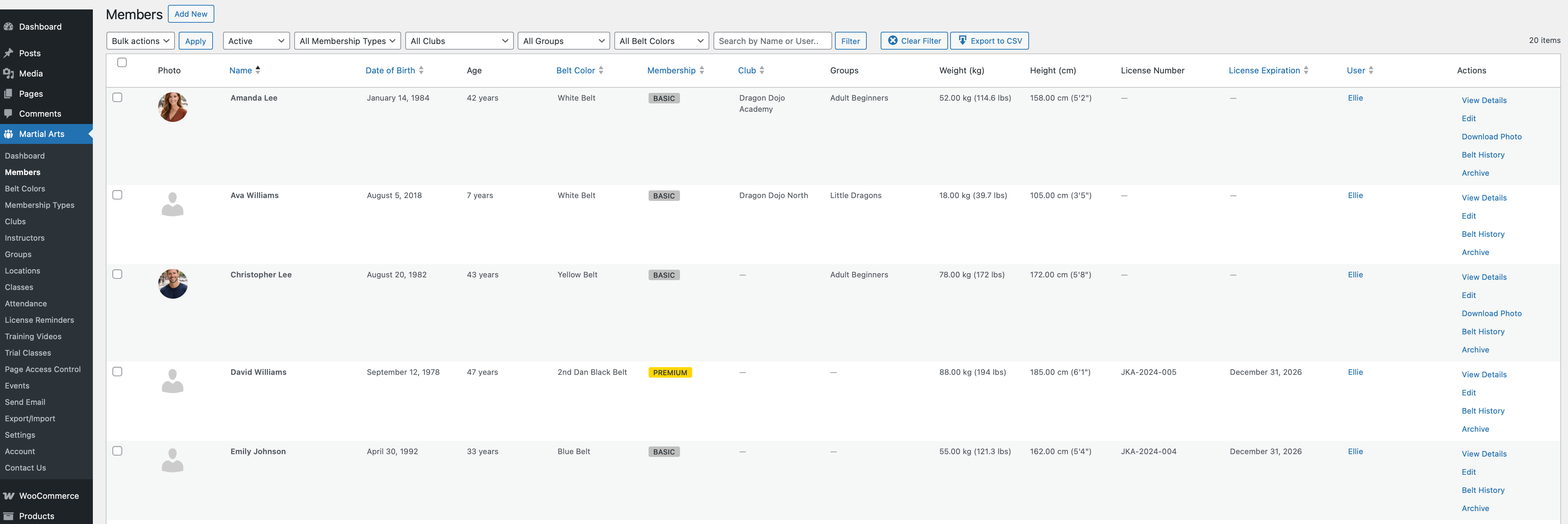
Member Management - Add and manage unlimited members with detailed profiles
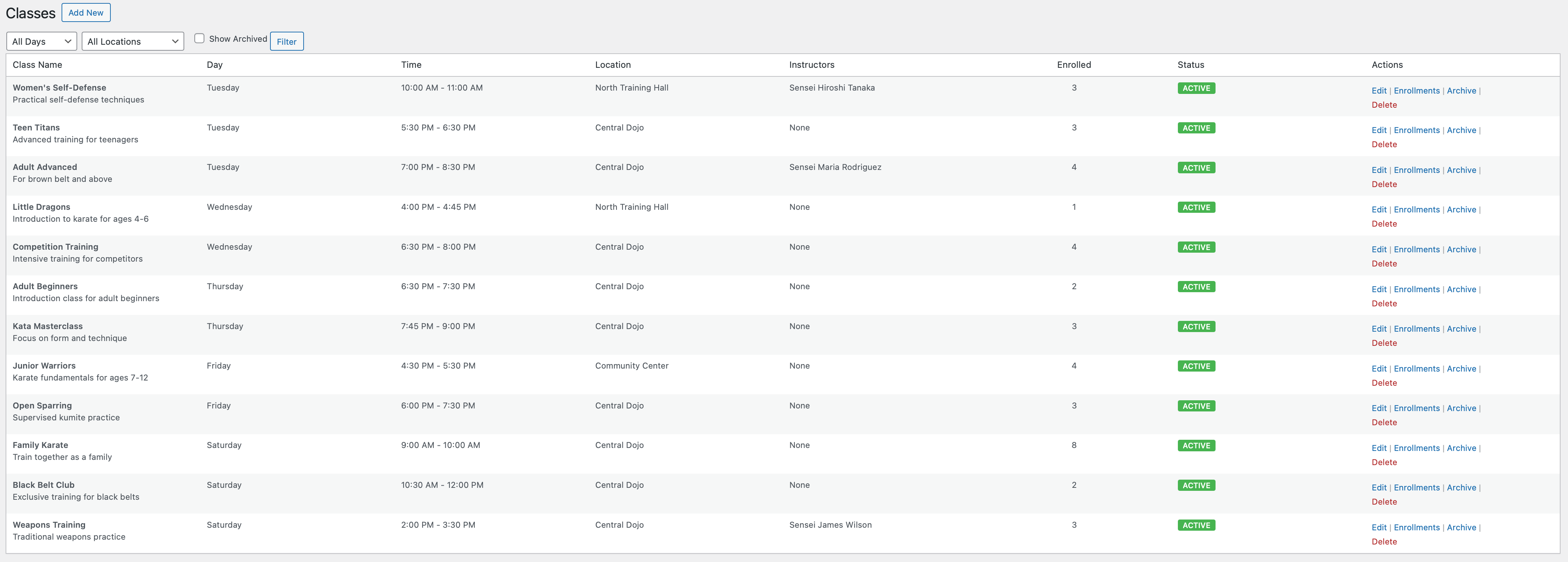
Class Schedule - Create and organize classes by day, time, and location
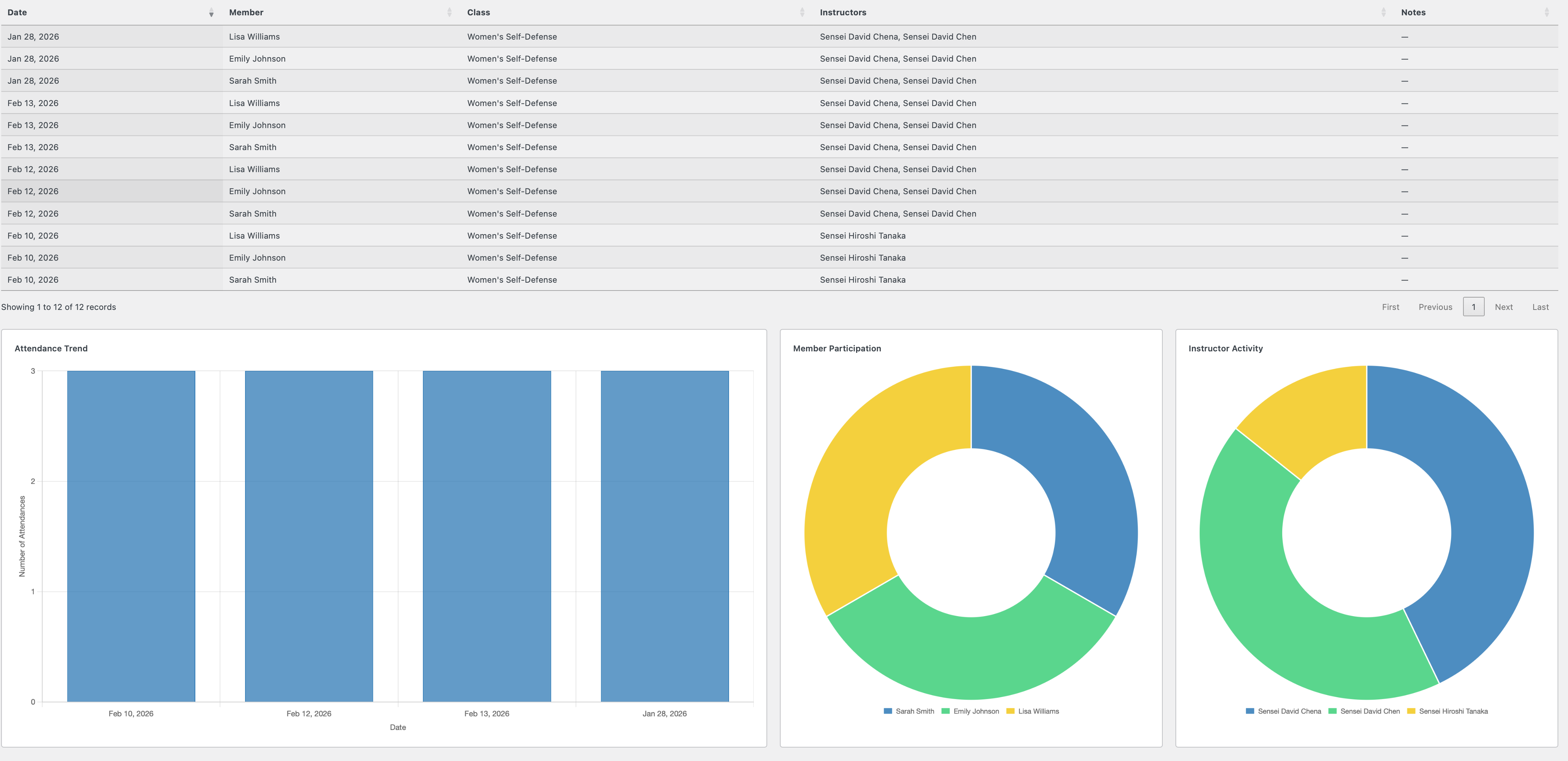
Attendance Tracking - Quick attendance recording interface
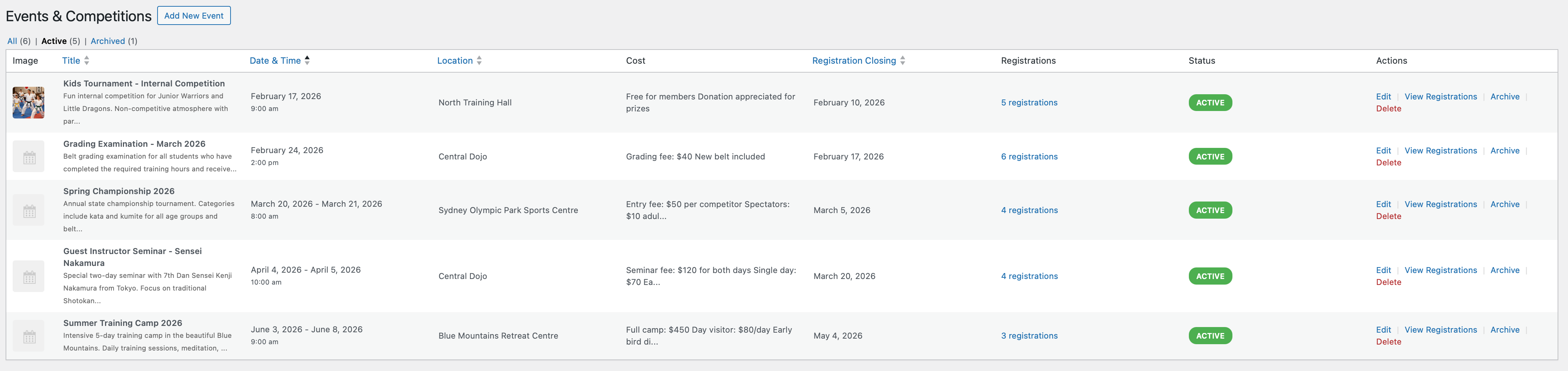
Events Management - Create tournaments, seminars, and special events
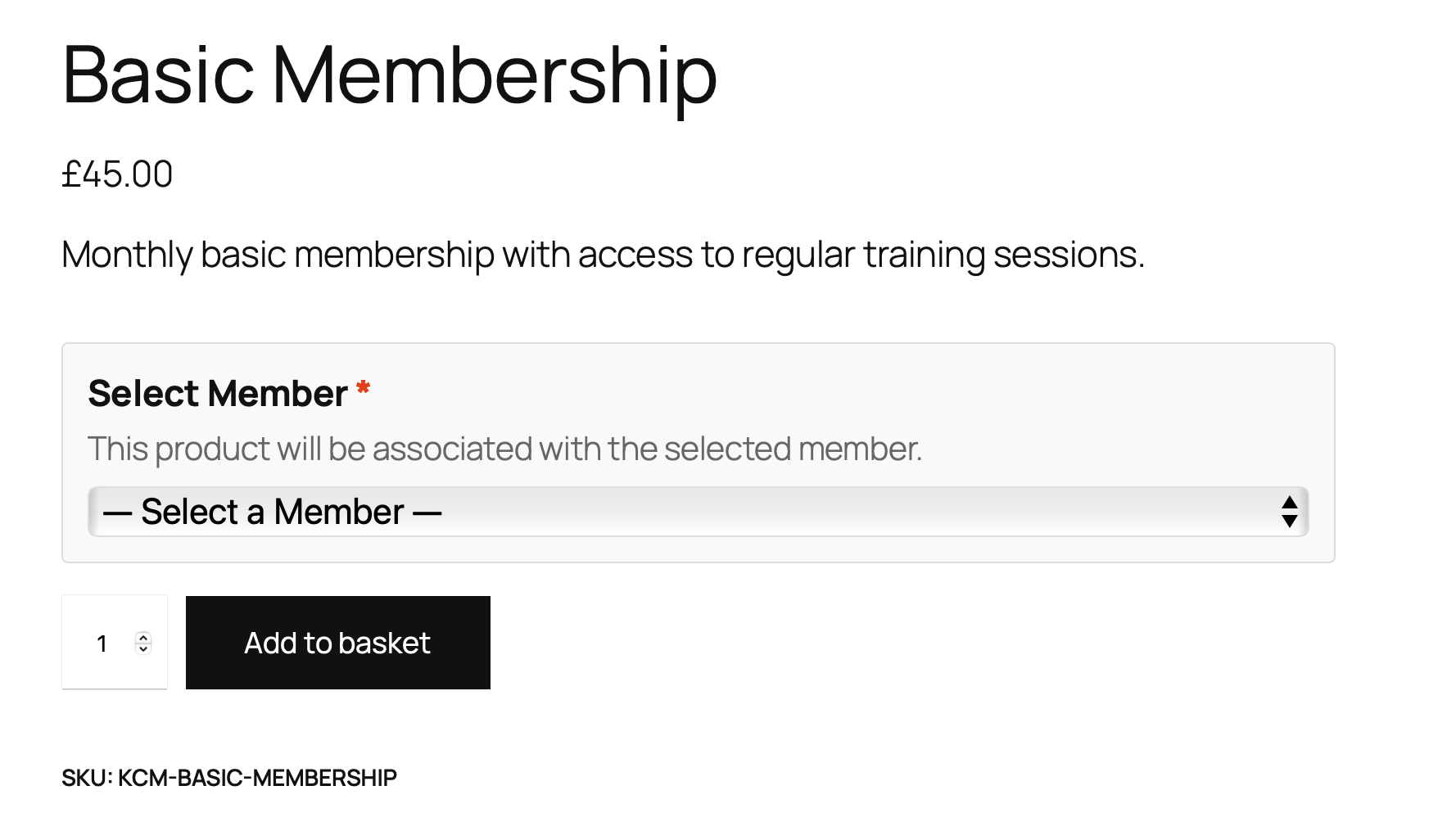
WooCommerce Integration - Member selection during product purchase
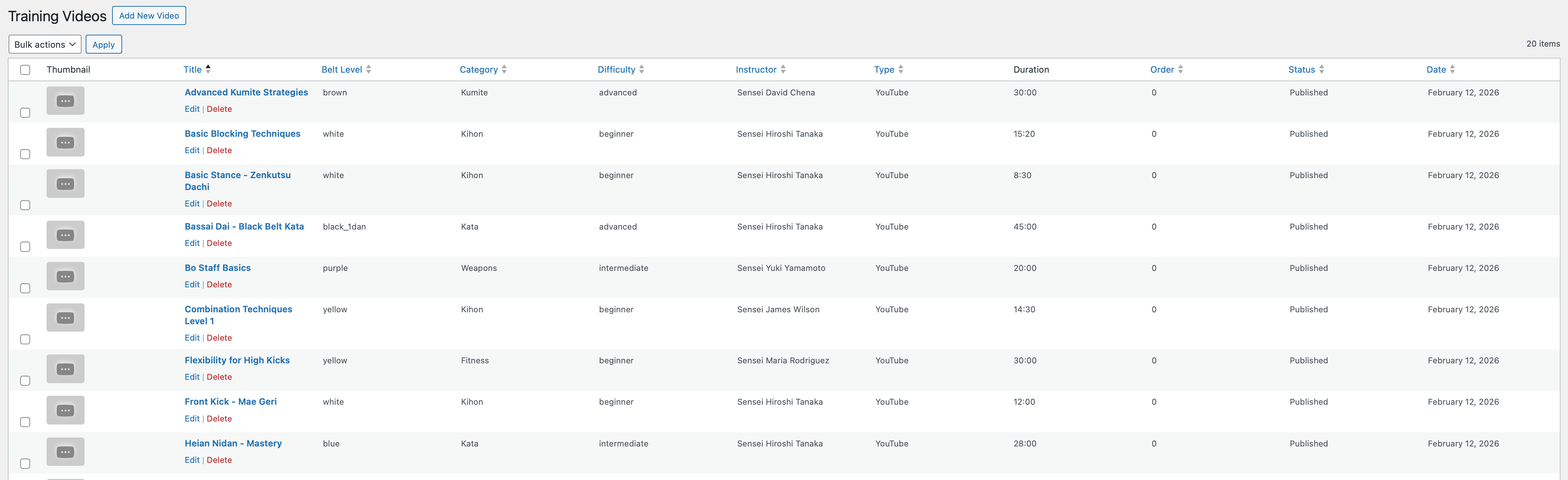
Training Videos - Organized video library with filtering
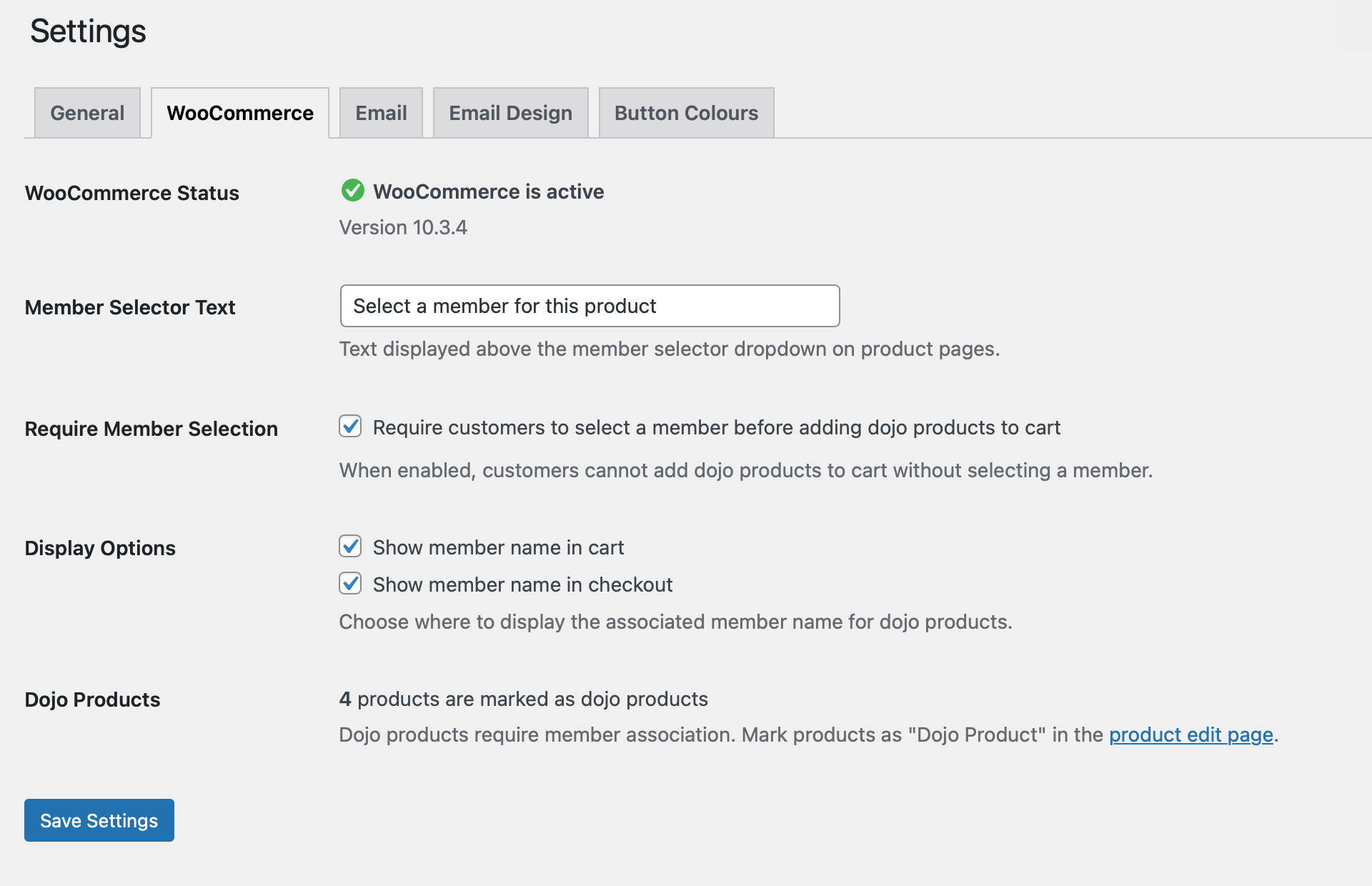
Settings Dashboard - Comprehensive configuration options
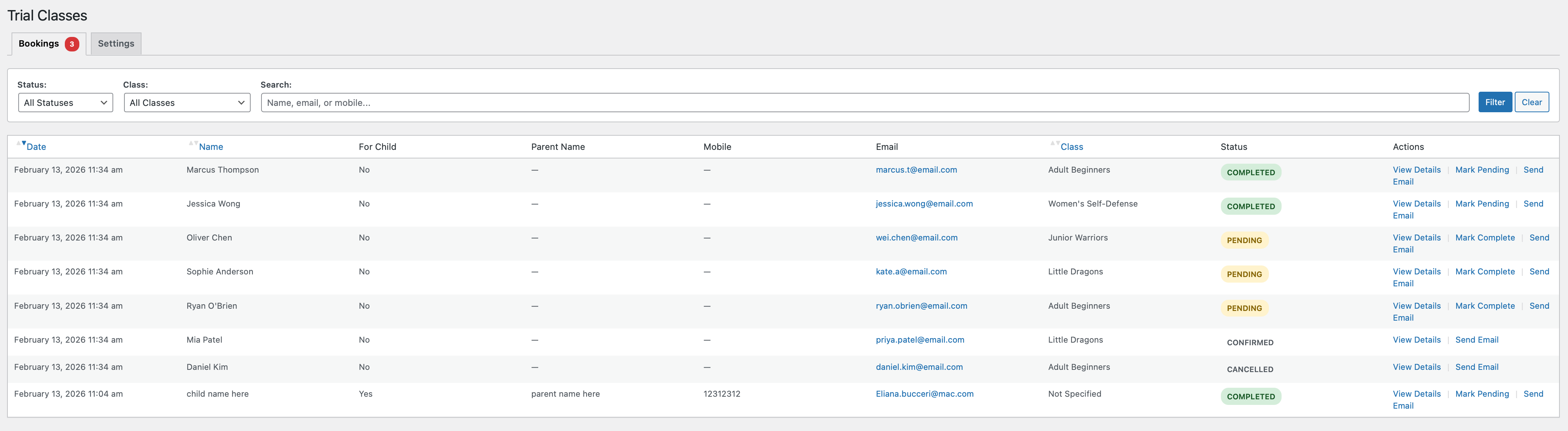
Trial Class Bookings - Manage trial class requests with status tracking
Faq
Yes, absolutely. Martial Arts Club Manager requires WooCommerce to be installed and active. WooCommerce handles the product purchase workflows and member associations during checkout.
No. If WooCommerce is not active, the plugin will automatically deactivate and display a notice. WooCommerce is a core dependency for this plugin’s functionality.
There is no limit. You can add as many members as your club needs.
Yes! This is actually the recommended approach. Parents can have one user account and add all their children as members. Each member has their own profile, attendance tracking, and class enrollments.
Attendance tracking is a premium feature. Instructors take attendance on the Class Register page on your site: choose a class and date, tick the members who attended, and save. Choosing an earlier date lets you correct past attendance. Members can also sign themselves in at the kiosk. In the admin area, Martial Arts Attendance lets you view records, generate reports, clear records and choose who can use the Class Register. Requires premium license.
Yes, with a premium license. Go to Martial Arts Attendance Generate Report and select your filters (class, date range, member). Click “Export to CSV” to download attendance data in spreadsheet format. Requires premium license.
The plugin doesn’t create any default membership types. You have complete flexibility to create your own custom membership types that match your club’s needs (e.g., Monthly, Quarterly, Annual, Student, Family, etc.). Create and manage membership types under Martial Arts Membership Types.
Training videos are a premium feature. Add videos under Martial Arts Training Videos, set the belt level, category, and difficulty, then embed YouTube or Vimeo URLs. You can limit the videos page to members with a chosen membership type. Users access videos via a frontend page. Requires premium license.
Yes, with a premium license! Groups are perfect for organizing members by skill level (beginners, intermediate, advanced) or age (kids, teens, adults). Create groups under Martial Arts Groups, then assign members to groups in their profiles. Requires premium license.
Events are a premium feature for special occasions like tournaments, seminars, belt gradings, or workshops. Create an event under Martial Arts Events, set the date and registration closing date. Users can register multiple members for events. You’ll receive email notifications for each registration. Requires premium license.
Yes, with a premium license! When a user clicks “Register” on an event, they see a list of all their members with checkboxes. They can select one or multiple members to register for the event. Requires premium license.
When you uninstall (delete) the plugin through WordPress, all plugin data is permanently removed including database tables, member information, attendance records, and settings. This cannot be undone. If you only deactivate the plugin, all data is preserved.
Yes! The plugin offers both free and premium versions. The free version includes essential member management, trial bookings, and basic dashboard features. The premium version unlocks advanced features like class scheduling, attendance tracking, events management, training videos, bulk emails, and more. Upgrade to Pro directly from your WordPress dashboard.
For support, please use the WordPress.org support forums. Check the user manual first – open it from View Documentation on the Martial Arts dashboard, or go to https://www.martialartsclubmanager.com/user-documentation/.
Yes! Go to Martial Arts Settings Button Colours. You can set gradient colors for all frontend buttons (trial booking, member area, etc.) to match your branding.
The trial booking form is automatically created when you activate the plugin. A page called “Book a Trial Class” is added to your site. Share this page with prospective students, and you’ll receive email notifications when someone books a trial.
Yes, with a premium license. Kiosk Mode turns a tablet at your entrance into a sign-in screen. Members search for their name, enter their 6-digit PIN, or scan their personal QR code, and their attendance is recorded against the class you selected. Instructors can switch to Instructor Mode to sign in a whole class at once. Set it up under Martial Arts Kiosk Mode. Requires premium license.
Yes, with a premium license. The Activity Log under Martial Arts Activity Log records who changed members, belts, groups, attendance, kiosk sign-ins and trial bookings, and when. Only administrators can see it. You can filter it, export it to CSV and choose how long entries are kept. Requires premium license.
The plugin needs WordPress 6.2 or newer, PHP 8.2 or newer and WooCommerce 7.0 or newer, and is tested with the latest WordPress and WooCommerce releases. Current WooCommerce versions need WordPress 7.0 or newer, so keep WordPress up to date. PHP 8.1 is no longer supported because it no longer receives security fixes. Ask your host to keep PHP on the latest updates.
Reviews
Changelog
1.0.361 (2026-10-22)
- Changed: The plugin now needs PHP 8.2 or newer. PHP 8.1 no longer receives security fixes. If your site still runs PHP 8.1, ask your host to move it to 8.2 or newer before updating
- Added: Trial bookings now record when you marked them as contacted. The date shows under the status on the Trial Classes screen, in the booking details and in the report
- Fixed (Premium): The Reports tab on the Trial Classes screen showed nothing when you clicked Generate Report, and Export CSV downloaded an empty file. Both work again, and the report now counts and filters contacted bookings
- Fixed: Filtering the Trial Classes list by “Contacted” showed every booking instead of only contacted ones
- Fixed: Add Member could only link a member to an existing WordPress user. You can again create a new WordPress account for the member, or leave the user empty to keep the member under your account with their email saved for later
- Fixed: Settings User Accounts listed no members and its “Create users” button did nothing. It lists members kept under an administrator account again and creates their logins, linking brothers and sisters who share an email to one account
- Fixed: Bulk Archive and Activate on the Members screen did nothing, and the “members archived” message never appeared
- Fixed (Premium): Data Export “Include Photos” produced a plain JSON file without photos, and ZIP files could not be imported. Both work again
- Fixed (Premium): Event notification emails accept several comma-separated addresses again
- Fixed (Premium): The Group and Membership Type columns of the class enrolment CSV were empty
- Fixed: Some admin messages showed “undefined” (Page Access and Training Videos) and others were not translated
- Fixed: Activating or updating the free version could write “Failed opening” PHP warnings to the error log
- Fixed: The first page load after activating the plugin could log “translation loading was triggered too early” notices for this plugin and WooCommerce
1.0.360 (2026-10-21)
- New (Premium): Activity Log — see who changed members, attendance, kiosk sign-ins and trial bookings, with filters, CSV export, retention and privacy tools.
- Added: Bulk actions on the Belt Colors screen. Tick several belts and activate or deactivate them in one go
- Added (Premium): Add belts to a group, replace their groups, or remove them from a group in bulk. Removing a belt’s last group makes it available to everyone, and the confirmation says so
- Added: Bulk actions on the Trial Classes screen. Tick several bookings and mark them contacted, confirmed, completed, cancelled or pending, or delete them
- Added (Premium): Bulk actions on the Classes screen: archive or restore classes, assign or remove an instructor, and change location. Archived classes keep their enrolments
- Fixed (Premium): Archived classes kept sending “class starts soon” reminders to enrolled members. Archiving now stops them, and restoring a class turns them back on
- Added (Premium): Bulk activate or deactivate instructors on the Instructors screen. Deactivated instructors keep their current classes
- Fixed: The Confirm and Cancel buttons on trial class bookings showed “An error occurred” and did nothing. They work again
- Fixed (Premium): Editing a member on the Members screen did not show or save their groups, and saving removed any groups they already had (since 1.0.356). Check the groups of members edited since then
- Fixed: On sites using object caching (for example Memcached), a belt that had just been renamed, deactivated or deleted could still be accepted under its old key for a few minutes
- Fixed (Premium): If saving a belt’s groups failed part-way, the belt could end up with no groups, making it available to every group. The belt is now left as it was and the error is reported
1.0.359 (2026-10-08)
This release also contains 1.0.358, which was prepared but never published separately — if you are updating from 1.0.357, all of the below is new to you.
- Added: Instructors can reopen sign-in for a class that is running late. In Instructor Mode on the kiosk, a “Reopen sign-in” button appears once a class is past its sign-in cutoff; one tap lets students keep signing in for the rest of that session, and the class locks again as normal next time
- Added: New Late Sign-In Grace setting (default 30 minutes) controls how long after a class’s scheduled end students can still sign in
- Fixed: Name, PIN and bulk sign-in now follow the same late cutoff as QR sign-in. Previously a student could be refused by QR scan but signed in by name at the same moment
- Fixed: Classes that run past midnight (for example 11:00 PM to 12:30 AM) now work on the kiosk. Before, they could not be saved, and the kiosk could not find them before or after midnight
- Fixed: Attendance for a class that runs past midnight is recorded on the date the class started, so one session’s register is no longer split across two days and a student cannot be signed in twice either side of midnight
- Improved: Class times are checked as a duration. An end time earlier than the start is treated as running past midnight, and anything over 12 hours is rejected as a likely typo
- Fixed: Activating the plugin from the Plugins screen failed with “Plugin could not be activated because it triggered a fatal error” (since 1.0.356). Updating an already active plugin was not affected
- Fixed: The kiosk page at /kiosk/ could show “Page not found” after the plugin was reactivated, until permalinks were re-saved. The kiosk address now repairs itself on the next page load
- Updated: Freemius SDK to 2.13.5
- Compatibility: Verified against WordPress 7.1.3 and WooCommerce 11.2.1
1.0.357 (2026-09-09)
- Improved: QR sign-in now records attendance against the class you have selected on the kiosk, instead of guessing from the time. When two classes overlap, scans go to the class you picked rather than the one the clock suggests
- Added: A warning now appears on the plugin’s screens if your WordPress timezone is not set, or is set to a fixed offset such as “UTC+1” rather than a city. Class times, attendance and scheduling are all compared against that setting, and a fixed offset looks correct until the clocks change. Choosing a city such as London or New York handles daylight saving for you
1.0.356 (2026-08-27)
This release also contains everything from 1.0.354 and 1.0.355, which were prepared but never published separately — if you are updating from 1.0.353, all of the below is new to you.
- Fixed: Class times displayed an hour or more out on the Class Register, Member Area, trial booking pages and kiosk whenever your site was not set to UTC. A class saved as 6:00 PM now shows as 6:00 PM everywhere. Your existing classes are unchanged — only the display was affected
- Fixed: Dates and times recorded by the plugin (member joined, attendance taken, booking received) could be saved an hour or more out on some hosting, because they were stamped by the database server’s clock rather than your site’s. All new timestamps now use your WordPress timezone
- Fixed: The Recent Attendance “Time” column on the dashboard showed 12:00 AM on every row instead of the actual sign-in time
- Fixed: The Recent Trial Bookings time on the dashboard could show the wrong hour on some hosting
- Fixed: A class scheduled inside the hour the clocks skip forward on a daylight-saving change could never be picked up by the kiosk
- Compatibility: Verified against WordPress 7.1 final
- Fixed: Plugin admin styles and scripts no longer load on screens the plugin does not own — they previously loaded on every wp-admin page, including the post editor
- Fixed: Row actions (Edit, Trash, View) in WordPress’s own Posts, Pages, Users and Plugins lists are no longer forced permanently visible by this plugin — they hover as WordPress intends again. Inside the plugin’s own screens they stay visible as before
- Fixed: Styling on the Belt Colours, License Reminders and Members pages could fail to load, leaving those screens looking unformatted
- Improved: Member photos now accept WebP, so pictures from newer phones work, and the file type is checked from the file itself rather than what the browser reports
- Improved: One consistent rule for every date and time in the plugin, protected by automated tests so it cannot drift again
- Improved: The media library is no longer loaded on admin pages that never use it, and database maintenance checks no longer run while rendering admin notices
- Note: existing records are untouched and display exactly as before; only newly saved dates use the corrected clock
- Note: if your timezone is set to a “UTC+1” style offset under Settings > General, consider switching to a city such as London or New York so daylight saving is handled for you
1.0.353 (2026-07-30)
- Added: Members “By User” view (FREE) — a new tab on the Members screen that groups members under their user account, with a per-user “select all” and bulk actions: Set Active/Inactive, Change membership, Assign belt, Send email, and Export selected to CSV (Assign group and Enroll in class are premium)
- Added: Per-member row actions in the By User view — View Details, Edit, Download Photo, Print Card, and Archive/Activate (Belt History on premium), matching the flat members list
- Added: Group and Club filters plus Group and Club columns in the By User view (premium)
- Added: WooCommerce compatibility declarations for High-Performance Order Storage (HPOS / custom order tables) and Cart/Checkout Blocks — clears the “incompatible with currently enabled WooCommerce features” admin notice
- Fixed: Order product-member association tracking now uses WooCommerce order CRUD (HPOS-safe) instead of order post meta
- Improved: Syllabus PDF attachments are clickable and open in a new tab in the editor; a new PDFs column on the syllabus list shows attachments at a glance (premium)
- Improved: Members filter bar and bulk-action toolbar layout, and button icon alignment across the Members and Belt History screens
- Improved: Per-requirement instructor notes on the Syllabus Progress screen — notes are preserved when a sign-off is cleared (premium)
- Fixed: Class times no longer shift by the timezone offset in the schedule grid
- Fixed: Syllabus tables are created on upgrade for installs that first activated before the syllabus feature existed (premium)
1.0.352 (2026-06-10)
- Added: Syllabi and Syllabus Progress in Export/Import — syllabi export with their nested requirements and PDF references (JSON and CSV), and member sign-off progress is matched back by belt colour and requirement title on import (premium)
- Added: “Download PDFs (ZIP)” on the Syllabus list — bundles every PDF attached to every syllabus into a single archive, organised one folder per belt (premium)
- Fixed: Import dispatch now includes syllabus progress, so sign-offs are restored alongside the syllabi they belong to (premium)
1.0.351 (2026-06-07)
- Added: Syllabus & Grading Progress system (premium) — publish grading requirements per belt, each with a description and an optional video (picked from your training video library or pasted as a URL) or PDF attachment
- Added: Syllabus Progress sign-off screen — instructors tick off individual requirements per member, and the system records who signed off and when (premium)
- Added:
[macm_syllabus]shortcode — members see their own grading requirements in a per-belt accordion with read-only completion markers (premium) - Added: Three member display modes for the syllabus — “Show all belts”, “Up to current grade”, or “Up to next grade” (premium)
- Added: Reusable member View Details modal, now also opened by clicking a member’s name in the event registrations list
- Fixed: Modal centring and overlay behaviour across admin screens
1.0.350 (2026-05-30)
- Added: QR Code Sign-In System (premium) — members view, regenerate, and download a permanent personal QR code from the Member Area, and admins can regenerate any member’s token from the member edit screen
- Added: Kiosk “Scan QR” mode — one scan resolves the member and the class currently in session and marks attendance, with no class picker, member search, or PIN
- Added: The printed membership card now includes the member’s QR code
- Changed: Minimum PHP requirement raised to 8.1 (required by the QR code library)
- Fixed: Kiosk scanner falls back to the front camera when no rear camera is available, and repeated scans of the same code no longer flood the roster
1.0.348 (2026-05-09)
- Added:
manage_macm_instructorscapability
1.0.346 (2026-05-08)
- Added: Instructor Bookings — public booking form (
[macm_booking]) for private and open-session bookings, with multi-member checkout, WooCommerce paid path (instructor session pricing), free admin-confirm path, and conflict detection - Added: Instructor Availability — recurring weekly slots and date-specific overrides, managed by admins or by instructors themselves via
[macm_instructor_availability]on WC My Account - Added: Class Recurrence — Weekly (default), Biweekly, and Monthly (nth-weekday) patterns; recurrence-aware filtering on the public schedule and kiosk
- Added: Multi-Day Class Groups — link multiple weekly sessions as one logical class with a shared roster and auto-enrollment when days are added
- Added: Belt Color Groups — restrict belts to specific member groups (Kids, Adults, etc.) or leave them universal
- Added: Export/Import covers Instructor Availability, Availability Overrides, and Bookings (premium);
wc_order_idis dropped on import for cross-site safety - Added: WordPress Dashboard Widgets (FREE) — Upcoming Member Birthdays, Membership Overview, and Members by Belt Color; the Birthdays widget also appears on the Karate Club admin dashboard
- Added: Print Member Card (FREE) — printable HTML view from both the admin members list and the member area; auto-triggers the print dialog
- Added: Trial Booking “Mark as Contacted” status (FREE) — new orange intermediate state, button on Pending bookings, “Contacted Only” filter
- Renamed: “Bookings” admin menu “Instructors Bookings”; placed under Instructors Availability
- Fixed: Paid-instructor bookings now correctly route to WooCommerce checkout (the hidden “Instructor Session” WC product self-heals on upgrades that skipped re-activation)
- Fixed: Cron only auto-cancels paid-path pending bookings — admin-pending bookings (free instructor / no-WC paths) are never auto-expired
- Fixed: Trial booking action buttons (Mark Complete, Pending, Confirmed, Cancelled, Contacted) now work — asset cache-busters use
MACM_VERSIONand confirm dialogs show readable prompts - Fixed: Instructor availability grid — single-click on a slot now selects correctly (a redundant click handler was double-toggling)
- Improved: Print Member Card surfaces License Number and Club; rows hide when empty; premium fields hide on free installs
1.0.333 (2026-04-13)
- Fixed: WooCommerce block editor compatibility — Dojo Product checkbox and Assign Membership Type field now work in WC 8.6+ block product editor
- Fixed: Membership type field toggle CSS selector in classic product editor
1.0.330 (2026-03-28)
- Added: Kiosk Mode — full-screen tablet self sign-in with member search, 6-digit PIN, and instructor dashboard
- Added: Waitlist management for full classes with auto-promotion and email notifications
- Added: Kiosk URL display and “Open Kiosk” button in Kiosk Settings admin page
- Added: Waitlist export/import integration (premium, Level 2 pipeline)
- Improved: PIN length increased from 4 to 6 digits across all inputs, validation, and documentation
- Improved: Dark blue gradient theme for kiosk member sign-in and instructor screens
- Improved: Instructor roster cards no longer stretch full row height
- Improved: Instructor class dropdown styled with accent border and chevron indicator
- Improved: Member sign-in header simplified to show class name only
- Improved: “Sign in with PIN” button always visible regardless of requirePin setting
- Fixed: PIN validation error in Member Area now shows correct “6 digits” message
- Fixed: PIN modal error messages now render inside the modal, not behind overlay
- Fixed: Modal overlay now covers full viewport on all browsers and ancestor transform contexts
1.0.328 (2026-02-20)
- Removed: Temporary email diagnostic logging (confirmed code works; delivery issue is hosting-level)
1.0.326 (2026-02-20)
- Fixed: Email From filter priority lowered from 999 to 20 so SMTP plugins can override it
- Fixed: Email From filter now registers in all contexts (admin, frontend, cron) instead of admin-only
- Fixed: Per-event notification email field now trimmed to prevent whitespace-only values bypassing global fallback
- Added: All notification emails now log failures via error_log for debugging
- Improved: All database queries in events class now use %i placeholders for table identifiers
- Improved: Removed dead filter methods from admin email class after architectural refactor
- Synced: Free-build email notifications class with full version (adds deletion email support)
- Synced: Free-build events class with full version (wp_kses_post rendering, error logging, %i queries)
1.0.325 (2026-02-18)
- Fixed: Email notifications not delivered because From address defaulted to fabricated noreply@domain which does not exist as a mailbox
- Fixed: All emails (events, trial booking, member registration) silently dropped when hosting provider rejects unauthorized From address
- Changed: Email From address now falls back to WordPress admin email instead of generating noreply@domain
- Fixed: Already-registered members shown as unchecked in event registration modal, allowing duplicate registration attempts
- Added: Already-registered members now appear pre-checked and disabled with green “(Already registered)” notice in event modal
- Updated: User documentation version references to 1.0.325
1.0.324 (2026-02-18)
- Fixed: Archived (inactive) members could register for events in the member area
- Added: Archived members now shown greyed out in event registration modal with disabled checkbox
- Added: Notice text “(This member is archived. Please contact your club)” for archived members
- Improved: Server-side validation rejects event registration for archived members
- Updated: User documentation version references to 1.0.324
1.0.323 (2026-02-18)
- Fixed: ZIP import failing with “does not contain data.json” when ZIP has wrapper folder (e.g. macOS re-zipped exports)
- Improved: ZIP import now scans all entries for data.json regardless of nesting depth
- Improved: Import cleanup correctly removes temporary extraction directory for nested ZIPs
- Added: Debug error message listing ZIP contents when data.json not found
- Fixed: Member details modal showing premium-only sections (Class Enrollments, Attendance Statistics, Event Registration History) in free version
- Improved: Premium sections in member details now use full dual-check pattern with sentinel file verification
- Improved: Premium-only database queries in member details no longer execute in free version
- Changed: Bug report email updated to support@martialartsclubmanager.com
- Removed: Third-party FormSubmit.co dependency from commercial roadmap page
- Added: Self-hosted PHP mail handler for roadmap feature requests with reCAPTCHA v2, honeypot, and rate limiting
1.0.307 (2026-02-13)
- Fixed: Attendance reports now show historical instructor data (the instructor at time of attendance, not current assignment)
- Added: Database stores instructor IDs when marking attendance for historical accuracy
- Added: Migration automatically populates existing attendance records with current instructor data
- Improved: Changed instructor to change for a class no longer affects historical attendance records
1.0.306 (2026-02-13)
- Fixed: Email notifications not sent when member created or deleted from member area
- Changed: Email notifications (member creation/deletion) moved from Premium to Free
- Improved: Both admin and user receive emails for new member registrations
1.0.305 (2026-02-13)
- Fixed: Single JSON file import incorrectly triggering “cannot be combined” error
- Fixed: JavaScript sends files as array (import_file[]), now correctly detected as single or multiple
- Improved: Import supports single JSON, single CSV, and multiple CSV files
1.0.304 (2026-02-13)
- Fixed: Dashboard Quick Actions showing premium links when free build installed with license
- Fixed: Premium UI sections (stats, charts, widgets) visible in free build with license
- Improved: Added dual-check for both license AND premium files existence across dashboard
1.0.303 (2026-02-13)
- Fixed: WordPress Plugin Check SQL preparation compliance (WordPress.DB.PreparedSQL.NotPrepared)
- Improved: Extended email query switch statement from 5 to 10 cases with literal SQL
- Improved: Added batch query processing for large email sets to maintain compliance
- Improved: Optimized array merging performance in batch operations
1.0.283 (2026-02-12)
- Fixed: Import failing on sites with older database schema (missing columns)
- Added: Dynamic schema detection to handle database structure differences between sites
- Improved: Import now filters data based on actual target database columns
- Improved: All import methods now use schema-aware insertion for better compatibility
1.0.282 (2026-02-12)
- Added: Complete Export/Import system with redesigned card-based UI
- Added: JSON export for full backup with all data types and relationships
- Added: CSV export with automatic ZIP packaging when multiple entities selected
- Added: Import functionality with user mapping options (match by email, assign to current user, skip unmatched)
- Added: Import conflict resolution options (skip duplicates, update existing, create new)
- Added: Reset plugin data with automatic restoration of default belt colors and membership types
- Added: Bulk Archive/Activate actions for member management
- Added: Admin photo management – upload, change, or remove member photos from admin panel
- Added: Dual unit support for height and weight (metric/imperial with automatic conversion)
- Added: Member search functionality in admin member list
- Added: Group filter for member management
- Fixed: Export validation showing wrong error message
- Fixed: CSS not loading on Export/Import pages
- Improved: Export page UI with two-column layout (Free/Premium features)
- Improved: Import page UI with card-based options for user mapping and conflict resolution
1.0.253 (2026-01-13)
- Fixed: Free version compatibility when premium license exists
- Fixed: Premium file existence check before loading premium classes
- Removed: Stale duplicate includes folder
1.0.252 (2026-01-13)
- Security: Enhanced nonce verification for form submissions
- Security: Improved CSRF protection across admin and frontend forms
1.0.219 (2026-01-05)
- Fixed: 8 PHPCS DocBlock errors in class-macm-trial-booking.php (summary and @return descriptions)
1.0.218 (2026-01-05)
- Fixed: 28 PHPCS errors in class-macm-belt-color.php (comments, DocBlocks, Yoda conditions)
1.0.217 (2026-01-05)
- Added: Caching to MACM_Membership_Type::get_member_count() method
- Fixed: 22 PHPCS errors in class-macm-membership-type.php (comments, DocBlocks, Yoda condition)
1.0.216 (2026-01-05)
- Added: Cache invalidation in MACM_Member::create() method
- Fixed: 81 PHPCS errors in class-macm-member.php (comments, DocBlocks, Yoda conditions)
1.0.215 (2026-01-05)
- Added: Database caching for MACM_Product_Member class with cache invalidation
- Fixed: PHPCS inline comment punctuation and DocBlock errors
1.0.200 (2026-01-03)
- WordPress.org Compliance: Updated all function, class, constant, and option prefixes from ‘kcm’ (3 chars) to ‘macm’ (4 chars)
- Improved: Renamed all class files to use consistent ‘macm’ prefix
- Improved: Updated all JavaScript variable names to use ‘macm’ prefix
1.0.193 (2025-12-20)
- Improved: Enhanced email sending reliability with better error handling
- Improved: Code quality and WordPress compatibility enhancements
- Improved: Build process with automated verification for clean releases
- Fixed: Email validation and fallback mechanisms for improved delivery
1.0.190 (2025-12-20)
- Improved: Database query optimization for better performance
- Improved: Code cleanup for production readiness
1.0.189 (2025-12-20)
- Fixed: Input validation improvements for better data handling
- Improved: Database compatibility enhancements
1.0.186 (2025-12-19)
- Improved: Code quality and standards compliance
- Improved: Documentation enhancements
1.0.184 (2025-12-19)
- Improved: Security enhancements with better input sanitization
- Improved: Performance optimization by hosting all scripts locally
- Updated: Chart.js library to latest version for improved dashboard charts
- Improved: Code documentation and quality standards
1.0.183 (2025-12-19)
- Fixed: “Add New” buttons now work correctly for Instructors, Groups, and Locations
- Improved: Admin interface reliability
1.0.182 (2025-12-19)
- Fixed: Clubs “Add New” button functionality
- Improved: Admin interface compatibility updates
1.0.180 (2025-12-19)
- Improved: Trial booking form now dynamically labels fields for better clarity
- Improved: User experience when booking for children
1.0.179 (2025-12-19)
- Fixed: Admin member modal centering on all screen sizes
- Improved: Modal display and scrolling behavior
1.0.177 (2025-12-19)
- Improved: Plugin performance with optimized package size (40% smaller)
- Improved: Code organization and quality
1.0.175 (2025-12-17)
- Improved: Security enhancements with direct file access protection
- Improved: WordPress compatibility and best practices
1.0.174 (2025-12-17)
- Updated: Chart.js library (4.4.1 4.5.1) for better dashboard performance
- Updated: DataTables library (1.13.11 2.3.5) for improved attendance reports
- Improved: Asset loading with proper WordPress enqueue functions
- Improved: Code quality and standards compliance
1.0.156 (2025-12-03)
- Fixed: PHP 8.1+ compatibility improvements
- Improved: Error handling and logging
- Improved: Page redirects now work correctly
1.0.155 (2025-12-03)
- Fixed: PHP 8.1+ compatibility enhancements
- Improved: Input sanitization and data handling
1.0.153 (2025-12-03)
- Fixed: PHP 8.1+ compatibility for page creation
- Improved: Plugin activation reliability
1.0.150 (2025-12-03)
- Fixed: Plugin activation issues
- Improved: Code syntax and compatibility
1.0.148 (2025-12-02)
- Improved: Security enhancements
- Improved: Database query safety
1.0.142 (2025-11-28)
- Fixed: Trial booking form flexibility – class selection now optional
- Improved: Database structure
1.0.141 (2025-11-28)
- Fixed: Admin dashboard errors
- Improved: Database compatibility
1.0.132 (2025-11-28)
- Improved: Plugin uninstall cleanup
- Fixed: Data removal on plugin deletion
1.0.130 (2025-11-28)
- Improved: Feature access management
- Improved: User interface organization
1.0.127 (2025-11-28)
- Improved: Documentation and plugin information
1.0.120 (2025-11-23)
- Fixed: Belt Grading History functionality
- Fixed: Form handling improvements
1.0.109 (2025-11-19)
- Fixed: All readme.txt references updated from “Karate Club” to “Martial Arts Club” for consistency
- Improved: Documentation now uses correct plugin name throughout
1.0.108 (2025-11-19)
- Fixed: Member area modal now centers properly on all screen sizes
- Fixed: Modal scrolling – header and footer stay fixed, body content scrolls
- Improved: Modal max-height prevents content from being cut off on small screens
- UX: Better modal positioning with flexbox layout for consistent display
1.0.107 (2025-11-19)
- Fixed: Belt colors order now follows correct progression (white – orange – red – yellow – green – purple – blue – brown – black)
- Added: update_belt_order() method to fix existing installations during activation
- Improved: Missing belt colors are automatically added during plugin activation
- Database: Sort order values updated to maintain correct belt progression
1.0.106 (2025-11-19)
- Added: Sortable columns in Class Register Permissions page
- Feature: Sort users by User name or Role with ascending/descending order
- UX: Clickable column headers with visual sorting indicators
- Improved: Easier navigation and user management in permissions table
1.0.105 (2025-11-19)
- Added: Remove member action in event registrations page
- Feature: Administrators can now remove members who can’t attend events
- UX: Confirmation dialog before removing member from event registration
- Improved: Success/error messages after removing registration
1.0.104 (2025-11-19)
- Improved: Oversubscribed classes now display enrollment count in red with bold text
- UX: Easy visual identification of classes exceeding their maximum capacity
1.0.103 (2025-11-19)
- Added: Request a Feature button on dashboard with modal form (name, email, explanation)
- Added: Report a Bug button on dashboard with modal form (URL, page, description, screenshot uploads)
- Added: Email notifications for feature requests and bug reports sent to developer
- Added: Screenshot upload functionality (up to 3 images) for bug reports
- Improved: Dashboard Quick Actions section with Support & Feedback subsection
1.0.102 (2025-11-19)
- Fixed: Delete photo button now displays X icon correctly on member cards
- Improved: Added Dashicons to frontend for proper icon display in member area
1.0.101 (2025-11-19)
- Fixed: Member modal now centers properly on screen in member area
- Improved: Added !important to modal centering CSS to override theme conflicts
1.0.100 (2025-11-19)
- Fixed: Trial booking shortcode now supports both [kcm_trial_booking] and [kcm_trial_booking_form] for compatibility
- Improved: Added shortcode alias to prevent confusion and ensure form displays on all installations