MaxiBlocks: 2300+ Patterns, 280+ Pages, 14.3K Icons & 100 Styles
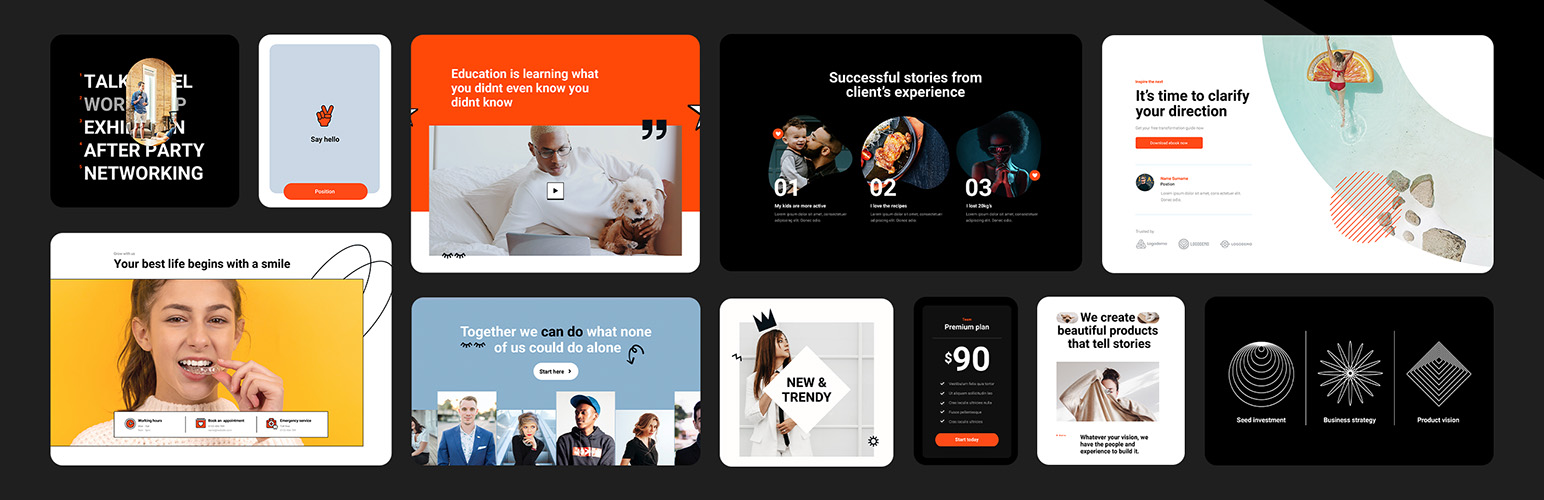
MaxiBlocks: 2300+ Patterns, 280+ Pages, 14.3K Icons & 100 Styles
Description
Build professional WordPress sites faster, boost your design confidence, and deliver higher-quality results with MaxiBlocks.
Our intuitive block patterns and extensive template library help you create unique, polished websites without coding expertise.
The Challenge 🤔
As a WordPress creator, you might be facing:
- Frustration with complex, time-consuming design tools
- Difficulty finding and customizing suitable templates
- Lack of confidence in your design abilities
- Pressure to create unique, professional-looking websites efficiently
No one wants to produce generic-looking websites or spend unnecessary time and resources on web design.
Introducing MaxiBlocks 🎈
We understand the struggle of turning your design vision into reality. That’s why we’ve created MaxiBlocks:
- 18 Foundation blocks with advanced design controls
- Extensive library of 2300+ block patterns and 280+ page templates
- 230+ Site editor theme templates
- 14.3k SVG icons for creative design possibilities
- Regular updates to keep your toolkit fresh and relevant
The Solution 💡
Get started with MaxiBlocks in 5 simple steps:
- Install the MaxiBlocks plugin
- Choose a Style Card for consistent, global styling
- Select from our extensive template library or start with a blank canvas
- Customize content using our intuitive drag-and-drop interface
- Launch your professional website
Design websites that stand out, save time doing it.
Key Features 🔑
MaxiBlocks powers your web design process with:
- Style Cards for easy, consistent global styling
- Drag-and-drop functionality for effortless customization
- Advanced design options for unique layouts
- Full Gutenberg integration for a modern WordPress experience
- Responsive designs for all devices
- No feature limited blocks – all core functionality available for free
Who It’s For 👥
MaxiBlocks is suitable for:
- WordPress developers seeking efficient design tools
- Designers transitioning to WordPress
- Beginners looking to create professional sites without coding
- Agencies and freelancers aiming to increase productivity
- Anyone moving from other page builders to a Gutenberg-compatible solution
Success Stories 🌟
Here’s what our creators are saying:
“MaxiBlocks reignited my design passion. 5+ stars!” – FutureImaging
“Finally, a builder even beginners can rock!” – MyLTD
“Gutenberg fun and powerful customization? Yes, please!” – MeditatingSurgeon
Ready to transform your WordPress design process? 🚀
Install MaxiBlocks for free and start creating designer websites today.
Not sure yet? Explore our demo library to see MaxiBlocks in action, or visit our website for more info.
Resources & Support 📚
Learn and master MaxiBlocks with our comprehensive resources:
- Documentation – Step-by-step guides and troubleshooting tips
- Video Tutorials – From basics to advanced techniques
- Support Forum – Get help from our dedicated team
- Changelog – Stay updated with the latest improvements
Join Our Community 🌍
MaxiBlocks is more than a plugin—it’s a growing community of creators:
- Twitter – Follow for updates and tips
- Discord – Connect with other users
- GitHub – Contribute to our open-source project
Share your creations with #maxiblocks or #madewithmaxi
“We’re on a mission to make website creation faster, easier, and more enjoyable. Can’t wait to see what you’ll create!”
– Kyra, Design Lead & Co-founder
Installation
Install the MaxiBlocks plugin from the WordPress plugin directory in your WordPress admin dashboard.
- Search for “Maxi Blocks” or “MaxiBlocks”
- Then click “Install Now”
- Click “Activate” plugin
To use free templates, first edit, or create a new page in WordPress
-
From the page editing view, click the MaxiBlocks icon to open the master toolbar, top left side.
-
Launch the template library and browse for patterns. Insert and start editing.
-
Play around with some patterns to see how Maxi works and how we use blocks to create patterns.
-
Also choose a style card to instantly update your templates to your chosen style.
-
Use the (?) icon to open the help docs for more info and tutorials.
-
Visit our help desk for more.
Helpful links:
YouTube | Pro library | Demo library | maxiblocks.com | X-Twitter | Discord community | Roadmap
Screenshots

Learn to change style cards: Find out how to switch style cards to improve the appearance of your website with our helpful guide.

Explore the template library: Discover a variety of block patterns and pages in our extensive library, designed to help you build your website more efficiently.

Customize button styles with presets: Quickly adjust your button styles using our selection of presets, making it easier to achieve the look you want on your website.

Create background layers for images: Follow our guide to layer images, enhancing the visual interest of your website with this design technique.

Improve efficiency with custom block toolbars: Work more effectively using our convenient block toolbars, designed to streamline your website design process.

Access the 100 style card library: Choose from a wide range of style cards in our library, featuring global styles to suit various design requirements.

Browse the SVG shape library: View our comprehensive collection of SVG shapes, offering versatile design elements to enhance your website's aesthetics.

Discover the SVG icons library: Search through our extensive SVG icons library, providing a broad selection of icons to give your website a polished appearance.

Customize your style cards: Use our guide to personalize your style cards, giving your website a unique touch.

Use the transform function for shape mask layers: Learn to manipulate design elements effectively with our guide on using the transform function for shape mask layers.
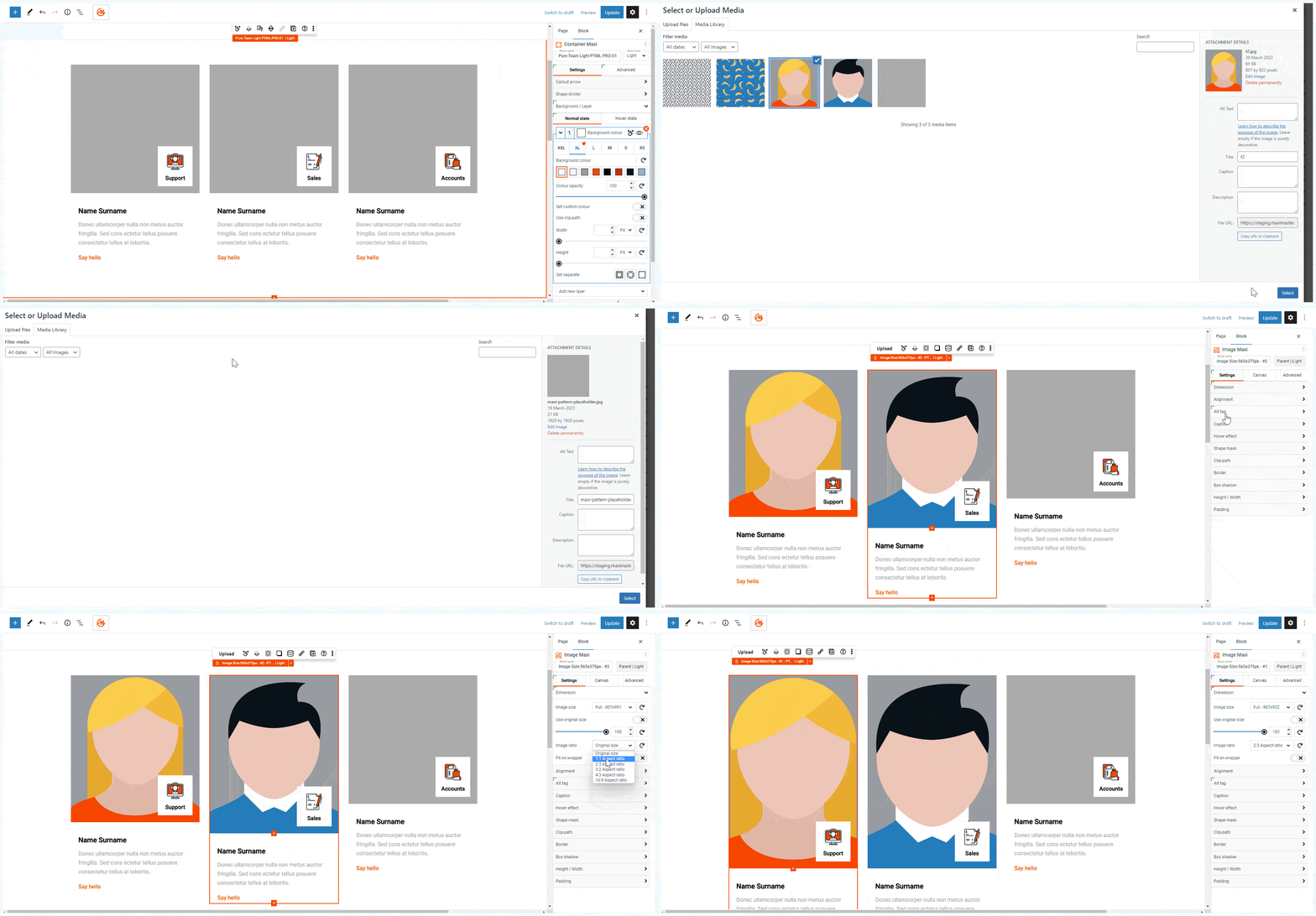
Set automatic image size ratios: See how to set automatic image size ratios to maintain consistent visuals throughout your entire website.

Load an icon from the editing experience: Simplify your design process with our easy-to-follow method for loading icons directly from your editing experience.
Faq
All core features (18 blocks, 14.2k icons, 100 style cards, 406 patterns, 7 pages, full functionality) are free with no restrictions. The Pro cloud library offers premium templates to speed up development.
While you can create the same patterns and pages from scratch with the free version, a Pro cloud account significantly reduces development time.
We take a different approach to block design. Instead of offering numerous specialized blocks, we’ve built extensive functionality into each of our foundation blocks. This allows you to create complex designs with fewer blocks overall, making the system easier to learn and more flexible to use.
Our 18 core blocks are highly versatile, as demonstrated in our pattern library. By focusing on a smaller set of powerful blocks, we ensure they’re well-maintained and continually improved.
Unlike some libraries that restrict key features to encourage paid upgrades, MaxiBlocks provides full functionality in every block from the start. This gives you the freedom to build without limitations, regardless of whether you’re using the free version or have a Pro cloud account. All our foundations block are free.
Yes, MaxiBlocks is fully integrated with the Gutenberg editor. For the best experience, we recommend using a block theme like Twenty Twenty-Four (TT4) or our own MaxiBlocks theme, which is currently in beta testing. Join the MaxiBlocks theme beta. Our support team is here to help if you encounter any issues.
A Pro cloud account gives you access to our cloud library of premium templates and priority support. It’s designed for those who want to streamline their workflow with professionally designed templates.
Once you have a Pro cloud account, you can use the templates on unlimited sites. The sites you create with Pro templates will continue to function and receive updates indefinitely, even if you don’t maintain your Pro account.
Check out our public roadmap.
Reviews
More than "just a product"
By 
When it comes to purchasing something that is supposed to last you for years, the product itself isn't the only thing to look at. Its updates and customer support becomes as important, and MaxiBlocks excels at both.
Not only it receives constant updates, but their customer support goes above and beyond to help, shares useful information, and throughout the whole process maintains professional but friendly attitude (tired of canned responses sounding like you're talking to a bot? you won't find them here).
So yes, I'm happy with the product itself, but what makes it even greater is the added value of people behind it caring about it and their customers.
Worth the money - Recommended
By 
Just bought the pro version have not used for long.
Initial impact - Its is full design kit for wordpress. as far as i know there is no gutenberg block editor in the market at this price which has full site editing with its own theme and plenty of pro templates for each section of your site.
Seems like it is easy to use has few videos to start with in documentation/help section. Link is included in the email received after purchase. Still to see how effective and easy to use different blocks and apply thier settings.
Fast And Easy
By 
I can build Nice websites every Week
This plugin is Very good
By 
MaxiBlocks has a very friendly interface with a fairly fast learning curve. I love it!
The only thing I think should be improved:
When I create a page with more of your blocks - the loading is a bit slow! This only applies when I create a page in the admin panel - there is a slight delay. Otherwise the speed itself when the site is finished is very good.
Keep up the excellent work and maintenance of this great plugin!
One of the Best Plugins & Support Team
By 
MaxiBlocks is one of the best WordPress plugins I've found, and I'm in love with this tool. If you want to design beautiful responsive websites in less time, this is the must-have plugin in your tools bucket. You can literally save hours, and boost your productivity. You don't need to think about what should be your website design as they have hundreds of ready-to-use templates. Just plug them in, and customize them as per your needs.
Now, here comes the best part - customer support. I have used many different tools and plugins, but when it comes to Support, nobody comes closer to MaxiBlocks. I was facing an issue (it was my fault), and didn't know what to do. So, I contacted the support. And the co-founder, Christiaan, really helped me a lot. He spent almost 2 hours with me via video call, and ensured all issues are fixed. The other team members are also really caring and helpful. And this is what a customer wants more than anything else.
Thanks so much guys for creating this amazing plugin, and for all your help and guidance. And I'm looking forward to some more features, templates, and of course, the MaxiBlocks Theme. Best of luck, Team!
Fantastic plugin from passionate developers.
By 
I've had and used MaxiBlocks for some time now and it is like the gift that keeps on giving. The builder is getting better, the template library is simply wow! Love the weekly updates with the new templates. It's great to see that a lot of the new designs come from special requests from MaxiBlocks users and the developers listen to their user base! I'm looking forward to the MaxiBlocks theme also! All in all, this is one of my more sensible investments. I'm excited to see what lies ahead for MaxiBlocks. Needless to say I wish Kyra and Christiaan all the very best.
A promising page builder with a unique library of templates.
By 
For me, this is a very promising page builder, with excellent support.
Particular attention will be paid to the unique library of templates; such variety will satisfy most of the tasks that I encounter during my work.
Definitely 5 stars!
Fantastic page builder plugin
By 
I'm excited about how many premium tools MaxiBlocks provides. t's great that there is a free page builder with which I can build a design of any complexity without touching the code. Dynamic content, style cards, interaction builder saves a ton of time + large and variable library with some awesome and unique templates
Very Good and easy to customise if advanced or novice
By 
Just so good, a glimpse of the future in web building and design
Great design flexibility & outstanding support!
By 
I have been working a while with MaxiBlocks site builder and can't more highlight their extraordinary support. Solved topics in a remote session and via email. I have received more help for challenges to solve than expected. There are many tools out there, but if you are searching for a trustworthy partner, check MaxiBlocks for your next site project.
Changelog
Updates 26 Nov 2025
MaxiBlocks v2.1.7
* Update: Implemented comprehensive UI/UX improvements across the Editor Experience, delivering a more intuitive interface.
* Update: Rebuilt translation system architecture to ensure proper localization support on WordPress.org, enabling seamless multilingual functionality and improved plugin accessibility for international users.
* Update: Updated npm packages and dependencies to latest versions for enhanced security measures and improved stability across all plugin features.
* Fix: Resolved styling inconsistencies with synced blocks and template parts in the Editor Experience for proper visual presentation and consistent design rendering across all editing contexts.
* Fix: Corrected Starter Sites functionality to properly overwrite existing templates and template parts on block themes instead of creating duplicates, maintaining a cleaner template structure and preventing conflicts.
* Fix: Enhanced Interaction Builder reliability for Show/Hide actions with consistent behaviour and proper execution of visibility toggles across all interactive elements.
* Fix: Resolved frontend pagination issues when displaying posts from child taxonomies with accurate post filtering and proper navigation through hierarchical taxonomy structures.
* Fix: Corrected Scroll Effects functionality on smaller screens when using anchor links for proper navigation across all responsive breakpoints.
Updates 5 Nov 2025
MaxiBlocks v2.1.6
* Update: Rebranded Pro features to Cloud, providing clearer terminology and improved user understanding of cloud-based functionality.
* Update: Updated npm packages and dependencies to the latest versions for enhanced security measures and improved stability across all plugin features.
* Update: Introduced option to hide native Gutenberg responsive preview controls, allowing for a cleaner and more streamlined editing interface.
* Fix: Resolved Interaction Builder relations disappearing after duplicating blocks and removing the original, ensuring a consistent editing experience and maintaining interaction configurations.
* Fix: Corrected copy-paste functionality for blocks and page duplication, ensuring all block settings and styles are properly transferred.
* Fix: Enhanced template parts rendering and editing experience in the Site Editing Experience editor, ensuring proper functionality and consistent behaviour.
* Fix: Addressed taxonomy styling issues on the frontend when using the All Archive template, ensuring custom taxonomy pages display correctly with proper style inheritance.
* Fix: Resolved custom colours in Style Cards breaking frontend styles in specific scenarios, maintaining consistent visual presentation across all pages.
Updates 13 Oct 2025
MaxiBlocks v2.1.5
* Update: Implemented comprehensive speed optimizations across both backend and frontend operations, resulting in faster load times and improved overall plugin performance.
* Update: Updated npm packages and dependencies to latest versions for enhanced security measures and improved stability across all plugin features.
* Update: Reorganized Link settings into a dedicated tab within the Editor Sidebar for improved user experience and better settings organization.
* Update: Enhanced Block Toolbar layout by re-arranging and optimizing setting controls for more intuitive access and streamlined editing workflow.
* Fix: Resolved Dynamic Content rendering issues when displaying Advanced Custom Fields data, ensuring proper field values are shown on both backend and frontend.
* Fix: Corrected border line properties resetting to default values when specific styling configurations were applied, maintaining consistent border appearance.
* Fix: Addressed compatibility issues with certain clip-path CSS options that were causing block rendering failures.