MaxiCharts

MaxiCharts
Description
Create beautiful Chartsjs charts from Gravity Forms submission data or CSV data with a simple shortcode.
Use all your past data to visualize advanced statistics in a few clics. You NEED to install at least one add-on in order to use shortcodes.
Requires Gravity Forms v2.3+
All code has been moved to GitHub now : MaxiCharts on Github
Add-ons
You NEED to install at least one of them:
- Maxicharts Gravity Forms source add-on : chart all Gravity Forms submission data
- MaxiCharts CSV add-on : in order to graph CSV files
Optional add-ons:
- MaxiCharts Gravity View add-on : in order to filter entries on Gravity View “approved” ones
- MaxiCharts Query Builder add-on : Real time filter entries on graph using Query Builder
- MaxiCharts Extended Colors add-on “Extended Colors”) : Extended colors sets
Usage
Use the post visual editor brand new button to add as many shortcodes as you want in a few clics !
You need to install the core MaxiCharts plugin in any case, then if you use, for example Gravity Forms add-on, the shortcode processed is:
[gfchartsreports gf_form_id="form_id" include="fieldNb1,fieldNb2,fieldNb3,.." exclude="fieldNb4,fieldNb5,..." color_set="set" type="graphType" width="width(px|%)" float="true|false" chart_js_options="options"]
where all parameters are optional:
- gf_form_id : expects the form ID in Gravity Forms (defaults to first form : id=1)
- type : is the type of graph, at the moment only line,pie,doughnut,bar,horizontalBar available (defaults to pie)
- include : expects the field ids to include (example :
include="1,3,4") - exclude : expects the field ids to exlude (example :
exclude="2,4,6")
see all parameters on demonstration site
Examples
Display all fields of form #1 as pie charts with custom chartjs options for titles:
[gfchartsreports chart_js_options="title: {display: true, text: 'My Funky Chart Title', fontSize:28,fontFamily:'Arial',fontColor:'#00B88A',fontStyle:'bold',padding:20}"]
Displays fields 4, 7 and 18 of gravity form #3 with bar charts. Default colors used.
[gfchartsreports gf_form_id="3" include="4,7,18" type="bar"]
Displays field 2 of gravity form #2 with default pie chart. Use red color set, with not randomization.
[gfchartsreports gf_form_id="2" include="2" color_set="red"]
Displays all but fields 4,7,18 of gravity form #8 with horizontalBar type charts. Use blue color set, randomized.
[gfchartsreports gf_form_id="8" exclude="4,7,18" color_set="blue" color_rand="true" type="horizontalBar"]
More examples here : >> Demonstration site <<
Installation
Easy
- Search via plugins > add new.
- Find the plugin listed and click activate.
- Use the Shortcode
Screenshots
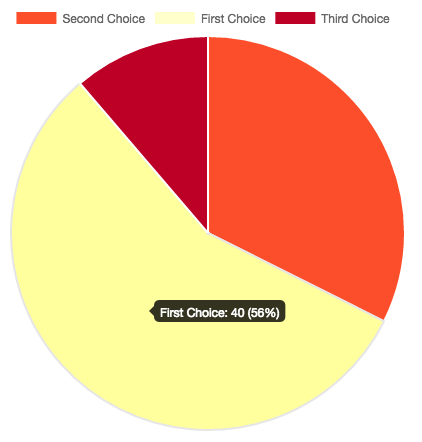
Chart report example 1

Chart report example 2

Chart report example 3


Reviews
Not work
By 
Beste charting option for gravity forms
By 
Amazing Charts. I LOVE THEM
By 
Powerful plugin and easy to set up
By 
Plugin flessibile e supporto istantaneo
By 
Awesome plugin and great service
By 
Wonderful integration of the great Chart.js library with tons of flexibility
By 
Great!
By 
Great chart hub
By 
Changelog
-
1.7.6 – php warning fixed
-
1.7.5 – log level as a parameter
-
1.7.4 – new maximum_fraction_digits parameter
-
1.7.3 – js rounding issue fixed
-
1.7.2 – information_source bug fix
-
1.7.1 – more parameters on datalabels
-
1.7.0 – introducing datalabels
-
1.6.7 – log level back to normal (warn)
-
1.6.6 – reduce space before : in tooltips
-
1.6.5 – no_entries_custom_message bug fixed
-
1.6.4 – automatic std dev annotation
-
1.6.3 – automatic mean for numeric datasets added
-
1.6.2 – box annotation added
-
1.6.1 – previous options fixed
-
1.6.0 – charjs upgraded to 2.9.3 / annotation plugin added
-
1.5.2 – better labels cleaning
-
1.5.1 – filter parameter fix
-
1.5.0 – new singleton structure
-
1.4.12 – bug fix on gf_entry_id
-
1.4.11 – bug on line charts
-
1.4.10 – bug on array access : https://wordpress.org/support/topic/php-warning-error-7/#post-11700240
-
1.4.9 – bug fix for : https://wordpress.org/support/topic/php-warning-error-7/
-
1.4.6 – more error msg feedback
-
1.4.5 – date_end filter added : accepts any strtotime input
-
1.4.4 – date_start filter added : accepts any strtotime input
-
1.4.3 – half doughnuts and pies
-
1.4.2 – radar charts with alpha backgrounds
-
1.4.1 – CSV patch added : https://wordpress.org/support/topic/proposed-bugfix-csv-source-always-assumes-multiset-of-data-even-when-untrue/
-
1.4.0 – Radar charts enhancements
-
1.3.4 – betsy bug
-
1.3.3 – bug fix on field filters, and log level set to info
-
1.3.2 – radar tests
-
1.3.1 – randomize color sets upon new ones
-
1.3 – color management upgraded for new add-on
-
1.2.5 – boolval bug fix for PHP < 5.5
-
1.2.4 – data conversion now converts to locale (solves , or . problems)
-
1.2.3 – table round precision set to 0 (parameter in next versions)
-
1.2.2 – multiple custom criteria (query builder and user custom) managed
-
1.2.1 – adjustments on number formats for UK clients
-
1.2 – tiny mce editor button gf forms pre-load fixed
-
1.1.4 – tick size fixed
-
1.1.3 – stepSize: 1
-
1.1.2 – back to only int fields
-
1.1.1 – new mode parameter compatibility
-
1.1 – query builder compatibility
-
1.0.9 – bug on button editor boolean values fixed
-
1.0.8 – only_data internal parameter added in order to manage query builder add-on
-
1.0.7 – multisite management for button in editor
-
1.0.6 – bug on tooltips
-
1.0.5 – warning fixed : https://wordpress.org/support/topic/warning-missing-argument-1-3/
-
1.0.4 – tinymce still bugs
-
1.0.3 – random
-
1.0.2 – tinymce bug fixed
-
1.0.1 – logger issues fixed
-
1.0 – First stable release.