MB ImageChimp RSS Feed Enhancer

MB ImageChimp RSS Feed Enhancer
Description
This plugin makes it easy to display the featured images of your posts in mailchimp RSS newsletters.
Once activated this plugin will add the following to your sites default rss feed:
To the rss name space declarations:
xmlns:media="http://search.yahoo.com/mrss/"
To each individual item (if it has a featured image):
<media:content url="[url]" type="[mimetype]" medium="image" width="100%" height="auto">
    <media:description type="plain"><![CDATA[title]]></media:description>
</media:content>
The featured images are not inserted directly into the content of your posts, so you have full control over where and how to present them.
If you send out newsletters using a Mailchimp RSS based Campaign, simply place the *|RSSITEM:IMAGE|* merge-tag in your mail template where you want the featured image inserted.
This plugin contains
- 100% clean lightweight code.
- 0% JS
- 0% CSS
- 0% options
The plugin uses the hooks ‘rss2_ns’ and ‘rss2_item’, part of the WordPress core API.
Tested with WP 3.7.1 and MailChimp Dec 2013
Contribute via github
Installation
- Install and activate plugin
- make sure your recent posts has a featured image
- Use the *|RSSITEM:IMAGE|* merge-tag in your MailChimp template to show the featured image
Screenshots
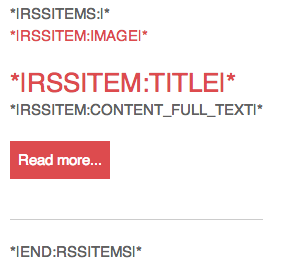
The image merge tag used in an RSS campaign template.

The featured image shown in the email
Faq
Can I contribute?
Yes, contribute are welcome via github
Can I control the size of the featured image
Yes, the url to the featured image is determined by the intermediate size set by the plugin. By default it will request the url for the default ‘large’ size. You can override this by hooking into the ‘mb_rss_extend_item_media_image_size’ filter. Pass the filter either a string or an array as documented in the Codex. You might also want to control the values for the width and height parameters of the image element. By default these are set to “100%” (width) and “auto” (height). This works well with mailchimp for mobile readers. If you want to set these to the actual dimensions of the image you can add the following to your functions.php or a custom plugin:
add_adction('init','my_rss_truedimensions', 20);
function my_rss_truedimensions(){
    remove_filter( 'mb_rss_extend_item_media_image_dimension', 'mb_rss_image_fullwidth' );
}
Reviews
Perfect! Fixes a major MailChimp bug instantly
By 
Perfect!
By 
Thanks.
It's old but it works!
By 
Did what no other plugin I tried could do, made it possible to use the MailChimp *|RSSITEM:IMAGE|* merge tag.
Changelog
1.0
- First public version.
0.1
- Unreleased version.