Media Meta & Force Regenerate

Media Meta & Force Regenerate
Description
Displays the metadata information in the Media Library. Regenerates the metadata and thumbnails even if they exist. This plugin is really useful when the metadata is broken. This is an extremely light plugin.
I am using this tool for debugging many installs and decided to make it available here. Try it, discuss it. Remarks are very welcome 🙂
Installation
- Upload the plugin to the
/wp-content/plugins/directory - Activate the plugin through the
Pluginsmenu in WordPress - Check your Media Library in List Mode.
Screenshots
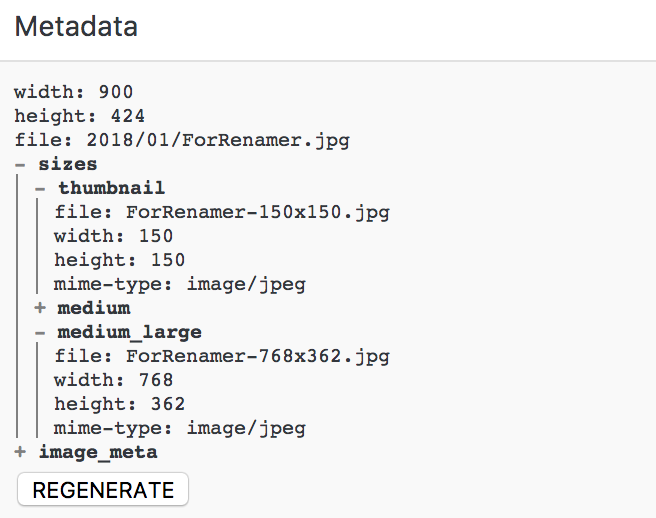
Column Metadata in the Media Library (List Mode).
Faq
No questions yet.
Reviews
Thank you, great tool!
By 
Thank you, this plugin helped us work out some srcset issues!
Would love to see a bulk option added 🙂
Love the Details
By 
I put this on every site I work on now. I love how it gives me a detailed view of media files in the list view. Indispensable!
Maybe this could become an advanced feature in the Renamer plugin. Just a thought.
Useful & Functional
By 
Very lightweight plugin that did just what it promised. I imported a bunch of photos from other site, but the thumbnails where missing. This plugin did the trick.
Good job!
Great!
By 
Not only does this work, but it is the only plugin I found to fix the problem of references to no-longer valid media files, that cause srcset lists to reference files you would rather delete. Great!
This plugin works
By 
No review for it yet, and probably need to be tried and reviewed by more. It does things Regenerate Thumbnails do not, it actually force regenerate the thumbnails, the metadata associated with it, and also visually display the content of this meta.
Changelog
0.0.3
- Info: Make sure it works with latest WordPress.
0.0.2
- Update: Make sure it regenerates all the custom sizes.
0.0.1
- Info: Initial commit.