MeetingHub – Appointment Booking & Meeting Scheduling for Zoom, Google Meet, Microsoft Teams, Webex, Jitsi
MeetingHub – Appointment Booking & Meeting Scheduling for Zoom, Google Meet, Microsoft Teams, Webex, Jitsi
Description
MeetingHub is a free appointment booking and scheduling plugin for WordPress. Share a booking page, let clients pick a time from your real availability, and every appointment is confirmed, added to both calendars, and given a working video link automatically.
Most booking plugins charge extra for video conferencing. MeetingHub does not. Five platforms are in the free version: Zoom, Google Meet, Microsoft Teams, Webex and Jitsi Meet. Your first booking can produce a working meeting link before you connect a single account.
Unlimited booking pages, unlimited appointments, unlimited meetings. No per-seat subscription, no commission, and every client record stays in your own WordPress database.
Get MeetingHub Pro | Join the community | Watch on YouTube
🏆 Key Features at a Glance:
✅ Appointment Booking & Online Scheduling
Set your working hours once, share a link, and people pick a time from what you actually have free. No account to connect and nothing to configure first.
-
Your own booking page
- Every booking page has its own address,
/booking/your-link/: a month, the times free on the day somebody picks, and three fields.
- Every booking page has its own address,
-
Put the booking form anywhere
- Paste
[meetinghub_booking link="your-link"]into any page or post to place the same appointment form inside your own layout.
- Paste
-
Weekly availability, buffers, notice and slot spacing
- Working hours per day, days off, gaps around each appointment, how far ahead and how late people may book, and how often start times are offered.
-
Confirmed the moment they book
- Every booking is confirmed at once and lands in both calendars. Holding each request until you approve it is in Pro.
-
Time zones handled
- Visitors see every appointment time on their own clock and can change it. What you set stays on yours.
-
Reschedule and cancel without emailing you
- Every confirmation carries a private link the customer uses to move or cancel their own appointment. You are told either way.
-
Ask what the appointment is about
- Every booking form carries a notes field. The answer reaches your inbox and sits on the booking.
-
Charge for an appointment (Pro)
- Put a price on a booking page, in any of 34 currencies. The booking page and the confirmation email both show the amount, and you mark each one paid. Card payments are coming to Pro.
-
Your appointment history is yours
- Download every booking as a spreadsheet, answers included, with no limit or fee.
-
The last 30 days, above the list (Pro)
- How many appointments you took, how often people failed to turn up, what is still unpaid, and which booking page is doing the work.
-
See whether your emails arrived
- The Emails tab lists every confirmation and reminder, whether it was delivered, and a button to send it again.
-
Appointment reminder emails
- One email before the appointment, at a lead time you choose, from one hour to one week.
-
No double bookings
- The slot is claimed in the database, so two people clicking the same time cannot both get it.
-
Group sessions and classes (Pro)
- Set how many people can claim the same slot for a class, a workshop or an office hour.
-
Phone, in person or video
- An appointment can be a call, an address, a link of your own, or a meeting created for you on any of the five platforms. Letting each client choose between several on one page is in Pro.
-
Works with the booking plugins you already run (Pro)
- A confirmed booking in WooCommerce Bookings can still create a meeting automatically.
-
Never booked over your Google Calendar (Pro)
- Times you are busy in Google Calendar stop being offered, using the Google account you already connected for Google Meet. Events marked as free and ones you declined are ignored.
-
Pro also adds your own booking questions, a page to send clients to after they book, and a cutoff on how late they may cancel or move. More than one host, multiple reminders and SMS are coming to Pro.
✅ Dashboard: Your Bookings and Meetings at a Glance
MeetingHub Dashboard puts the whole period on one screen: what happened, what is next, and what needs you.
- Headline numbers: events held, bookings and cancellation rate for any date range, each against the period before, with a trend line. Green is better, amber is worse. Revenue is in Pro.
- Events over time: meetings, webinars and appointments stacked in one chart, with the previous period behind it.
- Live and up next: a Join button for whatever is live or starts within 15 minutes, then the next events and their platform.
- To do: emails that did not send, bookings without a meeting link, platforms to reconnect, overlaps and booking pages nobody can book, worst first, each a click from its fix.
- Busiest day, platform health and your booking link, ready to share. Top booking pages are in Pro.
✅ Booking Calendar & Calendar Sync
-
Your appointments in your own calendar (Pro)
- Subscribe to a private
.icsfeed in Google Calendar, Outlook or Apple Calendar. Cancellations drop off it, and the address can be rotated.
- Subscribe to a private
-
Calendar files on every confirmation
- Confirmation and reschedule emails carry an
.icsattachment.
- Confirmation and reschedule emails carry an
-
Add to Calendar button (Pro)
- A one-click Add to Google Calendar button on every meeting page.
-
All Events in one list
- Meetings, webinars and booked appointments together, with search, a platform filter, bulk actions, and overlapping meetings flagged before your attendees find them. A month and week calendar view is in Pro.
✅ Built for Appointments That Happen Over Video
Works with Zoom, Google Meet, Jitsi Meet, Webex and Microsoft Teams, all in the free plugin. Each meeting picks its own platform, so one site can run all five.
- Telehealth and virtual health – patients book a consultation and join from the confirmation email.
- Consultants, coaches and therapists – sell your time, then meet the client without a second tool.
- Tutors and course creators – office hours and live classes, attached to the lesson.
- Legal and financial advisers – remote consultations, client records on your own server.
- Agencies and freelancers – a discovery call link for a proposal or an email signature.
- Marketplace vendors – each vendor runs their own meetings in Pro, and their own booking pages are coming.
✅ WooCommerce Integration
Sell consultations, classes and webinars, and let the meeting create itself once the order is paid. WooCommerce features are Pro.
- Sell meetings and appointments as WooCommerce products, using any gateway you already accept.
- Automatic meeting creation and attendee notifications once a purchase is confirmed.
- WooCommerce Bookings appointments create a meeting link automatically.
✅ LMS Integration
Run a virtual classroom, a live lesson or an educational webinar from inside your LMS. LMS features are Pro.
- Compatible platforms: Tutor LMS, LearnPress, LifterLMS and Academy LMS.
- Virtual classrooms attached to a course or lesson, open only to its enrolled students.
- Shortcodes and an editor button for any lesson page, including LearnDash.
✅ Multi-Vendor Support
Vendors create and manage their own bookings, meetings and webinars without going through you. Multi-vendor features are Pro.
- Compatible plugins: Dokan, WCFM Marketplace and MultivendorX.
- Vendor dashboards for creating and managing their own sessions.
- Meetings linked to vendor products, with branding of their own.
✅ Multi-Language Support
- Translate the plugin into your preferred language with built-in support for internationalization.
✅ Customizable & User-Friendly
- Easy setup and management for instant meetings.
- Connect each video platform from a step-by-step setup panel on MeetingHub Integrations, and install supported plugins such as WooCommerce or an LMS without leaving the page.
- Settings keep unsaved changes as you move between tabs, save with Ctrl+S or Cmd+S, and ask before you leave with changes unsaved.
- Fully customizable shortcodes for embedding meetings and booking forms.
- Compatible with Elementor and Gutenberg.
✅ Built for Developers
- Fully customizable source code for advanced developers.
- Gutenberg blocks, Elementor widgets and filters such as
mhub_user_can_access_meetingto decide who sees a meeting.
✅ 🔥 More Additional Features
- Meeting categories: group sessions by course, client or department and list only those with
[mhub-zoom-meeting-list category="coaching-101"]. - My Meetings:
[mhub-my-meetings]shows a signed-in member their own upcoming sessions with a join button on each. - Shortcodes and blocks for Gutenberg and Elementor: one meeting, a full list, or one platform.
- Private meetings: password protection, plus limits by role, by user or by WooCommerce product purchased.
- Privacy tools: appointment data is included in WordPress personal data export and erasure requests.
- Custom thumbnails, banners, countdown timers and embed sizing. Recurring meetings and priority support are Pro.
Integrations:
🔥 Zoom Meeting
Create Zoom meetings and webinars from WordPress, attach them to a booking page, and show them on any page, with countdown timers and front-end registrant lists. Zoom users, reports and recordings come into WordPress with Pro.
🔥 Google Meet
Google Meet sessions are created as real Google Calendar events, with their attendees, reminders and time zone, so an appointment lands in a calendar rather than an inbox.
🔥 Jitsi Meet
Jitsi Meet is open source and needs no account, which is what lets a first booking work with nothing connected. Unlimited duration, branded rooms, and your own domain or 8×8 JaaS when you want them.
🔥 Webex
Schedule, manage and show Webex meetings and webinars, with attendee registration, breakout sessions, meeting lock and livestreaming.
🔥 Microsoft Teams
Schedule and manage Teams meetings from WordPress over a secure Microsoft Graph connection, with recurring meetings, lobby and recording controls. View Setup Guide
📢 Hear From Our Users
⭐⭐⭐⭐⭐
Great Plugin!
Functional and complete plugin, it allows you to integrate all the main video conferencing platforms. Technical assistance is available and responsive to any user problems, solving them very quickly. The Pugin is constantly updated to develop improvements and add new features, listening to the needs of users! Highly recommended.
– by @giomax86
🔥 Get MeetingHub PRO | 🤝 Join Community | 🕹️ YouTube
External services
MeetingHub talks to the services below only after you connect one, create a meeting on it, or a visitor joins or books one. Freemius is used for opt-in licensing.
Bookings: a booking on a page set to Zoom, Google Meet, Microsoft Teams or Webex sends that service the start time, length, time zone and a meeting title (with the client’s name for one-to-one appointments), and later changes or cancellation. Client email, phone, notes and answers stay in your database.
Zoom (Zoom Video Communications, Inc.) creates, updates and deletes meetings and webinars and reads users and reports once you connect Zoom. It receives your Server-to-Server credentials, meeting details (title, agenda, time, time zone, password, duration, options) and, with webinar registration, registrant name and email. “Join in Browser” loads the Zoom Meeting SDK and its React, Redux and lodash builds from source.zoom.us and sends Zoom the name and email the attendee enters. Terms, Privacy.
Google Meet / Google Calendar (Google LLC) creates and updates Meet events once you upload Google credentials. It receives the credentials, and the title, description, times, time zone, attendee emails and reminder and visibility settings of each event. “Add to Google Calendar” opens google.com with the title, time and link only when a visitor clicks it. Terms, Privacy.
Webex (Cisco Systems, Inc.) creates, updates and deletes meetings once you connect Webex. It receives your OAuth credentials, meeting details (title, agenda, password, times, time zone, options) and, with registration, registrant name and email. Terms, Privacy.
Microsoft Teams / Microsoft Graph (Microsoft Corporation) creates and updates Teams meetings once you connect Microsoft. It receives your app credentials (client ID, secret, tenant ID) and each meeting’s subject, times and length. Terms, Privacy.
Jitsi Meet hosts calls on the server you choose in MeetingHub Integrations. The room name and the joining person’s display name go to that server.
- Public server (default): one of these community servers, not run by us, each under its operator’s own terms. Set your own domain or JaaS to avoid them.
jitsi.member.fsf.org, Free Software Foundation: Privacy.meet.evolix.org, Evolix: Terms and data protection, Legal notice and privacy.video.devloprog.org, Devloprog: Terms of use.webconf.viviers-fibre.net, Association Viviers Fibre (website): publishes no separate terms or privacy policy.
- JaaS on
8x8.vc(8×8, Inc.): a moderator who can edit posts joins with a signed token holding their WordPress user ID, name, email and avatar URL. Terms, Privacy. The avatar comes from Gravatar (Automattic Inc.): Terms, Privacy. - Self-hosted: your own server, under its own terms.
Freemius (Freemius, Inc.) handles licensing. Nothing is sent unless an administrator opts in after activation; “Skip” sends nothing. Opting in sends your name, email, site URL, WordPress, PHP and plugin versions and active plugins and themes. Deactivation feedback is sent only if you submit it. The Contact Us page loads a form from wp.freemius.com; upgrading opens checkout.freemius.com. Terms, Privacy.
Source Code
Compiled files in assets/dist/ are built from assets/src/ (JavaScript and SCSS) with the configs in the plugin root (package.json, webpack*.js, tailwind*.js, postcss.config.js). Build: npm install, npm run build, npm run build:getstarted; PHP libraries: composer install --no-dev.
Bundled open-source libraries, all GPL-compatible: Jitsi Meet External API (Apache-2.0); Google API Client, Google Auth, Guzzle, Monolog, firebase/php-jwt and their dependencies in vendor/ (Apache-2.0, MIT, BSD-3-Clause); Freemius SDK (GPL-3.0); React, React Router, moment-timezone, axios, crypto-js, react-select, react-datepicker, react-datetime, react-time-picker, react-toastify, react-tooltip, react-simple-wysiwyg and @wordpress packages compiled into assets/dist/ (MIT, GPL-2.0+). The Zoom Meeting SDK is not bundled; Zoom serves it on browser join.
Installation
From your WordPress dashboard
- Go to Plugins Add New and search for MeetingHub.
- Click Install Now, then Activate.
- Go to MeetingHub Booking setup and click New booking page. Pick a starting point, confirm the name, length and where you meet, and click Create booking page.
- Share the address it gives you, or paste
[meetinghub_booking link="your-link"]into a page of your own.
Manual installation
- Download the plugin ZIP from WordPress.org.
- Go to Plugins Add New Upload Plugin, choose the ZIP, and click Install Now.
- Activate the plugin, then follow steps 3 and 4 above.
Do I need to connect an account first?
No. A booking page works with nothing connected, and Jitsi Meet needs no account at all. Zoom, Google Meet, Microsoft Teams and Webex each connect to an account you already have, from MeetingHub Integrations Video platforms.
Screenshots
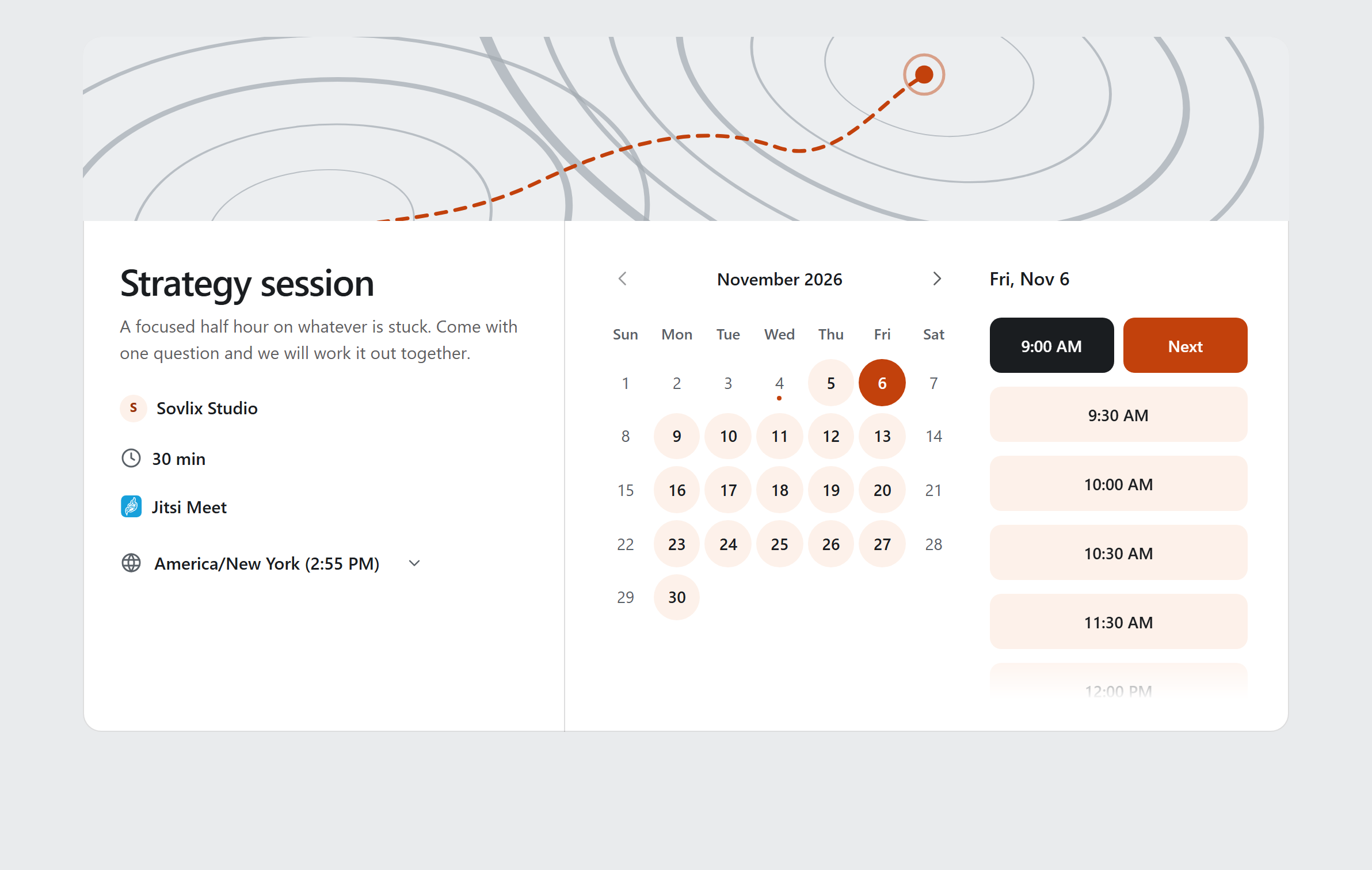
The booking page: pick a day, then pick a time
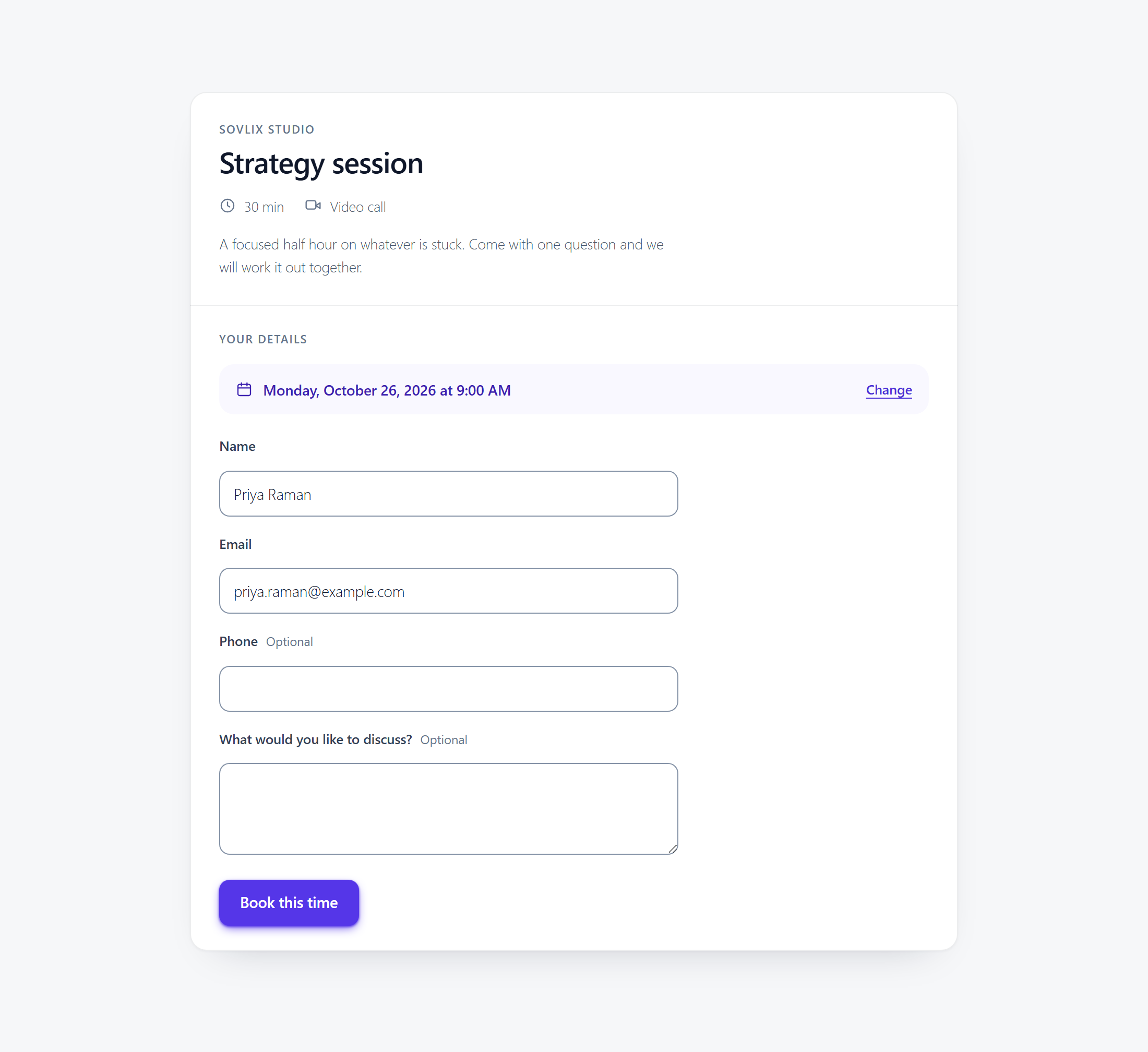
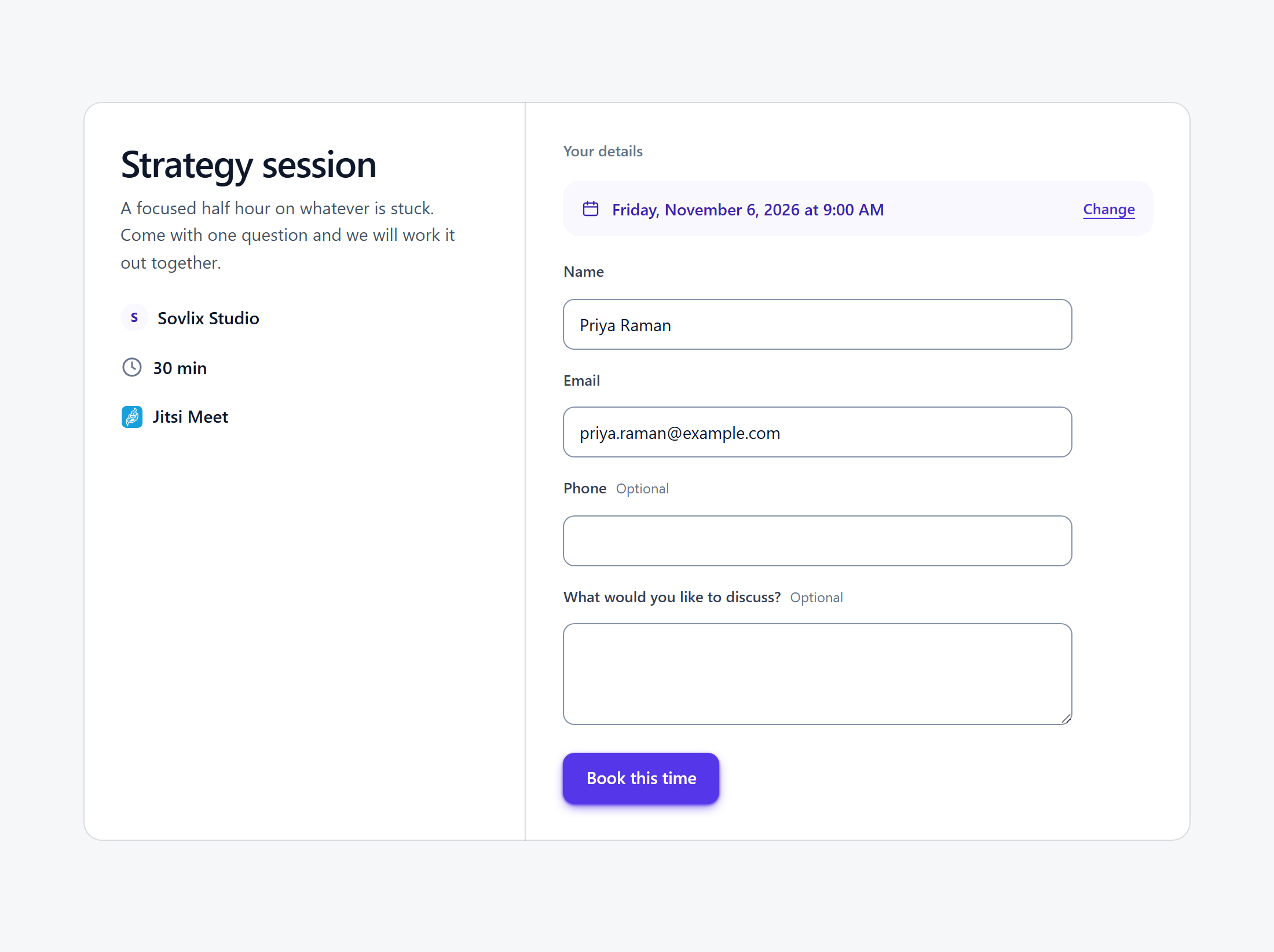
Confirming an appointment, with the time already chosen
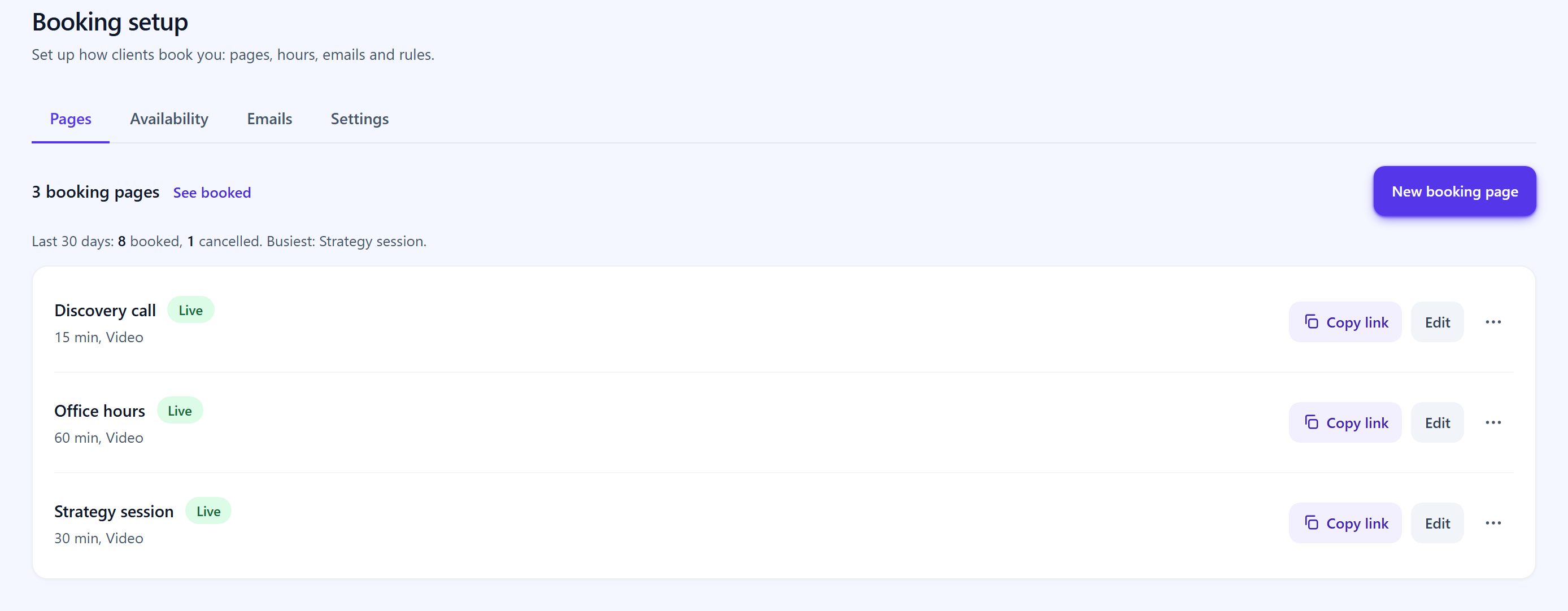
Booking setup, with what the last 30 days looked like
Booked appointments in All Events, with the ones awaiting your approval
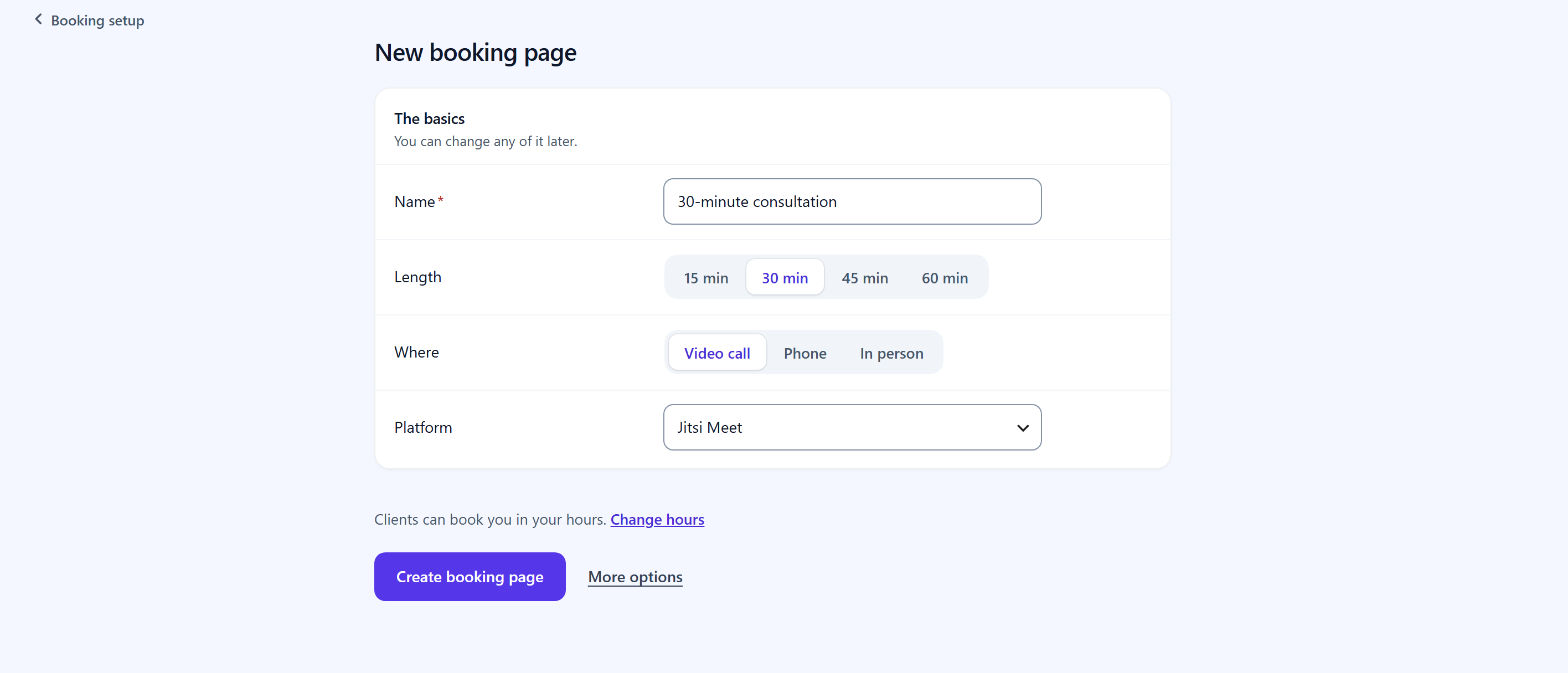
Creating a booking page: length, hours, price and where it happens

The same booking form inside a page of your own

The booking page on a phone
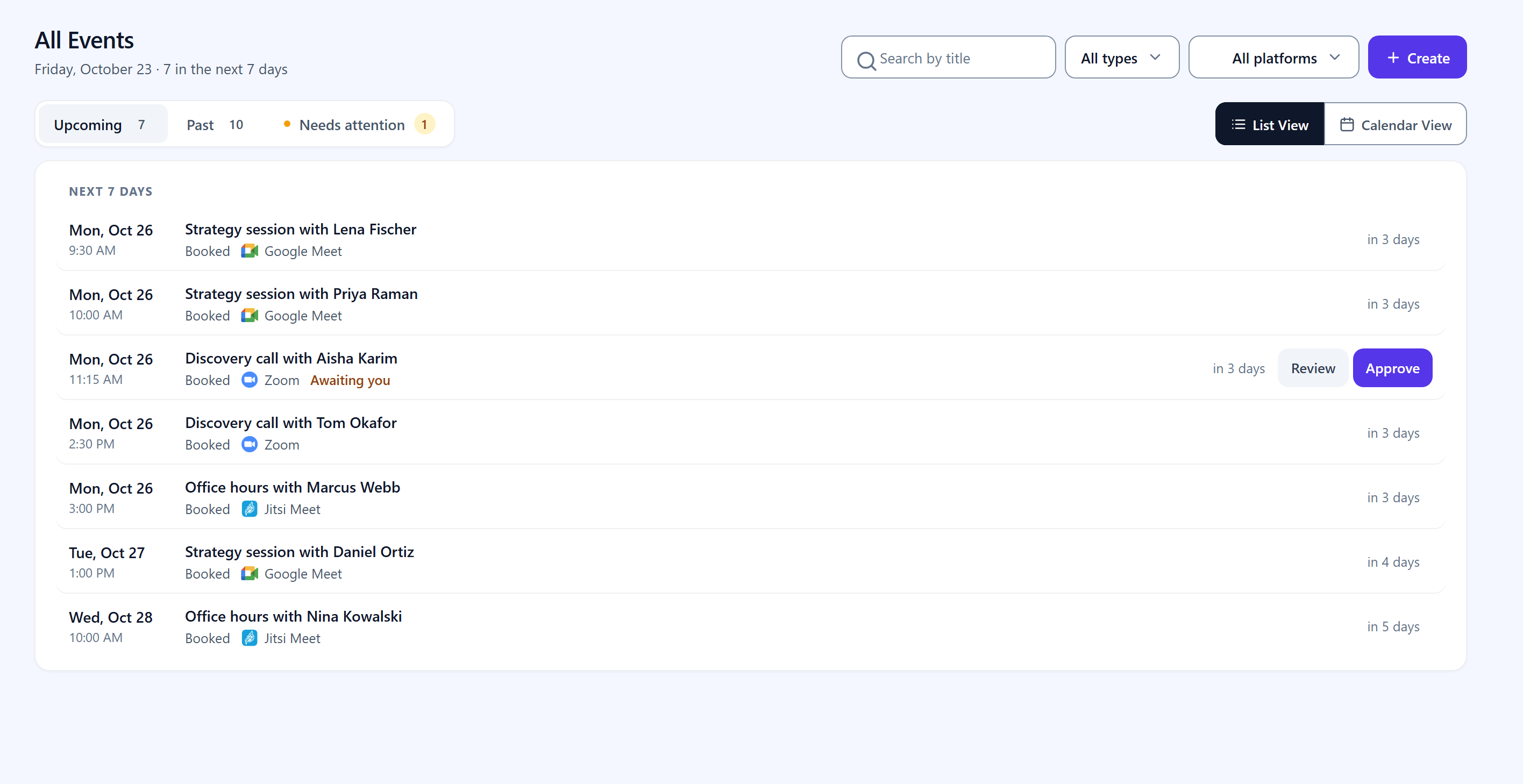
All Events: your meetings, webinars and booked appointments in one list

Every booking email, and whether it arrived

The Dashboard: the period's numbers, events over time, what is next and what needs doing
Faq
Yes. Appointment booking and scheduling are in the free plugin, with no cap on booking pages, appointments or meetings. Free covers your own booking page, weekly working hours, buffers, minimum notice, a booking window, appointment length and slot spacing, instant confirmation, time zone handling, customer reschedule and cancel, one reminder email at a lead time you choose, a calendar file on every confirmation, and all five video platforms.
Pro adds prices, group sessions, approving each booking, letting clients choose how to meet, your own booking questions, checking your Google Calendar for busy times, a private calendar feed, a calendar view and booking stats. More than one host, several reminders per appointment, and SMS are coming to Pro.
Install MeetingHub, then go to MeetingHub Booking setup and click New booking page. Pick a starting point such as a 30-minute consultation, confirm the name and where you meet, and create it. Your hours default to Monday to Friday, 9 to 5, until you change them under Availability. You get a public booking page at /booking/your-link/ straight away. To put the same booking calendar inside a page you have designed yourself, paste [meetinghub_booking link="your-link"] into it. The whole process takes about two minutes and needs no account connected to anything.
They open your booking page and see a month. Picking a day shows the times you actually have free on it, in their own time zone. They choose one, fill in name, email and a note, and confirm. You get an email, they get an email, and the appointment carries a calendar file so it lands in a real calendar. If the booking page is set to a video platform, the meeting link is created and included automatically.
Yes, in the free plugin. MeetingHub Dashboard shows events held, bookings and cancellation rate for any date range, each compared with the period before, a chart of meetings, webinars and appointments over time, what is live and up next, and a to-do list of anything that needs you, such as an email that did not send or a platform to reconnect. Pro adds revenue and your top booking pages.
MeetingHub runs on your own WordPress site instead of somebody else’s service. Your booking page sits on your domain, under your theme, and every client name, email and appointment is stored in your own database, which you can export or delete yourself at any time. There is no per-seat monthly charge and no commission on what you sell. The trade-off is honest: a hosted service is somebody else’s problem to keep running, and MeetingHub is yours.
Their free versions include no video platform: Zoom, Google Meet and Teams are paid add-ons or paid plans. MeetingHub’s free version includes all five, Zoom, Google Meet, Microsoft Teams, Webex and Jitsi Meet, and every booking gets its own working meeting link. MeetingHub is built for appointments that happen over video; if you run a salon or a hotel, a plugin built for in-person resources will suit you better.
Yes, and that is the point of the plugin. Set a booking page’s location to one of the five platforms, and every appointment booked on it gets a real meeting created on that service, with the join link in both confirmation emails and in the calendar file. Nobody copies a link by hand, and no second plugin is involved.
No. A booking page works with nothing connected. Choose Phone call or In person and there is no video account involved at all. Choose Jitsi Meet and the room is created without an account either. Connecting Zoom, Google Meet, Teams or Webex is a separate decision you can make later.
Yes. The slot is claimed in the database with a uniqueness check, not filtered in the browser, so two people clicking the same time in the same second cannot both get it. One of them is told the time has gone and is shown what is still free. Group booking pages are the deliberate exception: you set how many people may claim one slot.
Yes, all three, and all free. A buffer adds a gap before or after every appointment so you are not booked back to back. Minimum notice stops somebody claiming a slot in twenty minutes’ time. The booking window caps how far into the future the calendar goes, so your diary is not booked out eight months ahead. Each booking page carries its own values.
Yes, with Pro. Each booking page can confirm instantly or hold each request until you approve it, and the held time stays reserved while you decide. The free plugin confirms every booking at once.
Yes, with Pro. Set a capacity above one on the booking page and that many people can claim the same slot, which is what a class, a workshop, a webinar or a shared office hour needs. The slot stops being offered once it is full.
Yes. The free plugin sends one reminder before each appointment, at a lead time you choose: one hour, two, four, twelve, a day, two days or a week. Confirmation and reschedule emails go to both sides automatically, each with a calendar file attached. Several reminders per appointment, and SMS, are coming to Pro.
Yes. Every confirmation email carries a calendar file in the free plugin. With Pro, MeetingHub also gives you a private .ics feed address you can subscribe to in Google Calendar, Outlook, Apple Calendar or anything else that reads a calendar feed. New bookings appear there and cancellations disappear from it. You can rotate the address if it ever gets out.
In the other direction, MeetingHub Pro reads your Google Calendar so times you are already busy there stop being offered. Outlook and Apple Calendar are not read yet.
Yes. Every confirmation carries a private link that lets them move to another free time or cancel, without emailing you. You are told either way, and the replacement calendar file is sent automatically. With Pro you can stop changes too close to the start.
Yes. You set your working hours in your own time zone once. Every visitor sees the times on their own clock, detected from their browser, and can switch to another time zone if they are booking on somebody else’s behalf. The stored appointment is the same moment for both of you.
Yes. Paste [meetinghub_booking link="your-link"] into any page or post. It is the same form as the standalone booking page and it takes the styling of your theme’s column rather than fighting it.
Anyone whose appointments happen over video: telehealth and virtual health practitioners, consultants, coaches and therapists, tutors and course creators running office hours, legal and financial advisers taking remote consultations, agencies booking discovery calls, and marketplace vendors selling their time. It is not built for salons, hotels, holiday rentals or restaurant tables, where a purpose-built in-person booking plugin will serve you better.
Yes, with Pro. The WooCommerce integration lets you sell a meeting or a consultation as a product using any gateway you already accept, and the WooCommerce Bookings integration creates the meeting automatically once a booking is paid for and sends the details to the customer. The free plugin can show a price that is paid at the appointment, and you mark it paid; it does not process card payments.
Five: Zoom, Google Meet, Microsoft Teams, Webex and Jitsi Meet. All five are in the free plugin, and one site can use as many as it needs, because each meeting and each booking page picks its own platform.
Not to get started. Jitsi Meet needs no account at all. Zoom, Google Meet, Webex and Microsoft Teams each connect to an account you already have, and their own free tiers are enough for most meetings. MeetingHub never charges you for meeting minutes.
On the service you picked. MeetingHub creates the meeting through that service’s API and embeds or links it on your site, so the video, audio and recording are all handled by Zoom, Google, Cisco, Microsoft or Jitsi. Your hosting is never in the path of the call.
Three ways, all in the free plugin: the MeetingHub block in the editor, the Elementor widget, or a shortcode. Pro adds Classic Editor support and a front-end form, so members can create and manage their own meetings without ever seeing wp-admin.
Yes. There is a shortcode for a single meeting and another for the whole list, both free, and meeting categories let a list show one course or one client only. Who sees a meeting is controlled on the meeting itself: limit it to chosen roles or users, put a password on it, or restrict it to people who bought a given WooCommerce product.
Free covers unlimited booking pages and appointments, your own booking page and booking form shortcode, working hours and days off with buffers and notice, instant confirmation, time zone handling, customer reschedule and cancel, one reminder email, editable booking emails, a calendar file on every confirmation, the Dashboard, and unlimited meetings on all five video platforms with screen sharing, thumbnails and banners, the Gutenberg block, the Elementor widget, meeting categories, role and password restrictions, email notifications and Multisite support.
Pro adds recurring meetings, meeting registration, recordings and transcripts inside WordPress, Zoom users and reports, front-end meeting creation and management, WooCommerce and WooCommerce Bookings, Tutor LMS, LearnPress, LifterLMS and Academy LMS, Dokan, WCFM and MultivendorX, Classic Editor support, white labelling and priority support. For booking, Pro adds approving each booking, group sessions, prices, several ways to meet on one page, your own booking questions, a redirect after booking, a cancel and reschedule cutoff, Google Calendar busy-time checking, a private calendar feed, the All Events calendar view, booking stats, and revenue and top booking pages on the Dashboard. More than one host, several reminders and SMS are coming.
The free plugin lets you give each booking page its own accent colour, set the embed width and height, and give a meeting its own thumbnail and banner. Pro adds white labelling, which takes MeetingHub’s own name off what your visitors and clients see.
Recurring schedules, weekly, bi-weekly or monthly, are a Pro feature. The free plugin creates as many one-off meetings and takes as many appointments as you like, with no cap.
Meeting registration is a Pro feature: attendees sign up first and the join link follows, so you know who is coming. Pro also surfaces Zoom users and reports inside WordPress, which is where you see who actually turned up.
Pro integrates with Tutor LMS, LearnPress, LifterLMS and Academy LMS, so a lesson can carry its own live class, and with Dokan, WCFM and MultivendorX, so each vendor runs their own meetings and bookings without going through you.
The recording is made and stored by the service you connected, as it always was. Pro is what brings it back into WordPress: a recording list with transcripts, next to the meeting it belongs to, instead of a hunt through Zoom.
On your own site, in your own WordPress database. Nothing about an appointment is sent to us. Bookings are included in WordPress’s own personal data tools, so a request under Tools Export Personal Data returns everything held about that email address, and Tools Erase Personal Data anonymises it while leaving your own schedule intact. That is the machinery a GDPR or CCPA request needs, handled by WordPress core rather than by a separate add-on.
PHP 7.4 up to 8.3. Google Meet needs PHP 8.1 or later, because Google’s own libraries do; on an older PHP it says so in place of connecting, and every other platform, bookings and integrations work as usual.
Yes, and in the free plugin. Each site in the network keeps its own meetings, bookings and connected accounts, so one subsite is never able to see or edit another’s.
Not for your visitors. The admin application is loaded only for signed-in users who are allowed to create meetings, because that is what front-end meeting management needs. Somebody reading a page while logged out never receives it.
Meetings already created on that service keep their links, because they live on the service and not in WordPress. MeetingHub simply stops being able to create new ones on it until you reconnect. Nothing is deleted at either end.
Deleting MeetingHub from the Plugins screen removes its own settings, connected credentials and cached data. Your meetings and any appointments booked through the plugin are kept, so deactivating or reinstalling never loses your content or a commitment you made to a customer. To remove booking records as well, delete them before uninstalling.
Reviews
Outstanding Support Beyond Expectations
By 
Outstanding Support – The Best I’ve Ever Experienced!
I don’t usually write reviews, but the MeetingHub team truly deserves this one.
I recently installed MeetingHub plugin for a Zoom meeting on one of my WordPress website. While installing the plugin was straightforward, I ran into some challenges setting up a few critical features exactly the way I needed them for an important scheduled meeting.
I contacted their support team expecting the usual “we’ll get back to you” response. Instead, they responded almost immediately and stayed with me every step of the way.
What amazed me most was their commitment. They literally stayed awake throughout the night helping me fine-tune every aspect of the setup to ensure everything would work perfectly before my meeting. They never made me feel rushed, and they patiently answered every question I had.
To my surprise, they even updated the MeetingHub plugin, also added I new feature within 12hours to accommodate my specific needs. That level of dedication is something I’ve never experienced with any software company.
Even after everything was set up, they didn’t disappear. instead they stayed available until my scheduled Zoom meeting was over, making sure everything ran smoothly. And it did without a single glitch. The entire experience was flawless.
In today’s world, it is very rare to find a company that genuinely cares about the success of its customers the way the MeetingHub team did with me. Their response time is incredibly fast, their technical knowledge is exceptional, and their willingness to go above and beyond is second to none.
If you’re considering MeetingHub, don’t hesitate. You’re not just getting a great plugin, you’re getting a team that stands behind it and treats your success as their own.
Thank you, MeetingHub team. You’ve earned my trust and my highest recommendation
Amazing Support & Super Fast Feature Delivery 🚀
By 
I requested the Zoom participant report feature, and they said it would take around 7 days. But they surprised me by delivering it within just 2 days!
Really amazing support and quick response. They also improved the Tutor LMS integration to sell meetings as a product, which is very helpful.
Really appreciate their effort. Highly recommended 👍
Support non-existent and video tutorials innaccurate
By 
No matter what I try, I can't get this to work correctly. The support is essentially non-existent - they don't answer direct inquiries or posts on the support threads. The video tutorials that they send you to are not accurate. I also only see 10 reviews, all 5 star, so my guess is that this will be hidden as well.
Best meeting plugin
By 
So many cool features and very good support. They helped me a lot. Thanks 🙏
Good Plugin Great Support Team
By 
I first found this plugin while working on a project for my day job. The plugin does everything it says and so far the support has been great even when dealing with weird edge cases.
Quick replies and fixes. Polite and hardworking team.
I am looking forward what the future holds.
Great plugin !
By 
Functional and complete plugin, it allows you to integrate all the main video conferencing platforms. Technical assistance is available and responsive to any user problems, solving them very quickly. The Pugin is constantly updated to develop improvements and add new features, listening to the needs of users! Highly recommended.
I would Recommend This 1billion times!!!
By 
the support is 100% satisfaction, this guys know their stuff. almost 24hrs online to respond to help. i cant fault the plugins. i love it!
Interested to Buy - Presale Questions
By 
- Does this have the whiteboard feature in Jitsimeet?
- Does the TutorLMS integration allow instructors to create their own meetings in the fronte-end editor without the use of shortcodes from Admin?
If these work, I'll purchase the lifetime plan, it's the core features I'm interested in for my elearning project.
TOP! The complete solution for videoconference
By 
Complete, intuitive and fast plugin with a professional support center, in less than a day they solved a small integration problem on my site.
The plugin is perfect for my use, it has ad hoc features for those who need to build a videoconferencing site accessible in a few clicks.
Really incredible
Good Plugin!
By 
Hi, many thank for your plugin. We are testing your plugin with Webex but once we have entered the Client ID and Client Secret credentials and saved them, when we try to click on Connect Webex Account we are redirected to a wp-admin/undefined page that does not exist. We have already tried uninstalling all plugins and the error persists. We are using wordpress 6.5.5. Thanks for your feedback
Changelog
3.0.0 – 25 October 2026
- New: Added a dashboard with event statistics, booking trends, upcoming sessions, pending tasks, busiest days, and video platform activity.
- New: Introduced booking pages with configurable availability, working hours, days off, and customizable appointment durations.
- New: Added the
[meetinghub_booking]shortcode to embed booking forms on any page or post. - New: Added appointment scheduling with Zoom, Google Meet, Microsoft Teams, Webex, and Jitsi Meet.
- New: Added support for video calls, phone calls, in-person meetings, and custom appointment details.
- New: Added an All Events screen to manage meetings, webinars, and appointments from one place, with search, platform filters, and bulk actions.
- New: Added appointment management options for approval, joining, rescheduling, cancellation, completion, and no-show tracking, with private notes.
- New: Added manual appointment creation with automatic availability checks, confirmation, and email notifications.
- New: Added booking confirmation emails, configurable appointment reminders, calendar attachments, and automatic notifications when appointments change or are cancelled.
- New: Added customizable email templates, test emails, and an email log with delivery status and resend options.
- New: Added a notes field to booking forms and spreadsheet export for booking records.
- New: Improved booking reliability with database-level protection against double bookings.
- New: Added support for WordPress personal data export and erasure requests for booking information.
- New: Added meeting categories to organize sessions and filter meeting lists using the
[mhub-zoom-meeting-list]shortcode. - New: Added the
[mhub-my-meetings]shortcode to display upcoming sessions for the currently logged-in user, with an option to show only the next session. - New: Added meeting access controls based on WooCommerce purchases, BricksMembers membership levels, and the
mhub_user_can_access_meetingfilter. - Enhancement: Redesigned the administration interface with dedicated sections for events, booking setup, integrations, recordings, reports, and video hosts.
- Enhancement: Added step-by-step video platform connection guides and supported plugin installation from the integrations screen.
- Enhancement: Improved settings management with preserved changes across tabs, keyboard shortcuts for saving, and warnings for unsaved changes.
- Enhancement: Updated the MeetingHub branding and applied a consistent visual design throughout the administration interface.
- Enhancement: Improved asset loading to reduce unnecessary scripts on unrelated admin screens and frontend pages.
- Enhancement: New booking pages default to video appointments, with Jitsi Meet available without requiring an external account connection.
- Enhancement: Video rooms are created only after appointment requests requiring approval have been approved.
- Enhancement: Optimized meeting queries to retrieve only the sessions required for the selected list or category.
- Fix: Improved video room creation retries to prevent duplicate meetings and detect responses missing a valid join link.
- Fix: Fixed Google Meet booking creation when no administrator is signed in.
- Fix: Fixed booking page routing on websites using plain permalinks.
- Fix: Improved email delivery status tracking to distinguish failed reminders from successfully sent emails.
- Fix: Fixed a fatal error in the Google Meet shortcode when the referenced meeting no longer exists.
- Security: Improved booking export security by neutralizing spreadsheet formula injection risks.
2.0.3 – 15 Oct, 2026
- Maintenance updates and bug fixes.
2.0.2 – 15 Oct, 2026
- Maintenance updates and bug fixes.
2.0.1 – 09 Sep, 2026
- Fix: Fixed a “Sorry, you are not allowed to access this page” error that could appear on the Get Started screen the first time the plugin was activated.
2.0.0 – 09 Sep, 2026
- New: Completely redesigned the admin interface for a cleaner and easier experience.
- New: Added a simple four-step meeting creation flow.
- New: Improved Dokan, WCFM, and MultivendorX integrations with separate settings and automatic migration.
- New: Redesigned Frontend Meetings with a guided setup wizard and improved page management.
- Enhancement: Improved settings management to prevent settings from being unintentionally overwritten.
- Enhancement: Improved navigation menu setup, accessibility, tooltips, and admin controls.
- Fix: Fixed Frontend Meetings displaying raw shortcodes when disabled.
- Fix: Fixed clipboard, dropdown, PHP 8, shortcode, and meeting page loading issues.
- Fix: Fixed layout issues in the All Meetings list and narrower dashboard containers.
- Fix: Improved integration setup when required marketplace plugins are not installed.
The full history of every earlier release is in changelog.txt, shipped alongside this file.