Melapress Login Security
Melapress Login Security
Description
COMPREHENSIVE WORDPRESS LOGIN SECURITY PLUGIN
Melapress Login Security enables you to effortlessly set login security policies that put you firmly in the driver’s seat of your WordPress sites. Policies are highly customizable and granular and can be implemented by user role or site-wide for complete control over the security of your WordPress login processes.
Use the free edition of Melapress Login Security to implement WordPress password requirements such as minimum length and complexity rules. The plugin also allows you to set password expiration policies, prevent password reuse, limit failed login attempts, and automatically disable inactive user accounts, among other things. This helps you:
- Prevent unauthorized login attempts
- Protect against brute force attacks
- Comply with GDPR with a login consent notice
🔐 Features list
A secure WordPress login starts right here. Explore all of the features included with the free edition of Melapress Login Security:
Set password policies
Strong passwords are your first line of defense against bad actors looking to gain access to your site. Set password requirement policies to make sure users set strong passwords. Set policies by user role or site-wide and define policy priority for users with multiple roles.
- Set minimum password length
- Require uppercase and lowercase characters, numbers, and special characters
- Set an automatic password expiration policy and advise users when their password is about to expire
- Disallow users from reusing passwords
- Provide users with helpful instructions during the password configuration stage
- Disable password reset links
- Mandate WordPress password reset on the first login
Limit login attempts
Limit failed login attempts and put an end to brute force attacks. Protect your login form by automatically disabling user accounts after a number of failed login attempts. Choose between manual unlocking by an admin or automatic unlocking after a cooldown period.
Temporary login without password
Provide temporary and secure login access to third parties, like developers, editors, employees or others, without a password. It works by providing the user with a temporary login link that expires after a certain amount of time, or after a number of uses. This prevents you from having to create new user accounts manually, while simultaneously reducing the security risks associated with old, unused user accounts.
Change WordPress login URL
Easily deploy security-by-obscurity tactics and change your WordPress login page URL using a plugin! Hiding the default login page from hackers makes it more difficult to find, potentially reducing brute force attacks and other unauthorized access attempts. After you change the default wp-admin URL, you can set a 404 for the old login page or redirect it to any page of your choosing.
Limit login page access by IP address(es)
Limit access to the WordPress login page by IP address(es) for additional security.
GDPR login page consent notice
Easily meet GDPR requirements by adding a GDPR consent notice to the login page. This is required for GDPR and PCI DSS compliance, thus ensuring your WordPress site login page is in compliance.
Emergency password reset
Discovered suspicious behavior? Reset all users’ passwords with just one click and regain instant control.
Upgrade to Melapress Login Security Premium and get even more benefits.
The premium edition of Melapress Login Security comes bundled with even more features, which enable you to take your WordPress website login security to the next level. Disable inactive WordPress user accounts and force passwords to be reset once accounts have been unlocked. Inactive accounts can be managed within a single dashboard for increased efficiency and faster response times. Moreover, you can set accounts to be locked out after a number of failed login attempts and customize the duration and method of unlocking them.
Premium features list
- Everything included in the free edition
- Manually lock user accounts to immediately prevent login access for rarely used accounts or users on extended leave
- Add an extra security layer with security questions users must answer when performing sensitive actions such as password resets and account unlocks
- Receive email alerts for unrecognized device logins, with the option to remotely terminate the session
- Control user session duration by extending or shortening session timeouts to balance security and convenience
- One-click integration with third-party plugins such as WooCommerce, LearnDash, MemberPress, and many others
- Automatically disable inactive WordPress users after a configurable period of inactivity
- Apply Geo-blocking rules to allow or block login access based on specific countries
- Restrict users’ login to specific IP addresses, including support for multiple allowed IPs
- Restrict WordPress user login times by day and/or hours
- Limit login credentials to email address, username, or both
- Add a GDPR consent notice to the WordPress login page
- View detailed user security reports, including last activity, password age, and expired passwords
- Receive weekly email summary reports covering password resets, password changes, user account lockouts, and more
|💎 UPGRADE TO PREMIUM |
Why you should use Melapress Login Security
Melapress Login Security is a WordPress plugin built from the ground up to help you improve the security of your user accounts and secure your WordPress login. Supercharge login credentials for maximum effectiveness and put a stop to unlimited login attempts, weak passwords, and inactive users. Set up policies to reduce your attack surface area such as login times restrictions, change the WordPress login URL, and much more.
Free and premium support
Support for the free edition of Melapress Login Security is free on the WordPress support forums. Premium world-class support via one-to-one email is available to the Premium users – upgrade to premium to benefit from priority support.
For any other queries, feedback, or if you simply want to get in touch with us, please use our contact form.
MAINTAINED & SUPPORTED BY MELAPRESS
Melapress builds high-quality WordPress security & admin plugins such as WP 2FA, Melapress Role Editor,and WP Activity Log, the #1 user-rated activity log plugin for WordPress.
Visit our website to see how our plugins can help you better manage and improve the security and administration of your WordPress websites and users.
Install the plugin from within WordPress
Keeping a secure WordPress login page is easy with Melapress Login Security. Simply:
- From your WordPress dashboard, navigate to Plugins > Add New
- Search for “Melapress Login Security”
- Install & activate Melapress Login Security from your Plugins page
Install the plugin manually (via file upload)
- Download the plugin from the WordPress plugins repository
- Unzip the zip file and upload the folder to the
/wp-content/plugins/directory - Activate the Melapress Login Security plugin through the Plugins page in WordPress
Screenshots
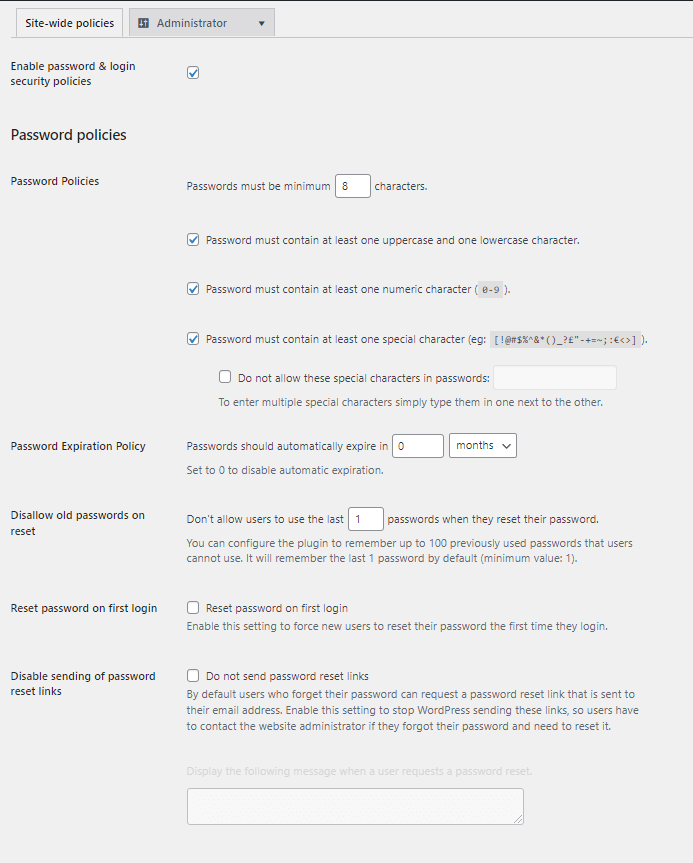
The configurable login security policies in the plugin.
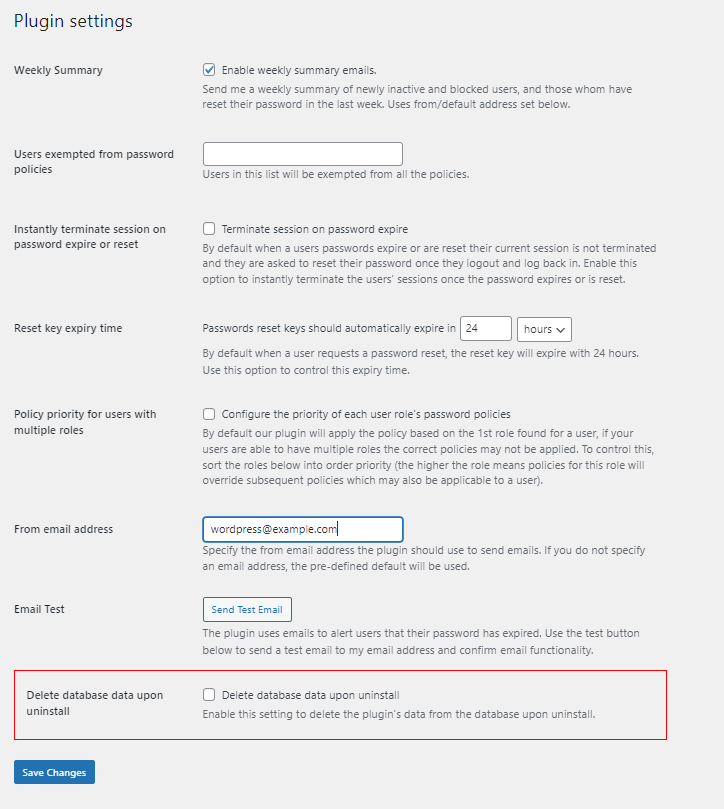
The plugin is highly configurable, allowing you to fine tune the plugin's functionality to fit your requirements.
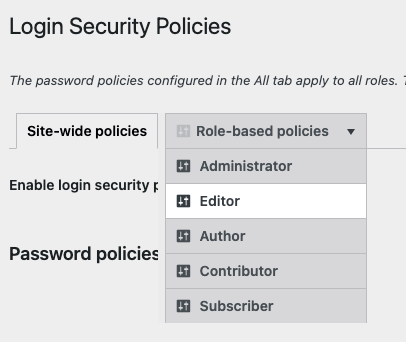
You can configure different login security policies for every user role, or exclude the role from the policies, or simply inherit the site-wide policies for every role.
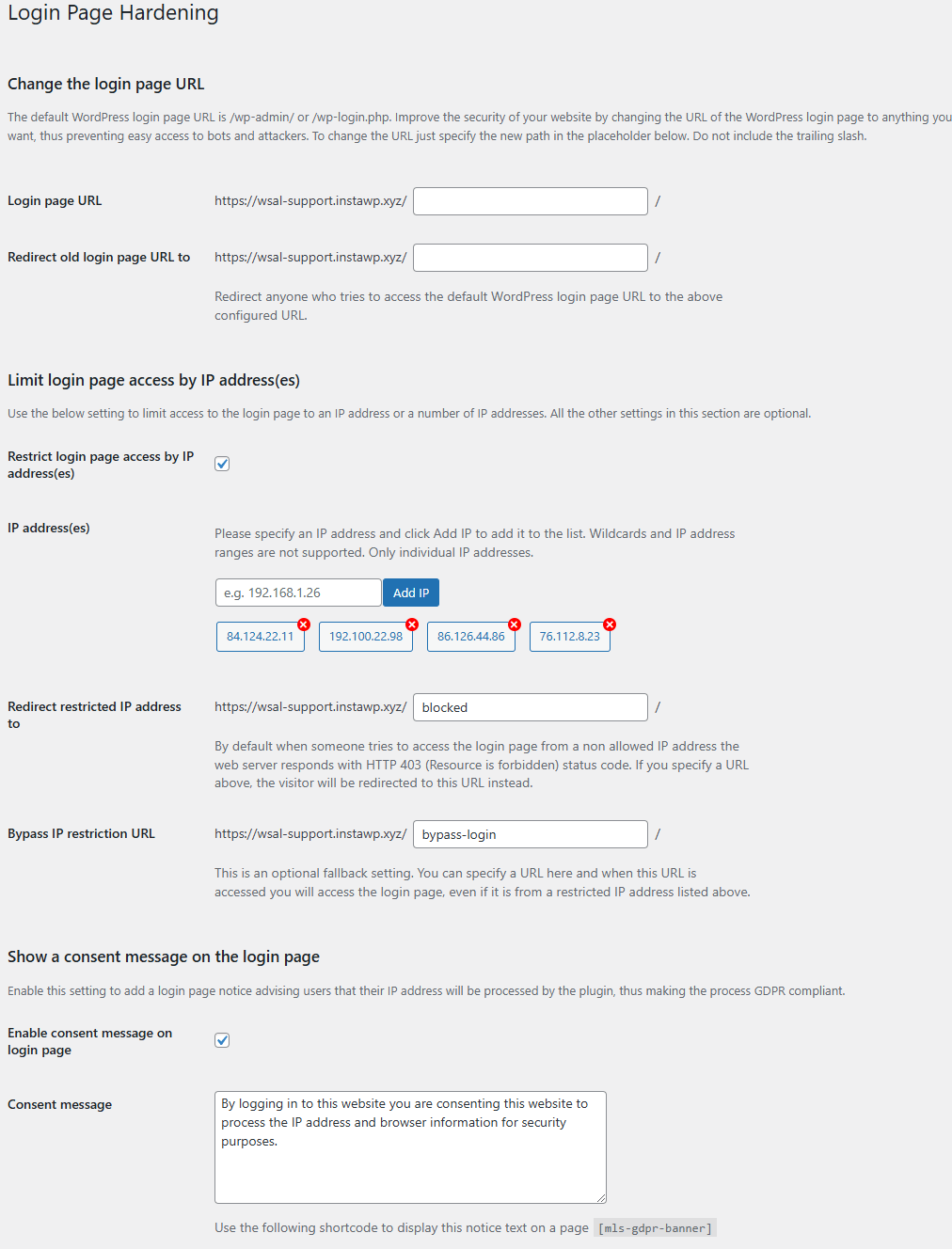
Change the login page URL as a security hardening technique, restrict access via IP address(es), and also add a GDPR consent message, which is required by PCI DSS and GDPR compliance regulations.
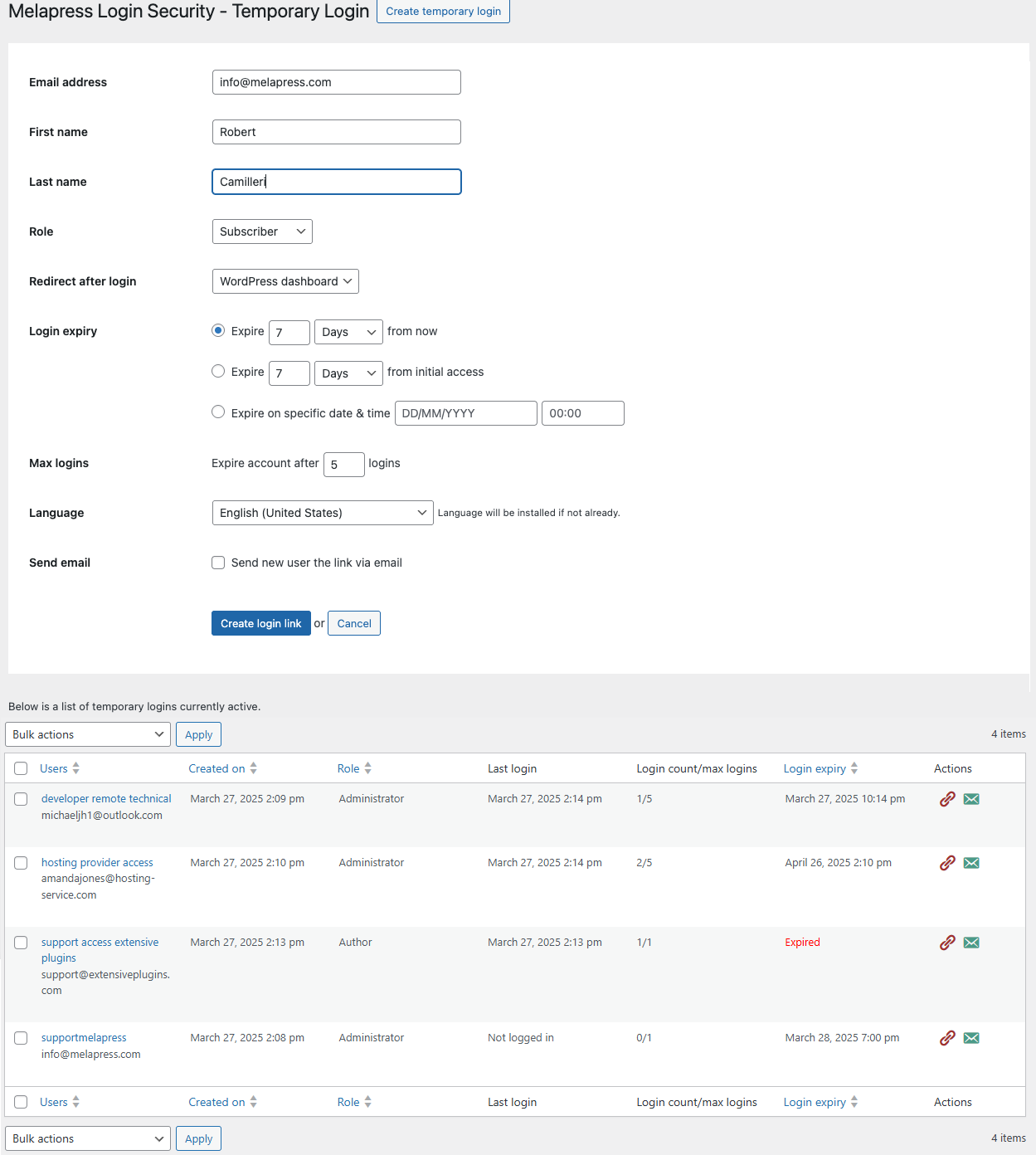
Easily create temporary secure logins without passwords that automatically expire after a specific period or a number of use.
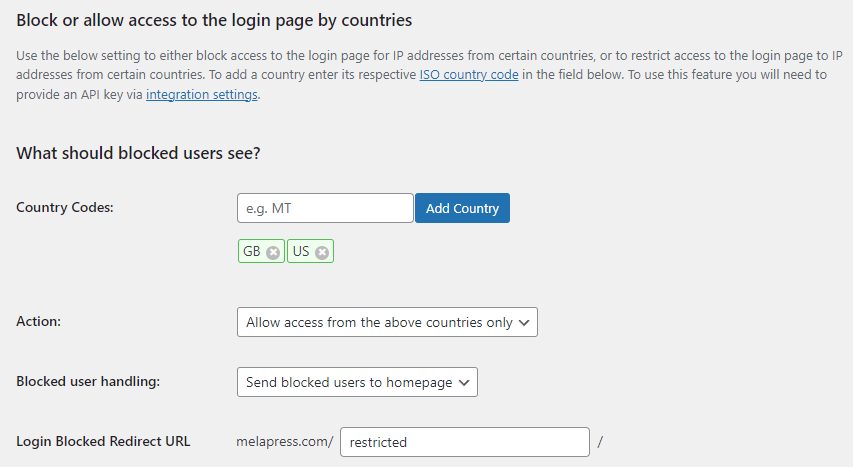
In the Premium edition you can also limit the traffic to the login page by country or a number of countries.
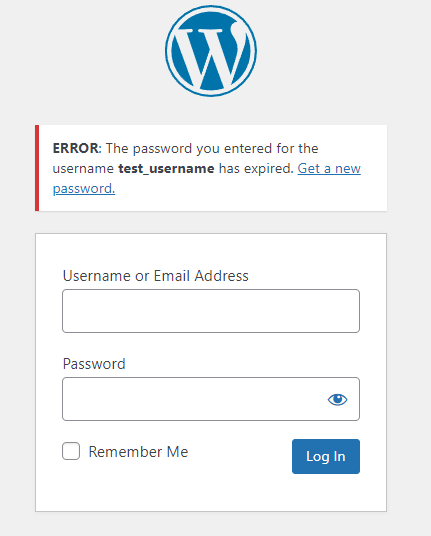
Users are notified when their password expires.
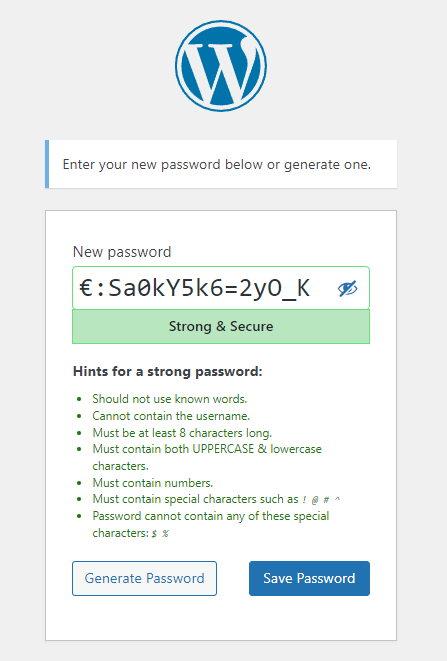
It is very easy for a user to know what their password should include or not because the policies which are not met when setting a new password are highlighted in red.
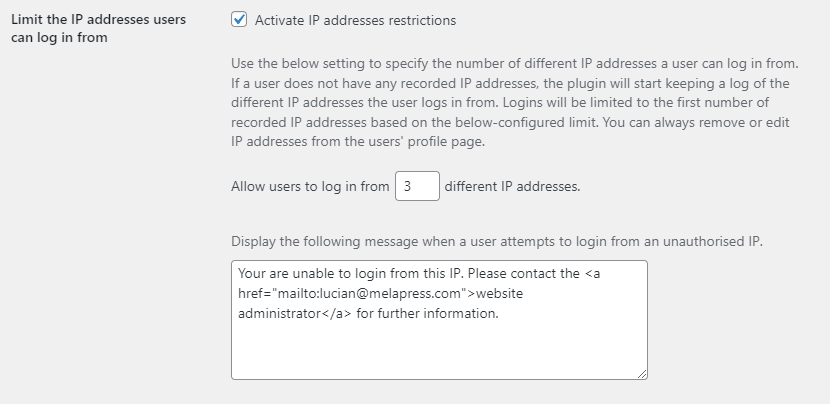
In the Premium edition you can also restrict the number of IP addresses a user can log in from, allowing you to easily control account sharing and boost user security.
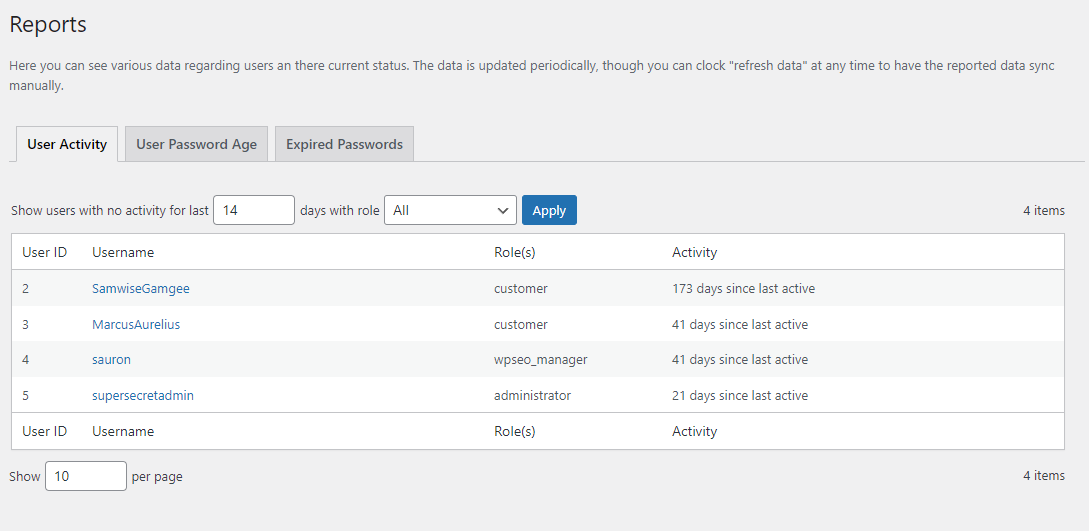
In the Premium edition the Reports allow you to see the last time users were active, the last time they reset their password, and those users with an expired password.
Faq
You can find more detailed information about WordPress website security, password security and user management, security best practices, and much more in the recommended reads linked below:
- WordPress Password Policy: Enforcing strong passwords
- WordPress security & hardening – the definitive guide
- The definitive guide to WordPress security plugins
Melapress Login Security comes in both free and premium editions. The free edition comes packed with several security measure features to protect your WordPress login, including:
- Password policies for all your users
- Limit login attempts
- Change login URL
- GDPR login page notification
The premium edition adds features such as:
- Login times restrictions
- Inactive users policies
- IP restrictions
- Geo-blocking
- One-click integration with WooCommerce, Memberpress, LearnDash, and others
- and much more!
The free edition includes all basic features without any restrictions to help you improve your WordPress login security. The premium edition adds several features over and above what is available in the free edition, enabling you to improve your WordPress login security even further.
Support for the Free edition of the plugin is provided only via the WordPress.org support forums. You can also refer to our support pages for all the technical and product documentation.
If you are using the Premium edition, you get direct access to our support team via one-to-one email support.
Melapress Login Security secures different aspects of the WordPress login process to increase the overall security of your site. Depending on which edition you get and which policies you activate, the plugin is flexible enough to enable you to be as restrictive as you like.
While the plugin is extensive, it is not a silver bullet, and you should still take other security measures, such as enabling two factor authentication.
Brute force attacks rely on unlimited login attempts to try as many username and password combinations as possible until they hit the right combination. By limiting login attempts, you effectively stop brute force attacks by removing the one thing they rely on to breach your login page.
Changing the login page URL is a security technique known as security-by-obscurity. Its entire premise is to make resources harder to find – but not impossible. This means that changing the wp-admin page URL can be an effective strategy when combined with other techniques such as using strong passwords and two factor authentication.
Melapress Login Security is actively supported and receives regular updates. Refer to the plugin changelog for more information about past updates.
You can uninstall Melapress Login Security just as easily as you would with any other plugin. Simply login to your WP admin dashboard, navigate to Plugins > Installed Plugins, locate Melapress Login Security, and then click on Deactivate and then Uninstall.
To remove all settings, navigate to Login Security > Settings and enable the Delete database data upon uninstall setting before deactivating and uninstalling the plugin.
The free edition does not send any data whatsoever. The premium edition, on the other hand, only sends licensing data to our server. All WordPress login security settings remain in your WordPress database. Furthermore, the plugin does not collect any user data.
You can report security bugs through the Patchstack Vulnerability Disclosure Program. Please use this form. For more details please refer to our Melapress plugins security program.
Reviews
Excelent plugin and support team
By 
Does a very good job to protect your website, good flexibility for each user role and also very good support when you are contacting the developer with some questions.
WARNING: Sends MelaPress branded emails TO YOUR SITE'S USERS
By 
I'm not sure what MelaPress are thinking with this "marketing" strategy, but they brand one of the emails that gets sent TO YOUR SITE'S USERS with MelaPress branding; the email that is sent to the User when their account is unlocked (after being locked due to exceeding the limit of invalid login attempts).
So, the customers of your site, already on edge after being locked out of their account on your website, then get an email branded by a company they've never heard of (MelaPress) FROM YOUR COMPANY'S EMAIL ADDRESS (@catfood.com)! Result: brand damage to your company, mass confusion of your customers, very likely treatment of the message as spam by your site's precious customers thereby eroding your domain score, and so on.
Terrible, TERRIBLE plan there @MelaPress! 😡
I can understand branding emails that get sent to WP website admins/owners who installed and use the plugin, and ARE ACTUALLY POTENTIAL CUSTOMERS FOR THE PREMIUM VERSION, but why you'd push advertising onto users of websites where your plugin is installed makes zero sense from a marketing perspective.
Great support
By 
Very useful plugin and very helpful support team.
Must have plugin in your wordpress stack
By 
Easy to use, very stable and great price. Overall pretty great value for a plugin that is underrated.
MelaPress Login - Great Plugin - Great Support
By 
We have been using the Plugin for a while and received great Support with clear Communication. The Plugin does what it is supposed too. You will have peace of find when purchasing this Plugin.
Excellent Plug-In with Excellent Support
By 
This is a great plug-in to enhance security and also works alongside Melapress 2FA plug-in where others do not. Great response from support too. Thank you!
A very good plugin and excellent support
By 
A very good plugin that offers some really useful options for fine-tuning connection access.
The support team is also very responsive.
Awesome plugin
By 
Great plugin to enhance your WP security. Works as intended, keep up the good work! Thanks.
Works well
By 
Good plugin, lots of options.
Very good support
By 
My staging site had Melapress security, which I hadn't been using, but now starting to use.
It was at a back level - 1.3.1. I upgraded to 2.1.0. When I followed the link for the migration from 1.3.1 to 2.1.0, the migration failed.
The reason is I had originally installed Melapress 1.3.1 and selected to 'NOT DELETE' database entrees when 'deactivating and deleting' the plugin.
This caused the migration to 2.1.0 to FAIL, as there were residual entries with MLS prefix from WP_OPTIONS.
Melapress support quickly identified MY MISTAKE - and I successfully upgraded to 2.1.0.
THANK YOU!
Changelog
2.4.2 (2026-09-17)
-
Functionality & plugin improvements
- Improved the policy enforcement so users with expired passwords or users required to reset their password on first login cannot continue with an active session before completing the required password action.
- Admin notices from other Melapress plugins are now shown on Melapress Login Security pages.
- The Locked Users table is now always displayed. When no users are locked, it shows a clear empty-state message.
- Updated the Policies page labels and organization. Security questions are now listed under User account and session policies.
- Updated the Locked Users help text in the Free edition.
- Updated the Locked Users search help text to clarify that searches include usernames, email addresses, display names, and user IDs.
-
Bug fixes
- Fixed memory exhaustion during REST API requests authenticated with Application Passwords
- Fixed an issue where a
user_idvalue of-1, meaning no selected user, was incorrectly converted to user ID1and could apply the wrong role policy. - Fixed a rendering issue that hid third-party form checkboxes on the Forms & Placements page.
- Fixed Locked Users searches so numeric terms also match usernames, email addresses, and display names, in addition to exact user IDs.
- Fixed manual locks not being enforced for users or roles excluded from other policies.
- Fixed a fatal error caused by an undefined
wp_salt()function during temporary login token migration after an upgrade. - Fixed an issue where the first manually locked user could not be unlocked until another locked user was unlocked.
Refer to the complete plugin changelog for more detailed information about what was new, improved and fixed in previous version updates of Melapress Login Security.