Minimum and Maximum Quantity for WooCommerce

Minimum and Maximum Quantity for WooCommerce
Description
Looking for a way to efficiently manage product quantity restrictions in your WooCommerce store? The Minimum and Maximum Quantity For WooCommerce Plugin provides you with complete control over product quantity limits, ensuring smoother operations and a better customer experience.
This easy-to-configure plugin allows you to set minimum and maximum quantity rules for products, categories, or even more. No more manual monitoring of order quantities — automate your store’s limits and focus on growing your business instead.
With the Minimum and Maximum Quantity Plugin, you get:
- Full control over product quantity limits
- Customizable rules for products, users, and carts
- Easy setup and user-friendly interface
- Fast and reliable customer support
Plugin Demo: View Demo
📒 KEY FEATURES
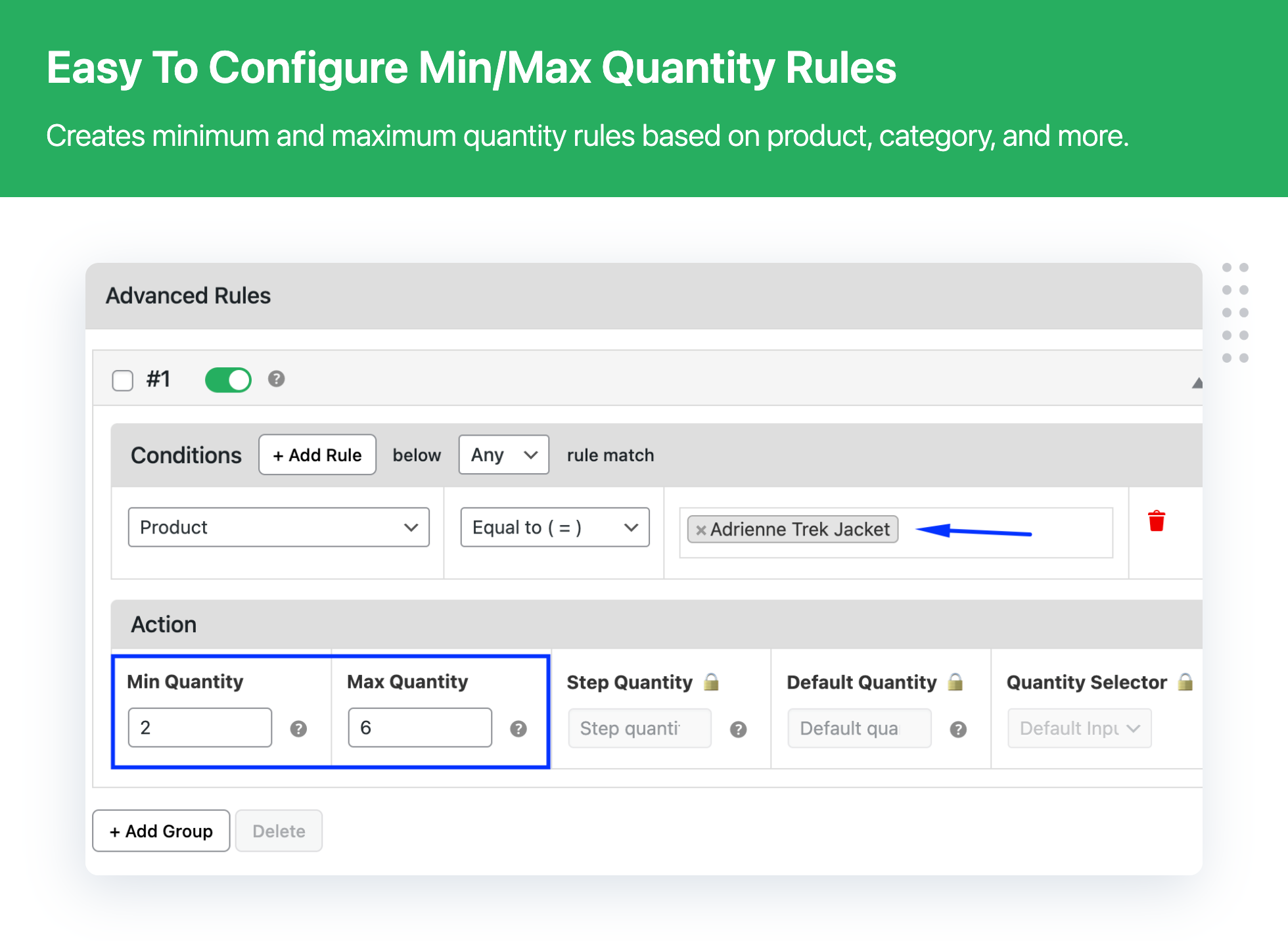
- Set minimum and maximum quantity rules for products.
- Customize minimum and maximum quantity for each product.
- Apply quantity limits to variable products and product categories.
- Set quantity rules based on the customer’s country.
- Display validation messages if the maximum quantity limit is reached.
- Set minimum and maximum order values to allow checkout.
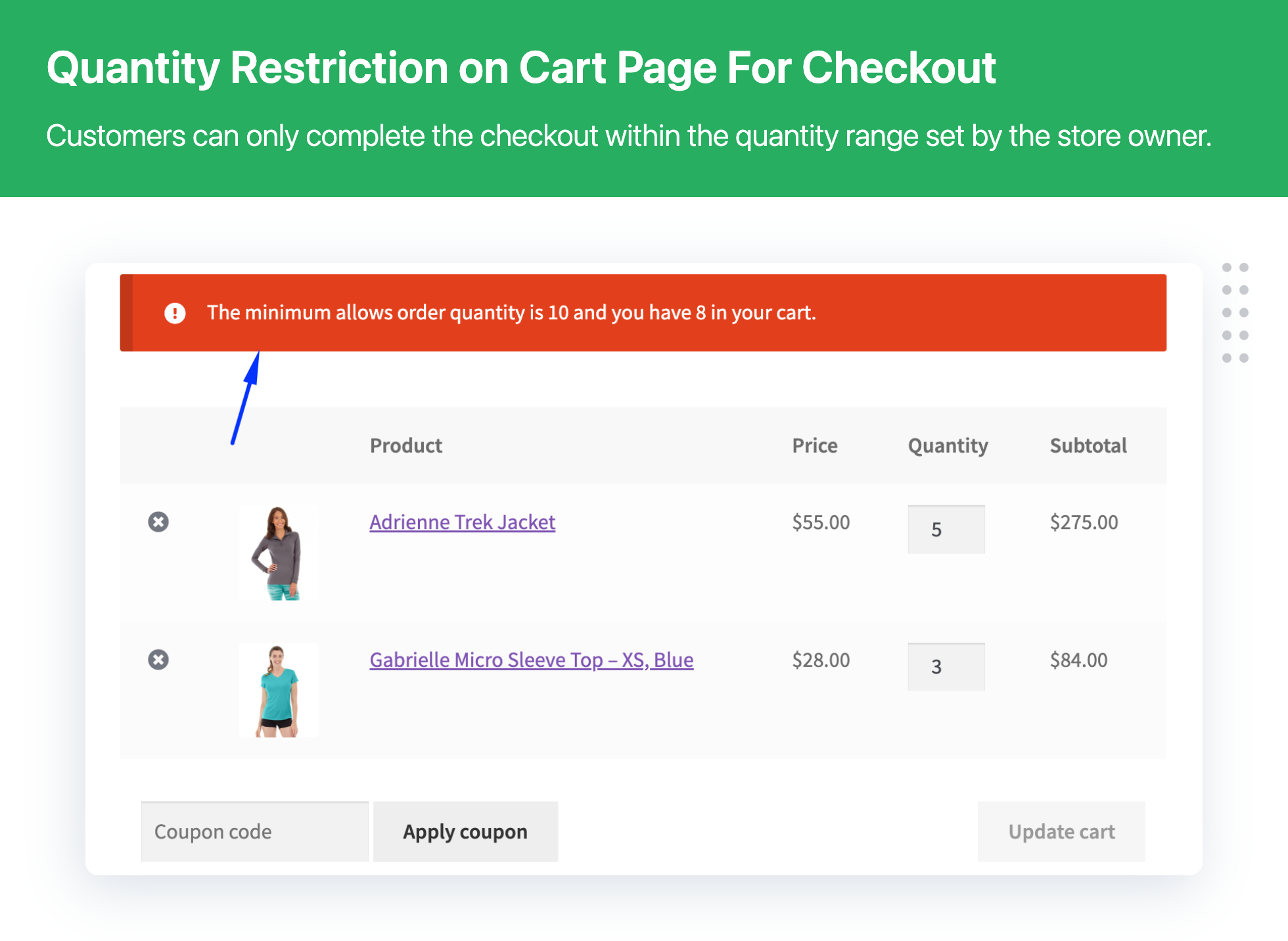
- Define minimum and maximum order quantities for checkout.
- Set a limit on the number of items required to proceed with checkout.
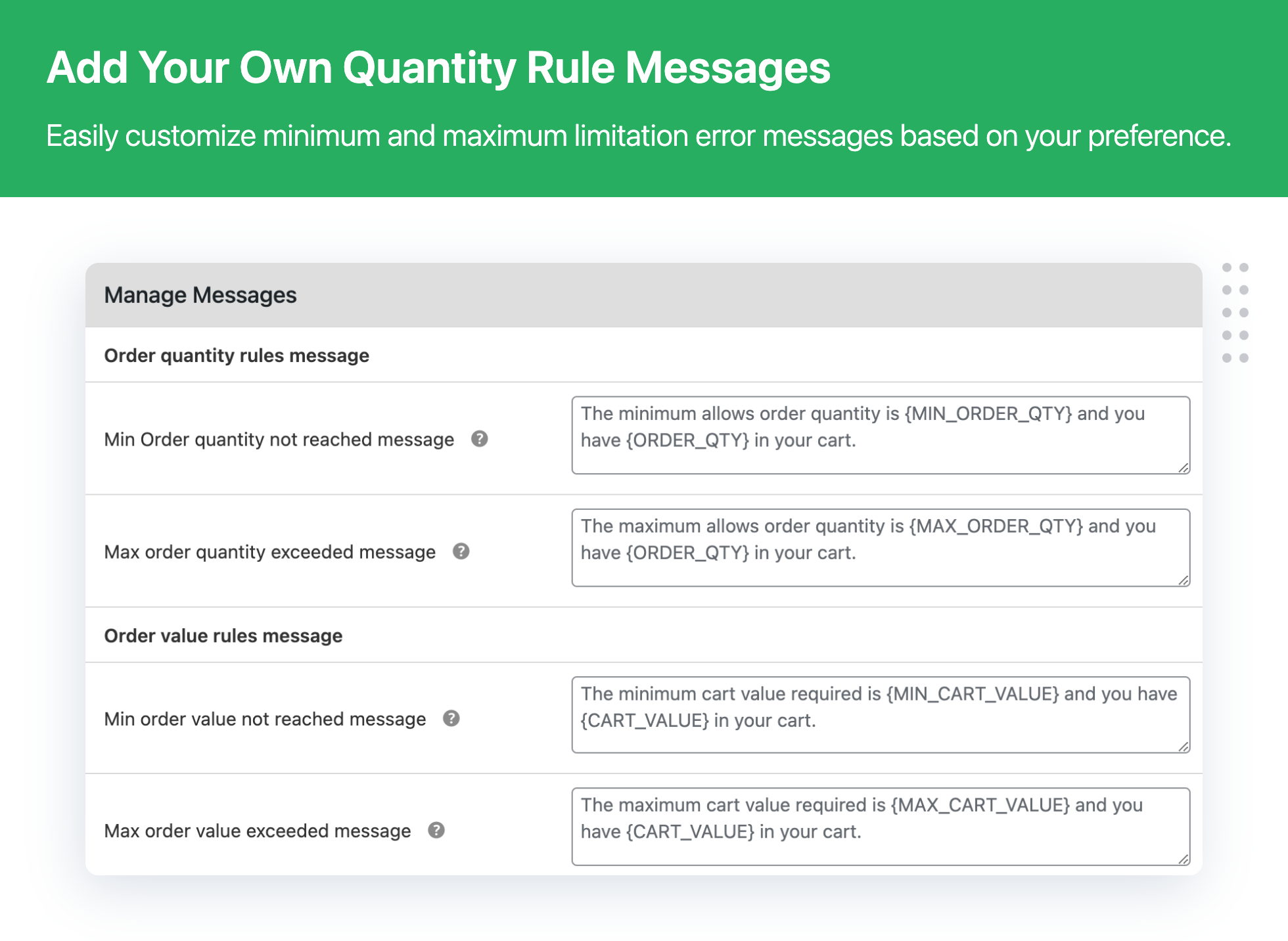
- Display custom messages and block checkout if global cart rules aren’t met.
🚀 PLUGIN USE CASES
- Limit High-Demand Product Quantities: Prevent stock shortages by controlling how many units customers can buy for popular products.
- Category-Level Quantity Limits: Manage sales and stock more effectively by applying limits to specific product categories.
- Set Minimum Order Quantities: Encourage larger purchases by enforcing minimum quantity limits, increasing average order value.
- Order Value Restrictions: Control minimum and maximum cart values, preventing orders that are too small or large to process efficiently.
👀 WHAT MAKES US STAND OUT
What sets us apart at Dotstore is not just our commitment to solving practical eCommerce challenges, but also our dedication to outstanding support and performance optimization.
- Tailored Solutions: We offer plugins that adapt to a range of business models, from retail to memberships.
- User-Centric Design: Our approach focuses on intuitive interfaces that don’t sacrifice power or flexibility.
- Robust Support: Our customer support is lauded for its responsiveness and effectiveness, ensuring you’re never alone with your queries.
- Quality and Integrity: Every line of code is written with precision and integrity, promising plugins that perform seamlessly.
📣 PREMIUM: Minimum and Maximum Quantity for WooCommerce — Try Pro Version Today!
✅ NEED EVEN MORE FEATURES?
Upgrade to Minimum and Maximum Quantity Plugin PRO to get all the advanced features.
- Includes all free plugin features.
- Set default and step quantities for all store products.
- Customize the quantity selector (radio button, dropdown, or default input).
- Apply conditional rules based on product, user, cart, and time limits.
- Advanced product rules based on total sales, price, stock, product age, attributes, and best sellers.
- Create user-specific rules for individual users or roles.
- Cart rules based on shipping methods, zones, and applied coupons.
- Time-sensitive rules with specific start and end times for quantity restrictions.
- Choose between ‘Any’ or ‘All’ conditions for rule matching.
- Display applied rules on individual product pages and customize headline text/position.
- Show global rules on the cart page to inform customers.
- Hide the checkout button when conditions aren’t met.
- Exclude specific products from global checkout rules.
📣 LEARN MORE: Minimum and Maximum Quantity Plugin — Try Pro Version Today!
☎️ CONTACT US
- Free plugin: Need Technical Help? – Click here
- Pro Plugin: PRE-SALE Questions – Click here or Review Help Document
🎯 Supercharge Your Store Performance
Gain access to 50 expert tips covering everything from site speed and user experience to advanced sales strategies, each with impact scores to help you prioritize what truly drives results.
💎 EXPLORE OUR OTHER PLUGINS TO SUPERCHARGE YOUR WEBSITE
👉 Premium WooCommerce Plugins list
- Flat-rate shipping plugins for WooCommerce
- WooCommerce Extra Fees
- Hide Shipping Method For WooCommerce
- Product Attachment For WooCommerce
- Advanced Product Size Charts Plugin
- Product Sample for WooCommerce
- Blocker – Prevent Fake Orders And Blacklist Fraud Customers
- Enhanced Ecommerce Google Analytics for WooCommerce
- Conditional Payments For WooCommerce
- Advanced USPS Shipping Plugin
- WooCommerce Multi-Vendor Shipping Addon
- Category Banner Management for Woocommerce
- Product Finder For WooCommerce
- Conditional Discount Rules For WooCommerce Checkout
- WooCommerce Checkout For Digital Goods
- WooCommerce Attribute Stock
Installation
- Download the plugin
- Upload
minimum-and-maximum-quantity-for-woocommerceto the/wp-content/plugins/directory - Activate and enjoy!
Screenshots


Faq
Ans: Yes you can set only minimum product quantity on a global level
Ans: Yes, you can set min and max quantity limit for the category
Ans: You can set minimum and maximum quantity rules on orders, products, categories, and country.
Ans: Yes, you can add a custom message on the cart page from the Manage Message section from the plugin.
Ans: Yes, you can create unlimited rules for product quantity, order quantity, category quantity and many more
Ans: Not at this time. Composite products are not recognized, so min/max rules are ignored.
Ans: Yes, a POT file is included.
Reviews
Simple, does what it says, and does it well.
By 
Error: Your review cannot be empty.
Excellent !
By 
Excellent plugin that perfectly meets my needs.
Support is fast and efficient in cas of problems, even for the free version.
Works Wonderfully!
By 
This plugin works beautifully and easy to configure. Highly recommended!
Very good!
By 
Works very well, I like it!
A bug Appears
By 
Hello,
The plugin works fine when adding to basket , but after this while you reviewing your basket you can increase quantities normally, Big issue !!
My first impression is successful
By 
I just started using the plugin. My first impression is successful. The rules structure is useful.
OK as a free plugin, but hard to use
By 
Nonfunctional after update
By 
No Longer Works!
By 
No mesage, not friendly with user
By 
Changelog
2.1.2
- [Bug Fix] – Plugin compatibility witht the cart and checkout block
- [Bug Fix] – Fixed minor issues with deprecated functions
- [Enhancement] – Fully compatible with WooCommerce 11.0.x
- [Enhancement] – Fully compatible with WordPress 7.1.x
2.1.1
- [Bug Fix] – Fixed minor compatibility issues with the Product Sample plugin
- [Bug Fix] – Fixed minor issues with default block-based themes
- [Enhancement] – Fully compatible with WooCommerce 10.4.x
- [Enhancement] – Fully compatible with WordPress 6.9.x
2.1.0
- [Bug Fix] – Minor fixes related to the plugin compatibility with Bricks theme
- [Bug Fix] – Minor fixes related to the country based rule
- [Enhancement] – Compatible with WooCommerce 9.5.x
- [Enhancement] – Compatible with WordPress 6.7.x
2.0.0
- [Enhancement] – Plugin UI enhancement
- [Enhancement] – Compatible with Elementor Plugin
- [Enhancement] – Compatible with WooCommerce 9.3.x
- [Enhancement] – Compatible with WordPress 6.6.x
1.1.2
- [Enhancement] – Compatible with WooCommerce 8.7.x
- [Enhancement] – Compatible with WordPress 6.5.x
1.1.1
- [Bug Fix] – Minor fixes related to the rules listing page information
- [Bug Fix] – Minor fixes related to the category specific min/max rule
- [Bug Fix] – Minor fixes related to the compatibility issue with the Salient theme
- [Enhancement] – Quick fix related to the Cross Site Scripting (XSS) vulnerability
- [Enhancement] – Compatible with WooCommerce 7.9.x
- [Enhancement] – Compatible with WordPress 6.2.x
1.1.0
- Enhancement – Implemented a new conditional workflow of min/max rules
- Enhancement – Ability to search products by SKU
- Enhancement – Ability to change rule status from listing page
- Enhancement – Plugin compatibility with PHP 8.1.x
- Enhancement – UI enhancement
- Enhancement – Integrated plugin with Freemius
- Update – Compatible with WordPress Version 6.1.x
- Update – Compatible with WooCommerce version 7.5.x
1.0.8
- Fixed – Plugin text translation issue
- Update – Compatible with WordPress Version 6.0.x
- Update – Compatible with WooCommerce version 7.0.x
1.0.7
- Enhancement – Improvise Plugin layout and design
- Enhancement – Allowed float numbers in Min/Max Order Value fields
- Fixed – Minor bug fixed related to the checkout message
- Update – Compatible with WordPress Version 6.0.x
- Update – Compatible with WooCommerce version 6.7.x
1.0.6
- Fixed – Minor bug fixed related to null value not allowed on max quantity field
- Update – Fully compatible with Loco Translate Plugin
- Update – Compatible with WordPress Version 5.8.x
- Update – Compatible with WooCommerce version 5.8.x
1.0.5
- Enhancement – UI enhancement
- Fixed – Once Min and Max’s quantity is the same then hiding quantity textbox
- Update – Compatible with WordPress Version 5.8.x
- Update – Compatible with WooCommerce version 5.6.x
1.0.4
- Fixed – Unable to add maximum 1 quantity
- Compatible with WordPress Version 5.7.x
- Compatible with WooCommerce version 5.3.x
1.0.3
- Compatible with WordPress Version 5.6.x
- Compatible with WooCommerce version 4.9.x
1.0.2 – 28.12.2020
- Compatible with WordPress Version 5.6.x
- Compatible with WooCommerce version 4.8.x
1.0.1 – 28.09.2020
- Compatible with WordPress Version 5.5.x
- Compatible with WooCommerce version 4.5.x
1.0.0
- First release!