miPlata FACTURAR

miPlata FACTURAR
Description
miPlata FACTURAR connects your WooCommerce store to your electronic-invoicing account at miPlata and issues a DIAN-validated electronic invoice (factura electrónica, Colombia) for every paid order — no manual steps.
- Invoice on payment. When an order moves to Processing or Completed, the plugin registers it with miPlata using native WooCommerce data (lines, coupons, shipping, fees, taxes, buyer). miPlata builds and signs the UBL 2.1 invoice and the DIAN validates it.
- WAVA payments verified. If you take payments with the official WAVA plugin (Nequi, cards, PSE), the invoice is only issued once WAVA confirms the payment to miPlata: an unpaid order is never invoiced.
- PayPal in foreign currency. Orders in USD, EUR, GBP, CAD, CHF, MXN or JPY are invoiced in their currency with the day’s official exchange rate (TRM).
- Your store’s e-mail. The invoice (PDF + signed XML) is attached to your own WooCommerce e-mail, with your template and logo. The buyer can also open it with one click in My account View invoice and on the order-received page.
- Refunds become credit notes. A full or partial refund issues the matching DIAN credit note (nota crédito).
- Only one new field. Buyer ID type and number — and only if no other plugin already asks for them. Optionally, the city as a DANE department municipality dropdown.
- Optional miPlata gateways. “Pay with WAVA” and “Pay with PayPal (miPlata)” for merchants who prefer not to install another payment plugin.
- HPOS and Cart/Checkout blocks compatible.
The plugin’s admin screens and buyer-facing texts are in Spanish (Colombia), the language of its users.
Requirements
- A miPlata account with electronic invoicing enabled (DIAN test or production). Sign up at miplata.co.
- WooCommerce 7.9 or later, PHP 7.4 or later. The PHP sodium extension is recommended (WordPress’ bundled sodium_compat is used as a fallback).
- The store must be reachable over HTTPS on its public domain (used once to verify domain ownership when connecting).
Security
- The store is connected with a single-use code generated by an administrator in miPlata and bound to the store’s domain. miPlata will never ask you for that code.
- Every request is signed with an Ed25519 key generated on your server; miPlata only stores the public key. Keys are encrypted at rest with libsodium (
MIPLATA_ENCRYPTION_KEYinwp-config.php) and wiped on uninstall. - The connection can only create invoices for its own orders and read those invoices; it has no access to other customers, payroll or other documents in your miPlata account.
External services
This plugin is a client for the miPlata electronic-invoicing service, operated by miPlata SAS (Colombia). Nothing is sent before an administrator connects the store with a pairing code generated in their miPlata account (explicit opt-in). After that, the plugin talks only to your own account host https://<your-account>.miplata.co:
- When an order is paid (status Processing / Completed): it sends the order lines, totals, currency, payment method and the buyer’s billing data (name, ID type and number, e-mail, phone, address) so miPlata can issue the electronic invoice.
- While the invoice is being issued: it reads the invoice status and downloads the signed PDF and XML to attach them to the order e-mail and show them to the buyer.
- When an invoiced order is refunded (full or partial): it requests the corresponding credit note (amount and reason). An order cancelled or fully refunded before it was invoiced is withdrawn instead, so no invoice is issued.
- Once a day: it reports a diagnostic without personal data (plugin, PHP and WooCommerce versions; whether WP-Cron, an SMTP plugin and the WAVA plugin are active).
miPlata also calls your site: once, at connection time, a GET to /wp-json/miplata/v1/connect-key (public key only) to verify you control the domain, and afterwards signed webhooks to /wp-json/miplata/v1/webhook with each invoice’s status.
- Terms of service: https://facturar.miplata.co/terminos
- Privacy policy: https://facturar.miplata.co/privacidad
Invoices are validated by the Colombian tax authority (DIAN); miPlata transmits them on your behalf as your electronic-invoicing provider. The buyer can verify any invoice at https://catalogo-vpfe.dian.gov.co/User/SearchDocument.
Installation
- Install and activate the plugin (WooCommerce must be active).
- Recommended: add
define( 'MIPLATA_ENCRYPTION_KEY', '<64 random hex characters>' );towp-config.php. - In miPlata: Configuración Integraciones Conectar tienda WooCommerce, enter your store’s domain and copy the code (valid 10 minutes, single use).
- In WooCommerce miPlata, paste the code and click Conectar tienda.
- Review the settings: how the invoice is sent, WooCommerce tax classes DIAN taxes, and the buyer-ID field.
Screenshots
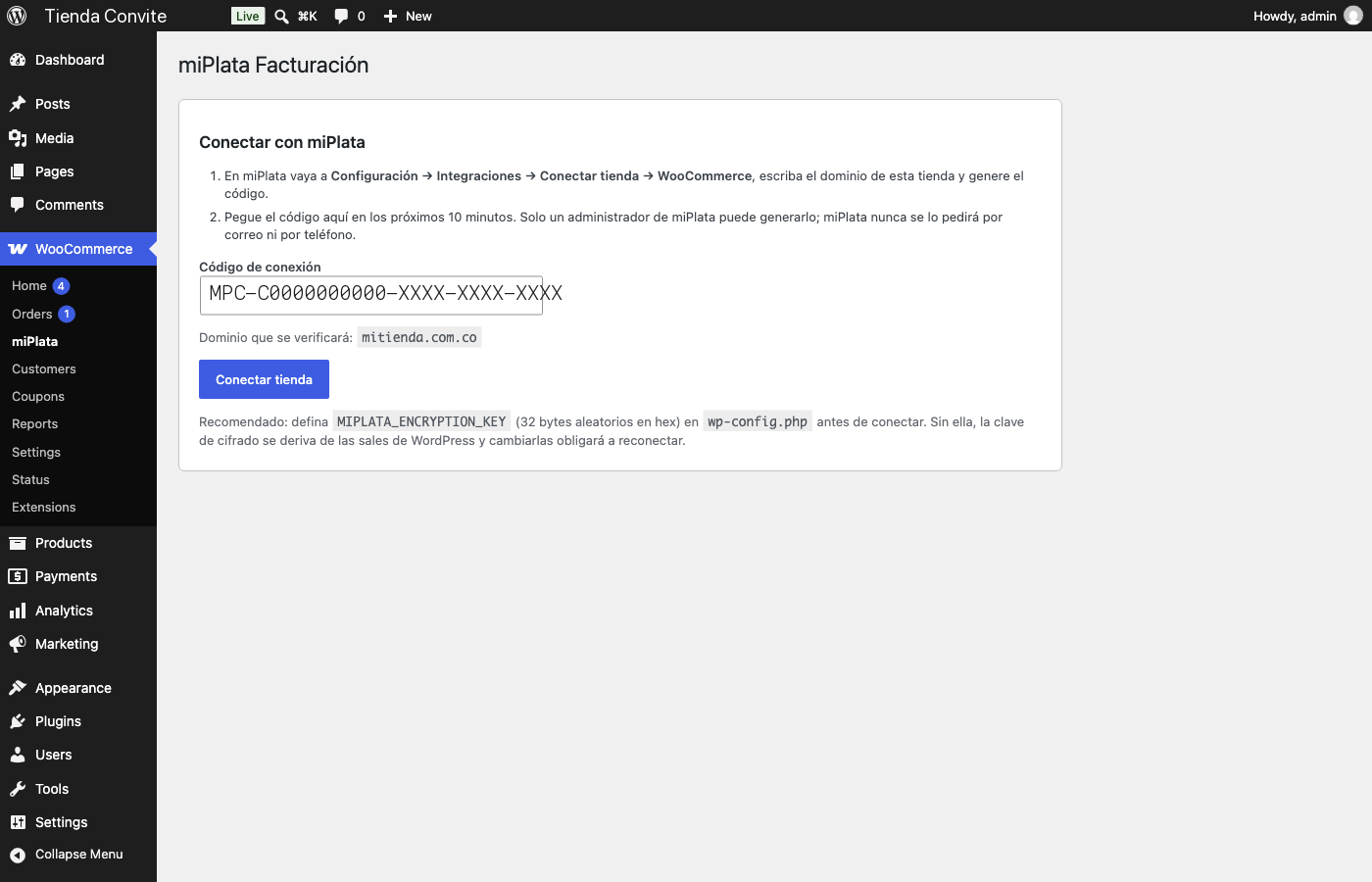
Connect the store with a single-use pairing code generated in miPlata.
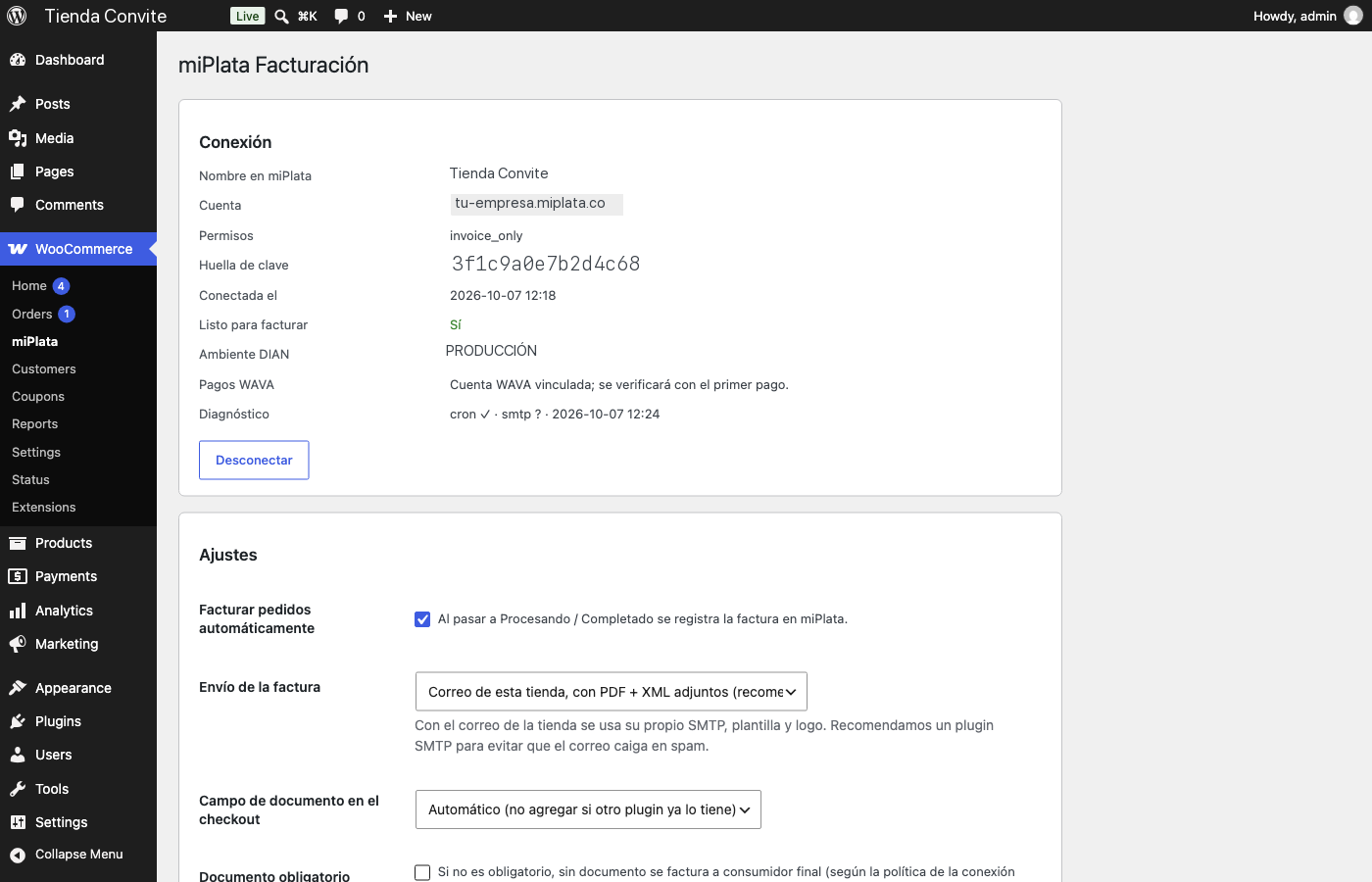
Connected store: account, permissions, DIAN environment and settings (tax classes → DIAN taxes).
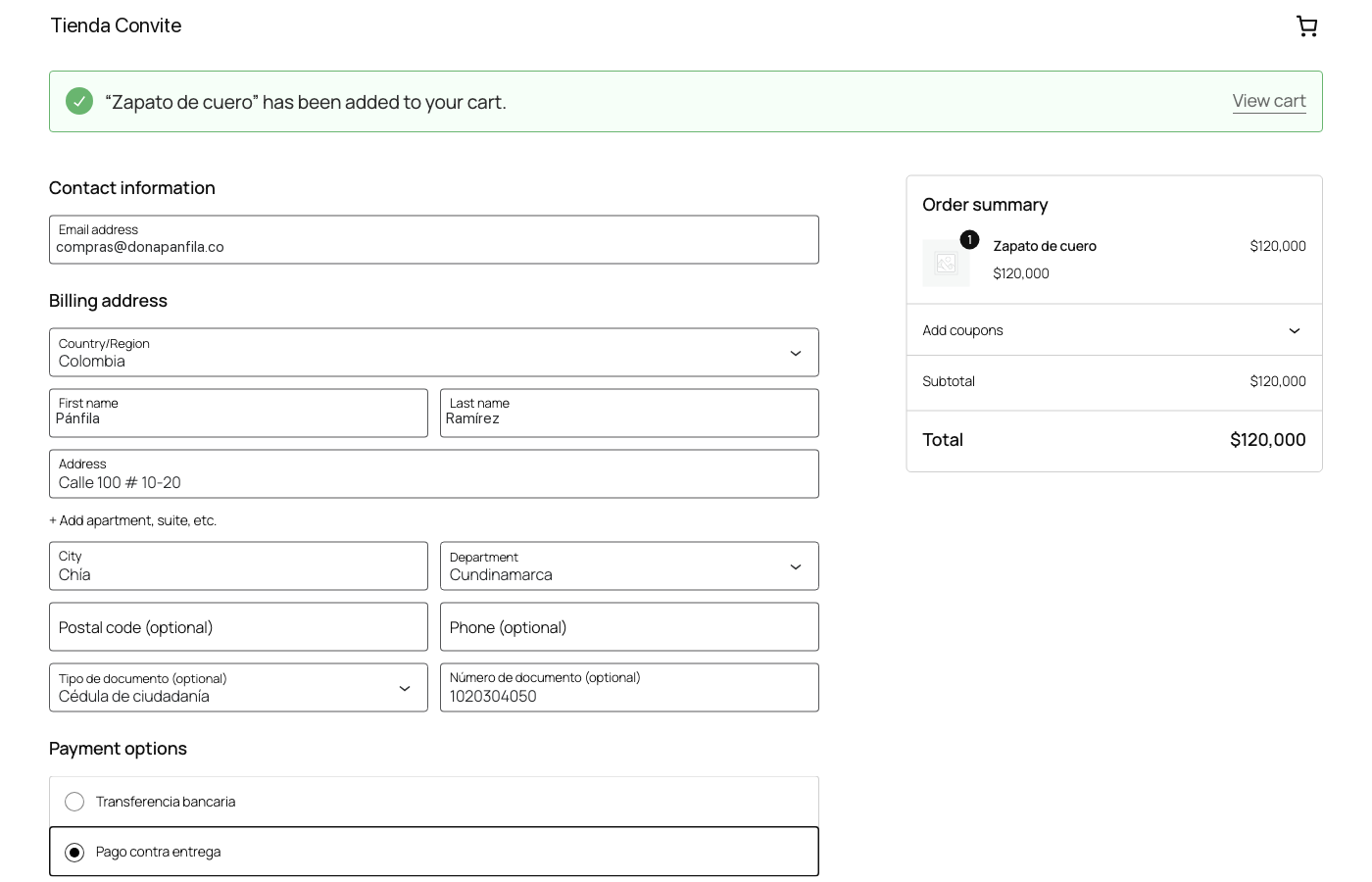
Checkout: buyer ID type and number, only when no other plugin already asks for them.
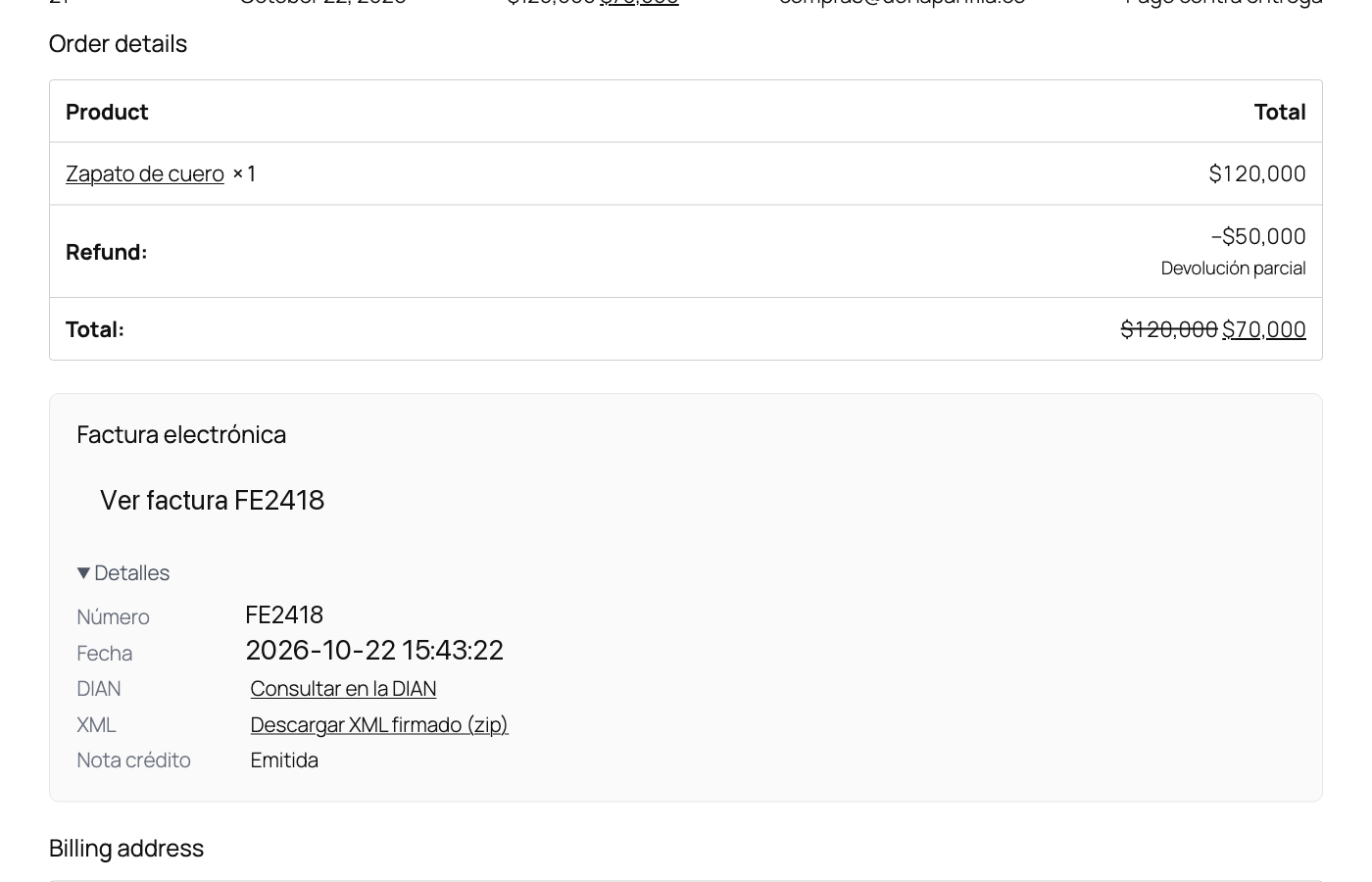
Order received: the buyer opens the electronic invoice (PDF), the signed XML and the DIAN lookup.
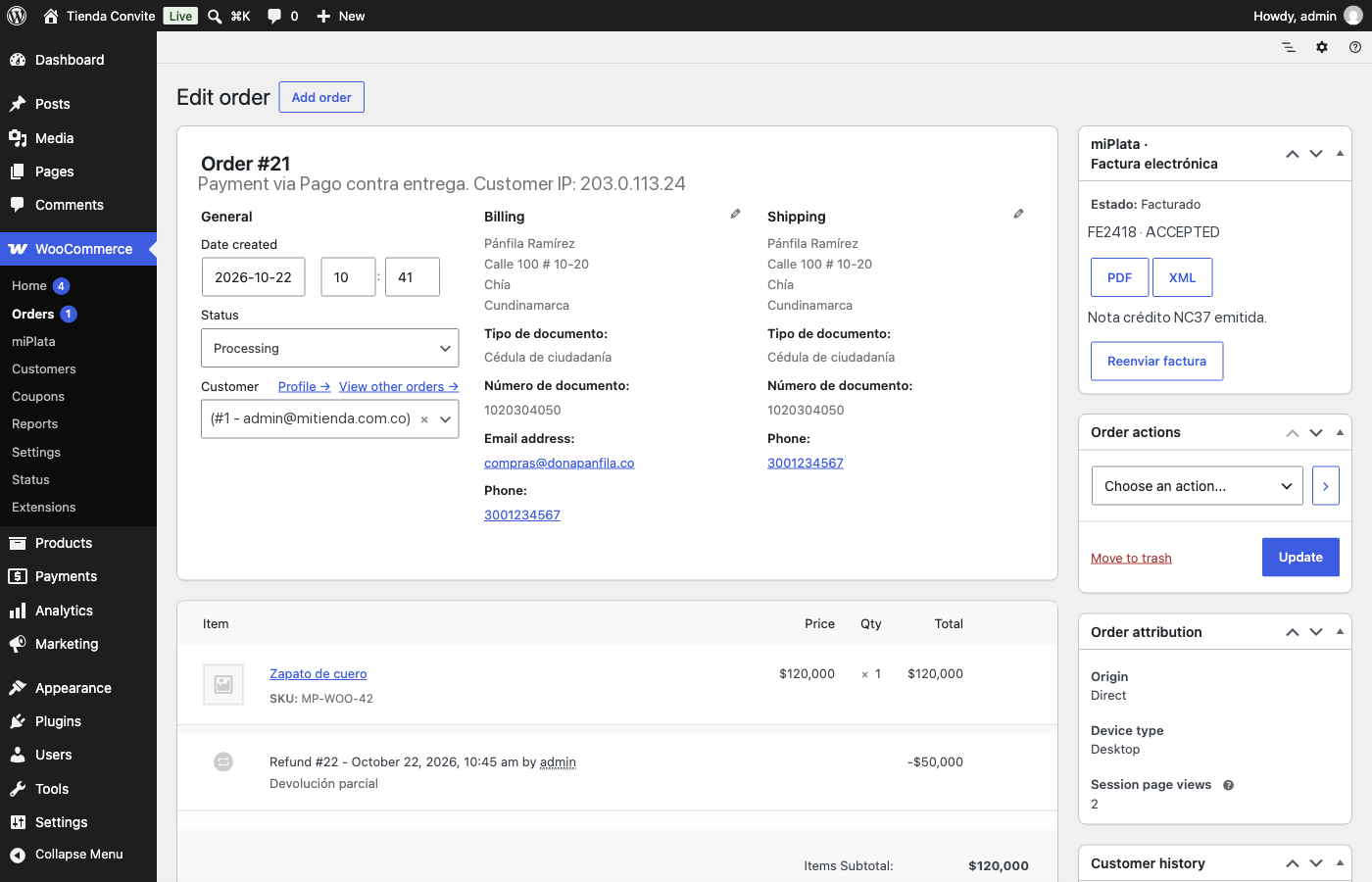
Order screen: invoice number, DIAN status, CUFE, PDF/XML and the credit note issued for a refund.
Faq
Yes. miPlata is the electronic-invoicing provider that signs the invoices and sends them to the DIAN. The plugin does nothing until it is connected to an account.
No. If you take payments with WAVA, use its official plugin; miPlata verifies every WAVA payment before invoicing. Otherwise, invoices are issued for paid orders from any payment method, or you can enable the optional miPlata gateways.
It depends on the policy configured in miPlata for this connection: invoice to consumidor final, send the buyer a link to complete the data, or hold the order.
In miPlata (5 years, as the DIAN requires) and a private copy on your server for the “View invoice” button, in a non-guessable folder under uploads (direct access denied on Apache). The plugin serves them only to the order owner, a store manager, or a guest holding the order key.
Yes. A miPlata account in DIAN test mode (habilitación) issues test-numbered invoices that are never filed as real ones.
Yes: hola@miplata.co, or the support section in your miPlata account.
Reviews
Changelog
1.0.3
- Admin notices only show on the miPlata page, the Plugins screen and WooCommerce order screens.
- Document-access errors use the standard WordPress error page (no inline styles).
- Removed an unneeded core include.
1.0.2
- Plugin name is now “miPlata FACTURAR” (the product name).
- Text domain is now
miplata, the plugin’s WordPress.org slug, so translations load from WordPress.org language packs. - Uninstall uses an identifier placeholder for the HPOS meta table.
1.0.1
- Fix: connecting no longer fails on hosts without the PHP sodium extension (WordPress’ sodium_compat cannot wipe memory; the plugin now falls back gracefully).
- The order screen shows the credit note number received in the signed webhook.
- Tested with WordPress 7.1 and WooCommerce 11.1.
- readme in English (WordPress.org requirement).
1.0.0
- First release: pairing by code, automatic invoicing, WAVA payment verification, PayPal in foreign currency, e-mail with PDF + XML, “View invoice” in My account, credit notes on refunds, optional gateways.