WP Mobile Redirect

WP Mobile Redirect
Description
Detect mobile device and redirect to mobile optimize website. You can also choose whether or not to redirect tablets by enabling or disabling the check-box option.
This plugin also gives you the ability to redirect back for viewing full version website. Place a link http://example.com/?main=true in your mobile website for that.
Features
- Redirect Full website to mobile optimized website
- Redirect One Specific page to mobile optimzed website
- Redirect within same WordPress website
- Exclude or include Tablets redirection
- Google recommended 302 redirects
- Option to view full site for your mobile user.
Installation
The quickest method for installing the importer is:
- Upload the
mobile-redirect-plus-litefolder to the/wp-content/plugins/directory - Activate the plugin through the ‘Plugins’ menu in WordPress
- Go to the Settings -> Mobile Redirect+ Lite
Screenshots
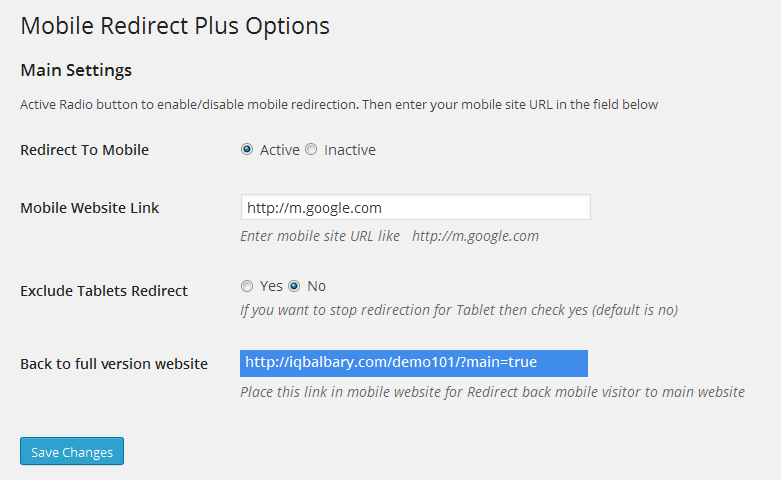
Mobile Redirect Plus Lite Options
Faq
Please setup the mobile redirect setting first and it will redirect mobile users.
It might be a caching issue. Please clear your cache and try again. If still not working, please contact us for suppport.
Yes, you can redirect within same WordPress site but for that you have to select specific page as ‘Redirect page’ and Mobile Website Link link will be your destination page.
Please place this link http://yourdomain.com/?main=true on your mobile page and your visitor can check full website via this link.
Reviews
Works well!
By 
Changelog
2.6
- Bug Fix & Script Update
2.5
- Bug Fix
2.4
- Bug Fix
2.3
- Initial Release