Moksa for WooCommerce

Moksa for WooCommerce
Description
A Taiwan-focused WooCommerce extension. Toggleable modules cover ECPay (綠界), NewebPay (藍新), SmilePay (速買配), LINE Pay, PAYUNi (統一金流), PayNow (立吉富), PChomePay (支付連), TapPay and Shopline Payments for payments; ECPay, NewebPay, SmilePay, PAYUNi and PayNow for convenience-store + home-delivery shipping; ezPay, ECPay, SmilePay, PayNow and AMEGO for Taiwan e-invoicing.
Enable only the providers you need from a single settings page — payment, shipping and invoice modules are fully independent and can be mixed in any combination.
HPOS-native, Block Checkout-native, PHP 8.2+ strict-typed, GPLv3, no premium gating.
Moksa AI assistant (new in 1.3.0)
Built on the WordPress 7.0 AI Client, Moksa AI is an optional in-admin chat assistant that lets you run common store tasks in natural language: find orders by invoice / shipping / payment number, look up order details and counts, change order status (single or batch), add order notes, issue / void / allowance e-invoices, create and print shipping labels, and enable or disable modules, individual payment methods and invoice issuing methods. Every action that changes data first shows a summary and waits for your explicit confirmation before it runs. The assistant uses whichever AI provider you connect under Settings Connectors — the plugin never handles your AI keys, refunds, or credentials.
Source
Source code and issue tracker: github.com/Moksa1123/moksa-for-woocommerce.
External Services
This plugin is a toolkit of optional integrations. Each integration only loads and only transmits data when you, the site administrator, explicitly enable that module and a customer chooses the corresponding payment / shipping / invoice option. No data is sent to any third party unless the relevant module is enabled and used. The plugin never sends data to Moksa or any analytics/telemetry service.
For every integration below, requests are made server-to-server over HTTPS using your own merchant credentials, and typically include the order number, order amount, buyer name, e-mail, phone, shipping/billing address, item descriptions, and (for e-invoices) the buyer tax ID or carrier number that the customer enters at checkout.
When a module is set to test/sandbox mode, requests go to the provider’s corresponding staging hostname instead of the production one listed below (for example payment-stage.ecpay.com.tw, logistics-stage.ecpay.com.tw, einvoice-stage.ecpay.com.tw, ccore.newebpay.com, sandbox-api.payuni.com.tw, sandbox-api.pchomepay.com.tw, sandbox-api-pay.line.me, sandbox.tappaysdk.com, api-sandbox.shoplinepayments.com, cinv.ezpay.com.tw, test.paynow.com.tw, testinvoice.paynow.com.tw, ssl.smse.com.tw/api_test).
Payment gateways
These run when a customer selects the gateway at checkout (to create the payment) and when you query, capture, refund or void the payment from the order screen.
- ECPay (綠界科技) — credit card, ATM, CVS, barcode, installments, wallets. Endpoints: payment.ecpay.com.tw, ecpayment.ecpay.com.tw (test mode: payment-stage.ecpay.com.tw, ecpayment-stage.ecpay.com.tw). Terms: https://support.ecpay.com.tw/10075/ — Privacy: https://www.ecpay.com.tw/CreditCard/Privacy
- NewebPay (藍新金流) — credit card, ATM, CVS, barcode, wallets. Endpoints: core.newebpay.com (test mode: ccore.newebpay.com). Terms: https://www.newebpay.com/website/Page/content/new_service_policy — Privacy: https://www.newebpay.com/website/Page/content/privacy
- PAYUNi (統一金流) — credit card, ATM, CVS, wallets. Endpoints: api.payuni.com.tw (test mode: sandbox-api.payuni.com.tw). Terms: https://www.payuni.com.tw/terms — Privacy: https://www.payuni.com.tw/privacy
- SmilePay (速買配) — credit card, ATM, CVS, barcode. Endpoints: ssl.smse.com.tw (SmilePay’s own API hostname — smse.com.tw and smilepay.net are both operated by the same company, 訊航科技 Shinhang Technology; its policies are published on the smilepay.net brand site; test mode uses the /api_test path on the same hostname). Terms: https://www.smilepay.net/em/servicepolicy.asp — Privacy: https://www.smilepay.net/em/servicepolicy.asp (SmilePay publishes a single combined service & personal-data-protection document, so both links point at that document)
- PayNow (立吉富) — credit card, ATM, CVS, installments. Endpoints: www.paynow.com.tw (test mode: test.paynow.com.tw). Terms: https://www.paynow.com.tw/PayNowUserAgreement.aspx — Privacy: https://www.paynow.com.tw/safepolicy.aspx
- PChomePay (支付連) — credit card, ATM, CVS, barcode. Endpoints: api.pchomepay.com.tw (test mode: sandbox-api.pchomepay.com.tw). Terms: https://www.pchomepay.com.tw/other/service_treaty — Privacy: https://web.pchomepay.com.tw/introduction/privacy
- LINE Pay — LINE Pay wallet. Endpoints: api-pay.line.me (test mode: sandbox-api-pay.line.me). Terms: https://terms2.line.me/linepay_TW_TermsofUse?lang=zh-Hant — Privacy: https://terms2.line.me/linepay_TW_PP
- TapPay — credit card via the TapPay Fields SDK loaded in the browser (js.tappaysdk.com). Card data is tokenised client-side; only the token reaches your server. Endpoints: prod.tappaysdk.com, js.tappaysdk.com (test mode: sandbox.tappaysdk.com). Terms: https://www.tappaysdk.com/taiwan-en/privacy-term — Privacy: https://www.tappaysdk.com/taiwan-en/privacy-term (TapPay publishes a single combined terms & privacy document, so both links point at that document)
- Shopline Payments — credit card, wallets. Endpoints: api.shoplinepayments.com (test mode: api-sandbox.shoplinepayments.com). Terms: https://book.shoplineapp.com/pages/shopline-payments-terms-and-conditions — Privacy: https://www.shopline.com/shopline-payments-privacy
Shipping / logistics
These run when a customer opens the convenience-store map at checkout (the store-selection map is hosted by the provider), when a shipment is created after an order is placed, and when you print a label or query shipment status.
- ECPay Logistics (綠界物流) — 7-11 / FamilyMart / Hi-Life / OK / home delivery. Endpoints: logistics.ecpay.com.tw (test mode: logistics-stage.ecpay.com.tw). Terms: https://support.ecpay.com.tw/10075/ — Privacy: https://www.ecpay.com.tw/CreditCard/Privacy
- NewebPay Logistics (藍新物流) — CVS / home delivery. Endpoints: core.newebpay.com (test mode: ccore.newebpay.com). Terms: https://www.newebpay.com/website/Page/content/new_service_policy — Privacy: https://www.newebpay.com/website/Page/content/privacy
- PAYUNi Logistics (統一物流) — 7-11 / home delivery (incl. cold chain). Endpoints: api.payuni.com.tw (test mode: sandbox-api.payuni.com.tw). Terms: https://www.payuni.com.tw/terms — Privacy: https://www.payuni.com.tw/privacy
- SmilePay Logistics (速買配物流) — 7-11 / FamilyMart / home delivery. Endpoints: ssl.smse.com.tw (SmilePay’s own API hostname; see the SmilePay entry above — same operator as smilepay.net; test mode uses the /api_test path on the same hostname). Terms: https://www.smilepay.net/em/servicepolicy.asp — Privacy: https://www.smilepay.net/em/servicepolicy.asp (single combined service & personal-data-protection document)
E-invoice (Taiwan electronic invoicing)
These run when an invoice is issued for an order (immediately on payment, on completion, or manually, per your setting) and when you void / issue an allowance / query an invoice. Data includes the order amount, item descriptions and the buyer’s carrier number, donation code or company tax ID entered at checkout.
- ECPay e-Invoice (綠界電子發票) — Endpoints: einvoice.ecpay.com.tw (test mode: einvoice-stage.ecpay.com.tw). Terms: https://support.ecpay.com.tw/10075/ — Privacy: https://www.ecpay.com.tw/CreditCard/Privacy
- ezPay e-Invoice (ezPay 電子發票) — Endpoints: inv.ezpay.com.tw (test mode: cinv.ezpay.com.tw). Terms: https://www.ezpay.com.tw/info/Site_description/service_page/member — Privacy: https://www.ezpay.com.tw/info/Site_description/service_page/member (ezPay publishes a single combined membership & data-protection terms page, so both links point at that page)
- SmilePay e-Invoice (速買配電子發票) — Endpoints: ssl.smse.com.tw (SmilePay’s own API hostname; see the SmilePay entry above — same operator as smilepay.net; test mode uses the /api_test path on the same hostname). Terms: https://www.smilepay.net/em/servicepolicy.asp — Privacy: https://www.smilepay.net/em/servicepolicy.asp (single combined service & personal-data-protection document)
- PayNow e-Invoice (立吉富電子發票) — Endpoints: invoice.paynow.com.tw (test mode: testinvoice.paynow.com.tw). Terms: https://www.paynow.com.tw/PayNowUserAgreement.aspx — Privacy: https://www.paynow.com.tw/safepolicy.aspx
- AMEGO e-Invoice (光貿電子發票) — Endpoints: invoice-api.amego.tw. Terms: https://invoice.amego.tw/term — Privacy: https://invoice.amego.tw/privacy
Carrier tracking links (hyperlinks only — the plugin itself never contacts these hosts)
When a shipment has a tracking number, the order screen renders a plain hyperlink to the carrier’s own public parcel-tracking page. The plugin makes no HTTP request to any of these hosts and transmits no data to them; the shipment number only leaves your site if a person clicks the link, at which point the carrier’s own terms and privacy policy apply in their browser:
- T-Cat 黑貓宅配 (t-cat.com.tw, incl. the tracking link shown for PAYUNi home-delivery shipments) — Privacy: https://www.t-cat.com.tw/member/privacy.aspx
- 7-ELEVEN (eservice.7-11.com.tw) — Privacy: https://www.7-11.com.tw/privacy.asp
- 7-ELEVEN pickup status via PAYUNi logistics (tracking.shopmore.com.tw, operated by the Uni-President group for PAYUNi shipments) — service info: https://help.shopmore.com.tw/ ; the PAYUNi logistics policies above apply to the shipment itself
- FamilyMart 全家 (fmec.famiport.com.tw), Hi-Life 萊爾富 (www.hilife.com.tw), OK Mart (ecservice.okmart.com.tw) — public tracking pages of each chain; their site policies are linked from those pages
- Chunghwa Post 中華郵政 (postserv.post.gov.tw) — Privacy: https://www.post.gov.tw/post/internet/Group/index.jsp?ID=156739569921
Moksa AI assistant (optional, admin-only)
When an administrator actively uses the in-admin Moksa AI assistant, the typed question and the store/order data needed to answer it (for example an order number, status, totals or invoice/shipping numbers) are sent to the AI provider you have connected in WordPress under Settings Connectors — Anthropic, Google or OpenAI — through the WordPress 7.0 AI Client. This never happens automatically and only for the administrator using the assistant. The plugin does not store these conversations on any Moksa server, sends nothing to Moksa, and never transmits your AI provider keys (WordPress manages the connector credentials). The transmitted data is governed by the terms and privacy policy of the provider you choose: Anthropic — Terms: https://www.anthropic.com/legal/commercial-terms — Privacy: https://www.anthropic.com/legal/privacy ; Google — Terms: https://ai.google.dev/gemini-api/terms — Privacy: https://policies.google.com/privacy ; OpenAI — Terms: https://openai.com/policies/terms-of-use/ — Privacy: https://openai.com/policies/privacy-policy/
MCP server (optional, off by default)
This plugin can optionally expose a standards-compliant, stateless MCP (Model Context Protocol) endpoint on your own site at /wp-json/moksa-for-woocommerce/v1/mcp, so a standard MCP client you control (for example mcp-remote or Claude) can look up orders and reports through the WordPress REST API. This is not a Moksa service and is not a phone-home: nothing is sent to Moksa, the endpoint only runs on your server and only exposes the plugin’s own WordPress Abilities. It is off by default and must be turned on under WooCommerce Moksa AI Settings. Access requires authentication with a WordPress Application Password for a user that has the “edit orders” capability (use a dedicated, limited account). By default only read-only tools are exposed; order-changing tools stay hidden unless you also enable the separate “allow external AI to make changes” option, and every request is permission-checked on your server.
Installation
Minimum Requirements
- PHP 8.2+
- WordPress 7.0+
- WooCommerce 9.9+
Setup
- Install and activate the plugin.
- Go to WooCommerce Settings Moksa for WooCommerce to enable the modules you need.
- Configure the credentials for each enabled provider on its dedicated tab.
Screenshots
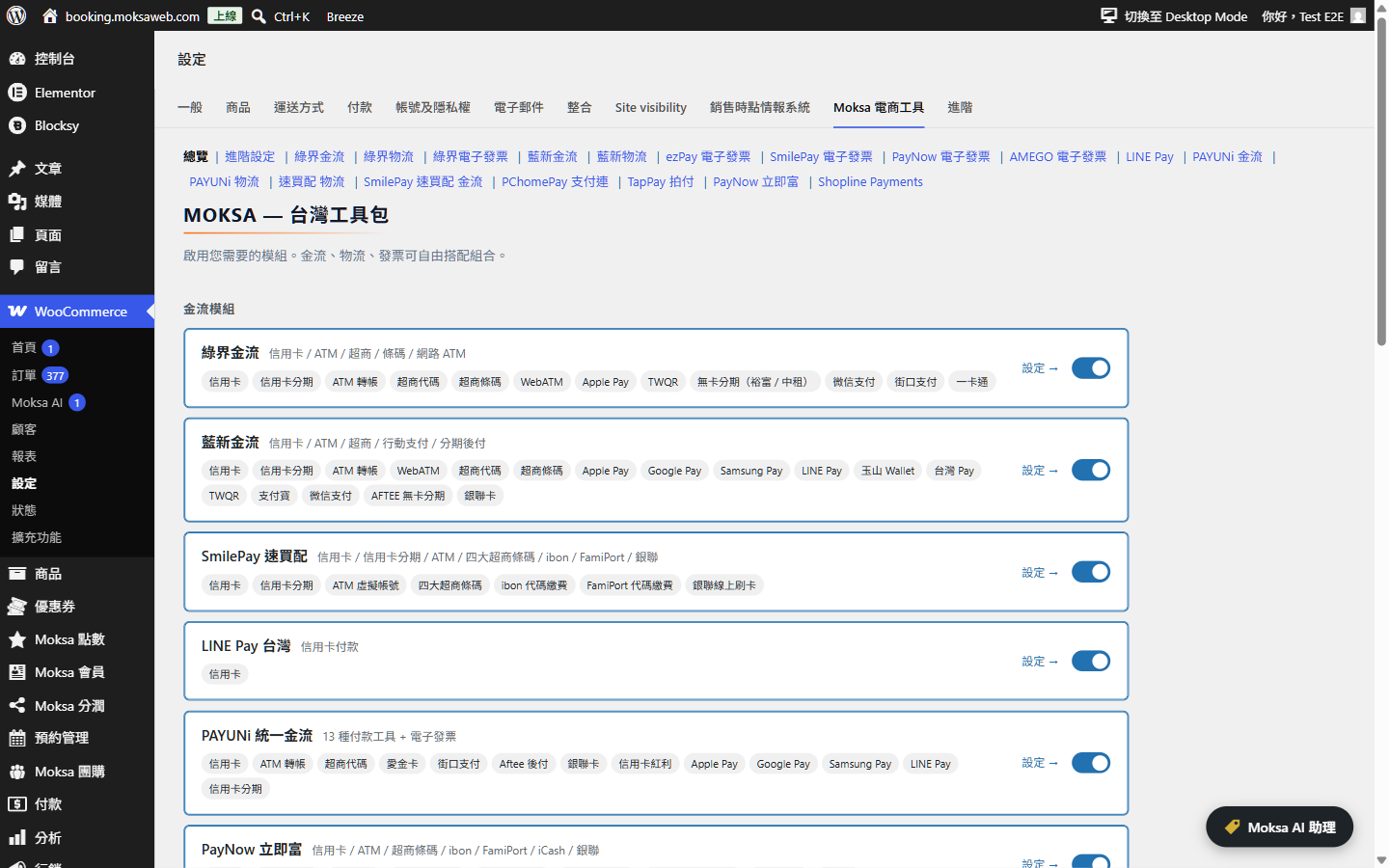
Modules overview — enable only the payment, shipping and e-invoice integrations you need, all from one settings page.
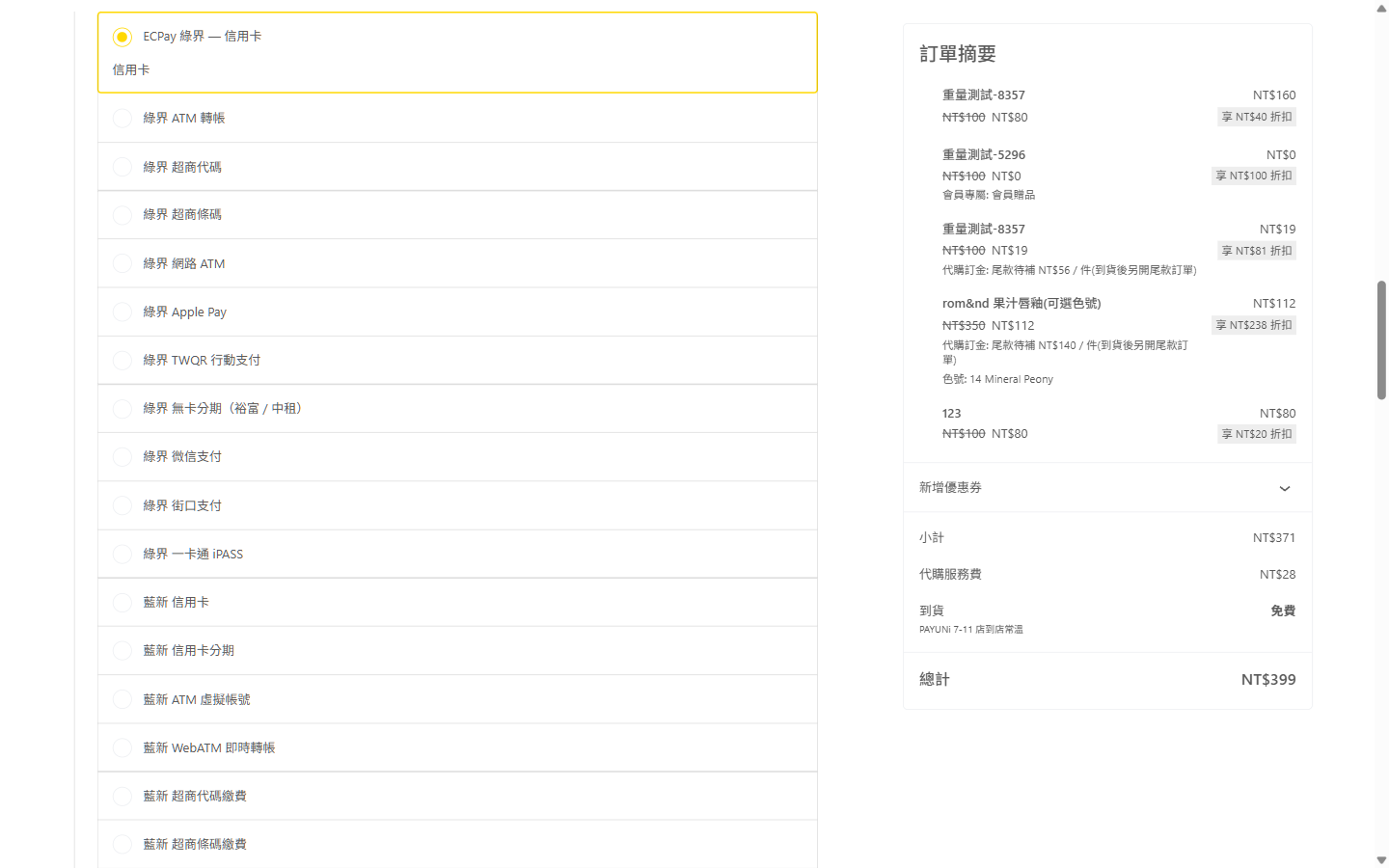
Block-based Checkout rendering Taiwanese payment methods natively, alongside the order summary.
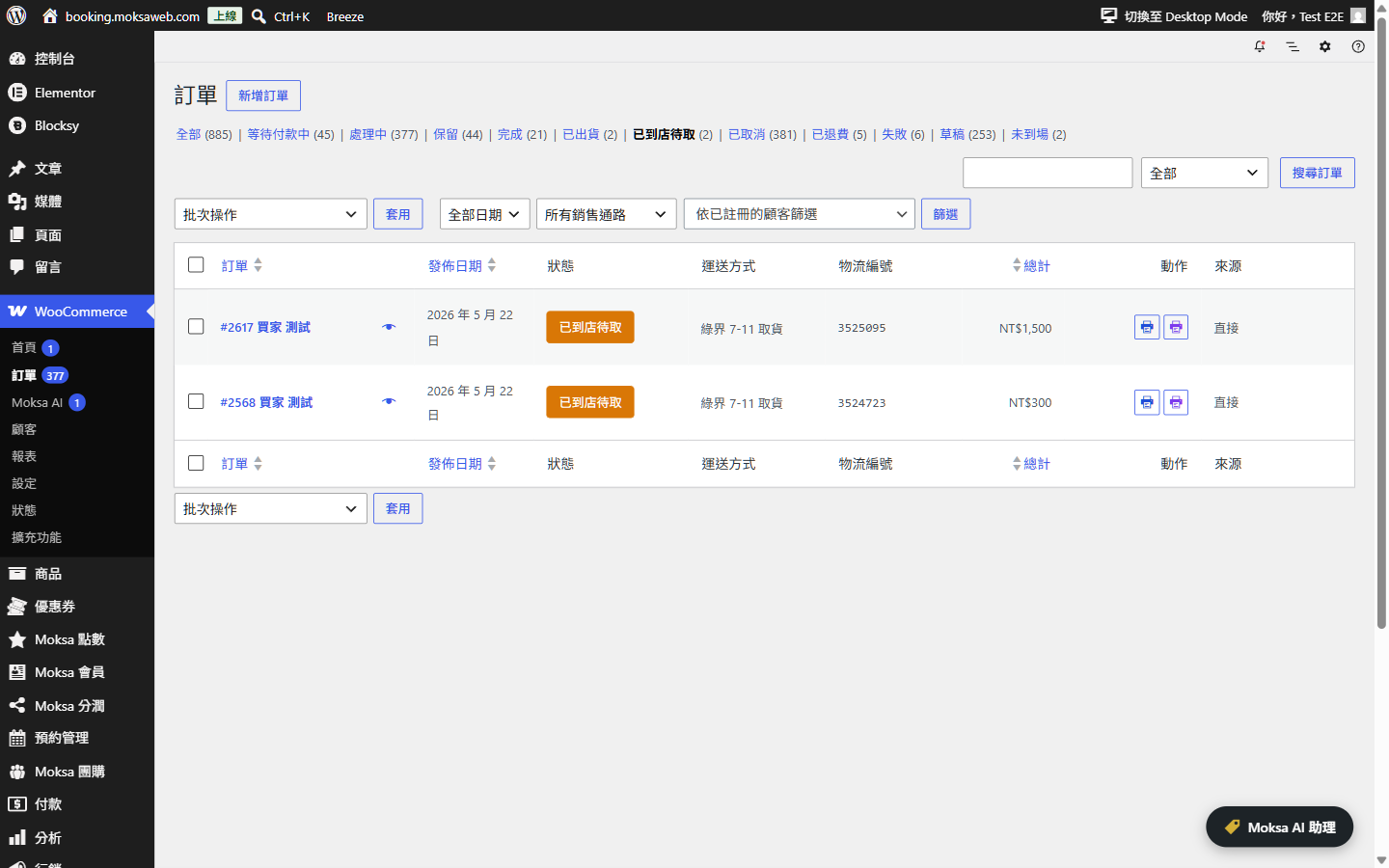
Order list with the plugin's own order statuses plus shipping-method and tracking-number columns (HPOS-native).
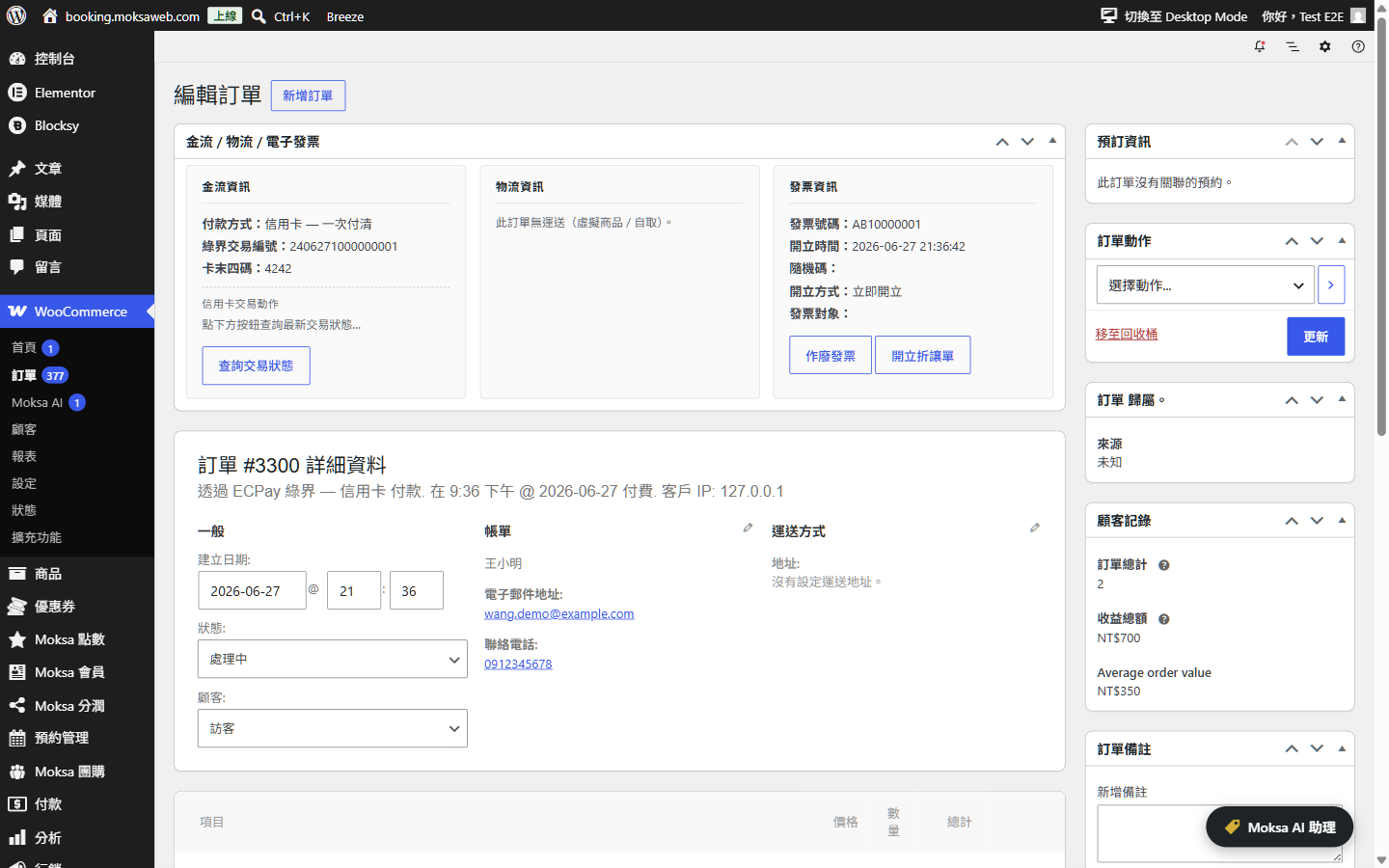
Order edit screen with per-provider payment, shipping and e-invoice cards.
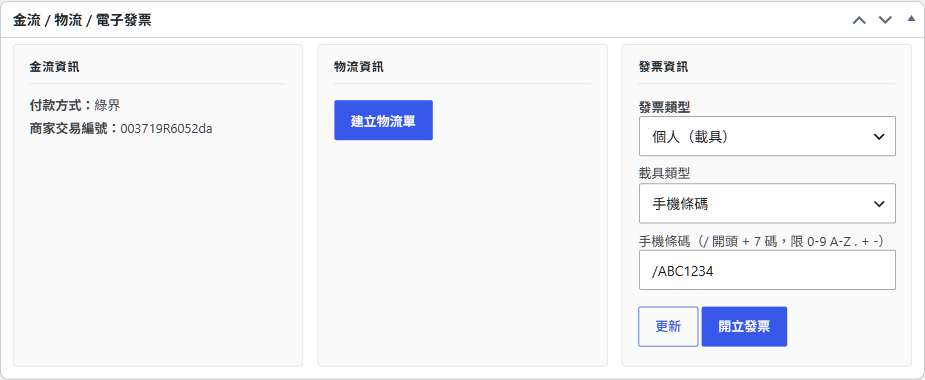
Issuing an e-invoice from the order screen, including carrier type and mobile barcode entry.
Faq
Yes. Every payment method ships an AbstractPaymentMethodType + React component, and the convenience-store picker / invoice fields render inside the Checkout block.
Yes. All order meta uses $order->update_meta_data() / $order->save(), never update_post_meta().
Yes. Payment, shipping and invoice modules are fully independent — any combination works.
It is an optional in-admin chat assistant for managing orders, e-invoices, shipping labels and module settings in natural language. It requires WordPress 7.0 (for the built-in AI Client) and an AI provider connected under Settings Connectors; enable it under the plugin’s Advanced settings. Every action that changes data first asks for your confirmation, and the assistant can never read or change your provider credentials, switch sandbox/live mode, or issue refunds.
Yes, optional and off by default. Turn it on under WooCommerce Moksa AI Settings “Enable external MCP server”. The plugin then serves a standards-compliant, stateless MCP (Model Context Protocol) endpoint at /wp-json/moksa-for-woocommerce/v1/mcp that any standard MCP client (for example mcp-remote or Claude) can connect to directly — no bridge required.
Authentication uses a WordPress Application Password for a user that has the “edit orders” capability; use a dedicated, limited account rather than an administrator. Connect your client to the endpoint with an Authorization: Basic <base64 of username:application-password> header. By default only read-only tools (look up orders, reports, settings overview) are exposed; order-changing tools stay hidden unless you also enable the “allow external AI to make changes” option, and destructive actions still require in-store confirmation. Every request is permission-checked on the server.
Reviews
推薦!
By 
超級金物流、發票大禮包!推薦
Changelog
1.11.0 – 2026-09-06
New
* Thirteen Taiwan-specific fields are now available as personalization tags in the block email editor, so you can write your own sentence around them instead of accepting a fixed paragraph and a table. Pickup store name, ID and address, tracking number, shipping provider, invoice number, bank code, ATM virtual account, convenience store payment code, the three barcode segments, and the payment deadline.
* The payment tags read from this plugin’s shared payment layer rather than from any one provider, so a store that switches between ECPay, NewebPay, PayNow, PChomePay and SmilePay keeps the same tags working without touching its emails.
Fixed
* SmilePay orders never showed the payment deadline to the customer, even though the date was recorded on the order. The other four payment providers all showed it.
1.10.5 – 2026-09-06
Fixed
* This plugin’s emails could not be customized on WooCommerce 11 once the block email editor was switched on. That editor only offers Edit, Preview and Send test for emails on a list WooCommerce keeps, and third-party emails have to ask to be on it — so the four emails this plugin sends sat in the list with no way to open them. They now behave exactly like WooCommerce’s own emails, opening in the block editor with an editable greeting, message and closing around the order details.
* The “Additional content” field did nothing on any of this plugin’s emails. Whatever a merchant typed there was never printed, in the HTML or the plain-text version. It now appears in the same place WooCommerce puts it. (With the block email editor switched on, WooCommerce ignores that field for its own emails too — you edit the content in the editor instead.)
* Shipping status and tracking numbers were about to go missing from these emails under the block editor, which does not run the plugin’s own templates. They are now attached to the extension point WooCommerce provides for that.
1.10.4 – 2026-09-05
Fixed
* The Taiwanese field order was ignored on phones narrower than 400 pixels — most phones — while working correctly on desktop. WooCommerce only lays the block checkout address form out in columns from 400 pixels up, and below that the ordering had nothing to attach to, so the fields fell back to WooCommerce’s own order with the given name above the family name. The order now applies at every width; below 400 pixels every field takes a full row, matching how WooCommerce lays that width out.
* The new phone number setting was drawn outside the settings table in Advanced settings, floating above the section with no label of its own. It now sits on its own labelled row.
1.10.3 – 2026-09-05
New
* An optional check that the phone number is a Taiwanese mobile — 10 digits starting with 09. Turn it on under Advanced settings. Dashes, spaces, brackets, full-width digits and a +886 country code are cleaned up before the check, so a customer typing 0912-345-678 or +886912345678 gets through and the order stores 0912345678. Landlines are rejected, and an empty field is still governed by whether you made the field required. Works on classic checkout, block checkout and the address form in My account.
Fixed
* Hiding the country field left the country showing in the address summary on the block checkout. That summary is a single line of text built from the address format rather than the field itself, so hiding the field alone never reached it. Order emails, the admin order screen and exports still show the country as before.
* No payment method appeared at the block checkout on stores running WooCommerce 11.1. WooCommerce changed how it hands each payment method its settings to the browser in that release, and this plugin was still reading the old location — so every method went quietly missing, with nothing wrong-looking in the admin. All eleven providers are affected and all are fixed. Stores on WooCommerce 9.9 to 11.0 keep working as before.
Older entries are available in the plugin’s repository.