MOP AI Indexer – LLMs.txt and LLMs-Full.txt SEO
MOP AI Indexer – LLMs.txt and LLMs-Full.txt SEO
Description
Configure the index file generation Run a test Set it to auto-generate
MOP AI Indexer generates lightweight, readable index files for AI crawlers and LLM tools. It lets you control which post types and posts are included, supports manual and scheduled generation, provides cache control, and respects Yoast, Rank Math, SEOPress, and AIOSEO directives. You can select the index file name as llms.txt or llms-full.txt, depending on the amount of content written to the index file.
MOP AI Indexer – Quick Introduction Video
Features
-
AI-Ready Index File Generation: Generates an AI-friendly index file for your WordPress content to help AI crawlers and tools understand your site.
-
Supports
llms.txtandllms-full.txt: Choose the file name format based on how much content you want to include in the AI index file. -
Customizable Post Types: Choose which post types to include in your generated index files, with flexible controls for how content is organized and output.
-
Per-Post-Type Controls: Set priority/order, content limits, and output detail settings separately for each post type.
-
Post Excerpts & Meta Descriptions: Improve content summaries by including excerpts and SEO descriptions, with smart fallback handling for better coverage.
-
Optional Content Details: Choose whether to include extra details like taxonomy terms, meta information, and custom fields in the generated output.
-
SEO Plugin Compatibility: Works with major SEO plugins and respects noindex/nofollow settings during index generation, including:
- Yoast SEO
- Rank Math
- SEOPress
- All in One SEO (AIOSEO)
-
Robots.txt Aware: Respects your
robots.txtrules when deciding which content should be included. -
Strict Indexability Checks (Optional): Can apply stricter checks using live page signals (such as robots meta headers/tags) for more accurate exclusions.
-
WooCommerce Visibility Support: Respects WooCommerce product visibility settings, excluding products hidden from search or catalog views.
-
Easy Regeneration: Regenerate or delete index files directly from the plugin screen whenever your content changes.
-
Automatic Scheduling (WP-Cron): Supports scheduled generation so your index files stay up to date automatically.
-
Flexible Update Intervals: Choose from multiple schedule options including manual, daily, weekly, and other timed intervals.
-
Progress-Based Processing: Large generate/delete jobs run in steps to reduce timeout issues on shared hosting and lower-resource servers.
-
Generation Logs: View recent generation and deletion logs in the admin area for troubleshooting and verification.
-
Index File Status Display: See the current status of your index file directly in the plugin admin screen.
-
Clear Caches Button: Clear supported caches from the plugin screen after making changes.
-
Automatic Cache Clearing (Optional): Optionally clear caches automatically after generating or deleting the index file.
-
Per-Post Exclude Option: Manually exclude individual posts/pages from the AI index output.
-
Quick Edit Support: Manage index inclusion directly from the posts list using Quick Edit.
-
Admin List Status Column: Shows whether a post is included or excluded in the plugin’s index output.
-
WordPress Endpoint Delivery: Serves the index file through WordPress endpoints for better compatibility and control.
-
Canonical Endpoint Handling: Redirects requests to the configured file format endpoint to avoid duplicate access paths.
-
Proper Plain-Text Headers: Sends appropriate text response headers for the index endpoint.
-
No-Cache Endpoint Protection: Adds no-cache behavior to reduce interference from caching and optimization layers.
-
Endpoint X-Robots-Tag Protection: Prevents normal search engines from indexing the AI index endpoint.
-
Discovery Hints (Optional): Can expose the index file location through helpful discovery hints, such as:
- HTML
<head>output - WordPress virtual
robots.txt
- HTML
-
WordPress Sitemap Integration (Optional): Can integrate the endpoint into WordPress sitemap discovery flows (when enabled).
-
UTF-8 BOM Support: Generates files with UTF-8 BOM for reliable handling of special characters across environments.
-
Clean Plain-Text Output: Produces structured, readable plain-text output suitable for AI indexing and retrieval use.
-
WordPress “Discourage Search Engines” Awareness: Detects when your site is set to discourage indexing and helps prevent unexpected output behavior.
-
Settings Reset Options: Includes reset actions to restore plugin settings and index configuration to default values.
-
Uploads-Based Storage: Stores generated files in the WordPress uploads area for WordPress.org-friendly file handling.
-
Safe Activation & Deactivation Handling: Includes setup and cleanup routines for a smoother plugin lifecycle.
-
WordPress & PHP Requirement Checks: Verifies minimum environment requirements during activation for safer installs.
Resources
Documentation: https://ministryofplugins.com/mop-ai-indexer-docs/
Installation
Requirements
- PHP version 7.4.0 or greater.
- WordPress 5.6.0 or greater.
- The website should not be a WordPress multisite.
Installation
- Method 1: Install and activate the MOP AI Indexer plugin via the WordPress Plugin Installer.
- Method 2: Download the MOP AI Indexer plugin zip, extract it, and upload its contents to the wp-content/plugins/ directory. Then, activate the plugin from the Plugins page in the WordPress Admin area.
Screenshots
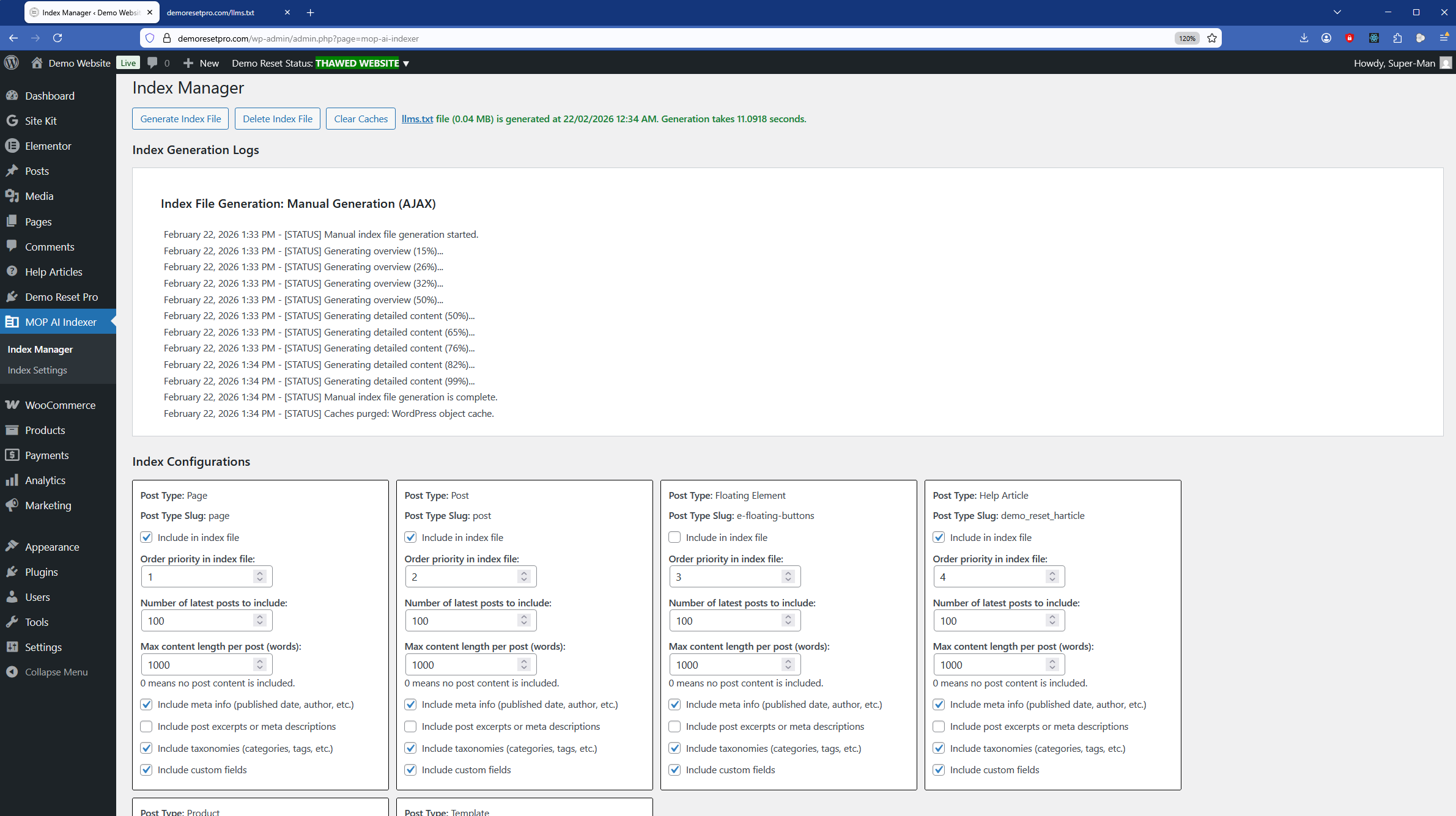
Index Manager page
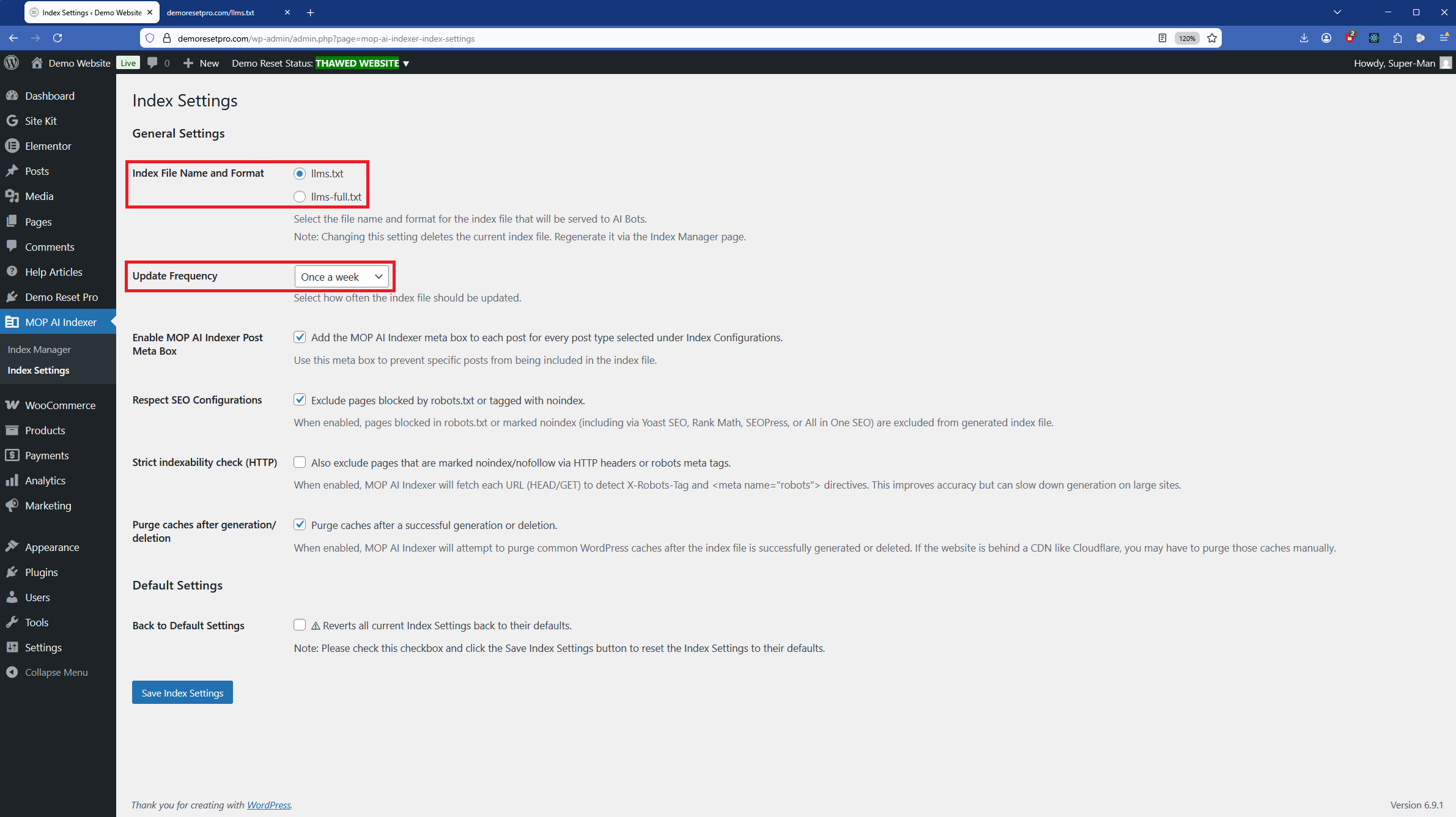
Index Settings page
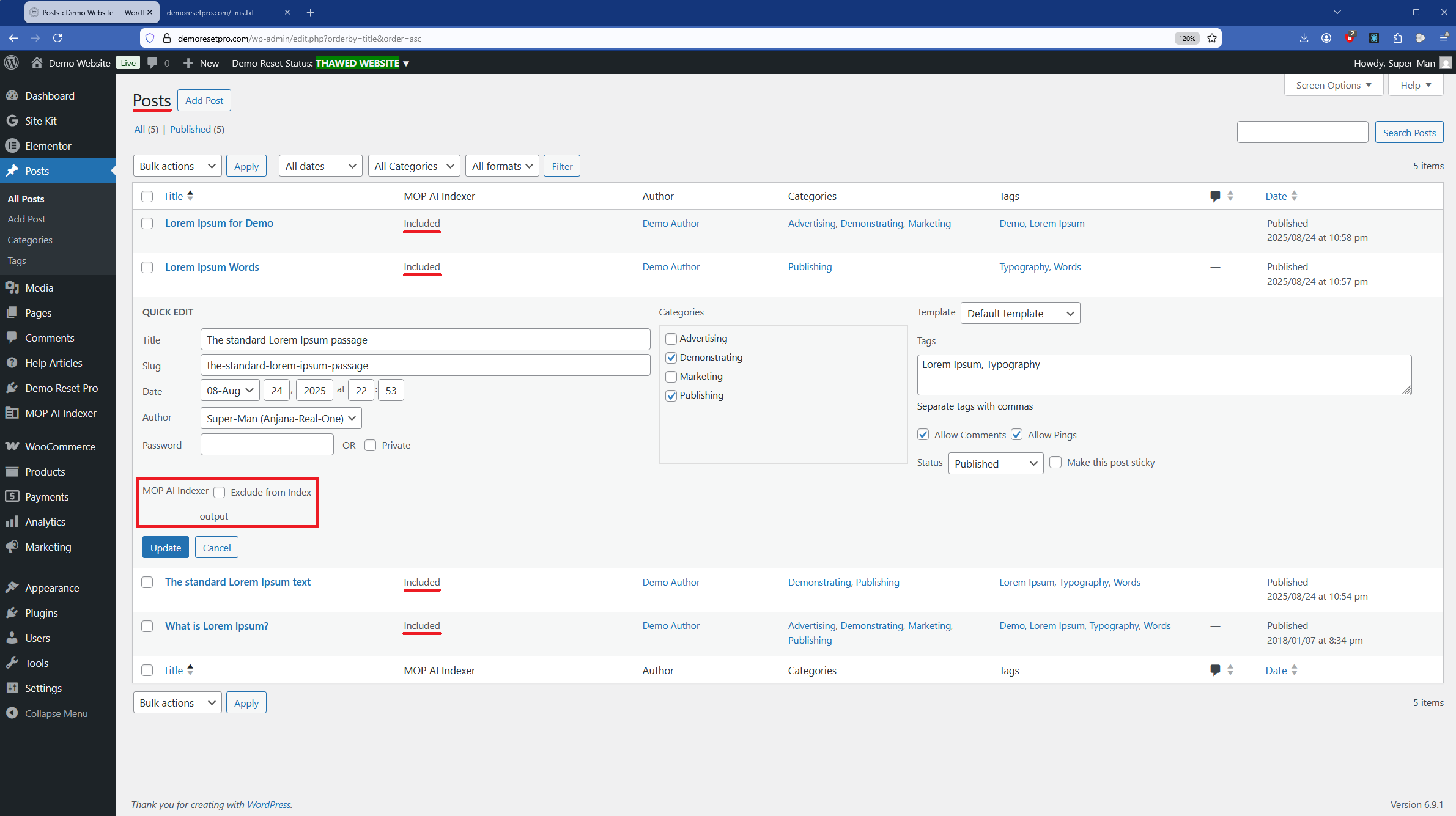
Quick Edit option to exclude posts
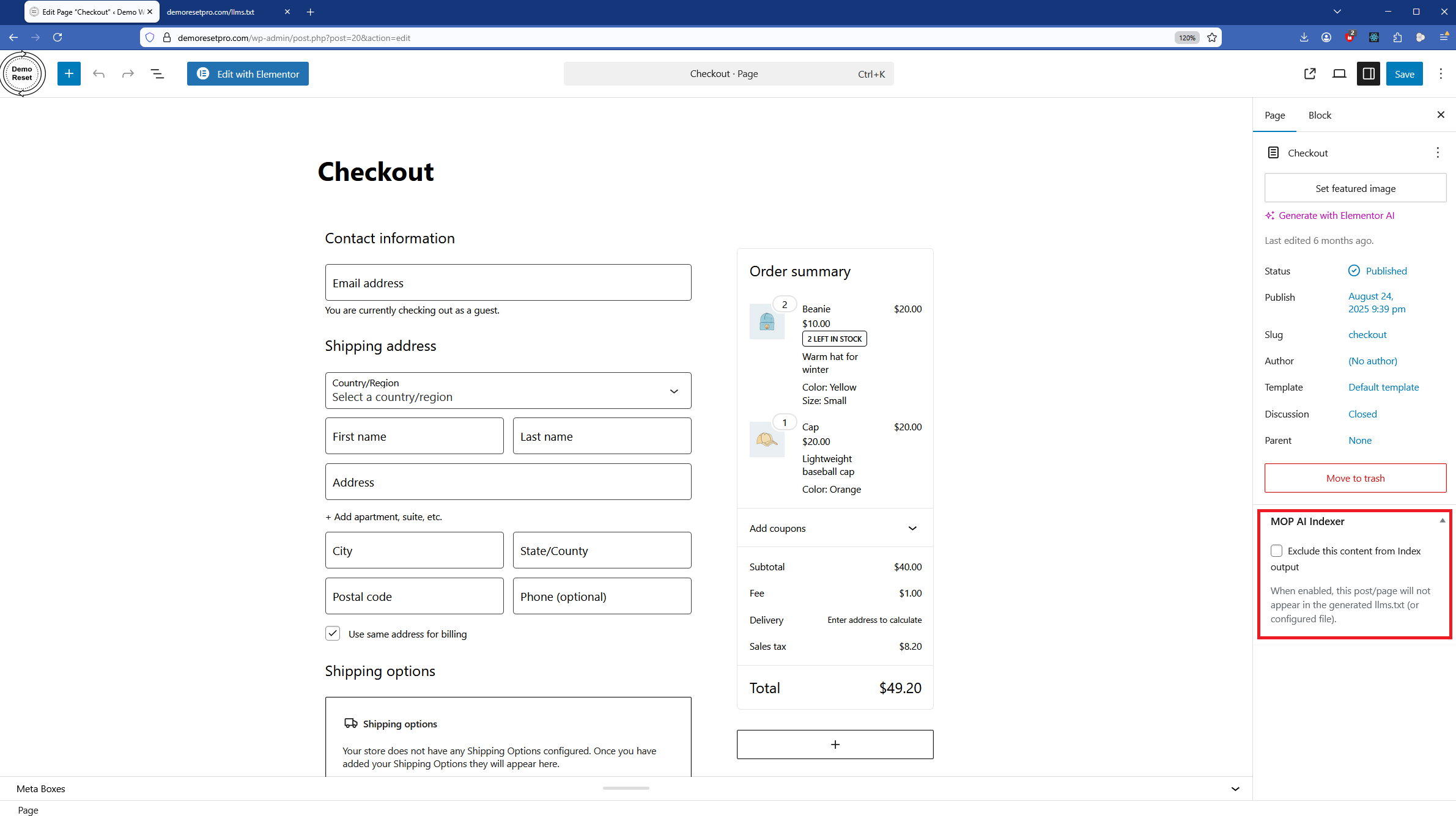
Meta Box option to exclude posts
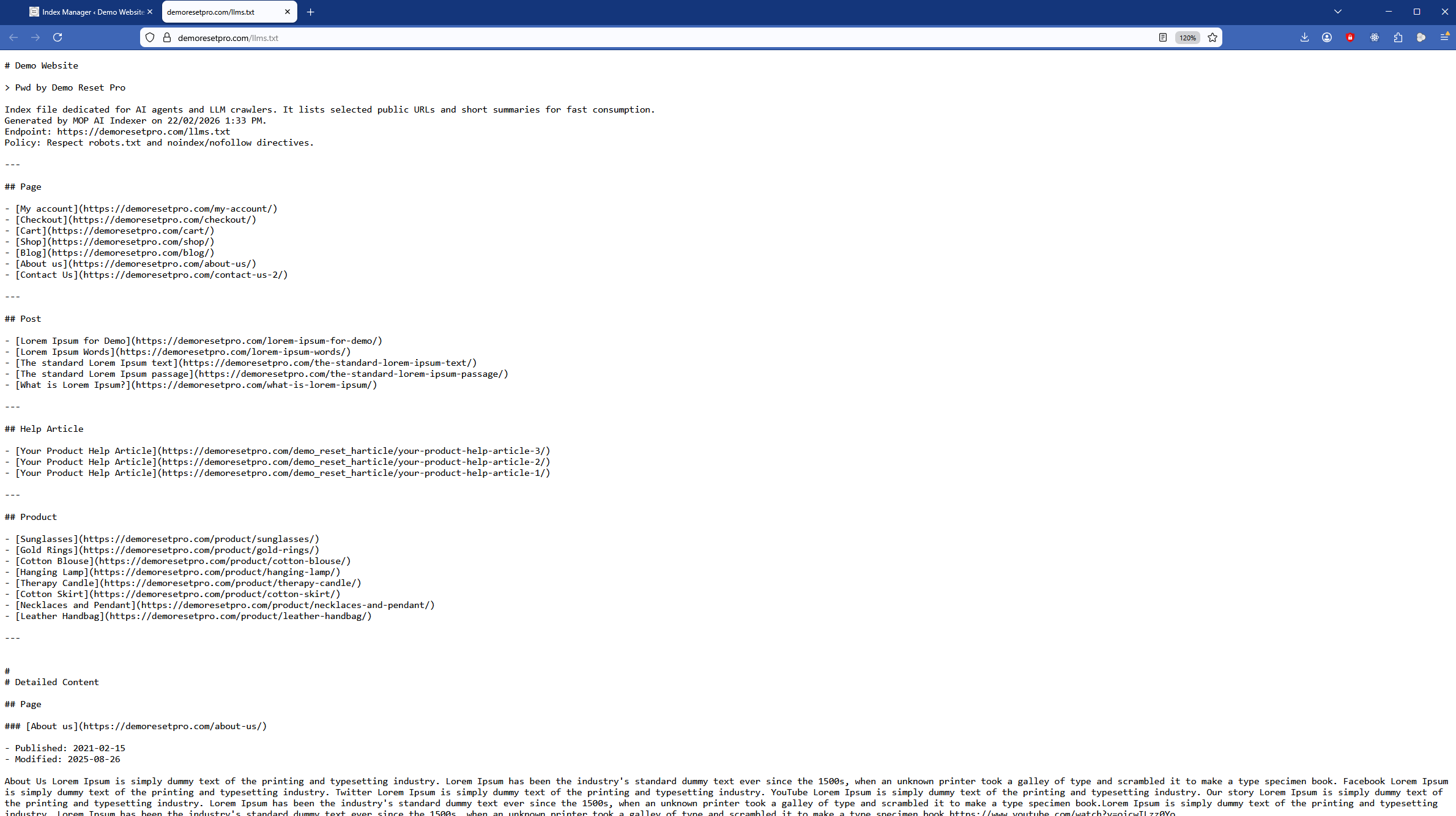
Index file (llms.txt or llms-full.txt)
Faq
- No. It only reads content and generates a separate index file (llms.txt or llms-full.txt) for LLM consumption.
- They’re saved in the WordPress uploads directory at /wp-content/uploads/mop-ai-indexer/ and served via a controlled endpoint.
Reviews
Changelog
1.0.6
- Added: A new Hooks & Constants tab has been added to the Concept & Help admin page to provide resources for developers.
1.0.5
- Added: A new Help Resources tab has been added to the Concept & Help admin page to provide access to resources and documentation.
- Changed: The readme.txt file has been improved.
1.0.4
- Added: New Coming Soon tab has been added to the Concept & Help admin page with upcoming improvements.
- Changed: The readme.txt file has been improved.
1.0.3
- Added: New Concept & Help admin page with tabbed sections to guide users and explain plugin usage.
1.0.2
- Changed: Index file status wording has been improved.
- Changed: The Index Manager page UI has been improved with inline CSS for a better user experience.
- Changed: The readme.txt file has been improved.
1.0.1
- Added: Notification display on MOP AI Indexer plugin pages has been optimized to improve visibility and access to buttons and plugin notices.
- Changed: Post meta box checkbox description text has been improved for clarity.
- Changed: The readme.txt file has been improved.
1.0.0
- Initial release.