Mortgage Rates

Mortgage Rates
Description
Mortgage Rates is a great value-add for any mortgage officer or real estate agent looking to provide good-looking, functional, valuable mortgage content to readers. The execution of this infobox is superb from the smooth sidebar integration, modal window trend and AJAX-based graphs that are incredibly visually appealing. It’s a great little mortgage application that delivers a lot of value in a user-friendly and well-executed way.
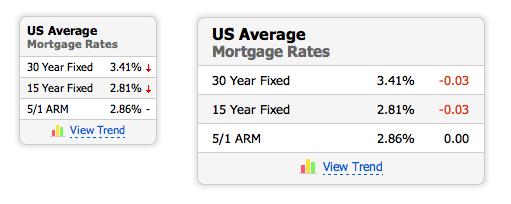
The widget shows the weekly U.S. average rates (Freddie Mac Primary Mortgage Market Survey) published by mlcalc.com. Your site fetches them as data and caches them; all of the widget’s code ships with the plugin.
Mortgage Rates Shortcode
Use the shortcodes on different pages:
[mlrates]
specify default values:
[mlrates state="NY" size="narrow"]
WordPress Mortgage Rates Plugin
External services
This plugin gets the current mortgage rates from mlcalc.com (operated by ARSIDIAN LLC). Your WordPress server requests https://www.mlcalc.com/mortgage-rates/rates.json when the widget is shown and the cached copy is older than six hours (or an hour after a failed request). The request is made by your server, not by visitors’ browsers, and sends no data about your site’s visitors; mlcalc.com sees only your server’s IP address and the standard request headers WordPress sends. The response contains only the rates and their date, which are stored in your database so the widget keeps working if mlcalc.com cannot be reached.
When a visitor clicks “View Trend”, the mlcalc.com mortgage rates page (https://www.mlcalc.com/mortgage-rates/) opens in a new tab; nothing is sent unless the visitor clicks.
- Service: https://www.mlcalc.com/mortgage-rates/
- Terms of use: https://www.mlcalc.com/terms.htm
- Privacy policy: https://www.mlcalc.com/privacy.htm
Mortgage Rates Screenshots
- The Mortgage Rates front-end, as it appears in your WordPress Sidebar.
- The Trend Chart and Detailed Rates, as it appears when a visitor clicks the View Trend anchor.
- The Mortgage Rates widget configuration dialog, as it appears within WordPress Administration Interface.
Installation
- Upload the
mortgage-ratesdirectory (including all files within) to the/wp-content/plugins/directory. - Activate the plugin through the ‘Plugins’ menu in WordPress.
The Mortgage Rates plugin can be used in one of two ways: if you are using widgets, just add the plugin to the sidebar through the Appearance -> Widgets menu in WordPress. If you aren’t using widgets, add the following code: <?php display_mlcalc_rates(); ?> to your template where you would like the rates box to appear.
Usage
- If you are using widgets, just add the Mortgage Rates plugin to the sidebar through the
Appearance -> Widgetsmenu in WordPress. - Add the following code:
<?php display_mlcalc_rates(); ?>to your template where you would like the calculator form to appear. - Add the shortcode
[mlrates]to your page or post and configure default parameters.
Shortcode parameters
- size = wide | narrow
- state = any US state here
Shortcode examples
[mlrates]
[mlrates state="NY" size="narrow"]
Screenshots


Faq
Yes. Absolutely.
Reviews
Best mortgage calculator
By 
Works but pretty basic
By 
Changelog
1.3.15
- Security: widget settings are saved only on requests whose nonce WordPress has verified (closes a CSRF on the classic widgets screen).
- Rates from mlcalc.com are checked for plausible, finite values and the response size is limited.
1.3.14
- Removed the unused jquery.pngFix.js file.
1.3.13
- Security: escape all output (widget title, state name, URLs and the form templates).
- Security: saving the widget settings now requires the edit_theme_options capability (core verifies the widgets nonce), and whitelists the state and form size.
- Shortcode attributes are sanitized instead of being extracted into variables.
- No remote code: the widget script ships with the plugin and loads in the footer; the rates are fetched by your server from mlcalc.com as data (rates.json), cached for six hours, with the last good copy kept for outages. “View Trend” opens the rates page in a new tab.
- Deleting the plugin removes its settings and cached rates.
- Documented the external service in readme.txt.