Multiple Event Reminders for Event Espresso

Multiple Event Reminders for Event Espresso
Description
Multiple Event Reminders for Event Espresso is a powerful add-on designed to extend the communication capabilities of Event Espresso.
While the standard notification system is great, complex events often require a more robust reminder strategy to ensure attendance. This plugin solves that problem by allowing you to schedule multiple email reminders with precise timing.
Stop worrying about “no-shows” and start engaging your attendees at the right moment.
Key Features
- Unlimited Reminders: Create as many notification instances as you need for a single event.
- Granular Precision (Days & Hours): Unlike standard tools that might limit you to days, this plugin allows you to mix and match.
- Example: Send a “Preparation Guide” 2 Days before the event.
- Example: Send a “Link to Join” 1 Hour before the event.
- Automated Workflow: Built on top of the native WordPress cron system for reliability. Set it up once, and it runs automatically.
- Native Integration: Works directly within the Event Espresso event editor interface.
How it works
- Go to your Event Espresso event editor.
- Locate the new “Multiple Reminders” meta box.
- Add your reminders, define the timing (e.g., 24 hours before), and customize the message.
- Save the event. The plugin handles the rest.
Requirements
- WordPress 5.8 or higher.
- Event Espresso Core plugin installed and active.
- EE Automated Upcoming Event Notifications Add-on plugin installed and active.
Installation
- Upload the plugin files to the
/wp-content/plugins/multiple-event-reminders-for-event-espressodirectory, or install the plugin through the WordPress plugins screen directly. - Activate the plugin through the ‘Plugins’ screen in WordPress.
- Ensure you have Event Espresso installed and active.
- Go to any Event Espresso event to start configuring your reminders.
Screenshots

Reminder Configuration: Easily add multiple reminders setting days and hours before the event.
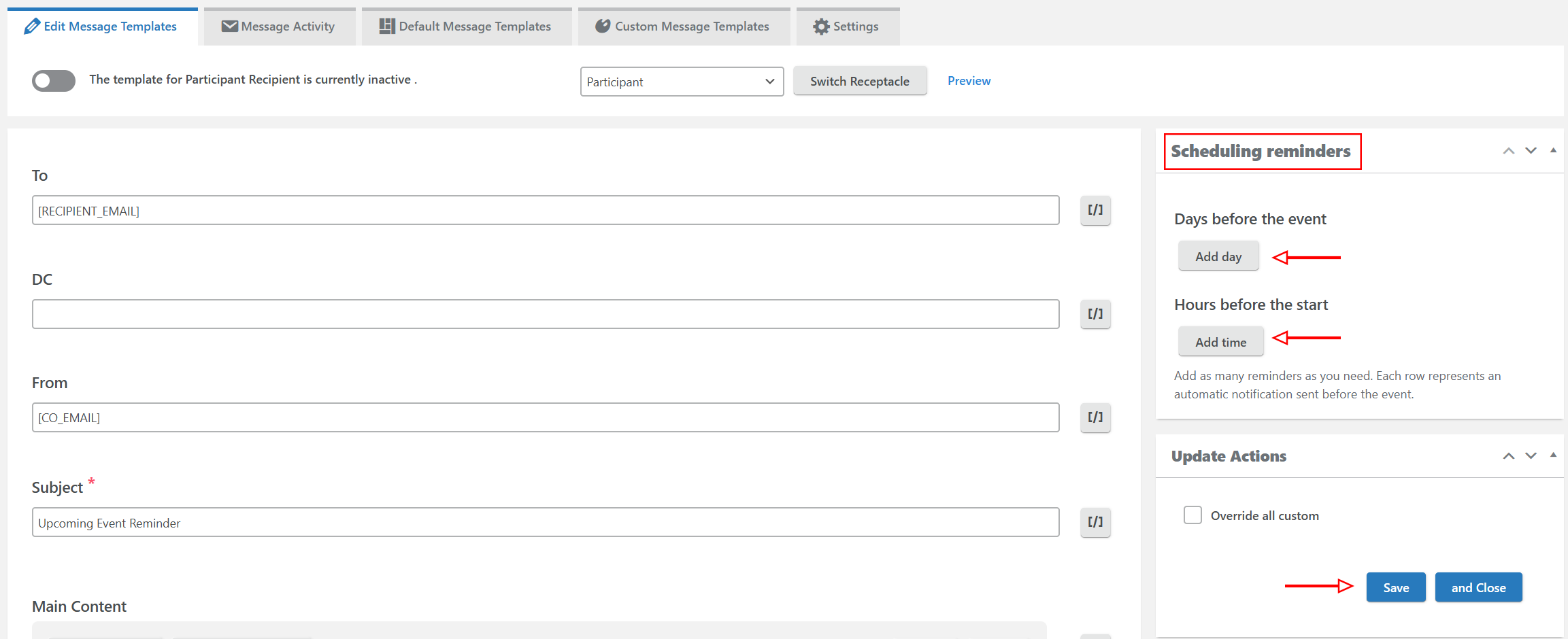
Email Template: Customize the content of your reminders.
Faq
Yes, this is an add-on for Event Espresso and EE Automated Upcoming Event Notifications Add-on and relies on its core functionality to identify events and attendees.
Yes! You can configure a specific email template for “1 Week Before” and a completely different message for “1 Hour Before”.
No, this is a third-party extension developed to add specific functionality (multiple granular reminders) not present in the core add-ons.
Reviews
Changelog
1.0.2
- Fix: Added dependency checks for Event Espresso core and the AUEN add-on. If either is missing, this plugin now auto-deactivates and displays an admin notice (instead of causing a fatal error).
1.0.1
- Fix: Resolved fatal error when ‘EE Automated Upcoming Event Notifications’ is deactivated.
1.0.0
- Initial release.
- Added support for multiple reminders based on days and hours.
- Integrated batch processing for high-volume sending.