WPS Bookings for WooCommerce

WPS Bookings for WooCommerce
Description
Bookings for WooCommerce allows store owners to offer bookable products such as appointments, rentals, and events directly from their WooCommerce store.
Incorporate the reliable, dependable online booking system for your bookings based business, designed specifically for your WooCommerce store. WooCommerce Bookings is an all-in-one appointment scheduling plugin Motivated to facilitate and automate your booking operations directly within your WooCommerce store. It empowers business owners to transform standard products into fully bookable services making time slot reservations seamless, intuitive, and entirely customer-driven.
This WordPress booking plugin allows you to add a booking calendar on your website in order to schedule online appointments. You can also show your booking calendar on websites like Booking.com and Airbnb. Set the booking people types (adults, kids, and oldies), and manage your bookings with ease by utilizing the listing calendar and regulating the booking durations.
You can now simply book time slots utilizing the WordPress booking plugin, confirm/reject bookings, display reservations on calendar listings, enable booking cancellations, promote booking availability, regulate booking duration, and much more using the Bookings plugin’s capabilities.
WooCommerce Bookings is the ultimate solution for all your booking and appointment needs across diverse industries:
-
Salons & Spas – Admin can manage bookings and appointments for salons and spas also for other beauty treatments, different massages, nail art, and consultations with ease. You can create different bookable products for each one of them, as per service type. Each service type can have specific time slots, durations, and pricing, ensuring your clients can easily book their desired appointments.
-
Fitness Trainers & Gyms – Our Bookings Plugin is compatible with the WooCommerce subscriptions plugin, which gives you the power of creating subscription-based booking products for your fitness classes, personal training sessions, and Gym memberships.
-
Healthcare Providers – Utilize the functionality of the booking plugin and set booking time slots – 24 hours or AM/PM, and schedule doctor’s appointments, therapy sessions, and consultations.
-
Consultants & Coaches – Administrators can integrate Google Calendar, which allows clients to book appointments for consultations, coaching sessions, or workshops.
-
Event Organizers – Admin managers can easily offer confirmations for booking requests made by customers, as well as easy booking cancellations. This enables users to book tickets for events or reserve spots for workshops, seminars, and conferences.
WordPress Booking plugin Demo | Documentation for booking for WooCommerce
KEY FEATURES OF THE FREE VERSION OF THE WORDPRESS BOOKING PLUGIN:
1) Centralized View For Bookings
Customers can view their bookings in a centralized manner. They can see the name of the booking product (which is clickable), the payment method they used, the option to add the booking to their Google Calendar, the booking status, and the cancellation option (if the merchant has enabled this functionality). Furthermore, customers can also select whether they want to view the bookings in a list or grid format.
2) Sync Global Calendar With Airbnb
Merchants can sync their global booking calendar with their Airbnb listing calendar. If specific dates are set as unavailable on Airbnb, an automated cron job that runs every 5 minutes will update the bookings calendar( listed on your WooCommerce store) to block those same dates, and vice versa. Similarly, any changes made in your store’s global calendar will reflect on Airbnb’s calendar too, ensuring both stay perfectly in sync.
3) Set Booking Limit & Weekoffs for Global Calendar
Merchants can now set a limit per date and per order for bookings over the Global Calendar. They can also mark particular days off for the week. This helps them manage overbooking by capping the total number of bookings allowed in a given period.
4) Global Calendar Booking
By utilizing this feature of the booking plugin, merchants can easily integrate the global calendar into any page on their booking website. This eliminates the hassle of creating multiple calendars. Merchants can also add unique forms to the global calendars; these forms are there to collect relevant information that will help you process the bookings more efficiently. Once a date is marked unavailable, the same date can not be marked available, and vice-versa.
NOTE: Merchants can only add up to 5 fields while creating the form if you’re using the Free version of the plugin, and the “required” action is only accessible for users with the Premium Version.
5) Choose Your Week’s Starting Day
The admins can conveniently select the start day for the week suiting the requirements of your booking website.
6) Multi-Language Support for Calendars
Merchants can select the language that aligns well with their target audience. This functionality helps merchants make their booking websites familiar to their customers.
7) Booking Spotlight
Enhance your customer’s online booking experience with this intuitive feature. Whenever a customer selects a particular date or slot for booking, it visually gets highlighted, making it easier for the customers to track their choices.
8) Offer Bookings Availability Settings
With the Bookings for WooCommerce Plugin, admins can effortlessly manage availability and scheduling for WooCommerce appointments. They can set daily availability as well as specific booking deadlines, simply by adjusting Start and End times in the plugin’s Availability tab within settings. This flexibility allows for more than 10 slots based on individual needs. Marketers can leverage this feature to customize availability for particular days, weeks, or even months.
For instance, Marketers can set Mondays and Tuesdays as available until December.
9) Flexible Bookings
With the booking and appointment plugin for WooCommerce, customers can tailor their WP booking criteria to their specific booking unit (hour, day, and minutes), budget, event, and requirements. You can make reservations without bothering to place a call, thus you can do so from the comfort of your home following easy booking management.
10) WordPress Bookings Confirmations & Cancellation Offered
With the WooCommerce appointments plugin, Admin managers can easily offer confirmations for booking requests made by customers, as well as easy booking cancellations, by utilizing the plugin’s capabilities.
11) Booking Listing and Sorting by Tag
All requested booking plugin-based orders made by the customers are to be listed in the WooCommerce Order Listing table. Admin managers can conveniently sort the booking out of the orders using the Bookings tag available there.
By utilizing this feature, you can ensure that your customers are only able to submit complete and accurate booking requests, leading to a more efficient and streamlined booking process.
12) Add your Bookings to Google Calendar
With the click of a button, you can now instantly add your WP Booking requests utilizing our plugin-based setting option to your Google Calendar.
Isn’t this a WOW feature? It goes without saying that this enables you to take pleasure in your reservations while also keeping you informed of their status and serving as a virtual reminder of them.
13) Offered Services & Additional Costs
With the WooCommerce appointments plugin, admin managers can easily create booking services and additional costs using the backend settings, and also can easily display them over the checkout page as well as over the individual bookable resource page.
14) Responsive Interface
WordPress Online Booking provides an online mobile-friendly WooCommerce easy free online booking system, i.e. a responsive UI that works on a variety of devices. In short, they offer ease of access for their customers for online appointment booking products.
15) Avoid Unwanted Bookings
Prior to a day, admin managers can easily determine the maximum amount of WooCommerce appointments that can be made. So that they may provide easy booking management for their items, avoid unnecessary bookings, and easily indicate unavailability with the WordPress booking plugin.
BOOKING APPOINTMENT WORDPRESS PLUGIN MEETS YOUR REQUIREMENT, SO
LIVE DEMO OF WORDPRESS BOOKING PLUGIN
Demo For Live Preview
- WordPress Booking Demo : Different Pricing On Different Dates
- WordPress Booking Demo : Configurable Booking Start and End Times
- WordPress Booking Demo : Booking Calendar
WORDPRESS BOOKINGS PLUGIN COMPATIBILITIES
- The Bookings plugin is compatible with Points and Rewards for WooCommerce and Points and Rewards for WooCommerce Pro. This allows merchants to offer points and rewards on bookable products.
- Compatibility with Gutenberg Block allows merchants to seamlessly add the global calendar, just by entering the calendar ID to incorporate the calendar into different pages. This eliminates the need to copy and paste the unique global calendar shortcodes.
- Elementor Page Builder is compatible with bookings plugin. This compatibility lets you use Elementor’s capabilities to add the “global calendar” to different pages without copying shortcodes.
- WooCommerce bookings plugin is compatible with Upsell Funnel Builder. This allows admins to upsell booking-related items or whatever best suits the requirements of their online booking business.
-
WooCommerce Bookings plugin is compatible with Return Refund and Exchange for WooCommerce and WooCommerce RMA For Return Refund & Exchange. This will help the customers in receiving the overdue reimbursement or refunds easily using the bookings plugin.
-
The Bookings for WooCommerce is compatible with WordPress Multilingual i.e. WPML plugin and Multisite.
-
Our Bookings plugin is compatible with Subscriptions for WooCommerce and Subscriptions For WooCommerce Pro. This allows merchants to list subscription-based booking products on their websites. They can charge sign-up fees and make it a recurring booking product.
- Bookings for WooCommerce plugin is compatible with our Wallet System for WooCommerce. This allows customers to make bookings through the wallet frontend panel and recharge their wallets to use the balance for future purchases.
- Our Bookings plugin is compatible with Ultimate Gift Cards for WooCommerce and Gift Cards for WooCommerce Pro. This enables merchants to run offers wherein they can offer gift cards for salons, spas, etc, along with their booking products.
WHAT PREMIUM VERSION OF BOOKINGS FOR WOOCOMMERCE PRO OFFERS
1. Allow Single-Day Booking For Customers
Utilize this functionality of the bookings plugin if merchants want their customers to book for a single day/date, not multiple days. This feature is suitable if you have a booking product that you want to enable for a day/date.
NOTE: This functionality works for Single Calendar.
2. Color Codes to Display Availability:
As an admin, you can now allow your customers and visitors to view the availability and unavailability of given slots with the help of color codes in the date picker calendar with our WP booking plugin.
3. Export Booking Order by Booking Name
You can now effectively export your Woo bookings order data with ease just by referring to the name of that particular WooCommerce Appointment product.
4. Google Calendar Sync:
Admins can use this feature to sync the processed bookings to their Google Calendar.
5. Resource’s Daily Maximum Number of Bookings
This option allows you to set the maximum booking limit for a single day. You can specify the number as per your ease here and easily avoid getting overburdened for a day.
6. Day-Wise Slot Management
The admins can utilize this functionality to schedule different appointment slots every day.
7. Smart Pre-Booking Email/SMS Reminders
This reminder settings tab offers multiple setting options for setting up your booking email and SMS-based reminders.
TAKE ADVANTAGE OF EXCLUSIVE FEATURES OF WOOCOMMERCE BOOKINGS PLUGIN
The Online Reservation Plugin i.e. Bookings for WooCommerce turns your ordinary WooCommerce store into an effective booking plugin in WordPress solution provider. Making use of bookings plugin features, you can create an online appointment booking system that caters to all your customer’s requirements with ease.
Note: Get Bookings for WooCommerce Pro
Additional Useful Content
WOOCOMMERCE BOOKINGS SUPPORT
If you need support or have questions, kindly use our online chat window here or and discover all types of WooCommerce Extensions for your eCommerce store.
If our documentation doesn’t contain the solution to your problem, you can visit the WP Swings Forums Community or Generate a ticket
Create and Revamp Your Store with WooCommerce Services
External Services
WP Swings Support Service
Purpose: Submit user support queries
Data Sent: Name, email, message (user-provided form data)
When: On form submission via support page
Service endpoint:
https://wpswings.com/submit-query/
Terms of Service:
https://wpswings.com/terms-and-conditions/
Privacy Policy:
https://wpswings.com/privacy-policy/
WP Swings Demos
Purpose: Provides users with access to live product demo previews to explore plugin features and functionality.
Data Sent: Standard web request data such as IP address, browser type, and referring URL.
When: Data is sent only when the user voluntarily clicks on a demo link. No automatic requests are made by the plugin.
Service endpoints:
https://demo.wpswings.com/bookings-for-woocommerce-pro/
Terms of Service:
https://wpswings.com/terms-and-conditions/
Privacy Policy:
https://wpswings.com/privacy-policy/
HubSpot Forms
Used for onboarding and deactivation feedback forms.
Data sent: Form fields submitted by admin, plus currency, and context pageUri, pageName, and ipAddress.
When: When onboarding/deactivation form is submitted from the plugin.
Service endpoint:
https://api.hsforms.com/
Terms of Service:
https://legal.hubspot.com/terms-of-service
Privacy Policy:
https://legal.hubspot.com/privacy-policy
Google Calendar (Add-to-Calendar Link)
Purpose: Create calendar events
Data Sent: Event details (title, date, location)
When: When user clicks the calendar link.
Service Endpoints:
https://calendar.google.com/calendar/r/eventedit
Terms: https://policies.google.com/terms
Privacy: https://policies.google.com/privacy
Google Calendar API (FullCalendar Integration)
Purpose: Sync calendar events
Data sent: Calendar ID, API key, and query parameters.
When: When FullCalendar is configured to pull events from Google Calendar.
Service endpoint:
https://www.googleapis.com/calendar/v3/calendars
Terms of Service:
https://policies.google.com/terms
Privacy Policy:
https://policies.google.com/privacy
Google Maps Embed
Purpose: Used to display booking location maps on the frontend product pages.
Data Sent: The booking location/address string is sent as a query parameter in the embedded map URL, along with standard browser request data.
When: Every time a booking product page with location map is loaded.
Service endpoint:
https://maps.google.it/maps
Terms of Service:
https://policies.google.com/terms
Privacy Policy:
https://policies.google.com/privacy
Google Fonts (Static Assets)
Purpose: Used to load font assets (if referenced by styles).
Data sent: Standard web request data for font files.
When: When fonts are loaded.
Service endpoint:
https://fonts.gstatic.com/
Terms of Service:
https://policies.google.com/terms
Privacy Policy:
https://policies.google.com/privacy
My Question is not listed
Check out WooCommerce Bookings knowledge base
Installation
Automatic installation
Automatic installation is the easiest option as WordPress handles the file transfers itself and you don’t need to leave your web browser. To do an automatic install of the plugin, log in to your WordPress dashboard, navigate to the Plugins menu, and click Add New.
In the search field type “Bookings for WooCommerce” and click Search Plugins. Once you’ve found our Bookings for WooCommerce plugin you can view details about it such as the point release, rating, and description. Most importantly, of course, you can install it by simply clicking “Install Now”.
Manual installation
The manual installation method involves downloading our Bookings for WooCommerce and uploading it to your web server via your favorite FTP application. The WordPress codex contains instructions on how to do this here.
Screenshots

General Settings

Configuration Settings (Bookings Form Settings)

Configuration Settings (Additional Cost Settings)

Configuration Settings (Additional Service Settings)

Booking Calendar Setting

Availability Settings
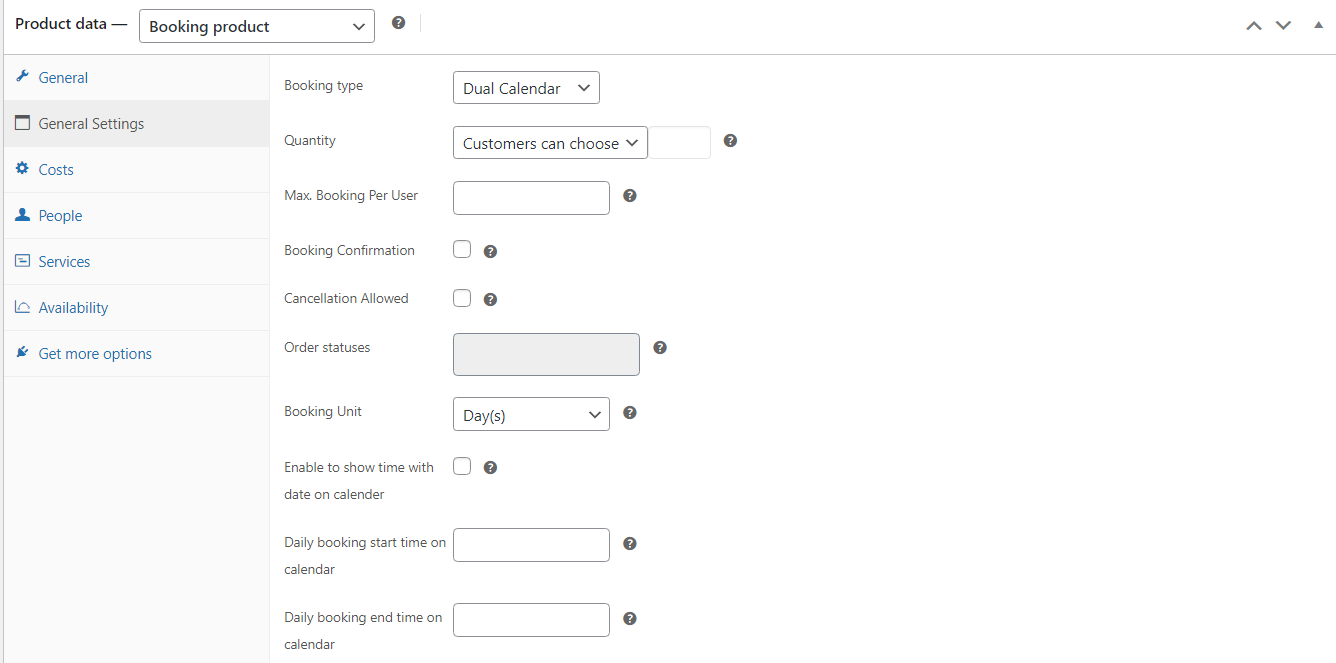
Product Data (General settings)
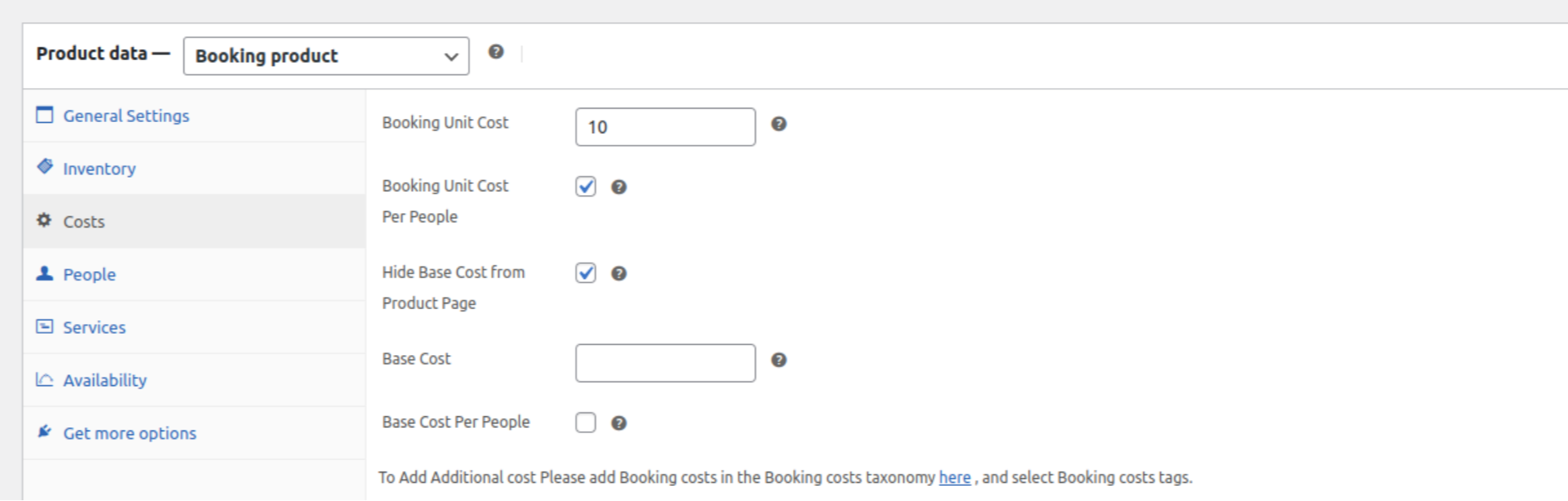
Product Data (Cost settings)
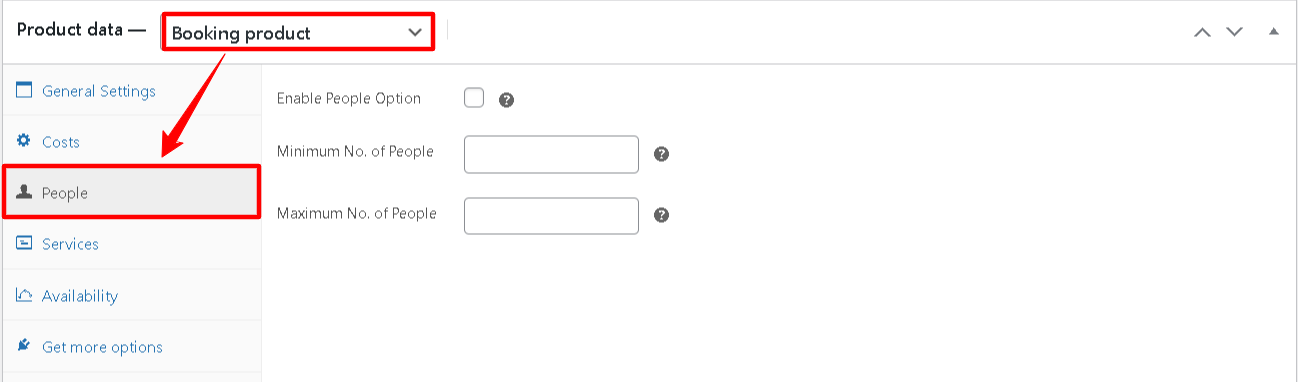
Product Data (People Type Settings)
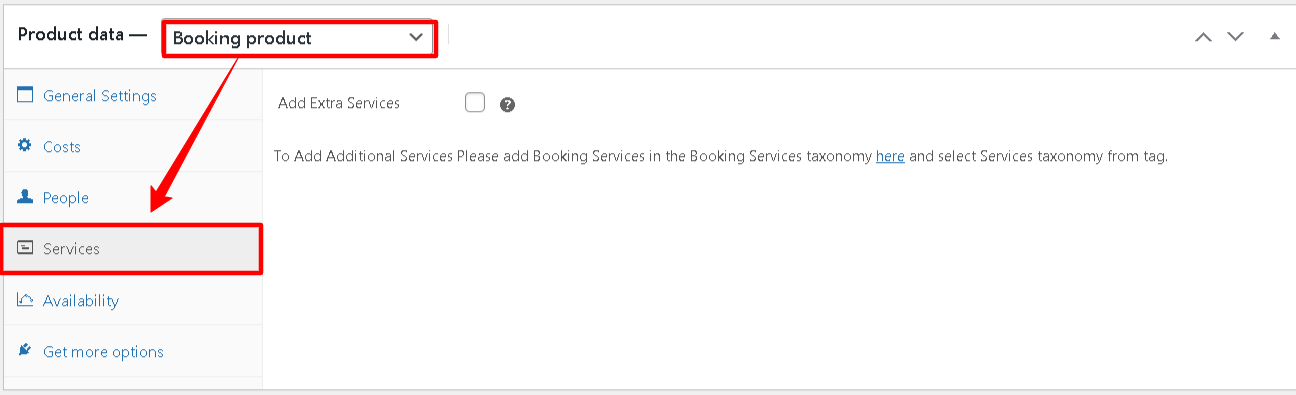
Product Data (Service Settings)
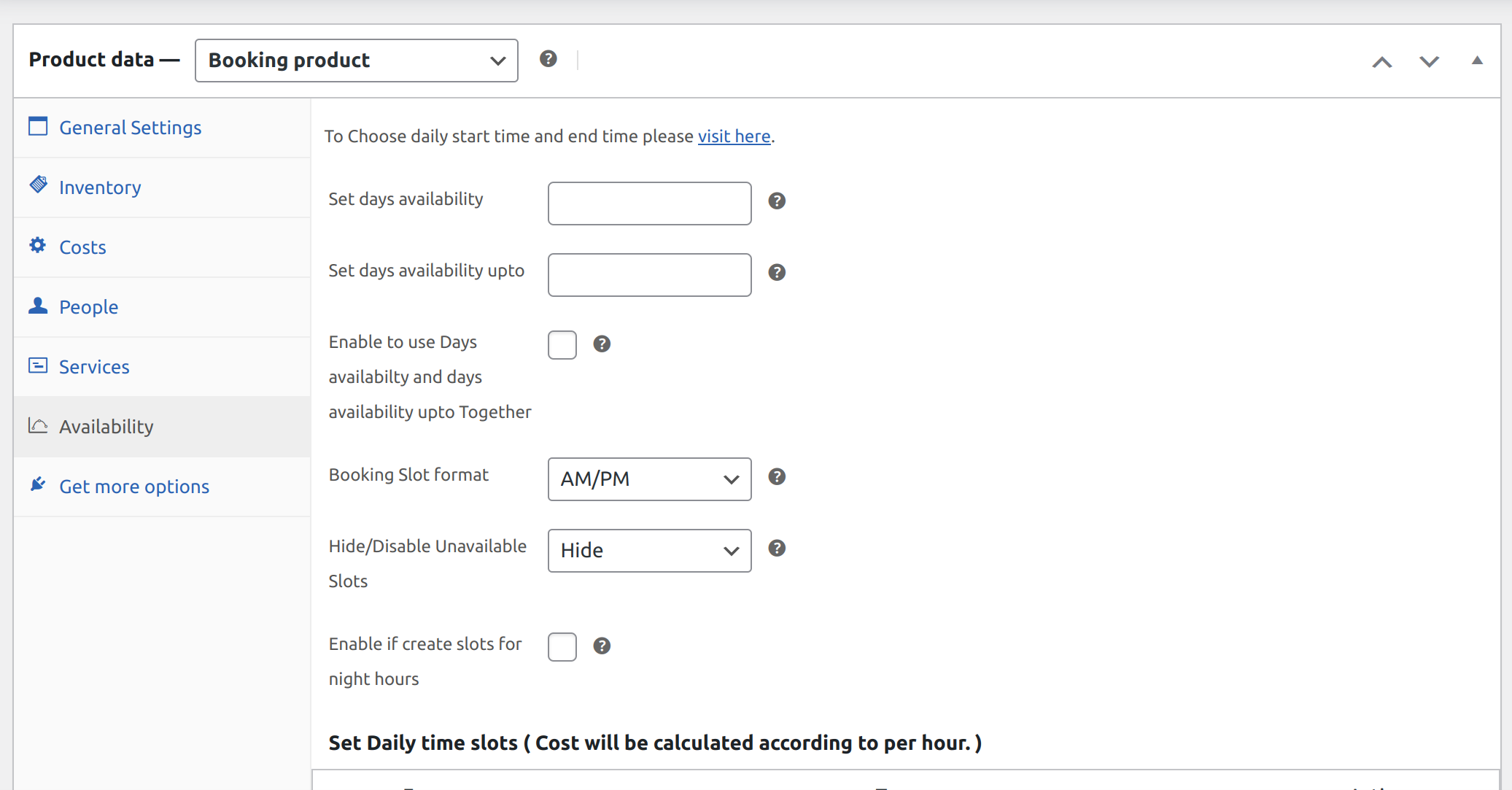
Product Data (Availability Settings) – Single Calendar

Add Booking to Google Calendar (My Account)

Multi Calendar Booking

Product Data (Availability Settings) – Dual Calendar

Compatibility With Points and Rewards – Allow customers to earn points.

Global Calendar

Sync Global Calendar With Airbnb.

Global Calendar Form: The admins can create forms for global calendars to collect relevant customer information.

Set a limit for bookings for a particular date, order, and week off for Global Calendar
Faq
Yes, we have this functionality in our plugin. The admin can create a bookable service based on its hours. For that, just visit the Product Edit Page to do this. Select Hours when scheduling a booking unit.
Yes, the admin must enable the date and time setting from the backend for this. To amend a bookable product, visit the Product Edit Page and Select days in the booking unit, and enable to show hours in the calendar.
Navigate to the Admin Dashboard > Plugin Back End Settings > Booking Form Settings to see the Included Services on the front-end booking form. Then turn ON the Show Included Services toggle switch.
Yes, the Bookings plugin has such functionality that allows customers to select a booking date from a calendar. To do so, go to the Edit Product page > General Settings > Activate the Calendar.
Yes, the number of people for the bookings can be modified by the admin. Go to the Product Edit page > People > Enable the checkbox option for People > Opt on something like a Min and Max number of individuals.
Admin can easily specify the day’s booking availability as well as the specific booking deadline. To do so, they only need to adjust the Start and End times under the Availability tab of the plugin settings area.
Yes, you can do so with our plugin. Navigate toward the General Settings section of the Edit Product page. Then, use the smart checkbox setting for the Cancellation Allowed option to set up the order cancellations allowed for their customer bookings.
Yes, you can easily offer additional services to your booking solutions by utilizing the plugin’s features. To add additional services, simply go to Admin Dashboard > Products > Booking Services and add any additional booking service you wish.
And in order to include them within a booking service, just make use of the Booking Service widget on the sidebar of the specific booking product and include them.
Yes, the admin can set the maximum booking per user to achieve this Go to the Product edit page >> General settings>> Set maximum booking per user according to your need.
In order to create a bookable product for your bookings plugin, you need to first navigate towards your Admin Dashboard > Products > New Product > Select Data Type > Select Booking Product and perform the settings accordingly.
In our plugin, there are two types of booking units-
- Fixed Unit
- Customer Selected Unit
Reviews
useful bookings plugin
By 
Bookings for WooCommerce Pro is very flexible and easy to use for appointment and rental bookings. The calendar, booking limits, and scheduling features work smoothly. Support team is quick and helpful whenever needed. Definitely planning to upgrade to the Pro version for more advanced booking features.
Looks promising but doesn't work
By 
Features look good on paper but even after configuring the settings, the booking form and add to cart didn't appear. This plugin is a joke. Deactivated and deleted.
Fixed the issue
By 
After a bit of back and forward with the team, they were able to fix the issue I had. Very happy with the communication and result.
Great customer service!
By 
<span style="color: rgb(45, 47, 41); font-family: "Trustpilot Sans", Arial, sans-serif; background-color: rgb(255, 255, 254);">WP Swings works great for my Pony Rental business. It was easy to set up with all the options I needed. The customer support has also been great on several occasions. </span>
Outstanding Customer support
By 
We experienced a conflict between two WordPress plugins. The support Team quickly provided a solution. Highly recommended. Thank you
Capsun Web Design Ltd
Extremely Disappointing – Not Recommended
By 
I have been using WordPress professionally since 2011 and have never experienced so many problems with a plugin as I did with the WP Swings Booking Plugin (both free and pro versions).
Major Issues:
- The pro plugin is excessively large and required me to contact my hosting provider just to increase the PHP upload limit. This is not standard practice and signals poor optimization.
- Product settings could not be saved, even after disabling all caching plugins. I wasted hours creating new products, only to find that changes were never applied and the initial settings were locked in.
- After hours of backend work, my site's frontend was broken: important header blocks and the entire cart section disappeared, and the price display was almost invisible to customers.
Support Experience: Despite multiple detailed reports and refund requests, support repeatedly insisted on admin access, which I am not willing to give to a company I do not know or trust—especially when I was never addressed by name. The responses were generic and unhelpful, and my refund request was not processed, even though their own policy states that unresolved issues qualify for a refund. My subscription cancellation has also been pending for days.
Conclusion: This plugin caused severe disruption to my website and business, and the customer service was completely inadequate. I cannot recommend WP Swings to anyone who values reliability and professional support.
Update to my experience:
After posting my negative review, WP Swings contacted me and made my refund conditional on first removing my review. I was informed in writing that the refund would only be processed once I deleted my review.
In my opinion, this approach goes against the principles of independent customer feedback and violates the guidelines of platforms like WordPress.org. I believe it is important for other customers to be aware of this behavior in order to make an informed decision.
Great plugin, exception support
By 
Exceptional support, plugin is helpful for booking. Plugin performance can be improved further.
Extreme Booking Delay
By 
I have setup the plugin for dress rental. When I click on Book button after selecting the start and end dates, it takes nearly 6 mins to load cart page. I have turn off other plugins, so it appears this plugin may be the culprit. please help.
Fantastic waste of time
By 
If you want to waste time configuring this plugin, you've come to the right place. In my opinion, the plugin is unusable unless you want to use at least one additional option beyond the basic calendar, which is already poor UX. I don't recommend it.
Fantastic Plugin & support !
By 
The plugin covers all our needs, the support is also amazing, they answer on our question with a speed of light ! (: - tosetec.com - highly recommend this plugin !
Changelog
3.12.0 – Released on 06 August 2026
- New: Latest Compatibility with WP [7.0.2] and WC [11.0.0]
- Fix : Need to enhance dual calender feature for airbnb compatibility
- Fix : Slot/capacity limit not enforced
- Fix : Booking amount showing $0.00 in WooCommerce order emails
- Fix : Date format (MM-DD-YYYY) conflict with Flatpickr
3.11.7 – Released on 24 June 2026
- Fix: Vulnerability issues fixed
- New: Latest Compatibility with WP [7.0] and WC [10.8.1]
3.11.6 – Released on 12 May 2026
- New: Performance optimization.
- New: Dashboard design change.
- New: Latest Compatibility with WP [6.9] and WC [10.7].
3.11.5 – Released on 17 April 2026
- New: Latest compatibility With WP [6.9] and WC [10.7].
- Fix: Deprecated function removed.
3.11.4 – Released on 13 April 2026
- New: Latest compatibility With WP [6.9] and WC [10.6.2].
- Fix: Deprecated function issues and escaping issues.
3.11.3 – Released on 08 April 2026
- New: Latest compatibility With WP [6.9] and WC [10.6.2].
3.11.2 – Released on 3rd March 2026
- New: Latest compatibility With WP [6.9.1] and WC [10.5.2].
3.11.1 – Released on 10th February 2026
- New: Latest compatibility With WP [6.9.1] and WC [10.5.0].
3.11.0 – Released on 28th January 2026
- New: Created a new React based layout for bookings in My account section.
- New: Latest compatibility With WP[6.9.0] and WC[10.4.3].
3.10.2 – Released on 8th January 2026
- New: Set limit for booking for particular date in global calendar.
- New: Latest compatibility With WP[6.9.0] and WC[10.4.3].
3.10.0 – Released on 3 November 2025
- New: Show total additional costs separately on product page
- New: Latest compatibility With WP[6.8.3] and WC[10.3.3].
3.9.0 – Released on 24 September 2025
- New: Work availability with global calendar in calendar selecting availability and unavailability.
- New : Create form and attach them to global calendars.
- New: Latest compatibility With WP[6.8.2] and WC[10.2.1].
3.8.0 – Released on 29 August 2025
- New: Optimize all Cost of different calendar with WooCommerce date format.
- New: Latest compatibility With WP[6.8.2] and WC[10.1.1].
3.7.0 – Released on 4 August 2025
- New: Compatibility with gift cards.
- New: Compatibility with subscription.
- New: Compatibility with Wallet.
- New: Latest compatibility With WP[6.8.2] and WC[10.0.4].
- New: sale banner image added.
- New: Elementor / Gutenberg Blocks compatibility.
3.6.0 – Released on 14 July 2025
- New: Import an export data from Airbnb.
- New: Latest Compatibility with WP [6.8.1] and WC [9.9.5].
3.5.2 – Released on 04 July 2025
- Fix: Cart page cost calculation issue fix.
3.5.1 – Released on 03 July 2025
- Fix: Fix cost calculation issue
- Fix: Fixed booking date display on cart page
- New: Latest Compatibility with WP [6.8.1] and WC [9.9.5].
3.5.0 – Released on 30 May 2025
- New: Global calendar booking option.
- New: Compatibility with Points and Rewards.
- New: Hide/Disable slots when unavailable.
- New: Latest Compatibility with WP [6.8] and WC [9.8.5].
3.4.1 – Released on 30 April 2025
- New: Am/Pm slot for dual calendar date and time.
- New: Compatibility with latest WP[6.8] and WC[9.8.2].
- Fix: Global cost issue fix.
3.4.0 – Released on 10 April 2025
- New: Option to select start day of the week.
- New: Option to select language of the day of week and Months in the calendars.
- New: Compatibility with latest WC [9.7.1] and WP [6.7.2].
3.3.3 – Released on 04 March 2025
- New: Option to hide/show general costs booking form.
- New: Single calendar slot in AP/PM and 24hr slot.
- New: Compatibility with Subscription Plugin.
- New: WP [6.7.2] and WC [9.7.0] Update.
3.3.2 – Released on 06 February 2025
- Fix: JS enqueue issue fix.
3.3.1 – Released on 31 January 2025
- New: Cost calculation for slot select on product page issue fixed.
- New: Highlight selected date on calendar.
- New: Highlighted selected slot on the calendar.
- New: Compatibility with latest WP[6.7.1] and WC[9.6.0].
3.3.0 – Released on 13 January 2025
- New: Widget of booking product to show on single page.
- New: Compatibility with latest WP[6.7.1] and WC[9.5.2].
3.2.3 – Released on 10 December 2024
- New: Compatibility with latest WP[6.7.1] and WC[9.4.3]
3.2.1 – Released on 01 November 2024
- New: Added setting to Enable Days availabilty and days availability upto Togather
- New: Implemented new calendar for single calendar days
- New: Additional settings hover setting issue is working
- New: Compatibility with latest WP[6.6.2] and WC[9.3.3]
- Fix: Fixed issue with ACF plugin
3.2.0 – Released on 7 September 2024
- New: user can add more than 10 slots for booking.
- New: Add midnight slots for booking.
- Fix: bug fix for mobile view dual calendar.
- New: Compatibility With Latest WP[6.6.2] and WC[9.3.3].
3.1.11 – Released on 30 August 2024
- Fix: Calendar issue fix for mobile devices.
- New: Compatibility With Latest WP[6.6.1] and WC[9.2.3].
3.1.10 – Released on 18 July 2024
- New: Slot Hours into minutes also.
- New: Hide base cost.
- New: Latest WC[9.1.2] and WP[6.6.0].
3.1.9 – Released on 19 June 2024
- Fix: To prevent the keyboard from opening on mobile view when clicking on single calendar.
- Fix: List of services in order issue fixed.
- Fix: Disable book now button on empty form issue fixed.
- New: Latest WC[9.0.0] and WP[6.5.4].
3.1.8 – Released on 03 June 2024
- Fix: language issue fixed by client
- New: Booking Calendar filter added
- New: Set available upto date for single calender
- New: Latest WP[6.5.3] and WC[8.9.1]
3.1.7 – Released on 26 April 2024
- New: Changed calendar for multiple Booking
- New: Changed calendar for Dual Booking supporting Hours and days
- New: Added order links in calendar Booking Section
- New: Allowed Decimal value for Booking Product
- New: Compatibility with RMA
- Fix: Fixed the Database Error
- Fix: Booking Cancel issue fixed
- New: Compatibility with Germanized Plugin
- New: Compatibility with latest WP[6.5.2] & WC[8.8.2]
3.1.6 – Released on 06 March 2024
- New: Add a Prompt Popup for the cancellation option
- New: Product total will show according to the quantity
- New: WP[6.4.3] and WC[8.6.1] Update
- Fix: When the user selects multiple slots for booking it will be visible on the booking calendar
- Fix: Compatibility with Block Cart for quantity restriction
3.1.5 – Released on 11 December 2023
- Support : Compatibility With Latest WP[6.4.2] and WC[8.3.1].
- Support : Compatibility With Cart and Checkout Block.
3.1.4 – Released on 15 November 2023
- New: Compatibility with WP[6.3.2] and WC[8.2.1].
3.1.3 – Released on 11 September 2023
- New: HPOS compatibility.
- New: Compatibility with WP[6.3.1] and WC[8.0.3].
3.1.2 – Released on 18 August 2023
- Fix: Translation issue fix
- Fix: Single calendar issue fix
- New: Compatible with latest wp[6.3.0] wc[8.0.2]
3.1.0 – Released on 22 June 2023
- New: Providing one more type of booking calendar.
- New: Single calendar booking form.
- New: Latest WP [6.2.0] and WC[7.8.0].
3.0.8 – Released on 27 April 2023
- New: Disable the book now button on the empty form
- New: Compatible with the latest WP[6.1.1] and WC[7.6.0]
3.0.7 – Released on 13 March 2023
- Fix: Issue in updating another post
- New: Compatible with the latest WP[6.1.1] and WC[7.4.1]
3.0.6 – Released on 17 February 2023
- New: Choose Single Upcoming Days
- New: Add Booking to Google Calendar
- New: Disable Setting For Availability by days setting
- New: My Booking Tab Added
- New: Compatible with the latest WP and WC
3.0.5 – Released on 23 December 2022
- Fix: Calendar timing issue fixed
- New: Compatible with the latest WP and WC
3.0.4 – Released on 16 December 2022
- New: Set Daily Start and End times on the Calendar
- New: Compatible with the latest WP and WC
3.0.3 – Released on 14 October 2022
- New: Minor Bug Fixes (Some Unnecessary code is removed)
- New: Compatible with the latest WP and WC
- New: Compatible with the latest version of Php 8
3.0.2 – Released on 05 August 2022
- New: Select Booking unit(days/hours)
- New: Minor Bug Fixes
- New: Compatible with the latest WP and WC
3.0.1 – Released on 08 July 2022
- New: Minor Bug Fixes
- New: Compatible with the latest WP and WC
3.0.0 – Released on 29 April 2022
- New: Some substantial UI changes across different areas of the plugin.
- New: Minor Bug Fixes
- New: Compatible with the latest WP and WC
2.0.4 – Released on 3 February 2022
- New: Change author from MakeWebBetter to WP Swings
- New: Notice display of current version for WP Swings.
- New: Minor Bug fixes
- New: Compatible with the latest WP and WC
2.0.2 – Released on 18 November 2021
- New: UI update
- New: Compatibility with WC 5.9.0 and WP 5.8.2
- Fix: Minor bugs fixes
2.0.1 – Released on 13 September 2021
- New: WPML compatibility added
- New: Multisite compatibility added
- Fix: Minor bug fixes
2.0.0 – Released on 25 August 2021
- New: Date and time selector
- New: UI/UX change for easy understanding.
- New: Compatibility with Bookings for WooCommerce Pro
- New: Compatibility with the latest WooCommerce 5.6.0
- New: Compatibility with the latest WordPress 5.8
- New: Compatibility with Return Refund and Exchange For WooCommerce and WooCommerce RMA For Return Refund & Exchange
- Fix: Updated settings for admin.
- Fix: Minor bug fixes and performance improvement
1.0.1 – Released on 31 May 2021
- Fix: Minor issues
- Fix: Booking Total Currency Symbol
- New: Compatibility with WooCommerce 5.3 and WordPress 5.7
1.0.0 – Released on 21 May 2021
- First version