MWR Hit Counter

MWR Hit Counter
Description
MWR Hit Counter displays a single site-wide counter. Every shortcode or MWR Hit Counter block uses the same stored total. The free plugin includes a collection of styles for different site designs and gives designers control over the displayed appearance without requiring a separate analytics service.
Features
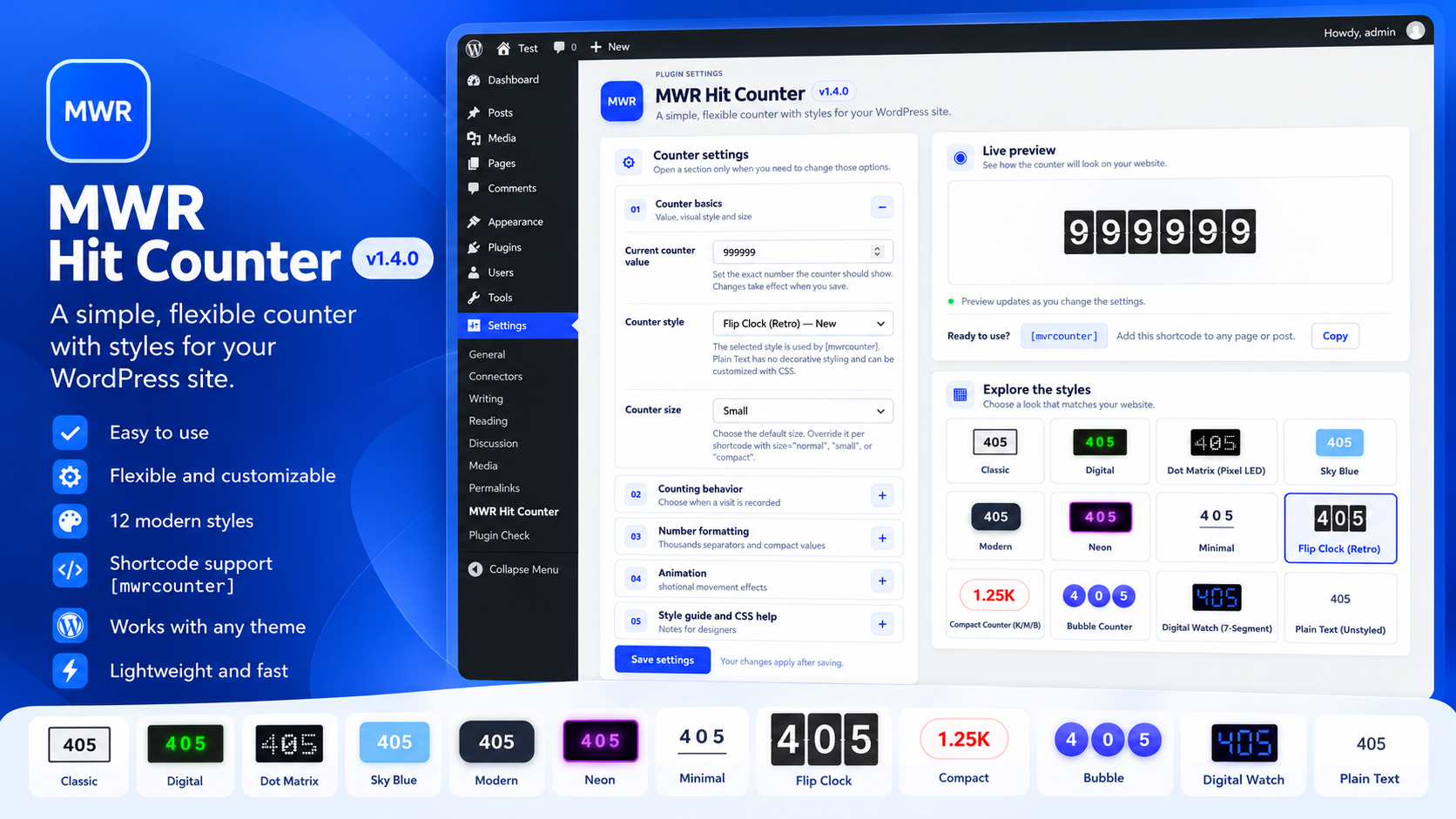
- Twelve visual styles: Classic, Digital, Dot Matrix, Modern, Sky Blue, Neon, Minimal, Flip Clock, Digital Watch, Compact Counter, Bubble Counter and Plain Text.
- Three size presets: Normal, Small and Compact.
- Counting behavior: count once per browser during a 30-day cookie window, or count every page load.
- Optional exclusion of logged-in users who have the manage_options capability.
- Numeric separator settings and configurable compact-value precision.
- Per-shortcode overrides for style, size, animation, number format and compact precision.
- Compact format precision: zero, one or up to two decimal places, with trailing zeroes removed.
- Dynamic Gutenberg block with controls for the per-block style, size, animation, number format and compact precision.
- Flip Clock uses dark split-flap cards and a digit transition when the value increments.
- Digital Watch draws numerals from seven glowing segments instead of a normal font glyph.
- Compact Counter abbreviates large totals with K, M, B and T suffixes while preserving the full stored count.
- Bubble Counter displays each digit inside an individual circle; punctuation remains outside the bubbles.
- Plain Text avoids decorative styling so theme CSS or custom CSS can control its appearance.
- Live preview, one-click shortcode copying and a WordPress Dashboard widget.
- Collapsible settings sections for counter basics, counting behavior, number formatting, animation, and designer help.
- Responsive two-column admin layout: settings on the left; compact live preview and style gallery on the right; support panel across the bottom.
Upgrade notes
Updating from version 1.3.0 to 1.4.0 preserves the global counter and the existing [mwrcounter] shortcode.
The start attribute retains the behavior established in version 1.3.0: it initializes the stored total only when the total is zero. This release does not reinterpret start as a display offset.
For installations with a legacy counter database column, the plugin copies a positive legacy value into count only when the modern value is empty or zero. A nonzero modern total is not overwritten.
Counter styles
- Classic: light counter with a dark border.
- Digital: green characters on a dark, terminal-inspired display.
- Dot Matrix: numerals made from a 5×7 grid of square luminous pixels, inspired by classic electronic displays.
- Modern: white characters on a dark background with rounded corners.
- Sky Blue: simple white numerals on a light blue background.
- Neon: violet neon text and glow on a dark background.
- Minimal: plain typography with a subtle underline.
- Flip Clock: retro mechanical split-flap cards. Enable animation globally or with animation=”1″.
- Digital Watch: digits drawn with seven LED-style segments and a violet glow.
- Compact Counter: formats large values as 1.25K, 2.4M, 1.2B or 1T. Values below 1,000 are shown normally. The selected compact precision and numeric format control its decimal separator.
- Bubble Counter: each numeric digit is inside a circular badge. Thousands separators remain outside the bubbles.
- Plain Text: displays the number without decorative plugin styling, making it suitable for custom CSS.
Global settings
- Current counter value: manually set the total displayed by the counter.
- Counter style and size: choose global defaults. A shortcode or Gutenberg block can override these values individually.
- Counting behavior:
- Once per browser every 30 days: the existing behavior, based on a first-party cookie named mwrcounter.
- Every page load: increments on each server-rendered request containing the counter. Several counter instances on the same request increment the global total only once.
- Exclude administrators: when enabled, requests from logged-in users with the manage_options capability are not counted.
- Number format: use the WordPress site locale, dot-separated thousands, comma-separated thousands, space-separated thousands or no grouping separator.
- Compact decimals: choose zero, one or up to two decimal places for Compact Counter. Trailing zeroes are removed.
Counting note: this is a lightweight hit counter, not full analytics. The cookie mode approximates one count per browser per 30-day period; it cannot identify people uniquely. The each-load mode counts server-rendered page requests. Full-page caching can serve an existing page without running PHP on each visit, so cached pages may require an appropriate cache exclusion or cache-aware integration for accurate increments. Bots and automated requests may also affect totals.
Shortcode
Basic use:
[mwrcounter]
Available attributes:
- style=”classic|digital|dot-matrix|modern|sky-blue|neon|minimal|flip-clock|digital-watch|compact|bubble|plain” selects the style for this instance.
- size=”normal|small|compact” selects the size for this instance.
- animation=”1″ enables animation; animation=”0″ disables it.
- format=”locale|dot|comma|space|none” overrides number grouping/decimal behavior.
- precision=”0|1|2″ overrides Compact Counter decimal precision.
- start=”100″ initializes the stored total to 100 only when the current stored total is zero.
Examples:
[mwrcounter]
[mwrcounter style=”flip-clock” animation=”1″ size=”small”]
[mwrcounter style=”digital-watch”]
[mwrcounter style=”compact” format=”dot” precision=”1″]
[mwrcounter style=”bubble” size=”compact”]
[mwrcounter style=”plain” format=”space”]
When an attribute is omitted, the corresponding global setting is used.
Important: counting behavior is global because all instances share one site-wide total. Choosing a counting mode per instance would make increments depend on where the shortcode appears, so it is configured from Settings > MWR Hit Counter instead.
Gutenberg block
In the block editor, search for “MWR Hit Counter” in the Widgets category. The dynamic block shares the same global total as the shortcode and can override style, size, animation, number format and compact precision from its sidebar settings. Counting happens when the published page is rendered on the server; the block editor placeholder itself does not increment the counter.
Display sizes
- Normal: default visual size for the selected style.
- Small: reduced size for sidebars and compact content areas.
- Compact: smallest preset for tight layouts.
Size is available globally, per shortcode and per Gutenberg block. Plain Text remains free of decorative styling, although the selected size adjusts its text size.
CSS customization for designers
Every shortcode wrapper receives .mwr-hit-counter, a style class and a size class. The plugin does not force alignment; use the parent block, theme or custom CSS to position the inline counter. Add rules in the theme stylesheet or WordPress Additional CSS, and use specific MWR classes rather than generic span selectors.
/* Every MWR counter */
.mwr-hit-counter { vertical-align: middle; }
/* Digital style */
.mwr-hit-counter.mwr-counter-digital {
color: #7cff8b !important;
background: #07130b !important;
}
/* Every bubble digit */
.mwr-hit-counter.mwr-counter-bubble .mwr-bubble-digit {
background: #111827;
border-color: #60a5fa;
color: #ffffff;
}
/* Plain Text: total control over appearance */
.mwr-hit-counter.mwr-counter-plain {
font-size: 2rem;
color: #333333;
font-weight: 700;
text-decoration: none;
}
/* Different appearance for only this instance */
.my-footer-count .mwr-hit-counter.mwr-counter-plain { color: #fff; font-size: 14px; }
To target a specific counter instance without changing other counters, give it a distinctive parent CSS class in the theme/page builder when supported, or use a wrapper element around the shortcode:
[mwrcounter style=”plain”]
/* Center or right-align the surrounding container, not the counter itself. */
.my-footer-count { text-align: center; }
Useful style classes:
- .mwr-counter-classic
- .mwr-counter-digital
- .mwr-counter-modern
- .mwr-counter-neon
- .mwr-counter-minimal
- .mwr-counter-flip-clock
- .mwr-counter-digital-watch
- .mwr-counter-compact
- .mwr-counter-bubble
- .mwr-counter-plain
Size classes:
- .mwr-counter-size-normal
- .mwr-counter-size-small
- .mwr-counter-size-compact
Bubble internals:
- .mwr-bubble-counter wraps all displayed characters.
- .mwr-bubble-digit is applied to each digit bubble.
- .mwr-bubble-separator is applied to punctuation and separators.
Digital Watch internals:
- .mwr-seven-segment wraps the display.
- .mwr-seven-digit is applied to each numeral.
- .mwr-segment and .mwr-segment-a through .mwr-segment-g control the LED segments.
Flip Clock internals:
- .mwr-flip-clock wraps the display.
- .mwr-flip-digit is applied to each flap card.
- .mwr-flip-top, .mwr-flip-bottom and .mwr-flip-divider control the two halves and center line.
Some visual styles intentionally use specific CSS declarations to remain consistent across WordPress themes. Use suitably specific selectors and, when necessary, !important to override those properties. Plain Text deliberately avoids the decorative declarations.
Installation
- Back up your existing plugin folder and database.
- Upload this ZIP through Plugins > Add New > Upload Plugin. If WordPress does not offer to replace the installed version, deactivate the plugin and replace its files without deleting the plugin data.
- Activate MWR Hit Counter.
- Go to Settings > MWR Hit Counter to configure the global defaults.
- Add [mwrcounter] to a page or post, or insert the MWR Hit Counter block in the Gutenberg editor.
Screenshots
Faq
No. The cookie mode limits repeat increments from the same browser during 30 days. It is an approximation, not an exact person-level visitor count. Clearing cookies, using another browser/device, caching and bots can affect totals.
“Once per browser every 30 days” uses a first-party cookie to limit repeat increments. “Every page load” counts every server-rendered request containing the counter, including reloads. A full-page cache can bypass PHP execution on cached visits.
Yes. Every instance shares the same global total, but each shortcode or Gutenberg block can use its own style, size and number format. Position it with the surrounding layout or custom CSS.
No. Compact Counter only changes the displayed format. For example, 1,250 can be shown as 1.25K or 1,2K depending on locale/precision settings, while the underlying value remains 1,250.
Enable “Exclude administrators” in the settings. Requests from logged-in users who can manage site settings are skipped. Public users are unaffected.
Use [mwrcounter style=”plain”] and add CSS in the theme or WordPress Additional CSS. The wrapper includes .mwr-counter-plain plus its size class. The plugin does not add decorative backgrounds, borders, shadows, underlines or animation to this style.
Yes. Updating preserves the existing counter table and old option names. New settings use safe defaults: cookie mode, WordPress locale formatting, two compact decimals and administrator visits included unless excluded explicitly.
Reviews
Handy!
By 
Changelog
1.4.0
- Expanded the counter to twelve visual styles, including Flip Clock, Digital Watch, Compact Counter, Bubble Counter, Plain Text, Dot Matrix and Sky Blue.
- Added Normal, Small and Compact display sizes, plus per-shortcode and per-block display options.
- Added configurable counting behavior, optional administrator exclusion, number formatting and compact-value precision.
- Added a dynamic Gutenberg block while preserving the [mwrcounter] shortcode and the shared global counter.
- Redesigned the settings dashboard with a live preview, style gallery and one-click shortcode copying.
- Added Flip Clock animation, seven-segment digits and additional display styles.
- Added Spanish (Spain) and Spanish (Argentina) translations and improved localization support.
- Improved compatibility with older counter tables while preserving existing counter totals during updates.
- Added a promotional panel for MWR Hit Counter Pro and refreshed the support links.