Customize My Account for WooCommerce – Custom Tabs, Login, Registration, 2FA & Design
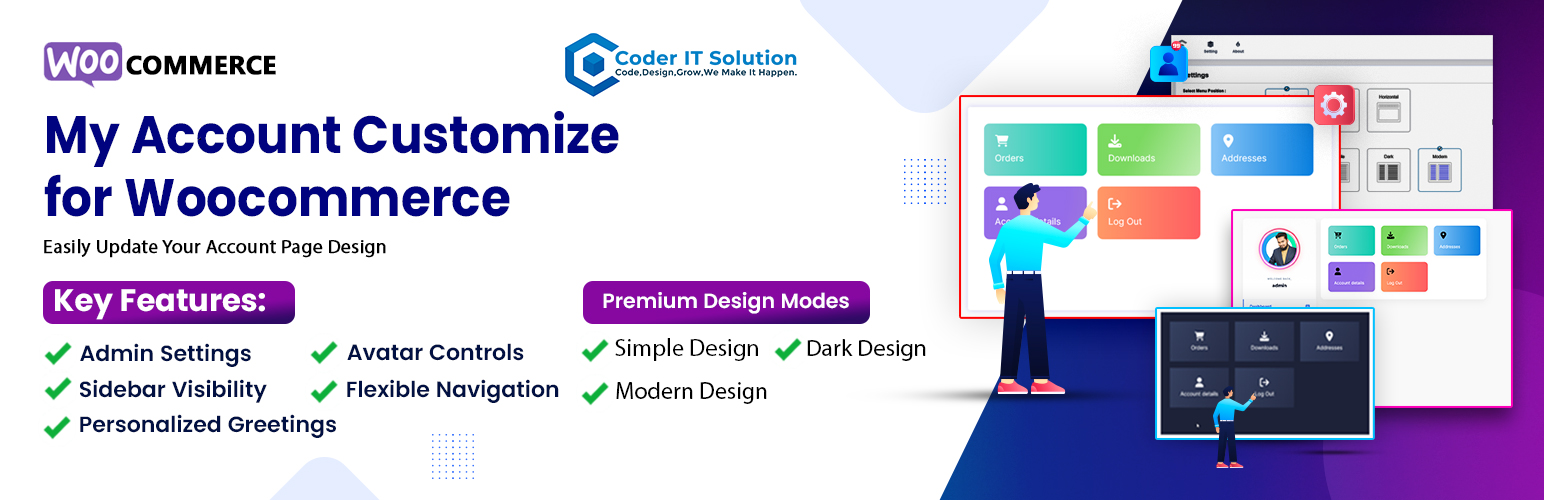
Customize My Account for WooCommerce – Custom Tabs, Login, Registration, 2FA & Design
Description
The most complete WooCommerce My Account plugin available. Redesign your account page with beautiful design themes, add unlimited custom tabs, brand the login page, and secure your store with Magic Link Login, Two-Factor Authentication (2FA), and Passkeys — all in one plugin, no coding required.
Used by 800+ stores on WordPress.org.
Features no other My Account plugin offers:
- Magic Link Login, Two-Factor Authentication, and Passkeys built-in
- Login Page full branding — logo, colors, background, all text editable
- White Label mode — replace all plugin branding with your own for client sites
- Import / Export Settings — JSON backup and restore across sites
- Full RTL language support
- CSS and JS only load on the My Account page — zero impact on the rest of your store
🎨 Design & Themes
Free themes:
✅ Modern — glassmorphism cards, frosted-glass sidebar
✅ Dark — neon night mode with blue accent glows
✅ Simple — clean minimalist layout
Pro themes:
✅ Corporate — dark-navy sidebar, crisp white content, slate-blue accents
✅ Gradient — purple-indigo gradient sidebar with vivid card gradients
✅ Neumorphism — soft extruded surfaces on a warm gray base
🖋 Typography
- Google Fonts picker — choose from 30+ Google Font families for your My Account page
- Live preview in the admin before saving
- Font size control with a range slider
- Reset to Defaults button to restore original typography with one click
🧭 Navigation & Layout
- Left, Right, or Top (Horizontal) navigation
- Drag-and-drop endpoint reorder
- Sidebar auto-hide when empty — content expands to full width
- Order and download count badges in the sidebar
- Custom brand colors — background, text, hover, active, and icon color
📑 Custom Tabs & Endpoints
- Create custom tabs with full WYSIWYG content
- Supports Gutenberg, Elementor, and Bricks Builder
- Assign Dashicons to every menu item
- Role-based tab visibility — show or hide tabs per user role
- Smart Tags —
{first_name},{display_name},{order_count},{member_since} - Free: up to 2 custom tabs | Pro: unlimited
🔐 Login & Security (Pro)
Magic Link Login
Send a one-click passwordless login link by email. Admins can generate links for any user, set expiry time, bind to IP address, and restrict admin access in magic-link sessions.
Passkeys / WebAuthn
Full FIDO2 implementation. Customers register their fingerprint, Face ID, or hardware key once and sign in instantly without a password. Works in Chrome, Safari, and Edge.
Two-Factor Authentication (2FA)
* TOTP apps — Google Authenticator, Authy, Microsoft Authenticator
* Email OTP fallback
* Backup codes for account recovery
Trusted Device Fingerprinting
Skip 2FA on recognized devices. Admins can view and revoke trusted devices per user.
Single Session Enforcement
New login auto-terminates the previous session — useful for membership and subscription sites.
Auto-Logout Timer
Set an idle timeout. A heartbeat keeps active sessions alive while users are working.
📋 Custom Registration Fields (Pro)
Add extra fields to the WooCommerce registration form and collect the information your store actually needs.
- Ready-made field types — text, phone, date of birth, company, address, select, checkbox, textarea
- Drag-and-drop field reorder — arrange fields in any order without code
- Role-based visibility — show or hide specific fields based on the user role being registered
- All field values saved as user meta and visible in the WordPress admin user profile
- Works alongside WooCommerce’s built-in registration form — no template overrides needed
👤 Profile & Dashboard
- Personalized welcome greeting with Smart Tags
- User avatar controls — enable/disable uploads, global size slider, toggle username display
- Announcement banner on the My Account dashboard
- Login Page Branding (Pro) — custom logo, gradient background, full color and text control
- Custom Registration Fields (Pro) — see full section above
🏷 White Label (Pro)
Built for agencies and developers who deliver client sites. White Label mode removes all MACFW and Coder IT Solution references from the WordPress admin and replaces them with your own branding.
- Set a custom plugin name — shown in the admin sidebar and all plugin pages
- Upload your own logo — replaces the default plugin icon in wp-admin
- Hide the About and Instructions pages from clients
- Your clients see your brand, not ours — fully transparent for resellers
🃏 Dashboard Quick-Access Cards
When a customer lands on the My Account dashboard, they see a visual card grid linking to every endpoint — Orders, Downloads, Addresses, Account settings, and all custom tabs. Each card shows the endpoint icon and label. No configuration needed — cards appear automatically and respect your drag-drop order and role visibility settings.
🔗 Shortcodes
Place any plugin form on any page or post using shortcodes:
[macfw_login_form]— WooCommerce login form with passkey and magic link buttons[macfw_register_form]— registration form including all custom fields[macfw_magic_link_form]— standalone magic link request form (Pro)[macfw_account_greeting]— personalized welcome greeting with Smart Tags
🛠 Tools & Admin
- Import / Export Settings — back up all plugin settings to JSON and restore on any site
- Security Insights and Activity Log (Pro) — login events, statistics, admin clear
- Elementor My Account Widget
- Card-based admin panel with toggle switches and range sliders
✅ FREE vs 🔒 PRO
Design
* Modern, Dark, Simple themes — Free
* Corporate, Gradient, Neumorphism themes — Pro
* Google Fonts family picker with live preview — Free
* Font size control — Free
Navigation & Tabs
* Drag-and-drop reorder, icon picker, role visibility — Free
* Up to 2 custom tabs — Free
* Unlimited custom tabs — Pro
Login & Security
* Standard WooCommerce login — Free
* Magic Link Login — Pro
* Passkeys / WebAuthn — Pro
* Two-Factor Authentication — Pro
* Trusted Device Fingerprinting — Pro
* Single Session Enforcement — Pro
* Auto-Logout Timer — Pro
Profile & Dashboard
* Avatar controls, greeting, order badges — Free
* Login Page Branding — Pro
* Custom Registration Fields (text, phone, DOB, company, address, select, checkbox) — Pro
* Drag-and-drop field reorder — Pro
* Role-based field visibility — Pro
Tools & Integration
* Import / Export Settings — Free
* Elementor Widget — Free
* Shortcodes (login form, register form, greeting) — Free
* Magic Link shortcode — Pro
* Security Activity Log — Pro
Agency
* White Label — custom plugin name, logo, hide about page — Pro
💎 Pro Pricing
Pro licenses are one-time payments — no annual renewal.
- Pro Single — $39 (launch price, normally $49) — 1 site
- Pro Agency — $129 — 10 sites
Questions before buying? Reach us on WhatsApp.
🔧 Works With
- WooCommerce 5.0+
- WordPress block editor (Gutenberg)
- Elementor Page Builder
- Bricks Builder
- Astra, OceanWP, Flatsome, Storefront, Divi, GeneratePress, Kadence
- RTL languages — Arabic, Hebrew, Persian, Urdu
External Services
This plugin connects to an external service for Pro license validation.
Service: CITS License Server at coderitsolution.com
When called: When a Pro license key is activated, deactivated, or during the daily background check via WP-Cron.
What is sent: The license key, your site URL, and the plugin version.
Why: To verify the license is valid and active for your site.
Privacy policy: https://coderitsolution.com/privacy-policy/
Terms of use: https://coderitsolution.com/terms-of-service/
The free version does not connect to the license server. Remote calls only happen after a Pro license key is entered.
Installation
- Log in to your WordPress admin.
- Go to Plugins > Add New.
- Search for “Customize My Account for WooCommerce”.
- Click Install Now then Activate.
- Go to WooCommerce > My Account Customize.
- Set your design, navigation, tabs, and colors, then click Save Changes.
- Visit your store’s My Account page to see the result.
Manual installation:
1. Download the plugin ZIP from WordPress.org.
2. Go to Plugins > Add New > Upload Plugin.
3. Upload the ZIP and activate.
Screenshots
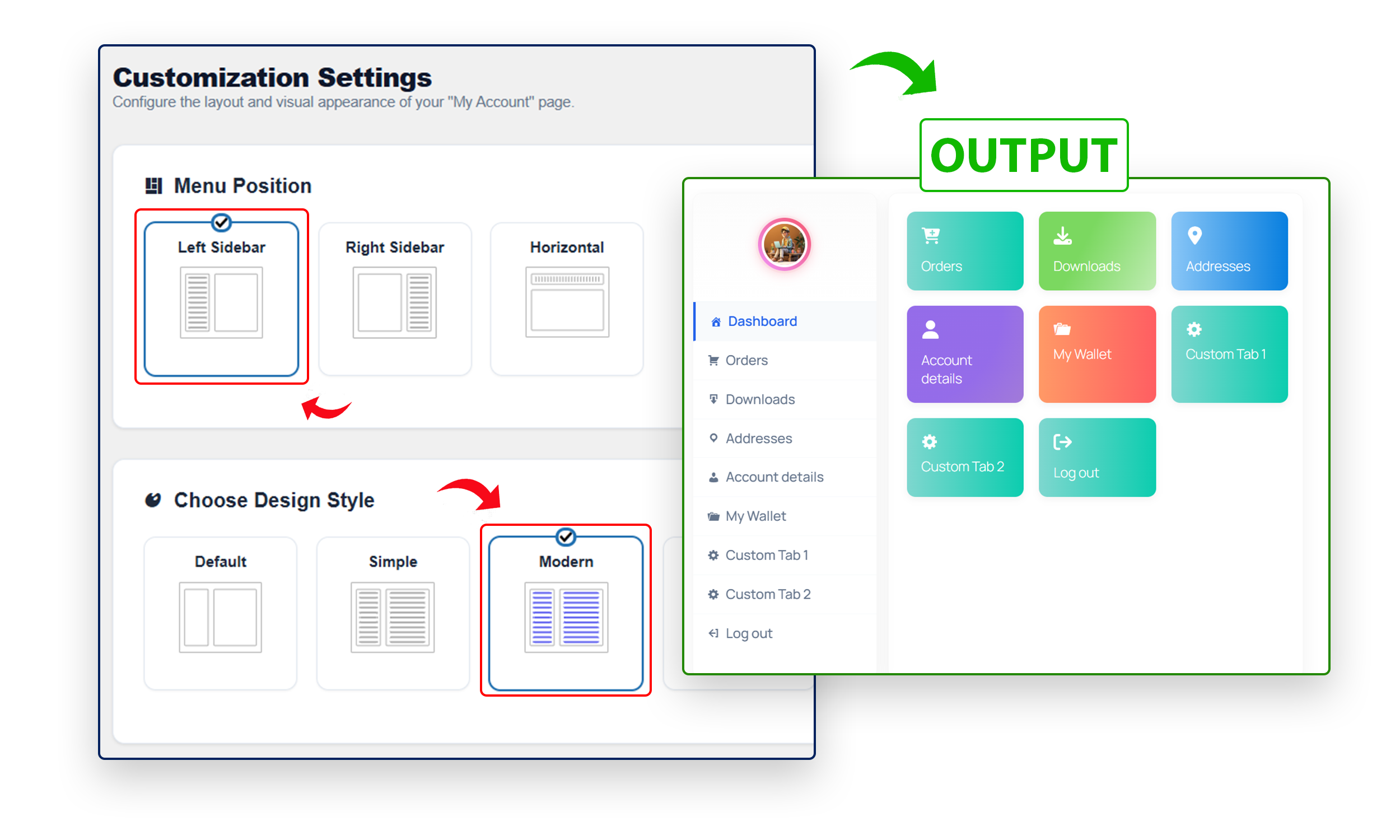
My Account Modern Design (Glassmorphism).
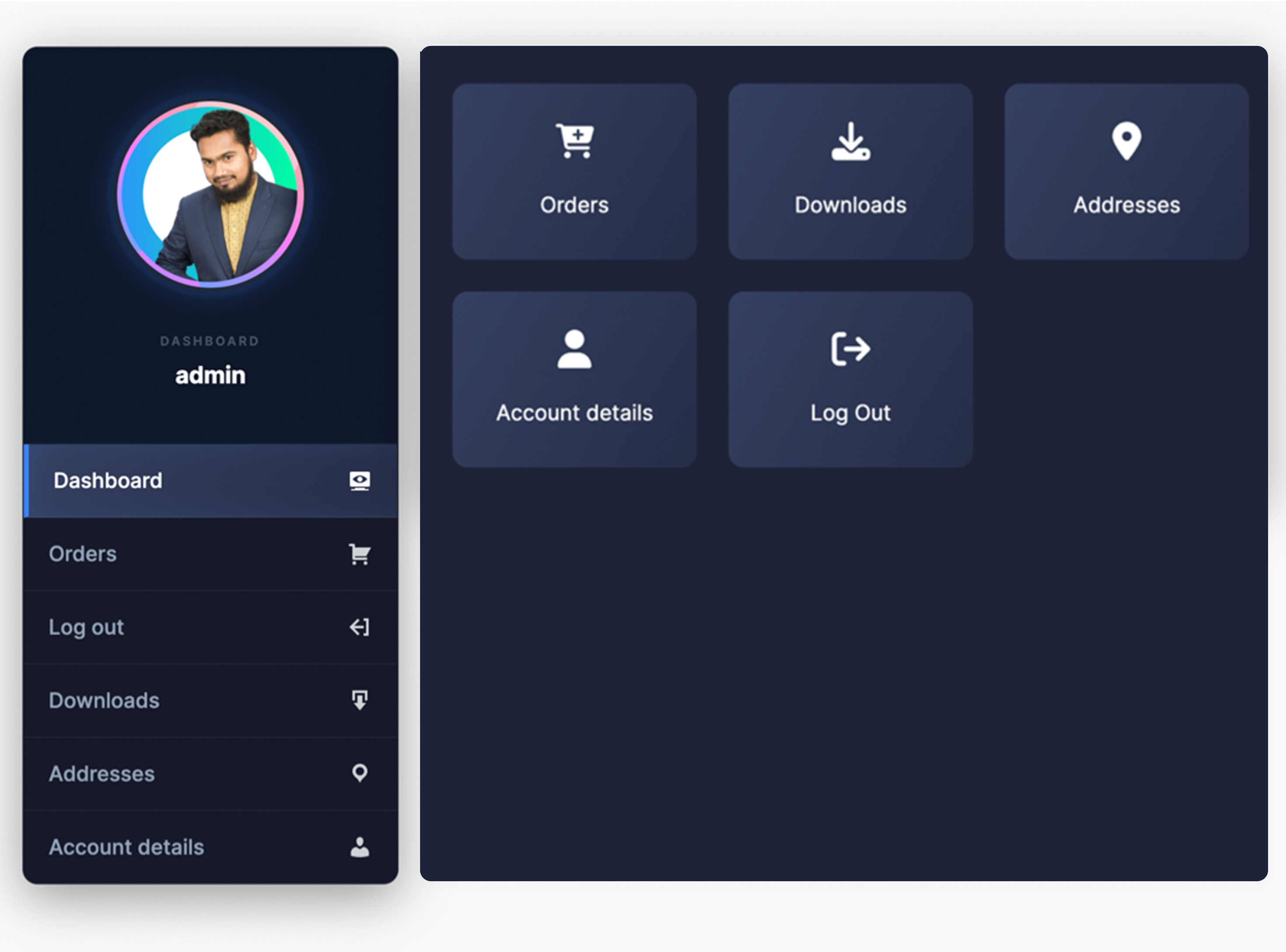
My Account Dark Design (Neon/Night Mode).
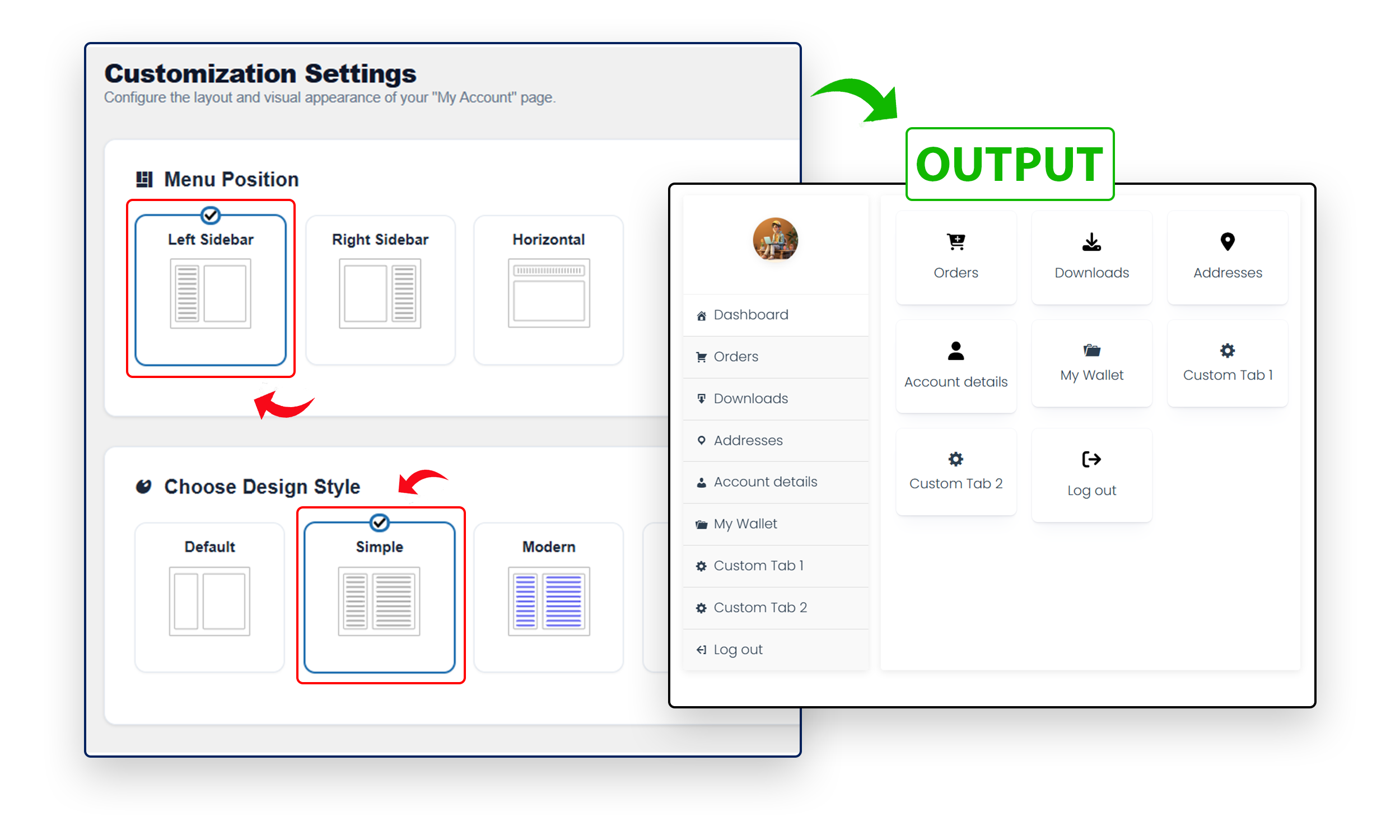
My Account Simple Design (Clean Minimalist).
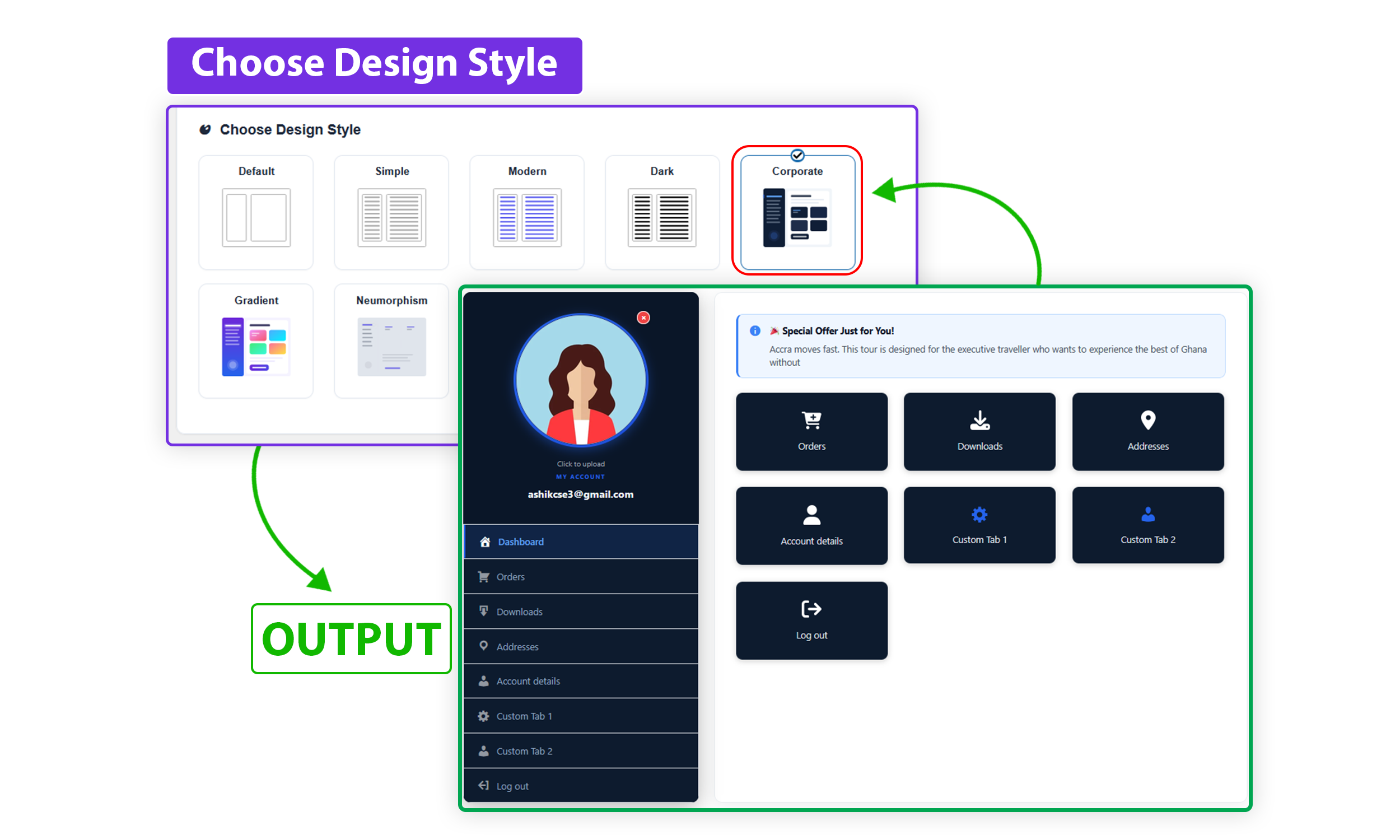
My Account Corporate Design — Pro.
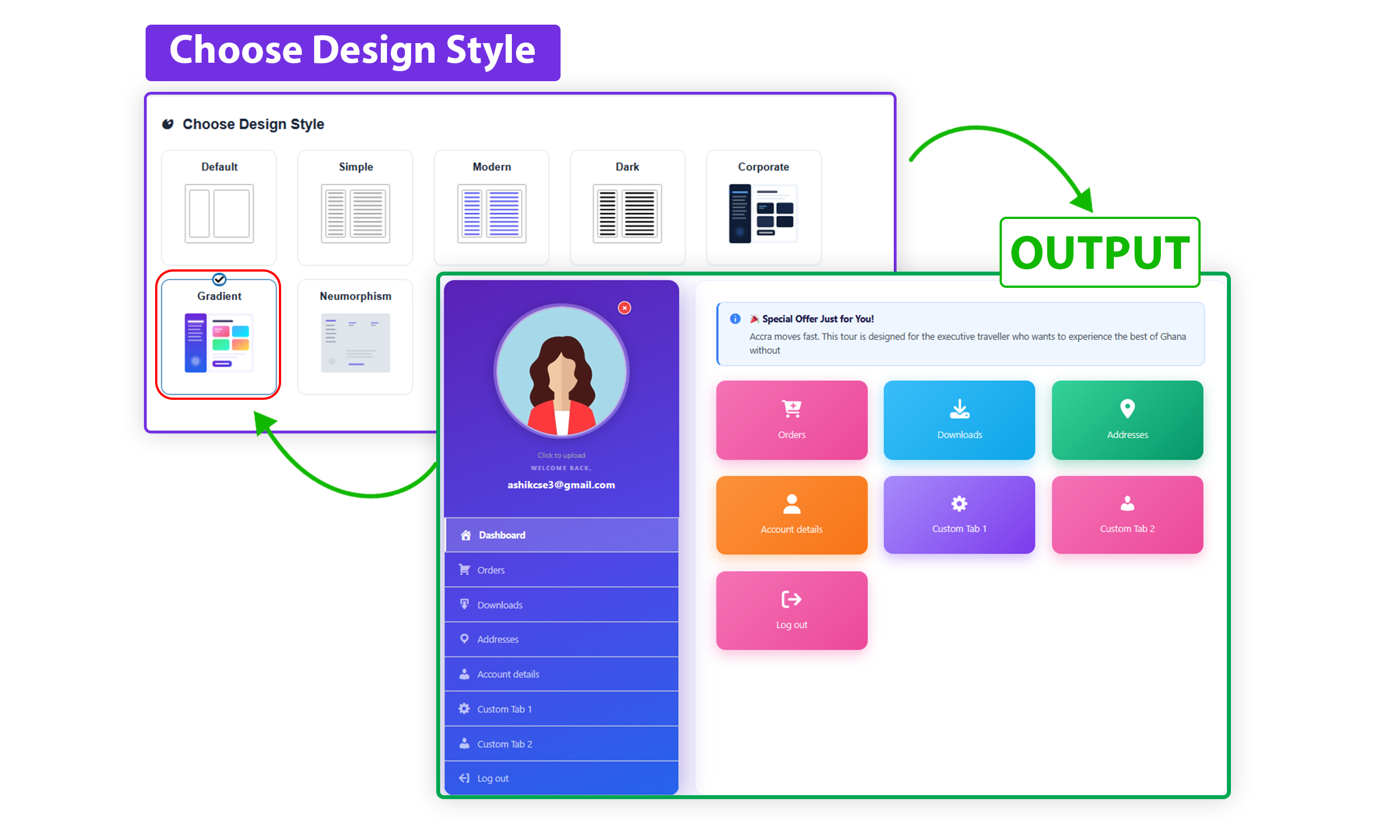
My Account Gradient Design — Pro.
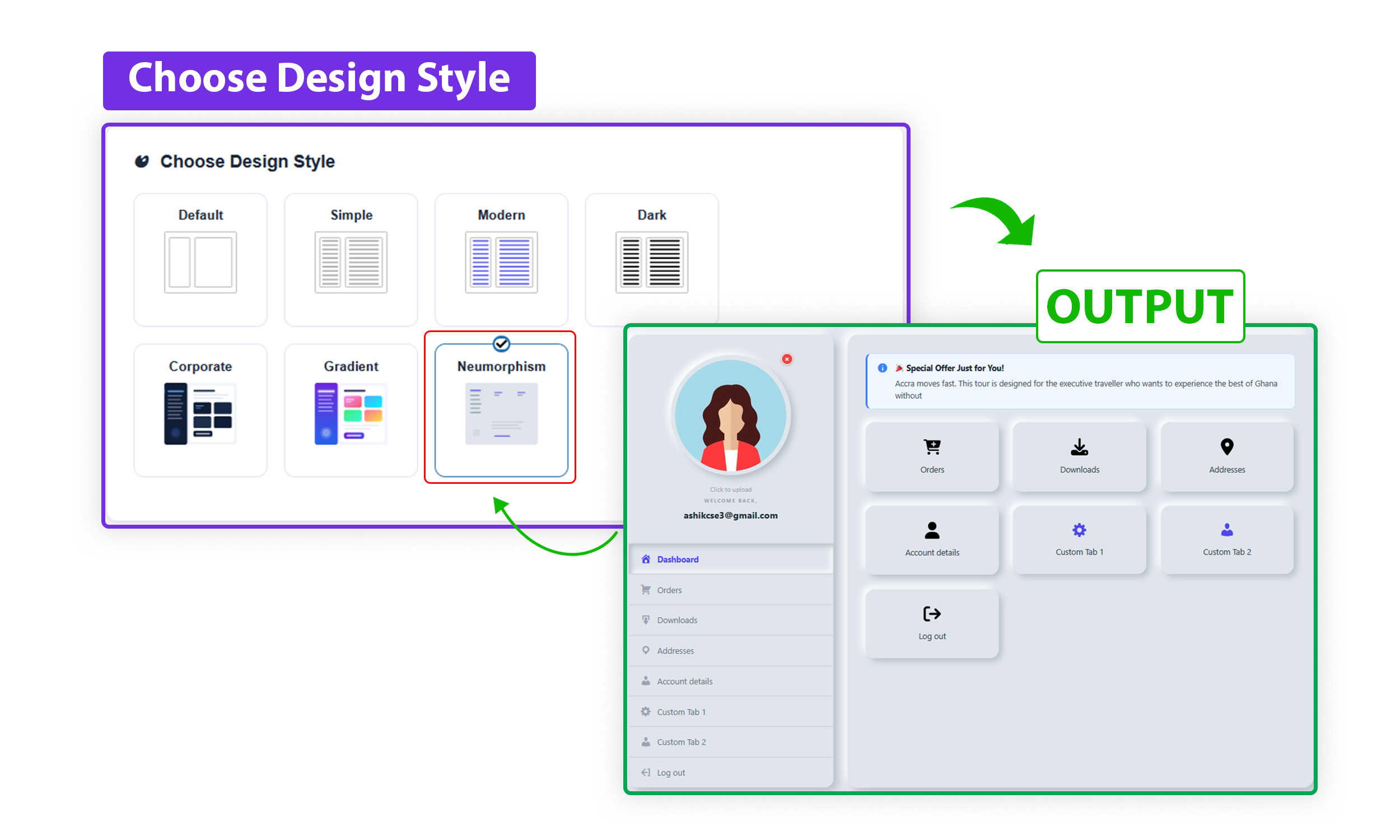
My Account Neumorphism Design — Pro.
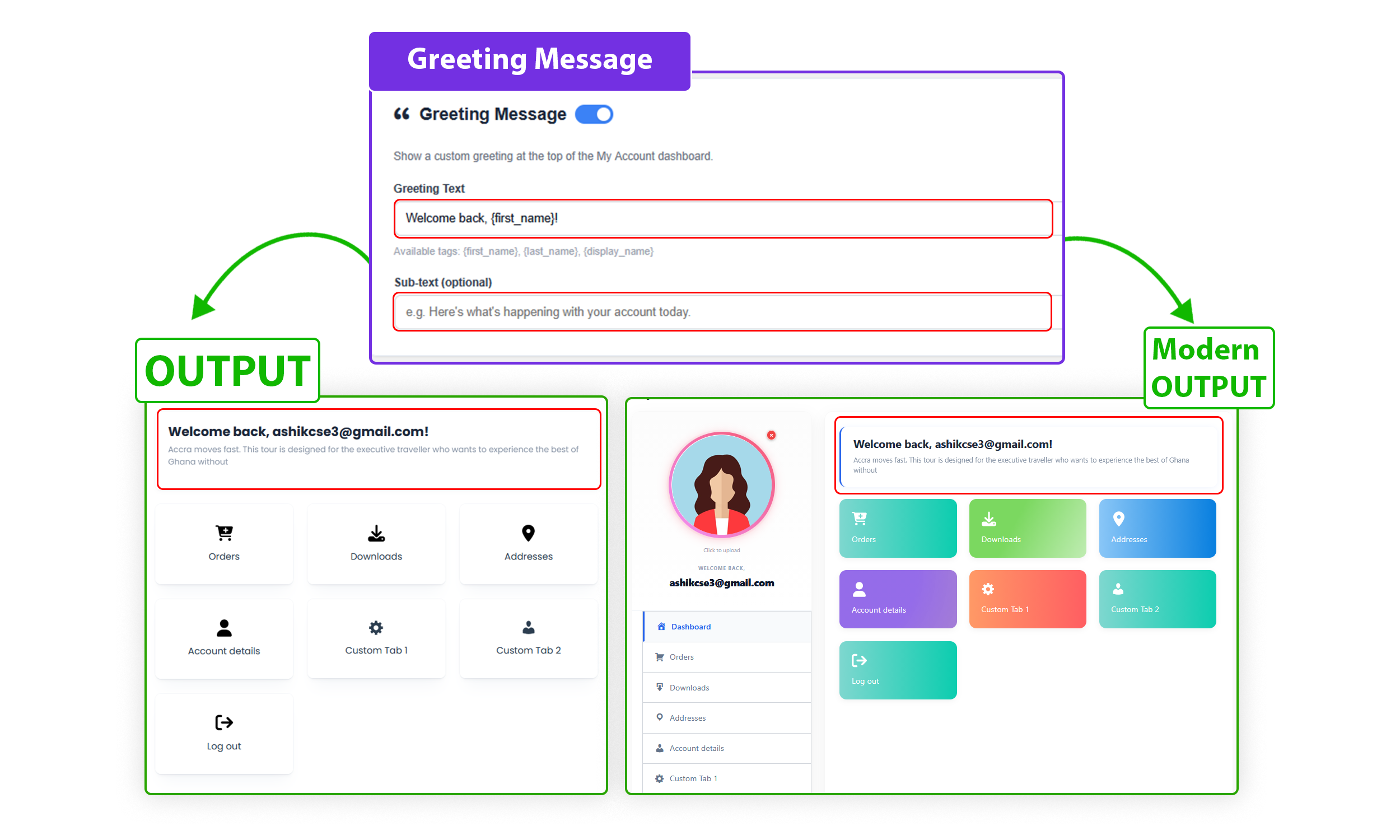
Greeting Message Settings.
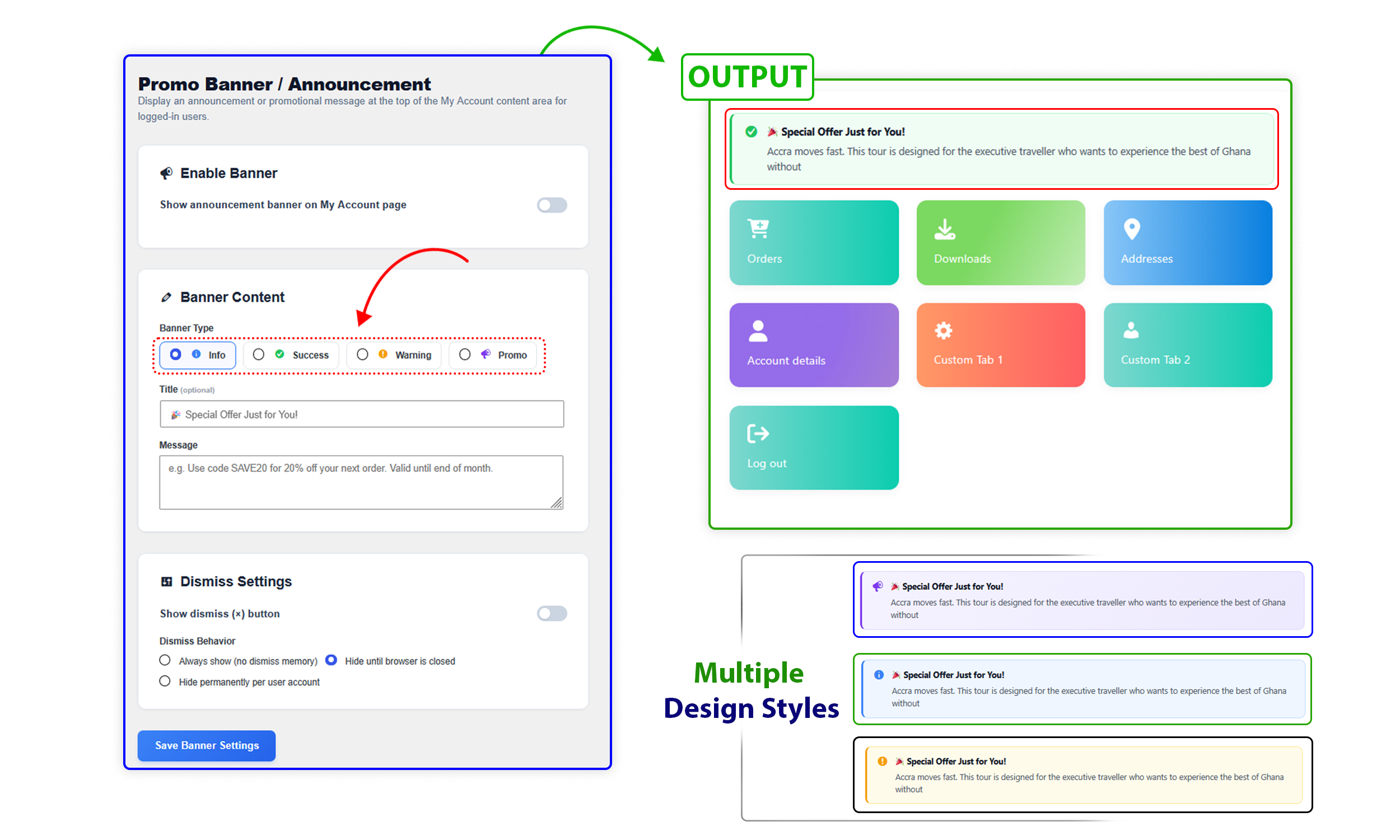
Promo Banner / Announcement.
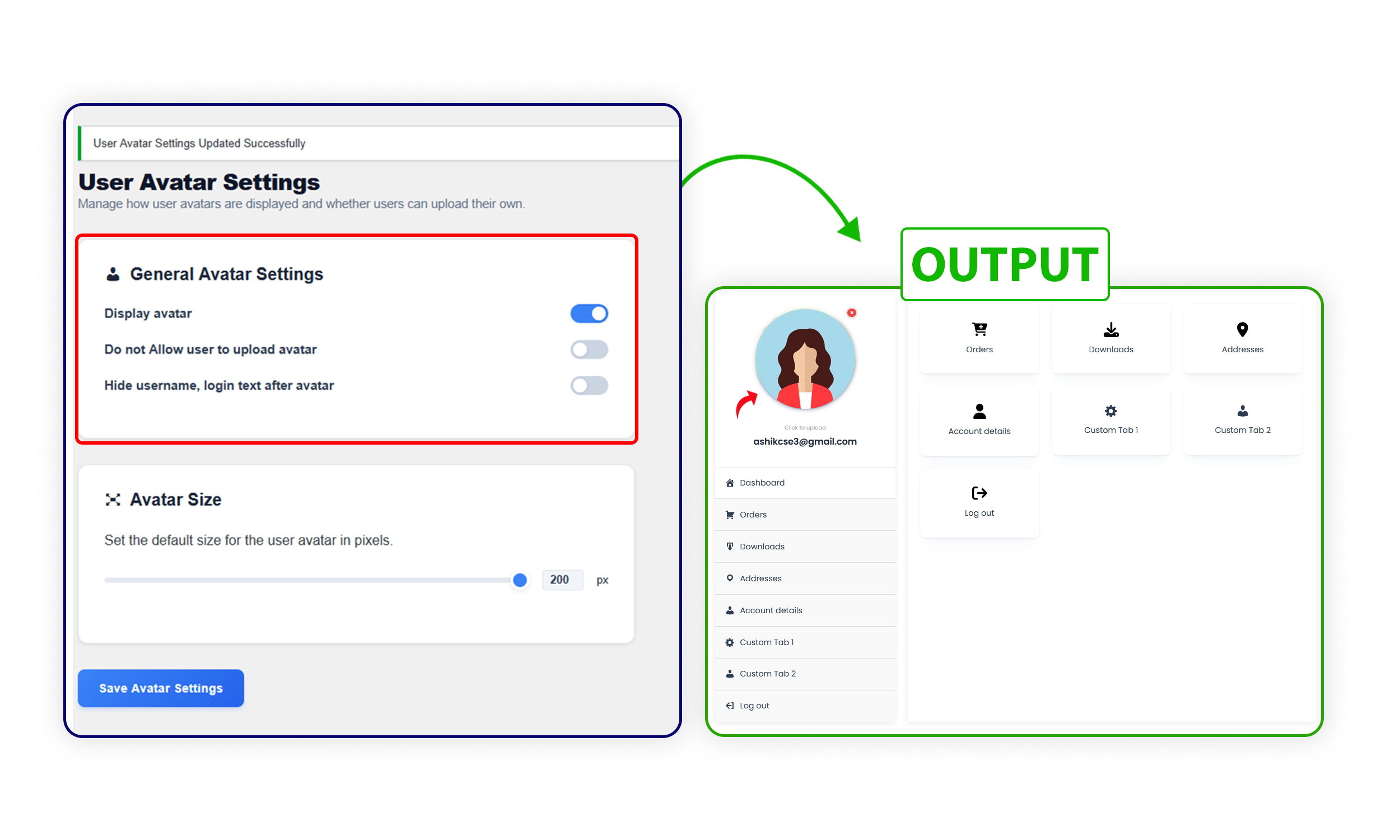
User Avatar Settings.
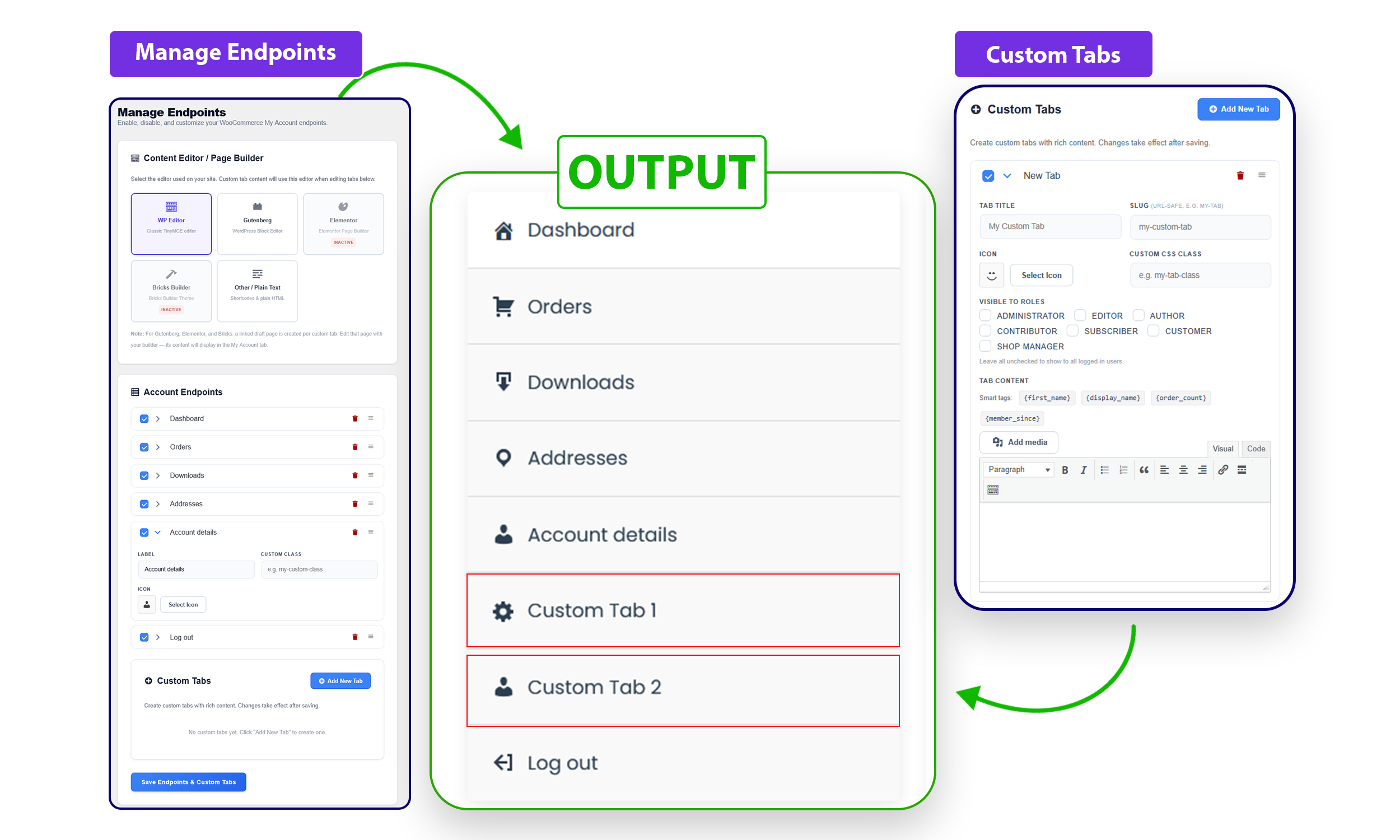
Custom Tabs & Endpoints Settings.
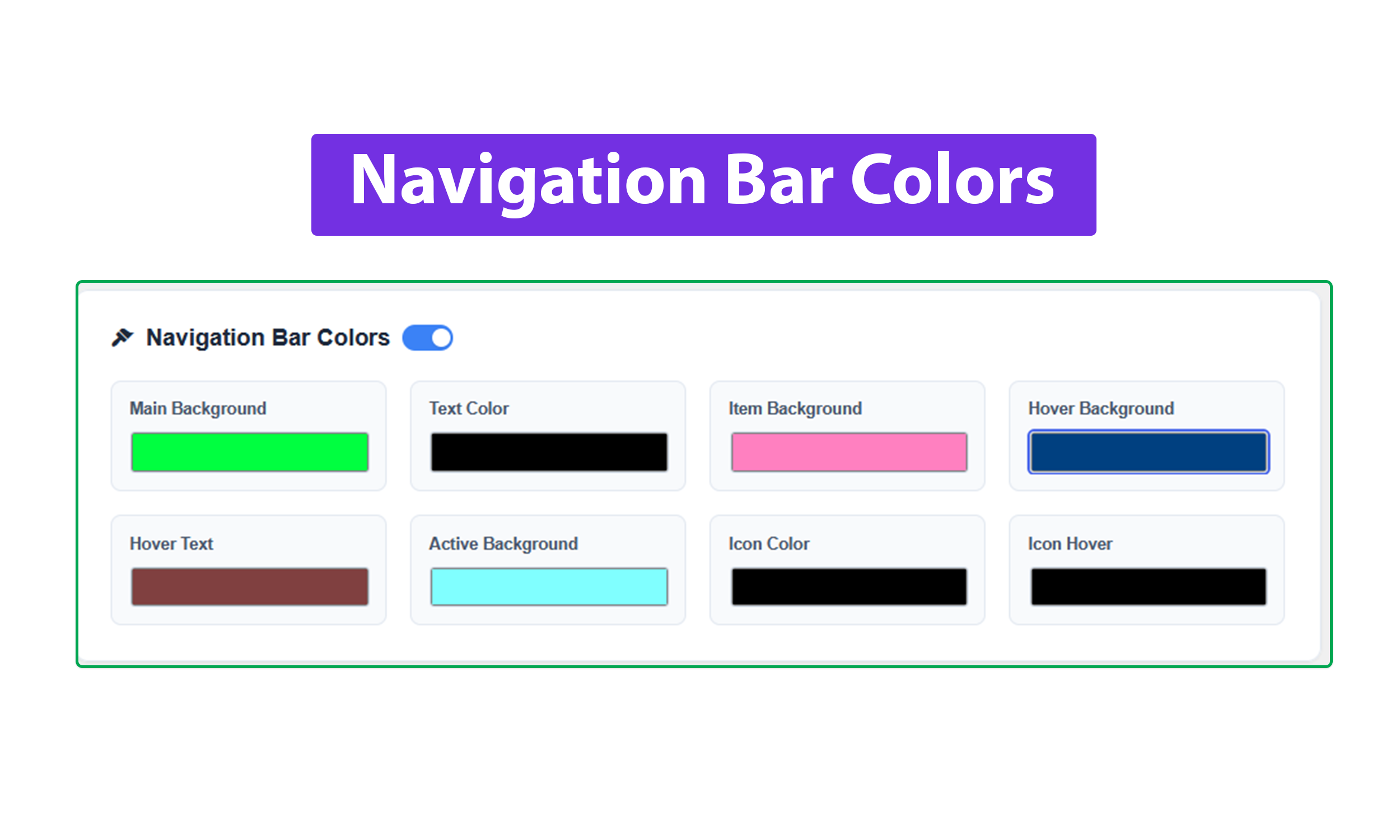
Custom Navigation Colors settings.
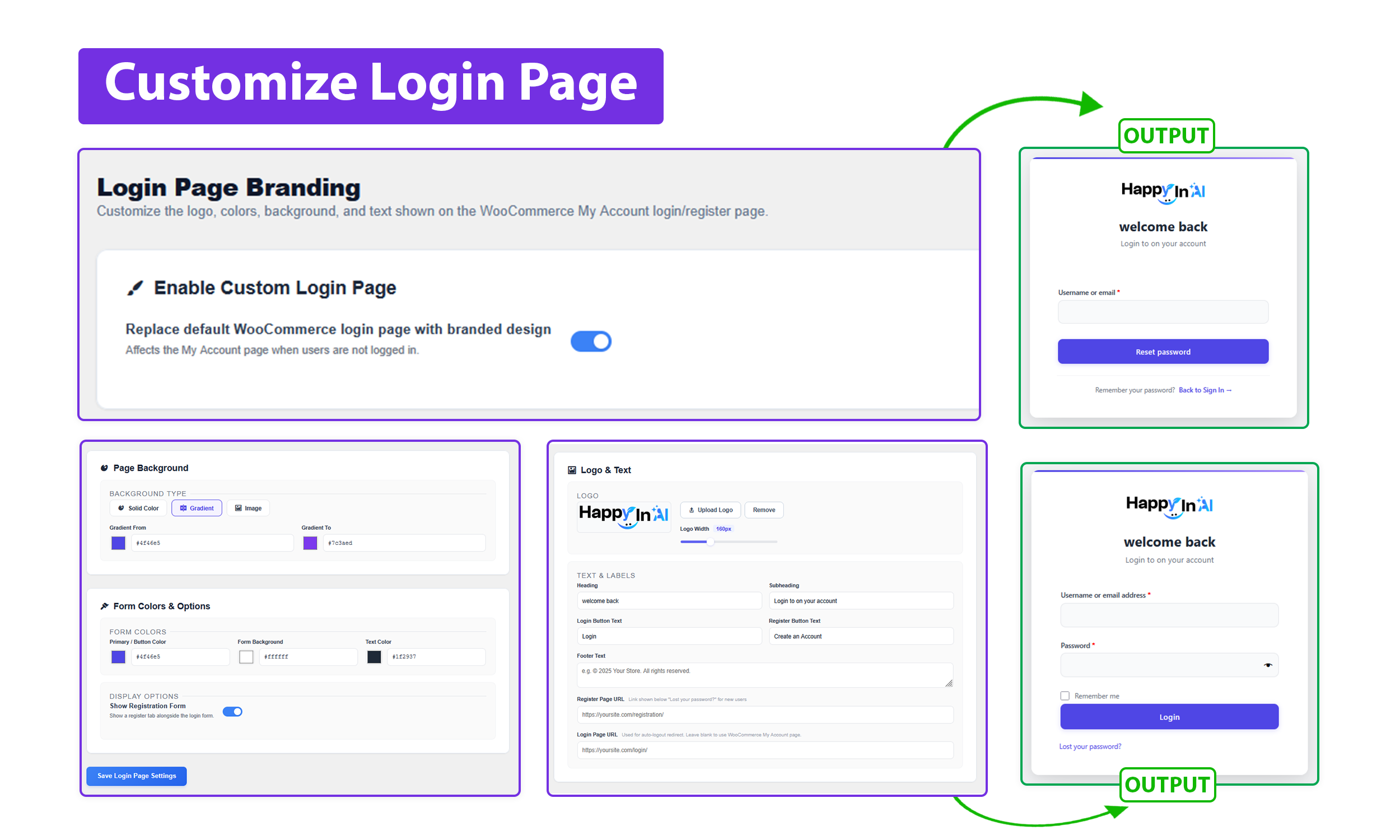
Customize Login Page settings.
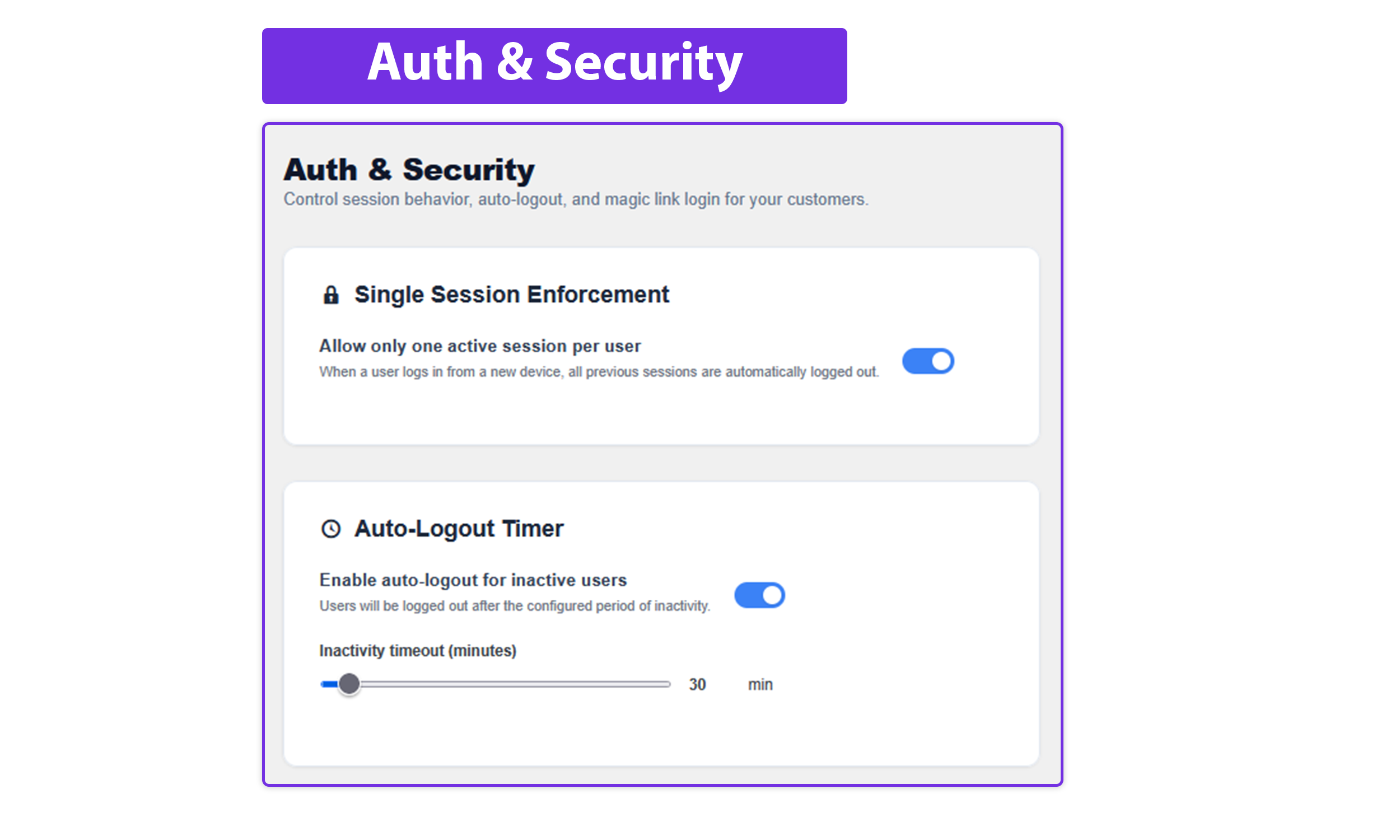
Auth & Security - Single Session - Auto Logout Timer.
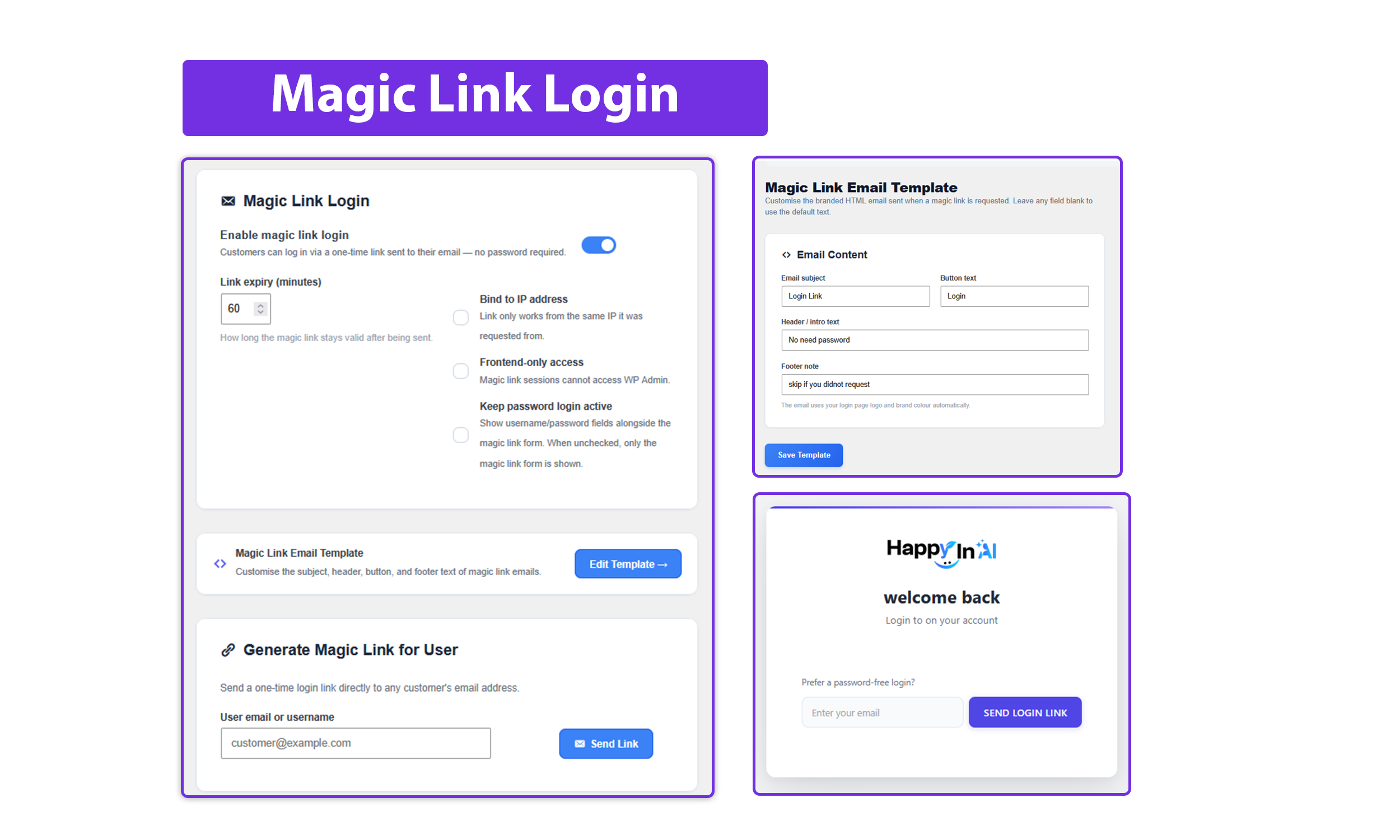
Magic Link Login settings.
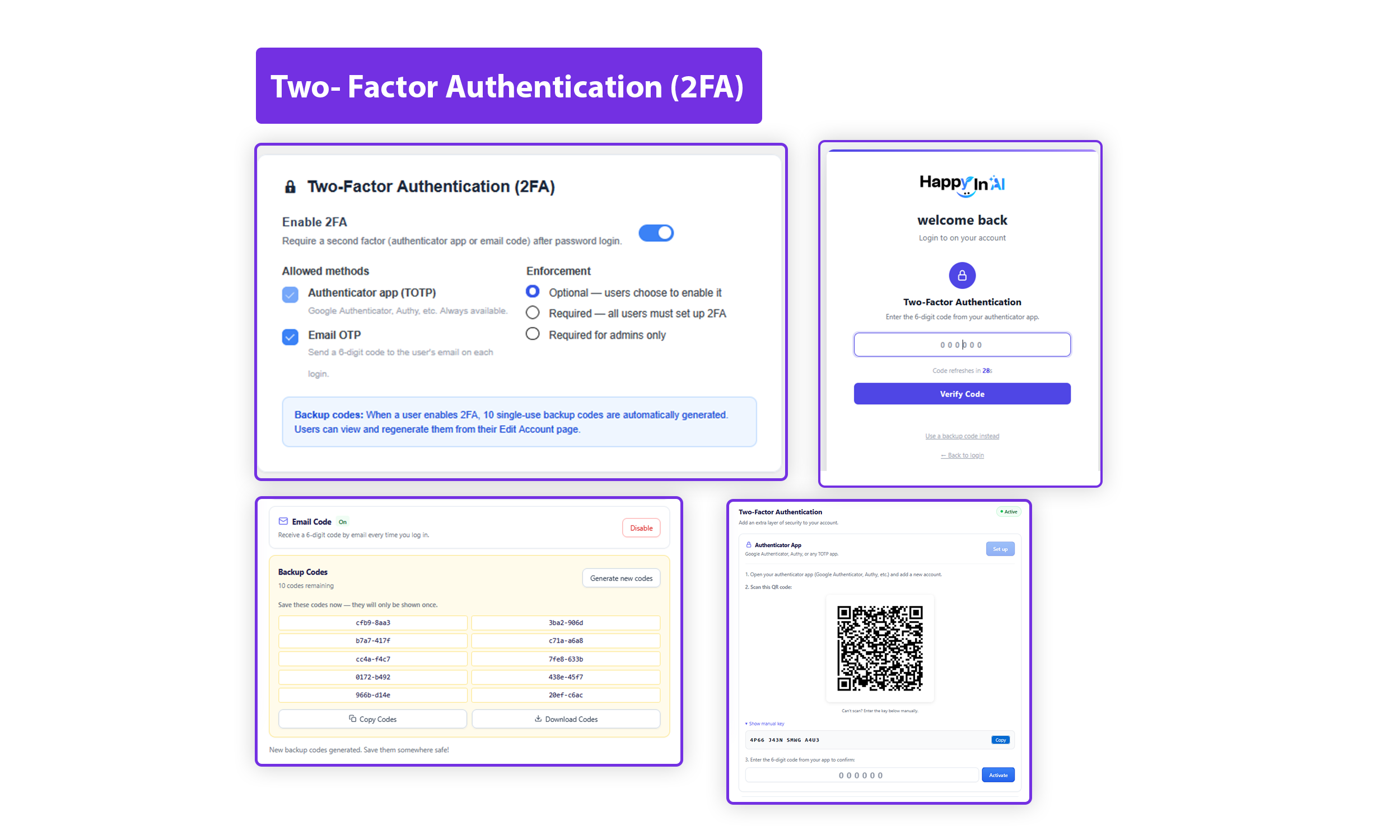
Two-Factor Authentication - 2FA.
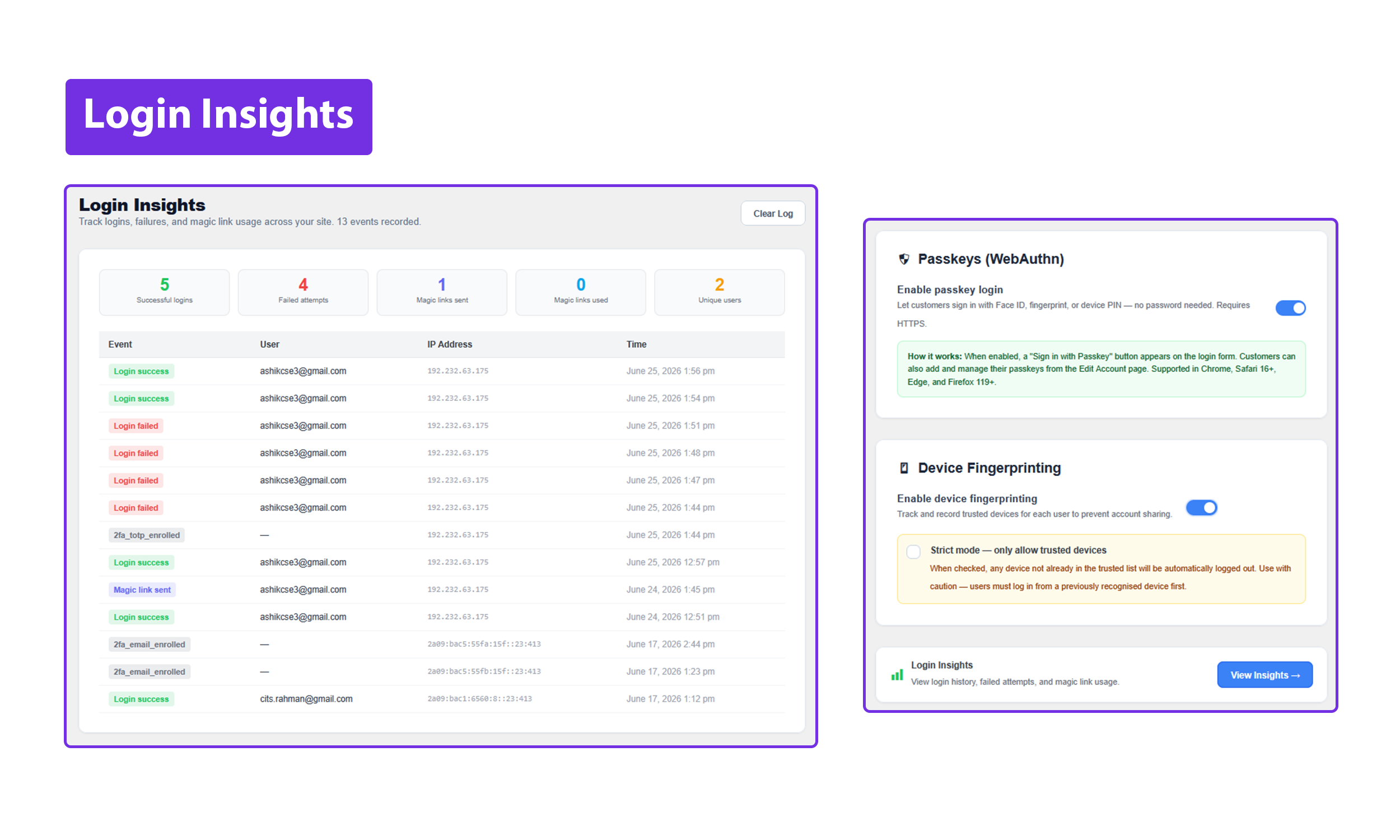
Login Insights.
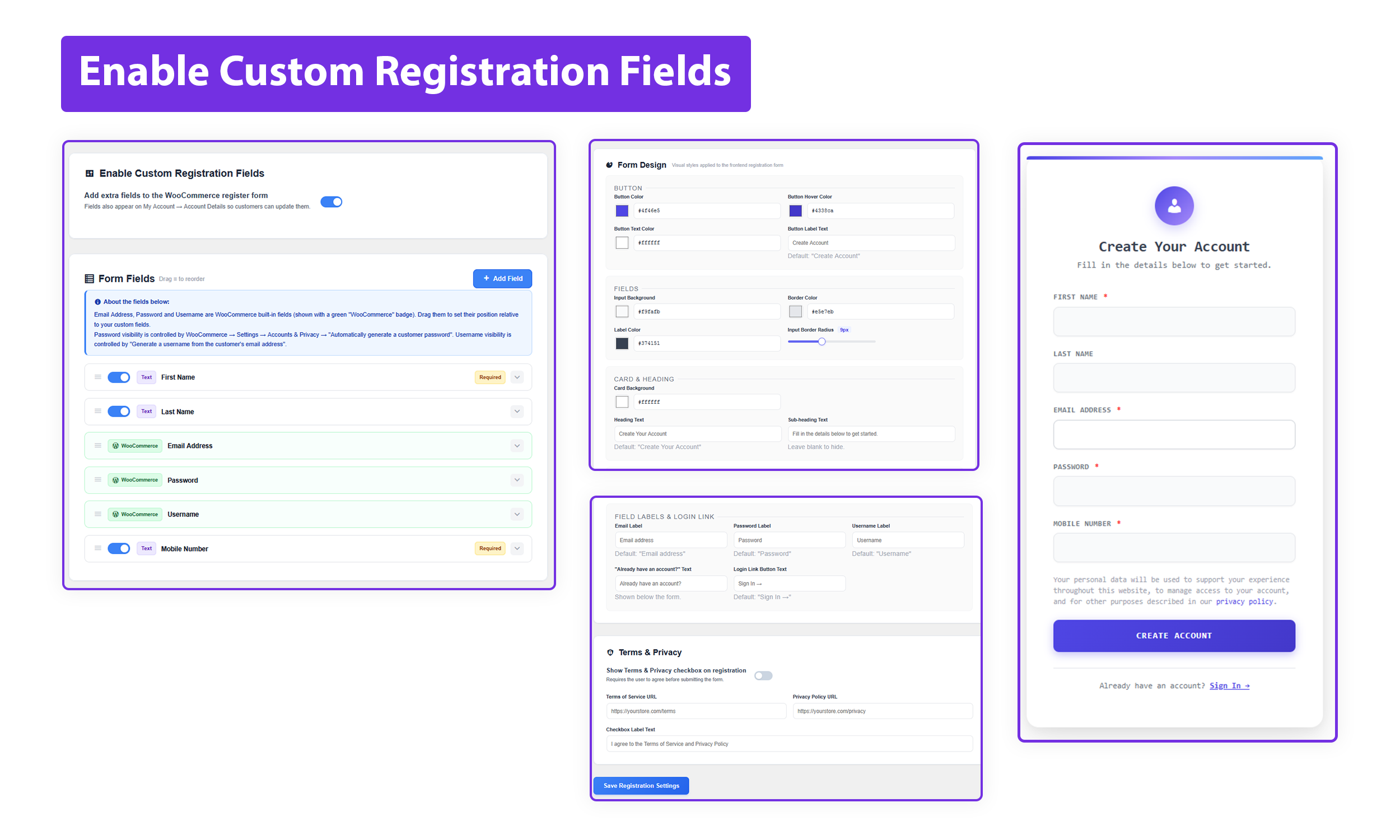
Enable Custom Registration Fields & Custom Page.
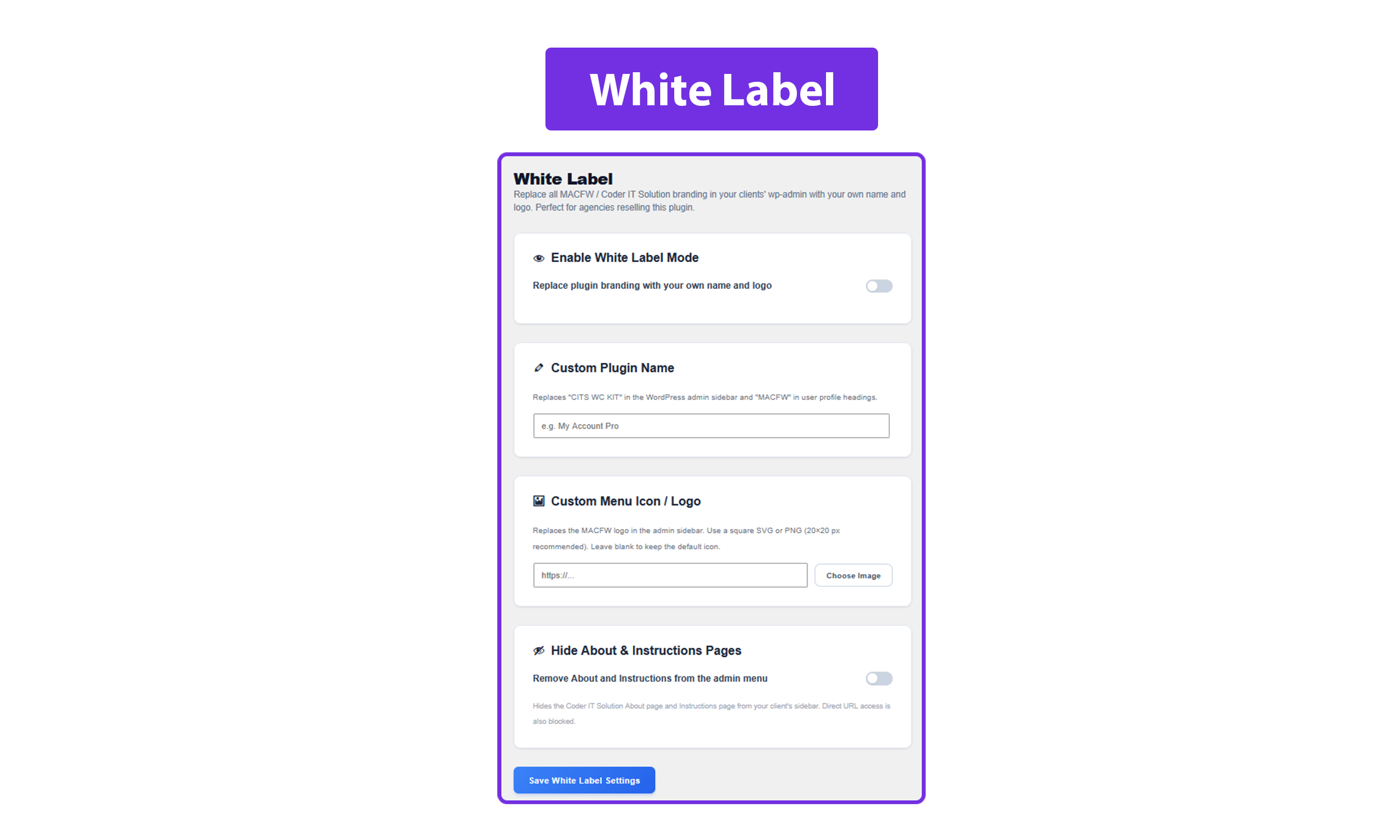
White Label settings.
Faq
No. CSS and JavaScript only load on the WooCommerce My Account page and have no impact on other pages.
Yes. The plugin works alongside any standard WordPress theme. It only styles the My Account page wrapper and does not touch your theme files.
Yes. Custom tab content can be built with the block editor, Elementor, or Bricks Builder.
Free includes 3 design themes, full navigation customization, drag-and-drop reorder, up to 2 custom tabs, avatar controls, import/export, and the Elementor widget. Pro adds 3 exclusive themes, unlimited custom tabs, Magic Link Login, Two-Factor Authentication, Passkeys, Trusted Device Fingerprinting, Single Session Enforcement, Auto-Logout Timer, Login Page Branding, Custom Registration Fields, and Security Activity Log.
A unique time-limited URL is emailed to the user. Clicking it logs them in instantly without a password. Works alongside standard login.
Passkeys use the WebAuthn/FIDO2 standard. Customers register their device biometrics or a hardware key once. On future visits the browser prompts them to use the passkey. Supported in Chrome, Safari, and Edge.
Yes. Full right-to-left support for Arabic, Hebrew, Persian, Urdu, and other RTL languages.
Go to the Tools tab in the plugin settings. Click Export to download your settings as a JSON file. To restore, go to Tools on another site and click Import to upload the file.
Yes, with Pro. Enable White Label mode in the settings to replace all plugin branding in wp-admin with your own name and logo. Your clients will see your brand, not Coder IT Solution. You can also hide the About and Instructions pages so clients only see the settings they need.
Yes, with Pro. Go to the Registration tab in the plugin settings and add any fields you need — phone, date of birth, company, address, select dropdown, checkbox, or free text. Drag and drop to reorder them. Each field is saved as user meta and shown in the WordPress admin user profile. You can also control which fields appear per user role.
Pro customers can email support@coderitsolution.com or reach us on WhatsApp at +8801751331330.
Yes. The plugin uses standard WooCommerce order functions and is fully compatible with High-Performance Order Storage.
Reviews
User avatar upload not working
By 
only few features work. Also layout options not working.
great and simple
By 
wow so simple and yet a huge improvement
Simple, lightweight and yet beautiful
By 
This is by far the best plugin for customizing WC My Account: awesome and lightweight, just like every single plugin should be.
To the devs: please, do not abandon this project.
[UPDATE] I've just found that your CSS mess with global WooCommerce CSS and, despite the awesome functionality, your plugin causes a few flaws in the customer's UI.
As I said before, please, do not abandon this project. A few minor changes need to be done in order to get perfection.
Simple yet beautiful.
By 
It does exactly what it's supposed to.
Thanks for the nice plugin. I deployed it on worpress 6.8.1 and there seem to be no problems.
Changelog
2.0.2
- FIX: Dark design — status badge text (e.g. 2FA “On” pill, passkeys browser-support warning) was invisible because the global dark span color rule overrode inline-styled badge colors; selector now excludes spans that carry their own inline background.
- FIX: Dashboard card grid columns changed from percentage-based (31% × 3 + gaps = overflow) to
repeat(3, 1fr)so all three columns are always equal-width with no overflow at any container size. - FIX: Tablet breakpoint grid changed from
48% 48%torepeat(2, 1fr)for the same reason. - FIX: Dashboard card
<div>wrappers now usedisplay: flexso all cards in the same row stretch to equal height; card content is vertically centred withflex-direction: column; align-items: center; justify-content: center.
2.0.1
- NEW: Google Fonts family picker in Font & Size settings — choose from 30+ Google Font families with live admin preview and a Reset to Defaults button; selected font loads on the public My Account page via Google Fonts API.
- FIX: Custom endpoint Dashicons icons now match SVG image icon size and vertical alignment across all 6 designs (Simple, Dark, Modern, Corporate, Gradient, Neumorphism) —
font-sizeincreased to match visual weight of 30 px / 28 px SVG images. - FIX: Dark design mobile layout — sidebar navigation no longer leaves a whitespace gap to the right on viewports ≤ 767 px; cleared WooCommerce default float and switched to flex-column stacking.
2.0
- NEW: 3 Pro design themes — Corporate, Gradient, Neumorphism.
- NEW: Magic Link Login — passwordless login via email, with IP binding, expiry, and admin link generation.
- NEW: Passkeys / WebAuthn — full FIDO2 implementation for biometric and hardware-key login.
- NEW: Two-Factor Authentication — TOTP (Google Authenticator, Authy), Email OTP, and Backup Codes.
- NEW: Trusted Device Fingerprinting — skip 2FA on recognized devices; admin can view/revoke per user.
- NEW: Single Session Enforcement — new login auto-terminates the previous session.
- NEW: Auto-Logout Timer — configurable idle timeout with heartbeat AJAX.
- NEW: Login Page Branding — full redesign of the WooCommerce login form (Pro).
- NEW: Custom Registration Fields — phone, DOB, company, address, drag-drop reorder (Pro).
- NEW: Security Insights & Activity Log — login events, stats, admin clear (Pro).
- NEW: Drag-and-drop endpoint reorder.
- NEW: Custom Tabs with WYSIWYG content (Gutenberg, Elementor, Bricks) and Dashicons icon picker.
- NEW: Smart Tags — {first_name}, {display_name}, {order_count}, {member_since}.
- NEW: Import / Export Settings.
- NEW: Announcement banner on the My Account dashboard.
- NEW: Tab role visibility.
- FIX: CSS and JS now load only on the My Account page.
- FIX: Color values sanitized with sanitize_hex_color().
- FIX: Menu position and design validated against an explicit whitelist.
- FIX: Import/Export forms use the correct admin_post_ hook pattern.
1.1.4
- FIX: Design issues.
1.1.3
- NEW: Advanced User Avatar controls (enable/disable uploads, custom sizing, hide username).
- NEW: Sidebar auto-hides when empty and expands content to full width.
- ENHANCEMENT: Standardized toggle switches and range sliders in admin panel.
- FIX: Custom background and navigation color priority across all designs.
- FIX: Icon visibility and contrast in Dark Mode.
1.1.2
- FIX: Styling issues.
1.1.1
- FIX: Bug fixes.
1.1.0
- FIX: Bug fixes.
1.0.0
- Initial release.