My WordPress Login Logo

My WordPress Login Logo
Description
My WordPress Login Logo lets you to add a custom logo in your wordpress login page instead of the usual wordpress logo and customize your login page.
It also allows you to specify the height and width of the logo. Apart from that you can also customize the login form by adding a custom message below login form and also provide some cool fade in effects for the login form. By adding your custom logo in your login page, you can make your website more professional and also impress the guest bloggers and other users who view these pages.
Installation
This section describes how to install the plugin and get it working.
- Upload the plugin.
- Activate the plugin through the ‘Plugins’ menu in WordPress
- Upload your desired logo using the WordPress media uploader and copy the uploaded image’s File URL path.
- Click the My WordPress Login Logo and paste the uploaded image’s File URL path in the Logo URL field provided.
- That’s it! You can now logout and check your yousite.com/wp-admin/ or yousite.com/wp-login/ page to see the changes.
Screenshots
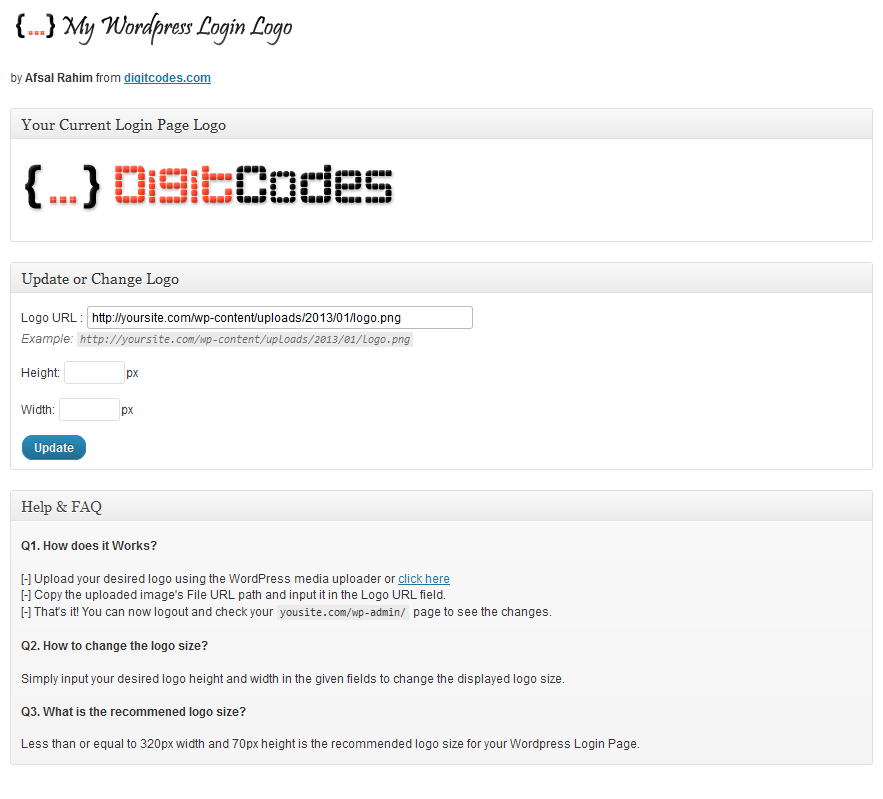
My WordPress Login Logo Settings Page

WordPress Login Page
Faq
- Upload your desired logo clicking the Upload Image button.
- Provide your custom height and width for the logo and press Update.
- That’s it! You can now logout and check your awesome new login page.
Simply input your desired logo height and width in the given fields to change the displayed logo size.
Less than or equal to 320px width and 70px height is the recommended logo size for your WordPress Login Page.
Reviews
Perfect, really bueno, awesome plg!!!
By 
Perfect
By 
Wonderful PLugin
By 
Cool, easy and fast
By 
Excelente plugin. Es genial, fácil de usar y rápido. Para lo que uno lo quiere!
Changelog
2.5.2
- Tested with WordPress 6.9.1
- Compatibility update
2.5.1
- Security improvements, compatibility updates for WordPress 6.7.1 and minor UI fixes.
2.5.0
- Security improvements and compatibility updates for WordPress 6.7.1.
2.4.1
- Fix readme and wp tested version
2.4.0
- Fixed deprecated login_headertitle
- Tested wordpress version 5.7.
2.3.3
- Fix prefill of old selected logo in input field.
2.3.2
- Improved settings page with media uploader.
- Settings link in plugins page.
2.3.1
- Remove subscribe box.
2.3.0
- Fix css layout in options page.
- Add new plugin logo.
- Align to new version and tested to WordPress v5.2.3
2.2
- More security updates
2.1
- Fix security issues.
2.0
- Add Custom Message below Login Form feature added.
- Customize Login Form using a Fade In effect.
- CSS Fix for smaller size logo images. Thanks to Valentins Ivanovs for the css fix.
1.1
- Implemented the option to edit the image link