Mydybox Taiwan for WooCommerce (台灣商店:核心助手)
Mydybox Taiwan for WooCommerce (台灣商店:核心助手)
Description
Mydybox Taiwan for WooCommerce 是專為台灣電商市場設計的 WooCommerce 在地化工具箱。本外掛能優化 WooCommerce 的結帳流程以符合台灣消費者的習慣,整合本地物流與金流平台,並提供直覺的視覺化規則引擎來管理常見的商業邏輯。
核心功能
- 台灣結帳流程優化 — 縣市/鄉鎮市區二級聯動下拉選單、3+3 碼郵遞區號自動填寫。
- 統一編號與發票載具 — 支援在結帳頁面收集統一編號(公司抬頭)、手機條碼載具、自然人憑證與捐贈碼。
- 統編自動查詢(選用功能) — 串接台灣政府商工登記開放資料 API。當消費者輸入 8 位數統編時,可自動帶出公司名稱(此功能預設關閉,需由管理員主動開啟)。
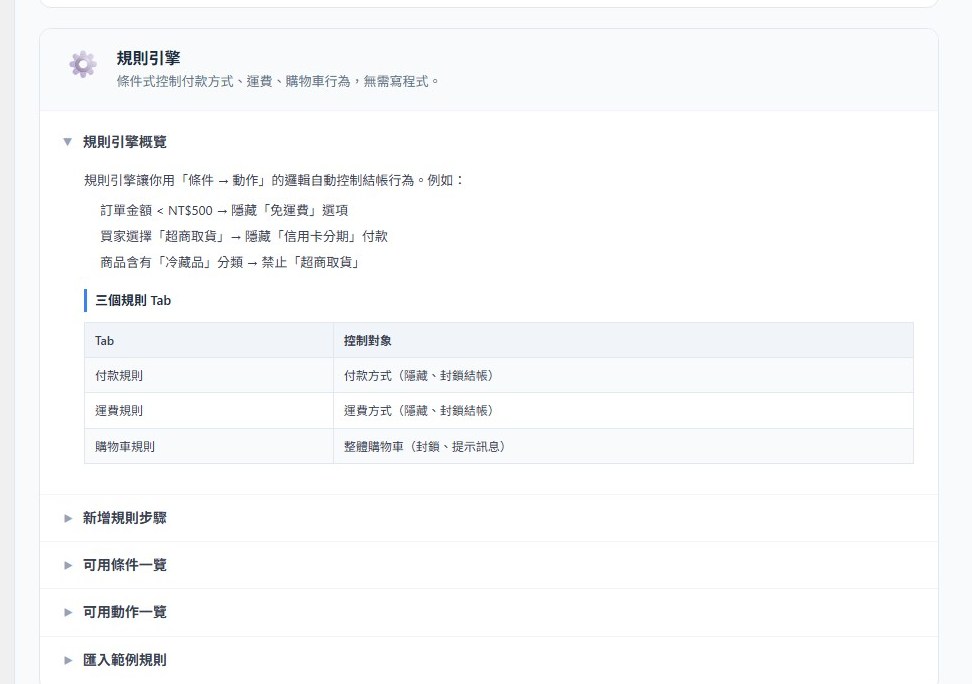
- 視覺化規則引擎 — 無需程式碼即可設定金流、物流與購物車的條件限制與邏輯。
- 自訂訂單編號 — 建立流水的自訂訂單格式(例如:
前綴 + YYYYMMDD + 流水號)。 - 結帳倒數計時 — 提供購物車保留倒數計時器,提升轉單率。
- 行動端底部固定購買列 — 在手機版商品頁面顯示固定的「立即購買」按鈕。
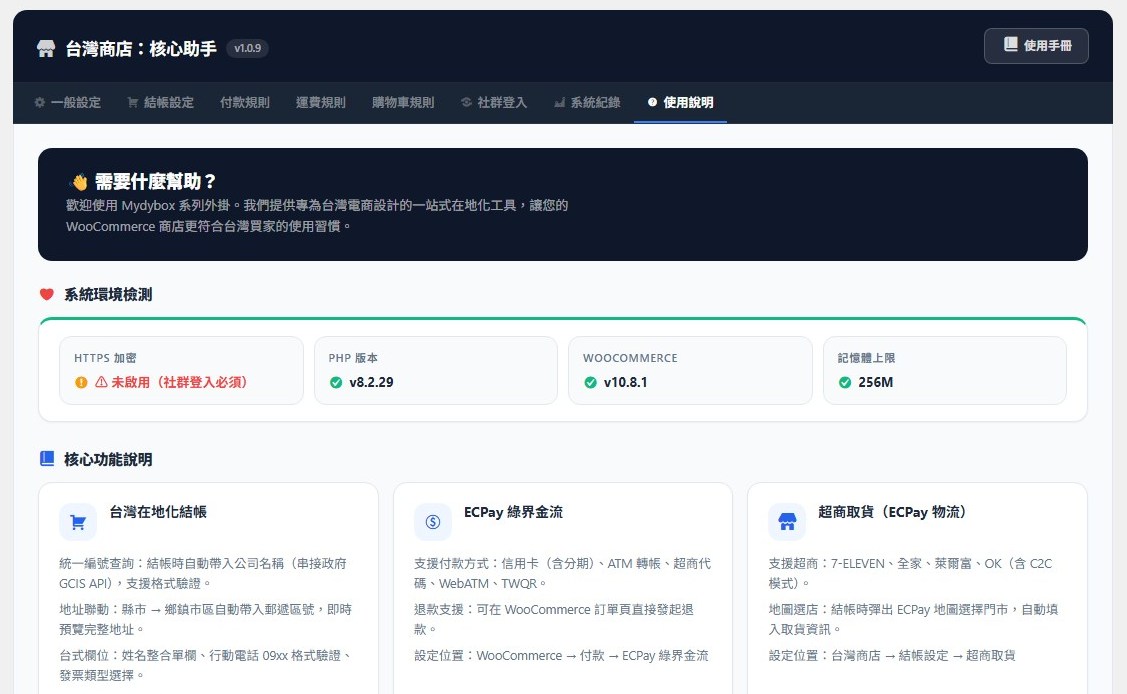
- 社群快速登入 — 整合 LINE、Google 與 Facebook 快速登入(各平台均為選用,預設為關閉狀態)。
- 便利超商取貨 — 支援串接綠界科技(ECPay)或藍新金流(NewebPay)的物流地圖,讓顧客選擇 7-11 / 全家 / 萊爾富 / OK 超商取貨。
- 相容 HPOS — 完全支援 WooCommerce 高性能訂單儲存(High-Performance Order Storage)。
Mydybox Taiwan for WooCommerce is a localization toolkit built for stores selling to customers in Taiwan. It adapts the WooCommerce checkout to Taiwanese conventions, integrates with local logistics and payment providers, and provides a visual rule engine for common business logic.
Core Features
- Taiwan Checkout Optimization — City/District cascading dropdowns and 3+3 digit postcode auto-fill.
- Tax ID Fields — Collect Unified Business Number (UBN), Company Name, Mobile Barcode, Citizen Digital Certificate, and Donation Code at checkout.
- Optional Tax ID Lookup — When the site owner explicitly opts in, an entered 8-digit Tax ID can be looked up against the Taiwan GCIS open-data API to pre-fill the company name. Disabled by default.
- Visual Rule Engine — Manage payment, shipping, and cart rules with a visual interface; no coding required.
- Custom Order Numbers — Sequential number formats (e.g.,
Prefix + YYYYMMDD + Sequence). - Checkout Countdown — Optional reservation timer.
- Mobile Sticky Bar — Sticky “Buy” button for mobile product pages.
- Social Login — One-click login with LINE, Google, and Facebook (each optional and disabled by default).
- Convenience-Store Pickup — 7-11 / FamilyMart / Hi-Life / OK pickup via ECPay or NewebPay logistics.
- HPOS Ready — Compatible with WooCommerce High-Performance Order Storage.
External services
本外掛可以連接多個第三方服務。這些連接僅在網站管理員於設定中主動啟用對應功能時才會發生。預設情況下,所有外部整合皆為關閉狀態。
1. 台灣商工登記資料查詢 (Government Open Data) — 統一編號查詢
* 服務用途:使用經濟部商工登記開放資料 API,根據輸入的 8 位數統編自動查詢註冊的公司名稱。
* 資料傳送:僅當管理員啟用「統編自動查詢」且消費者在結帳頁面輸入 8 位統編時,會將該統編發送至 data.gcis.nat.gov.tw。不會傳送任何其他顧客隱私資料。
* 預設關閉,需主動啟用。
2. LINE 快速登入 (LINE Login OAuth)
* 服務用途:使用 LINE Corp 的 OAuth 2.0 / OpenID Connect 端點驗證顧客的 LINE 帳號。
* 資料傳送:僅在管理員啟用 LINE 登入且訪客點擊「使用 LINE 登入」時。授權碼、您的 Channel ID/Secret 及重新導向 URL 會發送至 api.line.me;回傳的資料(LINE 用戶 ID、顯示名稱、選用信箱、頭像)將用於建立或對應 WordPress 用戶。
3. LINE Messaging API — 購物車挽回推送通知
* 服務用途:使用 LINE Corp 的 Messaging API 向已綁定 LINE 的顧客發送購物車挽回訊息。
* 資料傳送:僅在管理員啟用購物車挽回 LINE 通知,且顧客已綁定 LINE 並留下了未結帳購物車時。設定的 Channel Access Token、接收者的 LINE 用戶 ID 及訊息內容會發送至 api.line.me。
4. Google 快速登入 (Google OAuth)
* 服務用途:使用 Google 的 OAuth 2.0 端點驗證顧客的 Google 帳號。
* 資料傳送:僅在管理員啟用 Google 登入且訪客點擊「使用 Google 登入」時。授權碼、您的 Client ID/Secret 及重新導向 URL 會發送至 oauth2.googleapis.com;回傳的 ID Token(Google 用戶 ID、姓名、信箱、頭像)將用於建立或對應 WordPress 用戶。
5. Facebook 快速登入 (Facebook Graph API)
* 服務用途:使用 Meta 的 Graph API OAuth 端點驗證顧客的 Facebook 帳號。
* 資料傳送:僅在管理員啟用 Facebook 登入且訪客點擊「使用 Facebook 登入」時。授權碼、您的 App ID/Secret 及重新導向 URL 會發送至 graph.facebook.com;回傳的個人資料(Facebook 用戶 ID、姓名、信箱、頭像)將用於建立或對應 WordPress 用戶。
6. 綠界科技 ECPay — 金流與超商取貨
* 服務用途:綠界科技的線上金流支付網關與物流(超商取貨門市選擇)API。
* 資料傳送:僅在管理員啟用綠界支付或超商物流,且顧客在結帳時選擇綠界服務時。訂單摘要(訂單 ID、總金額、商品名稱、顧客姓名/信箱/電話、帳單及運送地址)會發送至 payment.ecpay.com.tw(或測試環境的主機)或 logistics.ecpay.com.tw。
7. 藍新金流 NewebPay — 超商取貨
* 服務用途:藍新金流的超商取貨門市地圖 API。
* 資料傳送:僅在管理員啟用藍新超商物流且顧客打開超商選擇彈窗時。設定的商店代號(Merchant ID)與回傳網址 Nonce 會發送至 cvsmap.newebpay.com,系統隨後會將選定的門市 ID、名稱與地址傳回外掛。
This plugin can connect to several third-party services. Each connection only happens when the corresponding feature is enabled in the plugin settings. By default, every external integration is disabled.
1. Taiwan GCIS (Government Open Data) — Tax ID Lookup
* What it is: The Ministry of Economic Affairs (Taiwan) open-data API that returns the registered company name for a given Unified Business Number.
* When data is sent: Only when the site owner has enabled “Tax ID Lookup” in Checkout settings, and a customer types an 8-digit Tax ID during checkout. The 8-digit Tax ID is then sent to data.gcis.nat.gov.tw. No other customer data is sent.
* Disabled by default; explicit opt-in is required both in the JS payload and on the server endpoint.
2. LINE Login (OAuth)
* What it is: LINE Corp’s OAuth 2.0 / OpenID Connect endpoint used to authenticate the customer with their LINE account.
* When data is sent: Only after the site owner enables LINE Login and a visitor clicks the “Login with LINE” button. The authorization code, your configured Channel ID/Secret, and the redirect URL are sent to api.line.me; the response (LINE user ID, display name, optional email, profile picture URL) is used to create or match a WordPress user.
3. LINE Messaging API — Abandoned-Cart Push Notifications
* What it is: LINE Corp’s Messaging API used to push a recovery message to a customer who linked their LINE account.
* When data is sent: Only when the site owner enables abandoned-cart LINE notifications and a customer has linked their LINE account and abandoned a cart. The configured channel access token and the recipient’s LINE user ID + message body are sent to api.line.me.
4. Google OAuth
* What it is: Google’s OAuth 2.0 endpoints used to authenticate the customer with their Google account.
* When data is sent: Only after the site owner enables Google Login and a visitor clicks “Login with Google”. The authorization code, your configured Client ID/Secret, and the redirect URL are sent to oauth2.googleapis.com; the returned ID token (Google user ID, name, email, picture URL) is used to create or match a WordPress user.
5. Facebook Graph API (Login)
* What it is: Meta’s Graph API OAuth endpoints used to authenticate the customer with their Facebook account.
* When data is sent: Only after the site owner enables Facebook Login and a visitor clicks “Login with Facebook”. The authorization code, your configured App ID/Secret, and the redirect URL are sent to graph.facebook.com; the returned profile (Facebook user ID, name, email, picture URL) is used to create or match a WordPress user.
6. ECPay (Green World) — Payment Gateway and CVS Pickup
* What it is: ECPay’s online payment gateway and logistics (CVS pickup) APIs.
* When data is sent: Only when the site owner enables the ECPay payment gateway and/or CVS shipping method, and a customer chooses ECPay at checkout. The order summary (order ID, total amount, item names, customer name/email/phone, billing/shipping address as needed by the chosen ECPay service) is posted to payment.ecpay.com.tw (or the staging host in test mode) or logistics.ecpay.com.tw for store-pickup selection.
7. NewebPay (藍新金流) — CVS Pickup
* What it is: NewebPay’s convenience-store pickup map API.
* When data is sent: Only when the site owner enables the NewebPay CVS shipping method and a customer opens the store-selection popup. The configured Merchant ID and a return-URL nonce are posted to cvsmap.newebpay.com. NewebPay then returns the selected store’s ID, name, and address to the plugin.
Installation
- 將
mydybox-taiwan-for-woocommerce資料夾上傳至/wp-content/plugins/目錄。 - 在 WordPress 後台的「外掛」頁面啟用此外掛。
- 前往後台選單中的 Mydybox 進行各項設定。
- Upload the
mydybox-taiwan-for-woocommercefolder to/wp-content/plugins/. - Activate the plugin from the WordPress “Plugins” screen.
- Configure under Mydybox in the admin menu.
Screenshots
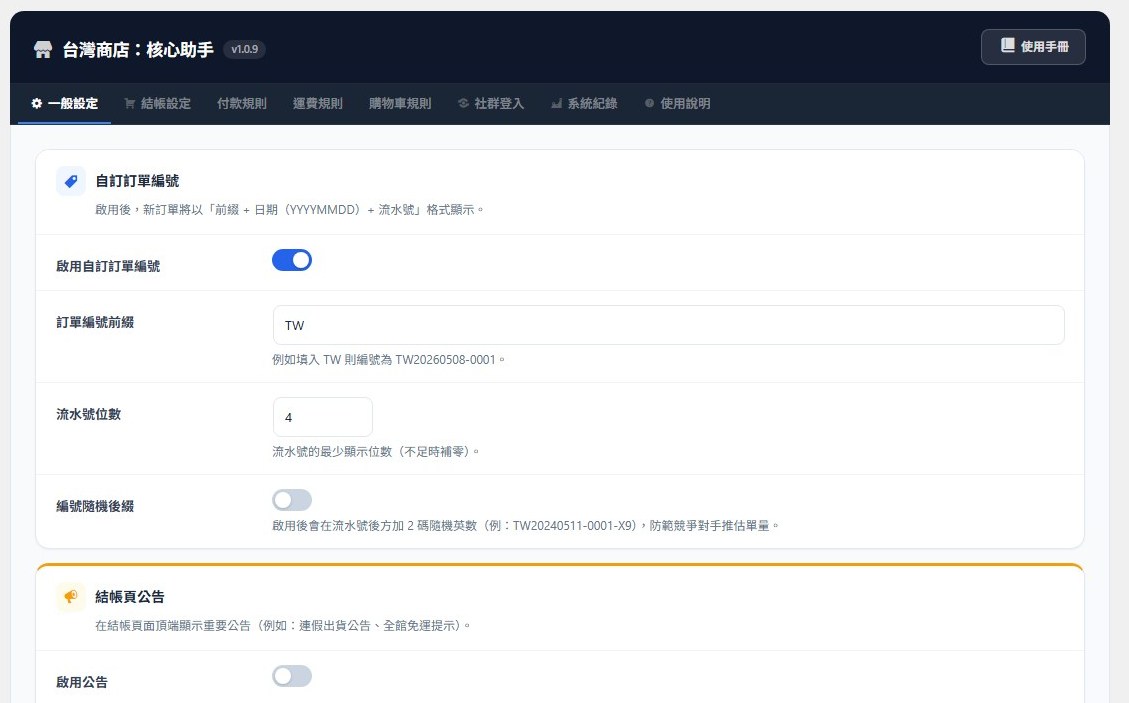
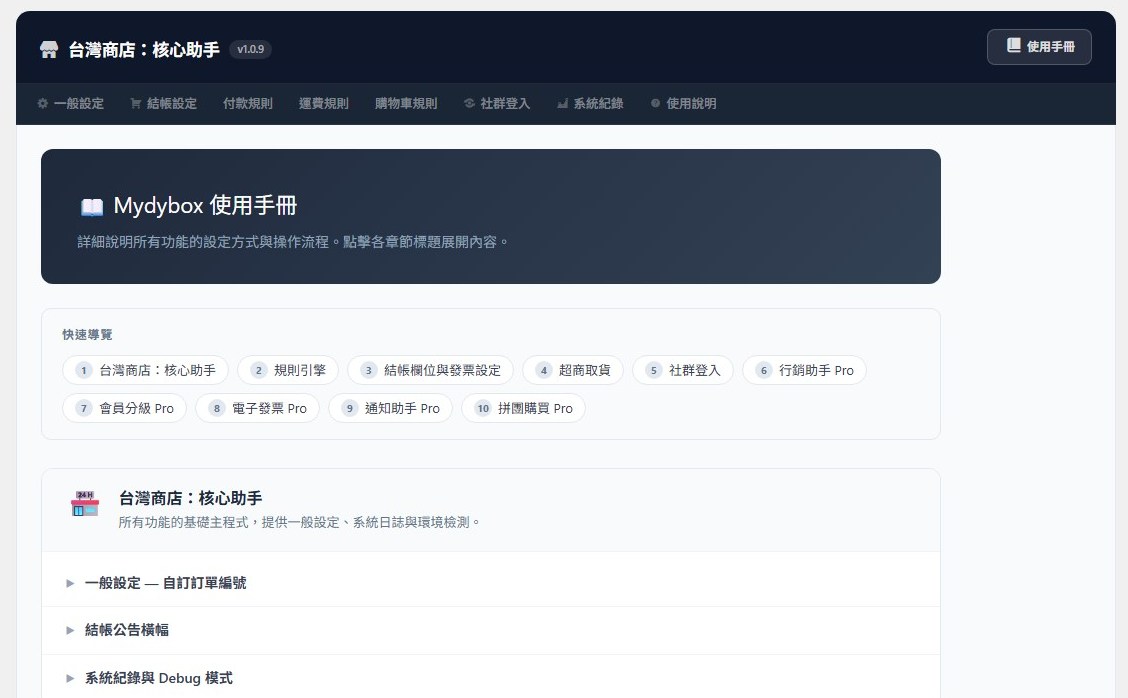
Mydybox Taiwan for WooCommerce 後台設定面板。
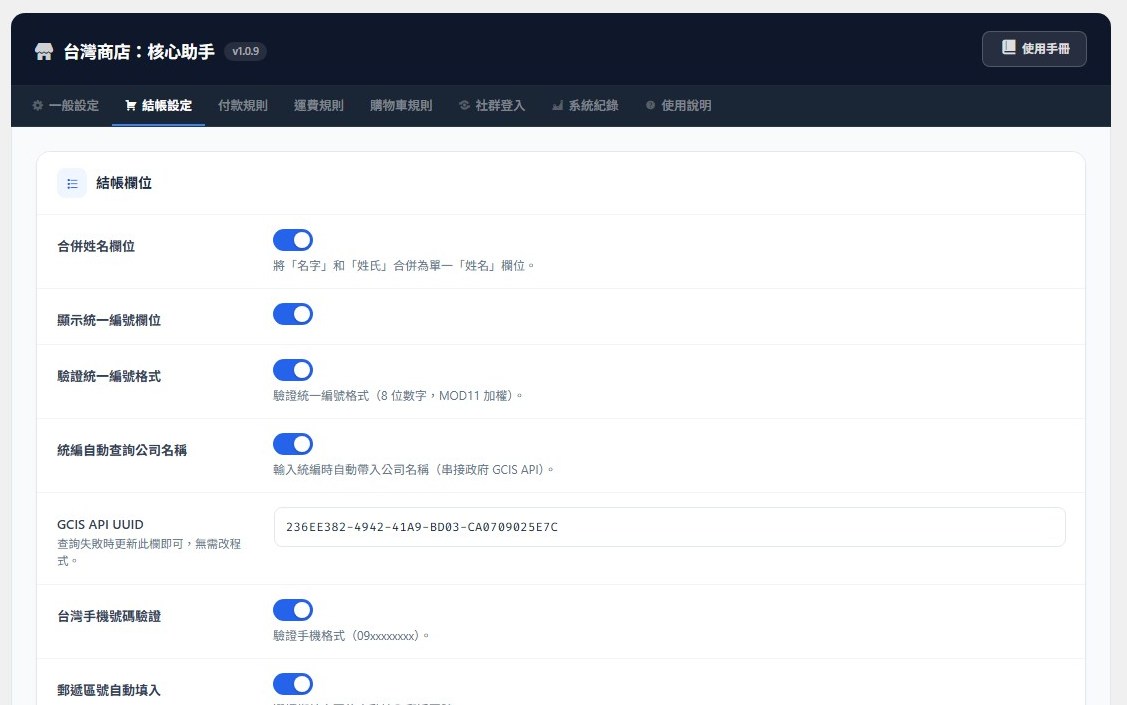
Mydybox Taiwan for WooCommerce Admin Settings Panel.
Faq
PHP 8.1+、WordPress 6.5+ 以及 WooCommerce 8.0+。
本外掛使用 WooCommerce 官方標準的 Additional Checkout Fields API,因此相容於絕大多數的現代佈景主題與結帳外掛。若遇到衝突,可以查看外掛的「日誌」分頁。
只有當您主動啟用需要外部串接的功能(例如社群登入、金物流、統編查詢)時才會傳送。請參閱下方的「外部服務」段落了解完整的第三方列表。
PHP 8.1+, WordPress 6.5+, and WooCommerce 8.0+.
The plugin uses the standard WooCommerce Additional Checkout Fields API, so it is compatible with most modern themes and plugins. If you run into a conflict, check the Logs tab.
Only when you explicitly enable a feature that requires it (social login, payment gateways, logistics, or tax-ID lookup). See the External services section below for the complete list.
Reviews
Changelog
1.1.0
- 新增:自動偵測結帳頁是否使用「區塊結帳」,並在後台提示——台灣在地化欄位(合併姓名、欄位排序、郵遞區號自動填入、縣市鄉鎮連動)僅支援傳統結帳。
- 新增:一鍵將結帳頁切換為傳統結帳短代碼
[woocommerce_checkout],並自動備份原本的區塊內容,可隨時還原。 - 修正:補上兩處 translators 註解,並將 readme 短描述改為標準英文,以通過 Plugin Check(0 錯誤)。
- Added: detects when the checkout page uses the block-based Checkout and shows an admin notice, since the Taiwan field customizations (name consolidation, field reordering, postcode autofill, district cascade) only apply to the classic checkout.
- Added: one-click switch that converts the checkout page to the classic
[woocommerce_checkout]shortcode, backing up the previous block content so the change is reversible. - Fixed: added missing “translators” comments for two placeholder strings and rewrote the readme short description in standard English to satisfy Plugin Check.
1.0.9
- Fixed: payment, shipping, and cart rules created in the visual editor now actually apply at checkout (the action configuration was being read from the wrong location, so rules silently did nothing).
- Fixed: the “Debug log” toggle now takes effect (it previously saved to an option the logger never read).
- Fixed: the daily invoice-type statistics on the Logs tab now count orders correctly.
- Security: the invoice CSV export now enforces an order-management capability check; removed an unused, improperly-nonced global export endpoint.
- Security: outbound calls to payment and government APIs now always verify TLS; hardened the social-login token parsing.
- Changed: the rule engine now fails closed on unknown conditions (a rule referencing an unavailable condition no longer matches unexpectedly).
- Changed: prefixed the NewebPay convenience-store shipping-method id for consistency.
- Changed: uninstall now removes all plugin options, the abandoned-cart table, and scheduled events.
- Removed: unused/superseded files and assets (legacy scripts, an unregistered editor block, dead helpers) to slim the plugin.
1.0.8
- Removed the legacy abandoned-cart routine that could send LINE messages without honoring the dedicated, off-by-default LINE opt-in. The maintained Abandoned Cart module already gates email and LINE notifications separately.
- Social login no longer auto-logs-in or auto-links to an existing account matched only by a provider’s email. Visitors whose email matches an existing account are asked to log in with their password first; new accounts are created only when the provider supplies a verified email.
- Documented the JavaScript build process and source files (
src/build/) and the bundled SweetAlert2 library. - Fixed rule-engine option keys so payment, shipping, and cart rules saved in the admin are actually enforced on the storefront.
- Daily order-number sequence counters are now stored non-autoloaded to avoid options-table bloat.
1.0.7
- Renamed to Mydybox Taiwan for WooCommerce for wp.org distinctiveness.
- Removed the locked electronic-invoice module that was previously gated behind a Pro plugin (Guideline 5 compliance).
- GCIS Tax ID lookup is now opt-in and off by default, with a server-side guard.
- Hardened social-login OAuth flow with a random, browser-bound
statecookie (login-CSRF fix). - Upgraded bundled SweetAlert2 from 11.14.1 to 11.26.25 (out of the vulnerable range).
- Removed every inline
<script>/<style>block in favor ofwp_enqueue_*/wp_print_inline_script_tag. - Sanitized the ECPay return-URL payload before any field is stored or displayed (MAC verification continues to run on the unmodified payload).
- Documented every external service in the new “External services” section.
1.0.6
- Added: ECPay convenience-store pickup map integration.
- Improved: Full admin UI redesign — fixed input widths and tab-bar overflow.
- Fixed: Invoice field description text display issue.
1.0.5
- Fixed: Mobile checkout flow and iOS compatibility issues.
1.0.4
- Improved: Localized SweetAlert2 for wp.org compliance.
- Improved: Upgraded rule-management notifications to SweetAlert2.
- Fixed: Removed redundant save buttons on log pages.
- Fixed: Sanitized user inputs; tightened nonce verification.
1.0.3
- Added: Social Login module (LINE / Google / Facebook).
- Added: Checkout countdown timer.
- Added: Mobile sticky buy bar.
1.0.0
- Initial release.