Text to Speech – Reinvent WP
Text to Speech – Reinvent WP
Description
Reinvent WP Text to Speech (formerly Natural Text To Speech) adds a “Listen” button that reads your posts aloud in a natural AI voice. As the audio plays, the current sentence and word are highlighted on the page, so readers can listen and follow along at the same time. It turns any post into text to audio in seconds, with no setup.
Works right after activation. No API key, no credit card, no configuration. Activate the plugin and the player appears on your posts, powered by 20,000 free characters a month from Reinvent WP Cloud Free.
Use the voice provider you prefer. Start with free voices, connect your own ElevenLabs account (10,000 free characters a month), or upgrade to PRO to use OpenAI, ElevenLabs, Google Cloud, Amazon Polly or Azure AI Speech with your own API key. Don’t want to manage API keys? PRO also includes Reinvent WP Cloud PRO: premium voices with no API key and 40,000 characters a month. You can switch providers at any time without changing plugins.
Word highlighting with real AI voices. Every word lights up in sync with the voice, whichever provider you use. Not just robotic browser voices.
Built for news sites, blogs, online courses, accessibility-focused websites, WooCommerce stores and agencies managing many client sites.
Why site owners choose it
- Word highlighting on real AI audio – Every word lights up in sync with natural AI voices from OpenAI, ElevenLabs, Google Cloud, Amazon Polly, Azure or Reinvent WP Cloud, not just robotic browser voices. Visitors can follow the text while they listen, which helps with focus, reading difficulties and long articles.
- Natural AI voices – ElevenLabs, OpenAI, Google Cloud, Amazon Polly and Azure, plus free voices from Reinvent WP Cloud Free.
- Pay your provider directly – With your own API key, you pay the voice provider for what you use, with no markup from us.
- 11 player styles – Modern, Classic Controls, Floating Pill, Waveform Card, Glassmorphism, Chapter Timeline, Accessible Controls, Article Contents and more. Colors adapt to your theme.
- Accessible player – Keyboard controls, ARIA labels, visible focus states and screen-reader-friendly status updates.
- Lightweight – About 300KB, deferred, and loaded only on pages that use the player.
- Instant Play – Long posts start playing right away, with no wait for the whole article to be generated.
Free text to speech features
- Text to speech player with sentence and word highlighting
- 20,000 free characters a month from Reinvent WP Cloud Free, or your own ElevenLabs free tier
- Automatic “Listen” button on posts, a Gutenberg block (search for “Reinvent WP TTS”) and the
[natural_tts]shortcode - Customizable player: styles, colors, button labels and position
- Accessible player controls
- Listening analytics: plays, listening time and completion rate
PRO text to speech features
- Bring your own key for OpenAI TTS, ElevenLabs, Google Cloud TTS, Amazon Polly and Azure AI Speech
- Reinvent WP Cloud PRO – premium voices with no API key, 40,000 characters a month for monthly and annual subscribers
- Smart audio caching – generate audio once and reuse it to keep API costs down
- MP3 export and bulk MP3 generation
- Post to Podcast – turn posts into podcast episodes with an RSS feed for Spotify, Apple Podcasts and other platforms
- Pronunciation rules for technical terms, abbreviations and names
- ElevenLabs audio tags with Eleven v3 and v4 (for example
[whispers]or[laughs]) - Usage limits – 5-hour, daily and monthly character quotas and rate limiting
- Advanced shortcode options
Supported text to speech languages
The plugin works with 140+ languages and variants and 1,000+ voices across providers. The available languages and voices depend on the text to speech provider you choose:
- OpenAI TTS: 57 languages, 11 voices
- ElevenLabs: 29+ languages, 1,000+ voices
- Google Cloud TTS: 40+ languages and variants, 200+ voices
- Amazon Polly: 41 languages and variants, 100+ voices
- Azure AI Speech: 140+ languages and variants, 400+ voices
Tested and confirmed working in Afrikaans, Arabic, Armenian, Azerbaijani, Belarusian, Bengali, Bosnian, Bulgarian, Catalan, Chinese, Croatian, Czech, Danish, Dutch, English, Estonian, Finnish, French, Galician, German, Greek, Hebrew, Hindi, Hungarian, Icelandic, Indonesian, Italian, Japanese, Kazakh, Korean, Latvian, Lithuanian, Macedonian, Malay, Maori, Marathi, Nepali, Norwegian, Persian (Farsi), Polish, Portuguese, Romanian, Russian, Serbian, Slovak, Slovenian, Spanish, Swahili, Swedish, Tagalog, Tamil, Telugu, Turkish, Ukrainian, Urdu, Vietnamese and Welsh. Kannada and Thai are not supported yet.
Hear live demos in every language
Compatibility
Works with most themes, page builders and plugins, including:
- Builders and themes: Gutenberg, Elementor, Divi, Avada, WPBakery, Beaver Builder, Brizy, SiteOrigin
- Multilingual: WPML, Polylang, TranslatePress, GTranslate
- Caching: LiteSpeed Cache, WP-Optimize, W3 Total Cache, Autoptimize, Speed Optimizer
- Custom post types: WooCommerce products, ACF, Custom Post Type UI, Toolset Types
Use it outside WordPress
Need the same player on a custom site or a React / Next.js app? Use the JavaScript embed or the NPM package.
Support
Ask questions in the support forum. We aim to reply within 24 hours. You can also use the live chat on reinventwp.com, email reinventwp@gmail.com, or join us on Telegram or Discord.
Found a bug or have an idea? Report a bug or request a feature.
Pricing
The free version is free forever. PRO plans:
- Monthly: 1 site $6 · 5 sites $20 · 20 sites $120
- Annual: 1 site $69 · 5 sites $79 · 20 sites $249
- Lifetime: 1 site $200 · 5 sites $700 · 20 sites $1,000
Reinvent WP Cloud PRO characters (40,000 a month) are included with monthly and annual plans. Lifetime plans don’t include Cloud PRO characters; use your own API key instead. Compare plans
Shortcodes
The player is added to your posts automatically. Use the Gutenberg block (search for “Reinvent WP TTS”) or the shortcode to place and configure it yourself:
[natural_tts target-tts-direction="below"]
[natural_tts target-tts-selector="body"]
[natural_tts lang="ru-RU"]
[natural_tts src="https://example.com/audio.mp3"]
[natural_tts trigger-play="all"]

[natural_tts]
  {
    "read_title": true
  }
[/natural_tts]
External Services
This plugin connects to the services below. Nothing is sent until the related feature is used.
Reinvent WP Cloud (https://services.reinventwp.com)
- Used when Reinvent WP Cloud Free or Reinvent WP Cloud PRO is your voice provider (the default after activation). When a visitor presses play, their browser sends the text being read to this service to generate the audio, so the visitor’s IP address is also visible to it. Your site URL and plan are sent to check your monthly quota.
- Used for license checks through Freemius when you open the plugin settings page. Your Freemius account details (email, site URL, license and plan) are sent.
- Used for error logging. Error messages, plugin version and site URL are sent so we can fix problems.
- Used for the list of Reinvent WP apps on the Reinvent WP Dashboard page. When an administrator opens that page, your site downloads the current list at most once a day and keeps a copy. Nothing about your site or you is sent.
- Used for the assistant (the Describe a problem with your site field) on the Reinvent WP Dashboard page and on this plugin’s settings page. When you send a question, it is sent with any screenshots or text files you attach to it (of a file, only its newest part, with emails, IP addresses, passwords and keys hidden by your browser first), the last few messages of the conversation and the list of Reinvent WP plugins on your site (whether each is active, inactive or not installed, and its version), so the answer can point to the right plugin and setting. Nothing is stored; the conversation stays in your browser tab. If you send feedback from the assistant’s form, your email, site address and message go to the Reinvent WP team, like the feedback form.
Voice providers you connect (OpenAI, ElevenLabs, Google Cloud, Amazon Polly, Azure AI Speech)
- When you choose one of these providers, the text to be spoken is sent from your site directly to that provider, using your own API key. Your API keys are stored in your WordPress database and are not sent to us.
- Please review the provider’s terms and privacy policy: OpenAI, ElevenLabs, Google Cloud, Amazon Web Services, Microsoft Azure.
Custom API (a text to speech API whose address you enter yourself)
- When you choose Custom API, the text to be spoken is sent from your site to the address you entered, with the headers and body you set. Nothing is sent until you choose it and save, or play a preview. The audio it returns is saved on your site.
- The address, headers and body you enter (which may include your API key) are saved encrypted in your WordPress database and are not sent to us or to your visitors.
- Please review that service’s terms and privacy policy before connecting it.
Reinvent WP website (https://reinventwp.com)
- Used to show current offers on the plugin settings page and to record basic interactions with them (shown, dismissed, coupon copied, button clicked).
Generated audio files and plugin settings are stored on your own WordPress site.
Affiliate disclosure: links to ElevenLabs (try.elevenlabs.io/reinventwp) are affiliate links. If you sign up for a paid ElevenLabs plan through them, we may earn a commission at no extra cost to you.
Installation
- Install the plugin from Plugins Add New (search for “Reinvent WP Text to Speech” or “text to speech”), or upload the .zip file.
- Activate it.
- A “Listen” button appears on your posts. Open any post and press play.
- You get 20,000 free characters a month from Reinvent WP Cloud Free right away. No API key or credit card needed.
To change the voice, player style or where the player appears, open Reinvent WP Text to Speech in your WordPress admin menu.
Screenshots
Integrate with ElevenLabs in the free version with 10,000 characters per month
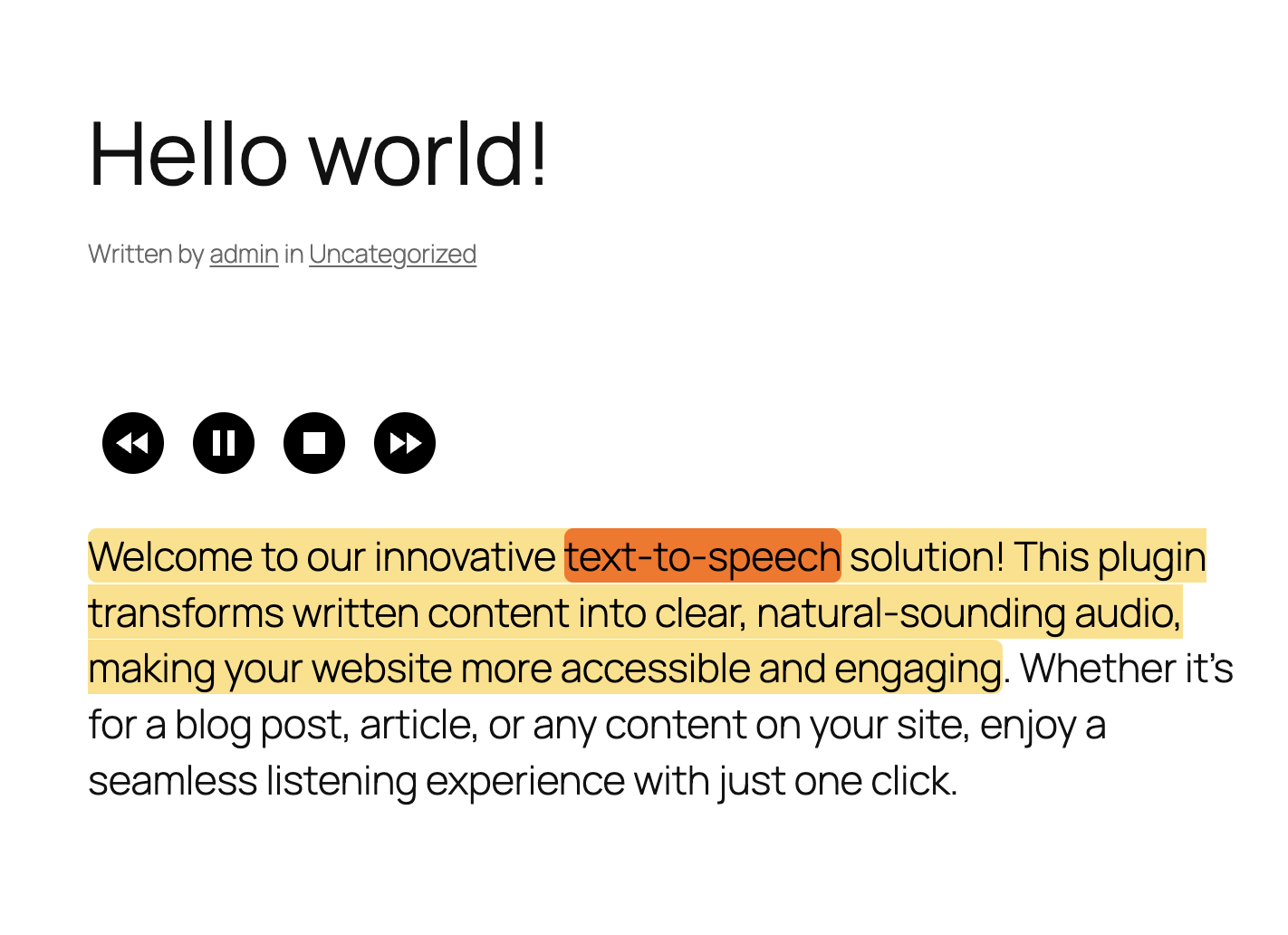
The "Listen" button above your post
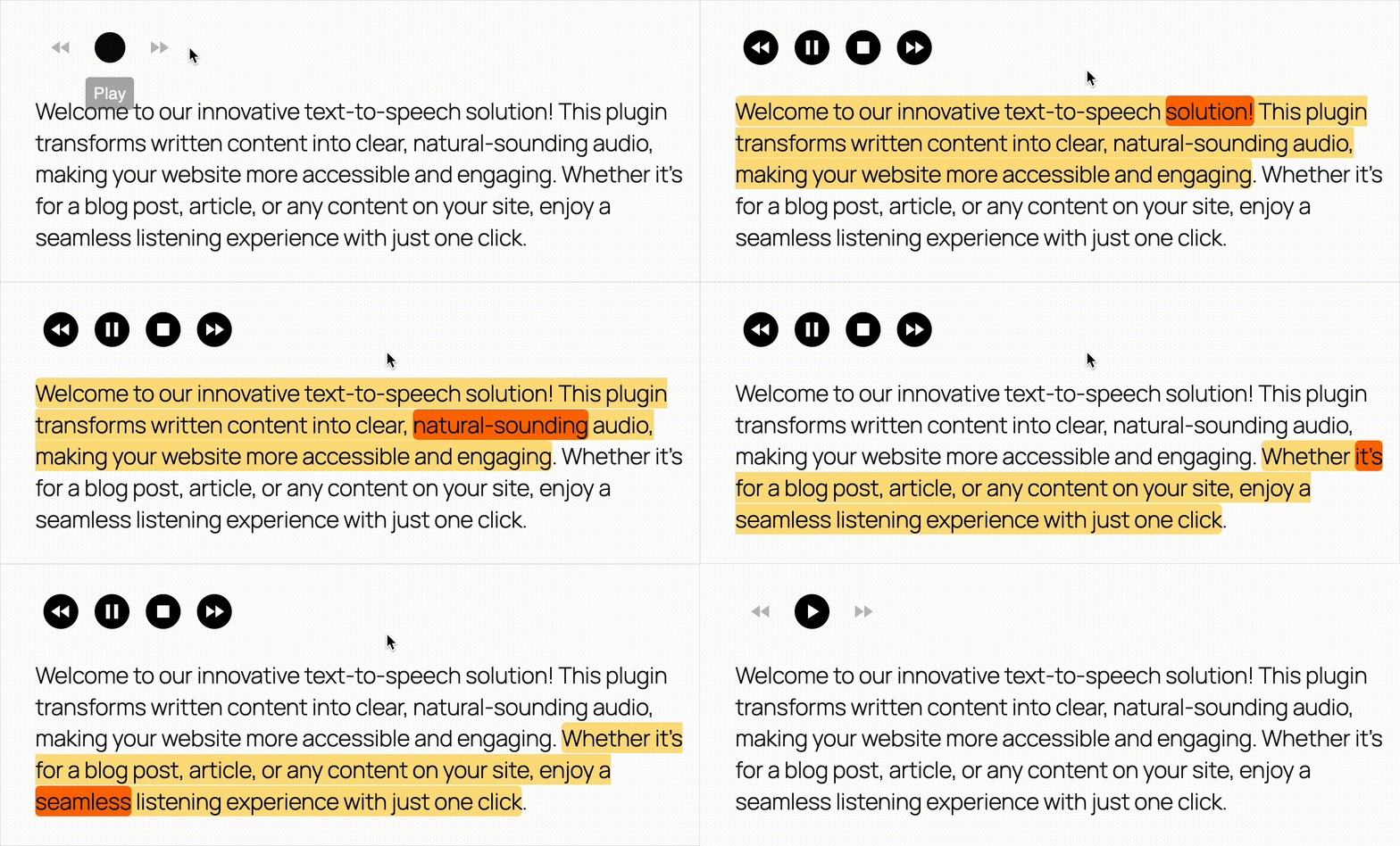
Text to speech with the sentence and word highlighted as they are spoken, synced to real AI audio

How it works

Gutenberg block editor support

11+ player styles

Simple mode for non-technical users

Advanced mode for complete customization
Faq
Yes. After activation you get 20,000 free characters a month from Reinvent WP Cloud Free, with no setup or credit card. You can also connect your own ElevenLabs account. Upgrade to PRO to use OpenAI, Google Cloud, Amazon Polly or Azure, or for 40,000 characters a month with Reinvent WP Cloud PRO.
It works with most themes and with Gutenberg, Elementor, Divi, Avada, WPBakery, Beaver Builder, Brizy and SiteOrigin. The player is added automatically, so no template editing is needed. If it doesn’t show up on your site, please open a support topic and we’ll help.
It depends on the provider you choose. See Supported languages above for the list and links to each provider’s language support.
Yes. It supports custom post types, including WooCommerce products, as well as posts and pages.
It gives visitors an audio alternative to your written content, with keyboard-accessible controls, ARIA labels, visible focus states, screen-reader-friendly status updates and customizable highlight colors. These help you work toward WCAG 2.1 AA. Full compliance also depends on the rest of your site.
As the voice reads the post aloud, the current sentence and word are highlighted. Visitors can follow the text without losing their place, which helps with long articles, small screens, reading difficulties and focus.
In your own WordPress database. With your own key, requests go directly from your site to the provider. If you use Reinvent WP Cloud, the text being spoken is processed by our service. See External Services above.
The plugin can be used in a GDPR-compliant way, but compliance depends on which providers you enable and how you describe those data flows in your privacy policy.
Yes. The plugin works out word timings in the visitor’s browser by matching the text with the generated audio. Highlighting stays in sync with OpenAI, ElevenLabs, Google Cloud, Amazon Polly, Azure and Reinvent WP Cloud.
Audio can keep visitors on the page longer. The plugin also adds AudioObject schema markup to posts that have audio.
- Choose a plan on our website.
- You’ll receive your license key by email from Freemius.
- In the plugin settings, enter your license key.
Yes. Visitors can double-click a sentence or word to play from there. You can turn this on in the plugin settings under Runtime.
Yes. Use the JavaScript embed or the NPM package for React and Next.js.
It works if your WebView supports the same browser APIs as a regular browser. We’ve tested it with a Trusted Web Activity (tutorial).
Reviews
Great support
By 
The plugin seems to work well, but what really makes the difference is the excellent support. The team is responsive, helpful, and quick to assist whenever needed. Great experience overall!
Best TTS plugin and amazing support
By 
The support was unmatched. They were able to help me in detail 50 message string of emails with ever question I had. Good job. Thanks.
Great plugin & Exceptional Support
By 
Great plugin with lots of customizable functions to make it fit your exact needs. And if something is wrong or you need a new functionality, just contact the author and you get incredibly fast assistance!
Great plugin and service
By 
the best TTS wordpress plugin
This actually works
By 
Having tried different options, this plugin is by far the best one I've come across. It's simple to set up, has a bunch of options to customize the critical parts and does exactly what it says. Works in many different languages, and most importantly for me - in Estonian as well.
Before setting up the plugin I had to clarify something via customer support and the creator replied to all my emails within 15 minutes. Amazing customer service.
Once my client's site becomes bigger and the free credits run out, I will happily pay for the pro version. You only get one shot at making a first impression and this plugin did it with flying colours.
I can understand how this may sound like a paid comment or something, but I'm honestly just relieved that it worked so well. I was stressing over adding a proper TTS to the project I'm working on and feared it was gonna be a nightmare.
Exactly What I Needed—And the Support Matched the Product
By 
I run a blog focused on practical wisdom for professionals navigating midlife transitions. Adding audio narration was on my list for months, but I kept putting it off, assuming the setup would be a headache.
It wasn't.
The installation was straightforward, and the documentation is genuinely impressive—extensive without being overwhelming, clearly written, and logically organized. I was up and running faster than expected.
What sealed it for me was the developer support. When I had questions, the response was fast, helpful, and human. No canned replies, no runaround—just someone who clearly cares about their product and the people using it.
The plugin does exactly what it promises: natural-sounding narration with word highlighting that keeps readers engaged. The OpenAI TTS integration with custom prompt instructions let me dial in the exact tone I wanted for my content.
If you're looking for a text-to-speech solution for WordPress and want something that actually works without becoming a side project, this is it.<gwmw style="display:none;"></gwmw>
Must Have TTS Plugin
By 
Friendly and fast support. Highly recommended.
Absolutely the BEST TTS Plugin for WordPress! Recommended.
By 
This is by far the most powerful and versatile Text-to-Speech plugin available for WordPress. The quality of the generated audio, especially with ElevenLabs integration, is simply outstanding.
The developer, Karim, provides exceptional support. He is incredibly responsive, knowledgeable, and genuinely committed to helping users resolve issues and implement custom requests. His recent updates have been fantastic, addressing many common pain points.
If you need a reliable, high-quality TTS solution with excellent developer support, look no further. This plugin is a game-changer for content creators.
Best ever
By 
It works, I have never had so fast and professionell support. Birr Karim is fantastic.
In this plugin you can use Azure and many other services, so you do not need an expensive third party plugin. Absolutely recommend using the Pro version, it's brilliant.
It is not working.
By 
my plug in is pro version. I am boring with this plugin. They are only exploiting.
Changelog
3.3.9
- Fixed pronunciation and language detection with OpenAI: OpenAI shut down gpt-3.5-turbo, gpt-4 and gpt-4-turbo on October 23, 2026. The plugin now uses GPT-6 Luna, and GPT-6.1 Sol with medium reasoning for harder cases.
- The site check only tests the OpenAI connection when pronunciation is turned on.
3.3.8
- New Custom API audio source: connect any text to speech API like a Postman request (method, endpoint URL, headers and body, with {{text}} where the text goes), then choose where the audio is in the response. It starts as an OpenAI request, so you only paste your key. The URL, headers and body are saved encrypted.
- New optional note next to each provider’s API key, so you remember which account the key belongs to.
- Links from Reinvent WP Cloud Free and PRO to their details on reinventwp.com.
- The Reinvent WP Apps page shows upcoming Reinvent WP apps as “Coming soon”.
3.3.7
- New Reinvent WP Apps page: see your Reinvent WP apps, activate or install them, and open the full catalog on reinventwp.com.
- New assistant: describe a problem with your site on the Apps page or the plugin page, attach a screenshot or log file, and get a link to the right setting.
- Links to a setting now open Advanced mode and highlight that setting.
3.3.6
- Update WP Live Preview
3.3.5
- Update WP Live Preview
3.3.4
- Added ElevenLabs Eleven v4 support, including v4 Turbo. Choose a model from the live ElevenLabs list or enter its model ID manually.
- Audio previews in Simple and Advanced mode now show how Eleven v3 and v4 use audio tags such as
[whispers]and[laughs]to guide delivery.
3.3.3
- Fixed a highlighting bug with the Avada theme.
3.3.2
- Improved the settings page design.
3.3.1
- Improved the player design.
3.3.0
- Added a feedback form.