Nest Frontend Editor for H5P

Nest Frontend Editor for H5P
Description
Nest Frontend Editor for H5P lets your users view, create, and edit H5P content without ever leaving the front end of your WordPress site.
Place the shortcodes on any pages you choose, configure permissions per role, and let the plugin handle the rest. Works seamlessly with Remix Manager for H5P when its Library Link Behavior settings point to Nest front-end pages.
Shortcodes:
[nest_h5p_editor_view]– Displays an H5P content item. Reads the item ID from the URL (?h5p_id=X).[nest_h5p_editor_create]– Displays the H5P content creation editor.[nest_h5p_editor_edit]– Displays the H5P content editor for an existing item. Reads the item ID from the URL (?h5p_id=X). Users may only edit content they own.[nest_h5p_editor_results]– Displays the H5P results page for an existing item. Reads the item ID from the URL (?h5p_id=X).[nest_h5p_editor_link_view]– Outputs a link to the front-end view page for the current H5P item. Acceptstextandclassattributes.[nest_h5p_editor_link_edit]– Outputs a link to the front-end edit page for the current H5P item. Only renders if the current user owns the content. Acceptstextandclassattributes.[nest_h5p_editor_link_results]– Outputs a link to the front-end results page for the current H5P item. Acceptstextandclassattributes.
Features:
- Role-based permissions – all roles registered on the site are listed, including custom roles like Teacher or Instructor.
- Configurable unauthorized redirect behavior per action – redirect to home, login, or a custom URL.
- Logged-out users are always redirected to the login page.
- Auto-resizing iframes that adjust to content height on load, on user interaction, and after content type selection on the create page.
- Admin menu, admin bar, and footer are automatically hidden inside the iframe so users see a clean, focused experience with no WordPress admin UI visible.
- Ownership enforcement for the Edit shortcode – users can only edit H5P content they own.
- Results shortcode – display H5P results on the front end with role-based permission control.
- Link shortcodes – generate styled links between view, edit, and results pages for the current H5P item.
- Filter hooks (
rmh5p_view_url,rmh5p_edit_url,rmh5p_create_url,rmh5p_results_url) integrate with Remix Manager for H5P when its Library Link Behavior settings point to Nest front-end pages.
For full documentation visit indiegg.com/nest-frontend-editor-for-h5p/documentation.
Disclaimer:
Nest Frontend Editor for H5P is an independent plugin and is not affiliated with, endorsed by, or sponsored by H5P or its developer, Joubel. H5P is a trademark of its respective owner.
Usage
Setting up pages
Create one page per action. Add the shortcode to each:
- View page:
[nest_h5p_editor_view] - Create page:
[nest_h5p_editor_create] - Edit page:
[nest_h5p_editor_edit] - Results page:
[nest_h5p_editor_results]
Then go to Settings -> Nest Frontend Editor for H5P and select each page from the dropdowns.
Permissions
Under Role Permissions, check which roles can access each action. All roles on the site are listed automatically, including custom roles.
Redirect behavior
Under Unauthorized Redirect Behavior, choose what happens when a logged-in user without permission tries to access each page. Options are:
- Redirect to home page
- Redirect to login page
- Redirect to a custom URL
Logged-out users are always sent to the login page regardless of this setting.
Integration with Remix Manager for H5P
When both plugins are active and pages are configured, the Remix Manager Library Link Behavior settings can point View, Edit, and Results links to the matching Nest Frontend Editor for H5P pages.
Link shortcodes
Place these shortcodes on your view, edit, or results pages to generate navigation links between pages for the same H5P item. All three read the current h5p_id from the URL automatically.
[nest_h5p_editor_link_view]– link to the view page[nest_h5p_editor_link_edit]– link to the edit page (only renders if the current user owns the content)[nest_h5p_editor_link_results]– link to the results page
All three accept optional attributes:
text– the link label. Example:[nest_h5p_editor_link_view text="Watch this activity"]class– additional CSS classes. Example:[nest_h5p_editor_link_edit class="button button-primary"]
Each link always includes the classes nfeh5p-link and a type-specific class (nfeh5p-link-view, nfeh5p-link-edit, nfeh5p-link-results) for styling in your theme CSS.
Installation
- Upload the
nest-frontend-editor-for-h5pfolder to/wp-content/plugins/, or install through the WordPress Plugins screen. - Activate the plugin.
- Install and activate the official H5P plugin if you have not already.
- Go to Settings -> Nest Frontend Editor for H5P to configure pages, permissions, and redirect behavior.
- Create pages for View, Create, Edit, and Results, place the appropriate shortcode on each, and select them in the settings.
Screenshots
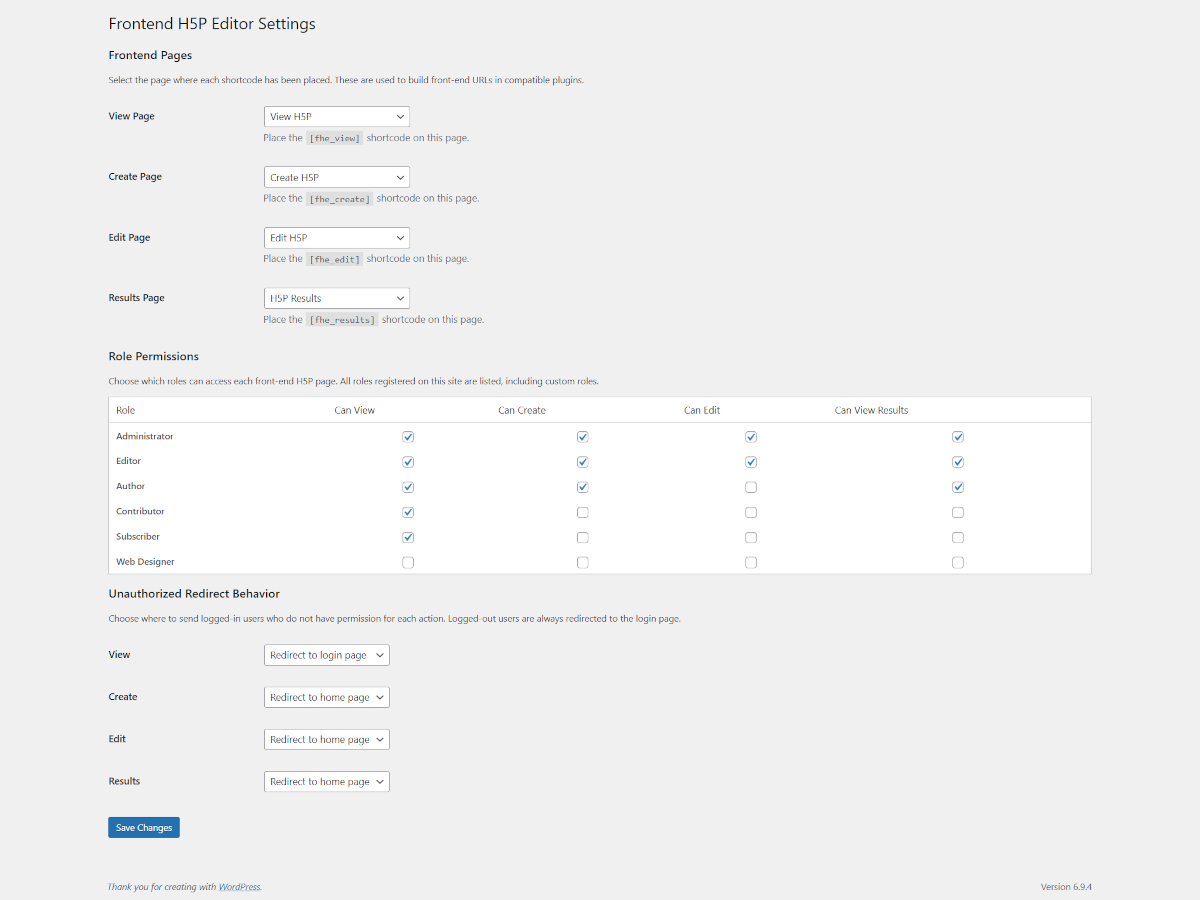
Admin settings page showing the Frontend Pages selectors, Role Permissions matrix, and Unauthorized Redirect Behavior section.
![The H5P content editor loaded on a front-end WordPress page via the [nest_h5p_editor_edit] shortcode, with the WordPress admin menu hidden.](https://ps.w.org/nest-frontend-editor-for-h5p/assets/screenshot-2.png?rev=3549823)
The H5P content editor loaded on a front-end WordPress page via the [nest_h5p_editor_edit] shortcode, with the WordPress admin menu hidden.
![The H5P content viewer loaded on a front-end page via the [nest_h5p_editor_view] shortcode.](https://ps.w.org/nest-frontend-editor-for-h5p/assets/screenshot-3.png?rev=3549823)
The H5P content viewer loaded on a front-end page via the [nest_h5p_editor_view] shortcode.
![The H5P content creation editor loaded on a front-end page via the [nest_h5p_editor_create] shortcode.](https://ps.w.org/nest-frontend-editor-for-h5p/assets/screenshot-4.png?rev=3549823)
The H5P content creation editor loaded on a front-end page via the [nest_h5p_editor_create] shortcode.
![The H5P results page loaded on a front-end page via the [nest_h5p_editor_results] shortcode.](https://ps.w.org/nest-frontend-editor-for-h5p/assets/screenshot-5.png?rev=3549823)
The H5P results page loaded on a front-end page via the [nest_h5p_editor_results] shortcode.
Faq
No. The shortcodes work independently. Remix Manager for H5P is only needed if you want its library table links to point to Nest front-end pages.
No. Set up only the pages you need. If you only want users to be able to edit existing content, you only need the Edit page. The shortcodes are fully independent of each other.
No. The [nest_h5p_editor_edit] shortcode checks ownership before rendering the iframe. Users who try to edit content they do not own are redirected immediately. If they want a customized version of someone else’s content, they can use Remix Manager for H5P to create their own copy first.
Links for that action are left unchanged, pointing to the WordPress admin. No broken links are generated.
Reviews
Changelog
1.0
- Initial release.
- Four display shortcodes: nest_h5p_editor_view, nest_h5p_editor_create, nest_h5p_editor_edit, nest_h5p_editor_results.
- Three navigation link shortcodes: nest_h5p_editor_link_view, nest_h5p_editor_link_edit, nest_h5p_editor_link_results, each with text and class attributes.
- Role-based permissions matrix with support for custom roles, including can_view_results permission.
- Configurable unauthorized redirect behavior per action (home, login, or custom URL).
- Logged-out users always redirected to login page.
- Auto-resizing iframes with type-specific CSS classes (nfeh5p-view-iframe, nfeh5p-edit-iframe, nfeh5p-create-iframe, nfeh5p-results-iframe).
- Admin menu, admin bar, and footer hidden inside iframes via nfeh5p_frame parameter.
- Horizontal scrollbar suppressed inside all iframes.
- Type-specific CSS injection inside iframes – H5P sidebar hidden on view and results pages.
- Ownership enforcement for the nest_h5p_editor_edit shortcode.
- Filter hooks for integration with Remix Manager for H5P (rmh5p_view_url, rmh5p_edit_url, rmh5p_create_url, rmh5p_results_url).